
Thursday, February 5, 2026
Get higher access to advanced AI in Google Workspace
Over the past year, we've launched groundbreaking AI capabilities into our Workspace plans, such as comprehensive Deep Research reports and stunning image generation with Nano Banana Pro. These AI features come with usage limits that are sufficient for many users, but your most innovative teams may want even more.
To meet that demand, we’re introducing AI Expanded Access, a new Workspace add-on that sits between our standard offering and our top-tier plan. This gives organizations more choice in how they empower their power users with these advanced AI capabilities:
- Business and Enterprise plans: Includes standard access in most Workspace plans at no extra cost.
- AI Expanded Access add-on (New!): Unlocks higher access to allow teams to further scale their impact.
- AI Ultra Access add-on (formerly Google AI Ultra for Business): Provides the highest access to help specialists push what's possible as they tackle their most ambitious creative, coding, and research projects.
Advanced AI features with higher access available through these add-ons include:
- Advanced image generation: Create and edit more images using Nano Banana Pro in Slides, NotebookLM, and the Gemini app to find the perfect visual for every placement and audience segment.
- Video generation: Scale video production to a daily content engine by generating more professional-grade videos using Veo 3.1 in Vids (including the use of AI avatars), Flow and the Gemini app.
- Gemini app: Solve complex strategic problems with higher access to deep reasoning in our most capable models such as Gemini 3 Pro.
- NotebookLM: Get instant insights from even larger source libraries and generate more high-value outputs to accelerate understanding, such as Audio Overviews, infographics, and Mind Maps.
- Workspace Studio (rolling out now*): Execute more automations from ad-hoc tasks like labeling emails to always-on workflows that deliver pre-meeting briefs and auto-create follow-up tasks.
- Speech translation (rolling out now*): Bridge language gaps in more meetings, automatically translating speech in real-time, while maintaining the tone and voice of the speaker.
Visit the Help Center for details on feature availability and limits. As we release new advanced AI features, your teams will also get higher access to these through the AI Expanded and AI Ultra add-ons.
*Workspace Studio is now available for Rapid Release and expected for Scheduled Release by the end of February; promotional access to higher limits of Workspace Studio in Business and Enterprise plans will remain in effect until September 1, 2026.
**Speech translation in Google Meet is currently rolling out to Rapid Release domains and expected to start rolling out to Scheduled Release domains later in February. Promotional access to higher limits of speech translation in Business and Enterprise plans is ongoing; we’ll communicate any updates to these limits in advance of them going into effect.
What’s not changing
To ensure every customer can benefit from AI, we’ll continue to include standard access to these advanced capabilities in most Workspace Business and Enterprise plans at no additional cost.
Additionally, features like Take notes for me in Meet, Help me write in Gmail, Help me create in Docs, and more are available in our standard plans with generous limits designed to support the everyday needs of most teams. This ensures these powerful tools remain an accessible and essential part of your plan.
Getting started
- Admins: The AI Expanded Access add-on can be purchased and assigned to specific users with eligible Business or Enterprise plans to provide more access to advanced AI capabilities.
- Admins can review AI feature usage levels (by feature, user, and app) in the Admin console at Generative AI > Gemini reports.
- End users: Users assigned a license will automatically get access to higher usage limits for certain AI features. Users will see an "Expanded" badge in the Gemini app, NotebookLM, and Flow, associated with their AI Expanded license.
Rollout pace
- Starting today, the AI Expanded Access add-on is available to purchase, and will enable higher usage of AI capabilities in Workspace apps, including the Gemini app, NotebookLM, and Flow.
- Workspace customers with Business and Enterprise plans currently have promotional access to higher usage of certain AI features in their plans, including advanced image generation with Nano Banana Pro, and video and AI avatar generation with Veo 3.1. Beginning March 1, 2026, Workspace customers will need to purchase the AI Expanded Access add-on to continue to get higher access to these advanced AI features.
Availability
Starting today, customers with the Google Workspace plans below can purchase the AI Expanded Access add-on:
- Business Standard and Plus
- Enterprise Standard and Plus
Visit the Help Center for more details on which AI capabilities you can start accessing with higher usage when you purchase the add-on, and how to manage access to additional services like Flow.
Resources
- Google Workspace Admin Help: AI Expanded Access
- Google Workspace Admin Help: Usage Limits in Gemini
- Google Workspace Admin Help: Compare AI Expansion add-ons
- Google Labs: Flow
Wednesday, January 21, 2026
Granular OAuth consent in Google Chat apps
What’s changing
We recently announced that Chat apps built as Google Workspace add-ons using Apps Script would begin supporting a more granular OAuth consent screen this month. OAuth consent is needed by an app when the app is accessing user data or performing actions on a user’s behalf. With this new feature, users can now choose the specific data that the app can access.
Building on the previous update, we’re introducing this granular OAuth consent for all types of Chat apps using Apps Script, not just those built as Workspace add-ons, starting on January 20, 2026. Please refer to our developer documentation for more details.
 |
A user can now choose the specific data that the app is allowed to access. |
Getting started
- Admins: There is no admin control for this feature.
- Developers and end users: This new consent screen will only be used for new OAuth scope grants. Pre-existing scope grants will not be affected, so no action is required by users on Chat apps they’ve already authorized. Developers should review the developer documentation to learn how to handle granular consent for Google Chat apps.
Rollout pace
- Rapid Release and Scheduled Release domains: Gradual rollout (up to 15 days for feature visibility) starting on January 20, 2026
Availability
- All Google Workspace customers, Workspace Individual subscribers, and users with personal Google accounts can use Chat apps
- All Google Workspace customers can develop Chat apps
Resources
- Google Workspace Updates Blog: Granular OAuth consent in web apps and Google Workspace add-ons
- Google Workspace Updates Blog: Granular OAuth consent in HTTP Google Workspace add-ons
- Developer documentation: Authenticate and authorize Chat apps and Google Chat API requests
- Developer documentation: Authenticate as a Google Chat app
- Developer documentation: Manage granular permissions in Apps Script
Friday, December 19, 2025
Google AI Ultra for Business plan adds enhanced NotebookLM experience
Specifically designed for organizations with high demand research needs, Google AI Ultra for Business, an add-on plan for Workspace customers, provides teams with the highest-tier access to Gemini models, unparalleled feature limits, and the capacity to handle the most intricate models. Now, Google AI Ultra for Business users can access an enhanced NotebookLM experience. NotebookLM, a research and thinking partner, gives you:
- Highest access to Gemini’s models
- Highest feature limits for the features you know and love like Audio & Video Overviews, Slide Decks, and more
- Largest notebook size with the most number of sources per notebook
- Priority access to features like the Long option for Slide Decks and the removal of watermarks on Slide Decks and Infographics
Getting started
- Admins: NotebookLM is ON by default and can be disabled at the domain, OU, or group level. Visit the Help Center to learn more.
- End users: There is no end user setting for this feature. Google AI Ultra for Business licensed users will see the “Ultra” badge in the upper right corner in NotebookLM. Visit the Help Center to learn more.
Monday, November 24, 2025
Granular OAuth consent in web apps and Google Workspace add-ons
What’s changing
Earlier this year, we launched an improved version of the OAuth consent screen to the Apps Script IDE and unpublished web apps and Google Workspace add-ons that allows users to specify which individual scopes they would like to authorize for that script. For example, if a script requests access to a user’s Google Sheets and Forms files, and the user only intends to use the script with Sheets files, they can decide to only allow access to their spreadsheets and not their forms.
 |
| This screenshot shows the new OAuth consent screen, which lets the user provide consent for a subset of the requested OAuth scopes. |
We’re excited to announce that this more granular OAuth consent screen will be expanding to an additional Apps Script execution type. Soon, published web apps and Google Workspace add-ons powered by Apps Script, including Chat apps built as add-ons, will also present users with this more granular consent screen when requesting an OAuth grant. This will allow users to provide partial OAuth consent when authorizing new applications built on these platforms. A reminder that this also includes reconsenting to applications when OAuth grants expire.
Additional details
To prepare for the release of this new consent flow, we suggest that web apps and Google Workspace add-ons developers refer to the ScriptApp and AuthorizationInfo classes. These allow Apps Script developers to programmatically interact with the scopes granted for a script. This allows developers to put in such safeguards as short-circuiting a script execution if not all scopes are granted. For more information, refer to the developer documentation. To test these changes, please see the documentation on testing web apps and Google Workspace add-ons.
Getting Started
- Admins: There is no admin control for this feature.
- Developers and end users:
- This new consent screen will only be used for new OAuth scope grants. Pre-existing scope grants will not be affected, so no action is required by users on scripts they’ve already authorized.
Rollout pace
- Rapid Release and Scheduled Release domains: Extended rollout (potentially longer than 15 days for feature visibility) starting on January 7, 2026
Availability
- Available to all Google Workspace customers and Workspace Individual subscribers
Thursday, November 20, 2025
Collaborate seamlessly across Google Workspace and Egnyte
What’s changing
Egnyte’s enhanced Google Workspace integration is now generally available to all customers. With this update, users can now securely locate, open, edit, and manage their Google Workspace files in Egnyte’s web UI, mobile app, and desktop client.
This latest update delivers a faster, more intuitive, and more collaborative experience for users who rely on both Egnyte and Google Workspace in their daily workflows, including:
- Dual file storage – Files are securely stored in both Egnyte and Google Drive, providing flexibility for users and IT teams while maintaining Egnyte’s data governance and access controls
- Egnyte add-ons for Google Workspace – Share Egnyte files directly from Google Docs, Sheets, and Slides for faster, more integrated collaboration without switching between apps
- Smart canvas and Gemini access – Leverage Google Workspace’s smart canvas capabilities and Gemini features within Egnyte’s updated integration for a more dynamic, interactive editing experience
- Additional Improvements – Backend optimizations to enhance overall performance, usability, and reliability

Getting started
- Admins:
- The Egnyte Workspace add-on to control file sharing must be enabled by Workspace admins for their domains in the Google Workspace Marketplace Settings menu.
- Egnyte admins must also enable the integration for their domains via “Egnyte Apps & Integration Settings” in the Egnyte Settings menu. Visit the Egnyte Help Center to learn more.
- End users: There is no end user setting for this integration. Visit the Egnyte for Google Workspace Landing Page to learn more.
Rollout pace
This integration is available now. New users of the integration will see the upgraded experience by default. Existing users will be migrated to the new version in a phased manner but can contact Egnyte support to migrate sooner.
Availability
Available for Google Workspace:
- Business Starter, Standard, and Plus
- Enterprise Starter, Standard, and Plus
- Essentials Starter, Enterprise Essentials, and Enterprise Essentials Plus
- Education Fundamentals, Standard, and Plus
- Nonprofits
- Frontline Starter, Standard, Plus
Resources
- Egnyte Helpdesk: Egnyte for Google Workspace
- Landing Page: Egnyte for Google Workspace
Friday, October 31, 2025
Improving the Workday Google Chat app
What’s changing
The latest update for Workday Google Chat app update makes it easier to manage time off with a single, improved flow to request, view, or cancel time off, along with quick commands to check balances and company holidays.

Getting started
- Workday Admins: Workday Admins must activate OAuth and create a new API client for the Google integration setup within Workday. The workday admin must make note of the following details during the API client setup, required for the next step:
- Client ID
- Secret ID
- Workday REST API Endpoint
- Workday Token Endpoint
- Workday Authorization Endpoint
- Workspace Admins: Admins need to allowlist the add-on to ensure end users have access. Visit the Help Center to learn how to manage Google Workspace Marketplace apps. Once allowed, the admin can either install the app to the domain, or install individually. After installation you will be asked to configure authorization in Workday (this requires the information above obtained during API client setup); This authorization will apply to all users of Workday within your domain.
- End users: If enabled by your admin, install the add-on by going to the Google Workspace Marketplace listing. Visit the Help Center to learn more about using the Workday app in Google Chat.
Rollout pace
- Rapid Release and Scheduled Release domains: Currently available.
Availability
- Available to all Google Workspace customers, Workspace Individual Subscribers, and users with personal Google accounts
Resources
Thursday, July 31, 2025
Build and deploy a single app across Chat, Gmail, Calendar, Drive and more with the Workspace add-ons framework
What’s changing
Previously available as part of the Google Workspace Developer Preview Program, we're excited to announce that the ability for developers to build Google Chat apps using the Workspace add-on framework is now generally available.
The Workspace add-ons framework makes it possible to build and maintain one app that works across multiple Workspace apps including Gmail, Calendar, Drive, and Chat. This reduces complexity and improves the experience for developers, system admins, and end-users.

In Chat, Workspace add-ons can provide helpful features, such as:
- Previewing links from Chat messages and taking action without leaving the conversation.
- Automating tasks across Google Workspace applications.
- Receiving alerts or notifications from linked external services.
- Combining external data from 3rd party apps and services with your data from Gmail, Chat, and Calendar.

Additional details
Lucid, developers of Lucidchart, Lucidspark, and Lucidscale, recently updated their existing Workspace Add-ons to now support Chat. These integrations with Google Chat enable link previews, quick search, and access management all within Chat.
See more details on the Lucidchart, Lucidspark, and Lucidscale integrations here.
Soon, other partners, including Asana, Confluence, Figma, HubSpot, Miro, Polly, ServiceNow, Trello, 1Password, and more will be releasing Chat apps built on the Workspace add-ons framework.
.png)
Upcoming ServiceNow integration with Chat
.png)
Upcoming Figma integration with Chat
.gif)
Upcoming Miro integration with Chat
Getting started
- Developers: Visit the developer documentation to learn how Google Workspace add-ons work in Chat and other information to get started.
- Apps Script developers can quickly build a Chat app as a Workspace Add-on using the Quickstart Guide, or using the Apps Script Chat app template.
- Apps Script developers can also refer to this Youtube tutorial published by our Workspace Developer Relations team: Build a Chat app as a Google Workspace add-on with Apps Script. This details how to build a Chat app as a Google Workspace add-on with Apps Script and extend it to other Workspace applications (Calendar, Gmail, Drive, Docs, Sheets, and Slides). Source code links are available in the description as well.
- Developers that would like to build a Chat app as a Workspace Add-on using HTTP services can follow this Quickstart Guide.
- Our Google Workspace Developers YouTube channel has also published a video showing how a Chat app can configure Calendar events, and Gmail vacation responder settings: Build a Chat app as a Google Workspace add-on with Apps Script.
- Admins:
- Admins can choose to admin-install Chat apps for their users, so that the Chat app will automatically be available for end users.
- If admins allow users to install Chat apps from the Workspace Marketplace, end users can browse the Marketplace to discover and find Chat apps to install.
- Visit the Help Center to learn more about Getting started as a Marketplace app admin.
- End users:
- Install Chat apps from the Workspace Marketplace.
- Visit the Help Center to learn more about Using apps in Google Chat.
Rollout pace
- Chat apps are available to all Google Workspace customers, Workspace Individual Subscribers, and users with personal Google accounts
- Developing Chat apps is available to all Google Workspace customers
Resources
Thursday, July 10, 2025
Introducing Lucidchart and Lucidspark apps in Google Chat
What’s changing
Lucidchart, an app that helps users collaborate on diagrams, such as flowcharts, wireframes, entity relationship diagrams, and more, and Lucidspark, a virtual whiteboard tool, are two third-party add-ons already available across Workspace apps, such as Docs and Meet. Today, we’re excited to announce support for both of these apps in Google Chat.
Lucidchart and Lucidspark’s integrations with Google Chat will enable users to:
- Get an immediate preview of Lucidspark and Lucidchart links shared in Chat conversations.
- Type “/lucidsearch” in Chat to find and share Lucid documents instantly.
- Keep teams aligned by bringing visual context into conversations.
 |
| Searching for Lucid documents in Chat spaces |
Additional details
Getting started
- Admins:
- If you have already admin-installed the Lucidchart and Lucidspark add-ons, then no action is needed.
- To enable the Lucid for Google Chat app for all users in a domain, or to add these apps to the allowlist for users to be able to install them, admins can admin-install or allowlist Lucidchart and Lucidspark from the Google Workspace Marketplace.
- Visit the Help Center to learn more about managing the Marketplace app allowlist for your organization.
- End users:
- Every user that already has the Lucidchart and Lucidspark add-ons will automatically get the Chat app.
- If you do not have the Lucidchart and Lucidspark add-ons yet, you can install them from the Workspace Marketplace and they will automatically appear in Chat.
Rollout pace
- Rapid Release and Scheduled Release domains: Full rollout (1–3 days for feature visibility) starting on July 10, 2025
Availability
- Available to all Google Workspace customers, Workspace Individual Subscribers, and users with personal Google accounts
Resources
- Google Workspace Admin Help: Install Marketplace apps for your organization
- Google Workspace Marketplace: Lucidchart and Lucidspark
Monday, February 3, 2025
Developers can now add form field validation to Google Workspace add-ons and Google Chat app cards
What’s changing
Starting today, Workspace add-ons and Chat app developers can add client-side input validation to Chat apps and add-ons.
Specifically, the card UI now supports required form field validation on the date-time picker, the multi select menu, the drop down menu and text input widgets via the Action API for add-ons and Chat apps. Additionally, text inputs now support input type and format validation with input length limits via the Validation API for add-ons and Chat apps.
As a result, developers can ensure data accuracy and improve their app's user experience by catching errors before information is submitted.

Example of the form validating if the user has populated all the required fields before submitting a form.

Example of the form validating the input type for text fields. The supported types are text, integers, decimals, email and emoji.

Example of the form limiting the allowed text input length to a specified length.
Wednesday, May 18, 2022
New and updated third-party DevOps integrations for Google Chat, including PagerDuty
What’s changing
We’re introducing and updating a variety of additional DevOps integrations, which will allow you to take action on common workflows directly in Google Chat:
- Apps such as Google Cloud Build, Asana, GitHub, Jenkins and more, have been updated with new functionality:
- Using Slash commands for quick actions such as creating a new Asana task or triggering a build in Jenkins or Google Cloud Build.
- Ability to use Dialogs for important flows such as setting up the app, or entering detailed info such as creating a GitHub issue.
- Operations and incident response professionals can use the new PagerDuty integration to take action on PagerDuty incidents from Chat. From Chat, you’ll be able to:
- Receive notifications of PagerDuty incidents right from Google Chat.
- Take action, including acknowledging and resolving incidents without leaving the conversation.

You can find these integrations and a complete list of other Google-developed Chat apps here.
Who’s impacted
Admins and end users
Why you’d use them
We hope these additional third-party integrations within Chat help you collaborate and get work done faster by eliminating the need to switch between various apps and browser tabs.
Additional details
We plan to introduce the ability to create dedicated spaces to collaborate with teammates on important incidents to resolve them quickly, with the right people. We will provide an update on the Workspace Updates blog when that functionality becomes available.
Getting started
- Admins: In the Admin Console, you can specify which applications your users can install from the Google Workspace Marketplace.
- End users: If allowed by your admin, you’ll be able to install Google Chat apps using the “New chat” button in Google Chat . The apps you install will appear in the Google Chat conversation list.
Rollout pace
- Rapid and Scheduled Release domains: Available immediately.
Availability
- Available to Google Workspace customers, as well as legacy G Suite Basic and Business customers
Resources
Wednesday, March 23, 2022
Develop Google Workspace add-ons to attach files to Calendar events from third-party services
Quick summary
Google Workspace developers can now create Google Workspace add-ons that attach files to a Google Calendar event from any third-party service. This feature enables developers to create add-ons that support attachments from a wide range of sources beyond Google Drive, such as digital whiteboard, content creation, or file management tools.
Users who have the relevant add-ons installed will be able to attach files from these sources to a Calendar event, and attendees can view the event with the attachment on the web or on mobile.
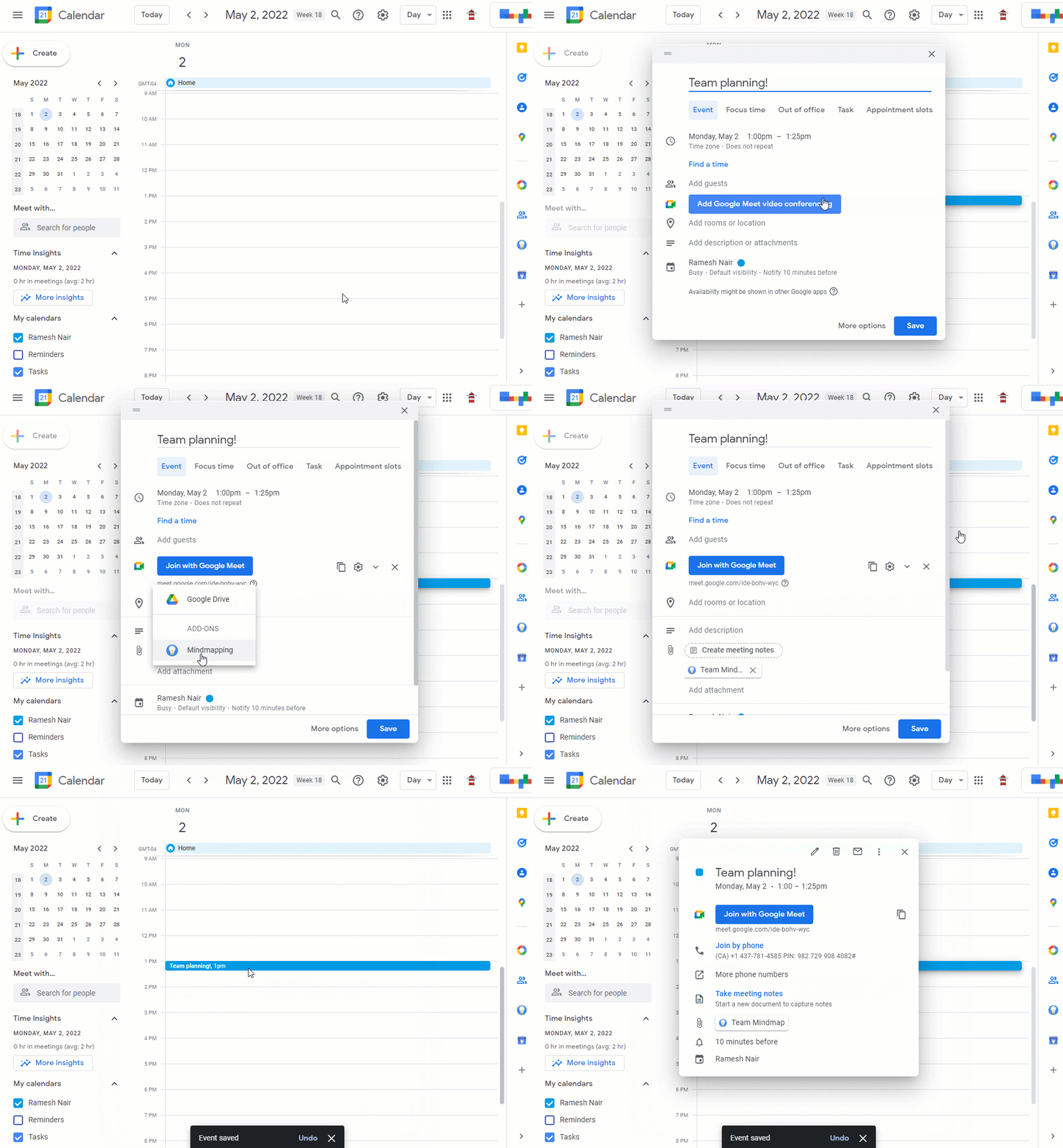
Attach files from a third-party service to a Calendar event
After attaching files in Calendar on the web, users can view the event with the attachment on the web or on mobile.
Getting started
- Developers: You can now develop add-ons that support attaching files from sources other than Google Drive. To get started, learn more about extending Calendar with Google Workspace add-ons and adding attachments with a callback function.
- Admins: There is no admin control for this feature. Visit the Help Center to learn more about managing Google Workspace Marketplace apps.
- End users: If allowed by your admin, you’ll be able to install a Calendar add-on using the “+” button in the quick access side panel or via the Google Workspace Marketplace. End users need to install a compatible add-on to enable this feature.
Rollout pace
- This feature is available now for all developers and users.
Availability
- Available to all Google Workspace customers, as well as legacy G Suite Basic and Business customers
Resources
- Google Workspace Developer Documentation: Google Workspace Add-ons
- Google Workspace Developer Documentation: Extending Calendar with Google Workspace add-ons
- Google Workspace Developer Documentation: Add attachments with a callback function
- Google Workspace Admin Help: Manage Google Workspace Marketplace apps
- Google Help: Get extra Calendar tools
Friday, August 13, 2021
Google Workspace Updates Weekly Recap - August 13, 2021
New updates
Unless otherwise indicated, the features below are fully launched or in the process of rolling out (rollouts should take no more than 15 business days to complete), launching to both Rapid and Scheduled Release at the same time (if not, each stage of rollout should take no more than 15 business days to complete), and available to all Google Workspace and G Suite customers.
New Categories in Google Workspace Marketplace
Three manually curated categories have been added to the Google Workspace Marketplace: Business essentials, Work from everywhere, and Apps to discover. A left navigation menu will be included to show new categories.

Previous announcements
The announcements below were published on the Workspace Updates blog earlier this week. Please refer to the original blog posts for complete details.
Reminder: Google Meet support for IE11 ending August 17, 2021
Beginning August 17, 2021, you will no longer be able to use Google Meet on IE11. To avoid disruption, please switch to a supported browser before that date. | Learn more.
Easily switch between lists in Google Tasks on mobile
We have now updated the current Tasks Mobile user interface to display multiple lists at the same time in a tabbed UI. | Learn more.
Add up to 25 co-hosts per meeting and expanded safety features for Google Meet
We’re expanding meeting moderation controls in Google Meet with several highly requested features, including assigning co-hosts, new safety features, and more. | See the original announcement for more details and full availability. | Learn more.
Friday, June 11, 2021
Google Workspace Updates Weekly Recap - June 11, 2021
New updates
Google Voice is now available in Belgium
Google Workspace customers based in Belgium can now sign up for Google Voice, and customers who have purchased Google Voice Premier can get phone numbers for their users in Belgium. With this launch, Voice is now available in these countries. | Learn more.
Easily view the number of Google Meet hardware devices in your organization in the Admin console
In the Admin console under Devices > Google Meet Hardware, admins will now see a simple count on the device list page of the number of devices that meet the criteria of the currently selected filters. | Learn more.
Previous announcements
The announcements below were published on the Workspace Updates blog earlier this week. Please refer to the original blog posts for complete details.
Replace your background with a video in Google Meet
In addition to replacing your Google Meet background with a static image, you can now replace your background with a video. | Learn more.
Option to replace your background in Google Meet is now available on Android
Find admin approved applications in the “Approved for you” section in the Google Workspace Marketplace
Tuesday, June 8, 2021
Find admin approved applications in the “Approved for you” section in the Google Workspace Marketplace
What’s changing

Who’s impacted
Admins and end users
Why it’s important
Admins can specify which third-party apps their users can install from the Google Workspace Marketplace. With the addition of the “Approved for you” section in the Marketplace, users can quickly find and install pre-approved apps for Gmail, Drive, Editors, Calendar, and more.
Getting started
- Admins: Visit the Help Center to learn more about managing Google Workspace Marketplace Apps for your organization. If you allow your users to install any app from the Marketplace, the “Approved for you” section will be hidden.
- End users: To view applications in the Marketplace approved by your admin, visit the “Approved for you” section of the Google Workspace Marketplace.
Rollout pace
- Rapid Release and Scheduled Release domains: Extended rollout (potentially longer than 15 days for feature visibility) starting on June 8, 2021
Availability
- Available to Google Workspace Business Starter, Business Standard, Business Plus, Enterprise Standard, Enterprise Plus, Education Fundamentals, Education Plus, and Nonprofits, as well as G Suite Basic and Business customers
- Not available to Google Workspace Essentials and Frontline customers
Resources
Monday, January 8, 2018
Install Gmail Add-ons for your entire domain
We recently launched Gmail Add-ons, which allow you to work with your favorite business apps—directly from Gmail. To make it super easy for users to access these helpful tools, we’ve now made it possible for G Suite admins to install Gmail Add-ons for their entire domains. To install an Add-on, click the Settings gear icon in Gmail and select “Get add-ons.” For additional info, see the Help Center.


In addition, we’re making it easier for developers to design Gmail Add-ons specifically for their organizations. In the coming weeks, developers in your domain will notice two changes:
- They’ll be able to install Gmail Add-ons for their own G Suite accounts before they’re published, to aid in the development process. Previously, this was limited to their personal Gmail accounts.
- They’ll be able to publish Gmail Add-ons to users in their own G Suite domains. In addition, they'll be able to publish to the general public, after requesting and receiving publication permission.
Stay tuned to the G Suite Developers Blog to learn more about these two developer capabilities and when they’ve launched.
These new features make it easier for users to take advantage of Gmail Add-ons and breeze through their email-related action items—without ever leaving Gmail.
Launch Details
Release track:
Launching to both Rapid Release and Scheduled Release
Editions:
Available to all G Suite editions
Rollout pace:
Extended rollout (potentially longer than 15 days for feature visibility)
Impact:
Admins and developers
Action:
Admin action suggested/FYI
More Information
G Suite Marketplace: Gmail Add-ons
Help Center: Install Marketplace apps
Launch release calendar
Launch detail categories
Get these product update alerts by email
Subscribe to the RSS feed of these updates