Waitlists for AI agents
Tell your agent.
Launch your list.
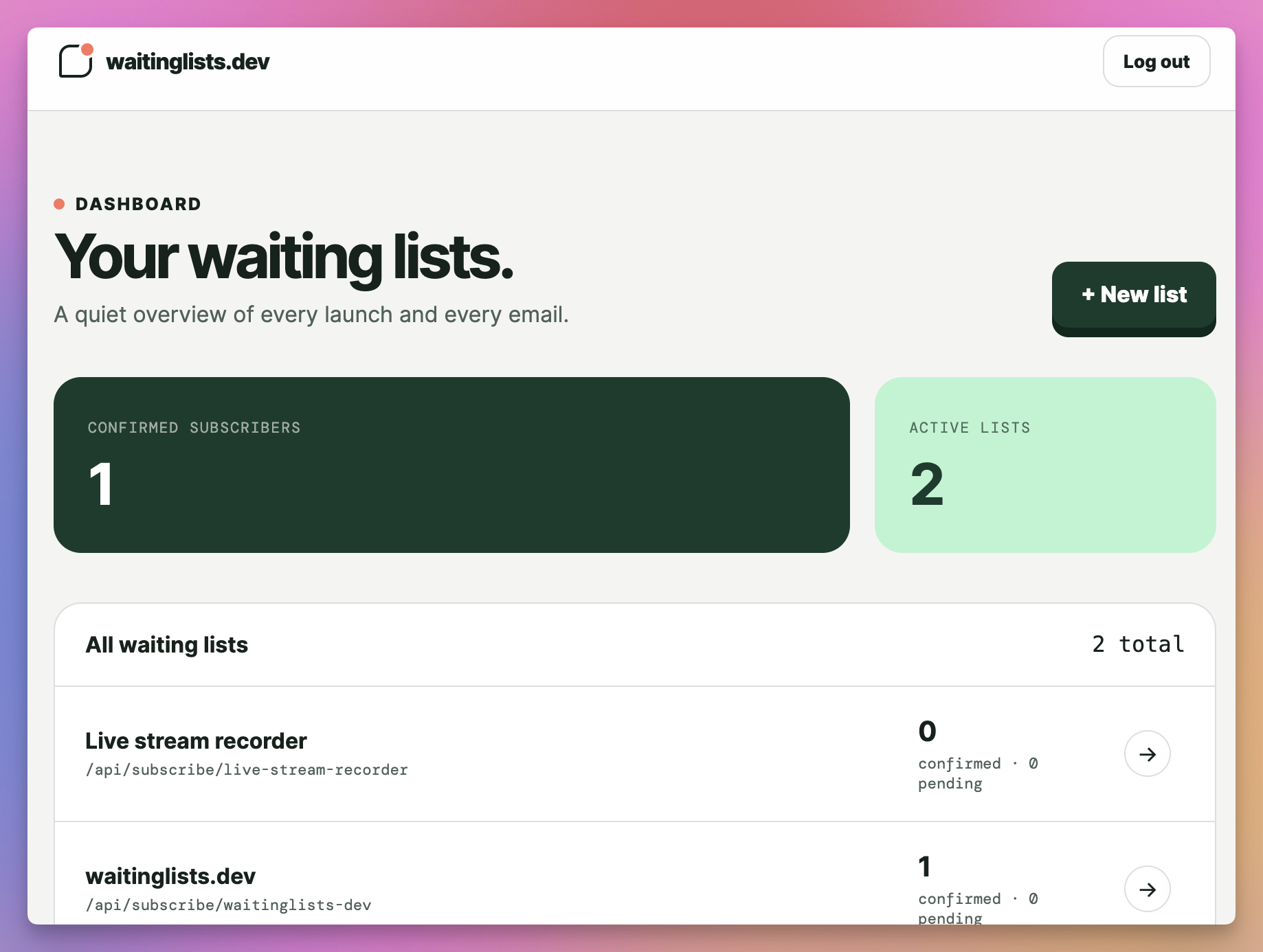
Give your coding agent one instruction. It creates the waiting list, connects your form, checks signups, and exports confirmed subscribers when you ask. Prefer a screen? A private dashboard makes every list easy to visualize and export as CSV.
Agent-operatedVisual dashboardSelf-hostableDouble opt-in
LIVE DOGFOOD DEMO
Live demo
Try this!
This form is a real waitinglists.dev waiting list. Enter your email and go through the exact flow your own subscribers would—double opt-in email included.
Built for tiny launches & serious productsAstroCloudflare WorkersD1Your HTML form
Private preview Public agent access is not live yet
One instruction
Your agent runs it. Your dashboard shows it.
Add the instruction to AGENTS.md, or paste it into a single prompt. The agent receives a secret key once, stores it outside your repository, and uses the CLI from then on. Whenever you want a visual overview, the private dashboard shows list activity, subscribers, and delivery status.
- Ask once.Your agent creates and connects the list.
- Keep the key private.The CLI stores it in your user configuration, never in Git.
- Manage in plain language.“How many joined?” and “export confirmed subscribers” become CLI actions.
- Open the dashboard.Visualize every list and download confirmed subscribers as a CSV whenever you prefer.
AGENTS.mdAVAILABLE AFTER LAUNCH
## Waiting lists
Use waitinglists.dev for this project's
email waiting list.
If this repository is not linked, run:
npx -y @waitinglists/cli init \
  --name "My product" \
  --origin "https://example.com"
Never commit credentials. Use --json
when consuming command output. Export
subscriber data only when I request it.
Private dashboard
See everything at a glance.
Let your agent handle the work, then open a calm visual dashboard whenever you want to inspect lists, review subscribers, adjust the form setup, or export confirmed addresses as CSV.
How it works
From one prompt to collecting emails.
The CLI gives agents a small, predictable interface. Underneath it is the same privacy-minded endpoint and focused private control room.
Give the instruction
Paste the prompt once or keep it in your project’s AGENTS.md file.
The agent connects it
The CLI creates the list, restricts allowed origins, and returns the exact form integration.
Ask for outcomes
Check counts, update settings, or export only confirmed subscribers without navigating a dashboard.
Just a form
Your frontend stays yours.
No embedded widget to restyle. Keep the form you already designed and change only where it sends the email.
index.html
<form method="post"
  action="https://waitinglists.dev/api/subscribe/your-list">
  <input
    type="email"
    name="email"
    required
  />
  <label>
    <input type="checkbox"
      name="consent" value="yes" required />
    I agree to join this waitlist.
  </label>
  <button>Join the waitlist</button>
</form>
No bloat
The useful parts, and nothing pretending to be a CRM.
Minimal by design
The only subscriber-supplied personal data is an email. We add consent evidence and an approximate confirmation country without retaining the IP address.
Works across your sites
Create a separate endpoint for every launch and restrict browser submissions to the origins you trust.
One-click CSV exports
Download confirmed addresses with their consent metadata in universal, Sendy, Kit, or Mailchimp-ready CSV formats.
A clear visual dashboard
See confirmed and pending counts at a glance, inspect subscribers and delivery status, and keep every launch organized.
Yours to runAvailable now
Self-host it.
Change anything.
You can buy waitinglists.dev on prototyped.dev and install it on your own servers. You get the complete source code, deployment instructions, and an agent-ready customization guide.
Hand the instructions to your coding agent and adapt the design, wording, workflow, exports, retention rules, or infrastructure in any way you want.
01Complete source codeOwn the application you deploy and the changes you make.
02Deployment instructionsRun your own copy on your own Cloudflare account.
03Instructions for agentsDescribe the result you want and let your agent customize the software.
Private means private
Locked down where it matters.
01
Server-enforced accessEvery dashboard page, write action, and export checks an active admin session on the server.
02
Hardened sessionsShort-lived, random session tokens are protected by secure, HTTP-only cookies and CSRF checks.
03
Edge rate limitingLogin and collection endpoints are throttled before abusive requests can become a problem.
04
Privacy by defaultDouble opt-in, self-service deletion, finite retention, and minimal collection are built in.
Hosted or self-hosted