Vita SDK is an open source toolchain for PlayStation® Vita development. This allows you to create applications, games, and more (homebrew) to run on hacked Vita consoles. You can find more information on the hack here.
Getting Started
Prerequisite
Linux
Install the following (adapt the command for your system): apt-get install make git-core cmake python
OSX
Windows
- Install WSL2
- Follow the Linux directions above.
A native Windows (mingw) toolchain is also published with every release, installable with bootstrap-vitasdk.ps1 from vdpm — but WSL2 is the recommended environment.
Option
By installing Visual Studio Code, you can flexibly develop in cooperation with WSL2.
To link Visual Studio Code and WSL2, select [Connect to WSL] from the remote button.
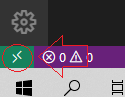
Also if you have error line missing headers for vitasdk in Visual Studio Code, Create a directory named .vscode in the same directory as CMakeLists.txt and download this file there.
Installing
Set the environment variable VITASDK to be the install destination for Vita SDK. We recommend using /usr/local/vitasdk. We also recommend making the change to your .bashrc or equivalent (.bash_profile on OSX) since using the toolchain requires VITASDK to be set.
export VITASDK=/usr/local/vitasdk
export PATH=$VITASDK/bin:$PATH # add vitasdk tool to $PATH
Download the host package manager and bootstrap VitaSDK. The bootstrap installs the newest supported release — currently 2026.08 — and selects its channel:
git clone https://github.com/vitasdk/vdpm
cd vdpm
./bootstrap-vitasdk.sh
Check what you got:
vdpm status
To install packages and libraries (such as zlib, SDL2, libvita2d, taihen) — dependencies are resolved automatically:
vdpm install zlib sdl2 libvita2d taihen
Docker
If you would rather not install anything, the SDK also ships as an image:
docker run --rm -v "$PWD:/workspace" vitasdk/vitasdk:2026.08 \
  sh -c 'cmake -B build -DCMAKE_TOOLCHAIN_FILE=$VITASDK/share/vita.toolchain.cmake && cmake --build build'
$VITASDK and PATH are already set inside the image, and /workspace is the
working directory, so your project lands where the build expects it.
| tag | what it is |
|---|---|
2026.08 |
the series, rebuilt when its packages move or the base gets security updates |
2026.08-20260815 |
that series frozen on that day, never rewritten |
latest |
the newest supported series — 2026.08 today |
Two suffixes combine with any of them: -minimal leaves out the target
packages (764 MB against 1.6 GB), and -non-root runs as the vitasdk user
instead of as root, which is what Kubernetes runAsNonRoot needs. Every tag is
a multi-architecture manifest covering linux/amd64 and linux/arm64, both
built natively. The image repository
documents the rest.
Pin a dated tag in CI if you need the bytes to stay put: latest follows the
supported series, so it moves the day a new release is announced.
If you were already pulling vitasdk/vitasdk: latest used to be a
nightly, rebuilt every night from whatever master held. It now follows the
supported release instead. Nothing was removed, but the tag means something
different, so a pipeline that pulled it is getting 2026.08 from now on.
Updating
There are two update commands, and the difference matters:
vdpm upgrade          # package fixes within your release — safe, never changes your toolchain
vdpm refresh 2026.08  # move to a release, or re-sync the one you are on
vdpm upgrade picks up package fixes published for the release you are on. It will never move you to a new toolchain behind your back: that only happens when you explicitly refresh to a newer release after one is announced.
Releases and channels
VitaSDK ships as versioned, signed releases through package channels. List them with vdpm channels:
- 2026.08 (supported) — what most homebrew is built against. Newlib 4.1.
- nightly (development) — rebuilt continuously; expect it to move under you.
Everything a channel serves is signed, and vdpm verifies it on every refresh and install. vdpm status prints the exact release and sequence you are on — include it in bug reports.
Already have an older vitasdk install? See the migration guide — nothing breaks if you stay, and moving takes minutes.
Removing
To remove all traces of Vita SDK, just delete your $VITASDK directory. You can then reverse the steps in installing the prerequisite.
Platform
Writing Code
The APIs are gathered from reversing the Vita’s firmware. It includes everything you can do with the system. It is recommended that you start by cloning the samples and by reading through them and understanding them. The environment is POSIX but the true power comes from the Sony specific APIs.
Plugins and Extensions
It is highly recommended that you are familiar with writing homebrews before attempting to write a plugin, which is significantly more difficult to do. Advanced developers can check out taiHEN for a substrate that allows you to hook system functions.
Building
Building is done with CMake and you should familiarize yourself with the hello world CMake file to better understand how it works. SELF is the executable format that the Vita runs and the included CMake macro vita_create_self will build it for you. VPK is the homebrew package format and is an archive of the SELF along with data files and LiveArea and is done by the CMake macro vita_create_vpk. VPK is what is installed to the Vita as a bubble.
Running
To run homebrew, you need a hacked Vita or PS TV. Currently only known hacks are HENkaku which requires firmware 3.60, h-encore which requires firmware 3.65 - 3.68, and Trinity which requires firmware 3.69 - 3.70 (after hacking your device if you are on firmware above 3.61 it’s recommended to downgrade to 3.60 using modoru) Once you installed HENkaku, h-encore or Trinity, open up molecularShell/VitaShell and copy your built VPK to ux0:data through FTP. You can then install it as a bubble.
Debugging
Currently, there is minimal debugging support. If your app crashes, a core dump will be generated in ux0:data. You can then parse the core dump to figure out what caused the crash. If you would like to help contribute to the Vita SDK project, we would love to have a debugger for the system.
Porting libraries
vitasdk ships with a flexible makepkg-based build system for building packages that can later be installed into the SDK. To get started, clone vitasdk/packages, cd into a directory with a VITABUILD file and run vita-makepkg. Once the package is built, you can install it with vdpm ./name-version-arm.tar.xz.
If you want to write your own VITABUILD file, here are a few examples that you can follow: a library using autotools-style build, a library using CMake, and a library where a Vita-specific patch is required.
Community
Thanks to the Vita SDK team for creating everything! The logo was designed by @Acemad_.
You can find most of us on Discord or Matrix (links at the top of this page). If you have any questions or need any help, don’t hesitate to ask! We also have a forums for discussions and a wiki for details on reversing engineering the Vita.