 Visual Studio
Overview
Features
Editions
Extensions
Get Started
Service Status
FAQ Support
Documentation
Blog
Overview
Extensions
Support
Documentation
Blog
VS Code for Education
Downloads
Buy
Overview
Support
Administrator Portal
Subscriber Portal
Dev Essentials
Visual Studio Hub
Free Visual Studio
Microsoft Security
Azure
Dynamics 365
Microsoft 365
Microsoft Teams
Windows 365
Microsoft AI
Azure Space
Mixed reality
Microsoft HoloLens
Microsoft Viva
Quantum computing
Sustainability
Education
Automotive
Financial services
Government
Healthcare
Manufacturing
Retail
Find a partner
Become a partner
Partner Network
Microsoft Marketplace
Software companies
Blog
Microsoft Advertising
Developer Center
Documentation
Events
Licensing
Microsoft Learn
Microsoft Research
View Sitemap
Visual Studio
Overview
Features
Editions
Extensions
Get Started
Service Status
FAQ Support
Documentation
Blog
Overview
Extensions
Support
Documentation
Blog
VS Code for Education
Downloads
Buy
Overview
Support
Administrator Portal
Subscriber Portal
Dev Essentials
Visual Studio Hub
Free Visual Studio
Microsoft Security
Azure
Dynamics 365
Microsoft 365
Microsoft Teams
Windows 365
Microsoft AI
Azure Space
Mixed reality
Microsoft HoloLens
Microsoft Viva
Quantum computing
Sustainability
Education
Automotive
Financial services
Government
Healthcare
Manufacturing
Retail
Find a partner
Become a partner
Partner Network
Microsoft Marketplace
Software companies
Blog
Microsoft Advertising
Developer Center
Documentation
Events
Licensing
Microsoft Learn
Microsoft Research
View Sitemap

Build modern C and C++ apps for Windows using tools of your choice, including MSVC, Clang, CMake, and MSBuild
- Contains C/C++ components for desktop, mobile, Linux, and game development
- Get a light and simplified installation
- Add more components during installation, or
By downloading, you agree to the licensing terms for the Visual Studio edition you select below. We also offer the ability to download software with Visual Studio. This software is licensed separately, as set out in the 3rd Party Notices or in its accompanying license. By downloading, you also agree to those licenses.
Download Visual Studio for Windows and choose the tools you need
Support for every codebase
Open a codebase from any environment and get to work right away. Use MSBuild with the Microsoft Visual C++ compiler or a 3rd party toolset like CMake with Clang or mingw to build and debug your code right in the IDE. Benefit from a first-class CMake experience.

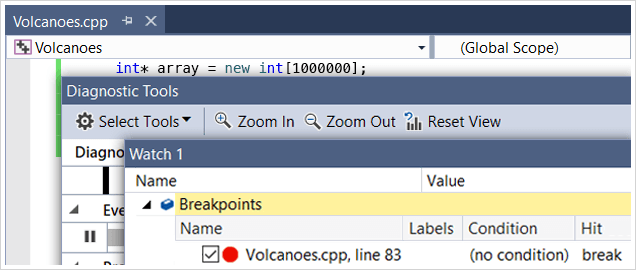
Unparalleled Debugging and Diagnostics
Do all the basics like setting breakpoints and stepping through your code, then get more advanced with variable visualization, performance profiling, debugging any local or remote process, and multi-threaded application debugging. Run to click, edit your live code and continue executing without having to rebuild.
Free, fully-featured IDE for students, open-source and individual developers.
Powerful developer tools, services, and subscription benefits for efficient small-team collaboration.
Advanced debugging, enterprise security, AI-assisted development—plus Azure Credits and Dev/Test pricing for the cloud.