Gremlin steps are chained together to produce the actual traversal and are triggered by way of start steps
on the GraphTraversalSource.
|
Important |
More details about the Gremlin language can be found in the Provider Documentation within the Gremlin Semantics Section. |
General Steps
There are five general steps, each having a traversal and a lambda representation, by which all other specific steps described later extend.
| Step | Description |
|---|---|
|
map the traverser to some object of type |
|
map the traverser to an iterator of |
|
map the traverser to either true or false, where false will not pass the traverser to the next step. |
|
perform some operation on the traverser and pass it to the next step. |
|
split the traverser to all the traversals indexed by the |
|
Warning |
Lambda steps are presented for educational purposes as they represent the foundational constructs of the Gremlin language. In practice, lambda steps should be avoided in favor of their traversals representation and traversal verification strategies exist to disallow their use unless explicitly "turned off." For more information on the problems with lambdas, please read A Note on Lambdas. |
The Traverser<S> object provides access to:
-
The current traversed
Sobject —Traverser.get(). -
The current path traversed by the traverser —
Traverser.path().-
A helper shorthand to get a particular path-history object —
Traverser.path(String) == Traverser.path().get(String).
-
-
The number of times the traverser has gone through the current loop —
Traverser.loops(). -
The number of objects represented by this traverser —
Traverser.bulk(). -
The local data structure associated with this traverser —
Traverser.sack(). -
The side-effects associated with the traversal —
Traverser.sideEffects().-
A helper shorthand to get a particular side-effect —
Traverser.sideEffect(String) == Traverser.sideEffects().get(String).
-
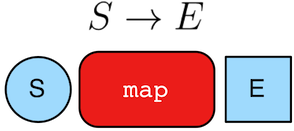
gremlin> g.V(1).out().values('name') //// (1)
==>lop
==>vadas
==>josh
gremlin> g.V(1).out().map {it.get().value('name')} //// (2)
==>lop
==>vadas
==>josh
gremlin> g.V(1).out().map(values('name')) //// (3)
==>lop
==>vadas
==>joshg.V(1).out().values('name') //// (1)
g.V(1).out().map {it.get().value('name')} //// (2)
g.V(1).out().map(values('name')) //3-
An outgoing traversal from vertex 1 to the name values of the adjacent vertices.
-
The same operation, but using a lambda to access the name property values.
-
Again the same operation, but using the traversal representation of
map().
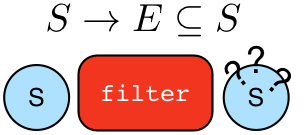
gremlin> g.V().filter {it.get().label() == 'person'} //// (1)
==>v[1]
==>v[2]
==>v[4]
==>v[6]
gremlin> g.V().filter(label().is('person')) //// (2)
==>v[1]
==>v[2]
==>v[4]
==>v[6]
gremlin> g.V().hasLabel('person') //// (3)
==>v[1]
==>v[2]
==>v[4]
==>v[6]
g.V().filter {it.get().label() == 'person'} //// (1)
g.V().filter(label().is('person')) //// (2)
g.V().hasLabel('person') //3-
A filter that only allows the vertex to pass if it has the "person" label
-
The same operation, but using the traversal representation of
filter(). -
The more specific
has()-step is implemented as afilter()with respective predicate.
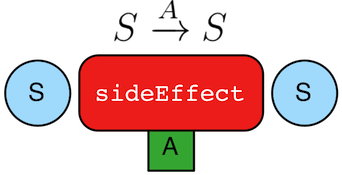
gremlin> g.V().hasLabel('person').sideEffect(System.out.&println) //// (1)
v[1]
==>v[1]
v[2]
==>v[2]
v[4]
==>v[4]
v[6]
==>v[6]
gremlin> g.V().sideEffect(outE().count().local(aggregate("o"))).
               sideEffect(inE().count().local(aggregate("i"))).cap("o","i") //// (2)
==>[i:[0,0,1,1,1,3],o:[3,0,0,0,2,1]]g.V().hasLabel('person').sideEffect(System.out.&println) //// (1)
g.V().sideEffect(outE().count().local(aggregate("o"))).
sideEffect(inE().count().local(aggregate("i"))).cap("o","i") //2-
Whatever enters
sideEffect()is passed to the next step, but some intervening process can occur. -
Compute the out- and in-degree for each vertex. Both
sideEffect()are fed with the same vertex.
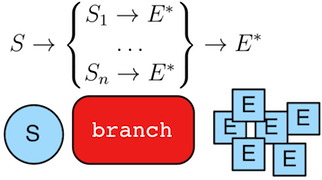
gremlin> g.V().branch {it.get().value('name')}.
               option('marko', values('age')).
               option(none, values('name')) //// (1)
==>29
==>vadas
==>lop
==>josh
==>ripple
==>peter
gremlin> g.V().branch(values('name')).
               option('marko', values('age')).
               option(none, values('name')) //// (2)
==>29
==>vadas
==>lop
==>josh
==>ripple
==>peter
gremlin> g.V().choose(has('name','marko'),
                      values('age'),
                      values('name')) //// (3)
==>29
==>vadas
==>lop
==>josh
==>ripple
==>peter
g.V().branch {it.get().value('name')}.
option('marko', values('age')).
option(none, values('name')) //// (1)
g.V().branch(values('name')).
option('marko', values('age')).
option(none, values('name')) //// (2)
g.V().choose(has('name','marko'),
values('age'),
values('name')) //3-
If the vertex is "marko", get his age, else get the name of the vertex.
-
The same operation, but using the traversal representing of
branch(). -
The more specific boolean-based
choose()-step is implemented as abranch().
Terminal Steps
Typically, when a step is concatenated to a traversal a traversal is returned. In this way, a traversal is built up in a fluent, monadic fashion. However, some steps do not return a traversal, but instead, execute the traversal and return a result. These steps are known as terminal steps (terminal) and they are explained via the examples below.
gremlin> g.V().out('created').hasNext() //// (1)
==>true
gremlin> g.V().out('created').next() //// (2)
==>v[3]
gremlin> g.V().out('created').next(2) //// (3)
==>v[3]
==>v[5]
gremlin> g.V().out('nothing').tryNext() //// (4)
==>Optional.empty
gremlin> g.V().out('created').toList() //// (5)
==>v[3]
==>v[5]
==>v[3]
==>v[3]
gremlin> g.V().out('created').toSet() //// (6)
==>v[3]
==>v[5]
gremlin> g.V().out('created').toBulkSet() //// (7)
==>v[3]
==>v[3]
==>v[3]
==>v[5]
gremlin> results = ['blah',3]
==>blah
==>3
gremlin> g.V().out('created').fill(results) //// (8)
==>blah
==>3
==>v[3]
==>v[5]
==>v[3]
==>v[3]
gremlin> g.addV('person').iterate() //// (9)g.V().out('created').hasNext() //// (1)
g.V().out('created').next() //// (2)
g.V().out('created').next(2) //// (3)
g.V().out('nothing').tryNext() //// (4)
g.V().out('created').toList() //// (5)
g.V().out('created').toSet() //// (6)
g.V().out('created').toBulkSet() //// (7)
results = ['blah',3]
g.V().out('created').fill(results) //// (8)
g.addV('person').iterate() //9-
hasNext()determines whether there are available results (not supported ingremlin-javascript). -
next()will return the next result. -
next(n)will return the nextnresults in a list (not supported ingremlin-javascriptor Gremlin.NET). -
tryNext()will return anOptionaland thus, is a composite ofhasNext()/next()(only supported for JVM languages). -
toList()will return all results in a list. -
toSet()will return all results in a set and thus, duplicates removed (not supported ingremlin-javascript). -
toBulkSet()will return all results in a weighted set and thus, duplicates preserved via weighting (only supported for JVM languages). -
fill(collection)will put all results in the provided collection and return the collection when complete (only supported for JVM languages). -
iterate()does not exactly fit the definition of a terminal step in that it doesn’t return a result, but still returns a traversal - it does however behave as a terminal step in that it iterates the traversal and generates side effects without returning the actual result.
There is also the promise() terminator step, which can only be used with remote traversals to
Gremlin Server or RGPs. It starts a promise to execute a function
on the current Traversal that will be completed in the future.
Finally, explain()-step is also a terminal step and is described in its own section.
AddE Step
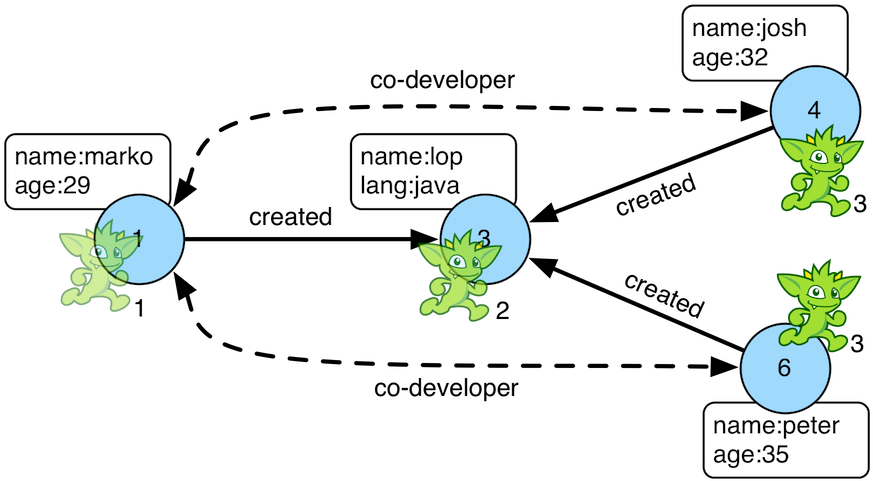
Reasoning is the process of making explicit what is implicit
in the data. What is explicit in a graph are the objects of the graph — i.e. vertices and edges. What is implicit
in the graph is the traversal. In other words, traversals expose meaning where the meaning is determined by the
traversal definition. For example, take the concept of a "co-developer." Two people are co-developers if they have
worked on the same project together. This concept can be represented as a traversal and thus, the concept of
"co-developers" can be derived. Moreover, what was once implicit can be made explicit via the addE()-step
(map/sideEffect).
gremlin> g.V(1).as('a').out('created').in('created').where(neq('a')).
           addE('co-developer').from('a').property('year',2009) //// (1)
==>e[0][1-co-developer->4]
==>e[13][1-co-developer->6]
gremlin> g.V(3,4,5).aggregate('x').has('name','josh').as('a').
           select('x').unfold().hasLabel('software').addE('createdBy').to('a') //// (2)
==>e[14][3-createdBy->4]
==>e[15][5-createdBy->4]
gremlin> g.V().as('a').out('created').addE('createdBy').to('a').property('acl','public') //// (3)
==>e[16][3-createdBy->1]
==>e[17][5-createdBy->4]
==>e[18][3-createdBy->4]
==>e[19][3-createdBy->6]
gremlin> g.V(1).as('a').out('knows').
           addE('livesNear').from('a').property('year',2009).
           inV().inE('livesNear').values('year') //// (4)
==>2009
==>2009
gremlin> g.V().match(
                 __.as('a').out('knows').as('b'),
                 __.as('a').out('created').as('c'),
                 __.as('b').out('created').as('c')).
               addE('friendlyCollaborator').from('a').to('b').
                 property(id,23).property('project',select('c').values('name')) //// (5)
==>e[23][1-friendlyCollaborator->4]
gremlin> g.E(23).valueMap()
==>[project:lop]
gremlin> vMarko = g.V().has('name','marko').next()
==>v[1]
gremlin> vPeter = g.V().has('name','peter').next()
==>v[6]
gremlin> g.V(vMarko).addE('knows').to(vPeter) //// (6)
==>e[22][1-knows->6]
gremlin> g.addE('knows').from(vMarko).to(vPeter) //// (7)
==>e[24][1-knows->6]
gremlin> g.addE('knows').from(__.V(1)).to(__.constant(6)) //// (8)
==>e[25][1-knows->6]g.V(1).as('a').out('created').in('created').where(neq('a')).
addE('co-developer').from('a').property('year',2009) //// (1)
g.V(3,4,5).aggregate('x').has('name','josh').as('a').
select('x').unfold().hasLabel('software').addE('createdBy').to('a') //// (2)
g.V().as('a').out('created').addE('createdBy').to('a').property('acl','public') //// (3)
g.V(1).as('a').out('knows').
addE('livesNear').from('a').property('year',2009).
inV().inE('livesNear').values('year') //// (4)
g.V().match(
__.as('a').out('knows').as('b'),
__.as('a').out('created').as('c'),
__.as('b').out('created').as('c')).
addE('friendlyCollaborator').from('a').to('b').
property(id,23).property('project',select('c').values('name')) //// (5)
g.E(23).valueMap()
vMarko = g.V().has('name','marko').next()
vPeter = g.V().has('name','peter').next()
g.V(vMarko).addE('knows').to(vPeter) //// (6)
g.addE('knows').from(vMarko).to(vPeter) //// (7)
g.addE('knows').from(__.V(1)).to(__.constant(6)) //8-
Add a co-developer edge with a year-property between marko and his collaborators.
-
Add incoming createdBy edges from the josh-vertex to the lop- and ripple-vertices.
-
Add an inverse createdBy edge for all created edges.
-
The newly created edge is a traversable object.
-
Two arbitrary bindings in a traversal can be joined
from()→to(), whereidcan be provided for graphs that supports user provided ids. -
Add an edge between marko and peter given the directed (detached) vertex references.
-
Add an edge between marko and peter given the directed (detached) vertex references.
-
Use child traversals producing either a vertex, or vertex id to add an edge between marko and peter.
Additional References
AddV Step
The addV()-step is used to add vertices to the graph (map/sideEffect). For every incoming object, a vertex is
created. Moreover, GraphTraversalSource maintains an addV() method.
gremlin> g.addV('person').property('name','stephen')
==>v[0]
gremlin> g.V().values('name')
==>stephen
==>marko
==>vadas
==>lop
==>josh
==>ripple
==>peter
gremlin> g.V().outE('knows').addV().property('name','nothing')
==>v[13]
==>v[15]
gremlin> g.V().has('name','nothing')
==>v[13]
==>v[15]
gremlin> g.V().has('name','nothing').bothE()g.addV('person').property('name','stephen')
g.V().values('name')
g.V().outE('knows').addV().property('name','nothing')
g.V().has('name','nothing')
g.V().has('name','nothing').bothE()Additional References
Aggregate Step

The aggregate()-step (sideEffect) is used to aggregate all the objects at a particular point of traversal into a
Collection. By default, the step will use eager evaluation in that
no objects continue on until all previous objects have been fully aggregated. The eager evaluation model is crucial in situations
where everything at a particular point is required for future computation.
gremlin> g.V(1).out('created') //// (1)
==>v[3]
gremlin> g.V(1).out('created').aggregate('x') //// (2)
==>v[3]
gremlin> g.V(1).out('created').aggregate('x').in('created') //// (3)
==>v[1]
==>v[4]
==>v[6]
gremlin> g.V(1).out('created').aggregate('x').in('created').out('created') //// (4)
==>v[3]
==>v[5]
==>v[3]
==>v[3]
gremlin> g.V(1).out('created').aggregate('x').in('created').out('created').
                where(without('x')).values('name') //// (5)
==>rippleg.V(1).out('created') //// (1)
g.V(1).out('created').aggregate('x') //// (2)
g.V(1).out('created').aggregate('x').in('created') //// (3)
g.V(1).out('created').aggregate('x').in('created').out('created') //// (4)
g.V(1).out('created').aggregate('x').in('created').out('created').
where(without('x')).values('name') //5-
What has marko created?
-
Aggregate all his creations.
-
Who are marko’s collaborators?
-
What have marko’s collaborators created?
-
What have marko’s collaborators created that he hasn’t created?
"What has userA liked? Who else has liked those things? What have they liked that userA hasn't already liked?"
Finally, aggregate()-step can be modulated via by()-projection.
gremlin> g.V().out('knows').aggregate('x').cap('x')
==>[v[2],v[4]]
gremlin> g.V().out('knows').aggregate('x').by('name').cap('x')
==>[vadas,josh]
gremlin> g.V().out('knows').aggregate('x').by('age').cap('x') //// (1)
==>[27,32]g.V().out('knows').aggregate('x').cap('x')
g.V().out('knows').aggregate('x').by('name').cap('x')
g.V().out('knows').aggregate('x').by('age').cap('x') //1-
The "age" property is not productive for all vertices and therefore those values are not included in the aggregation.
Aggregation can be controlled to occur in a lazy fashion by using
the step inside local().
gremlin> g.V().aggregate('x').limit(1).cap('x')
==>[v[1],v[2],v[3],v[4],v[5],v[6]]
gremlin> g.V().local(aggregate('x')).limit(1).cap('x')
==>[v[1],v[2]]g.V().aggregate('x').limit(1).cap('x')
g.V().local(aggregate('x')).limit(1).cap('x')g.E().local(aggregate('x')).by('weight').cap('x')Additional References
All Step
It is possible to filter list traversers using all()-step (filter). Every item in the list will be tested against
the supplied predicate and if all of the items pass then the traverser is passed along the stream, otherwise it is
filtered. Empty lists are passed along but null or non-iterable traversers are filtered out.
|
Python |
The term |
gremlin> g.V().values('age').fold().all(gt(25)) //// (1)
==>[29,27,32,35]g.V().values('age').fold().all(gt(25)) //1-
Return the list of ages only if everyone’s age is greater than 25.
Additional References
And Step
The and()-step ensures that all provided traversals yield a result (filter). Please see or() for or-semantics.
|
Python |
The term |
gremlin> g.V().and(
            outE('knows'),
            values('age').is(lt(30))).
              values('name')
==>marko
g.V().and(
outE('knows'),
values('age').is(lt(30))).
values('name')The and()-step can take an arbitrary number of traversals. All traversals must produce at least one output for the
original traverser to pass to the next step.
gremlin> g.V().where(outE('created').and().outE('knows')).values('name')
==>markog.V().where(outE('created').and().outE('knows')).values('name')Additional References
Any Step
It is possible to filter list traversers using any()-step (filter). All items in the list will be tested against
the supplied predicate and if any of the items pass then the traverser is passed along the stream, otherwise it is
filtered. Empty lists, null traversers, and non-iterable traversers are filtered out as well.
|
Python |
The term |
gremlin> g.V().values('age').fold().any(gt(25)) //// (1)
==>[29,27,32,35]g.V().values('age').fold().any(gt(25)) //1-
Return the list of ages if anyone’s age is greater than 25.
Additional References
As Step
The as()-step is not a real step, but a "step modulator" similar to by() and option().
With as(), it is possible to provide a label to the step that can later be accessed by steps and data structures
that make use of such labels — e.g., select(), match(), and path.
|
Groovy |
The term |
|
Python |
The term |
gremlin> g.V().as('a').out('created').as('b').select('a','b') //// (1)
==>[a:v[1],b:v[3]]
==>[a:v[4],b:v[5]]
==>[a:v[4],b:v[3]]
==>[a:v[6],b:v[3]]
gremlin> g.V().as('a').out('created').as('b').select('a','b').by('name') //// (2)
==>[a:marko,b:lop]
==>[a:josh,b:ripple]
==>[a:josh,b:lop]
==>[a:peter,b:lop]g.V().as('a').out('created').as('b').select('a','b') //// (1)
g.V().as('a').out('created').as('b').select('a','b').by('name') //2-
Select the objects labeled "a" and "b" from the path.
-
Select the objects labeled "a" and "b" from the path and, for each object, project its name value.
A step can have any number of labels associated with it. This is useful for referencing the same step multiple times in a future step.
gremlin> g.V().hasLabel('software').as('a','b','c').
            select('a','b','c').
              by('name').
              by('lang').
              by(__.in('created').values('name').fold())
==>[a:lop,b:java,c:[marko,josh,peter]]
==>[a:ripple,b:java,c:[josh]]g.V().hasLabel('software').as('a','b','c').
select('a','b','c').
by('name').
by('lang').
by(__.in('created').values('name').fold())Additional References
AsString Step
The asString()-step (map) returns the value of incoming traverser as strings. Any null value will cause an IllegalArgumentException.
gremlin> g.V().hasLabel('person').values('age').asString() //// (1)
==>29
==>27
==>32
==>35
gremlin> g.V().hasLabel('person').values('age').asString().concat(' years old') //// (2)
==>29 years old
==>27 years old
==>32 years old
==>35 years old
gremlin> g.V().hasLabel('person').values('age').fold().asString(local) //// (3)
==>[29,27,32,35]g.V().hasLabel('person').values('age').asString() //// (1)
g.V().hasLabel('person').values('age').asString().concat(' years old') //// (2)
g.V().hasLabel('person').values('age').fold().asString(local) //3-
Return ages as string.
-
Return ages as string and use concat to generate phrases.
-
Use
Scope.localto operate on individual string elements inside incoming list, which will return a list.
Additional References
AsBool Step
The asBool()-step (map) converts the incoming traverser to a boolean value. If the traverser is already a boolean value, it is passed as-is. Numbers evaluate to
true if non-zero, and to false if zero or NaN. Strings are only accepted when
equal to "true" or "false" (case-insensitive), otherwise an IllegalArgumentException is thrown.
All other types (including null) will throw an IllegalArgumentException.
gremlin> g.inject(1).asBool() //// (1)
==>true
gremlin> g.inject("false").asBool() //// (2)
==>falseg.inject(1).asBool() //// (1)
g.inject("false").asBool() //2-
Convert number to boolean
-
Convert string to boolean
Additional References
AsDate Step
The asDate()-step (map) converts string or numeric input to Date.
For string input only ISO-8601 format is supported. For numbers, the value is considered as the number of the milliseconds since "the epoch" (January 1, 1970, 00:00:00 GMT). Date input is passed without changes.
If the incoming traverser is not a string, number, Date or OffsetDateTime then an IllegalArgumentException will be thrown.
gremlin> g.inject(1690934400000).asDate() //// (1)
==>2023-08-02T00:00Z
gremlin> g.inject("2023-08-02T00:00:00Z").asDate() //// (2)
==>2023-08-02T00:00Z
gremlin> g.inject(datetime("2023-08-24T00:00:00Z")).asDate() //// (3)
==>2023-08-24T00:00Zg.inject(1690934400000).asDate() //// (1)
g.inject("2023-08-02T00:00:00Z").asDate() //// (2)
g.inject(datetime("2023-08-24T00:00:00Z")).asDate() //3-
Convert number to Date
-
Convert ISO-8601 string to Date
-
Pass Date without modification
Additional References
AsNumber Step
The asNumber()-step (map) converts the incoming traverser to the nearest parsable type if no argument is provided,
or to the desired numerical type, based on the type token (GType) provided. If a type token entered isn’t a numerical type, an IllegalArgumentException will be thrown.
Numerical input will pass through unless a type is specified by the number token. ArithmeticException will be thrown
for any overflow during narrowing of types.
String inputs are parsed into numeric values. By default, the value will be parsed as an integer if it represents a
whole number, or as a double if it contains a decimal point. A NumberFormatException will be thrown if the string
cannot be parsed into a valid number format.
Date inputs are converted to milliseconds since epoch (January 1, 1970, 00:00:00 GMT).
All other input types will result in IllegalArgumentException.
gremlin> g.inject(1234).asNumber() //// (1)
==>1234
gremlin> g.inject(1.76d).asNumber() //// (2)
==>1.76
gremlin> g.inject(1.76d).asNumber(GType.INT) //// (3)
==>1
gremlin> g.inject("2023-08-02T00:00:00Z").asDate().asNumber() //// (4)
==>1690934400000g.inject(1234).asNumber() //// (1)
g.inject(1.76d).asNumber() //// (2)
g.inject(1.76d).asNumber(GType.INT) //// (3)
g.inject("2023-08-02T00:00:00Z").asDate().asNumber() //4-
An int will be passed through.
-
A double will be passed through.
-
A double is converted into an int.
-
A date is converted into milliseconds since epoch.
|
Java |
The enums values |
|
Groovy & Gremlin Console |
The enums values |
|
JavaScript |
The enums values |
Additional References
Barrier Step
The barrier()-step (barrier) turns the lazy traversal pipeline into a bulk-synchronous pipeline. This step is
useful in the following situations:
-
When everything prior to
barrier()needs to be executed before moving onto the steps after thebarrier()(i.e. ordering). -
When "stalling" the traversal may lead to a "bulking optimization" in traversals that repeatedly touch many of the same elements (i.e. optimizing).
gremlin> g.V().sideEffect{println "first: ${it}"}.sideEffect{println "second: ${it}"}.iterate()
first: v[1]
second: v[1]
first: v[2]
second: v[2]
first: v[3]
second: v[3]
first: v[4]
second: v[4]
first: v[5]
second: v[5]
first: v[6]
second: v[6]
gremlin> g.V().sideEffect{println "first: ${it}"}.barrier().sideEffect{println "second: ${it}"}.iterate()
first: v[1]
first: v[2]
first: v[3]
first: v[4]
first: v[5]
first: v[6]
second: v[1]
second: v[2]
second: v[3]
second: v[4]
second: v[5]
second: v[6]
g.V().sideEffect{println "first: ${it}"}.sideEffect{println "second: ${it}"}.iterate()
g.V().sideEffect{println "first: ${it}"}.barrier().sideEffect{println "second: ${it}"}.iterate()The theory behind a "bulking optimization" is simple. If there are one million traversers at vertex 1, then there is
no need to calculate one million both()-computations. Instead, represent those one million traversers as a single
traverser with a Traverser.bulk() equal to one million and execute both() once. A bulking optimization example is
made more salient on a larger graph. Therefore, the example below leverages the Grateful Dead graph.
gremlin> graph = TinkerGraph.open()
==>tinkergraph[vertices:0 edges:0]
gremlin> g = traversal().with(graph)
==>graphtraversalsource[tinkergraph[vertices:0 edges:0], standard]
gremlin> g.io('data/grateful-dead.xml').read().iterate()
gremlin> g = traversal().with(graph).withoutStrategies(LazyBarrierStrategy) //// (1)
==>graphtraversalsource[tinkergraph[vertices:808 edges:8049], standard]
gremlin> clockWithResult(1){g.V().both().both().both().count().next()} //// (2)
==>4458.2642909999995
==>126653966
gremlin> clockWithResult(1){g.V().repeat(both()).times(3).count().next()} //// (3)
==>4960.452041
==>126653966
gremlin> clockWithResult(1){g.V().both().barrier().both().barrier().both().barrier().count().next()} //// (4)
==>5.427665999999999
==>126653966
graph = TinkerGraph.open()
g = traversal().with(graph)
g.io('data/grateful-dead.xml').read().iterate()
g = traversal().with(graph).withoutStrategies(LazyBarrierStrategy) //// (1)
clockWithResult(1){g.V().both().both().both().count().next()} //// (2)
clockWithResult(1){g.V().repeat(both()).times(3).count().next()} //// (3)
clockWithResult(1){g.V().both().barrier().both().barrier().both().barrier().count().next()} //4-
Explicitly remove
LazyBarrierStrategywhich yields a bulking optimization. -
A non-bulking traversal where each traverser is processed.
-
Each traverser entering
repeat()has its recursion bulked. -
A bulking traversal where implicit traversers are not processed.
If barrier() is provided an integer argument, then the barrier will only hold n-number of unique traversers in its
barrier before draining the aggregated traversers to the next step. This is useful in the aforementioned bulking
optimization scenario with the added benefit of reducing the risk of an out-of-memory exception.
LazyBarrierStrategy inserts barrier()-steps into a traversal where appropriate in order to gain the
"bulking optimization."
gremlin> graph = TinkerGraph.open()
==>tinkergraph[vertices:0 edges:0]
gremlin> g = traversal().with(graph) //// (1)
==>graphtraversalsource[tinkergraph[vertices:0 edges:0], standard]
gremlin> g.io('data/grateful-dead.xml').read().iterate()
gremlin> clockWithResult(1){g.V().both().both().both().count().next()}
==>4.155125
==>126653966
gremlin> g.V().both().both().both().count().iterate().toString() //// (2)
==>[TinkerGraphStep(vertex,[]), VertexStep(BOTH,vertex), NoOpBarrierStep(2500), VertexStep(BOTH,vertex), NoOpBarrierStep(2500), VertexStep(BOTH,edge), CountGlobalStep, DiscardStep]
graph = TinkerGraph.open()
g = traversal().with(graph) //// (1)
g.io('data/grateful-dead.xml').read().iterate()
clockWithResult(1){g.V().both().both().both().count().next()}
g.V().both().both().both().count().iterate().toString() //2-
LazyBarrierStrategyis a default strategy and thus, does not need to be explicitly activated. -
With
LazyBarrierStrategyactivated,barrier()-steps are automatically inserted where appropriate.
Additional References
Branch Step
The branch() step splits the traverser to all the child traversals provided to it. Please see the
General Steps section for more information, but also consider that branch() is the basis for more
robust steps like choose() and union().
Additional References
By Step
The by()-step is not an actual step, but instead is a "step-modulator" similar to as() and
option(). If a step is able to accept traversals, functions, comparators, etc. then by() is the
means by which they are added. The general pattern is step().by()…by(). Some steps can only accept one by()
while others can take an arbitrary amount.
gremlin> g.V().group().by(bothE().count()) //// (1)
==>[1:[v[2],v[5],v[6]],3:[v[1],v[3],v[4]]]
gremlin> g.V().group().by(bothE().count()).by('name') //// (2)
==>[1:[vadas,ripple,peter],3:[marko,lop,josh]]
gremlin> g.V().group().by(bothE().count()).by(count()) //// (3)
==>[1:3,3:3]
g.V().group().by(bothE().count()) //// (1)
g.V().group().by(bothE().count()).by('name') //// (2)
g.V().group().by(bothE().count()).by(count()) //3-
by(outE().count())will group the elements by their edge count (traversal). -
by('name')will process the grouped elements by their name (element property projection). -
by(count())will count the number of elements in each group (traversal).
When a by() modulator does not produce a result, it is deemed "unproductive". An "unproductive" modulator will lead
to the filtering of the traverser it is currently working with. The filtering will manifest in various ways depending
on the step.
gremlin> g.V().sample(1).by('age') //// (1)
==>v[4]g.V().sample(1).by('age') //1-
The "age" property key is not present for all vertices, therefore
sample()will ignore (i.e. filter) such vertices for consideration in the sampling.
The following steps all support by()-modulation. Note that the semantics of such modulation should be understood
on a step-by-step level and thus, as discussed in their respective section of the documentation.
-
aggregate(): aggregate all objects into a set but only store theirby()-modulated values. -
cyclicPath(): filter if the traverser’s path is cyclic givenby()-modulation. -
dedup(): dedup on the results of aby()-modulation. -
format(): transform a traverser provided to the step by way of theby()modulator before it is processed by it. -
group(): create group keys and values according toby()-modulation. -
groupCount(): count those groups where the group keys are the result ofby()-modulation. -
math(): transform a traverser provided to the step by way of theby()modulator before it is processed by it. -
order(): order the objects by the results of aby()-modulation. -
path(): get the path of the traverser where each path element isby()-modulated. -
project(): project a map of results given variousby()-modulations off the current object. -
propertyMap(): transform the result of the values in the resultingMapusing theby()modulator. -
sack(): provides the transformation for a traverser to a value to be stored in the sack. -
sample(): sample using the value returned byby()-modulation. -
select(): select path elements and transform them viaby()-modulation. -
simplePath(): filter if the traverser’s path is simple givenby()-modulation. -
tree(): get a tree of traversers objects where the objects have beenby()-modulated. -
valueMap(): transform the result of the values in the resultingMapusing theby()modulator. -
where(): determine the predicate given the testing of the results ofby()-modulation.
Additional References
Call Step
The call() step allows for custom, provider-specific service calls either at the start of a traversal or mid-traversal.
This allows Graph providers to expose operations not natively built into the Gremlin language, such as full text search,
custom analytics, notification triggers, etc.
When called with no arguments, call() will produce a list of callable services available for the graph in use. This
no-argument version is equivalent to call('--list'). This "directory service" is also capable of producing more
verbose output describing all the services or an individual service:
gremlin> g.call() //// (1)
gremlin> g.call('--list') //// (1)
gremlin> g.call().with('verbose') //// (2)
gremlin> g.call().with('verbose').with('service', 'xyz-service') //// (3)
g.call() //// (1)
g.call('--list') //// (1)
g.call().with('verbose') //// (2)
g.call().with('verbose').with('service', 'xyz-service') //3-
List available services by name
-
Produce a Map of detailed service information by name
-
Produce the detailed service information for the 'xyz-service'
The first argument to call() is always the name of the service call. Additionally, service calls can accept both
static and dynamically produced parameters. Static parameters can be passed as a Map to the call() as the second
argument. Individual static parameters can also be added using the .with() modulator. Dynamic parameters can be
passed as a Map-producing Traversal as the second argument (no static parameters) or third argument (static + dynamic
parameters). Additional individual dynamic parameters can be added using the .with() modulator.
g.call('xyz-service') //1
g.call('xyz-service', ['a':'b']) //2
g.call('xyz-service').with('a', 'b') //2
g.call('xyz-service', __.inject(['a':'b'])) //3
g.call('xyz-service').with('a', __.inject('b')) //3
g.call('xyz-service', ['a':'b'], __.inject(['c':'d'])) //4-
Call the 'xyz-service' with no parameters
-
Examples of static parameters (constants known before execution)
-
Examples of dynamic parameters (these will be computed at execution time)
-
Example of static + dynamic parameters (these will be computed and merged into one set of parameters at execution time)
Additional References
GraphTraversalSource:
GraphTraversal:
Cap Step
The cap()-step (barrier) iterates the traversal up to itself and emits the sideEffect referenced by the provided
key. If multiple keys are provided, then a Map<String,Object> of sideEffects is emitted.
gremlin> g.V().groupCount('a').by(label).cap('a') //// (1)
==>[software:2,person:4]
gremlin> g.V().groupCount('a').by(label).groupCount('b').by(outE().count()).cap('a','b') //// (2)
==>[a:[software:2,person:4],b:[0:3,1:1,2:1,3:1]]g.V().groupCount('a').by(label).cap('a') //// (1)
g.V().groupCount('a').by(label).groupCount('b').by(outE().count()).cap('a','b') //2-
Group and count vertices by their label. Emit the side effect labeled 'a', which is the group count by label.
-
Same as statement 1, but also emit the side effect labeled 'b' which groups vertices by the number of out edges.
Additional References
Choose Step

The choose()-step (branch) routes the current traverser to a particular traversal branch option. With choose(),
it is possible to implement two different types of semantics: if-then-else (conditional branching) and switch
(value-based selection).
If-Then-Else
The if-the-else semantics of choose() evaluate a predicate traversal and route the traverser to either the "true"
branch or the "false" branch based on the result.
gremlin> g.V().hasLabel('person').
               choose(values('age').is(lte(30)),
                      __.in(),
                      __.out()).values('name') //// (1)
==>marko
==>ripple
==>lop
==>lop
gremlin> g.V().hasLabel('person').
               choose(outE('knows').count().is(gt(0)),
                      __.out('knows'),
                      __.identity()).values('name') //// (2)
==>vadas
==>josh
==>vadas
==>josh
==>peterg.V().hasLabel('person').
choose(values('age').is(lte(30)),
__.in(),
__.out()).values('name') //// (1)
g.V().hasLabel('person').
choose(outE('knows').count().is(gt(0)),
__.out('knows'),
__.identity()).values('name') //2-
If the person’s age is less than or equal to 30, then traverse to incoming vertices, else traverse to outgoing vertices.
-
If the person has outgoing "knows" edges, then traverse to those known vertices, else return the person vertex itself.
If the "false"-branch is not provided, then simple if-then-semantics are implemented, where traversers that don’t match the condition are passed through unchanged.
gremlin> g.V().choose(hasLabel('person'), out('created')).values('name') //// (1)
==>lop
==>lop
==>ripple
==>lop
==>ripple
==>lop
gremlin> g.V().choose(hasLabel('person'), out('created'), identity()).values('name') //// (2)
==>lop
==>lop
==>ripple
==>lop
==>ripple
==>lopg.V().choose(hasLabel('person'), out('created')).values('name') //// (1)
g.V().choose(hasLabel('person'), out('created'), identity()).values('name') //2-
If the vertex is a person, emit the vertices they created, else emit the vertex.
-
if-the-else with an
identity()on the false-branch is equivalent to if-then with no false-branch.
Switch
The switch semantics of choose() use the result of a traversal as a key to select from multiple traversal options.
This allows for more complex branching logic beyond simple true/false conditions.
gremlin> g.V().hasLabel('person').
               choose(values('name')).
                 option('marko', values('age')).
                 option('josh', values('name')).
                 option('vadas', elementMap()).
                 option('peter', label()) //// (1)
==>29
==>[id:2,label:person,name:vadas,age:27]
==>josh
==>person
gremlin> g.V().hasLabel('person').
               choose(values('age')).
                 option(27, __.in().values('name')).
                 option(32, __.out().values('name')) //// (2)
==>v[1]
==>marko
==>ripple
==>lop
==>v[6]g.V().hasLabel('person').
choose(values('name')).
option('marko', values('age')).
option('josh', values('name')).
option('vadas', elementMap()).
option('peter', label()) //// (1)
g.V().hasLabel('person').
choose(values('age')).
option(27, __.in().values('name')).
option(32, __.out().values('name')) //2-
Use the person’s name to select which property or operation to return.
-
Use the person’s age value to select which traversal to apply, noting that traversers matching no age values simply pass through.
The choose()-step can use predicates with options to match ranges of values or other conditions.
gremlin> g.V().hasLabel('person').
               choose(values('age')).
                 option(P.between(26, 30), constant('younger')).
                 option(P.gt(30), constant('older')).
                 option(Pick.none, constant('unknown')) //// (1)
==>younger
==>younger
==>older
==>olderg.V().hasLabel('person').
choose(values('age')).
option(P.between(26, 30), constant('younger')).
option(P.gt(30), constant('older')).
option(Pick.none, constant('unknown')) //1-
If the person’s age is between 26 and 30, classify them as 'younger', if greater than 30, classify as 'older', otherwise 'unknown'.
The token T.label can be used as shorthand for __.label() when selecting options based on element labels.
gremlin> g.V().choose(T.label).
                 option('person', out('created')).
                 option('software', in('created')).
                 values('name') //// (1)
==>lop
==>marko
==>josh
==>peter
==>ripple
==>lop
==>josh
==>lop
g.V().choose(T.label).
option('person', out('created')).
option('software', in('created')).
values('name') //1-
For person vertices, traverse to the software they created; for software vertices, traverse to the people who created them.
The Pick enum was introduced in an example earlier to handle non-matching scenarios. The following Pick options may
be used with choose():
-
Pick.none- Matches when no other options match -
Pick.unproductive- Matches when the choice inchoose()produces no results
gremlin> g.V().choose(values('age')).
                 option(P.between(26, 30), values('name')).
                 option(Pick.none, values('name')).
                 option(Pick.unproductive, label()) //// (1)
==>marko
==>vadas
==>software
==>josh
==>software
==>peter
gremlin> g.V().hasLabel('person').
               choose(out('knows').count()).
                 option(0, constant('noFriends')).
                 option(Pick.none, constant('hasFriends')) //// (2)
==>hasFriends
==>noFriends
==>noFriends
==>noFriends
gremlin> g.V().choose(values('age')).
                 option(27, __.in().values('name')).
                 option(32, __.out().values('name')).
                 option(Pick.unproductive, discard()).
                 option(Pick.none, discard()) //// (3)
==>marko
==>ripple
==>lopg.V().choose(values('age')).
option(P.between(26, 30), values('name')).
option(Pick.none, values('name')).
option(Pick.unproductive, label()) //// (1)
g.V().hasLabel('person').
choose(out('knows').count()).
option(0, constant('noFriends')).
option(Pick.none, constant('hasFriends')) //// (2)
g.V().choose(values('age')).
option(27, __.in().values('name')).
option(32, __.out().values('name')).
option(Pick.unproductive, discard()).
option(Pick.none, discard()) //3-
For vertices with age between 26-30, return the name. For vertices with age outside that range, return the name. For vertices without an age property, return the label.
-
For people with no outgoing "knows" edges, return 'noFriends', otherwise return 'hasFriends'.
-
Use
none()step in combination withPick.noneandPick.unproductiveto filter unproductive traversals and unmatched values.
|
Important |
It is important to think of choose() as a branching step and not a filter. The if-then semantics can
intuitively lead to thinking the latter, where no match would mean to remove the traverser from the stream. As shown in
the examples, this is not what happens.
|
The choose()-step can be used within a map() step to apply the branching logic to each element in a collection.
gremlin> g.V().hasLabel('person').
               map(choose(values('age')).
                     option(P.between(26, 30), values('name').fold()).
                     option(Pick.none, values('name').fold())) //// (1)
==>[marko]
==>[vadas]
==>[josh]
==>[peter]g.V().hasLabel('person').
map(choose(values('age')).
option(P.between(26, 30), values('name').fold()).
option(Pick.none, values('name').fold())) //1-
For each person, create a list containing their name, using the same traversal regardless of age.
Additional References
Coalesce Step
The coalesce()-step evaluates the provided traversals in order and returns the first traversal that emits at
least one element.
gremlin> g.V(1).coalesce(outE('knows'), outE('created')).inV().path().by('name').by(label)
==>[marko,knows,vadas]
==>[marko,knows,josh]
gremlin> g.V(1).coalesce(outE('created'), outE('knows')).inV().path().by('name').by(label)
==>[marko,created,lop]
gremlin> g.V(1).property('nickname', 'okram')
==>v[1]
gremlin> g.V().hasLabel('person').coalesce(values('nickname'), values('name'))
==>okram
==>vadas
==>josh
==>peterg.V(1).coalesce(outE('knows'), outE('created')).inV().path().by('name').by(label)
g.V(1).coalesce(outE('created'), outE('knows')).inV().path().by('name').by(label)
g.V(1).property('nickname', 'okram')
g.V().hasLabel('person').coalesce(values('nickname'), values('name'))Be aware that the current traverser behavior where the traverser appears to be unaffected by state modifying steps or
account as a single bulk to side effects inside the coalesce() traversal is subject to change. The following are
examples of some traversals on the "modern" graph whose output may change:
gremlin> g.V(1, 1).barrier().coalesce(aggregate("x"), groupCount("x")).cap("x")
==>[v[1]]
gremlin> g.withSack(1.0f).V(1).barrier().coalesce(sack(mult).by("age"), constant(2)).sack()
==>1.0
Additional References
Coin Step
To randomly filter out a traverser, use the coin()-step (filter). The provided double argument biases the "coin toss."
gremlin> g.V().coin(0.5)
==>v[1]
==>v[3]
==>v[4]
==>v[5]
gremlin> g.V().coin(0.0)
gremlin> g.V().coin(1.0)
==>v[1]
==>v[2]
==>v[3]
==>v[4]
==>v[5]
==>v[6]g.V().coin(0.5)
g.V().coin(0.0)
g.V().coin(1.0)Additional References
Combine Step
The combine()-step (map) combines the elements of the incoming list traverser and the provided list argument into
one list. This is also known as appending or concatenating. This step only expects list data (array or Iterable) and
will throw an IllegalArgumentException if any other type is encountered (including null). This differs from the
merge()-step in that it allows duplicates to exist.
gremlin> g.V().values("name").fold().combine(["james","jen","marko","vadas"])
==>[marko,vadas,lop,josh,ripple,peter,james,jen,marko,vadas]
gremlin> g.V().values("name").fold().combine(__.constant("stephen").fold())
==>[marko,vadas,lop,josh,ripple,peter,stephen]g.V().values("name").fold().combine(["james","jen","marko","vadas"])
g.V().values("name").fold().combine(__.constant("stephen").fold())Additional References
Concat Step
The concat()-step (map) concatenates one or more String values together to the incoming String traverser. This step
can take either String varargs or Traversal varargs.
Any null String values will be skipped when concatenated with non-null String values. If two null value are
concatenated, the null value will be propagated and returned.
If the incoming traverser is a non-String value then an IllegalArgumentException will be thrown.
gremlin> g.addV(constant('prefix_').concat(__.V(1).label())).property(id, 10) //// (1)
==>v[10]
gremlin> g.V(10).label()
==>prefix_person
gremlin> g.V().hasLabel('person').values('name').as('a').
             constant('Mr.').concat(__.select('a')) //// (2)
==>Mr.marko
==>Mr.vadas
==>Mr.josh
==>Mr.peter
gremlin> g.V().hasLabel('software').as('a').values('name').
             concat(' uses ').
             concat(select('a').values('lang')) //// (3)
==>lop uses java
==>ripple uses java
gremlin> g.V(1).outE().as('a').V(1).values('name').
             concat(' ').
             concat(select('a').label()).
             concat(' ').
             concat(select("a").inV().values('name')) //// (4)
==>marko created lop
==>marko knows vadas
==>marko knows josh
gremlin> g.V(1).outE().as('a').V(1).values('name').
             concat(constant(' '),
                 select("a").label(),
                 constant(' '),
                 select('a').inV().values('name')) //// (5)
==>marko created lop
==>marko knows vadas
==>marko knows josh
gremlin> g.inject('hello', 'hi').concat(__.V().values('name')) //// (6)
==>hellomarko
==>himarko
gremlin> g.inject('This').concat(' ').concat('is a ', 'gremlin.') //// (7)
==>This is a gremlin.g.addV(constant('prefix_').concat(__.V(1).label())).property(id, 10) //// (1)
g.V(10).label()
g.V().hasLabel('person').values('name').as('a').
constant('Mr.').concat(__.select('a')) //// (2)
g.V().hasLabel('software').as('a').values('name').
concat(' uses ').
concat(select('a').values('lang')) //// (3)
g.V(1).outE().as('a').V(1).values('name').
concat(' ').
concat(select('a').label()).
concat(' ').
concat(select("a").inV().values('name')) //// (4)
g.V(1).outE().as('a').V(1).values('name').
concat(constant(' '),
select("a").label(),
constant(' '),
select('a').inV().values('name')) //// (5)
g.inject('hello', 'hi').concat(__.V().values('name')) //// (6)
g.inject('This').concat(' ').concat('is a ', 'gremlin.') //7-
Add a new vertex with id 10 which should be labeled like an existing vertex but with some prefix attached
-
Attach the prefix "Mr." to all the names using the
constant()-step -
Generate a string of software names and the language they use
-
Generate a string description for each of marko’s outgoing edges
-
Alternative way to generate the string description by using traversal varargs. Use the
constant()step to add desired strings between arguments. -
The
concat()step will append the first result from the child traversal to the incoming traverser -
A generic use of
concat()to join strings together
Additional References
Conjoin Step
The conjoin()-step (map) joins together the elements in the incoming list traverser together with the provided argument
as a delimiter. The resulting String is added to the Traversal Stream. This step only expects list data (array or
Iterable) in the incoming traverser and will throw an IllegalArgumentException if any other type is encountered
(including null). Null values are skipped and not included in the result.
gremlin> g.V().values("name").fold().conjoin("+")
==>marko+vadas+lop+josh+ripple+peterg.V().values("name").fold().conjoin("+")Additional References
ConnectedComponent Step
The connectedComponent() step performs a computation to identify Connected Component
instances in a graph. When this step completes, the vertices will be labelled with a component identifier to denote
the component to which they are associated.
|
Important |
The connectedComponent()-step is a VertexComputing-step and as such, can only be used against a graph
that supports GraphComputer (OLAP).
|
gremlin> g = traversal().with(graph).withComputer()
==>graphtraversalsource[tinkergraph[vertices:6 edges:6], graphcomputer]
gremlin> g.V().
           connectedComponent().
             with(ConnectedComponent.propertyName, 'component').
           project('name','component').
             by('name').
             by('component')
==>[name:vadas,component:1]
==>[name:josh,component:1]
==>[name:ripple,component:1]
==>[name:marko,component:1]
==>[name:peter,component:1]
==>[name:lop,component:1]
gremlin> g.V().hasLabel('person').
           connectedComponent().
             with(ConnectedComponent.propertyName, 'component').
             with(ConnectedComponent.edges, outE('knows')).
           project('name','component').
             by('name').
             by('component')
==>[name:vadas,component:1]
==>[name:marko,component:1]
==>[name:peter,component:6]
==>[name:josh,component:1]
g = traversal().with(graph).withComputer()
g.V().
connectedComponent().
with(ConnectedComponent.propertyName, 'component').
project('name','component').
by('name').
by('component')
g.V().hasLabel('person').
connectedComponent().
with(ConnectedComponent.propertyName, 'component').
with(ConnectedComponent.edges, outE('knows')).
project('name','component').
by('name').
by('component')Note the use of the with() modulating step which provides configuration options to the algorithm. It takes
configuration keys from the ConnectedComponent class and is automatically imported to the Gremlin Console.
Additional References
Constant Step
To specify a constant value for a traverser, use the constant()-step (map). This is often useful with conditional
steps like choose()-step or coalesce()-step.
gremlin> g.V().choose(hasLabel('person'),
             values('name'),
             constant('inhuman')) //// (1)
==>marko
==>vadas
==>inhuman
==>josh
==>inhuman
==>peter
gremlin> g.V().coalesce(
             hasLabel('person').values('name'),
             constant('inhuman')) //// (2)
==>marko
==>vadas
==>inhuman
==>josh
==>inhuman
==>peterg.V().choose(hasLabel('person'),
values('name'),
constant('inhuman')) //// (1)
g.V().coalesce(
hasLabel('person').values('name'),
constant('inhuman')) //2-
Show the names of people, but show "inhuman" for other vertices.
-
Same as statement 1 (unless there is a person vertex with no name).
Additional References
Count Step
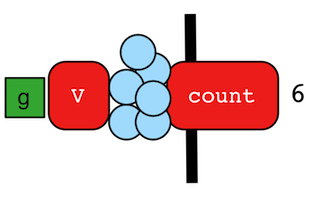
The count()-step (map) counts the total number of represented traversers in the streams (i.e. the bulk count).
gremlin> g.V().count()
==>6
gremlin> g.V().hasLabel('person').count()
==>4
gremlin> g.V().hasLabel('person').outE('created').count().path() //// (1)
==>[4]
gremlin> g.V().hasLabel('person').outE('created').count().map {it.get() * 10}.path() //// (2)
==>[4,40]
g.V().count()
g.V().hasLabel('person').count()
g.V().hasLabel('person').outE('created').count().path() //// (1)
g.V().hasLabel('person').outE('created').count().map {it.get() * 10}.path() //2-
count()-step is a reducing barrier step meaning that all of the previous traversers are folded into a new traverser. -
The path of the traverser emanating from
count()starts atcount().
|
Important |
count(local) counts the current, local object (not the objects in the traversal stream). This works for
Collection- and Map-type objects. For any other object, a count of 1 is returned.
|
Additional References
CyclicPath Step
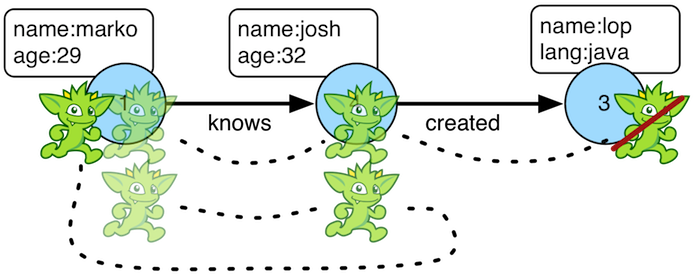
Each traverser maintains its history through the traversal over the graph — i.e. its path.
If it is important that the traverser repeat its course, then cyclic()-path should be used (filter). The step
analyzes the path of the traverser thus far and if there are any repeats, the traverser is filtered out over the
traversal computation. If non-cyclic behavior is desired, see simplePath().
gremlin> g.V(1).both().both()
==>v[1]
==>v[4]
==>v[6]
==>v[1]
==>v[5]
==>v[3]
==>v[1]
gremlin> g.V(1).both().both().cyclicPath()
==>v[1]
==>v[1]
==>v[1]
gremlin> g.V(1).both().both().cyclicPath().path()
==>[v[1],v[3],v[1]]
==>[v[1],v[2],v[1]]
==>[v[1],v[4],v[1]]
gremlin> g.V(1).both().both().cyclicPath().by('age').path() //// (1)
==>[v[1],v[2],v[1]]
==>[v[1],v[4],v[1]]
gremlin> g.V(1).as('a').out('created').as('b').
           in('created').as('c').
           cyclicPath().
           path()
==>[v[1],v[3],v[1]]
gremlin> g.V(1).as('a').out('created').as('b').
           in('created').as('c').
           cyclicPath().from('a').to('b').
path()g.V(1).both().both()
g.V(1).both().both().cyclicPath()
g.V(1).both().both().cyclicPath().path()
g.V(1).both().both().cyclicPath().by('age').path() //// (1)
g.V(1).as('a').out('created').as('b').
in('created').as('c').
cyclicPath().
path()
g.V(1).as('a').out('created').as('b').
in('created').as('c').
cyclicPath().from('a').to('b').
path()-
The "age" property is not productive for all vertices and therefore those traversers are filtered.
Additional References
DateAdd Step
The dateAdd()-step (map) returns the value with the addition of the value number of units as specified by the DateToken.
If the incoming traverser is not a Date or OffsetDateTime, then an IllegalArgumentException will be thrown.
gremlin> g.inject("2023-08-02T00:00:00Z").asDate().dateAdd(DT.day, 7) //// (1)
==>2023-08-09T00:00Z
gremlin> g.inject(["2023-08-02T00:00:00Z", "2023-08-03T00:00:00Z"]).unfold().asDate().dateAdd(DT.minute, 1) //// (2)
==>2023-08-02T00:01Z
==>2023-08-03T00:01Zg.inject("2023-08-02T00:00:00Z").asDate().dateAdd(DT.day, 7) //// (1)
g.inject(["2023-08-02T00:00:00Z", "2023-08-03T00:00:00Z"]).unfold().asDate().dateAdd(DT.minute, 1) //2-
Add 7 days to Date
-
Add 1 minute to incoming dates
Additional References
DateDiff Step
The dateDiff()-step (map) returns the difference between two Dates in epoch time in milliseconds.
If the incoming traverser is not a Date or OffsetDateTime, then an IllegalArgumentException will be thrown.
gremlin> g.inject("2023-08-02T00:00:00Z").asDate().dateDiff(constant("2023-08-03T00:00:00Z").asDate()) //// (1)
==>-86400000g.inject("2023-08-02T00:00:00Z").asDate().dateDiff(constant("2023-08-03T00:00:00Z").asDate()) //1-
Find difference between two dates in milliseconds
Additional References
Dedup Step
With dedup()-step (filter), repeatedly seen objects are removed from the traversal stream. Note that if a
traverser’s bulk is greater than 1, then it is set to 1 before being emitted.
gremlin> g.V().values('lang')
==>java
==>java
gremlin> g.V().values('lang').dedup()
==>java
gremlin> g.V(1).repeat(bothE('created').dedup().otherV()).emit().path() //// (1)
==>[v[1],e[9][1-created->3],v[3]]
==>[v[1],e[9][1-created->3],v[3],e[11][4-created->3],v[4]]
==>[v[1],e[9][1-created->3],v[3],e[12][6-created->3],v[6]]
==>[v[1],e[9][1-created->3],v[3],e[11][4-created->3],v[4],e[10][4-created->5],v[5]]
gremlin> g.V().bothE().properties().dedup() //// (2)
==>p[weight->0.4]
==>p[weight->0.5]
==>p[weight->1.0]
==>p[weight->0.2]g.V().values('lang')
g.V().values('lang').dedup()
g.V(1).repeat(bothE('created').dedup().otherV()).emit().path() //// (1)
g.V().bothE().properties().dedup() //2-
Traverse all
creatededges, but don’t touch any edge twice. -
Note that
Propertyinstances will compare on key and value, whereas aVertexPropertywill also include its element as it is a first-class citizen.
If a by-step modulation is provided to dedup(), then the object is processed accordingly prior to determining if it
has been seen or not.
gremlin> g.V().elementMap('name')
==>[id:1,label:person,name:marko]
==>[id:2,label:person,name:vadas]
==>[id:3,label:software,name:lop]
==>[id:4,label:person,name:josh]
==>[id:5,label:software,name:ripple]
==>[id:6,label:person,name:peter]
gremlin> g.V().dedup().by(label).values('name')
==>marko
==>lopg.V().elementMap('name')
g.V().dedup().by(label).values('name')If dedup() is provided an array of strings, then it will ensure that the de-duplication is not with respect to the
current traverser object, but to the path history of the traverser.
gremlin> g.V().as('a').out('created').as('b').in('created').as('c').select('a','b','c')
==>[a:v[1],b:v[3],c:v[1]]
==>[a:v[1],b:v[3],c:v[4]]
==>[a:v[1],b:v[3],c:v[6]]
==>[a:v[4],b:v[5],c:v[4]]
==>[a:v[4],b:v[3],c:v[1]]
==>[a:v[4],b:v[3],c:v[4]]
==>[a:v[4],b:v[3],c:v[6]]
==>[a:v[6],b:v[3],c:v[1]]
==>[a:v[6],b:v[3],c:v[4]]
==>[a:v[6],b:v[3],c:v[6]]
gremlin> g.V().as('a').out('created').as('b').in('created').as('c').dedup('a','b').select('a','b','c') //// (1)
==>[a:v[1],b:v[3],c:v[1]]
==>[a:v[4],b:v[5],c:v[4]]
==>[a:v[4],b:v[3],c:v[1]]
==>[a:v[6],b:v[3],c:v[1]]
gremlin> g.V().as('a').both().as('b').both().as('c').
           dedup('a','b').by('age'). //// (2)
           select('a','b','c').by('name')
==>[a:marko,b:vadas,c:marko]
==>[a:marko,b:josh,c:ripple]
==>[a:vadas,b:marko,c:lop]
==>[a:josh,b:marko,c:lop]g.V().as('a').out('created').as('b').in('created').as('c').select('a','b','c')
g.V().as('a').out('created').as('b').in('created').as('c').dedup('a','b').select('a','b','c') //// (1)
g.V().as('a').both().as('b').both().as('c').
dedup('a','b').by('age'). //// (2)
select('a','b','c').by('name')-
If the current
aandbcombination has been seen previously, then filter the traverser. -
The "age" property is not productive for all vertices and therefore those values are filtered.
The dedup() step can work on many different types of objects. One object in particular can need a bit of explanation.
If you use dedup() on a Path object there is a chance that you may get some unexpected results. Consider the
following example which forcibly generates duplicate path results in the first traversal and in the second applies
dedup() to remove them:
gremlin> g.V().union(out().path(), out().path())
==>[v[1],v[3]]
==>[v[1],v[2]]
==>[v[1],v[4]]
==>[v[1],v[3]]
==>[v[1],v[2]]
==>[v[1],v[4]]
==>[v[4],v[5]]
==>[v[4],v[3]]
==>[v[4],v[5]]
==>[v[4],v[3]]
==>[v[6],v[3]]
==>[v[6],v[3]]
gremlin> g.V().union(out().path(), out().path()).dedup()
==>[v[1],v[3]]
==>[v[1],v[2]]
==>[v[1],v[4]]
==>[v[4],v[5]]
==>[v[4],v[3]]
==>[v[6],v[3]]
g.V().union(out().path(), out().path())
g.V().union(out().path(), out().path()).dedup()The dedup() step checks the equality of the paths by examining the equality of the objects on the Path (in this case
vertices), but also on any path labels. In the prior example, there weren’t any path labels so dedup() behaved as
expected. In the next example, note the difference in the results if a label is added for one Path but not the other:
gremlin> g.V().union(out().as('x').path(), out().path())
==>[v[1],v[3]]
==>[v[1],v[2]]
==>[v[1],v[4]]
==>[v[1],v[3]]
==>[v[1],v[2]]
==>[v[1],v[4]]
==>[v[4],v[5]]
==>[v[4],v[3]]
==>[v[4],v[5]]
==>[v[4],v[3]]
==>[v[6],v[3]]
==>[v[6],v[3]]
gremlin> g.V().union(out().as('x').path(), out().path()).dedup()
==>[v[1],v[3]]
==>[v[1],v[2]]
==>[v[1],v[4]]
==>[v[1],v[3]]
==>[v[1],v[2]]
==>[v[1],v[4]]
==>[v[4],v[5]]
==>[v[4],v[3]]
==>[v[4],v[5]]
==>[v[4],v[3]]
==>[v[6],v[3]]
==>[v[6],v[3]]g.V().union(out().as('x').path(), out().path())
g.V().union(out().as('x').path(), out().path()).dedup()The prior example shows how dedup() does not have the same effect when a path label is in place. In this contrived
example the answer is simple: remove the as('x'). If in the real world, it is not possible to remove the label, the
workaround is to deconstruct the Path into a List to drop the label. In this way, dedup() is just comparing List
objects and the objects in the Path.
gremlin> g.V().union(out().as('x').path(), out().path()).map(unfold().fold()).dedup()
==>[v[1],v[3]]
==>[v[1],v[2]]
==>[v[1],v[4]]
==>[v[4],v[5]]
==>[v[4],v[3]]
==>[v[6],v[3]]g.V().union(out().as('x').path(), out().path()).map(unfold().fold()).dedup()Additional References
Difference Step
The difference()-step (map) calculates the difference between the incoming list traverser and the provided list
argument. More specifically, this provides the set operation A-B where A is the traverser and B is the argument. This
step only expects list data (array or Iterable) and will throw an IllegalArgumentException if any other type is
encountered (including null).
gremlin> g.V().values("name").fold().difference(["lop","ripple"])
==>[peter,vadas,josh,marko]
gremlin> g.V().values("name").fold().difference(__.V().limit(2).values("name").fold())
==>[ripple,peter,josh,lop]g.V().values("name").fold().difference(["lop","ripple"])
g.V().values("name").fold().difference(__.V().limit(2).values("name").fold())Additional References
Discard Step
The discard()-step (filter) filters all objects from a traversal stream. It is helpful with Branch Step types
of steps where a particular branch of code should "throw away" traversers. In the following example, traversers that
don’t match are filtered out of the traversal stream.
gremlin> g.V().choose(T.label).
                 option("person", __.out("knows").values("name")).
                 option("bleep", __.out("created").values("name")).
                 option(none, discard())
==>vadas
==>josh
g.V().choose(T.label).
option("person", __.out("knows").values("name")).
option("bleep", __.out("created").values("name")).
option(none, discard())It is also useful for traversals that are executed remotely where returning results is not useful and the traversal is
only meant to generate side-effects. Choosing not to return results saves in serialization and network costs as the
objects are filtered on the remote end and not returned to the client side. Typically, this step does not need to be
used directly and is quietly used by the iterate() terminal step which appends discard() to the traversal before
actually cycling through results.
Additional References
Disjunct Step
The disjunct()-step (map) calculates the disjunct set between the incoming list traverser and the provided list
argument. This step only expects list data (array or Iterable) and will throw an IllegalArgumentException if any other
type is encountered (including null).
gremlin> g.V().values("name").fold().disjunct(["lop","peter","sam"]) //// (1)
==>[ripple,vadas,josh,sam,marko]
gremlin> g.V().values("name").fold().disjunct(__.V().limit(3).values("name").fold())
==>[ripple,peter,josh]g.V().values("name").fold().disjunct(["lop","peter","sam"]) //// (1)
g.V().values("name").fold().disjunct(__.V().limit(3).values("name").fold())-
Find the unique names between two group of names
Additional References
Drop Step
The drop()-step (filter/sideEffect) is used to remove element and properties from the graph (i.e. remove). It
is a filter step because the traversal yields no outgoing objects.
gremlin> g.V().outE().drop()
gremlin> g.E()
gremlin> g.V().properties('name').drop()
gremlin> g.V().elementMap()
==>[id:1,label:person,age:29]
==>[id:2,label:person,age:27]
==>[id:3,label:software,lang:java]
==>[id:4,label:person,age:32]
==>[id:5,label:software,lang:java]
==>[id:6,label:person,age:35]
gremlin> g.V().drop()
gremlin> g.V()
g.V().outE().drop()
g.E()
g.V().properties('name').drop()
g.V().elementMap()
g.V().drop()
g.V()Additional References
E Step
The E()-step is meant to read edges from the graph and is usually used to start a GraphTraversal, but can also
be used mid-traversal.
gremlin> g.E(11) //// (1)
==>e[11][4-created->3]
gremlin> g.E().hasLabel('knows').has('weight', gt(0.75))
==>e[8][1-knows->4]
gremlin> g.inject(1).coalesce(E().hasLabel("knows"), addE("knows").from(V().has("name","josh")).to(V().has("name","vadas"))) //// (2)
==>e[7][1-knows->2]
==>e[8][1-knows->4]g.E(11) //// (1)
g.E().hasLabel('knows').has('weight', gt(0.75))
g.inject(1).coalesce(E().hasLabel("knows"), addE("knows").from(V().has("name","josh")).to(V().has("name","vadas"))) //2-
Find the edge by its unique identifier (i.e.
T.id) - not all graphs will use a numeric value for their identifier. -
Get edges with label
knows, if there is none then add new one betweenjoshandvadas.
Additional References
Element Step
The element() step is a no-argument step that traverses from a Property to the Element that owns it.
gremlin> g.V().properties().element() //// (1)
==>v[1]
==>v[1]
==>v[1]
==>v[1]
==>v[1]
==>v[7]
==>v[7]
==>v[7]
==>v[7]
==>v[8]
==>v[8]
==>v[8]
==>v[8]
==>v[8]
==>v[9]
==>v[9]
==>v[9]
==>v[9]
==>v[10]
==>v[11]
gremlin> g.E().properties().element() //// (2)
==>e[13][1-develops->10]
==>e[14][1-develops->11]
==>e[15][1-uses->10]
==>e[16][1-uses->11]
==>e[17][7-develops->10]
==>e[18][7-develops->11]
==>e[19][7-uses->10]
==>e[20][7-uses->11]
==>e[21][8-develops->10]
==>e[22][8-uses->10]
==>e[23][8-uses->11]
==>e[24][9-uses->10]
==>e[25][9-uses->11]
gremlin> g.V().properties().properties().element() //// (3)
==>vp[location->san diego]
==>vp[location->san diego]
==>vp[location->santa cruz]
==>vp[location->santa cruz]
==>vp[location->brussels]
==>vp[location->brussels]
==>vp[location->santa fe]
==>vp[location->centreville]
==>vp[location->centreville]
==>vp[location->dulles]
==>vp[location->dulles]
==>vp[location->purcellville]
==>vp[location->bremen]
==>vp[location->bremen]
==>vp[location->baltimore]
==>vp[location->baltimore]
==>vp[location->oakland]
==>vp[location->oakland]
==>vp[location->seattle]
==>vp[location->spremberg]
==>vp[location->spremberg]
==>vp[location->kaiserslautern]
==>vp[location->kaiserslautern]
==>vp[location->aachen]
g.V().properties().element() //// (1)
g.E().properties().element() //// (2)
g.V().properties().properties().element() //3-
Traverse from
VertexPropertytoVertex -
Traverse from
Property(edge property) toEdge -
Traverse from
Property(meta property) toVertexProperty
Additional References
ElementMap Step
The elementMap()-step yields a Map representation of the structure of an element.
gremlin> g.V().elementMap()
==>[id:1,label:person,name:marko,age:29]
==>[id:2,label:person,name:vadas,age:27]
==>[id:3,label:software,name:lop,lang:java]
==>[id:4,label:person,name:josh,age:32]
==>[id:5,label:software,name:ripple,lang:java]
==>[id:6,label:person,name:peter,age:35]
gremlin> g.V().elementMap('age')
==>[id:1,label:person,age:29]
==>[id:2,label:person,age:27]
==>[id:3,label:software]
==>[id:4,label:person,age:32]
==>[id:5,label:software]
==>[id:6,label:person,age:35]
gremlin> g.V().elementMap('age','blah')
==>[id:1,label:person,age:29]
==>[id:2,label:person,age:27]
==>[id:3,label:software]
==>[id:4,label:person,age:32]
==>[id:5,label:software]
==>[id:6,label:person,age:35]
gremlin> g.E().elementMap()
==>[id:7,label:knows,IN:[id:2,label:person],OUT:[id:1,label:person],weight:0.5]
==>[id:8,label:knows,IN:[id:4,label:person],OUT:[id:1,label:person],weight:1.0]
==>[id:9,label:created,IN:[id:3,label:software],OUT:[id:1,label:person],weight:0.4]
==>[id:10,label:created,IN:[id:5,label:software],OUT:[id:4,label:person],weight:1.0]
==>[id:11,label:created,IN:[id:3,label:software],OUT:[id:4,label:person],weight:0.4]
==>[id:12,label:created,IN:[id:3,label:software],OUT:[id:6,label:person],weight:0.2]
g.V().elementMap()
g.V().elementMap('age')
g.V().elementMap('age','blah')
g.E().elementMap()It is important to note that the map of a vertex assumes that cardinality for each key is single and if it is list
then only the first item encountered will be returned. As single is the more common cardinality for properties this
assumption should serve the greatest number of use cases.
gremlin> g.V().elementMap()
==>[id:1,label:person,name:marko,location:santa fe]
==>[id:7,label:person,name:stephen,location:purcellville]
==>[id:8,label:person,name:matthias,location:seattle]
==>[id:9,label:person,name:daniel,location:aachen]
==>[id:10,label:software,name:gremlin]
==>[id:11,label:software,name:tinkergraph]
gremlin> g.V().has('name','marko').properties('location')
==>vp[location->san diego]
==>vp[location->santa cruz]
==>vp[location->brussels]
==>vp[location->santa fe]
gremlin> g.V().has('name','marko').properties('location').elementMap()
==>[id:6,key:location,value:san diego,startTime:1997,endTime:2001]
==>[id:7,key:location,value:santa cruz,startTime:2001,endTime:2004]
==>[id:8,key:location,value:brussels,startTime:2004,endTime:2005]
==>[id:9,key:location,value:santa fe,startTime:2005]
g.V().elementMap()
g.V().has('name','marko').properties('location')
g.V().has('name','marko').properties('location').elementMap()|
Important |
The elementMap()-step does not return the vertex labels for incident vertices when using GraphComputer
as the id is the only available data to the star graph.
|
Additional References
Emit Step
The emit-step is not an actual step, but is instead a step modulator for repeat() (find more
documentation on the emit() there).
Additional References
Explain Step
The explain()-step (terminal) will return a TraversalExplanation. A traversal explanation details how the
traversal (prior to explain()) will be compiled given the registered traversal strategies.
A TraversalExplanation has a toString() representation with 3-columns. The first column is the
traversal strategy being applied. The second column is the traversal strategy category: [D]ecoration, [O]ptimization,
[P]rovider optimization, [F]inalization, and [V]erification. Finally, the third column is the state of the traversal
post strategy application. The final traversal is the resultant execution plan.
gremlin> g.V().hasLabel('person').outE().identity().inV().count().is(gt(5)).explain()
==>Traversal Explanation
==========================================================================================================================================================================================
Original Traversal                    [GraphStep(vertex,[]), HasStep([~label.eq(person)]), VertexStep(OUT,edge), IdentityStep, EdgeVertexStep(IN), CountGlobalStep, IsStep(gt(5))]
ConnectiveStrategy              [D]   [GraphStep(vertex,[]), HasStep([~label.eq(person)]), VertexStep(OUT,edge), IdentityStep, EdgeVertexStep(IN), CountGlobalStep, IsStep(gt(5))]
IdentityRemovalStrategy         [O]   [GraphStep(vertex,[]), HasStep([~label.eq(person)]), VertexStep(OUT,edge), EdgeVertexStep(IN), CountGlobalStep, IsStep(gt(5))]
MatchPredicateStrategy          [O]   [GraphStep(vertex,[]), HasStep([~label.eq(person)]), VertexStep(OUT,edge), EdgeVertexStep(IN), CountGlobalStep, IsStep(gt(5))]
FilterRankingStrategy           [O]   [GraphStep(vertex,[]), HasStep([~label.eq(person)]), VertexStep(OUT,edge), EdgeVertexStep(IN), CountGlobalStep, IsStep(gt(5))]
CountStrategy                   [O]   [GraphStep(vertex,[]), HasStep([~label.eq(person)]), VertexStep(OUT,edge), EdgeVertexStep(IN), RangeGlobalStep(0,6), CountGlobalStep, IsStep(gt(5))]
EarlyLimitStrategy              [O]   [GraphStep(vertex,[]), HasStep([~label.eq(person)]), VertexStep(OUT,edge), EdgeVertexStep(IN), RangeGlobalStep(0,6), CountGlobalStep, IsStep(gt(5))]
IncidentToAdjacentStrategy      [O]   [GraphStep(vertex,[]), HasStep([~label.eq(person)]), VertexStepPlaceholder(OUT,vertex), RangeGlobalStep(0,6), CountGlobalStep, IsStep(gt(5))]
InlineFilterStrategy            [O]   [GraphStep(vertex,[]), HasStep([~label.eq(person)]), VertexStepPlaceholder(OUT,vertex), RangeGlobalStep(0,6), CountGlobalStep, IsStep(gt(5))]
ByModulatorOptimizationStrategy [O]   [GraphStep(vertex,[]), HasStep([~label.eq(person)]), VertexStepPlaceholder(OUT,vertex), RangeGlobalStep(0,6), CountGlobalStep, IsStep(gt(5))]
AdjacentToIncidentStrategy      [O]   [GraphStep(vertex,[]), HasStep([~label.eq(person)]), VertexStepPlaceholder(OUT,edge), RangeGlobalStep(0,6), CountGlobalStep, IsStep(gt(5))]
RepeatUnrollStrategy            [O]   [GraphStep(vertex,[]), HasStep([~label.eq(person)]), VertexStepPlaceholder(OUT,edge), RangeGlobalStep(0,6), CountGlobalStep, IsStep(gt(5))]
PathRetractionStrategy          [O]   [GraphStep(vertex,[]), HasStep([~label.eq(person)]), VertexStepPlaceholder(OUT,edge), RangeGlobalStep(0,6), CountGlobalStep, IsStep(gt(5))]
LazyBarrierStrategy             [O]   [GraphStep(vertex,[]), HasStep([~label.eq(person)]), VertexStepPlaceholder(OUT,edge), RangeGlobalStep(0,6), CountGlobalStep, IsStep(gt(5))]
GValueReductionStrategy         [O]   [GraphStep(vertex,[]), HasStep([~label.eq(person)]), VertexStep(OUT,edge), RangeGlobalStep(0,6), CountGlobalStep, IsStep(gt(5))]
TinkerGraphCountStrategy        [P]   [GraphStep(vertex,[]), HasStep([~label.eq(person)]), VertexStep(OUT,edge), RangeGlobalStep(0,6), CountGlobalStep, IsStep(gt(5))]
TinkerGraphStepStrategy         [P]   [TinkerGraphStep(vertex,[~label.eq(person)]), VertexStep(OUT,edge), RangeGlobalStep(0,6), CountGlobalStep, IsStep(gt(5))]
ProfileStrategy                 [F]   [TinkerGraphStep(vertex,[~label.eq(person)]), VertexStep(OUT,edge), RangeGlobalStep(0,6), CountGlobalStep, IsStep(gt(5))]
StandardVerificationStrategy    [V]   [TinkerGraphStep(vertex,[~label.eq(person)]), VertexStep(OUT,edge), RangeGlobalStep(0,6), CountGlobalStep, IsStep(gt(5))]
Final Traversal [TinkerGraphStep(vertex,[~label.eq(person)]), VertexStep(OUT,edge), RangeGlobalStep(0,6), CountGlobalStep, IsStep(gt(5))]g.V().hasLabel('person').outE().identity().inV().count().is(gt(5)).explain()For traversal profiling information, please see profile()-step.
Fail Step
The fail()-step provides a way to force a traversal to immediately fail with an exception. This feature is often
helpful during debugging purposes and for validating certain conditions prior to continuing with traversal execution.
gremlin> g.V().has('person','name','peter').fold().
......1>   coalesce(unfold(),
......2>            fail('peter should exist')).
......3>   property('k',100)
==>v[6]
gremlin> g.V().has('person','name','stephen').fold().
......1>   coalesce(unfold(),
......2>            fail('stephen should exist')).
......3>   property('k',100)
fail() Step Triggered
===========================================================================================================================
Message > stephen should exist
Traverser> []
  Bulk   > 1
Traversal> fail()
Parent   > CoalesceStep [V().has("person","name","stephen").fold().coalesce(__.unfold(),__.fail()).property("k",(int) 100)]
Metadata > {}
===========================================================================================================================
The code example above exemplifies the latter use case where there is essentially an assertion that there is a vertex with a particular "name" value prior to updating the property "k" and explicitly failing when that vertex is not found.
The fail() step does not guarantee that mutations are not partially applied. Triggering fail() produces an
exception, but it’s effect on any open transactions or the underlying graph’s behavior ends there. Generally speaking,
mutations made to the point of fail() being triggered are applied and fail() itself has no influence on rolling back
those changes. It is up to the application catching that exception to act in a fashion that will allow for that
rollback. Moreover, the ability to rollback at all is graph provider dependent. For example, a basic TinkerGraph,
configured without transaction support, will simply be left in a partially mutated state whether the action to rollback
on fail() was implemented or not.
Additional References
Filter Step
The filter() step maps the traverser from the current object to either true or false where the latter will not
pass the traverser to the next step in the process. Please see the General Steps section for more
information.
Additional References
FlatMap Step
The flatMap() step maps the traverser from the current object to an Iterator of objects for the next step in the
process. Please see the General Steps section for more information.
Be aware that the current traverser behavior where the traverser appears to be unaffected by state modifying steps or
account as a single bulk to side effects inside the flatMap() traversal is subject to change. The following are
examples of some traversals on the "modern" graph whose output may change:
gremlin> g.V(1, 1).barrier().flatMap(aggregate("x")).cap("x")
==>[v[1]]
gremlin> g.withSack(1.0f).V(1).barrier().flatMap(sack(mult).by("age")).sack()
==>1.0
Additional References
Format Step
This step is designed to simplify some string operations. In general, it is similar to the string formatting function available in many programming languages. Variable values can be picked up from Element properties, maps and scope variables.
gremlin> g.V().format("%{name} is %{age} years old") //// (1)
==>marko is 29 years old
==>vadas is 27 years old
==>josh is 32 years old
==>peter is 35 years old
gremlin> g.V().hasLabel("person").as("a").values("name").as("p1").select("a").in("knows").format("%{p1} knows %{name}") //// (2)
==>vadas knows marko
==>josh knows marko
gremlin> g.V().format("%{name} has %{_} connections").by(bothE().count()) //// (3)
==>marko has 3 connections
==>vadas has 1 connections
==>lop has 3 connections
==>josh has 3 connections
==>ripple has 1 connections
==>peter has 1 connections
gremlin> g.V().project("name","count").by(values("name")).by(bothE().count()).format("%{name} has %{count} connections") //// (4)
==>marko has 3 connections
==>vadas has 1 connections
==>lop has 3 connections
==>josh has 3 connections
==>ripple has 1 connections
==>peter has 1 connectionsg.V().format("%{name} is %{age} years old") //// (1)
g.V().hasLabel("person").as("a").values("name").as("p1").select("a").in("knows").format("%{p1} knows %{name}") //// (2)
g.V().format("%{name} has %{_} connections").by(bothE().count()) //// (3)
g.V().project("name","count").by(values("name")).by(bothE().count()).format("%{name} has %{count} connections") //4-
A
format()will use property values from incoming Element to produce String result. -
A
format()will use scope variablep1and propertynameto resolve variable values. -
A
format()will use propertynameand traversal product for positional argument to resolve variable values. -
A
format()will use map produced byprojectstep to resolve variable values.
Additional References
Fold Step
There are situations when the traversal stream needs a "barrier" to aggregate all the objects and emit a computation
that is a function of the aggregate. The fold()-step (map) is one particular instance of this. Please see
unfold()-step for the inverse functionality.
gremlin> g.V(1).out('knows').values('name')
==>vadas
==>josh
gremlin> g.V(1).out('knows').values('name').fold() //// (1)
==>[vadas,josh]
gremlin> g.V(1).out('knows').values('name').fold().next().getClass() //// (2)
==>class java.util.ArrayList
gremlin> g.V(1).out('knows').values('name').fold(0) {a,b -> a + b.length()} //// (3)
==>9
gremlin> g.V().values('age').fold(0) {a,b -> a + b} //// (4)
==>123
gremlin> g.V().values('age').fold(0, sum) //// (5)
==>123
gremlin> g.V().values('age').sum() //// (6)
==>123
gremlin> g.inject(["a":1],["b":2]).fold([], addAll) //// (7)
==>[[a:1],[b:2]]g.V(1).out('knows').values('name')
g.V(1).out('knows').values('name').fold() //// (1)
g.V(1).out('knows').values('name').fold().next().getClass() //// (2)
g.V(1).out('knows').values('name').fold(0) {a,b -> a + b.length()} //// (3)
g.V().values('age').fold(0) {a,b -> a + b} //// (4)
g.V().values('age').fold(0, sum) //// (5)
g.V().values('age').sum() //// (6)
g.inject(["a":1],["b":2]).fold([], addAll) //7-
A parameterless
fold()will aggregate all the objects into a list and then emit the list. -
A verification of the type of list returned.
-
fold()can be provided two arguments — a seed value and a reduce bi-function ("vadas" is 5 characters + "josh" with 4 characters). -
What is the total age of the people in the graph?
-
The same as before, but using a built-in bi-function.
-
The same as before, but using the
sum()-step. -
A mechanism for merging
Mapinstances. If a key occurs in more than a singleMap, the later occurrence will replace the earlier.
Additional References
From Step
The from()-step is not an actual step, but instead is a "step-modulator" similar to as() and
by(). If a step is able to accept traversals or strings then from() is the
means by which they are added. The general pattern is step().from(). See to()-step.
The list of steps that support from()-modulation are: simplePath(), cyclicPath(),
path(), and addE().
|
Javascript |
The term |
|
Python |
The term |
Additional References
Group Step
As traversers propagate across a graph as defined by a traversal, sideEffect computations are sometimes required.
That is, the actual path taken or the current location of a traverser is not the ultimate output of the computation,
but some other representation of the traversal. The group()-step (map/sideEffect) is one such sideEffect that
organizes the objects according to some function of the object. Then, if required, that organization (a list) is
reduced. An example is provided below.
gremlin> g.V().group().by(label) //// (1)
==>[software:[v[3],v[5]],person:[v[1],v[2],v[4],v[6]]]
gremlin> g.V().group().by(label).by('name') //// (2)
==>[software:[lop,ripple],person:[marko,vadas,josh,peter]]
gremlin> g.V().group().by(label).by(count()) //// (3)
==>[software:2,person:4]
g.V().group().by(label) //// (1)
g.V().group().by(label).by('name') //// (2)
g.V().group().by(label).by(count()) //3-
Group the vertices by their label.
-
For each vertex in the group, get their name.
-
For each grouping, what is its size?
The two projection parameters available to group() via by() are:
-
Key-projection: What feature of the object to group on (a function that yields the map key)?
-
Value-projection: What feature of the group to store in the key-list?
gremlin> g.V().group().by('age').by('name') //// (1)
==>[32:[josh],35:[peter],27:[vadas],29:[marko]]
gremlin> g.V().group().by('name').by('age') //// (2)
==>[ripple:[],peter:[35],vadas:[27],josh:[32],lop:[],marko:[29]]g.V().group().by('age').by('name') //// (1)
g.V().group().by('name').by('age') //2-
The "age" property is not productive for all vertices and therefore those keys are filtered.
-
The "age" property is not productive for all vertices and therefore those values are filtered.
Additional References
GroupCount Step
When it is important to know how many times a particular object has been at a particular part of a traversal,
groupCount()-step (map/sideEffect) is used.
"What is the distribution of ages in the graph?"
gremlin> g.V().hasLabel('person').values('age').groupCount()
==>[32:1,35:1,27:1,29:1]
gremlin> g.V().hasLabel('person').groupCount().by('age') //// (1)
==>[32:1,35:1,27:1,29:1]
gremlin> g.V().groupCount().by('age') //// (2)
==>[32:1,35:1,27:1,29:1]g.V().hasLabel('person').values('age').groupCount()
g.V().hasLabel('person').groupCount().by('age') //// (1)
g.V().groupCount().by('age') //2-
You can also supply a pre-group projection, where the provided
by()-modulation determines what to group the incoming object by. -
The "age" property is not productive for all vertices and therefore those values are filtered.
There is one person that is 32, one person that is 35, one person that is 27, and one person that is 29.
"Iteratively walk the graph and count the number of times you see the second letter of each name."
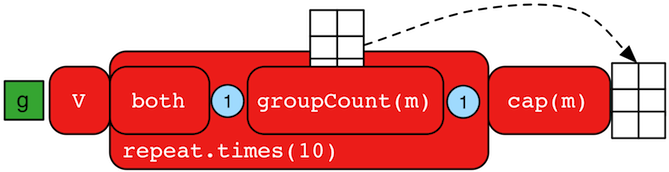
gremlin> g.V().repeat(both().groupCount('m').by(label)).times(10).cap('m')
==>[software:19598,person:39196]g.V().repeat(both().groupCount('m').by(label)).times(10).cap('m')The above is interesting in that it demonstrates the use of referencing the internal Map<Object,Long> of
groupCount() with a string variable. Given that groupCount() is a sideEffect-step, it simply passes the object
it received to its output. Internal to groupCount(), the object’s count is incremented.
Additional References
Has Step

It is possible to filter vertices, edges, and vertex properties based on their properties using has()-step
(filter). There are numerous variations on has() including:
-
has(key,value): Remove the traverser if its element does not have the provided key/value property. -
has(label, key, value): Remove the traverser if its element does not have the specified label and provided key/value property. -
has(key,predicate): Remove the traverser if its element does not have a key value that satisfies the bi-predicate. For more information on predicates, please read A Note on Predicates. -
hasLabel(labels…): Remove the traverser if its element does not have any of the labels. -
hasId(ids…): Remove the traverser if its element does not have any of the ids. -
hasKey(keys…): Remove thePropertytraverser if it does not match one of the provided keys. -
hasValue(values…): Remove thePropertytraverser if it does not match one of the provided values. -
has(key): Remove the traverser if its element does not have a value for the key. -
hasNot(key): Remove the traverser if its element has a value for the key.
gremlin> g.V().hasLabel('person')
==>v[1]
==>v[2]
==>v[4]
==>v[6]
gremlin> g.V().hasLabel('person','name','marko')
==>v[1]
==>v[2]
==>v[4]
==>v[6]
gremlin> g.V().hasLabel('person').out().has('name',within('vadas','josh'))
==>v[2]
==>v[4]
gremlin> g.V().hasLabel('person').out().has('name',within('vadas','josh')).
               outE().hasLabel('created')
==>e[10][4-created->5]
==>e[11][4-created->3]
gremlin> g.V().has('age',inside(20,30)).values('age') //// (1)
==>29
==>27
gremlin> g.V().has('age',outside(20,30)).values('age') //// (2)
==>32
==>35
gremlin> g.V().has('name',within('josh','marko')).elementMap() //// (3)
==>[id:1,label:person,name:marko,age:29]
==>[id:4,label:person,name:josh,age:32]
gremlin> g.V().has('name',without('josh','marko')).elementMap() //// (4)
==>[id:2,label:person,name:vadas,age:27]
==>[id:3,label:software,name:lop,lang:java]
==>[id:5,label:software,name:ripple,lang:java]
==>[id:6,label:person,name:peter,age:35]
gremlin> g.V().has('name',not(within('josh','marko'))).elementMap() //// (5)
==>[id:2,label:person,name:vadas,age:27]
==>[id:3,label:software,name:lop,lang:java]
==>[id:5,label:software,name:ripple,lang:java]
==>[id:6,label:person,name:peter,age:35]
gremlin> g.V().properties().hasKey('age').value() //// (6)
==>29
==>27
==>32
==>35
gremlin> g.V().hasNot('age').values('name') //// (7)
==>lop
==>ripple
gremlin> g.V().has('person','name', startingWith('m')) //// (8)
==>v[1]
gremlin> g.V().has(null, 'vadas') //// (9)
gremlin> g.V().has('person', 'name', regex('r')).values('name') //// (10)
==>marko
==>peterg.V().hasLabel('person')
g.V().hasLabel('person','name','marko')
g.V().hasLabel('person').out().has('name',within('vadas','josh'))
g.V().hasLabel('person').out().has('name',within('vadas','josh')).
outE().hasLabel('created')
g.V().has('age',inside(20,30)).values('age') //// (1)
g.V().has('age',outside(20,30)).values('age') //// (2)
g.V().has('name',within('josh','marko')).elementMap() //// (3)
g.V().has('name',without('josh','marko')).elementMap() //// (4)
g.V().has('name',not(within('josh','marko'))).elementMap() //// (5)
g.V().properties().hasKey('age').value() //// (6)
g.V().hasNot('age').values('name') //// (7)
g.V().has('person','name', startingWith('m')) //// (8)
g.V().has(null, 'vadas') //// (9)
g.V().has('person', 'name', regex('r')).values('name') //10-
Find all vertices whose ages are between 20 (exclusive) and 30 (exclusive). In other words, the age must be greater than 20 and less than 30.
-
Find all vertices whose ages are not between 20 (inclusive) and 30 (inclusive). In other words, the age must be less than 20 or greater than 30.
-
Find all vertices whose names are exact matches to any names in the collection
[josh,marko], display all the key,value pairs for those vertices. -
Find all vertices whose names are not in the collection
[josh,marko], display all the key,value pairs for those vertices. -
Same as the prior example save using
notonwithinto yieldwithout. -
Find all age-properties and emit their value.
-
Find all vertices that do not have an age-property and emit their name.
-
Find all "person" vertices that have a name property that starts with the letter "m".
-
Property key is always stored as
Stringand therefore an equality check withnullwill produce no result. -
An example of using
has()with regular expression predicate.
Additional References
has(String),
has(String,Object),
has(String,P),
has(String,String,Object),
has(String,String,P),
has(String,Traversal),
has(T,Object),
has(T,P),
has(T,Traversal),
hasId(Object,Object…),
hasId(P),
hasKey(P),
hasKey(String,String…),
hasLabel(P),
hasLabel(String,String…),
hasNot(String),
hasValue(Object,Object…),
hasValue(P),
P,
TextP,
T,
Recipes - Anti-pattern
Id Step
The id()-step (map) takes an Element and extracts its identifier from it.
gremlin> g.V().id()
==>1
==>2
==>3
==>4
==>5
==>6
gremlin> g.V(1).out().id().is(2)
==>2
gremlin> g.V(1).outE().id()
==>9
==>7
==>8
gremlin> g.V(1).properties().id()
==>0
==>1
g.V().id()
g.V(1).out().id().is(2)
g.V(1).outE().id()
g.V(1).properties().id()Additional References
Identity Step
The identity()-step (map) is an identity function which maps
the current object to itself.
gremlin> g.V().identity()
==>v[1]
==>v[2]
==>v[3]
==>v[4]
==>v[5]
==>v[6]g.V().identity()Additional References
Index Step
The index()-step (map) indexes each element in the current collection. If the current traverser’s value is not a collection, then it’s treated as a single-item collection. There are two indexers
available, which can be chosen using the with() modulator. The list indexer (default) creates a list for each collection item, with the first item being the original element and the second element
being the index. The map indexer created a linked hash map in which the index represents the key and the original item is used as the value.
gremlin> g.V().hasLabel("software").index() //// (1)
==>[[v[3],0]]
==>[[v[5],0]]
gremlin> g.V().hasLabel("software").values("name").fold().
           order(Scope.local).
           index().
           unfold().
           order().
             by(__.tail(Scope.local, 1)) //// (2)
==>[lop,0]
==>[ripple,1]
gremlin> g.V().hasLabel("software").values("name").fold().
           order(Scope.local).
           index().
             with(WithOptions.indexer, WithOptions.list).
           unfold().
           order().
             by(__.tail(Scope.local, 1)) //// (3)
==>[lop,0]
==>[ripple,1]
gremlin> g.V().hasLabel("person").values("name").fold().
           order(Scope.local).
           index().
             with(WithOptions.indexer, WithOptions.map) //// (4)
==>[0:josh,1:marko,2:peter,3:vadas]g.V().hasLabel("software").index() //// (1)
g.V().hasLabel("software").values("name").fold().
order(Scope.local).
index().
unfold().
order().
by(__.tail(Scope.local, 1)) //// (2)
g.V().hasLabel("software").values("name").fold().
order(Scope.local).
index().
with(WithOptions.indexer, WithOptions.list).
unfold().
order().
by(__.tail(Scope.local, 1)) //// (3)
g.V().hasLabel("person").values("name").fold().
order(Scope.local).
index().
with(WithOptions.indexer, WithOptions.map) //4-
Indexing non-collection items results in multiple indexed single-item collections.
-
Index all software names in their alphabetical order.
-
Same as statement 1, but with an explicitely specified list indexer.
-
Index all person names in their alphabetical order and store the result in an ordered map.
Additional References
Inject Step

The concept of "injectable steps" makes it possible to insert objects arbitrarily into a traversal stream. In general,
inject()-step (sideEffect) exists and a few examples are provided below.
gremlin> g.V(4).out().values('name').inject('daniel')
==>daniel
==>ripple
==>lop
gremlin> g.V(4).out().values('name').inject('daniel').map {it.get().length()}
==>6
==>6
==>3
gremlin> g.V(4).out().values('name').inject('daniel').map {it.get().length()}.path()
==>[daniel,6]
==>[v[4],v[5],ripple,6]
==>[v[4],v[3],lop,3]g.V(4).out().values('name').inject('daniel')
g.V(4).out().values('name').inject('daniel').map {it.get().length()}
g.V(4).out().values('name').inject('daniel').map {it.get().length()}.path()In the last example above, note that the path starting with daniel is only of length 2. This is because the
daniel string was inserted half-way in the traversal. Finally, a typical use case is provided below — when the
start of the traversal is not a graph object.
gremlin> inject(1,2)
==>1
==>2
gremlin> inject(1,2).map {it.get() + 1}
==>2
==>3
gremlin> inject(1,2).map {it.get() + 1}.map {g.V(it.get()).next()}.values('name')
==>vadas
==>lopinject(1,2)
inject(1,2).map {it.get() + 1}
inject(1,2).map {it.get() + 1}.map {g.V(it.get()).next()}.values('name')Additional References
Intersect Step
The intersect()-step (map) calculates the intersection between the incoming list traverser and the provided list
argument. This step only expects list data (array or Iterable) and will throw an IllegalArgumentException if any other
type is encountered (including null).
gremlin> g.V().values("name").fold().intersect(["marko","josh","james","jen"])
==>[josh,marko]
gremlin> g.V().values("name").fold().intersect(__.V().limit(2).values("name").fold())
==>[vadas,marko]g.V().values("name").fold().intersect(["marko","josh","james","jen"])
g.V().values("name").fold().intersect(__.V().limit(2).values("name").fold())Additional References
IO Step
 The task of importing and exporting the data of
 Graph instances is the
job of the io()-step. By default, TinkerPop supports three formats for importing and exporting graph data in
GraphML, GraphSON, and Gryo.
|
Note |
Additional documentation for TinkerPop IO formats can be found in the IO Reference. |
By itself the io()-step merely configures the kind of importing and exporting that is going
to occur and it is the follow-on call to the read() or write() step that determines which of those actions will
execute. Therefore, a typical usage of the io()-step would look like this:
g.io(someInputFile).read().iterate()
g.io(someOutputFile).write().iterate()|
Important |
The commands above are still traversals and therefore require iteration to be executed, hence the use of
iterate() as a termination step.
|
By default, the io()-step will try to detect the right file format using the file name extension. To gain greater
control of the format use the with() step modulator to provide further information to io(). For example:
g.io(someInputFile).
    with(IO.reader, IO.graphson).
  read().iterate()
g.io(someOutputFile).
    with(IO.writer,IO.graphml).
  write().iterate()
The IO class is a helper for the io()-step that provides expressions that can be used to help configure it
and in this case it allows direct specification of the "reader" or "writer" to use. The "reader" actually refers to
a GraphReader implementation and the "writer" refers to a GraphWriter implementation. The implementations of
those interfaces provided by default are the standard TinkerPop implementations.
That default is an important point to consider for users. The default TinkerPop implementations are not designed with massive, complex, parallel bulk loading in mind. They are designed to do single-threaded, OLTP-style loading of data in the most generic way possible so as to accommodate the greatest number of graph databases out there. As such, from a reading perspective, they work best for small datasets (or perhaps medium datasets where memory is plentiful and time is not critical) that are loading to an empty graph - incremental loading is not supported. The story from the writing perspective is not that different in there are no parallel operations in play, however streaming the output to disk requires a single pass of the data without high memory requirements for larger datasets.
|
Important |
Default graph formats don’t contain information about property cardinality, so it is up to the graph provider to choose the appropriate one. You will see a warning message if the chosen cardinality is SINGLE while your graph input contains multiple values for that property. |
In general, TinkerPop recommends that users examine the native bulk import/export tools of the graph implementation
that they choose. Those tools will often outperform the io()-step and perhaps be easier to use with a greater
feature set. That said, graph providers do have the option to optimize io() to back it with their own
import/export utilities and therefore the default behavior provided by TinkerPop described above might be overridden
by the graph.
An excellent example of this lies in HadoopGraph with SparkGraphComputer
which replaces the default single-threaded implementation with a more advanced OLAP style bulk import/export
functionality internally using CloneVertexProgram. With this model, graphs of arbitrary size
can be imported/exported assuming that there is a Hadoop InputFormat or OutputFormat to support it.
|
Important |
Remote Gremlin Console users or Gremlin Language Variant (GLV) users (e.g. gremlin-python) who utilize
the io()-step should recall that their read() or write() operation will occur on the server and not locally
and therefore the file specified for import/export must be something accessible by the server.
|
GraphSON and Gryo formats are extensible allowing users and graph providers to extend supported serialization options.
These extensions are exposed through IoRegistry implementations. To apply an IoRegistry use the with() option
and the IO.registry key, where the value is either an actual IoRegistry instance or the fully qualified class
name of one.
g.io(someInputFile).
    with(IO.reader, IO.gryo).
    with(IO.registry, TinkerIoRegistryV3d0.instance())
  read().iterate()
g.io(someOutputFile).
    with(IO.writer,IO.graphson).
    with(IO.registry, "org.apache.tinkerpop.gremlin.tinkergraph.structure.TinkerIoRegistryV3d0")
  write().iterate()
GLVs will obviously always be forced to use the latter form as they can’t explicitly create an instance of an
IoRegistry to pass to the server (nor are IoRegistry instances necessarily serializable).
The version of the formats (e.g. GraphSON 2.0 or 3.0) utilized by io() is determined entirely by the IO.reader and
IO.writer configurations or their defaults. The defaults will always be the latest version for the current release
of TinkerPop. It is also possible for graph providers to override these defaults, so consult the documentation of the
underlying graph database in use for any details on that.
|
Note |
The io() step will try to automatically detect the appropriate GraphReader or GraphWriter to use based on
the file extension. If the file has a different extension than the ones expected, use with() as shown above to set the
reader or writer explicitly.
|
For more advanced configuration of GraphReader and GraphWriter operations (e.g. normalized output for GraphSON,
disabling class registrations for Gryo, etc.) then construct the appropriate GraphReader and GraphWriter using
the build() method on their implementations and use it directly. It can be passed directly to the IO.reader or
IO.writer options. Obviously, these are JVM based operations and thus not available to GLVs as portable features.
GraphML
 The GraphML file format is a
common XML-based representation of a graph. It is widely supported by graph-related tools and libraries making it a
solid interchange format for TinkerPop. In other words, if the intent is to work with graph data in conjunction with
applications outside of TinkerPop, GraphML may be the best choice to do that. Common use cases might be:
The GraphML file format is a
common XML-based representation of a graph. It is widely supported by graph-related tools and libraries making it a
solid interchange format for TinkerPop. In other words, if the intent is to work with graph data in conjunction with
applications outside of TinkerPop, GraphML may be the best choice to do that. Common use cases might be:
|
Warning |
GraphML is a "lossy" format in that it only supports primitive values for properties and does not have
support for Graph variables. It will use toString to serialize property values outside of those primitives.
|
|
Warning |
GraphML as a specification allows for <edge> and <node> elements to appear in any order. Most software
that writes GraphML (including as TinkerPop’s GraphMLWriter) write <node> elements before <edge> elements.
However it is important to note that GraphMLReader will read this data in order and order can matter. This is because
TinkerPop does not allow the vertex label to be changed after the vertex has been created. Therefore, if an <edge>
element comes before the <node>, the label on the vertex will be ignored. It is thus better to order <node>
elements in the GraphML to appear before all <edge> elements if vertex labels are important to the graph.
|
// expects a file extension of .xml or .graphml to determine that
// a GraphML reader/writer should be used.
g.io("graph.xml").read().iterate();
g.io("graph.xml").write().iterate();|
Note |
If using GraphML generated from TinkerPop 2.x, read more about its incompatibilities in the Upgrade Documentation. |
GraphSON
 GraphSON is a JSON-based format extended
from earlier versions of TinkerPop. It is important to note that TinkerPop’s GraphSON is not backwards compatible
with prior TinkerPop GraphSON versions. GraphSON has some support from graph-related application outside of TinkerPop,
but it is generally best used in two cases:
GraphSON is a JSON-based format extended
from earlier versions of TinkerPop. It is important to note that TinkerPop’s GraphSON is not backwards compatible
with prior TinkerPop GraphSON versions. GraphSON has some support from graph-related application outside of TinkerPop,
but it is generally best used in two cases:
-
A text format of the graph or its elements is desired (e.g. debugging, usage in source control, etc.)
-
The graph or its elements need to be consumed by code that is not JVM-based (e.g. JavaScript, Python, .NET, etc.)
// expects a file extension of .json to interpret that
// a GraphSON reader/writer should be used
g.io("graph.json").read().iterate();
g.io("graph.json").write().iterate();|
Note |
Additional documentation for GraphSON can be found in the IO Reference. |
Gryo
 Kryo is a popular
serialization package for the JVM. Gremlin-Kryo is a binary
Kryo is a popular
serialization package for the JVM. Gremlin-Kryo is a binary Graph serialization format for use on the JVM by JVM
languages. It is designed to be space efficient, non-lossy and is promoted as the standard format to use when working
with graph data inside of the TinkerPop stack. A list of common use cases is presented below:
-
Migration from one Gremlin Structure implementation to another (e.g.
TinkerGraphtoNeo4jGraph) -
Serialization of individual graph elements to be sent over the network to another JVM.
-
Backups of in-memory graphs or subgraphs.
|
Warning |
When migrating between Gremlin Structure implementations, Kryo may not lose data, but it is important to
consider the features of each Graph and whether or not the data types supported in one will be supported in the
other. Failure to do so, may result in errors.
|
// expects a file extension of .kryo to interpret that
// a GraphSON reader/writer should be used
g.io("graph.kryo").read().iterate()
g.io("graph.kryo").write().iterate()
Additional References
Is Step
It is possible to filter scalar values using is()-step (filter).
|
Python |
The term |
gremlin> g.V().values('age').is(32)
==>32
gremlin> g.V().values('age').is(lte(30))
==>29
==>27
gremlin> g.V().values('age').is(inside(30, 40))
==>32
==>35
gremlin> g.V().where(__.in('created').count().is(1)).values('name') //// (1)
==>ripple
gremlin> g.V().where(__.in('created').count().is(gte(2))).values('name') //// (2)
==>lop
gremlin> g.V().where(__.in('created').values('age').
                                    mean().is(inside(30d, 35d))).values('name') //// (3)
==>lop
==>rippleg.V().values('age').is(32)
g.V().values('age').is(lte(30))
g.V().values('age').is(inside(30, 40))
g.V().where(__.in('created').count().is(1)).values('name') //// (1)
g.V().where(__.in('created').count().is(gte(2))).values('name') //// (2)
g.V().where(__.in('created').values('age').
mean().is(inside(30d, 35d))).values('name') //3-
Find projects having exactly one contributor.
-
Find projects having two or more contributors.
-
Find projects whose contributors average age is between 30 and 35.
Additional References
Key Step
The key()-step (map) takes a Property and extracts the key from it.
gremlin> g.V(1).properties().key()
==>name
==>location
==>location
==>location
==>location
gremlin> g.V(1).properties().properties().key()
==>startTime
==>endTime
==>startTime
==>endTime
==>startTime
==>endTime
==>startTimeg.V(1).properties().key()
g.V(1).properties().properties().key()Additional References
Label Step
The label()-step (map) takes an Element and extracts its label from it.
gremlin> g.V().label()
==>person
==>person
==>software
==>person
==>software
==>person
gremlin> g.V(1).outE().label()
==>created
==>knows
==>knows
gremlin> g.V(1).properties().label()
==>name
==>age
g.V().label()
g.V(1).outE().label()
g.V(1).properties().label()Additional References
Length Step
The length()-step (map) returns the length incoming string or list of string traverser. Null values are not processed and remain as null when returned.
If the incoming traverser is a non-String value then an IllegalArgumentException will be thrown.
gremlin> g.V().values('name').length() //// (1)
==>5
==>5
==>3
==>4
==>6
==>5
gremlin> g.V().values('name').fold().length(local) //// (2)
==>[5,5,3,4,6,5]g.V().values('name').length() //// (1)
g.V().values('name').fold().length(local) //2-
Return the string length of all vertex names.
-
Use
Scope.localto operate on individual string elements inside incoming list, which will return a list.
Additional References
Limit Step
The limit()-step is analogous to range()-step save that the lower end range is set to 0.
gremlin> g.V().limit(2)
==>v[1]
==>v[2]
gremlin> g.V().range(0, 2)
==>v[1]
==>v[2]g.V().limit(2)
g.V().range(0, 2)The limit()-step can also be applied with Scope.local, in which case it operates on the incoming collection.
The examples below use the The Crew toy data set.
gremlin> g.V().valueMap().select('location').limit(local,2) //// (1)
==>[san diego,santa cruz]
==>[centreville,dulles]
==>[bremen,baltimore]
==>[spremberg,kaiserslautern]
gremlin> g.V().valueMap().limit(local, 1) //// (2)
==>[name:[marko]]
==>[name:[stephen]]
==>[name:[matthias]]
==>[name:[daniel]]
==>[name:[gremlin]]
==>[name:[tinkergraph]]
gremlin> g.V().valueMap().select('location').limit(local, 1) //// (3)
==>[san diego]
==>[centreville]
==>[bremen]
==>[spremberg]
gremlin> g.V().valueMap().select('location').limit(local, 1).unfold() //// (4)
==>san diego
==>centreville
==>bremen
==>sprembergg.V().valueMap().select('location').limit(local,2) //// (1)
g.V().valueMap().limit(local, 1) //// (2)
g.V().valueMap().select('location').limit(local, 1) //// (3)
g.V().valueMap().select('location').limit(local, 1).unfold() //4-
List<String>for each vertex containing the first two locations. -
Map<String, Object>for each vertex, but containing only the first property value. -
List<String>for each vertex containing the first location. -
Stringfor each vertex containing the first location (useunfold()to extract single elements from singleton collections).
Additional References
Local Step
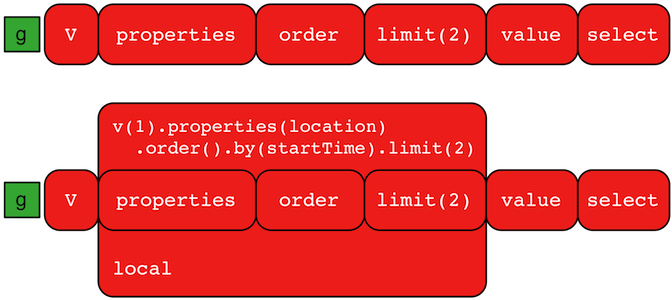
A GraphTraversal operates on a continuous stream of objects. In many situations, it is important to operate on a
single element within that stream. To do such object-local traversal computations, local()-step exists (branch).
Note that the examples below use the The Crew toy data set.
gremlin> g.V().as('person').
               properties('location').order().by('startTime',asc).limit(2).value().as('location').
               select('person','location').by('name').by() //// (1)
==>[person:daniel,location:spremberg]
==>[person:stephen,location:centreville]
gremlin> g.V().as('person').
               local(properties('location').order().by('startTime',asc).limit(2)).value().as('location').
               select('person','location').by('name').by() //// (2)
==>[person:marko,location:san diego]
==>[person:marko,location:santa cruz]
==>[person:stephen,location:centreville]
==>[person:stephen,location:dulles]
==>[person:matthias,location:bremen]
==>[person:matthias,location:baltimore]
==>[person:daniel,location:spremberg]
==>[person:daniel,location:kaiserslautern]g.V().as('person').
properties('location').order().by('startTime',asc).limit(2).value().as('location').
select('person','location').by('name').by() //// (1)
g.V().as('person').
local(properties('location').order().by('startTime',asc).limit(2)).value().as('location').
select('person','location').by('name').by() //2-
Get the first two people and their respective location according to the most historic location start time.
-
For every person, get their two most historic locations.
The two traversals above look nearly identical save the inclusion of local() which wraps a section of the traversal
in an object-local traversal. As such, the order().by() and the limit() refer to a particular object, not to the
stream as a whole.
Local Step is quite similar in functionality to Flat Map Step where it can often be confused.
The primary distinction between these steps is that while local() preserves the path history of traversers as they
pass through its child traversal, flatMap() does not. As another example consider:
gremlin> g.V().local(outE().inV()).path()
==>[v[1],e[9][1-created->3],v[3]]
==>[v[1],e[7][1-knows->2],v[2]]
==>[v[1],e[8][1-knows->4],v[4]]
==>[v[4],e[10][4-created->5],v[5]]
==>[v[4],e[11][4-created->3],v[3]]
==>[v[6],e[12][6-created->3],v[3]]
gremlin> g.V().flatMap(outE().inV()).path()
==>[v[1],v[3]]
==>[v[1],v[2]]
==>[v[1],v[4]]
==>[v[4],v[5]]
==>[v[4],v[3]]
==>[v[6],v[3]]
g.V().local(outE().inV()).path()
g.V().flatMap(outE().inV()).path()|
Warning |
The anonymous traversal of local() processes the current object "locally." In OLAP, where the atomic unit
of computing is the vertex and its local "star graph," it is important that the anonymous traversal does not leave
the confines of the vertex’s star graph. In other words, it can not traverse to an adjacent vertex’s properties or edges.
|
Additional References
Loops Step
The loops()-step (map) extracts the number of times the Traverser has gone through the current loop.
gremlin> g.V().emit(__.has("name", "marko").or().loops().is(2)).repeat(__.out()).values("name")
==>marko
==>ripple
==>lopg.V().emit(__.has("name", "marko").or().loops().is(2)).repeat(__.out()).values("name")Additional References
LTrim Step
The lTrim()-step (map) returns a string with leading whitespace removed. Null values are not processed and remain
as null when returned. If the incoming traverser is a non-String value then an IllegalArgumentException will be thrown.
gremlin> g.inject("   hello   ", " world ", null).lTrim()
==>hello
==>world
==>null
gremlin> g.inject(["   hello   ", " world ", null]).lTrim(local) //// (1)
==>[hello ,world ,null]g.inject(" hello ", " world ", null).lTrim()
g.inject([" hello ", " world ", null]).lTrim(local) //1-
Use
Scope.localto operate on individual string elements inside incoming list, which will return a list.
Map Step
The map() step maps the traverser from the current object to the next step in the process. Please see the
General Steps section for more information.
Additional References
Match Step
The match()-step (map) provides a more declarative
form of graph querying based on the notion of pattern matching.
With match(), the user provides a collection of "traversal fragments," called patterns, that have variables defined
that must hold true throughout the duration of the match(). When a traverser is in match(), a registered
MatchAlgorithm analyzes the current state of the traverser (i.e. its history based on its
path data), the runtime statistics of the traversal patterns, and returns a traversal-pattern
that the traverser should try next. The default MatchAlgorithm provided is called CountMatchAlgorithm and it
dynamically revises the pattern execution plan by sorting the patterns according to their filtering capabilities
(i.e. largest set reduction patterns execute first). For very large graphs, where the developer is uncertain of the
statistics of the graph (e.g. how many knows-edges vs. worksFor-edges exist in the graph), it is advantageous to
use match(), as an optimal plan will be determined automatically. Furthermore, some queries are much easier to
express via match() than with single-path traversals.
"Who created a project named 'lop' that was also created by someone who is 29 years old? Return the two creators."
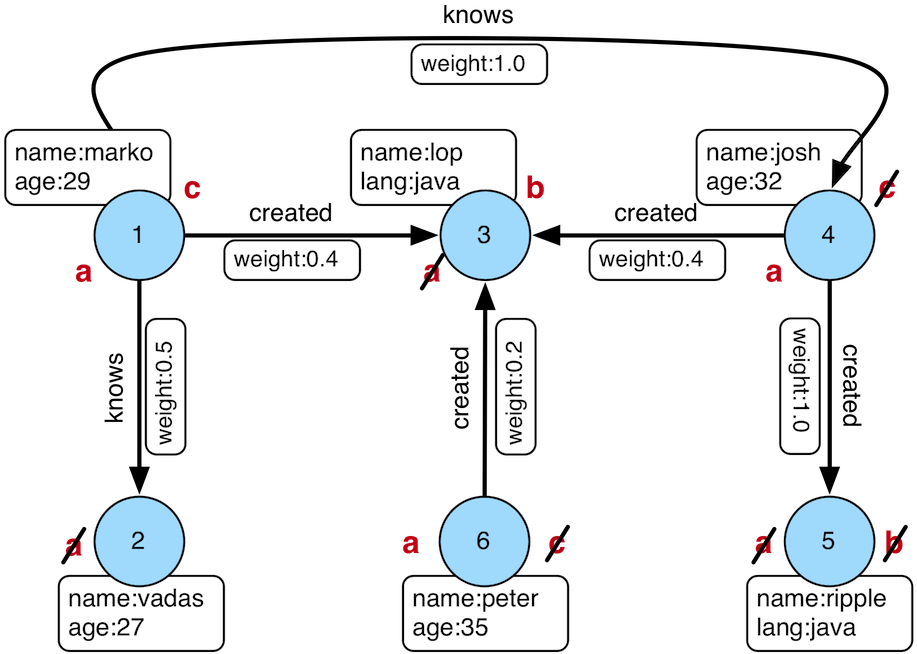
gremlin> g.V().match(
                 __.as('a').out('created').as('b'),
                 __.as('b').has('name', 'lop'),
                 __.as('b').in('created').as('c'),
                 __.as('c').has('age', 29)).
               select('a','c').by('name')
==>[a:marko,c:marko]
==>[a:josh,c:marko]
==>[a:peter,c:marko]
g.V().match(
__.as('a').out('created').as('b'),
__.as('b').has('name', 'lop'),
__.as('b').in('created').as('c'),
__.as('c').has('age', 29)).
select('a','c').by('name')Note that the above can also be more concisely written as below which demonstrates that standard inner-traversals can be arbitrarily defined.
gremlin> g.V().match(
                 __.as('a').out('created').has('name', 'lop').as('b'),
                 __.as('b').in('created').has('age', 29).as('c')).
               select('a','c').by('name')
==>[a:marko,c:marko]
==>[a:josh,c:marko]
==>[a:peter,c:marko]
g.V().match(
__.as('a').out('created').has('name', 'lop').as('b'),
__.as('b').in('created').has('age', 29).as('c')).
select('a','c').by('name')In order to improve readability, as()-steps can be given meaningful labels which better reflect your domain. The
previous query can thus be written in a more expressive way as shown below.
gremlin> g.V().match(
                 __.as('creators').out('created').has('name', 'lop').as('projects'), //// (1)
                 __.as('projects').in('created').has('age', 29).as('cocreators')). //// (2)
               select('creators','cocreators').by('name') //// (3)
==>[creators:marko,cocreators:marko]
==>[creators:josh,cocreators:marko]
==>[creators:peter,cocreators:marko]
g.V().match(
__.as('creators').out('created').has('name', 'lop').as('projects'), //// (1)
__.as('projects').in('created').has('age', 29).as('cocreators')). //// (2)
select('creators','cocreators').by('name') //3-
Find vertices that created something and match them as 'creators', then find out what they created which is named 'lop' and match these vertices as 'projects'.
-
Using these 'projects' vertices, find out their creators aged 29 and remember these as 'cocreators'.
-
Return the name of both 'creators' and 'cocreators'.
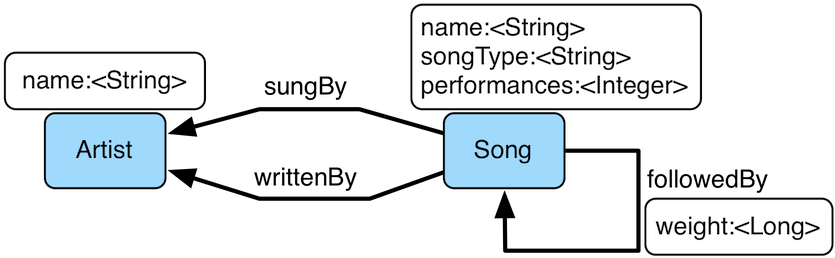
Figure 4. Grateful Dead
MatchStep brings functionality similar to SPARQL to Gremlin. Like SPARQL,
MatchStep conjoins a set of patterns applied to a graph. For example, the following traversal finds exactly those
songs which Jerry Garcia has both sung and written (using the Grateful Dead graph distributed in the data/ directory):
gremlin> g = traversal().with(graph)
==>graphtraversalsource[tinkergraph[vertices:0 edges:0], standard]
gremlin> g.io('data/grateful-dead.xml').read().iterate()
gremlin> g.V().match(
                 __.as('a').has('name', 'Garcia'),
                 __.as('a').in('writtenBy').as('b'),
                 __.as('a').in('sungBy').as('b')).
               select('b').values('name')
==>CREAM PUFF WAR
==>CRYPTICAL ENVELOPMENT
g = traversal().with(graph)
g.io('data/grateful-dead.xml').read().iterate()
g.V().match(
__.as('a').has('name', 'Garcia'),
__.as('a').in('writtenBy').as('b'),
__.as('a').in('sungBy').as('b')).
select('b').values('name')Among the features which differentiate match() from SPARQL are:
gremlin> g.V().match(
                 __.as('a').out('created').has('name','lop').as('b'), //// (1)
                 __.as('b').in('created').has('age', 29).as('c'),
                 __.as('c').repeat(out()).times(2)). //// (2)
               select('c').out('knows').dedup().values('name') //// (3)
==>vadas
==>josh
g.V().match(
__.as('a').out('created').has('name','lop').as('b'), //// (1)
__.as('b').in('created').has('age', 29).as('c'),
__.as('c').repeat(out()).times(2)). //// (2)
select('c').out('knows').dedup().values('name') //3-
Patterns of arbitrary complexity:
match()is not restricted to triple patterns or property paths. -
Recursion support:
match()supports the branch-based steps within a pattern, includingrepeat(). -
Imperative/declarative hybrid: Before and after a
match(), it is possible to leverage classic Gremlin traversals.
To extend point #3, it is possible to support going from imperative, to declarative, to imperative, ad infinitum.
gremlin> g.V().match(
                 __.as('a').out('knows').as('b'),
                 __.as('b').out('created').has('name','lop')).
               select('b').out('created').
                 match(
                   __.as('x').in('created').as('y'),
                   __.as('y').out('knows').as('z')).
               select('z').values('name')
==>vadas
==>josh
g.V().match(
__.as('a').out('knows').as('b'),
__.as('b').out('created').has('name','lop')).
select('b').out('created').
match(
__.as('x').in('created').as('y'),
__.as('y').out('knows').as('z')).
select('z').values('name')|
Important |
The match()-step is stateless. The variable bindings of the traversal patterns are stored in the path
history of the traverser. As such, the variables used over all match()-steps within a traversal are globally unique.
A benefit of this is that subsequent where(), select(), match(), etc. steps can leverage the same variables in
their analysis.
|
Like all other steps in Gremlin, match() is a function and thus, match() within match() is a natural consequence
of Gremlin’s functional foundation (i.e. recursive matching).
gremlin> g.V().match(
                 __.as('a').out('knows').as('b'),
                 __.as('b').out('created').has('name','lop'),
                 __.as('b').match(
                              __.as('b').out('created').as('c'),
                              __.as('c').has('name','ripple')).
                            select('c').as('c')).
               select('a','c').by('name')
==>[a:marko,c:ripple]
g.V().match(
__.as('a').out('knows').as('b'),
__.as('b').out('created').has('name','lop'),
__.as('b').match(
__.as('b').out('created').as('c'),
__.as('c').has('name','ripple')).
select('c').as('c')).
select('a','c').by('name')If a step-labeled traversal proceeds the match()-step and the traverser entering the match() is destined to bind
to a particular variable, then the previous step should be labeled accordingly.
gremlin> g.V().as('a').out('knows').as('b').
           match(
             __.as('b').out('created').as('c'),
             __.not(__.as('c').in('created').as('a'))).
           select('a','b','c').by('name')
==>[a:marko,b:josh,c:ripple]g.V().as('a').out('knows').as('b').
match(
__.as('b').out('created').as('c'),
__.not(__.as('c').in('created').as('a'))).
select('a','b','c').by('name')There are three types of match() traversal patterns.
-
as('a')…as('b'): both the start and end of the traversal have a declared variable. -
as('a')…: only the start of the traversal has a declared variable. -
…: there are no declared variables.
If a variable is at the start of a traversal pattern it must exist as a label in the path history of the traverser
else the traverser can not go down that path. If a variable is at the end of a traversal pattern then if the variable
exists in the path history of the traverser, the traverser’s current location must match (i.e. equal) its historic
location at that same label. However, if the variable does not exist in the path history of the traverser, then the
current location is labeled as the variable and thus, becomes a bound variable for subsequent traversal patterns. If a
traversal pattern does not have an end label, then the traverser must simply "survive" the pattern (i.e. not be
filtered) to continue to the next pattern. If a traversal pattern does not have a start label, then the traverser
can go down that path at any point, but will only go down that pattern once as a traversal pattern is executed once
and only once for the history of the traverser. Typically, traversal patterns that do not have a start and end label
are used in conjunction with and(), or(), and where(). Once the traverser has "survived" all the patterns (or at
least one for or()), match()-step analyzes the traverser’s path history and emits a Map<String,Object> of the
variable bindings to the next step in the traversal.
gremlin> g.V().as('a').out().as('b'). //// (1)
             match( //// (2)
               __.as('a').out().count().as('c'), //// (3)
               __.not(__.as('a').in().as('b')), //// (4)
               or( //// (5)
                 __.as('a').out('knows').as('b'),
                 __.as('b').in().count().as('c').and().as('c').is(gt(2)))). //// (6)
             dedup('a','c'). //// (7)
             select('a','b','c').by('name').by('name').by() //// (8)
==>[a:marko,b:lop,c:3]g.V().as('a').out().as('b'). //// (1)
match( //// (2)
__.as('a').out().count().as('c'), //// (3)
__.not(__.as('a').in().as('b')), //// (4)
or( //// (5)
__.as('a').out('knows').as('b'),
__.as('b').in().count().as('c').and().as('c').is(gt(2)))). //// (6)
dedup('a','c'). //// (7)
select('a','b','c').by('name').by('name').by() //8-
A standard, step-labeled traversal can come prior to
match(). -
If the traverser’s path prior to entering
match()has requisite label values, then those historic values are bound. -
It is possible to use barrier steps though they are computed locally to the pattern (as one would expect).
-
It is possible to
not()a pattern. -
It is possible to nest
and()- andor()-steps for conjunction matching. -
Both infix and prefix conjunction notation is supported.
-
It is possible to "distinct" the specified label combination.
-
The bound values are of different types — vertex ("a"), vertex ("b"), long ("c").
Using Where with Match
Match is typically used in conjunction with both select() (demonstrated previously) and where() (presented here).
A where()-step allows the user to further constrain the result set provided by match().
gremlin> g.V().match(
                 __.as('a').out('created').as('b'),
                 __.as('b').in('created').as('c')).
                 where('a', neq('c')).
               select('a','c').by('name')
==>[a:marko,c:josh]
==>[a:marko,c:peter]
==>[a:josh,c:marko]
==>[a:josh,c:peter]
==>[a:peter,c:marko]
==>[a:peter,c:josh]
g.V().match(
__.as('a').out('created').as('b'),
__.as('b').in('created').as('c')).
where('a', neq('c')).
select('a','c').by('name')The where()-step can take either a P-predicate (example above) or a Traversal (example below). Using
MatchPredicateStrategy, where()-clauses are automatically folded into match() and thus, subject to the query
optimizer within match()-step.
gremlin> traversal = g.V().match(
                             __.as('a').has(label,'person'), //// (1)
                             __.as('a').out('created').as('b'),
                             __.as('b').in('created').as('c')).
                             where(__.as('a').out('knows').as('c')). //// (2)
                           select('a','c').by('name'); null //// (3)
==>null
gremlin> traversal.toString() //// (4)
==>[GraphStep(vertex,[]), MatchStep(null,AND,[[MatchStartStep(a), HasStep([~label.eq(person)]), MatchEndStep(null)], [MatchStartStep(a), VertexStep(OUT,[created],vertex), MatchEndStep(b)], [MatchStartStep(b), VertexStep(IN,[created],vertex), MatchEndStep(c)]]), WhereTraversalStep([WhereStartStep(a), VertexStep(OUT,[knows],vertex), WhereEndStep(c)]), SelectStep(last,[a, c],[value(name)])]
gremlin> traversal // // (5) (6)
==>[a:marko,c:josh]
gremlin> traversal.toString() //// (7)
==>[TinkerGraphStep(vertex,[~label.eq(person)])@[a], MatchStep(null,AND,[[MatchStartStep(a), VertexStep(OUT,[created],vertex), MatchEndStep(b)], [MatchStartStep(b), VertexStep(IN,[created],vertex), MatchEndStep(c)], [MatchStartStep(a), WhereTraversalStep([WhereStartStep(null), VertexStep(OUT,[knows],vertex), WhereEndStep(c)]), MatchEndStep(null)]]), SelectStep(last,[a, c],[value(name)])]
traversal = g.V().match(
__.as('a').has(label,'person'), //// (1)
__.as('a').out('created').as('b'),
__.as('b').in('created').as('c')).
where(__.as('a').out('knows').as('c')). //// (2)
select('a','c').by('name'); null //// (3)
traversal.toString() //// (4)
traversal // // (5) (6) (5)
traversal.toString() //7-
Any
has()-step traversal patterns that start with the match-key are pulled out ofmatch()to enable the graph system to leverage the filter for index lookups. -
A
where()-step with a traversal containing variable bindings declared inmatch(). -
A useful trick to ensure that the traversal is not iterated by Gremlin Console.
-
The string representation of the traversal prior to its strategies being applied.
-
The Gremlin Console will automatically iterate anything that is an iterator or is iterable.
-
Both marko and josh are co-developers and marko knows josh.
-
The string representation of the traversal after the strategies have been applied (and thus,
where()is folded intomatch())
|
Important |
A where()-step is a filter and thus, variables within a where() clause are not globally bound to the
path of the traverser in match(). As such, where()-steps in match() are used for filtering, not binding.
|
Additional References
Math Step
The math()-step (math) enables scientific calculator functionality within Gremlin. This step deviates from the common
function composition and nesting formalisms to provide an easy to read string-based math processor. Variables within the
equation map to scopes in Gremlin — e.g. path labels, side-effects, or incoming map keys. This step supports
by()-modulation where the by()-modulators are applied in the order in which the variables are first referenced
within the equation. Note that the reserved variable _ refers to the current numeric traverser object incoming to the
math()-step.
gremlin> g.V().as('a').out('knows').as('b').math('a + b').by('age')
==>56.0
==>61.0
gremlin> g.V().as('a').out('created').as('b').
           math('b + a').
             by(both().count().math('_ + 100')).
             by('age')
==>132.0
==>133.0
==>135.0
==>138.0
gremlin> g.withSideEffect('x',10).V().values('age').math('_ / x')
==>2.9
==>2.7
==>3.2
==>3.5
gremlin> g.withSack(1).V(1).repeat(sack(sum).by(constant(1))).times(10).emit().sack().math('sin _')
==>0.9092974268256817
==>0.1411200080598672
==>-0.7568024953079282
==>-0.9589242746631385
==>-0.27941549819892586
==>0.6569865987187891
==>0.9893582466233818
==>0.4121184852417566
==>-0.5440211108893698
==>-0.9999902065507035
gremlin> g.V().math('_+1').by('age') //// (1)
==>30.0
==>28.0
==>33.0
==>36.0g.V().as('a').out('knows').as('b').math('a + b').by('age')
g.V().as('a').out('created').as('b').
math('b + a').
by(both().count().math('_ + 100')).
by('age')
g.withSideEffect('x',10).V().values('age').math('_ / x')
g.withSack(1).V(1).repeat(sack(sum).by(constant(1))).times(10).emit().sack().math('sin _')
g.V().math('_+1').by('age') //1-
The "age" property is not productive for all vertices and therefore those values are filtered.
The operators supported by the calculator include: *, +, /, ^, and %. Furthermore, the following built in
functions are provided:
-
abs: absolute value -
acos: arc cosine -
asin: arc sine -
atan: arc tangent -
cbrt: cubic root -
ceil: nearest upper integer -
cos: cosine -
cosh: hyperbolic cosine -
exp: euler’s number raised to the power (e^x) -
floor: nearest lower integer -
log: logarithmus naturalis (base e) -
log10: logarithm (base 10) -
log2: logarithm (base 2) -
sin: sine -
sinh: hyperbolic sine -
sqrt: square root -
tan: tangent -
tanh: hyperbolic tangent -
signum: signum function
Additional References
Max Step
The max()-step (map) operates on a stream of comparable objects and determines which is the last object according
to its natural order in the stream.
gremlin> g.V().values('age').max()
==>35
gremlin> g.V().repeat(both()).times(3).values('age').max()
==>35
gremlin> g.V().values('name').max()
==>vadasg.V().values('age').max()
g.V().repeat(both()).times(3).values('age').max()
g.V().values('name').max()When called as max(local) it determines the maximum value of the current, local object (not the objects in the
traversal stream). This works for Collection and Comparable-type objects.
gremlin> g.V().values('age').fold().max(local)
==>35g.V().values('age').fold().max(local)When there are null values being evaluated the null objects are ignored, but if all values are recognized as null
the return value is null.
gremlin> g.inject(null,10, 9, null).max()
==>10
gremlin> g.inject([null,null,null]).max(local)
==>nullg.inject(null,10, 9, null).max()
g.inject([null,null,null]).max(local)Additional References
Mean Step
The mean()-step (map) operates on a stream of numbers and determines the average of those numbers.
gremlin> g.V().values('age').mean()
==>30.75
gremlin> g.V().repeat(both()).times(3).values('age').mean() //// (1)
==>30.645833333333332
gremlin> g.V().repeat(both()).times(3).values('age').dedup().mean()
==>30.75g.V().values('age').mean()
g.V().repeat(both()).times(3).values('age').mean() //// (1)
g.V().repeat(both()).times(3).values('age').dedup().mean()-
Realize that traversers are being bulked by
repeat(). There may be more of a particular number than another, thus altering the average.
When called as mean(local) it determines the mean of the current, local object (not the objects in the traversal
stream). This works for Collection and Number-type objects.
gremlin> g.V().values('age').fold().mean(local)
==>30.75g.V().values('age').fold().mean(local)If mean() encounters null values, they will be ignored (i.e. their traversers not counted toward toward the
divisor). If all traversers are null then the stream will return null.
gremlin> g.inject(null,10, 9, null).mean()
==>9.5
gremlin> g.inject([null,null,null]).mean(local)
==>nullg.inject(null,10, 9, null).mean()
g.inject([null,null,null]).mean(local)Additional References
Merge Step
The merge()-step (map) combines collections like lists and maps. It expects an incoming traverser to contain a
collection objection and will combine that object with its specified argument which must be of a matching type. This is
also known as the union operation. If the incoming traverser or its associated argument do not meet the expected type,
the step will throw an IllegalArgumentException if any other type is encountered (including null). This step differs
from the combine()-step in that it doesn’t allow duplicates.
gremlin> g.V().values("name").fold().merge(["james","jen","marko","vadas"])
==>[jen,ripple,peter,vadas,james,josh,lop,marko]
gremlin> g.V().values("name").fold().merge(__.constant("james").fold())
==>[ripple,peter,vadas,james,josh,lop,marko]
gremlin> g.V().hasLabel('software').elementMap().merge([year:2009])
==>[id:3,name:lop,label:software,lang:java,year:2009]
==>[id:5,name:ripple,label:software,lang:java,year:2009]g.V().values("name").fold().merge(["james","jen","marko","vadas"])
g.V().values("name").fold().merge(__.constant("james").fold())
g.V().hasLabel('software').elementMap().merge([year:2009])Additional References
MergeEdge Step
The mergeE() step is used to add edges and their properties to a graph in a "create
if not exist" fashion. The mergeE() step can also be used to find edges matching a given
pattern. The input passed to mergeE() can be either a Map, or a child traversal that
produces a Map.
|
Note |
There is a corresponding mergeV() step that can be used when creating vertices.
|
Additionally, option() modulators may be combined with mergeE() to take action depending on
whether a vertex was created, or already existed. There are various ways that mergeE() can
be used. The simplest being to provide a single Map of keys and values, along with the
source and target vertex IDs, as a parameter. A T.id and a T.label may also be provided but
this is optional. The mergeE() step can be used directly from the GraphTraversalSource - g,
or in the middle of a traversal. For a match with an existing vertex to occur, all values
in the Map must exist on a vertex; otherwise, a new vertex will be created. The examples
that follow show how mergeE() can be used to add relationships between dogs in the graph.
gremlin> g.mergeV([(T.id):1,(T.label):'Dog',name:'Toby'])
==>v[1]
gremlin> g.mergeV([(T.id):2,(T.label):'Dog',name:'Brandy']) //// (1)
==>v[2]
gremlin> g.mergeE([(T.label):'Sibling',created:'2022-02-07',(Direction.from):1,(Direction.to):2]) //// (2)
==>e[2][1-Sibling->2]
gremlin> g.E().elementMap()
==>[id:2,label:Sibling,IN:[id:2,label:Dog],OUT:[id:1,label:Dog],created:2022-02-07]g.mergeV([(T.id):1,(T.label):'Dog',name:'Toby'])
g.mergeV([(T.id):2,(T.label):'Dog',name:'Brandy']) //// (1)
g.mergeE([(T.label):'Sibling',created:'2022-02-07',(Direction.from):1,(Direction.to):2]) //// (2)
g.E().elementMap()-
Create two vertices with ID values of 1 and 2.
-
Create a "Sibling" relationship between the vertices.
|
Note |
The example above is written with gremlin-groovy and evaluated in Gremlin Console as a Groovy script thus
allowing Groovy syntax for initializing a Map.
|
For a mergeE() step to succeed, both the from and to vertices must already exist. It
is not possible to create new vertices directly using mergeE(), but mergeV() and mergeE()
steps can be combined, in a single query, to achieve that goal.
|
Note |
The mergeE() step will not create vertices that do not exist. In those cases an
error will be returned.
|
If the Direction enum has been statically included, its explicit use can be omitted from
the query.
gremlin> g.mergeV([(T.id):1,(T.label):'Dog',name:'Toby'])
==>v[1]
gremlin> g.mergeV([(T.id):2,(T.label):'Dog',name:'Brandy'])
==>v[2]
gremlin> g.mergeE([(T.label):'Sibling',created:'2022-02-07',(from):1,(to):2])
==>e[2][1-Sibling->2]
gremlin> g.E().elementMap()
==>[id:2,label:Sibling,IN:[id:2,label:Dog],OUT:[id:1,label:Dog],created:2022-02-07]g.mergeV([(T.id):1,(T.label):'Dog',name:'Toby'])
g.mergeV([(T.id):2,(T.label):'Dog',name:'Brandy'])
g.mergeE([(T.label):'Sibling',created:'2022-02-07',(from):1,(to):2])
g.E().elementMap()One or more option() steps can be used to control the behavior when an edge is created or
updated. Similar to mergeV(), the onCreate Map inherits from the main merge argument - any
existence criteria in the main merge argument (T.id, T.label, Direction.OUT, Direction.IN)
will be automatically carried over to the onCreate action, and these existence criteria cannot be overriden
in the onCreate Map.
gremlin> g.mergeV([(T.id):1,(T.label):'Dog',name:'Toby'])
==>v[1]
gremlin> g.mergeV([(T.id):2,(T.label):'Dog',name:'Brandy'])
==>v[2]
gremlin> g.withSideEffect('map',[(T.label):'Sibling',(from):1,(to):2]).
mergeE(select('map')).
option(Merge.onCreate,[created:'2022-02-07']). //// (1)
option(Merge.onMatch,[updated:'2022-02-07'])
==>e[2][1-Sibling->2]
gremlin> g.E().elementMap()
==>[id:2,label:Sibling,IN:[id:2,label:Dog],OUT:[id:1,label:Dog],created:2022-02-07]
gremlin> g.withSideEffect('map',[(T.label):'Sibling',(from):1,(to):2]).
mergeE(select('map')).
option(Merge.onCreate,[created:'2022-02-07']).
option(Merge.onMatch,[updated:'2022-02-07']) //// (2)
==>e[2][1-Sibling->2]
gremlin> g.E().elementMap()
==>[id:2,label:Sibling,IN:[id:2,label:Dog],OUT:[id:1,label:Dog],created:2022-02-07,updated:2022-02-07]g.mergeV([(T.id):1,(T.label):'Dog',name:'Toby'])
g.mergeV([(T.id):2,(T.label):'Dog',name:'Brandy'])
g.withSideEffect('map',[(T.label):'Sibling',(from):1,(to):2]).
mergeE(select('map')).
option(Merge.onCreate,[created:'2022-02-07']). //// (1)
option(Merge.onMatch,[updated:'2022-02-07'])
g.E().elementMap()
g.withSideEffect('map',[(T.label):'Sibling',(from):1,(to):2]).
mergeE(select('map')).
option(Merge.onCreate,[created:'2022-02-07']).
option(Merge.onMatch,[updated:'2022-02-07']) //// (2)
g.E().elementMap()-
The edge did not exist - set the created date.
-
The edge did exist - set the updated date.
More than one edge can be created by a single mergeE() operation. This is done by
injecting a list of maps into the traversal and letting them stream into the mergeE()
step.
gremlin> maps = [[(T.label):'Siblings',(from):1,(to):2],
[(T.label):'Siblings',(from):1,(to):3]]
==>[label:Siblings,OUT:1,IN:2]
==>[label:Siblings,OUT:1,IN:3]
gremlin> g.mergeV([(T.id):1,(T.label):'Dog',name:'Toby']) //// (1)
==>v[1]
gremlin> g.mergeV([(T.id):2,(T.label):'Dog',name:'Brandy'])
==>v[2]
gremlin> g.mergeV([(T.id):3,(T.label):'Dog',name:'Dax'])
==>v[3]
gremlin> g.inject(maps).unfold().mergeE() //// (2)
==>e[3][1-Siblings->2]
==>e[4][1-Siblings->3]
gremlin> g.E().elementMap()
==>[id:3,label:Siblings,IN:[id:2,label:Dog],OUT:[id:1,label:Dog]]
==>[id:4,label:Siblings,IN:[id:3,label:Dog],OUT:[id:1,label:Dog]]maps = [[(T.label):'Siblings',(from):1,(to):2],
[(T.label):'Siblings',(from):1,(to):3]]
g.mergeV([(T.id):1,(T.label):'Dog',name:'Toby']) //// (1)
g.mergeV([(T.id):2,(T.label):'Dog',name:'Brandy'])
g.mergeV([(T.id):3,(T.label):'Dog',name:'Dax'])
g.inject(maps).unfold().mergeE() //// (2)
g.E().elementMap()-
Create three dogs.
-
Stream the edge maps into
mergeE()steps.
The mergeE step can be combined with the mergeV step (or any other step producing a Vertex) using the
Merge.outV and Merge.inV option modulators. These options can be used to "late-bind" the OUT and IN
vertices in the main merge argument and in the onCreate argument:
gremlin> g.mergeV([(T.id):1,(T.label):'Dog',name:'Toby']).as('Toby').
mergeV([(T.id):2,(T.label):'Dog',name:'Brandy']).as('Brandy').
mergeE([(T.label):'Sibling',created:'2022-02-07',(from):Merge.outV,(to):Merge.inV]).
option(Merge.outV, select('Toby')).
option(Merge.inV, select('Brandy'))
==>e[2][1-Sibling->2]
gremlin> g.E().elementMap()
==>[id:2,label:Sibling,IN:[id:2,label:Dog],OUT:[id:1,label:Dog],created:2022-02-07]g.mergeV([(T.id):1,(T.label):'Dog',name:'Toby']).as('Toby').
mergeV([(T.id):2,(T.label):'Dog',name:'Brandy']).as('Brandy').
mergeE([(T.label):'Sibling',created:'2022-02-07',(from):Merge.outV,(to):Merge.inV]).
option(Merge.outV, select('Toby')).
option(Merge.inV, select('Brandy'))
g.E().elementMap()The Merge.outV and Merge.inV tokens can be used as placeholders for values for Direction.OUT and Direction.IN
respectively in the mergeE arguments. These options can produce Vertices, as in the example above, or they can
specify Maps, which will be used to search for Vertices in the graph. This is useful when the exact T.id of
the from/to vertices is not known in advance:
gremlin> g.mergeV([(T.label):'Dog',name:'Toby'])
==>v[0]
gremlin> g.mergeV([(T.label):'Dog',name:'Brandy'])
==>v[2]
gremlin> g.mergeE([(T.label):'Sibling',created:'2022-02-07',(from):Merge.outV,(to):Merge.inV]).
option(Merge.outV, [(T.label):'Dog',name:'Toby']).
option(Merge.inV, [(T.label):'Dog',name:'Brandy'])
==>e[4][0-Sibling->2]
gremlin> g.E().elementMap()
==>[id:4,label:Sibling,IN:[id:2,label:Dog],OUT:[id:0,label:Dog],created:2022-02-07]g.mergeV([(T.label):'Dog',name:'Toby'])
g.mergeV([(T.label):'Dog',name:'Brandy'])
g.mergeE([(T.label):'Sibling',created:'2022-02-07',(from):Merge.outV,(to):Merge.inV]).
option(Merge.outV, [(T.label):'Dog',name:'Toby']).
option(Merge.inV, [(T.label):'Dog',name:'Brandy'])
g.E().elementMap()Additional References
MergeVertex Step
The mergeV() -step is used to add vertices and their properties to a graph in a "create
if not exist" fashion. The mergeV() step can also be used to find vertices matching a given
pattern. The input passed to mergeV() can be either a Map, or a child Traversal that
produces a Map.
|
Note |
There is a corresponding mergeE() step that can be used when creating edges.
|
Additionally, option() modulators may be combined with mergeV() to take action depending on
whether a vertex was created, or already existed. There are various ways mergeV() can
be used. The simplest being to provide a single Map of keys and values as a parameter. A T.id
and a T.label may also be provided but this is optional. The mergeV() step can be used directly
from the GraphTraversalSource - g, or in the middle of a traversal. For a match with an
existing vertex to occur, all values in the Map must exist on a vertex; otherwise, a new
vertex will be created. The examples that follow show how mergeV() can be used to add some
dogs to the graph.
gremlin> g.mergeV([name: 'Brandy']) //// (1)
==>v[0]
gremlin> g.V().has('name','Brandy')
==>v[0]
gremlin> g.mergeV([(T.label):'Dog',name:'Scamp', age:12]) //// (2)
==>v[2]
gremlin> g.V().hasLabel('Dog').valueMap()
==>[name:[Scamp],age:[12]]
gremlin> g.mergeV([(T.id):300, (T.label):'Dog', name:'Toby', age:10]) //// (3)
==>v[300]
gremlin> g.V().hasLabel('Dog').valueMap().with(WithOptions.tokens)
==>[id:2,label:Dog,name:[Scamp],age:[12]]
==>[id:300,label:Dog,name:[Toby],age:[10]]g.mergeV([name: 'Brandy']) //// (1)
g.V().has('name','Brandy')
g.mergeV([(T.label):'Dog',name:'Scamp', age:12]) //// (2)
g.V().hasLabel('Dog').valueMap()
g.mergeV([(T.id):300, (T.label):'Dog', name:'Toby', age:10]) //// (3)
g.V().hasLabel('Dog').valueMap().with(WithOptions.tokens)-
Create a vertex for Brandy as no other matching ones exist yet.
-
Create a vertex for Scamp and also add a Dog label his age.
-
Create a vertex for Toby with an
T.idof 300.
|
Note |
The example above is written with gremlin-groovy and evaluated in Gremlin Console as a Groovy script thus
allowing Groovy syntax for initializing a Map.
|
If a vertex already exists that matches the map passed to mergeV(), the existing
vertex will be returned, otherwise a new one will be created. In this way, mergeV()
provides "get or create" semantics.
gremlin> g.mergeV([name: 'Brandy']) //// (1)
==>v[0]g.mergeV([name: 'Brandy']) //1-
A vertex for Brandy already exists so return it. A new one is not created.
It’s important to note that every key/value pair passed to mergeV() must already exist on
one or more vertices for there to be a match. If a match is found, the vertex, or
vertices, representing that match will be returned. If a vertex representing a dog called
Brandy already exists, but it does not have an "age" property, the mergeV() below will not
find a match and a new vertex will be created.
gremlin> g.addV('Dog').property('name','Brandy') //// (1)
==>v[0]
gremlin> g.mergeV([(T.label):'Dog',name:'Brandy',age:13]) //// (2)
==>v[2]g.addV('Dog').property('name','Brandy') //// (1)
g.mergeV([(T.label):'Dog',name:'Brandy',age:13]) //2-
Create a vertex for Brandy with no age property.
-
A new vertex is created as there is no exact match to any existing vertices.
A common scenario is to search for a vertex with a known T.id and if it exists return that
vertex. If it does not exist, create it. As we have seen, one way to do this is to pass
the T.id and all properties directly to mergeV(). Another is to use Merge.onCreate. Note
that the Map specified for Match.onCreate does not need to include the T.id already present
in the original search. The values provided to the mergeV() Map are inherited by the onCreate
action and combined with the Map provided to Merge.onCreate. Overrides of the T.id or T.label
in the onCreate Map are prohibited.
gremlin> g.mergeV([(T.id):300]).
option(Merge.onCreate,[(T.label):'Dog', name:'Toby', age:10])
==>v[300]g.mergeV([(T.id):300]).
option(Merge.onCreate,[(T.label):'Dog', name:'Toby', age:10])To take specific action when the vertex already exists, Merge.onMatch can be used. The
second parameter to the option step can be either a Map whose values are used to update
the vertex or another Gremlin traversal that generates a Map.
|
Note |
If mergeV() is given an empty Map; such as mergeV([:]), it will match, and
return, every vertex in the graph. This is the same behavior seen with V([]).
|
gremlin> g.mergeV([(T.id):300]).
option(Merge.onCreate,[(T.label):'Dog', name:'Toby', age:10]). //// (1)
option(Merge.onMatch,[age:11]) //// (2)
==>v[300]
gremlin> g.withSideEffect('new-data',[age:11]).
mergeV([(T.id):300]).
option(Merge.onCreate,[(T.label):'Dog', name:'Toby', age:10]).
option(Merge.onMatch,select('new-data')) //// (3)
==>v[300]
gremlin> g.V(300).valueMap().with(WithOptions.tokens)
==>[id:300,label:Dog,name:[Toby],age:[11]]g.mergeV([(T.id):300]).
option(Merge.onCreate,[(T.label):'Dog', name:'Toby', age:10]). //// (1)
option(Merge.onMatch,[age:11]) //// (2)
g.withSideEffect('new-data',[age:11]).
mergeV([(T.id):300]).
option(Merge.onCreate,[(T.label):'Dog', name:'Toby', age:10]).
option(Merge.onMatch,select('new-data')) //// (3)
g.V(300).valueMap().with(WithOptions.tokens)-
If no match found create the vertex using these values.
-
If a match is found, change the age property value.
-
Change the age property by selecting from the
new-datamap.
It is sometimes helpful to incorporate fail() step into scenarios where there is a need to stop the traversal
for one event or the other:
gremlin> g.mergeV([(T.id): 1]).
......1> option(onCreate, fail("vertex did not exist")).
......2> option(onMatch, [modified: 2022])
fail() Step Triggered
======================================================================================================================================================================
Message > vertex did not exist
Traverser> false
Bulk > 1
Traversal> fail("vertex did not exist")
Parent > TinkerMergeVertexStep [mergeV([(T.id):((int) 1)]).option(Merge.onCreate,__.fail("vertex did not exist")).option(Merge.onMatch,[("modified"):((int) 2022)])]
Metadata > {}
======================================================================================================================================================================When working with multi-properties, there are two ways to specify them for mergeV(). First, you can specify them
individually using a CardinalityValue as the value in the Map. The CardinalityValue allows you to specify the
value as well as the Cardinality for that value. Note that it is only possible to specify one value with this syntax
even if you are using set or list.
gremlin> g.mergeV([(T.label):'Dog', name:'Max']). //// (1)
option(onCreate, [alias: set('Maximus')]). //// (2)
property(set,'alias','Maxamillion') //// (3)
==>v[0]
gremlin> g.V().has('name','Max').valueMap().with(WithOptions.tokens)
==>[id:0,label:Dog,name:[Max],alias:[Maximus,Maxamillion]]g.mergeV([(T.label):'Dog', name:'Max']). //// (1)
option(onCreate, [alias: set('Maximus')]). //// (2)
property(set,'alias','Maxamillion') //// (3)
g.V().has('name','Max').valueMap().with(WithOptions.tokens)-
Find or create a vertex for Max.
-
If Max is not found then add an alias of
setcardinality. -
Whether Max was found or created, add another alias with
setcardinality.
The second option is to specify Cardinality for the entire range of values as follows:
gremlin> g.mergeV([(T.label):'Dog', name:'Max']).
option(onCreate, [alias: 'Maximus', city: 'Boston'], set) //// (1)
==>v[0]
gremlin> g.mergeV([(T.label):'Dog', name:'Max']).
option(onCreate, [alias: 'Maximus', city: single('Boston')], set) //// (2)
==>v[0]g.mergeV([(T.label):'Dog', name:'Max']).
option(onCreate, [alias: 'Maximus', city: 'Boston'], set) //// (1)
g.mergeV([(T.label):'Dog', name:'Max']).
option(onCreate, [alias: 'Maximus', city: single('Boston')], set) //2-
If Max is created then set the alias and city with cardinality of
set. -
If Max is created then set the alias with cardinality of
setand city with cardinalitysingle.
More than one vertex can be created by a single mergeV() operation. This is done by
injecting a List of Map objects into the traversal and letting them stream into the mergeV()
step.
gremlin> maps = [[(T.label) : 'Dog', name: 'Toby' , breed: 'Golden Retriever'],
[(T.label) : 'Dog', name: 'Brandy', breed: 'Golden Retriever'],
[(T.label) : 'Dog', name: 'Scamp' , breed: 'King Charles Spaniel'],
[(T.label) : 'Dog', name: 'Shadow', breed: 'Mixed'],
[(T.label) : 'Dog', name: 'Rocket', breed: 'Golden Retriever'],
[(T.label) : 'Dog', name: 'Dax' , breed: 'Mixed'],
[(T.label) : 'Dog', name: 'Baxter', breed: 'Mixed'],
[(T.label) : 'Dog', name: 'Zoe' , breed: 'Corgi'],
[(T.label) : 'Dog', name: 'Pixel' , breed: 'Mixed']]
==>[label:Dog,name:Toby,breed:Golden Retriever]
==>[label:Dog,name:Brandy,breed:Golden Retriever]
==>[label:Dog,name:Scamp,breed:King Charles Spaniel]
==>[label:Dog,name:Shadow,breed:Mixed]
==>[label:Dog,name:Rocket,breed:Golden Retriever]
==>[label:Dog,name:Dax,breed:Mixed]
==>[label:Dog,name:Baxter,breed:Mixed]
==>[label:Dog,name:Zoe,breed:Corgi]
==>[label:Dog,name:Pixel,breed:Mixed]
gremlin> g.inject(maps).unfold().mergeV()
==>v[0]
==>v[3]
==>v[6]
==>v[9]
==>v[12]
==>v[15]
==>v[18]
==>v[21]
==>v[24]
gremlin> g.V().hasLabel('Dog').valueMap().with(WithOptions.tokens)
==>[id:0,label:Dog,name:[Toby],breed:[Golden Retriever]]
==>[id:18,label:Dog,name:[Baxter],breed:[Mixed]]
==>[id:3,label:Dog,name:[Brandy],breed:[Golden Retriever]]
==>[id:21,label:Dog,name:[Zoe],breed:[Corgi]]
==>[id:6,label:Dog,name:[Scamp],breed:[King Charles Spaniel]]
==>[id:24,label:Dog,name:[Pixel],breed:[Mixed]]
==>[id:9,label:Dog,name:[Shadow],breed:[Mixed]]
==>[id:12,label:Dog,name:[Rocket],breed:[Golden Retriever]]
==>[id:15,label:Dog,name:[Dax],breed:[Mixed]]maps = [[(T.label) : 'Dog', name: 'Toby' , breed: 'Golden Retriever'],
[(T.label) : 'Dog', name: 'Brandy', breed: 'Golden Retriever'],
[(T.label) : 'Dog', name: 'Scamp' , breed: 'King Charles Spaniel'],
[(T.label) : 'Dog', name: 'Shadow', breed: 'Mixed'],
[(T.label) : 'Dog', name: 'Rocket', breed: 'Golden Retriever'],
[(T.label) : 'Dog', name: 'Dax' , breed: 'Mixed'],
[(T.label) : 'Dog', name: 'Baxter', breed: 'Mixed'],
[(T.label) : 'Dog', name: 'Zoe' , breed: 'Corgi'],
[(T.label) : 'Dog', name: 'Pixel' , breed: 'Mixed']]
g.inject(maps).unfold().mergeV()
g.V().hasLabel('Dog').valueMap().with(WithOptions.tokens)Another useful pattern that can be used with mergeV() involves putting multiple maps in a
list and selecting different maps based on the action being taken. The examples below use
a list containing three maps. The first containing just the ID to be searched for. The
second map contains all the information to use when the vertex is created. The third map
contains additional information that will be applied if an existing vertex is found.
gremlin> g.inject([[(T.id):400],[(T.label):'Dog',name:'Pixel',age:1],[updated:'2022-02-1']]).as('m').
mergeV(select('m').limit(local,1).unfold()). //// (1)
option(Merge.onCreate, select('m').range(local,1,2).unfold()). //// (2)
option(Merge.onMatch, select('m').tail(local).unfold()) //// (3)
==>v[400]
gremlin> g.V(400).valueMap().with(WithOptions.tokens)
==>[id:400,label:Dog,name:[Pixel],age:[1]]
gremlin> g.inject([[(T.id):400],[(T.label):'Dog',name:'Pixel',age:1],[updated:'2022-02-1']]).as('m').
mergeV(select('m').limit(local,1).unfold()).
option(Merge.onCreate, select('m').range(local,1,2).unfold()).
option(Merge.onMatch, select('m').tail(local).unfold()) //// (4)
==>v[400]
gremlin> g.V(400).valueMap().with(WithOptions.tokens) //// (5)
==>[id:400,label:Dog,name:[Pixel],updated:[2022-02-1],age:[1]]g.inject([[(T.id):400],[(T.label):'Dog',name:'Pixel',age:1],[updated:'2022-02-1']]).as('m').
mergeV(select('m').limit(local,1).unfold()). //// (1)
option(Merge.onCreate, select('m').range(local,1,2).unfold()). //// (2)
option(Merge.onMatch, select('m').tail(local).unfold()) //// (3)
g.V(400).valueMap().with(WithOptions.tokens)
g.inject([[(T.id):400],[(T.label):'Dog',name:'Pixel',age:1],[updated:'2022-02-1']]).as('m').
mergeV(select('m').limit(local,1).unfold()).
option(Merge.onCreate, select('m').range(local,1,2).unfold()).
option(Merge.onMatch, select('m').tail(local).unfold()) //// (4)
g.V(400).valueMap().with(WithOptions.tokens) //5-
Use the first map to search for a vertex with an ID of 400.
-
If the vertex was not found, use the second map to create it.
-
If the vertex was found, add an
updatedproperty. -
Pixel exists now, so we will take this option.
-
The
updatedproperty has now been added.
Additional References
Min Step
The min()-step (map) operates on a stream of comparable objects and determines which is the first object according
to its natural order in the stream.
gremlin> g.V().values('age').min()
==>27
gremlin> g.V().repeat(both()).times(3).values('age').min()
==>27
gremlin> g.V().values('name').min()
==>joshg.V().values('age').min()
g.V().repeat(both()).times(3).values('age').min()
g.V().values('name').min()When called as min(local) it determines the minimum value of the current, local object (not the objects in the
traversal stream). This works for Collection and Comparable-type objects.
gremlin> g.V().values('age').fold().min(local)
==>27g.V().values('age').fold().min(local)When there are null values being evaluated the null objects are ignored, but if all values are recognized as null
the return value is null.
gremlin> g.inject(null,10, 9, null).min()
==>9
gremlin> g.inject([null,null,null]).min(local)
==>nullg.inject(null,10, 9, null).min()
g.inject([null,null,null]).min(local)Additional References
None Step
It is possible to filter list traversers using none()-step (filter). Every item in the list will be tested against
the supplied predicate and if none of the items pass then the traverser is passed along the stream, otherwise it is
filtered. Empty lists are passed along but null or non-iterable traversers are filtered out.
|
Note |
Prior to release 3.8.0, none() was a traversal discarding step primarily used by iterate().
This step has since been renamed to discard()
|
gremlin> g.V().values('age').fold().none(gt(25)) //// (1)g.V().values('age').fold().none(gt(25)) //1-
Return the list of ages only if no one’s age is greater than 25.
Additional References
Not Step
The not()-step (filter) removes objects from the traversal stream when the traversal provided as an argument
returns an object.
|
Groovy |
The term |
|
Python |
The term |
gremlin> g.V().not(hasLabel('person')).elementMap()
==>[id:3,label:software,name:lop,lang:java]
==>[id:5,label:software,name:ripple,lang:java]
gremlin> g.V().hasLabel('person').
not(out('created').count().is(gt(1))).values('name') //// (1)
==>marko
==>vadas
==>peterg.V().not(hasLabel('person')).elementMap()
g.V().hasLabel('person').
not(out('created').count().is(gt(1))).values('name') //1-
josh created two projects and vadas none
Additional References
Optional Step
The optional()-step (branch/flatMap) returns the result of the specified traversal if it yields a result else it returns the calling
element, i.e. the identity().
gremlin> g.V(2).optional(out('knows')) //// (1)
==>v[2]
gremlin> g.V(2).optional(__.in('knows')) //// (2)
==>v[1]g.V(2).optional(out('knows')) //// (1)
g.V(2).optional(__.in('knows')) //2-
vadas does not have an outgoing knows-edge so vadas is returned.
-
vadas does have an incoming knows-edge so marko is returned.
optional is particularly useful for lifting entire graphs when used in conjunction with path or tree.
gremlin> g.V().hasLabel('person').optional(out('knows').optional(out('created'))).path() //// (1)
==>[v[1],v[2]]
==>[v[1],v[4],v[5]]
==>[v[1],v[4],v[3]]
==>[v[2]]
==>[v[4]]
==>[v[6]]g.V().hasLabel('person').optional(out('knows').optional(out('created'))).path() //1-
Returns the paths of everybody followed by who they know followed by what they created.
Additional References
Or Step
The or()-step ensures that at least one of the provided traversals yield a result (filter). Please see
and() for and-semantics.
|
Python |
The term |
gremlin> g.V().or(
__.outE('created'),
__.inE('created').count().is(gt(1))).
values('name')
==>marko
==>lop
==>josh
==>peterg.V().or(
__.outE('created'),
__.inE('created').count().is(gt(1))).
values('name')The or()-step can take an arbitrary number of traversals. At least one of the traversals must produce at least one
output for the original traverser to pass to the next step.
gremlin> g.V().where(outE('created').or().outE('knows')).values('name')
==>marko
==>josh
==>peterg.V().where(outE('created').or().outE('knows')).values('name')Additional References
Order Step
When the objects of the traversal stream need to be sorted, order()-step (map) can be leveraged.
gremlin> g.V().values('name').order()
==>josh
==>lop
==>marko
==>peter
==>ripple
==>vadas
gremlin> g.V().values('name').order().by(desc)
==>vadas
==>ripple
==>peter
==>marko
==>lop
==>josh
gremlin> g.V().hasLabel('person').order().by('age', asc).values('name')
==>vadas
==>marko
==>josh
==>peterg.V().values('name').order()
g.V().values('name').order().by(desc)
g.V().hasLabel('person').order().by('age', asc).values('name')One of the most traversed objects in a traversal is an Element. An element can have properties associated with it
(i.e. key/value pairs). In many situations, it is desirable to sort an element traversal stream according to a
comparison of their properties.
gremlin> g.V().values('name')
==>marko
==>vadas
==>lop
==>josh
==>ripple
==>peter
gremlin> g.V().order().by('name',asc).values('name')
==>josh
==>lop
==>marko
==>peter
==>ripple
==>vadas
gremlin> g.V().order().by('name',desc).values('name')
==>vadas
==>ripple
==>peter
==>marko
==>lop
==>josh
gremlin> g.V().both().order().by('age') //// (1)
==>v[2]
==>v[1]
==>v[1]
==>v[1]
==>v[4]
==>v[4]
==>v[4]
==>v[6]g.V().values('name')
g.V().order().by('name',asc).values('name')
g.V().order().by('name',desc).values('name')
g.V().both().order().by('age') //1-
The "age" property is not productive for all vertices and therefore those values are filtered.
The order()-step allows the user to provide an arbitrary number of comparators for primary, secondary, etc. sorting.
In the example below, the primary ordering is based on the outgoing created-edge count. The secondary ordering is
based on the age of the person.
gremlin> g.V().hasLabel('person').order().by(outE('created').count(), asc).
by('age', asc).values('name')
==>vadas
==>marko
==>peter
==>josh
gremlin> g.V().hasLabel('person').order().by(outE('created').count(), asc).
by('age', desc).values('name')
==>vadas
==>peter
==>marko
==>joshg.V().hasLabel('person').order().by(outE('created').count(), asc).
by('age', asc).values('name')
g.V().hasLabel('person').order().by(outE('created').count(), asc).
by('age', desc).values('name')Randomizing the order of the traversers at a particular point in the traversal is possible with Order.shuffle.
gremlin> g.V().hasLabel('person').order().by(shuffle)
==>v[1]
==>v[2]
==>v[4]
==>v[6]
gremlin> g.V().hasLabel('person').order().by(shuffle)
==>v[4]
==>v[6]
==>v[2]
==>v[1]g.V().hasLabel('person').order().by(shuffle)
g.V().hasLabel('person').order().by(shuffle)It is possible to use order(local) to order the current local object and not the entire traversal stream. This works for
Collection- and Map-type objects. For any other object, the object is returned unchanged.
gremlin> g.V().values('age').fold().order(local).by(desc) //// (1)
==>[35,32,29,27]
gremlin> g.V().values('age').order(local).by(desc) //// (2)
==>29
==>27
==>32
==>35
gremlin> g.V().groupCount().by(inE().count()).order(local).by(values, desc) //// (3)
==>[1:3,0:2,3:1]
gremlin> g.V().groupCount().by(inE().count()).order(local).by(keys, asc) //// (4)
==>[0:2,1:3,3:1]g.V().values('age').fold().order(local).by(desc) //// (1)
g.V().values('age').order(local).by(desc) //// (2)
g.V().groupCount().by(inE().count()).order(local).by(values, desc) //// (3)
g.V().groupCount().by(inE().count()).order(local).by(keys, asc) //4-
The ages are gathered into a list and then that list is sorted in decreasing order.
-
The ages are not gathered and thus
order(local)is "ordering" single integers and thus, does nothing. -
The
groupCount()map is ordered by its values in decreasing order. -
The
groupCount()map is ordered by its keys in increasing order.
|
Note |
The values and keys enums are from Column which is used to select "columns" from a Map, Map.Entry, or Path.
|
If a property key does not exist, then it will be treated as null which will sort it first for Order.asc and last
for Order.desc.
gremlin> g.V().order().by("age").elementMap()
==>[id:2,label:person,name:vadas,age:27]
==>[id:1,label:person,name:marko,age:29]
==>[id:4,label:person,name:josh,age:32]
==>[id:6,label:person,name:peter,age:35]g.V().order().by("age").elementMap()|
Note |
Prior to version 3.3.4, ordering was defined by Order.incr for ascending order and Order.decr for descending
order. Those tokens were deprecated and eventually removed in 3.5.0.
|
Additional References
The pageRank()-step (map/sideEffect) calculates PageRank using
PageRankVertexProgram.
|
Important |
The pageRank()-step is a VertexComputing-step and as such, can only be used against a graph that
supports GraphComputer (OLAP).
|
gremlin> g = traversal().with(graph).withComputer()
==>graphtraversalsource[tinkergraph[vertices:6 edges:6], graphcomputer]
gremlin> g.V().pageRank().with(PageRank.propertyName, 'friendRank').values('pageRank')
gremlin> g.V().hasLabel('person').
pageRank().
with(PageRank.edges, __.outE('knows')).
with(PageRank.propertyName, 'friendRank').
order().by('friendRank',desc).
elementMap('name','friendRank')
==>[id:1,label:person,friendRank:0.5839416733381598,name:marko]
==>[id:4,label:person,friendRank:0.8321166533236799,name:josh]
==>[id:2,label:person,friendRank:0.8321166533236799,name:vadas]
==>[id:6,label:person,friendRank:0.5839416733381598,name:peter]g = traversal().with(graph).withComputer()
g.V().pageRank().with(PageRank.propertyName, 'friendRank').values('pageRank')
g.V().hasLabel('person').
pageRank().
with(PageRank.edges, __.outE('knows')).
with(PageRank.propertyName, 'friendRank').
order().by('friendRank',desc).
elementMap('name','friendRank')Note the use of the with() modulating step which provides configuration options to the algorithm. It takes
configuration keys from the PageRank and is automatically imported to the Gremlin Console.
The explain()-step can be used to understand how the traversal is compiled into multiple
GraphComputer jobs.
gremlin> g = traversal().with(graph).withComputer()
==>graphtraversalsource[tinkergraph[vertices:6 edges:6], graphcomputer]
gremlin> g.V().hasLabel('person').
pageRank().
with(PageRank.edges, __.outE('knows')).
with(PageRank.propertyName, 'friendRank').
order().by('friendRank',desc).
elementMap('name','friendRank').explain()
==>Traversal Explanation
=============================================================================================================================================================================================================================================
Original Traversal [GraphStep(vertex,[]), HasStep([~label.eq(person)]), PageRankVertexProgramStep([VertexStep(OUT,[knows],edge)],friendRank,20,graphfilter[none]), OrderGlobalStep([[value(friendRank), desc]]), ElementMa
pStep([name, friendRank])]
ConnectiveStrategy [D] [GraphStep(vertex,[]), HasStep([~label.eq(person)]), PageRankVertexProgramStep([VertexStep(OUT,[knows],edge)],friendRank,20,graphfilter[none]), OrderGlobalStep([[value(friendRank), desc]]), ElementMa
pStep([name, friendRank])]
VertexProgramStrategy [D] [TraversalVertexProgramStep([GraphStep(vertex,[]), HasStep([~label.eq(person)])],graphfilter[none]), PageRankVertexProgramStep([VertexStep(OUT,[knows],edge)],friendRank,20,graphfilter[none]), Travers
alVertexProgramStep([OrderGlobalStep([[value(friendRank), desc]]), ElementMapStep([name, friendRank])],graphfilter[none]), ComputerResultStep]
IdentityRemovalStrategy [O] [TraversalVertexProgramStep([GraphStep(vertex,[]), HasStep([~label.eq(person)])],graphfilter[none]), PageRankVertexProgramStep([VertexStep(OUT,[knows],edge)],friendRank,20,graphfilter[none]), Travers
alVertexProgramStep([OrderGlobalStep([[value(friendRank), desc]]), ElementMapStep([name, friendRank])],graphfilter[none]), ComputerResultStep]
MatchPredicateStrategy [O] [TraversalVertexProgramStep([GraphStep(vertex,[]), HasStep([~label.eq(person)])],graphfilter[none]), PageRankVertexProgramStep([VertexStep(OUT,[knows],edge)],friendRank,20,graphfilter[none]), Travers
alVertexProgramStep([OrderGlobalStep([[value(friendRank), desc]]), ElementMapStep([name, friendRank])],graphfilter[none]), ComputerResultStep]
FilterRankingStrategy [O] [TraversalVertexProgramStep([GraphStep(vertex,[]), HasStep([~label.eq(person)])],graphfilter[none]), PageRankVertexProgramStep([VertexStep(OUT,[knows],edge)],friendRank,20,graphfilter[none]), Travers
alVertexProgramStep([OrderGlobalStep([[value(friendRank), desc]]), ElementMapStep([name, friendRank])],graphfilter[none]), ComputerResultStep]
CountStrategy [O] [TraversalVertexProgramStep([GraphStep(vertex,[]), HasStep([~label.eq(person)])],graphfilter[none]), PageRankVertexProgramStep([VertexStep(OUT,[knows],edge)],friendRank,20,graphfilter[none]), Travers
alVertexProgramStep([OrderGlobalStep([[value(friendRank), desc]]), ElementMapStep([name, friendRank])],graphfilter[none]), ComputerResultStep]
EarlyLimitStrategy [O] [TraversalVertexProgramStep([GraphStep(vertex,[]), HasStep([~label.eq(person)])],graphfilter[none]), PageRankVertexProgramStep([VertexStep(OUT,[knows],edge)],friendRank,20,graphfilter[none]), Travers
alVertexProgramStep([OrderGlobalStep([[value(friendRank), desc]]), ElementMapStep([name, friendRank])],graphfilter[none]), ComputerResultStep]
IncidentToAdjacentStrategy [O] [TraversalVertexProgramStep([GraphStep(vertex,[]), HasStep([~label.eq(person)])],graphfilter[none]), PageRankVertexProgramStep([VertexStep(OUT,[knows],edge)],friendRank,20,graphfilter[none]), Travers
alVertexProgramStep([OrderGlobalStep([[value(friendRank), desc]]), ElementMapStep([name, friendRank])],graphfilter[none]), ComputerResultStep]
PathProcessorStrategy [O] [TraversalVertexProgramStep([GraphStep(vertex,[]), HasStep([~label.eq(person)])],graphfilter[none]), PageRankVertexProgramStep([VertexStep(OUT,[knows],edge)],friendRank,20,graphfilter[none]), Travers
alVertexProgramStep([OrderGlobalStep([[value(friendRank), desc]]), ElementMapStep([name, friendRank])],graphfilter[none]), ComputerResultStep]
InlineFilterStrategy [O] [TraversalVertexProgramStep([GraphStep(vertex,[]), HasStep([~label.eq(person)])],graphfilter[none]), PageRankVertexProgramStep([VertexStep(OUT,[knows],edge)],friendRank,20,graphfilter[none]), Travers
alVertexProgramStep([OrderGlobalStep([[value(friendRank), desc]]), ElementMapStep([name, friendRank])],graphfilter[none]), ComputerResultStep]
ByModulatorOptimizationStrategy [O] [TraversalVertexProgramStep([GraphStep(vertex,[]), HasStep([~label.eq(person)])],graphfilter[none]), PageRankVertexProgramStep([VertexStep(OUT,[knows],edge)],friendRank,20,graphfilter[none]), Travers
alVertexProgramStep([OrderGlobalStep([[value(friendRank), desc]]), ElementMapStep([name, friendRank])],graphfilter[none]), ComputerResultStep]
AdjacentToIncidentStrategy [O] [TraversalVertexProgramStep([GraphStep(vertex,[]), HasStep([~label.eq(person)])],graphfilter[none]), PageRankVertexProgramStep([VertexStep(OUT,[knows],edge)],friendRank,20,graphfilter[none]), Travers
alVertexProgramStep([OrderGlobalStep([[value(friendRank), desc]]), ElementMapStep([name, friendRank])],graphfilter[none]), ComputerResultStep]
RepeatUnrollStrategy [O] [TraversalVertexProgramStep([GraphStep(vertex,[]), HasStep([~label.eq(person)])],graphfilter[none]), PageRankVertexProgramStep([VertexStep(OUT,[knows],edge)],friendRank,20,graphfilter[none]), Travers
alVertexProgramStep([OrderGlobalStep([[value(friendRank), desc]]), ElementMapStep([name, friendRank])],graphfilter[none]), ComputerResultStep]
PathRetractionStrategy [O] [TraversalVertexProgramStep([GraphStep(vertex,[]), HasStep([~label.eq(person)])],graphfilter[none]), PageRankVertexProgramStep([VertexStep(OUT,[knows],edge)],friendRank,20,graphfilter[none]), Travers
alVertexProgramStep([OrderGlobalStep([[value(friendRank), desc]]), ElementMapStep([name, friendRank])],graphfilter[none]), ComputerResultStep]
LazyBarrierStrategy [O] [TraversalVertexProgramStep([GraphStep(vertex,[]), HasStep([~label.eq(person)])],graphfilter[none]), PageRankVertexProgramStep([VertexStep(OUT,[knows],edge)],friendRank,20,graphfilter[none]), Travers
alVertexProgramStep([OrderGlobalStep([[value(friendRank), desc]]), ElementMapStep([name, friendRank])],graphfilter[none]), ComputerResultStep]
OrderLimitStrategy [O] [TraversalVertexProgramStep([GraphStep(vertex,[]), HasStep([~label.eq(person)])],graphfilter[none]), PageRankVertexProgramStep([VertexStep(OUT,[knows],edge)],friendRank,20,graphfilter[none]), Travers
alVertexProgramStep([OrderGlobalStep([[value(friendRank), desc]]), ElementMapStep([name, friendRank])],graphfilter[none]), ComputerResultStep]
MessagePassingReductionStrategy [O] [TraversalVertexProgramStep([GraphStep(vertex,[]), HasStep([~label.eq(person)])],graphfilter[none]), PageRankVertexProgramStep([VertexStep(OUT,[knows],edge)],friendRank,20,graphfilter[none]), Travers
alVertexProgramStep([OrderGlobalStep([[value(friendRank), desc]]), ElementMapStep([name, friendRank])],graphfilter[none]), ComputerResultStep]
GValueReductionStrategy [O] [TraversalVertexProgramStep([GraphStep(vertex,[]), HasStep([~label.eq(person)])],graphfilter[none]), PageRankVertexProgramStep([VertexStep(OUT,[knows],edge)],friendRank,20,graphfilter[none]), Travers
alVertexProgramStep([OrderGlobalStep([[value(friendRank), desc]]), ElementMapStep([name, friendRank])],graphfilter[none]), ComputerResultStep]
TinkerGraphCountStrategy [P] [TraversalVertexProgramStep([GraphStep(vertex,[]), HasStep([~label.eq(person)])],graphfilter[none]), PageRankVertexProgramStep([VertexStep(OUT,[knows],edge)],friendRank,20,graphfilter[none]), Travers
alVertexProgramStep([OrderGlobalStep([[value(friendRank), desc]]), ElementMapStep([name, friendRank])],graphfilter[none]), ComputerResultStep]
TinkerGraphStepStrategy [P] [TraversalVertexProgramStep([GraphStep(vertex,[]), HasStep([~label.eq(person)])],graphfilter[none]), PageRankVertexProgramStep([VertexStep(OUT,[knows],edge)],friendRank,20,graphfilter[none]), Travers
alVertexProgramStep([OrderGlobalStep([[value(friendRank), desc]]), ElementMapStep([name, friendRank])],graphfilter[none]), ComputerResultStep]
ProfileStrategy [F] [TraversalVertexProgramStep([GraphStep(vertex,[]), HasStep([~label.eq(person)])],graphfilter[none]), PageRankVertexProgramStep([VertexStep(OUT,[knows],edge)],friendRank,20,graphfilter[none]), Travers
alVertexProgramStep([OrderGlobalStep([[value(friendRank), desc]]), ElementMapStep([name, friendRank])],graphfilter[none]), ComputerResultStep]
ComputerVerificationStrategy [V] [TraversalVertexProgramStep([GraphStep(vertex,[]), HasStep([~label.eq(person)])],graphfilter[none]), PageRankVertexProgramStep([VertexStep(OUT,[knows],edge)],friendRank,20,graphfilter[none]), Travers
alVertexProgramStep([OrderGlobalStep([[value(friendRank), desc]]), ElementMapStep([name, friendRank])],graphfilter[none]), ComputerResultStep]
StandardVerificationStrategy [V] [TraversalVertexProgramStep([GraphStep(vertex,[]), HasStep([~label.eq(person)])