Airtable is an easy-to-use online platform for creating and sharing relational databases.
The Airtable Wrapper allows you to read data from your Airtable bases/tables within your Postgres database.
Before you can query Airtable, you need to enable the Wrappers extension and store your credentials in Postgres.
Enable Wrappers#
Make sure the wrappers extension is installed on your database:
1
create extension if not exists wrappers with schema extensions;
Enable the Airtable Wrapper#
Enable the airtable_wrapper FDW:
1
create foreign data wrapper airtable_wrapper
2
handler airtable_fdw_handler
3
validator airtable_fdw_validator;
Store your credentials (optional)#
By default, Postgres stores FDW credentials inside pg_catalog.pg_foreign_server in plain text. Anyone with access to this table will be able to view these credentials. Wrappers is designed to work with Vault, which provides an additional level of security for storing credentials. We recommend using Vault to store your credentials.
Get your token from Airtable's developer portal.
1
-- Save your Airtable API key in Vault and retrieve the created `key_id`
2
select vault.create_secret(
3
'<Airtable API Key or PAT>', -- Airtable API key or Personal Access Token (PAT)
4
'airtable',
5
'Airtable API key for Wrappers'
6
);
Connecting to Airtable#
We need to provide Postgres with the credentials to connect to Airtable, and any additional options. We can do this using the create server command:
1
create server airtable_server
2
foreign data wrapper airtable_wrapper
3
options (
4
api_key_id '<key_ID>' -- The Key ID from above.
5
);
Create a schema#
We recommend creating a schema to hold all the foreign tables:
1
create schema if not exists airtable;
The Airtable Wrapper supports data reads from the Airtable API.
Records#
The Airtable Wrapper supports data reads from Airtable's Records endpoint (read only).
Operations#
| Object | Select | Insert | Update | Delete | Truncate |
|---|---|---|---|---|---|
| Records | ✅ | ❌ | ❌ | ❌ | ❌ |
Usage#
Get your base ID and table ID from your table's URL.
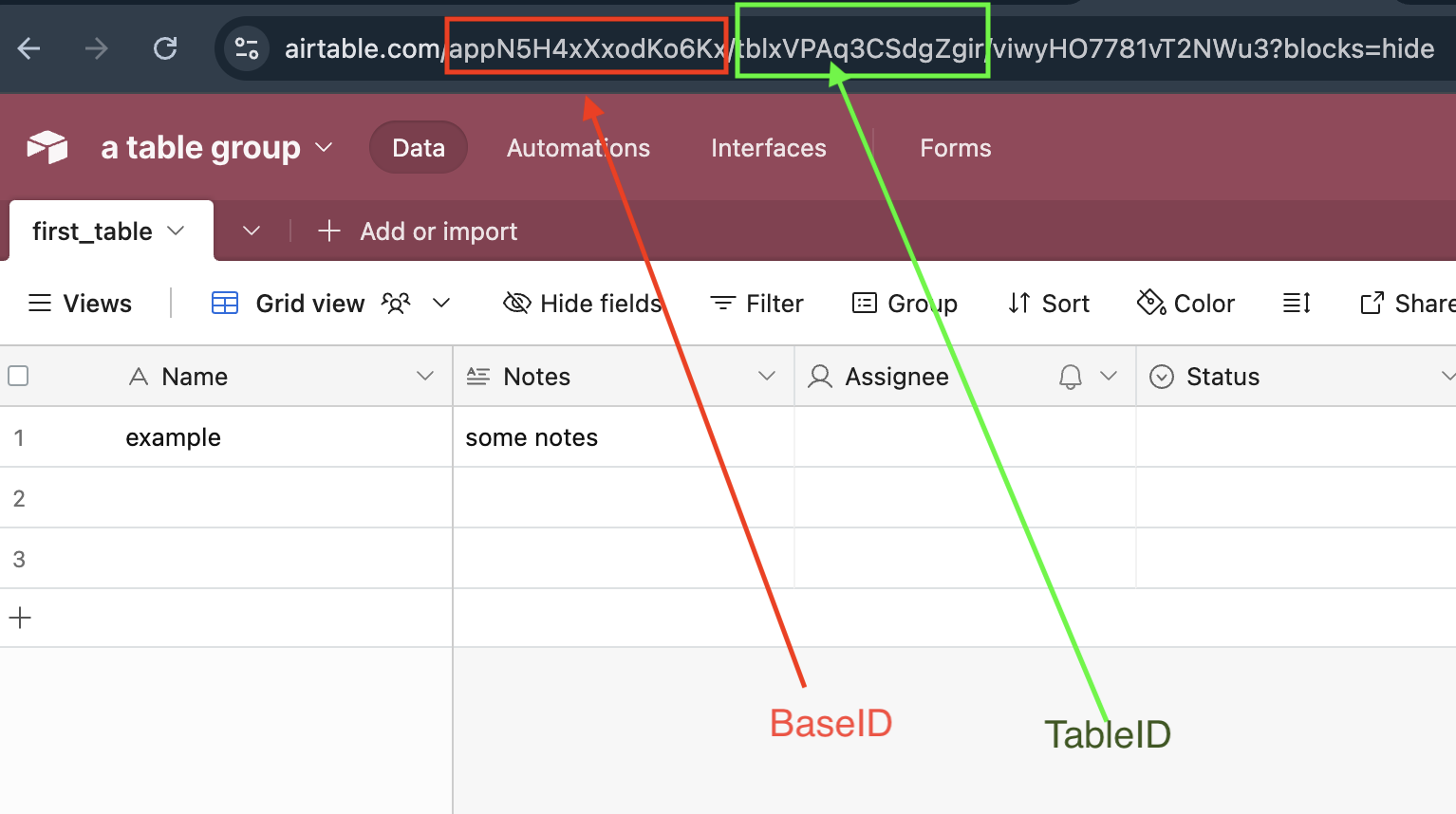
1
create foreign table airtable.my_foreign_table (
2
message text
3
-- other fields
4
)
5
server airtable_server
6
options (
7
base_id 'appXXXX',
8
table_id 'tblXXXX'
9
);
Notes#
- The table requires both
base_idandtable_idoptions - Optional
view_idcan be specified to query a specific view
The Airtable Wrapper maps Airtable field types to PostgreSQL data types. Use this reference when defining your foreign table columns.
Text Fields#
| Airtable Field Type | PostgreSQL Type | Example | Notes |
|---|---|---|---|
| Single line text | text | name text | No length limit in PostgreSQL |
| Long text | text | description text | Preserves line breaks |
text | email text | Validate in application if needed | |
| URL | text | website text | Store as plain text |
| Phone number | text | phone text | Preserves formatting |
Numeric Fields#
| Airtable Field Type | PostgreSQL Type | Example | Notes |
|---|---|---|---|
| Number | numeric, integer, bigint, real, double precision | quantity integer | Choose based on precision needs |
| Currency | numeric | price numeric(19,4) | Use precision for currency calculations |
| Percent | numeric | rate numeric(5,4) | Stored as decimal (e.g., 75% = 0.75) |
| Autonumber | bigint | row_num bigint | Auto-generated, read-only |
Selection Fields#
| Airtable Field Type | PostgreSQL Type | Example | Notes |
|---|---|---|---|
| Single select | text | status text | Returns option name as string |
| Multiple select | jsonb | tags jsonb | Returns JSON array of option names |
| Checkbox | boolean | is_active boolean | true when checked |
Date/Time Fields#
| Airtable Field Type | PostgreSQL Type | Example | Notes |
|---|---|---|---|
| Date | date | due_date date | ISO 8601 format |
| Created time | timestamp | created_at timestamp | Auto-generated by Airtable |
| Last modified time | timestamp | updated_at timestamp | Auto-updated by Airtable |
User/Collaborator Fields#
| Airtable Field Type | PostgreSQL Type | Example | Notes |
|---|---|---|---|
| Created by | jsonb | created_by jsonb | Contains {id, email, name} |
| Last modified by | jsonb | modified_by jsonb | Contains {id, email, name} |
| User | jsonb | assigned_to jsonb | Contains user object |
Complex Fields#
| Airtable Field Type | PostgreSQL Type | Example | Notes |
|---|---|---|---|
| Multiple record links | jsonb | related_records jsonb | Array of linked record IDs |
| Attachments | jsonb | files jsonb | Array of attachment objects with url, filename, size |
| Lookup | jsonb | lookup_values jsonb | Values from linked records |
| Rollup | Varies | total numeric | Match to rollup result type |
| Formula | Varies | computed text | Match to formula result type |
PostgreSQL and Airtable handle column names differently. Understanding these differences is essential for successful data mapping.
Understanding Case Sensitivity#
PostgreSQL identifiers are case-insensitive by default and are folded to lowercase. Airtable field names preserve case exactly as entered.
| PostgreSQL Column | Airtable Field | Match? |
|---|---|---|
name | name | ✅ Yes |
name | Name | ❌ No - Airtable field is uppercase |
firstname | FirstName | ❌ No - Case mismatch |
first_name | First Name | ❌ No - Space in Airtable name |
Using Quoted Column Name#
When your Airtable field name doesn't match PostgreSQL's lowercase convention, use double-quotes " to enclose the column name to explicitly map columns:
1
create foreign table airtable.customers (
2
-- Simple lowercase match
3
id text,
4
5
-- Airtable field has a space: "First Name"
6
"First Name" text,
7
8
-- Airtable field is mixed case: "LastName"
9
"LastName" text,
10
11
-- Airtable field has special characters: "Price ($)"
12
"Price ($)" numeric,
13
14
-- Airtable field is all caps: "SKU"
15
"SKU" text
16
)
17
server airtable_server
18
options (
19
base_id 'appXXXX',
20
table_id 'tblXXXX'
21
);
Best Practices#
- Always check your Airtable field names - Open your Airtable base and note the exact spelling and capitalization
- Use quoted column name liberally - When in doubt, explicitly quote the column name to avoid silent NULL values
- Matching is by name, not position - You can define columns in any order and omit columns you don't need
Several Airtable field types return JSONB data in PostgreSQL. Here's how to work with them effectively.
Multiple Select Fields#
Multiple select fields are returned as JSON arrays of strings.
1
-- Create foreign table with multiple select field
2
create foreign table airtable.products (
3
id text,
4
name text,
5
"Tags" jsonb
6
)
7
server airtable_server
8
options (
9
base_id 'appXXXX',
10
table_id 'tblXXXX'
11
);
12
13
-- Example data in tags: ["Electronics", "Sale", "Featured"]
14
15
-- Query: Find products with a specific tag
16
select name, "Tags"
17
from airtable.products
18
where "Tags" ? 'Sale';
19
20
-- Query: Find products with any of several tags
21
select name, "Tags"
22
from airtable.products
23
where "Tags" ?| array['Electronics', 'Furniture'];
24
25
-- Query: Extract tags as text array for processing
26
select name, jsonb_array_elements_text("Tags") as tag
27
from airtable.products;
Linked Records#
Linked record fields return JSON arrays of record IDs.
1
-- Create foreign table with linked records
2
create foreign table airtable.orders (
3
id text,
4
"Order Number" text,
5
"Customer" jsonb
6
)
7
server airtable_server
8
options (
9
base_id 'appXXXX',
10
table_id 'tblXXXX'
11
);
12
13
-- Example data in customer ids: ["recABC123", "recDEF456"]
14
15
-- Query: Find orders linked to a specific customer
16
select order_number, "Customer"
17
from airtable.orders
18
where "Customer" ? 'recABC123';
19
20
-- Query: Count linked records
21
select order_number, jsonb_array_length("Customer") as customer_count
22
from airtable.orders;
Attachments#
Attachment fields return JSON arrays containing file metadata.
1
-- Create foreign table with attachments
2
create foreign table airtable.documents (
3
id text,
4
title text,
5
"Attachments" jsonb
6
)
7
server airtable_server
8
options (
9
base_id 'appXXXX',
10
table_id 'tblXXXX'
11
);
12
13
-- Example data in attachments:
14
-- [{"id": "attXXX", "url": "https://...", "filename": "doc.pdf", "size": 12345, "type": "application/pdf"}]
15
16
-- Query: Get first attachment URL
17
select title, "Attachments"->0->>'url' as first_file_url
18
from airtable.documents;
19
20
-- Query: Get all attachment filenames
21
select title, jsonb_path_query("Attachments", '$[*].filename') as filename
22
from airtable.documents;
23
24
-- Query: Find documents with PDF attachments
25
select title
26
from airtable.documents
27
where exists (
28
select 1 from jsonb_array_elements("Attachments") as f
29
where f->>'type' = 'application/pdf'
30
);
User/Collaborator Fields#
User fields return JSON objects with user details.
1
-- Create foreign table with user fields
2
create foreign table airtable.tasks (
3
id text,
4
"Task Name" text,
5
"Assigned To" jsonb,
6
"Created By" jsonb
7
)
8
server airtable_server
9
options (
10
base_id 'appXXXX',
11
table_id 'tblXXXX'
12
);
13
14
-- Example data in assigned_to: {"id": "usrXXX", "email": "user@example.com", "name": "John Doe"}
15
16
-- Query: Get assignee email
17
select "Task Name", "Assigned To"->>'email' as assignee_email
18
from airtable.tasks;
19
20
-- Query: Find tasks assigned to specific user
21
select "Task Name"
22
from airtable.tasks
23
where "Assigned To"->>'email' = 'john@example.com';
This FDW doesn't support query pushdown. All filtering is performed locally in PostgreSQL after fetching data from Airtable.
This section describes important limitations and considerations when using this FDW:
Read-Only Access#
The Airtable Wrapper provides read-only access. Write operations are not supported:
- ✅
SELECT- Fully supported - ❌
INSERT- Not supported - ❌
UPDATE- Not supported - ❌
DELETE- Not supported - ❌
TRUNCATE- Not supported
To modify Airtable data, use the Airtable API directly.
Other Limitations#
- No query pushdown - All filtering happens locally after data is fetched
- Large datasets - Performance may degrade with large result sets due to full data transfer
- Computed fields - Formula, rollup, and lookup fields work but require matching the output type
- Views - Must be pre-configured in Airtable before referencing
- Block features - Airtable Blocks/Apps are not accessible
- Materialized views - May fail during logical backups; use regular views instead
All Columns Return NULL#
Symptom: Query returns the correct number of rows, but all column values are NULL.
Cause: Column name mismatch between PostgreSQL and Airtable.
Solution:
-
Check the exact field names in Airtable (including capitalization and spaces)
-
Use quoted column name to map columns correctly:
1
-- Before (returns NULL because Airtable field is "Full Name"):
2
full_name text
3
4
-- After (correctly maps to Airtable field):
5
"Full Name" text
"Column Does Not Exist" Error#
Symptom: Error message stating a column doesn't exist.
Cause: Case sensitivity mismatch or typo in field name.
Solution: Verify the Airtable field name and use quoted column name:
1
-- Airtable field is "ProductID" not "productid"
2
"ProductID" text
Type Conversion Errors#
Symptom: Error when querying, mentioning type mismatch.
Cause: PostgreSQL column type doesn't match Airtable field data.
Solution: Refer to the Supported Data Types section and adjust your column type:
1
-- Multiple select returns JSONB, not TEXT
2
tags jsonb -- Correct
3
tags text -- Incorrect: will cause errors
Empty Results from JSONB Queries#
Symptom: JSONB containment queries (?, @>) return no results.
Cause: Incorrect JSON path or data structure assumption.
Solution: First inspect the raw JSONB structure:
1
-- Check what the JSONB actually contains
2
select tags from airtable.products limit 1;
3
4
-- Then build your query based on actual structure
Slow Query Performance#
Symptom: Queries take a long time to execute.
Cause: No query pushdown means all data is fetched before filtering.
Solution:
-
Create an Airtable View with the filters you need
-
Use
view_idin your foreign table options:
1
create foreign table airtable.filtered_products (
2
-- columns...
3
)
4
server airtable_server
5
options (
6
base_id 'appXXXX',
7
table_id 'tblXXXX',
8
view_id 'viwYYYY' -- Pre-filtered view
9
);
Basic Table Query#
This example creates a foreign table for a simple product catalog:
1
create foreign table airtable.products (
2
id text,
3
name text,
4
description text,
5
price numeric,
6
in_stock boolean,
7
created_at timestamp
8
)
9
server airtable_server
10
options (
11
base_id 'appTc3yI68KN6ukZc',
12
table_id 'tbltiLinE56l3YKfn'
13
);
14
15
-- Query all products
16
select * from airtable.products;
17
18
-- Query with filter (applied locally)
19
select name, price
20
from airtable.products
21
where in_stock = true
22
and price < 100
23
order by price;
Query an Airtable View#
Create a foreign table from an Airtable View for pre-filtered data:
1
create foreign table airtable.active_products (
2
name text,
3
price numeric
4
)
5
server airtable_server
6
options (
7
base_id 'appTc3yI68KN6ukZc',
8
table_id 'tbltiLinE56l3YKfn',
9
view_id 'viwY8si0zcEzw3ntZ'
10
);
11
12
select * from airtable.active_products;
Working with Tags (Multiple Select)#
Query products by their tags:
1
create foreign table airtable.tagged_products (
2
id text,
3
name text,
4
"Tags" jsonb,
5
category text
6
)
7
server airtable_server
8
options (
9
base_id 'appXXXX',
10
table_id 'tblXXXX'
11
);
12
13
-- Find all products tagged as "Featured"
14
select name, "Tags"
15
from airtable.tagged_products
16
where "Tags" ? 'Featured';
17
18
-- Find products with both "Sale" and "Electronics" tags
19
select name, "Tags"
20
from airtable.tagged_products
21
where "Tags" ?& array['Sale', 'Electronics'];
Complex Query with User Data#
Combine multiple field types in a practical example:
1
create foreign table airtable.project_tasks (
2
id text,
3
task_name text,
4
status text,
5
priority text,
6
due_date date,
7
assigned_to jsonb,
8
attachments jsonb,
9
tags jsonb,
10
created_at timestamp
11
)
12
server airtable_server
13
options (
14
base_id 'appXXXX',
15
table_id 'tblXXXX'
16
);
17
18
-- Find high-priority tasks due this week with assignee details
19
select
20
task_name,
21
status,
22
due_date,
23
assigned_to->>'name' as assignee,
24
assigned_to->>'email' as assignee_email,
25
jsonb_array_length(coalesce(attachments, '[]'::jsonb)) as attachment_count
26
from airtable.project_tasks
27
where priority = 'High'
28
and due_date between current_date and current_date + interval '7 days'
29
order by due_date;