Elements
Use Stripe’s suite of rich UI building blocks to design a secure payments experience that perfectly matches your site and helps drive conversion.
Full name
Jane Diaz
Country
United States
Address
Street address
Card
Afterpay
Klarna
Card number
1234 1234 1234 1234
Expiration date
MM / YY
Security code
CVV
Submit order
Email address
jane.diaz@example.com
Country
Netherlands
iDEAL
SEPA Debit
iDEAL Bank
ING Bank
Finish checkout
Name
Jane Diaz
Country
Mainland China
Postal code
City
Region
Address
Street address
Alipay
Card
Pay $450.00
Choose the elements you need and match them to the look and feel of your site with CSS-level styling.
Save development time and eliminate user confusion with built-in accessibility, error messages, input masking, autofill, and more.
Reach more users with 40+ payment methods through a single integration. Easily run A/B tests and manage payment methods from the Dashboard.
Stripe’s platform meets industry certification standards to help reduce compliance burdens for your business.
Use our suite of optimized and composable UIs to seamlessly collect payment details, customer addresses, offer mobile wallets, and more. Businesses using Stripe's Payment Element saw 11.9% more revenue on average.
Card
ACH bank debit
Card number
1234 1234 1234 1234
Expiration date
MM/YY
Security code
CVV
Pay $175.00
Klarna
Card
PayPal
Name
Alistair Hanton
Land oder Region
Deutschland
Zahle €90.00
Card
Klarna
Clearpay
Card number
1234 1234 1234 1234
Expiration date
MM/YY
Security code
CVV
Pay £235.00
Boleto
Cartão
CPF/CNPJ
123.456.789-00
Nome
Jane Diaz
Pague R$160.00
Link autofills your customers’ payment and shipping details to deliver an easy and seamless checkout experience.
Customers can choose to save their payment details at any Link-supported site across the Stripe network, and Link autofills those details for future purchases. When customers use Link on a new site or new device, they receive a one-time code to verify their identity.
Create a frictionless checkout—businesses with a large repeat customer base have seen an average returning user conversion increase of 14%.
Enable your customers to check out in seconds with the optimized Link experience, 3x faster than non-Link customers.
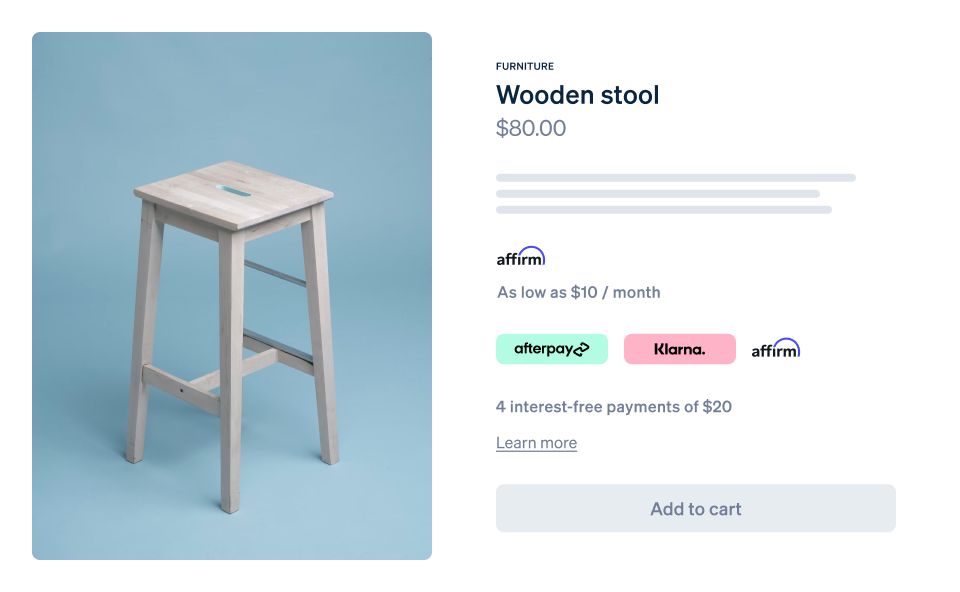
Use the payment method messaging element to promote buy now, pay later options before checkout. It automatically determines available plans and conditions, generates a localized description, and matches your page's styling.
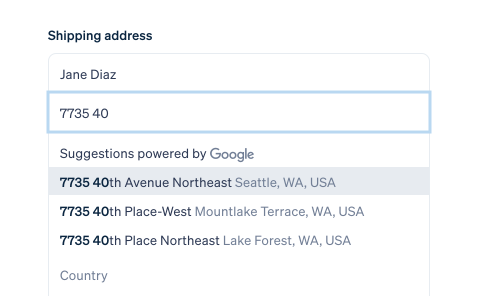
Use the address element to collect and validate addresses for billing, shipping, and more. It can help you reduce the risk of shipping goods to the wrong location, and more accurately apply the right sales taxes.
Our versatile APIs and libraries let you combine the simplicity of prebuilt components with the freedom of custom UIs. Use React or JavaScript to build your ideal web integration or our iOS, Android, or React Native SDKs to design a streamlined mobile flow.
Card
Apple Pay
Card number
1234 1234 1234 1234
Expiration date
MM / YY
Security code
CVV
Country
United States
Postal code
12345
Card
Google Pay
Card number
1234 1234 1234 1234
Expiration date
MM / YY
Security code
CVV
Country
United States
Postal code
90210
Card
Apple Pay
Card number
1234 1234 1234 1234
Expiration date
MM / YY
Security code
CVV
Country
United States
Postal code
90210
Use CSS properties to customize font, color, spacing, and more.
We migrated to Stripe Elements in less than a day with a single developer. Since then, we’ve seen a 6% increase in conversion at checkout.
With Stripe Elements, we were able to instantly turn on iDEAL, Bancontact, EPS, and Giropay. As we rapidly enter new markets, it’s important that we’re able to scale new payment methods without being limited by engineering bandwidth.
We wanted the checkout experience to feel cohesive with the rest of our product, but didn’t want to recreate payments from scratch. Stripe Elements made it super simple to achieve this.
Integrating with Stripe Elements was surprisingly easy. Having Stripe handle localization, formatting, and automatically displaying relevant local payment methods has made the user experience much better for our global customer base.
Building a conversion-optimized payments experience is hard. Elements lets you take advantage of Stripe’s collective experience across front-end, design, and analytics, so that you can spend less time on payments and more time on your product.
All of Stripe’s payment UIs give you instant access to 40+ payment methods, 35+ languages, and 135+ currencies. Choose the integration that best suits your business.
Launch faster with a conversion-optimized, full-page checkout
The fastest way to accept payments—no code required
Launch a customizable embedded checkout experience
Build your own pixel-perfect payment experience
Create an account and start accepting payments—no contracts or banking details required. Or, contact us to design a custom package for your business.