FREE Udemy Course
The Udemy course makes $10's a month, usually less. I've decided to give away the course for a while. This coupon is good for the next 30 days.
https://www.udemy.com/course/pysimplegui/?couponCode=033334A16163C571B739
Or use code: 033334A16163C571B739
Open Source Once Again...
Hey, it's Mike....

We gave commercialization a try. It was an incredible experience, but it didn’t generate the resources needed to sustain PySimpleGUI at the level we had hoped. In February 2025, we announced that PySimpleSoft would be shutting down, with support continuing through the end of 2025.
That process is now complete. The next question was what to do with the code, documentation, and repositories. I always planned to keep the repos available for reference—so the decision came down to the software itself.
See the History section below for a summary of the PySimpleGUI history.

I’ve released the PySimpleGUI 5 code as open source. After removing licensing and security components, it’s now available under the LGPL3 license on GitHub and PyPI.
Installing from PyPI
To install the latest version (v6):
python -m pip install PySimpleGUI
If you need the older version (4.60.5.1):
python -m pip install PySimpleGUI==4.60.5.1
Installing from Github
The GitHub repo has the most up-to-date code. You can install directly without cloning:
python -m pip install --upgrade https://github.com/PySimpleGUI/PySimpleGUI/zipball/master
To install a specific release that's here on GitHub, change master to the release number. To install version 6.1:
python -m pip install --upgrade https://github.com/PySimpleGUI/PySimpleGUI/zipball/6.1
Or clone/download the repo and install locally:
python -m pip install .
Longer Term Outlook
I’m honestly not sure what the long-term future looks like—but if the past 8 years are any indication, I’m not great at predicting it.
For now, I’m here, having fun writing code, and happy to help.
Thank you
PySimpleGUI has been a once-in-a-lifetime experience. It’s been amazing to see what people have built and to be a small part of it. Thanks to everyone who supported the project over the years.
What is PySimpleGUI?
PySimpleGUI is a wrapper for tkinter (and other GUI libraries) that transforms the GUI SDK into a simpler, more compact architecture while still providing detailed customization. No prior GUI programming experience needed.
This is an entire interactive application.
import PySimpleGUI as sg
# Define the window's contents
layout = [[sg.Text("What's your name?")],
          [sg.Input(key='-INPUT-')],
          [sg.Text(size=(40,1), key='-OUTPUT-')],
          [sg.Button('Ok'), sg.Button('Quit')]]
# Create the window
window = sg.Window('Window Title', layout)
# Display and interact with the Window using an Event Loop
while True:
    event, values = window.read()
    # See if user wants to quit or window was closed
    if event == sg.WINDOW_CLOSED or event == 'Quit':
        break
    # Output a message to the window
    window['-OUTPUT-'].update('Hello ' + values['-INPUT-'] + "! Thanks for trying PySimpleGUI")
# Finish up by removing from the screen
window.close()
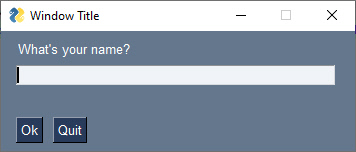
This is the window that's created.
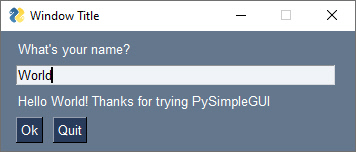
Here's the same window after some user interaction.
Documentation - want to learn more?
You'll find extensive documentation at:
Contributing
PySimpleGUI has always been developed more like a proprietary product than an open source project. Pull requests aren't accepted.
What's new...
Features & Fixes in version 6.2
- Fixed bug in Window.settings_save
- Added ability to "print" an image inline in a Multiline element
- The ability to upgrade to the latest Maint Release is once again built into PSG. You can use the Home Window or the command line command
psgupgrade. You can see the release notes and install a new version. - Fix for bug #5750. Graph events was going into an infinite loop when write_event_value events were received. Fix was to clear the realtime button flag. Potential for regression problems should be minimal since only the Graph element conditional was changed.
- Added Enhancement #6671. Added parameter select select_node_keys to Tree.update. Enables nodes in the tree to be programmatically selected as if the user selected them.
- Fixed Multiline echo_stdout_stderr feature/parameter. Was not correctly echoing out to sys.stdout, stderr. Edited docstring to document the correct behavior. It will only echo if you've rerouted stdout or stderr to the element. It will not do the reroute for you.
- Fix for Issue #6686 - Calendar chooser button clearing fields that should only be cleared when window.read returns. Used the newly added element_that_generated_event variable from the Graph element fix above (already came in handy).
- Display the Maint Release version number in the Home Window. Moved the install button
- Added ability to specify timers using string "H:M:S" when calling Window.start_timer.
- Enhancement - support for horizontal scroll only for scrollable column element
- Fixed Multiline echo_stdout_stderr feature/parameter. Was not correctly echoing out to sys.stdout, stderr. Edited docstring to document the correct behavior. It will only echo if you've rerouted stdout or stderr to the element. It will not do the reroute for you.
- Fix for Issue #6686 - Calendar chooser button clearing fields that should only be cleared when window.read returns. Used the newly added element_that_generated_event variable from the Graph element fix above (already came in handy).
- Added ability to specify timers using string "H:M:S" when calling Window.start_timer.
- Enhancement - ability to set the Frame border color. Added border_color and border_width_no_relief parms to the Frame element
- Frame border color to default to the text element color if no color is set
The documentation has been updated. The call ref section matches the version 6.2 release.
Drag and Drop!
Hard to believe, but drag and drop is working on PySimpleGUI.
Drag and Drop support has been a wish for many years. We finally may have found a way to do it such that the PySimpleGUI code is not changed. All code is in the user code-space.
psgdnd is a new package posted on GitHub that adds drag and drop to PySimpleGUI. You can pip install it and try drag and drop for yourself. More information and examples can be found in that repo.
Version 6.0.1 was released to PyPI. It's working on Windows. Version 6.0.2 on GitHub has the fixes that were needed for Linux (so far... there could be more to come). The Mac is still an unknown.
New repo - PSGMicroPython
Created a new repo and added code for interfacing to a MicroPython-based microcontroller. It works with Raspberry Pi Pico and ESP32. It may work with other boards too. Not meant to be robust or significant. It's just some code I threw together that could maybe be useful to someone else... or not...

PSGWeb
- PSGWeb - PySimpleGUI running in a browser window
- Works with most demo programs
- To try it, go to any PySimpleGUI application on GitHub, add
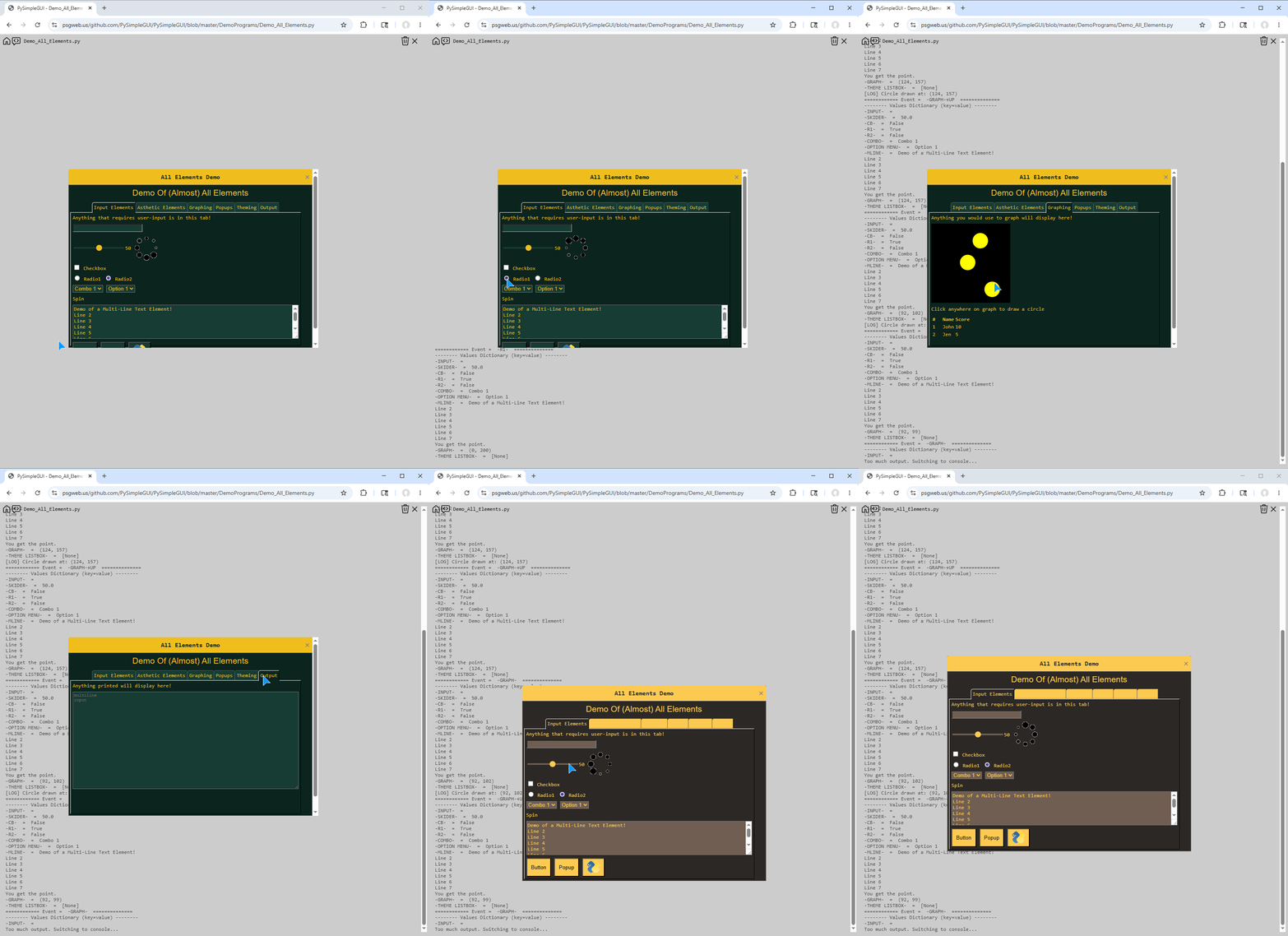
psgweb.usonto the front of the url, press enter - https://github.com/PySimpleGUI/PySimpleGUI/blob/master/DemoPrograms/Demo_All_Elements.py becomes https://psgweb.us/github.com/PySimpleGUI/PySimpleGUI/blob/master/DemoPrograms/Demo_All_Elements.py
- There are no plans to release or expand this prototype. It was created as part of the larger PSG 5 effort, but not released.
Here's that Demo Program running in browser:
AI....

Seems most projects have something to say about AI usage now. This is my opinion and how I've decided to use AI. It's what's right for me. It might not be right for you or anyone else.
I use LLMs to search and summarize documentation, lookup errors, do research, get knowledge, analyze data, and prototype. I don't use LLMs to write PySimpleGUI code. My reason is very simple.
I like to write code.
I fell in love with programming 50 years ago. Writing software is my happy place. It's an "I get to write software" thing. AI can generate lots of things. The feeling I get writing software is not one of the things AI can generate. I'm not in a hurry and can take time to enjoy the process.
I've heard several software engineers talk about the addictive pull that they feel when using LLMs to write code. One side effect in particular I want to avoid... lack of engagement with the product being developed. When LLMs are used to write large amounts of code, some engineers have reported they don't feel as committed, don't a sense of ownership, and lack the passion they normally feel for projects they've devloped in the past. That doesn't sound like fun to me,
PySimpleGUI in the AI era
A common question in software today is whether a library is still relevant. I think for PySimpleGUI the answer is yes. People discover and install PySimpleGUI every day. Doesn't matter how many people use it. More than one is good enough. It's a thrill that other programmers want to use what I create.
I use PySimpleGUI regularly. I can’t imagine building a Windows app without it. I’ve recently been working on a 6502 breadboard computer. I built a bus analyzer using a couple of Raspberry Pi Picos and a PySimpleGUI app to control everything from Windows. Coding up a windows application to be the front-end to my tools is very easy for me to do using PySimpleGUI.
That’s reason enough for me to keep working to clean up the ecosystem and keep it running.
History
Open Source v4 → Commercial v5 → Open Source v6
PySimpleGUI’s journey has included plenty of ups and downs, good decisions and bad ones, a few surprises, and a lot of fun along the way.
Hi, it’s Mike. I thought it might be useful to share the story from my perspective.
PySimpleGUI began in 2018 as throwaway code. I needed a GUI for a media player prototype and had no experience building GUIs or working with object-oriented GUI frameworks. My goal was simple: wrap Tkinter in a way that felt more linear and straightforward so I could get something working quickly.
There was no bigger plan. But as I used it, it started to feel genuinely useful, so I shared it.
My background is in Silicon Valley startups—building products, shipping software, and later managing teams. I had no experience with Python or open source at the time. So when I put PySimpleGUI on GitHub, I approached it the way I knew how: like a startup. It became a full-time, self-funded effort rather than a traditional open source project.
Timeline
- July 2018 – Version 1
- June 2019 – Version 4
- January 2020 – Funding becomes a major concern; commercialization mentioned
- November 2020 – Udemy course announced; a public plea for help added
- December 2021 – Course released
- February 2024 – Version 5 (commercial launch)
- April 2026 – Version 6
There’s an Announcements Issue on GitHub that I’ve used like a running blog. It has grown to over 1,700 entries documenting the project in detail. To make reading it easier, a snapshot is posted in the documnation under the tab Announcements 2018-2024.
Funding Reality
Working full-time on an open source project creates immediate and ongoing financial pressure.
I explored the common options:
- Sponsorships and donations (GitHub Sponsors, Buy Me a Coffee). At peak, this brought in about $150 per month.
- Education. We built an 11.5-hour Udemy course with 61 lessons. It performed well initially, reaching around $2,000 per month for a short time, but eventually dropped below $100.
Neither path was enough to sustain the project long term.
Commercialization
Moving to a commercial model wasn’t a sudden decision. It had been discussed openly for years in the README and announcements.
By early 2024, after exhausting other options, Version 5 launched as a paid product. Even then, the goal was to keep things accessible, not to put up barriers.
How Did It Go?
If the metric is financial sustainability, it didn’t go well.
If the metric is experience, learning, and relationships, it was absolutely worth it.
We didn’t lose most users after commercialization. Many companies continued using PySimpleGUI. The challenge was getting them to purchase licenses.
The Hobbyist License
We made a deliberate choice: hobbyists and students could use PySimpleGUI for free, while companies were expected to pay.
It felt like the right balance.
In practice, the vast majority of users identified as hobbyists. Tens of thousands of corporate users registered under the free tier. It wasn’t unusual to see large companies with hundreds of users and only a handful of paid licenses.
I don’t regret the decision to offer a free option.
A Culture of Free
My personal takeaway is that there’s a strong cultural expectation that Python tools & libraries should be free.
The issue didn’t seem to be price or dissatisfaction. People kept using PySimpleGUI—they just didn’t feel obligated to pay for it. Even clear licensing terms didn’t consistently change that behavior.
That’s my interpretation, based on what I saw. Others may see it differently.
Having Fun
Startups fail more often than they succeed. This one didn’t achieve financial sustainability, and that’s part of the process.
From the beginning, one of the stated goals of PySimpleGUI was: have fun.
That part has held true. Writing code, building things, seeing what others create, and working with people along the way—that’s the part I’ve enjoyed the most.
Business, on the other hand, has never been the fun part for me.
Thank You
Thank you to everyone who has supported the project over the years.
I don’t know exactly what comes next, but I’ve enjoyed the journey and I'm looking forward to whatever is ahead.
License & Copyright
Copyright 2018-2026 PySimpleGUI. All rights reserved.
Licensed under LGPL3.
Download files
Download the file for your platform. If you're not sure which to choose, learn more about installing packages.
Source Distribution
Built Distribution
Filter files by name, interpreter, ABI, and platform.
If you're not sure about the file name format, learn more about wheel file names.
Copy a direct link to the current filters
File name
Interpreter
ABI
Platform
File details
Details for the file pysimplegui-6.3.0.1.tar.gz.
File metadata
- Download URL: pysimplegui-6.3.0.1.tar.gz
- Upload date:
- Size: 498.4 kB
- Tags: Source
- Uploaded using Trusted Publishing? No
- Uploaded via:
twine/7.0.0 CPython/3.12.10
File hashes
| Algorithm | Hash digest | |
|---|---|---|
| SHA256 |
d711ac856a8c03382ecc13e58468c8d6b02c580881fc4115c770691b0db680ea
|
|
| MD5 |
36d812faa2c48d0db7d357eb30070270
|
|
| BLAKE2b-256 |
9958bb2d530bfc597e1a86378b508a96bc57ff588af7b37ebd68fb4eec62a871
|
File details
Details for the file pysimplegui-6.3.0.1-py3-none-any.whl.
File metadata
- Download URL: pysimplegui-6.3.0.1-py3-none-any.whl
- Upload date:
- Size: 494.9 kB
- Tags: Python 3
- Uploaded using Trusted Publishing? No
- Uploaded via:
twine/7.0.0 CPython/3.12.10
File hashes
| Algorithm | Hash digest | |
|---|---|---|
| SHA256 |
937da4ae6dd6a93b8239aefc76f717e1f4861d4fb64cd4e9b3a5df88865520a5
|
|
| MD5 |
7cf605fadf2b3869a1ccdc3483e99d56
|
|
| BLAKE2b-256 |
4569dcff3a6f9c8b411b967a56cf34eafac2d50a14d5ea4efa15e2aa774c28cf
|
Release history Release notifications | RSS feed
This release

