Lufthansa
Disney
Autodesk
UBS
Dropbox
IBM
Lufthansa
Disney
Autodesk
UBS
Dropbox
IBM
Choose your SDK
Build exactly where your users are — with full control, high performance, and deep integration across every platform.
Web Viewer
Embed fast, full-featured document viewing into your web app — with support for React, Angular, Vue, and other modern frameworks.
Server processing
Add scalable document processing to your backend — generate, convert, compress, extract, automate, and more with .NET, Python, Java, or Node.js.
Mobile viewers
Deliver smooth, native PDF viewing on iOS, Android, and cross-platform apps — with high-fidelity rendering and a customizable UI.
Easy to use — easier to customize
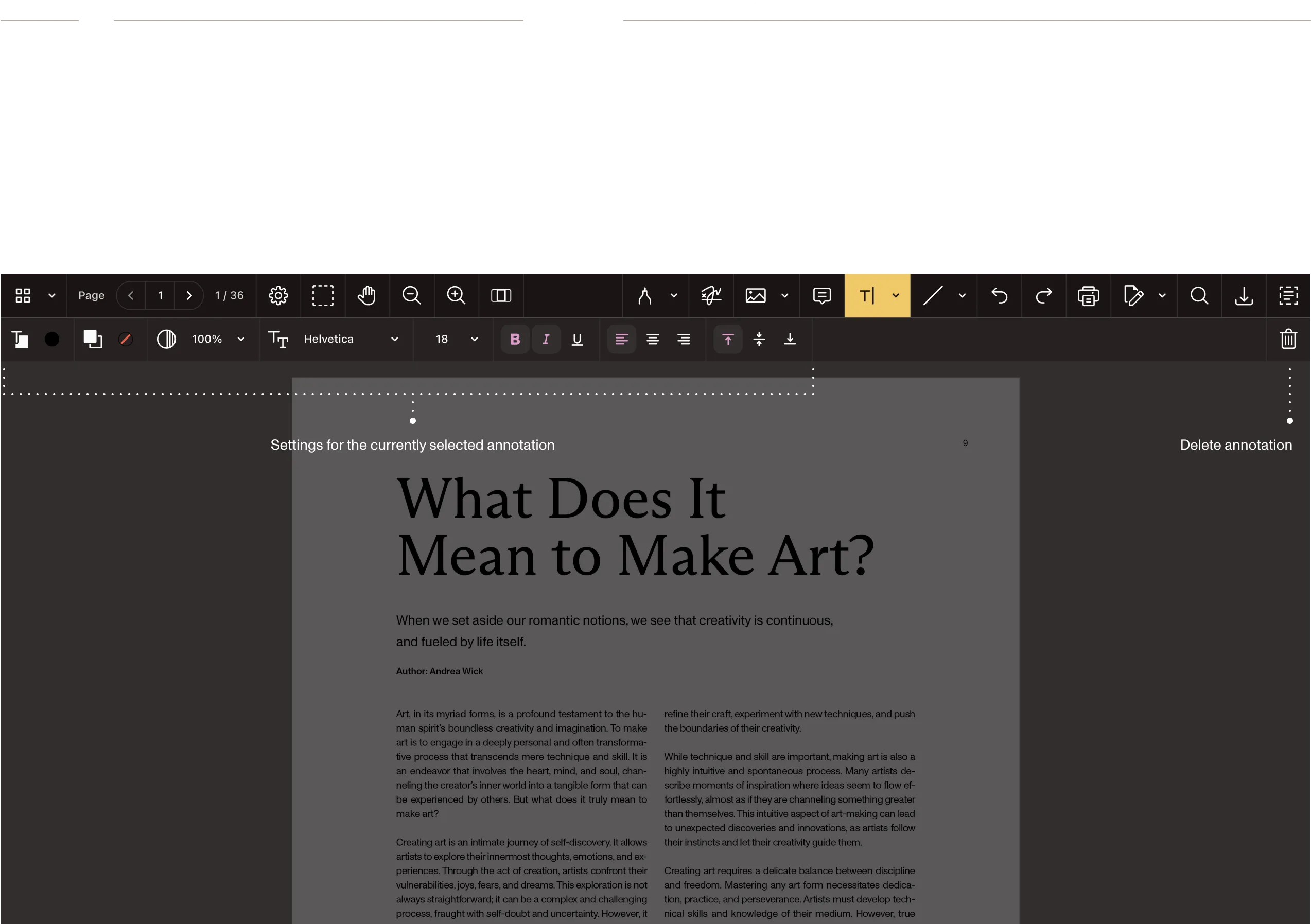
Supported on your platform
Nutrient PDF SDKs run consistently across all major platforms — Web (JavaScript/WebAssembly), iOS, Android, .NET, Java, Node.js, Flutter, and React Native — with native performance and unified APIs.
Build with the most intuitive and flexible PDF APIs
Integrate document viewing, processing, and signing into your app with native and cross-platform SDKs. Explore features, tweak the UI, and export working code in seconds — with APIs that expose everything from prebuilt UI components to custom renderers, annotation hooks, and programmatic document operations.
Get started in three steps
- Choose your language and framework
- Follow the step-by-step installation guide
- Run your app
Web
Nutrient Web SDK
import PSPDFKit from "pspdfkit";
// Obtain a PSPDFKit document instance.
const instance = await PSPDFKit.load({
container: "#pspdfkit",
document: "<document-file-path>",
licenseKey: "<license-key>"
});
console.log("PSPDFKit for Web is ready!");
console.log(instance);
Document Authoring Library
import DocAuth from '@pspdfkit/document-authoring';
const docAuthSystem = await DocAuth.createDocAuthSystem({
licenseKey: '<license-key>',
});
const editor = await docAuthSystem.createEditor(
document.getElementById('editor'),
{
document: await docAuthSystem.createDocumentFromPlaintext('Hi there!'),
}
);
Nutrient iOS SDK
import PSPDFKit
import PSPDFKitUI
import SwiftUI
// A `Document` is the container for your PDF file.
let document = Document(url: documentURL)
var body: some View {
// A `PDFView` will present and manage the PSPDFKit UI.
PDFView(document: document)
.scrollDirection(.vertical)
.pageTransition(.scrollContinuous)
.pageMode(.single)
}
Nutrient Android SDK
package com.your.package
import android.net.Uri
import android.os.Bundle
import androidx.appcompat.app.AppCompatActivity
import com.pspdfkit.ui.PdfActivityIntentBuilder
// We need to use a Compat activity for the PdfFragment.
class MainActivity : AppCompatActivity() {
override fun onCreate(savedInstanceState: Bundle?) {
super.onCreate(savedInstanceState)
// Get the document path from the application assets.
val documentUri = Uri.parse("file:///android_asset/document.pdf")
// Build the `Intent` for launching the `PdfActivity`.
val intent = PdfActivityIntentBuilder.fromUri(this, documentUri)
.build()
startActivity(intent)
}
}
Nutrient Flutter SDK
import 'dart:io';
import 'package:flutter/material.dart';
import 'package:path_provider/path_provider.dart';
import 'package:pspdfkit_flutter/pspdfkit.dart';
const String DOCUMENT_PATH = 'PDFs/Document.pdf';
void main() => runApp(MyApp());
class MyApp extends StatefulWidget {
@override
_MyAppState createState() => _MyAppState();
}
class _MyAppState extends State<MyApp> {
void showDocument(BuildContext context) async {
final bytes = await DefaultAssetBundle.of(context).load(DOCUMENT_PATH);
final list = bytes.buffer.asUint8List();
final tempDir = await getTemporaryDirectory();
final tempDocumentPath = '${tempDir.path}/$DOCUMENT_PATH';
final file = await File(tempDocumentPath).create(recursive: true);
file.writeAsBytesSync(list);
await Pspdfkit.present(tempDocumentPath);
}
@override
Widget build(BuildContext context) {
final theme = Theme.of(context);
return MaterialApp(
home: Scaffold(body:
Center(
child: ElevatedButton(
onPressed: () => showDocument(context),
child: Text('Show Document'),
)
)
)
);
}
}
Nutrient React Native SDK
import React, {Component} from 'react';
import {Platform} from 'react-native';
import PSPDFKitView from 'react-native-pspdfkit';
const DOCUMENT =
Platform.OS === 'ios' ? 'Document.pdf' : 'file:///android_asset/Document.pdf';
export default class PSPDFKitDemo extends Component<{}> {
render() {
return (
<PSPDFKitView
document={DOCUMENT}
configuration={{
showThumbnailBar: 'scrollable',
pageTransition: 'scrollContinuous',
scrollDirection: 'vertical',
}}
ref={this.pdfRef}
fragmentTag="PDF1"
style={{flex: 1}}
/>
);
}
}
Nutrient for Cordova
// Install the plugin first:
// cordova plugin add pspdfkit-cordova
document.addEventListener('deviceready', function() {
// Open a PDF document
PSPDFKit.present('document.pdf', {
pageTransition: 'scrollContinuous',
scrollDirection: 'vertical',
backgroundColor: '#FFFFFF'
});
}, false);
Nutrient for Xamarin
using PSPDFKit.Model;
using PSPDFKit.UI;
using PSPDFKit.Instant;
var configuration = PSPDFConfiguration.FromConfigurationBuilder ((builder) => {
builder.PageMode = PSPDFPageMode.Single;
builder.PageTransition = PSPDFPageTransition.ScrollContinuous;
builder.ScrollDirection = PSPDFScrollDirection.Vertical;
}));
var document = new PSPDFDocument (NSUrl.FromFilename ("document.pdf"));
var pdfViewController = new PSPDFViewController (document, configuration);
Nutrient for Ionic
import { Component } from '@angular/core';
import { PSPDFKit } from '@ionic-native/pspdfkit/ngx';
@Component({
selector: 'app-pdf',
templateUrl: 'pdf.page.html'
})
export class PdfPage {
constructor(private pspdfkit: PSPDFKit) {}
openPDF() {
this.pspdfkit.present('document.pdf', {
pageTransition: 'scrollContinuous',
scrollDirection: 'vertical'
});
}
}
Nutrient .NET SDK
using (GdPictureDocumentConverter oConverter = new GdPictureDocumentConverter())
{
// Select the source document and its file format (DOCX, DOC, XLSX, XLS, PPTX, PPT).
oConverter.LoadFromFile("input.docx", GdPicture14.DocumentFormat.DocumentFormatDOCX);
// Convert the source document to PDF.
oConverter.SaveAsPDF("output.pdf", PdfConformance.PDF);
}
Document Engine
# You simply supply a list of document operations to apply.
curl -F file=@Example.pdf \
-F operations='{"operations":[{"type": "flattenAnnotations"}]}' \
http://localhost:5000/process \
--output result.pdf
Nutrient Python SDK
from nutrient_sdk import Document
from nutrient_sdk.exceptions import NutrientException
try:
with Document.open("input.docx") as document:
document.export_as_pdf("output.pdf")
except NutrientException as e:
print(f"Error: {e}")
Nutrient Java SDK
package io.nutrient.Sample;
import io.nutrient.sdk.Document;
public class WordDocumentToPDF {
public static void main(String[] args){
try (Document document = Document.open("input.docx")){
document.exportAsPdf("output.pdf");
}
}
}
Managed Document Engine
# You simply supply a list of document operations to apply.
curl -F file=@Example.pdf \
-F operations='{"operations":[{"type": "flattenAnnotations"}]}' \
http://localhost:5000/process \
--output result.pdf
Nutrient for Windows
// This loads a PDF from `Assets` as soon as the `PdfView` is ready.
private async void PdfViewInitializationCompletedHandler(PdfView sender, Document args)
{
try
{
var file = await StorageFile.GetFileFromApplicationUriAsync(new Uri("ms-appx:///Assets/document.pdf"));
if (file == null) return;
await sender.OpenStorageFileAsync(file);
}
catch (Exception e)
{
var messageDialog = new MessageDialog(e.Message);
await messageDialog.ShowAsync();
}
}
// This loads a PDF from a file picked by the user in the UI.
private async void Button_OpenPDF_Click(object sender, RoutedEventArgs e)
{
// Open a `Picker` so the user can choose a PDF.
var picker = new FileOpenPicker
{
ViewMode = PickerViewMode.Thumbnail,
SuggestedStartLocation = PickerLocationId.DocumentsLibrary
};
picker.FileTypeFilter.Add(".pdf");
var file = await picker.PickSingleFileAsync();
if (file == null) return;
// Open and display it in the PSPDFKit `PdfView`.
var documentSource = DocumentSource.CreateFromStorageFile(file);
await PdfView.Controller.ShowDocumentAsync(documentSource);
}
Nutrient Mac Catalyst SDK
import PSPDFKit
import PSPDFKitUI
import SwiftUI
// A Document is the container for your PDF file.
let document = Document(url: documentURL)
var body: some View {
// A PDFView will present and manage the PSPDFKit UI.
PDFView(document: document)
.scrollDirection(.vertical)
.pageTransition(.scrollContinuous)
.pageMode(.single)
}
Nutrient Electron SDK
const { app, BrowserWindow } = require('electron');
const path = require('path');
function createWindow() {
const mainWindow = new BrowserWindow({
width: 1200,
height: 800,
webPreferences: {
nodeIntegration: true,
contextIsolation: false
}
});
mainWindow.loadFile('index.html');
}
app.whenReady().then(createWindow);
// In your renderer process (index.html):
// <script>
// import PSPDFKit from 'pspdfkit';
//
// PSPDFKit.load({
// container: '#pspdfkit',
// document: 'document.pdf',
// licenseKey: '<license-key>'
// });
// </script>
PDF Generation API
curl -X POST https://api.pspdfkit.com/build
-H "Authorization: Bearer your_api_key_here"
-o result.pdf
-F index.html=@index.html
-F instructions='{
"parts": [
{ "html": "index.html" }
]
}'
PDF Conversion API
curl -X POST https://api.pspdfkit.com/build
-H "Authorization: Bearer your_api_key_here"
-o converted.pdf
-F document=@Example1.docx
-F instructions='{
"parts": [
{ "file": "document" }
]
}'
PDF Editor API
curl -X POST https://api.pspdfkit.com/build
-H "Authorization: Bearer your_api_key_here"
-o merged.pdf
-F part1=@Example1.pdf
-F part2=@Example2.pdf
-F instructions='{
"parts": [
{ "file": "part1" },
{ "file": "part2" }
]
}'
PDF OCR API
curl -X POST https://api.pspdfkit.com/build
-H "Authorization: Bearer your_api_key_here"
-o result.pdf
-F document=@Example.pdf
-F instructions='{
"parts": [
{ "file": "document" }
],
"actions": [{
"type": "ocr",
"language": "english"
}]
}'
Accelerate development
Ship faster with enterprise-grade SDKs built on years of R&D — so you can focus on features, not edge cases.
- Clean APIs and live examples
- Handles document complexity for you
- High-fidelity rendering
Save time and money
Skip PDF maintenance and brittle tools. Nutrient handles updates, rendering, and support — so your team can focus on what matters.
- No technical debt or glue code
- Fewer bugs, faster releases
- Lower long-term costs
AI at your fingertips
Power document workflows with built-in AI. Summarize, translate, redact, or build agentic flows — all in just a few lines of code.
- Native AI features, no bolt-ons
- Supports complex automation
- Simple, fast integration
Your users will love it
Instant load times
Documents stream page by page, so users start reading immediately — even with 1,000+ page files.
Pixel-perfect rendering
Every font, vector, and layer displays exactly as intended, on any device or browser.
Privacy by default
Documents stay on device or in your infrastructure. No third-party uploads, no data leaks.
Accessible to everyone
Screen reader support, keyboard navigation, and WCAG 2.2 compliance built in.
One platform. All your document needs.
Document interaction
Build exceptional user-facing document experiences — from fast PDF viewing to collaborative editing, markup, and forms — right inside your app.
Document processing
Automate how documents are handled behind the scenes. Convert, classify, scan, and extract data with server-side SDKs or cloud APIs.
Document finalization
Handle approvals and secure delivery with integrated signing and redaction tools that ensure accuracy, auditability, and compliance.
Document assurance
Meet the strictest data protection and accessibility standards with built-in security, PDF/A support, audit trails, and WCAG-compliant rendering.
Document AI built in — wherever you build
One intelligence across SDKs, cloud, low-code, and workflows. The same document-tuned AI engine powers every Nutrient product, adding real insight, automation, and compliance in a single drop-in.

Understand
Summaries, smart diffs, and chat answers in seconds.
Protect
Confidence-scored redaction with full audit trails.
Extract
Prompt-based data capture, no templates.
Automate
No-code workflows route documents and data wherever they’re needed.
Deploy
Self-host, run on Nutrient-managed infrastructure, or use our cloud service — same AI engine, same results.
Our comprehensive buyer’s guide walks you through the key questions, tradeoffs, and red flags to watch for — so you can choose with confidence.
Built for industries that run on documents
Discover why developers love Nutrient SDKs

Nutrient help us significantly accelerate our time to market, provide key services to our clients, and reliably deliver solutions that we can easily integrate into our portfolio.
Faria Education Group
PROVEN AT SCALE
Trusted by the brands that move the world
IBM powers flight releases for 34,000+ commercial pilots with Nutrient, replacing paper workflows with digital signing and annotations.
DocuSign relies on Nutrient to render and tag documents for 200M+ users, ensuring fast, reliable eSignature workflows at scale.
FC Bayern München delivers its digital magazine to fans worldwide using Nutrient, with DRM protection across iOS, Android, and Web.
Shift your product development into overdrive with our PDF SDKs
+63%
Reduction in engineering investment for document features
+80%
of customers report faster time to market
Frequently asked questions
A PDF SDK (software development kit) is a collection of tools, libraries, and documentation that enables developers to integrate PDF functionality directly into their applications. With a PDF SDK, you can add features like viewing, editing, annotating, form filling, digital signing, and document conversion without building these capabilities from scratch.
Yes. Nutrient offers PDF SDKs for all major platforms — including Web (JavaScript), iOS, Android, React Native, Flutter, .NET, and Java. Our SDKs share a consistent API design across platforms, making it easier to maintain cross-platform applications with unified PDF functionality.
Nutrient SDKs support PDF as the primary format, along with images (PNG, JPEG, TIFF), Microsoft Office documents (Word, Excel, PowerPoint), and more through our conversion capabilities. We provide native integrations for popular frameworks like React, Vue, Angular, and Next.js, and support both client-side and server-side implementations.
Absolutely. Nutrient SDKs offer extensive customization options, including theming, custom toolbars, branded UI components, and the ability to build completely custom interfaces using our APIs. You can match your brand colors, fonts, and design patterns while maintaining full PDF functionality.
Yes. Security is a top priority. Our SDKs support encryption, password protection, digital signatures, and redaction, and they comply with standards like PDF/A and PDF/UA. We offer both client-side processing for sensitive documents and secure server-side options. Our solutions are used in highly regulated industries, including healthcare, finance, and government.
Nutrient uses advanced rendering engines optimized for each platform. Our Web SDK leverages WebAssembly for consistent rendering across all browsers, while native SDKs use platform-specific optimizations. This ensures accurate display of complex PDFs, including forms, annotations, embedded fonts, and special formatting — regardless of the viewing environment. See the published SDK benchmark reports for measured rendering, OCR, and compliance performance.
We provide comprehensive documentation, API references, integration guides, code samples, and video tutorials. Our GitHub repositories include example projects for various frameworks. You also get access to dedicated support channels, regular webinars, and a responsive technical support team to help with implementation.
A dedicated PDF SDK gives you complete control over the user experience, data security, and feature set. Unlike third-party viewers, you own the implementation, avoid vendor lock-in, and can customize every aspect. PDF SDKs also eliminate external dependencies, reduce latency, and ensure your sensitive documents never leave your infrastructure.
Nutrient PDF SDK licensing is tailored to your use case — pricing depends on the platforms, capabilities, and deployment model you need. Start with a free trial (no credit card required). Then contact Sales for a quote that matches your requirements. See the pricing page for details on licensing options.
Getting started is easy: Sign up for a free trial, choose your platform, and follow our getting started guides. Most developers have a working PDF viewer in less than 15 minutes. Our SDKs include npm packages, CocoaPods, Maven repositories, and NuGet packages for easy integration. No credit card is required for the trial, and we offer flexible licensing options for production use.
FREE TRIAL
Ready to get started?
PDF SDK
What is a PDF SDK?
A PDF SDK (software development kit) provides developers with tools to integrate robust PDF capabilities into their applications — like viewing, editing, signing, generating, converting, and more. Nutrient’s PDF SDK is a complete solution that works across web, mobile, and server platforms, helping you build secure, scalable, and interactive document support in your application, without relying on external tools.
- View, edit, annotate, and sign PDFs directly in your app.
- Generate documents from Word templates or HTML.
- Convert between PDF and Word, Excel, PowerPoint, and PDF/A.
- Redact, extract data, and perform advanced OCR on scanned documents.
- Integrate seamlessly with JavaScript, .NET, Java, Node.js, iOS, Android, and more.
How to choose the right PDF SDK?
Choosing a PDF SDK comes down to flexibility, performance, and platform coverage. Consider these key questions:
- Cross-platform support — Does it work on web, mobile (iOS/Android), and backend systems?
- Modular architecture — Can you start with core features and expand to advanced features like OCR, redaction, or signing later?
- Performance and rendering — How does it handle large or complex PDFs across devices?
- Developer experience — Is the SDK well-documented, actively maintained, and easy to integrate?
- Security and compliance — Can it run on-premises or in secure environments to meet data privacy requirements?
What are the best PDF SDKs to solve my PDF integration needs?
The best PDF SDK depends on your use case — whether it’s lightweight client-side only deployment, secure signing, or the ability to fully automate your document workflows. Nutrient’s PDF SDK has a full-featured PDF engine with AI built into it, giving you best-in-class performance, cross-platform support, and modular APIs that developers love. It’s trusted by thousands of companies —from startups, to multinational enterprises across the globe — and used by billions of end users.
What are the benefits of using Nutrient’s PDF SDK?
Nutrient’s PDF SDK is the core engine behind all types of use cases — contract management, form filling, document workflows, compliance, and more — all within your app’s native environment.
- Unified API across platforms — Consistent, phenomenal developer experience across Web, iOS, Android, and Server.
- Modular feature set — Start with viewing and annotations, and then scale into signing, OCR, redaction, and collaboration.
- Faster time to market — Built-in UI components and code examples accelerate your development.
- Secure by design — Keep documents in your environment — no risky third-party uploads.
- Enterprise-ready — Deploy on-premises, in the cloud, or in hybrid environments with robust compliance, accessibility, and enterprise support. Meet data residency, regulatory, and performance requirements in finance, healthcare, government, and other highly regulated industries.
How does Nutrient’s PDF SDK compare to others?
Nutrient stands out by focusing on developer-first tools with enterprise-level performance, scalability, and support. It’s ideal for engineering and product teams that need flexibility, performance, and real ROI.
- Broader platform support — Web, mobile, desktop, and server — all from one vendor.
- Easier to embed — Clean APIs and UI components save weeks of custom work building in-house or on top of open source.
- Lower cost and vendor risk — Replace multiple tools from multiple vendors with a single, battle-tested, secure, unified PDF engine.
- Vendor partner — We view our relationship with customers as a partnership, and work individually with them to help them achieve their goals.
- Backed by developer-first support — Quickstart guides, extensive code examples, comprehensive documentation, and support from the developers building the product.