Prolost Watches
After my experience being rejected from the App Store, I was left with an unscratched itch to ship a native iPhone app. Staying well away from my day-job turf of tools for motion artists, I created an app to support a hobby I fell into.
Prolost Watches is an iPhone app for managing your watch collection. It’s part database, part journal; designed for the detail-obsessed mind of the watch fanatic. As you log each day’s choice of watch, insights are revealed. Wear logs trace a path on the map. Events from the past are resurfaced at opportune times. Finances mange themselves as you buy and sell. Your entire collection lives in your pocket, and you get to enjoy all your watches, even the ones you’re not wearing.
Vibe-coding is starting to get a bit of a reputation as just more AI slop, and it’s not totally undeserved. You see daily breathless AI-bro posts declaring an entire industry “cooked” because of something built with “a single prompt.” This would be easy to dismiss as pure hype if it wasn’t so harmful to, well, everything.
But I also see daily feed of people laboring with care and craft on apps designed to solve niche problems. My mission with Prolost Watches is to create one of these counter-examples: a luxurious, native iPhone experience. I’ve responded to user feedback from dozens of active beta testers, added creature comforts and Easter eggs, optimized performance and squashed bugs, and packed as much “it just works” in as I can. I’ve also said “no” a few times, just for good measure. Prolost Watches is my first app, and I’m proud to release it on the App Store.
Prolost Watches is a one-time purchase. There’s no subscription, no ads, no account, and no server. Your data is secure and private, and never leaves your device. Pre-order now for US$14.99, with expected release on June 16 2nd at US$19.99.
Making Prolost Watches with Bitrig
Bitrig has changed a lot since I used the iPhone client to create the ill-fated version of Drinking Buddy. It’s now a native Mac app that allows prompt-base creation of native SwiftUI apps for iPhone, as well as iPad, Mac, and Apple Watch. It has a built-in simulator, and can preview your apps on your device as well. If Lovable (which I used to create the shipping version of Drinking Buddy) is at one end of the spectrum — easy for anyone to use with little experience, and Claude Code running in the terminal is at the other, Bitrig is in a sweet spot right in the middle: a little nerdy, but with some well-considered creature comforts that, in my case, made it mostly a delight to craft and refine a complex app.
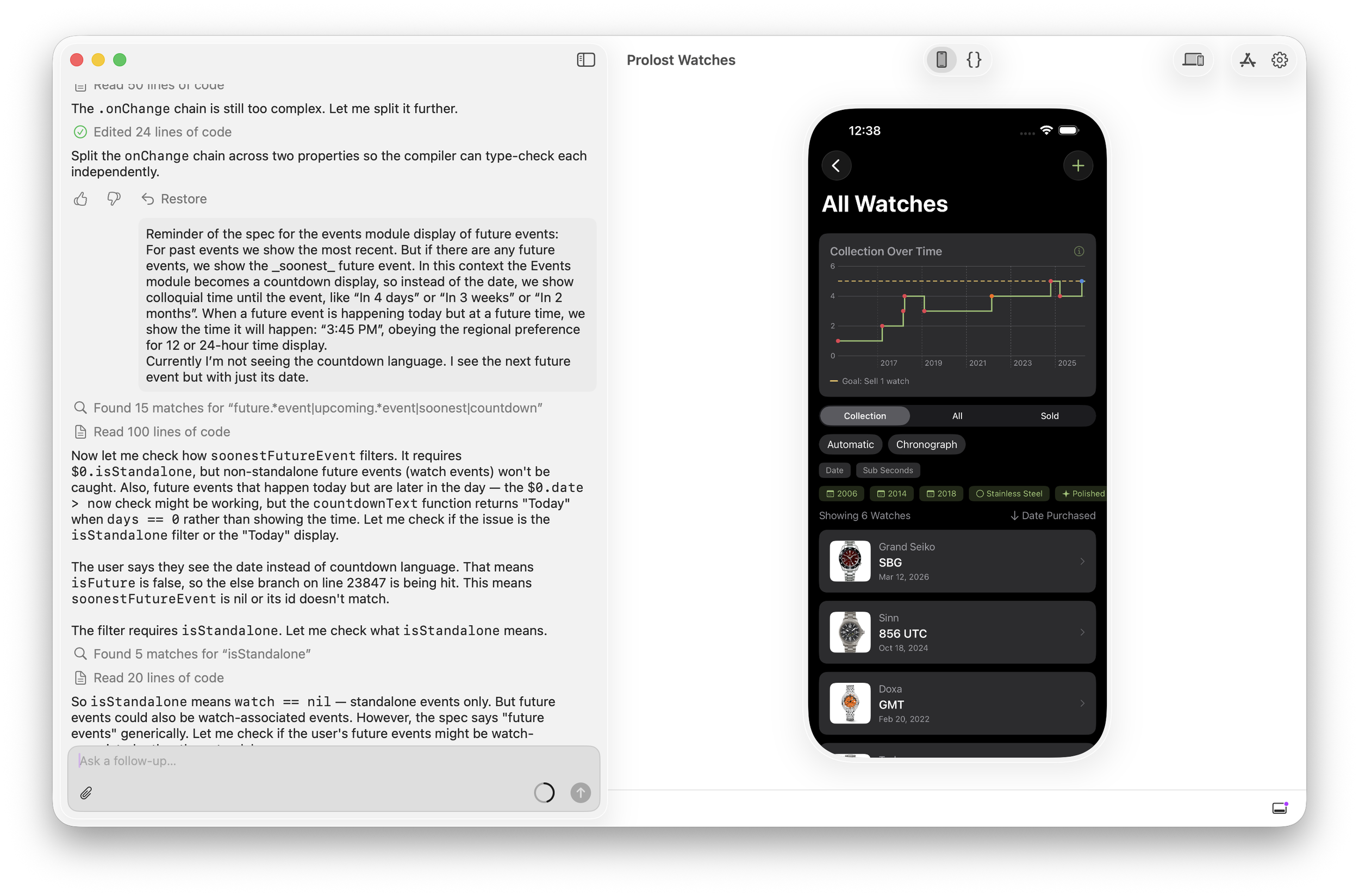
I am very polite when correcting the robot. I’ve seen The Terminator too many times.
We’re not quite at the point where domain knowledge is all you need. It’s actually refreshing to me that there’s still a place in vibe-coding for nerding out about data formats, performance, user-experience models, and how things function under the hood. But on a good day, working with Bitrig feels creatively empowering in a way AI very often doesn’t for me. Prolost Watches wouldn’t exist without it.
Maxon Autograph
Today Maxon announced the return of Autograph, a modern compositing and motion graphics tool.
Autograph is incredibly powerful, and it’s been a thrill to work with the original creators to fold it into the Maxon and Red Giant ecosystem. Even more exciting:
Autograph is completely free for individuals.
You can download it today and start discovering how powerful and fast it is. If you have a Universe or Red Giant subscription, you’ll see some familiar tools in there as well.
My App Will Harm You Physically, Using Math
I made an app! A real, native iPhone app coded in Swift and SwiftUI.
It’s a thing of beauty. I love it and use it every day. But I can’t share it with you, because Apple rejected it from the App Store due to “Physical Harm.”
Don’t worry, I figured out a workaround. That’s how determined I am to harm you.
Everyone, Finally, Can Code — by Not Coding
I created this app by “vibe-coding” it — prompting it into existence via AI — using an iPhone app called Bitrig. Bitrig is the brainchild of some folks who helped create the Swift programing language that Apple now favors for all iOS/iPadOS development. There are many AI-assisted app creation platforms out there, but Bitrig has two (currently) unique value propositions: It creates native iPhone apps, and it works on your phone.
Building iPhone apps right on your phone is fun! And, of course, maddening, because AI — but when it works, it’s delightful and rather amazing.
On Vibe Coding, Briefly
Kevlin Henney (via John Siracusa):
The act of describing a program in unambiguous detail and the act of programming are one and the same.
I have complex feelings about AI and creativity, but this quote feels right to me — I created this app using AI, even though I didn’t write one line of code.
If you’ve tried anything like this you know that the process is a mix of the miraculous and the infuriating. You’ll get a working prototype up and running in minutes, and then argue with a cheerful robot for 15 fruitless prompts about the color of a button. Complex features come together with ease, while a bug fix might take dozens of attempts, and risk reverting previous fixes.
It’s a bit like building an app by talking to a polite and well-meaning tech support agent on the phone — only their computer is down, so they can’t test the app themselves.
But power through all these frustrations, and you have an app.
I’m sure I’ll have more to say about that in the future, but let’s get on to what my app is, and why Apple rejected it.
The Many Lives of Drinking Buddy
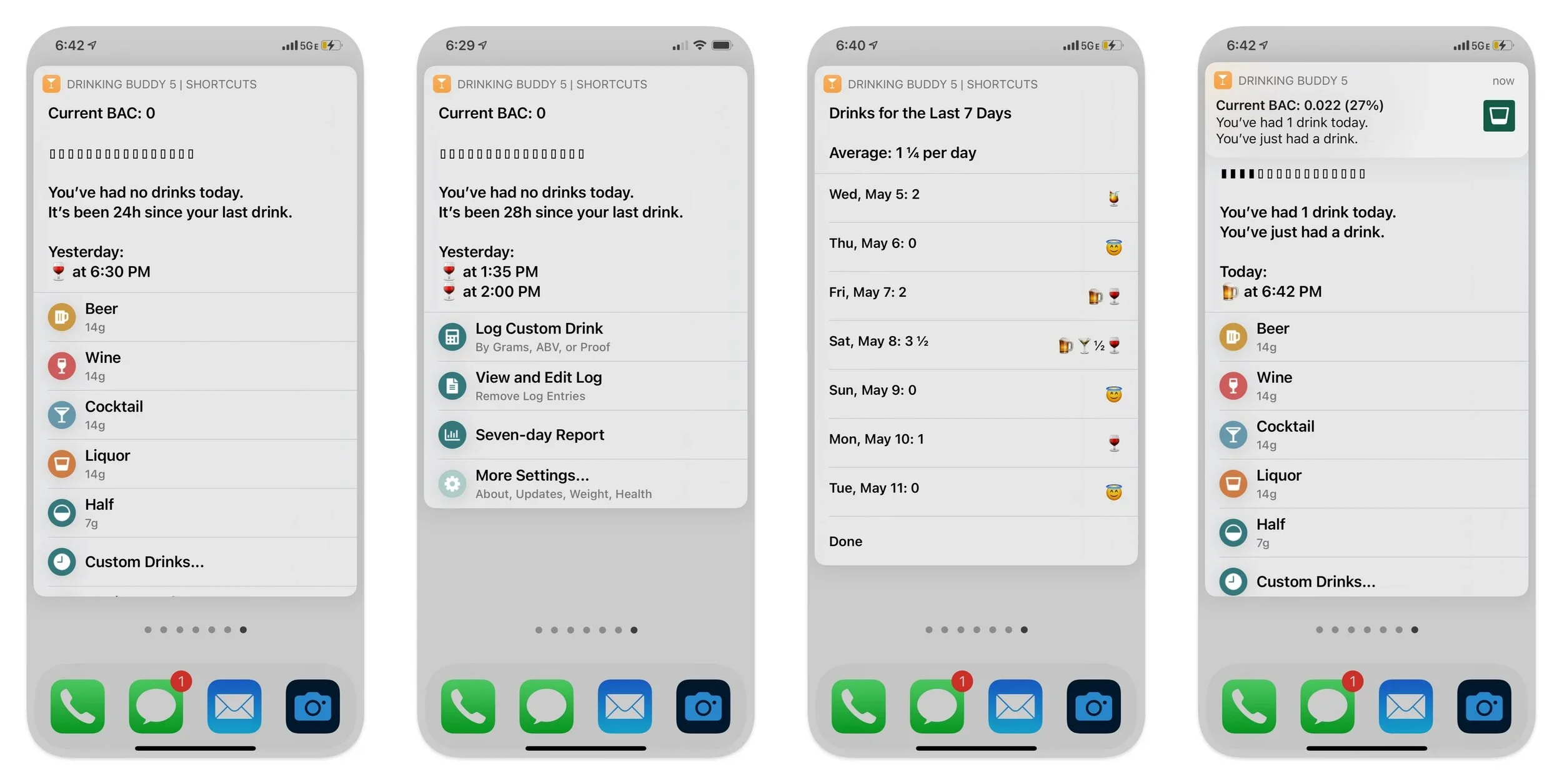
The Drinking Buddy Shortcut, before iOS 26 made Shortcuts menus absolutely hideous.
In 2018 I released a Shortcut called Drinking Buddy that helps you keep track of your alcohol consumption. I mostly share the tools and automations I create to support creative work, but here I was sharing something personal. I enjoy a drink from time to time, and I wanted a tool to help me be thoughtful and intentional about that. Drinking Buddy does this by showing how many drinks you’ve had in the last seven days (a question your doctor might ask), and by estimating your current Blood Alcohol Level based on your recent drinks.
This estimation is done using the Widmark Formula, which has been around since the 1930s. It’s a simple equation that uses your gender and body weight to model how you metabolize alcohol over time.
I’ve updated Drinking Buddy many times in the seven years since I first shared it. It’s a shining/ridiculous example of how I’ve pushed Shortcuts past the point that any reasonable person would consider sane. I wanted to create an app-like experience, but I was always fighting the limitations of a tool designed primarily for simple automations.
Drinking Buddy: The App
This is the version of Drinking Buddy that I created using Bitrig:
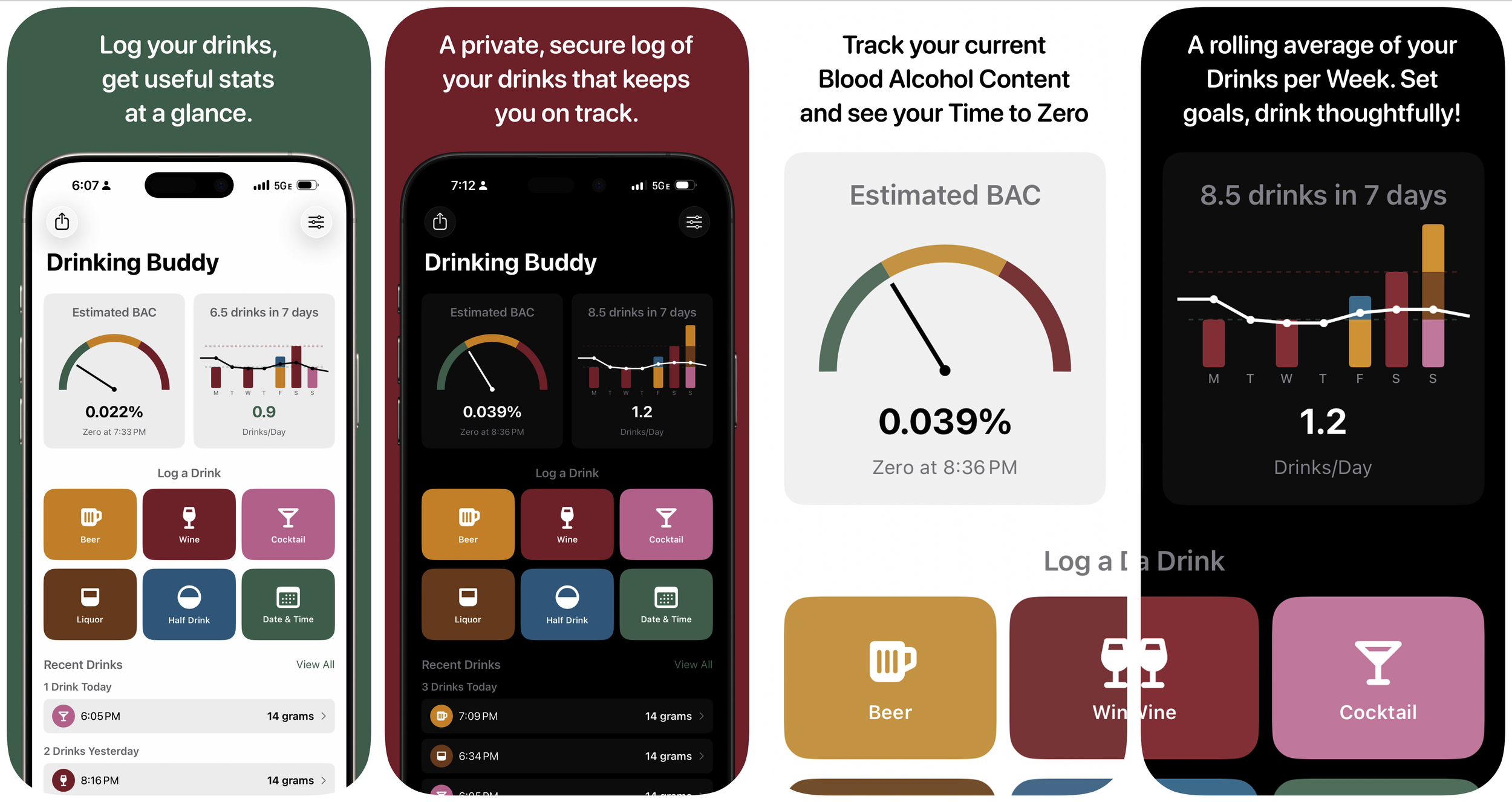
The App Store page that will never be.
Use the big buttons to log drinks. Your estimated BAC appears on the left, in a fun little gauge that animates when it changes. Your weekly drinks are charted on the right, as well as a rolling weekly average of drinks/day.
What started as my first real vibe-coding experiment took me down a rabbit hole of refining this design, tweaking the user experience, and, unfortunately, liking the results enough to want to share them.
Apple Holds the Keys
In 2016 Apple formalized its distaste for dubious health-related apps with strengthened guidelines. Although section 1.4, called Physical Harm, doesn’t specifically call out blood alcohol calculators, the language in my App Store rejection did:
To ensure users' safety, only blood alcohol content calculator apps that pair with hardware capable of offering accurate blood alcohol content measurements are appropriate. Apps that rely solely on software, Widmark formulas, or other mechanisms to calculate blood alcohol content are not appropriate.
Consistency is the Hobgoblin of, Well, Not the App Store
One reason I thought I might be able to get Drinking Buddy onto the App Store is that there are many BAC calculators currently available there. I won’t link them here,1 as I don’t feel it’s my place to rat them out, but their abundance led me to believe it might be possible to pepper one’s app with enough warnings and admonitions that it would be considered “safe.”
So I appealed my rejection, and it was upheld in no uncertain terms.
A Solution so Sweet

Drinking Buddy lives, as a web app. The Forecast view and Custom Drinks are new features never implemented in the native iOS version.
Aside from assuming precedent means anything on the App Store, the big mistake I made in this process was diving deep into the “sweating the details” part of building my app before I’d tested Apple’s commitment to keeping you safe by forbidding simple math. 2
But the time and effort I put into the native Drinking Buddy did not go to waste. I turned my attention to Loveable (a turnkey web app vibe-coding platform), where I was able to rapidly build a near-clone of my SwiftUI app. I had the complete spec already and several screenshots to guide the process, and my experience with Bitrig had given me a good idea of where I was likely to bump into issues.
This greatly sped up the process, and I had a working version in less than a day. A week later, after some beta feedback, I arrived at something even more powerful and feature-rich than the iOS-native version.
So now Drinking Buddy is a Progressive Web App — a web page that can be added to the Home Screen of your Apple or Android phone, where it will behave very much like a native app, even when offline. Your sensitive boozing data stays local and private, but it will be up to you to back up and restore your logs if you lose or replace your phone.
After All This, You Know What I Need?

Cheers. If you’d like to try Drinking Buddy, it’s free, and works on any device you’re likely to have.
But one is literally called “OK to Drive”.
Obviously I understand of Apple’s concerns here. Some 99¢ app says your BAC was at zero an hour ago, so you get behind the wheel of a car and crash into an orphanage. At Apple’s scale, the liability is unmeasurable. While my app is well-intentioned, the App Store is genuinely besieged by bad actors of all kinds. I support Apple’s right to dictate what can and can’t be on their own store. I also believe that Apple would be in a lot less regulatory trouble (and community disfavor) if iOS and iPadOS worked more like the Mac, where apps not suitable for Apple’s explicit endorsement can be installed through other avenues.
Cameras, Phones, and Log — What’s the Juice?
I know, I know, another video about shooting video in log on iPhones? I promise I’ll move on to other topics, but two events happening in one week pushed me into making this video:
- Samsung adding log to the Galaxy s25 Ultra
- My brother-in-law texting me “Do you have a fix for iPhone videos looking washed-out?”
Why is log important, even to Samsung, who never met a color they didn’t crank to eleven? Why does non-log iPhone footage often look bright and desaturated in editing software? Why does log matter from a creative standpoint, not just the technical reasons I covered in my previous videos? Is it OK to shoot log in highly-compressed HEVC instead of ProRes?
To answer all these questions, I’ve got my longest video yet, and some new free LUTs for working with non-log HDR iPhone footage. The meat of the video is a “Color Grade With Me” tour through some of the more interesting shots from my Peru and Taiwan travelogue edits, where I dive into the creative possibilities afforded by log.
And is it worth the squeeze?
Being me, I also used these topics as an excuse to share a philosophical view of how I look at any given camera. I hope you enjoy this more creative, less technical video. My goal this year is to make more, so please drop a comment on the video or on Bluesky letting me know what topics you’d like to see me cover.
Kino: My New Favorite iPhone Video App
Yes we’re still talking about shooting video on iPhones. But I also want to talk about digital cinema shooting in general, in a world where top camera makers are battling to give filmmakers everything we want in a small, affordable package.
How does the DV Rebel spirit — born of camcorders and skateboard dollies — live on in a time of purpose-built digital cinema cameras that fit in your hand? For me, it’s meant keeping my rigs small and manageable. I love gimbals and drones and lidar focus rigs, but I’m happiest when my whole rig — tripod and all — can be picked up and moved with one hand.
We suffered through so many years of too little camera, but now it’s quite easy to have way too much camera. I want to live in that sweet spot where image quality is not compromised, but I can still move fast.
Turns out I feel the same way about iPhone camera apps.
Photo by Karen Lum
The Goldilocks of iPhone ProRes Log
The built-in iPhone camera app is too little camera for shooting ProRes Log. There’s no preview LUTs, no manual adjustments, and the viewfinder is obscured by the controls.
The Blackmagic Camera app is a truly wonderful gift to the Apple Log shooter, addressing all these issues. The only feature it lacks is the ability to pick it up in a rush and quickly make great-looking video. So, confession time: I almost never use it for anything other than the most controlled studio shooting. My Peru and Taiwan travel clips? Almost entirely shot with the native camera app.
There’s a massive gulf between the too-little Apple app and the too-much Blackmagic offering. And my friends at Lux, makers of the wonderful Halide still photo app for iPhone, have created a new video app that lives squarely in this sweet spot.
Kino
Choose from built-in LUTs, or load your own. Bake them in, or just preview through them as you record uncorrected log.
Kino is an app you can pop open and start shooting with right away, with just enough control to maximize the final quality of your iPhone video. It’s fast, fun, and a joy to use thanks to its thoughtful and beautiful design.
Out of the (skeuomorphic) box, Kino is basically an app that shoots better-looking video on your recent iPhone. You can choose from professionally-designed LUTs to dial in the look you want.
On iPhone 15 Pro and Pro Max, Kino becomes a log-shooting powerhouse. You can choose whether to bake the LUT into your footage or not, and you can add your own LUTs.
Maybe my favorite feature is AutoMotion. While Apple’s camera app prefers fast shutter speeds, Kino tries to keep you as close to a cinematic 180º shutter angle as possible.
Kino runs the spectrum from consumer app that just makes iPhone video look better to professional control and options. It’s the perfect DV Rebel video app.
Prolost Brand LUTs
Kino features LUTs created by filmmakers you’ll recognize, but the honor of supplying the most boring LUT fell to me. The Neutral LUT is none other than my Prolost “TECH” LUT that I explained here.

Point and Shoot Experience, Pro Results
Accessibility has always been core to the DV Rebel ethos, and along with that came a focus on tuning not-quite-professional gear to achieve cinematic results. Years ago, this was essential for the indie filmmaker, as professional gear was truly unattainable.
But even when professional tools are abundant and affordable (seriously, what a time to be a filmmaker!), sometimes the right camera for the job is the one that feels great to shoot with. And the same is true for camera apps.