What does GitHub’s security team even do?
Right now, there are thousands of repositories on GitHub distributing malware. Any of you can find these repositories, and you don’t need any special knowledge to do so. All you have to do is use the standard search function on the GitHub website.
These repositories have been around for two years. GitHub has billions of dollars, a security team, and artificial intelligence. Why haven’t they solved this problem in two years?
First, we’ll look at the repositories we’ve already found, identify common patterns within them, and then use those patterns to find other repositories.
Take a look at these repositories; in each one, the readme contains a link to a zip archive containing a Trojan:
- https://github.com/lukasriedinger1501-alt/datahub
- https://github.com/marsergiovp/udif
- https://github.com/m4kskool/serverless-dns
- https://github.com/manani111/PaCoRe
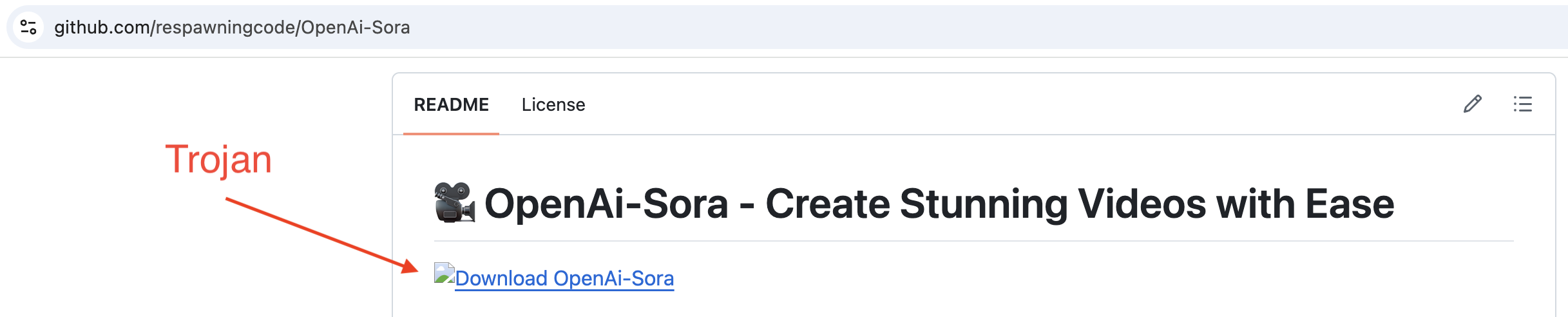
If we download this zip archive and submit individual files from it to VirusTotal, we’ll see the following results:
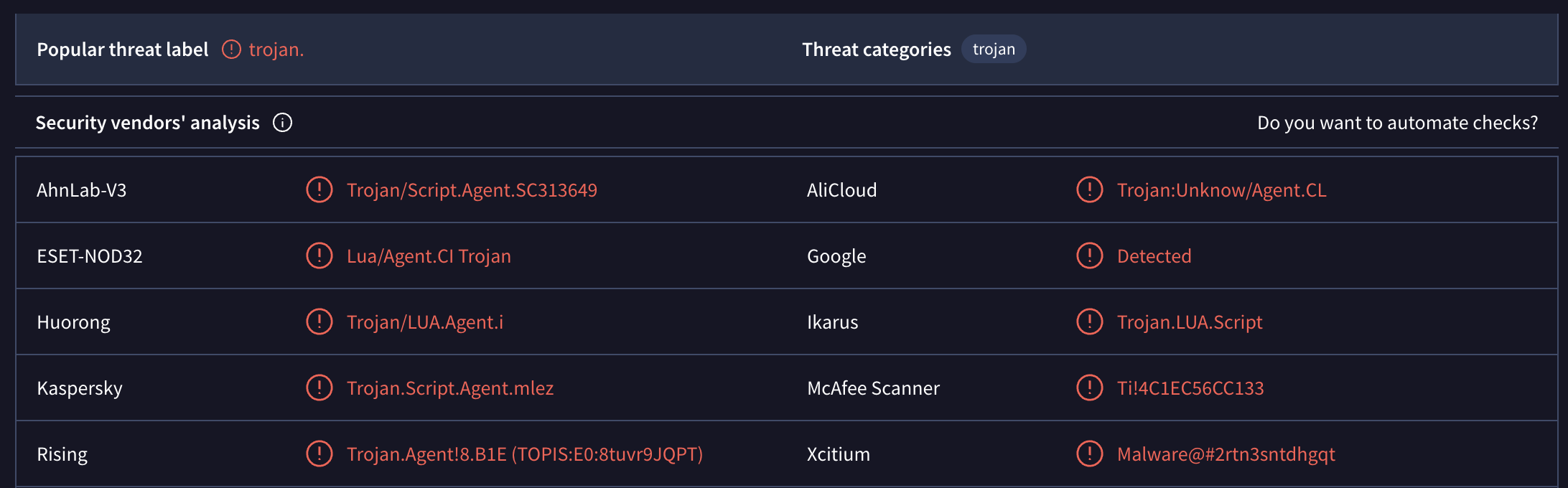
Even a quick glance at these repositories shows that they have the same structure, nearly identical headings, and every heading contains an emoji. That’s all the information we need to find other repositories.
Let’s use the heading "📥 Download" and search for that string on GitHub. But we don’t want to search the entire codebase — just the readme files. Go to github.com and enter the following in the search bar at the top:
path:readme.md "## 📥 Download"
The number of results will always vary. At first, it showed me 9k repositories, but when I went to page 2, there were only 109 repositories. After refreshing the page, it was back to 9k repositories.
In the search output, you’ll need to visually filter out the results that contain any other text besides just the heading. The heading variations will look something like this:
- ## 📥 Download Now
- ## 📥 Download Now Again
- ## 📥 Download the Software
- ## 📥 Download & Install
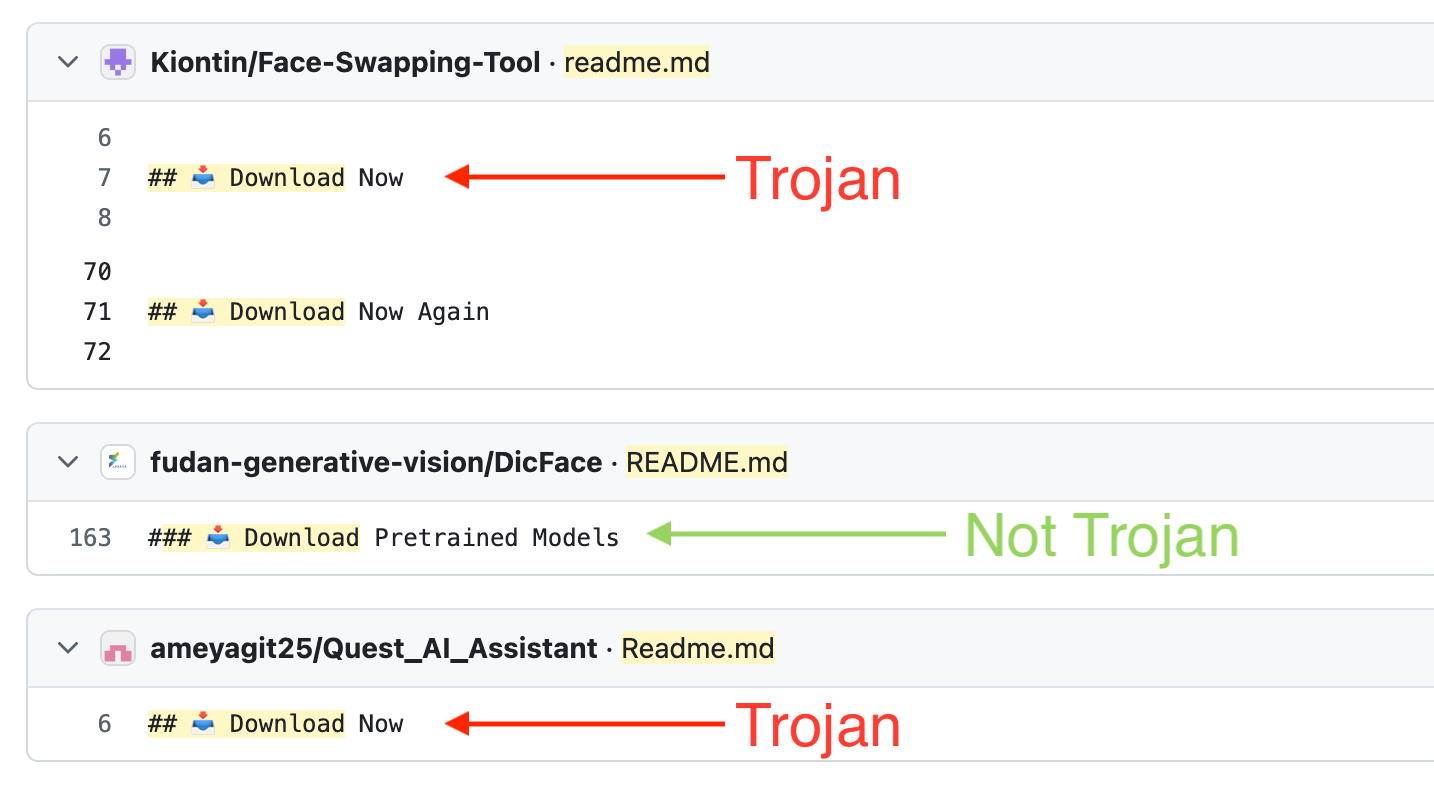
Open these repositories. They will have a link to a zip archive containing a Trojan.
However, the search results will include many legitimate repositories. We can improve the search by adding a search for zip archives. The search string will look like this:
path:readme.md "## 📥 Download" ".zip"
This will significantly improve the results. Now, right in the search results, we can see which repositories contain the heading we need and a link to a zip archive.
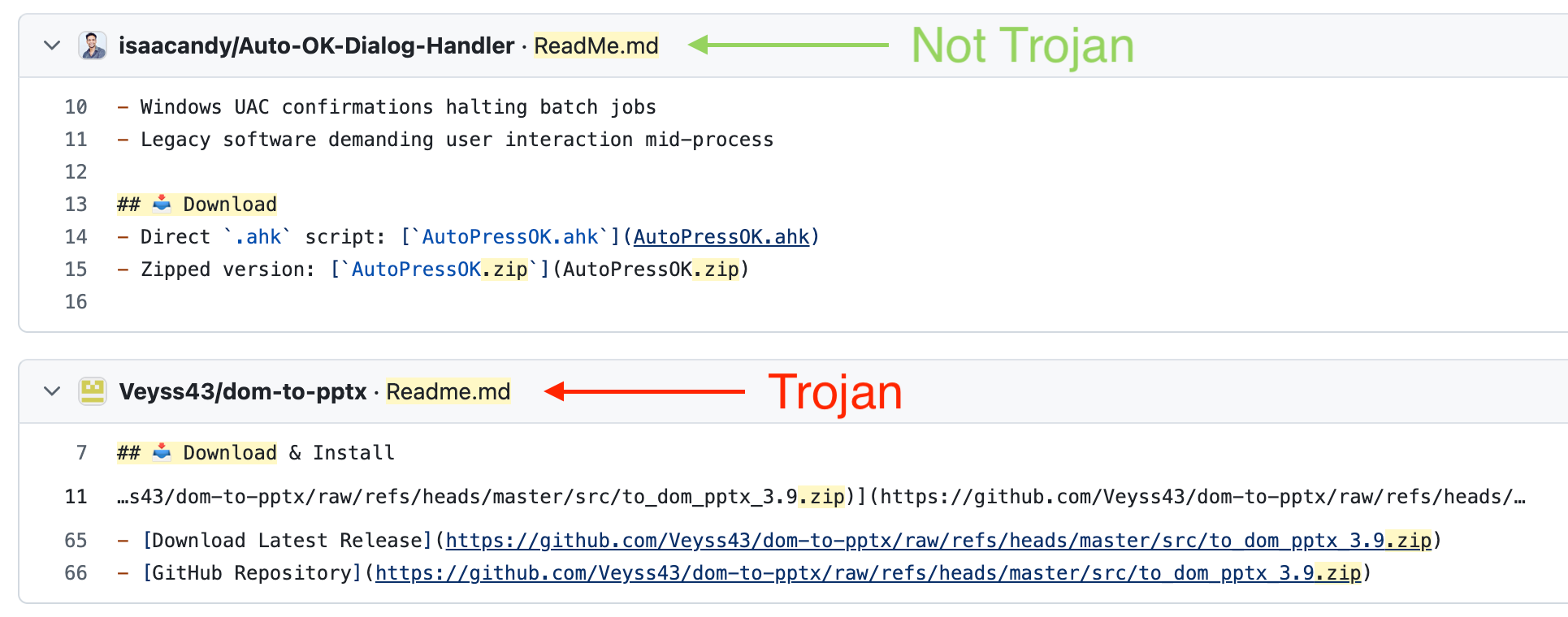
But these results still include legitimate repositories. How else can we refine the search query?
All links to zip archives lead to githubusercontent.com or github.com. Also, the zip archive contains a version number, for example, "Software-3.6.zip". So we just need to write a regular expression to search for such links. But as I said at the beginning, you don’t need any specialized knowledge for this. Any free AI model can handle it. We feed it 10 such links, and after a few iterations, we get this result:
path:README.md /raw\.githubusercontent\.com\/.*\d+\.\d+\.zip|github\.com\/.*\/raw\/refs\/heads\/.*\d+\.\d+\.zip/
Enter this query, and you’ll get the repositories that are distributing the zip archive containing the Trojan. The number of repositories varies. In my case, sometimes there are 111, sometimes 4.4k.
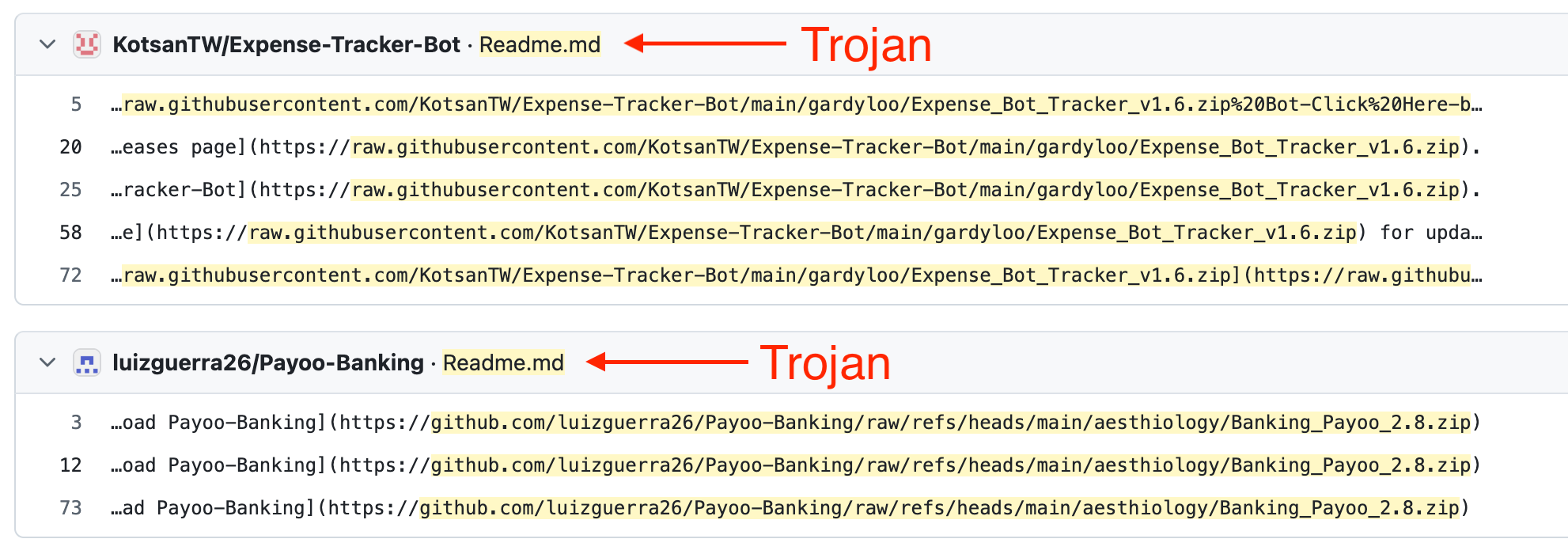
But this entire search only worked because we had an initial list of repositories from which we were able to derive a general search pattern.
Maybe GitHub’s security team didn’t have these repositories?
Maybe they don’t know about this general pattern?
A month ago, I published an article in which I analyzed this scheme in detail. I wrote a script that found 10,000 such repositories. I published the list of all the repositories and the script on GitHub.
The article made it to the Hacker News front page. Other cybersecurity websites wrote about this scheme.
Here is the full list of actions GitHub took:
- They deleted all 10k repositories that the script found.
That’s it. They didn’t do anything else.
What’s more, a few hours later I ran the script again; it found new repositories, and I added them to the article. They weren’t blocked for an entire month. Even though all they had to do was open my article again, grab the new links, and block those repositories. That turned out to be too difficult for them.
But there’s one conclusion we can draw: they’re well aware of this malware distribution scheme.
No matter how hard I try, I can’t find an answer to why this is happening. Microsoft is a corporation with billions in revenue. They have thousands of employees, limitless resources, and artificial intelligence. All they needed to do was allocate a few days for any regular employee so they could use Copilot to find all these repositories and block them.
I’ve never worked at a large company. And I can’t imagine how decisions are made specifically at GitHub, or what bureaucratic nightmare managers have to go through to start combating malicious repositories.
But they deleted all 10k repositories just a few hours after the first article was published.
Why did they stop and take no further action?
Problems with hourly and project-based pay
Imagine you’re working on an hourly basis. How would you answer these questions?
- An idea popped into your head that could improve the company’s financial situation. It came out of nowhere — you weren’t even thinking about it; you were just going about your daily routine. The company doesn’t buy individual ideas; it only pays by the hour. How many hours should the company pay you if you spent 0 hours on this idea?
- You’ve been assigned the task of implementing a certain feature. You remember that you’ve already built this feature before and spent 50 hours on it. You reuse that solution in the current project in 10 minutes. Everything works. The task is complete. Should the company pay for 50 hours or for 10 minutes?
- With the advent of AI agents, things have gotten even more interesting. You know how to use them effectively and delegate a task to them that would have taken you 10 hours to complete yourself. The agent draws up a plan, you review it, the agent carries it out, and you review it. After a few such iterations, the task is completed in 30 minutes. Should the company pay for 10 hours or for 30 minutes?
- You spent 10 hours working on a solution, only to realize that you’d been doing everything wrong all along, and it seems you could have figured this out right from the start and chosen a completely different solution. Should the company pay for that time?
There are two options for the contractor here:
- Don’t work with companies that pay by the hour.
- Artificially inflate the number of hours in your report.
If you choose the first option, you’ll lose half of your potential clients.
If you want to keep your clients and get paid what you want, you’ll have to choose the second option.
If you use a ready-made solution and complete a task in 30 minutes, write in your report that you spent 50 hours on it. This way, when working remotely, you can juggle 2-4 full-time jobs at the same time. You work 30 hours, report 150 hours, and get paid for 150 hours.
Why am I even talking about reports? Managers at companies that pay by the hour want to see a report detailing where those hours were spent. If you simply say that a task took 50 hours without providing any details, you’ll most likely get questions. But if you come up with a plausible explanation of how you spent your time, an effective manager will open the spreadsheet, see the neatly organized information broken down by the hour, and be satisfied with it.
You can argue all you want that this isn’t fair. But if we look at the real world, it turns out that, in most cases, money is a way to live comfortably. The more you earn, the better you live. Of course, you can choose the honest path and hope that your honesty will be properly recognized and that you’ll get some bonus for it down the line. Are you willing to sacrifice your current income for the sake of a hypothetical future?
To prevent this, companies sometimes use apps that automatically take a screenshot of the screen every 15 minutes and ask workers to fill out a report after every hour worked. This weeds out experienced and confident workers. Only those who clearly have trouble finding work — and are willing to accept almost any conditions — remain. What quality of work will the company get if it chooses this approach?
There’s another way to avoid logging three times as many hours. Just set your hourly rate three times higher. But if you want $300 an hour and someone else wants $100, a company hiring based on price will choose the other person, not you. Even if the company ends up paying that other person the same amount, because he’ll report three times as many hours as he actually worked. In that case, your honesty and higher hourly rate will leave you without a job.
Of course, this doesn’t work with ideas. There’s a belief that ideas are worthless, and that only their implementation has value. So if you come up with a brilliant idea to solve a problem, the company won’t pay you for it. Managers believe that this idea is already included in your billable hours. If your hourly rate is $60 and you spent one minute on the idea, then so be it — you’ll get a whopping $1 for the idea. And you can’t write in a report that you spent dozens of hours coming up with that idea. After all, you didn’t conduct any research. This is often why employees don’t share ideas with management at all — ideas that could actually help the company grow.
If there are so many problems with hourly billing, why not simply agree to pay per project or per task? This solves some problems but creates new ones:
- The client must specify the tasks in detail before work begins. What if, after work has started, the client wants to change the requirements or add something? The client will have to renegotiate the terms with the contractor.
- The contractor needs to accurately estimate the timeline and price. However, they don’t yet know what challenges will arise during the project. If their estimates are off and the work takes three times as long, what should they do? Try to negotiate new terms or complete the work under the current terms?
- Sometimes, estimating a project can take many hours. The client may not agree to these terms, in which case the contractor ends up wasting their time on the estimate.
- Different contractors can provide very different estimates for the same project. This depends on the contractor’s experience, the quality of their work, their current workload, and a dozen other factors. How can a client choose the best contractor for a project?
With rare exceptions, I never work on a per-task or per-project basis — neither as a freelancer nor as a client. But I also don’t work on an hourly basis.
I’ve chosen an approach where I’m paid weekly or monthly, with very brief reports or none at all. This works very well for startups with small teams.
When I’m looking for an employee, I discuss their target weekly pay with them. Every few weeks, I assess the value they’ve delivered. I look not only at the tasks they’ve completed, but also at the ideas they’ve proposed, the help they’ve given to other employees, or any other value they’ve added. I don’t care at all how many hours they worked. And I don’t care about their timesheet, because I always know what my employees have been working on.
This approach solves all the problems associated with hourly and project-based billing. But if you’re a contractor, you’ll lose a lot of clients with this approach. The client will ask: what exactly am I paying for? After all, they don’t know what tasks you’ll complete during that period or exactly how many hours you’ll spend on the work. In most cases, they need to see a pretty, detailed report. If you work at a company like this, you have zero leverage over the process. Management works the way it’s always worked and considers its management style to be the right one.
Consider another scenario. A company has agreed with a contractor to pay on a weekly basis, regardless of hours worked. The contractor has been working for several months, has performed well, and the client is very satisfied with their work. But they didn’t work last week. Should the company pay them for that week?
Gurus
I follow a crypto blogger, but I see that almost all of his posts are about how successful he is. He flies business class, buys his wife gifts, and dines at expensive restaurants. But if I wanted to look at your photos, I’d follow you on Instagram, wouldn’t I?
Your profile bio says you’ll teach me how to trade crypto. I followed you to learn something new, but after scrolling through a month’s worth of your posts, I only saw one piece of advice from an AI. How exactly is looking at all your photos going to help me? How will that convince me to buy something from you? Why should I trust you?
Photos of your success don’t explain where that success came from. People could have signed up through your referral links, lost money following your advice, and you would have earned a commission on their losses.
Right, you’ve caught the attention of people who want the same kind of successful life. But how will you get the attention of millionaires? They live much more successful lives than you do. You won’t attract them with a picture-perfect life.
How old are you?
At first, you get used to a single number, confidently give your answer, and then realize you’ve already gotten it wrong by a year. The years fly by so quickly that it’s sometimes hard to remember. You have to calculate the difference between the current year and the year you were born.
That’s why I’ve chosen a different way to answer. I pick a single number and stick with it for the next five years. Or until I’m mentally okay with that number. For example, if I’m between 22 and 28, I say 25.
People probably don’t care about your actual date of birth. If you want to feel younger, say 30, even if you’re 35. Want to seem more mature? Say 25, even if you’re 20.
As you get older, you’ll hear this question much less often than when you were younger. When you’re 17 and someone else is 20, you think they’re smarter and more experienced than you. A difference of a few years seems significant. But when you’re 40 and interacting with someone around the same age, it doesn’t matter to you whether they’re 35 or 45.
And when you have kids, people will often ask you how old your child is. And that’s when you’ll get even more mixed up with the answer.
I discovered a large-scale malware distribution campaign on GitHub
This is the story of how I found 10,000 repositories on GitHub that distribute Trojan malware. They are all from different contributors, have different names, and are not forks of other repositories. But they share a common pattern, which is what allowed me to write a script to find such repositories.
Introduction
I have a project on GitHub, and I wanted to check whether search engines had indexed it. I typed the project name into Google, and my repository appeared in the results. I entered the same query into Bing, and someone else’s repository appeared in the results, with the exact same name and description. It was a copy of my repository with all the commits, and I was listed as a contributor. But an hour ago, another commit was pushed with a change to the readme. A link to a zip archive has been added to it.
I was choosing appropriate tags for another one of my projects on GitHub. I clicked through those tags to look at similar projects. In the list, I found a repository whose name and description matched exactly those of another repository on that list. It turned out that it also contained copies of all the commits from that repository, and two hours ago, a link to a zip archive has been added to the readme.
After monitoring these two repositories, I discovered that every few hours they delete the previous commit and push the exact same commit again. This commit contains only one change: adding a link to the archive in the readme file.
I submitted a request to GitHub support asking them to delete these repositories. Two weeks passed and nothing has changed; GitHub support hasn’t responded. I discussed with an AI what else could be done about this, but it didn’t offer any useful advice. I opened a thread on GitHub, and three people replied with the same AI slop that was of no use at all.
Another month later, GitHub support sent me an email saying that they had removed these repositories.
You can open other similar repositories, look at the latest commit, and see that a link to a zip archive was added to the readme a few hours ago:
https://github.com/lucioloprey/OcyShield-Framework
https://github.com/luigi1973/AssetRipper-CLI
The zip archive contains 4 files:
- Application.cmd or Launcher.cmd
- loader.exe or luajit.exe or another_name.exe
- random_name.cso or random_name.txt
- lua51.dll
If you submit a link to the archive to VirusTotal, it will find 0 viruses.
If you submit the zip file itself, it will detect a Trojan inside it.
Continued
It seemed like I had already forgotten about this event, but my subconscious hadn’t. And my subconscious often throws interesting ideas at me when I’m sleeping or waking up. Recently, I woke up and in the very same second realized what I needed to do. I need to come up with a general pattern and then write a script that will analyze all GitHub repositories and find the ones that match that pattern.
Search pattern:
- Every few hours the previous commit is deleted and a new one is pushed
- Only the readme file is updated in the commit
- The readme file contains a link to a zip archive
- The commits are copied from another repository
- This is a new repository, not a fork
- All repositories have different contributors and different names
From the last two points, it becomes clear that even if we find one such repository, we won’t be able to find other similar repositories using it. But there are 500 million repositories on GitHub. How can we analyze all of them? GitHub allows 5,000 requests per hour with a single token. For each repository, we need to make several requests to get the list of commits, modified files, and the content of the readme file. I didn’t want to wait a year for the script to analyze all the repositories.
But we don’t need all the repositories, we only need the ones that are updated every few hours. I found a service called gharchive, which lets you download all GitHub events for any given day. So we need to download the event archives for the last few days, filter them to include only commit push events, and identify the repositories that are updated between 2 and 10 times every 10 hours.
Over the past 5 days, there have been 16 million commit pushes. Of these, only 3,000 are repositories that are updated every few hours.
However, the events do not include information about which specific files were modified. This means that for each relevant repository, we need to make additional requests to the GitHub API.
After running the script, it returned a large number of repositories. I added several parameters to the filters:
- The commit must be from a user, not a bot
- More than a month has passed between the last commit and the one before that
- The repositories have more than one contributor
After that, only 14 repositories were found that fully matched the pattern. And I couldn’t stop wondering: why were there so few repositories? What are the odds that I stumbled upon these repositories two months ago and there are only 14 of them on the entire GitHub? There should be many more. Imagine what the headline of this article would have been if I’d found a million such repositories or even just a thousand.
But I accepted the fact that there were only 14 of them and started writing this article. I decided to double-check them one more time so I wouldn’t accidentally include any unnecessary repositories in the article. Imagine my surprise when I saw that they had all been updated 20 hours ago. So the “updated every few hours” parameter was completely wrong. The filter had discarded all repositories that are updated infrequently.
During my manual check, I also noticed repositories that contained a link to a zip archive and had a recent commit, but that commit had zero changes. The filter, however, only considered repositories where a single readme file had been modified in the latest commit.
I also noticed that the last commit in all of these repositories had the same name: “Update README.md”.
I changed the filter. Now the script searched for repositories that were updated between 1 and 24 times every 24 hours. It found 40,000 such repositories.
There were 10,000 repositories that exactly matched the pattern. That’s 25% of the total.
Each of these repositories contains a zip archive with a Trojan.
These repositories have been around for many months, some even for over a year, and GitHub does not automatically detect and delete them.
I’ve published a complete list of these repositories on GitHub.
A script for finding such repositories: Git Malware Finder
Open Questions
- Why do they only clone new repositories, rather than popular ones?
- Why do they delete a commit and push a new one every few hours?
- Why doesn’t GitHub automatically detect such repositories?
- What exactly does the executable exe file from the archive do?
- What is the actual scale of this campaign?
My Hypotheses
The hackers’ goal is to understand how the system works, find its limitations and vulnerabilities, and exploit that information. If overwriting commits helps bypass GitHub’s security algorithms, then that’s what they did. Perhaps that’s also why every commit is named “Update README.md”.
The second goal is to spread the virus. How do they get people to find and download it? I think they do this by cloning only new repositories, which immediately appear at the top of search engine results for low-volume search terms. They also add these repositories to popular GitHub tags to increase the chances of indexing and to help people find them through those tags.
But why do they copy all the commits and contributors? After all, they could have just copied the entire source code. This is likely done to build trust. When someone visits a repository, they see the contributors, can click through to their profiles, and see that these aren’t one-day accounts. And the commit history is preserved so it’s clear that the repository didn’t just appear yesterday. But perhaps this is also done to bypass GitHub’s algorithms.
These are just my assumptions, but the reality may be completely different.
Conclusion
I was subject to GitHub’s API limit of 5,000 requests per hour. I optimized the script to search only for relevant repositories, and I think that because of the filter, the script found only a small percentage of repositories. The GitHub team does not have such limitations. They can analyze all 500 million repositories, find any archives or executable files within them, and scan them for viruses.
This time, I won’t be sending a request to GitHub. There are simply too many repositories. If any of you have direct contact with GitHub’s security team, please send them a link to this article.
* Update
I found this article from April 18: How 109 Fake GitHub Repositories Delivered SmartLoader and StealC
It explains in detail how this Trojan malware works. At that time, the author had found 109 such repositories.
* Update 2
GitHub has started deleting all the repositories that the script found. Most of these repositories have already been deleted.
* Update 3
I found a post on Reddit that mentioned this scheme. It was posted in February 2025, almost 1.5 years ago: If you’re creating new repositories, they are being spoofed to host malware
* Update 4
GitHub deleted only the repositories I listed in the complete list in a txt file. Then I ran the script again, it found new repositories, and I added them to this article. 14 days have passed, and these repositories have not been deleted. GitHub has no way to search for these repositories. They didn’t run my script, and they didn’t write their own script. They didn’t even open this article to see if the list of repositories had changed. They only delete repositories that are reported to them, but they don’t do anything else. That’s why this scheme has been going on for several years now, and will most likely continue.
* Update 5
Someone sent me this article: The rise of malicious repositories on GitHub. In it, the author identified the same pattern for distributing zip archives. Just enter “path:README.md /software-v.*.zip/” into the GitHub search bar, and you’ll get a list of such repositories. What’s noteworthy is that some of them haven’t been updated in half a year, while others are forks of other repositories. But more importantly, I saw repositories in the search results where the readme was updated just 30 minutes ago. Can you believe it? The GitHub team doesn’t even need a script. They can find these repositories with a simple search.
* Update 6
Another article: FakeGit: LuaJIT malware distributed via GitHub at scale. It provides a detailed account of the stages in the development of this scheme, from the initial deployment of the smart contract in March 2025 to the present day. It also includes a detailed analysis of the entire infrastructure, IP addresses accessed by the Trojan, and the hashes of the archives with links to VirusTotal.