Explore, test, and check regular expressions in the terminal.
Project Tree
update build instructions
Michael03 authored 7 years ago
crex
assets
src
README.md
crex
Explore, test, and check regular expressions in the terminal.
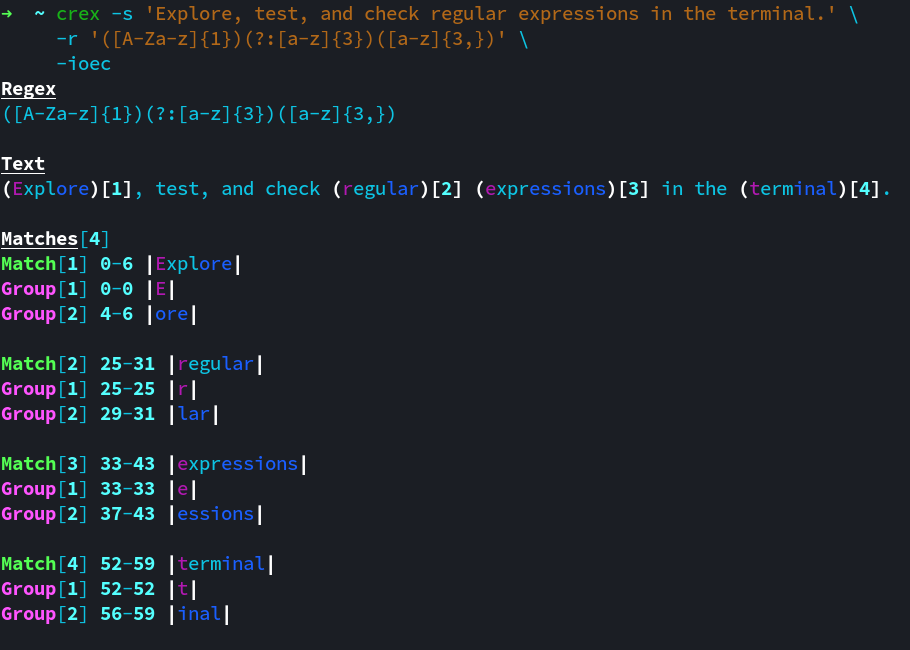
Given your regular expression and text, crex will output matches, capture groups, and details. crex has a range of options, allowing fine grained control over matching and output. It uses ECMAScript grammar by default, while also accepting posix, extended posix, awk, grep, and extended grep grammars. Input can be received by piped stdin, or by using the -s option. Output options include plain, colour, and json formats.
Build
Environment:
- tested on linux
- c++ 14 compiler
- cmake
Libraries:
- my parg library, for parsing cli args, included as
./src/parg.hh
The following shell commands will build the project:
1
2
3
git clone <repo_url>
cd crex
./build.sh -r
To build the debug version, run the build script without the -r flag.
Install
The following shell commands will install the project:
1
./install.sh -r