Stop wasting time arranging windows. Transform chaotic windows into organized layouts. Work smarter, not harder.
💚 Risk-Free Trial 💎 Lifetime License 💻 Transfer to New Mac Anytime
Split screen, snap & tile windows with keyboard shortcuts
Your Workflow, Perfected
Choose your preferred interaction method – or use all three. MacTiler adapts to your workflow.
Click & Apply
Select a layout from the menubar and instantly position 2-4 windows. Click again to reorder windows within the same layout.
- Multi-window positioning
- Reorder with repeated clicks
- Preview before applying
Keyboard Shortcuts
Lightning-fast navigation between zones with intuitive shortcuts. Fully customizable to match your muscle memory.
- Intuitive default shortcuts
- Fully customizable bindings
- Move to any zone instantly
Drag & Drop
Drag windows to see visual zone highlights. The highlighted zone is where your window will be placed. Toggle on/off anytime.
- Visual zone highlighting
- Clear drop target preview
- Quickly toggle on/off
MacTiler speaks your language
You can use MacTiler with full native translation.
🇺🇸 English 🇩🇪 Deutsch 🇫🇷 Français 🇪🇸 Español 🇮🇹 Italiano 🇵🇹 Português 🇳🇱 Nederlands 🇸🇪 Svenska 🇩🇰 Dansk 🇵🇱 Polski 🇷🇺 Русский 🇸🇦 العربية 🇮🇱 עברית 🇯🇵 日本語 🇰🇷 한국어 🇨🇳 简体中文 🇹🇼 繁體中文
Professional Window Management for Mac
Split screen, snap windows, or use keyboard shortcuts - MacTiler adapts to your workflow.
Three Columns Layout (30% - 40% - 30%)
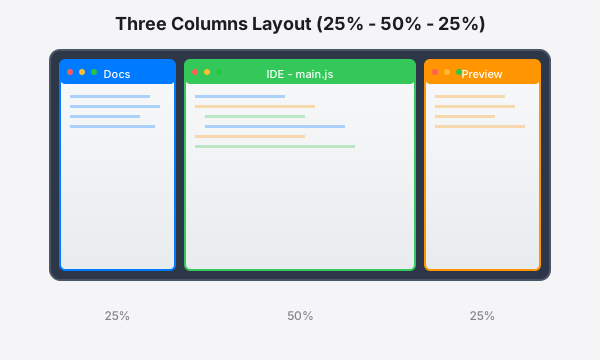
Perfect for development: Documentation (30%), IDE (40%), and live preview (30%). Available also with 25-50-25 ratio for ultrawide monitors.
Quartet Layout (4 × 25%)
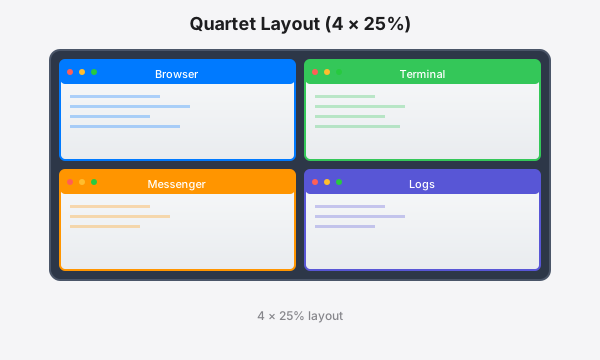
Monitor everything at once: browser, terminal, messenger, and logs in perfect harmony.
Vertical Split (50% - 50%)
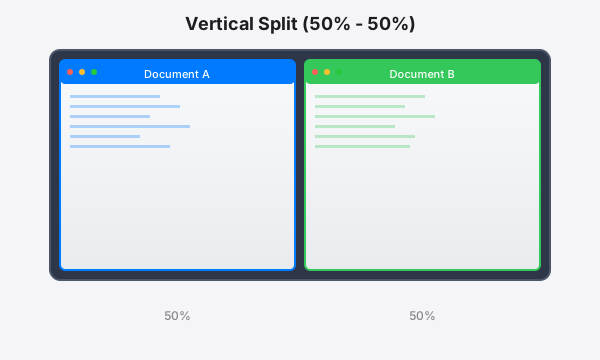
Classic side-by-side for comparisons, code reviews, and collaborative editing.
Horizontal Split (50% - 50%)
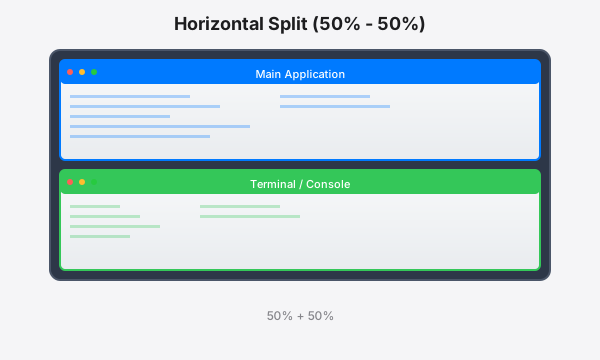
Stack windows vertically: main application on top with terminal or logs below for monitoring output.
Three-Window Mode
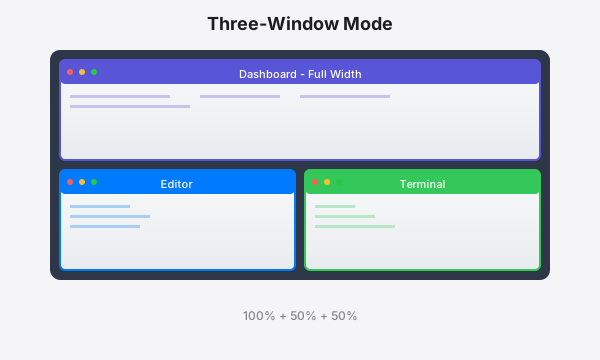
Dashboard or overview on top, with editor and terminal side-by-side below.
Three-Window Mode (Bottom Full Width)
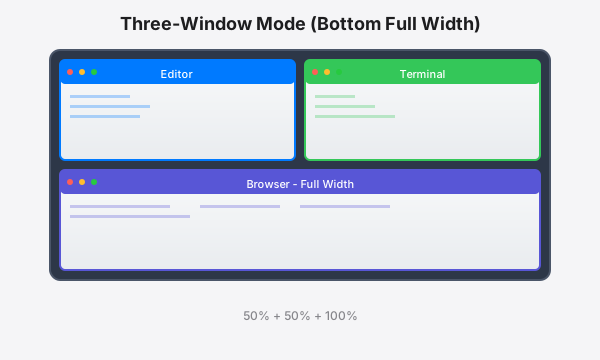
Editor and terminal on top, with browser or logs spanning the full width below.
Asymmetric Split (30% - 70%)
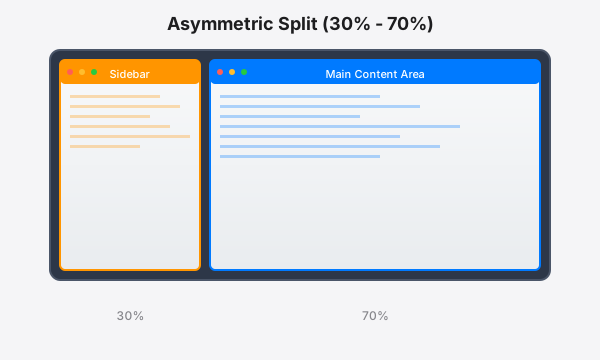
Compact sidebar (30%) for navigation or tools with main content area (70%) for focused work.
Asymmetric Split (70% - 30%)
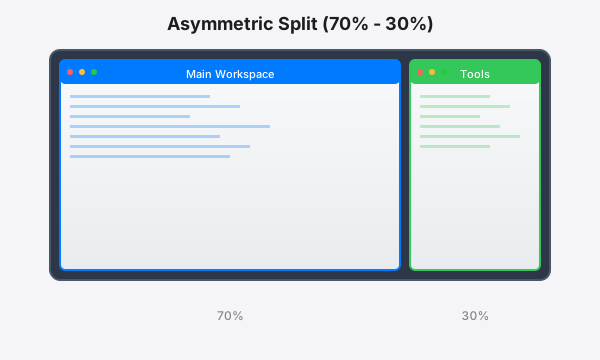
Large workspace (70%) for main content with dedicated tools panel (30%) for quick access.
Left Split (50% - 25% - 25%)
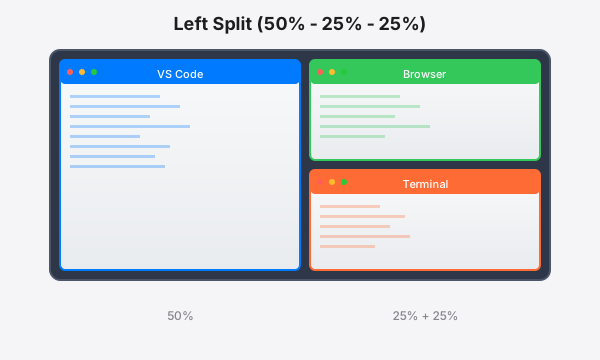
Full-height main window on the left with two stacked windows on the right for monitoring and tools.
Right Split (25% - 25% - 50%)
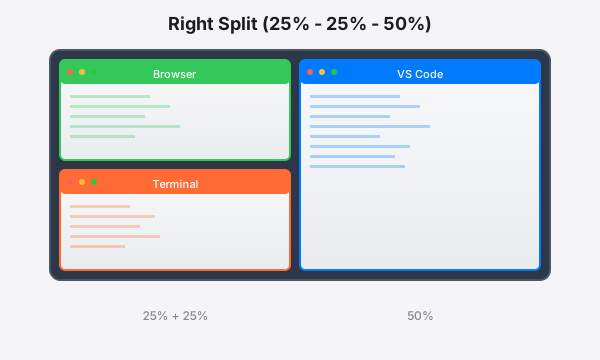
Two stacked windows on the left for quick access with full-height main workspace on the right.
Master Multiple Monitors
Move Single Window
Send any window to another screen
→
Swap All Windows
Swap content between monitors
⇄
Frequently Asked Questions
macOS has built-in Split View, but it's slow and limited. MacTiler makes split screen effortless with drag-and-drop zones, keyboard shortcuts, and support for 3+ windows. Unlike native Split View, MacTiler gives you instant layouts without hovering or manual adjustments.
Yes! MacTiler includes intuitive keyboard shortcuts for instant window positioning. All shortcuts are fully customizable to match your workflow. Move windows to any zone, switch layouts, or snap to specific positions - all without touching your mouse.
MacTiler organizes windows automatically with pre-defined layouts. Simply select a layout from the menubar, and MacTiler instantly positions your windows.
Yes! MacTiler treats each monitor independently, so you can organize windows on each screen separately. Move windows between monitors, apply different layouts to each display, and even swap all windows between screens with one command while preserving their layouts.
Unlike competitors who lock licenses to specific devices, MacTiler lets you deactivate on your current Mac and activate on a new one anytime. Simply deactivate from the old device, and your license slot becomes available for the new Mac. Perfect when upgrading or replacing your computer.
Personal
Perfect for individual users
$19.99
one-time payment
Just one Mac
- ✓ Activate on 1 Mac
- ✓ Transfer to new device anytime
- ✓ Lifetime license
- ✓ Free lifetime updates
- ✓ Email support
$19.99 per Mac
⭐ MOST POPULAR
Family Pack
Best for families & small teams
$37.49
$59.97
one-time payment
Up to 3 Macs
- ✓ Activate on up to 3 Macs
- ✓ Share with family or team
- ✓ Lifetime license
- ✓ Free lifetime updates
- ✓ Priority email support
- ✓ Transfer licenses anytime
$12.49 per Mac
💎 BEST VALUE
Business Pack
For teams & power users
$49.99
$99.95
one-time payment
Up to 5 Macs
- ✓ Activate on up to 5 Macs
- ✓ Perfect for small teams
- ✓ Lifetime license
- ✓ Free lifetime updates
- ✓ Priority email support
- ✓ Transfer licenses anytime
$9.99 per Mac
🎯 Risk-Free Option
Not Ready to Buy? Try It Free!
Test every feature for 14 days with zero commitment.
✓ No credit card • ✓ No signup hassle • ✓ Full access
100% Risk-Free: All purchases include a 30-day money-back guarantee. If you're not satisfied, we'll refund you in full. No questions asked.