On this page…
I got my Xteink X4 on April 27th, 2026. In a twist of fate, I accidentally ended up with two. A shipping mishap lead me to think it wasn’t coming, so I purchased a second one while waiting for the first, and they both showed up on the same day. By this point my youngest was interested, and I ended up setting one up for me and the bonus one for them.
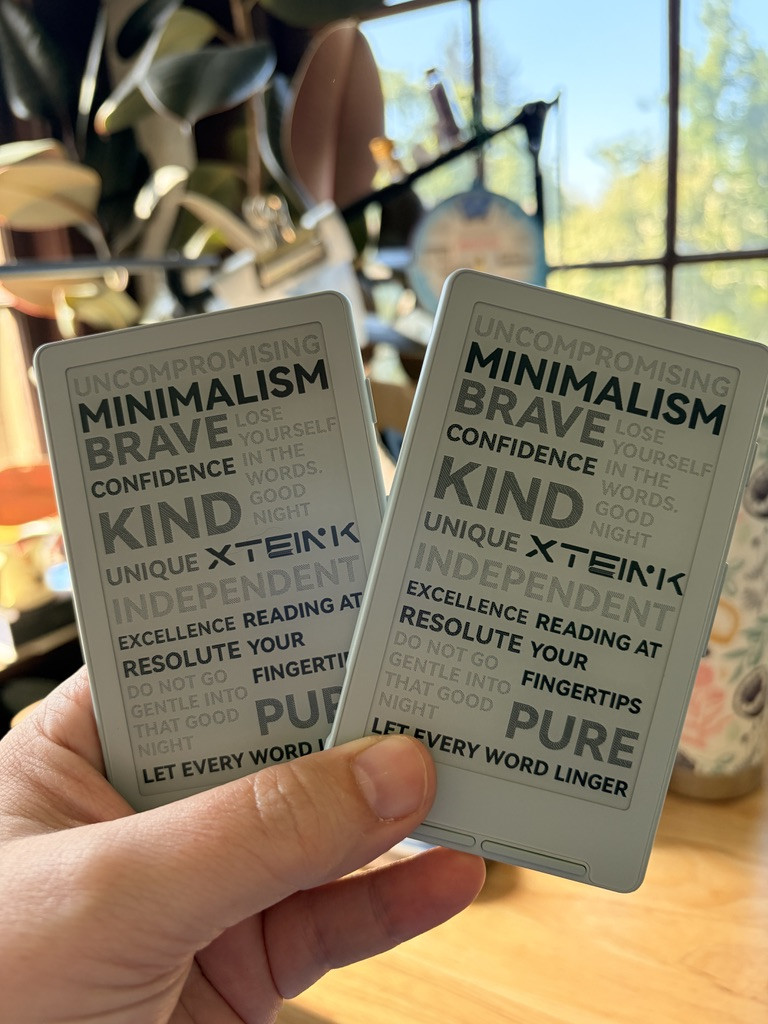
Getting mine up and running
I’m not a technical person, and I also have a chronic illness that gives me brain fog as a fun side effect, which means I struggled a bit getting started. Here are all the things I did, and the info and sources I used to get mine set up.
Read beforehand
The Xteink subrredit - chock full of tips. Check out their highlights reel at the top of the page for little guides to different aspects of using and setting up the Xteink. Especially this page: Just got your new Xteink? Start here!
readme.club - the official Xteink Community. It’s free to join (here’s my profile). A great place to find wallpapers, which are images that appear on the screen when it’s in Sleep mode. Once you get an account, the site can also generate a Lost and Found image for sleep mode that has a message (which you edit) and a QR code for anyone who finds your ereader and wants to get it back to you.
Unboxing
The units come with their own firmware, and then they have MicroSD cards as well, which is good to know because you can replace those with new ones if you want. The cards they come with are 32 GB which will only store 30,000 to 60,000 novels, so of course I got a 128 GB one to use instead (mine is a Sandisk 128 GB Ultra). Besides fulfilling the dream of Having All The Books With You At All Times, which is a good dream, the other nice thing about buying a name brand MicroSD is that apparently they’re a bit more reliable, or so some YouTube videos said about the topic.
You should charge up the battery before you muck about with it, or so some online instructions said, but I didn’t read that in time and it was okay. It turned out that both batteries were at 98% anyway.
No. 1 - Can you just put the new ginormous MicroSD card in there? Without messing up any software or anything?
Turns out yes, it was that easy. I just took the old one out and put the new one in, before I did anything else. There was no magic smoke or tiny explosion.
No. 2 - Crosspoint - what is it and why do I want it?
It’s a new firmware, I think it fully replaces the original firmware based on the fact that you’re supposed to make a backup of the one your Xteink comes with, just in case everything goes terrible wrong (kidding - it’s super safe). Be aware that making this backup takes about half an hour. You’ll need something to do. I recommend tea and toast.
Crosspoint is desirable because it’s better than what the Xteink comes with natively, and it’s also open-source! It has much better customization features, and from what I can tell, is just prettier. And it’s made by the community, which is very cool.
Installing it:
The Xteink’s readme.club community’s Crosspoint info page points you to this GitHub repository, which, if you’re not familiar with GitHub, is where coders put their code, and the site can feel pretty intimidating if it isn’t familiar. If that’s you, don’t feel bad.
Go here: https://github.com/crosspoint-reader/crosspoint-reader
And don’t worry about downloading anything, just scroll to the text at the bottom. Read the list of features you’re about to enjoy, and then get to Installing, and follow the ones for Web (latest firmware). That worked great for me. It involves opening up a new web page they link to (this one), and following the instructions listed.
While you’re at it, open up the User Guide. That will come in handy later.
No. 3 - Where do you put your books?
I made a folder at the root of my MicroSD card and called it “books”.
In that, I created a similar sort of file tree that I have on my KOReader/Kobo. Then I stocked my little digital booksheleves (i.e. named folders) with books, all in EPUB format.
No. 4 - Where do you put the wallpapers?
The User Guide has instructions here.
Create a folder in the root of your MicroSD called .sleep (Mac users, you can toggle on the visibility of hidden folders - of which a folder name that starts with a period is one - by hitting SHIFT-COMMAND-period, which will then let you create a folder and name it .sleep).
Go to here and download a bunch of wallpapers.
You want the files to be in .bmp format, so if they aren’t, go here and convert those puppies.
Put the .bmp files into your .sleep folder.
Put the MicroSD card back in your Xteink. Go to Settings and read this User Guide page for how to set them.
Now, when you turn off your Xteink, you’ll have a fun image instead of the Crosspoint logo.
No. 5 - FONTS
Theoretically you can change the fonts on your Xteink (my favorite font is Andika), but tonight when I was trying to do that, I didn’t get very far. I used this site to convert .tff files to .bin files, but then I couldn’t figure out where to put them so that they would show up in Crosspoint’s Settings. But also, I was brain fogged and exhausted and somehow managed to do all this other stuff, so I figure I’ll get the fonts thing settled later, when I have more energy.
Reviews of the Xteink
It was Joel’s blog post that made me take a second look at the Xteink! I had seen some discussion about it late in 2025 but read just one post about the text being wonky, and I quickly abandoned the idea. Joel’s post brought me back!
⭐️ New Xteink? Watch this: Reading, using Crosspoint & other Xteink tips and basics (great tips!!)
This E-Reader Changed My Life: Xteink X4 Review (short and good)
Playing around with my Xteink X4 and my experience was... Simple (the first time I saw someone put theirs in a passport-sized Traveler’s Notebook <swoon>) 📘
Keeping a tiny e-reader inside my journal | xteink x4 ereader & traveler’s notebook (another person putting theirs in a passport Traveler’s Notebook!) 📘
I've used the Xteink X3 for a week and it's miraculous, but is it TOO small to actually read on? - by CriminOlly. The answer? No, it’s not too small, he likes it. This guy does videos on a genre I don’t even read that often, but he gives such great reviews that I often watch them anyway. At the end, he describes benefits to the X4, namely that the X4 is already small enough, and the teensier-ness of the X3 doesn’t give you much added benefit (and it requires a fancier power cord as well, which he’s afraid of losing, whereas the X4 has a USB-C, easy to find).