
How to install
General instructions
A simple cabal install hs-tango should suffice to build and install the library, as you would for any other Haskell library. Of course, you need to have the development packages for Tango (namely “cpptango”) installed.
The Tango documentation has instructions on how to install Tango for different operating systems. On Debian and Ubuntu, for example, you can do apt install libtango-dev.
With Nix
If you’re using the Nix package manager, you have to enable flakes, and then use the accompanying flake.nix. To get Tango, it uses the tango-flake from your truly. You can simply clone the repository, do nix develop, and then cabal build.
Usage
Client, reading attributes
There is haddock documentation available. But just to illustrate how to use the library, here’s a little client example:
{-# LANGUAGE OverloadedStrings #-}
module Main where
import Tango.Client(
  parseTangoUrl,
  withDeviceProxy,
  getTimeout,
  AttributeName(..),
  readBoolAttribute,
  readBoolSpectrumAttribute
)
main :: IO ()
main =
  case parseTangoUrl "sys/tg_test/1" of
    Left e -> error "couldn't resolve tango URL"
    Right deviceAddress -> withDeviceProxy deviceAddress $ \proxy -> do
      timeout <- getTimeout proxy
      putStrLn $ "proxy timeout is " <> show timeout
      booleanResult <- readBoolAttribute proxy (AttributeName "boolean_scalar")
      putStrLn $ "boolean_scalar is " <> show booleanResult
      booleanResultBetter <- readBoolAttribute proxy (AttributeName "boolean_scalar")
      putStrLn $ "boolean_scalar better is " <> show booleanResultBetter
      booleanSpectrumResult <- readBoolSpectrumAttribute proxy (AttributeName "boolean_spectrum")
      putStrLn $ "boolean_spectrum is " <> show booleanSpectrumResult
Client, subscribing to events
In this example, we are subscribing to changes in the attribute boolean_scalar and waiting for two changes (the forM_ loop).
{-# LANGUAGE BlockArguments #-}
{-# LANGUAGE ImportQualifiedPost #-}
{-# LANGUAGE OverloadedStrings #-}
{-# LANGUAGE ScopedTypeVariables #-}
module Main where
import Control.Concurrent (newChan, readChan, writeChan)
import Control.Monad (forM_)
import Control.Monad.IO.Class (liftIO)
import Data.Int (Int16)
import Data.Text.IO qualified as TIO
import Tango.Client
main =
  case parseTangoUrl "sys/tg_test/1" of
    Left e -> error "couldn't resolve tango URL"
    Right deviceAddress -> withDeviceProxy deviceAddress \proxy -> do
      timeout <- getTimeout proxy
      chan <- newChan
      let attributeName = AttributeName "boolean_scalar"
          eventCallback attribute bool = liftIO do
            boolValue <- readBoolAttribute proxy attributeName
            putStrLn $ "got a change: " <> show boolValue
            writeChan chan True
      pollAttribute proxy attributeName (Milliseconds 2000)
      withSubscribedEvent proxy attributeName ChangeEvent False eventCallback do
        forM_ [0 .. 2] \_ -> do
          putStrLn "waiting for change"
          _ <- readChan chan
          putStrLn "received change"
Example: Web Astor
Under benchmark in the .cabal file, you will find web-astor, which is a web-based implementation of the Astor starter overlay. It runs on localhost:8081 and displays a HTML version of Astor, asking for a Tango host. The code is short and should be fairly easy to grasp. A screenshot of that should explain it well:
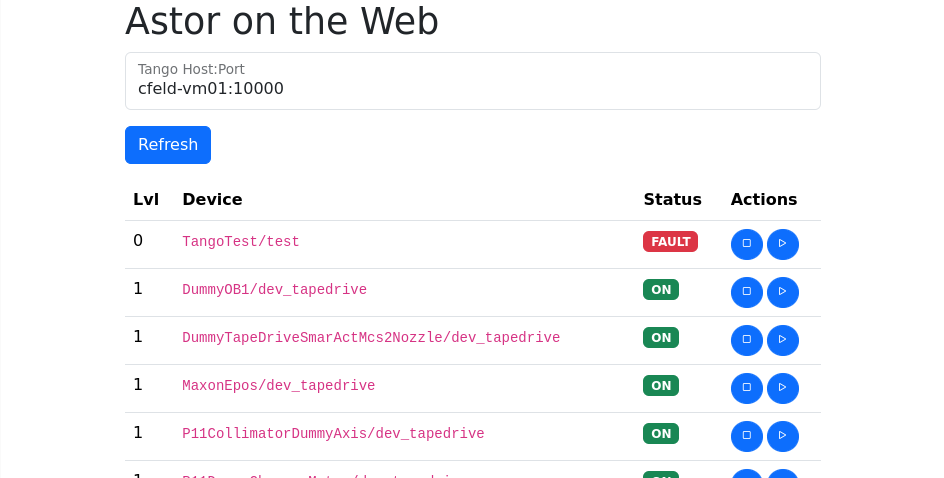
The example uses Servant and Lucid to render the HTML.
What’s missing
- Server: Everything
- Client
- Setting advanced attribute properties, specifically event-related ones like
rel_changeand the period for periodic events. This is no technical difficulty, you just have to write the code. - Commands returning or receiving an
UInt32. I’m not sure how to handle this, since tango has no such data type. - In event callbacks, it would be good to transport more information like the list of errors, not just a boolean (see cppTango’s
event.h) - Dynamic attribute properties such as the “quality” (currently we’re only exporting read/write value)
- Setting advanced attribute properties, specifically event-related ones like
Rationale for the used dependencies
derive-storableso that we can just declare data types as records, and have CStorableinstances generatedtextto replaceStringfor textual data (ByteStringmight have been an option, we haven’t decided yet)unliftioto have the opssibility to have code running inMonadIO