
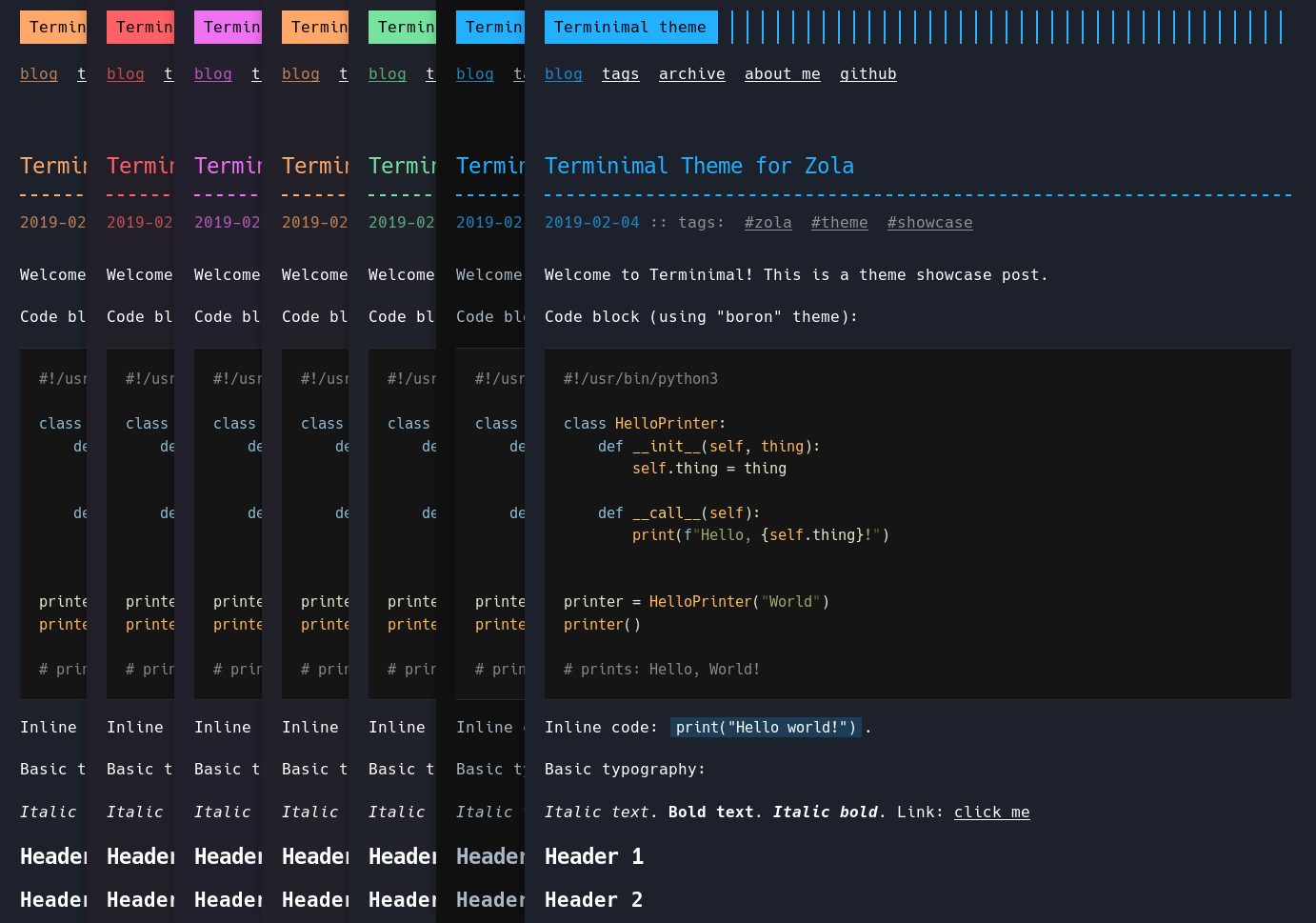
See the live demo (of the default configuration) here: https://pawroman.github.io/zola-theme-terminimal/
Tested with Zola v0.19.2.
Please note that earlier (and older) versions might not work because of breaking changes across Zola versions.
Fork disclaimer
This theme is a fork (not a port) of "Terminal" Hugo theme by Radosław Kozieł (aka. panr): https://github.com/panr/hugo-theme-terminal
Many thanks for that outstanding original theme, Radek!
For more information about this fork and the differences to the original theme, please see: Changes compared to the original theme below.
Versioning
This theme used to be non-versioned, e.g. you'd pull the master branch, and occasionally new features or fixes would be released.
Starting from version v1.0.0, the project adopted Semantic Versioning.
Please check the GitHub releases to see a change log and work out if there's any breaking changes.
How to start
Option A: clone the theme directly into your Zola site folder:
$ git clone https://github.com/pawroman/zola-theme-terminimal.git themes/terminimal
Option B: include it as a git submodule (it's better if you plan to use CI builders):
$ git submodule add https://github.com/pawroman/zola-theme-terminimal.git themes/terminimal
Then in your config.toml set:
theme = "terminimal"
# Sass compilation is required
compile_sass = true
Also see the Zola documentation on using themes: https://www.getzola.org/documentation/themes/installing-and-using-themes/
Shortcodes
The theme adds two custom shortcodes related to image handling.
image
Used to show images.
Required arguments:
src
Optional arguments:
altposition(center [default] | left | right)style
Example:
{{ image(src="/img/hello.png", alt="Hello Friend",
         position="left", style="border-radius: 8px;") }}
figure
Same as image, but with a few extra optional arguments:
caption(supports markdown)caption_position(center [default] | left | right)caption_style
Example:
{{ figure(src="http://rustacean.net/assets/rustacean-flat-gesture.png",
          style="width: 25%;",
          position="right",
          caption_position="left",
          caption="**Ferris**, the (unofficial) Rust mascot",
          caption_style="font-style: italic;") }}
OpenGraph
To add an image to a post, set the og_image extra option to the desired image
in the same directory of the markdown file:
[extra]
og_image = "colocated_image.png"
Additionally, for the section pages and for posts to have a fallback image, add
default_og_image to the [extra] section:
[extra]
default_og_image = "static/ocean.jpg"
Configuration
Only show the post's description
On each post you can specify the following:
description = "test description"
[extra]
show_only_description = true
This will render test description under this
particular post on the homepage instead of a summary.
Colors
Both the accent colors and background colors are configurable.
By default, both accent and background are set
to blue.
To configure menu, add this in [extra] section
of your config.toml:
[extra]
# One of: blue, green, orange, pink, red.
# Defaults to blue.
# Append -light for light themes, e.g. blue-light
# Or append -auto, e.g. blue-auto
accent_color = "green"
# One of: blue, dark, green, orange, pink, red, light, auto
# Enabling dark background will also modify primary font color to be darker.
# Defaults to accent color (or, if not accent color specified, to blue).
background_color = "dark"
Logo text and link
You can set the "logo" text and what it links to,
by modifying config.toml like so:
[extra]
# The logo text - defaults to "Terminimal theme"
logo_text = "My blog"
# The logo link - defaults to base_url.
logo_home_link = "/take/me/away!"
Author and copyright
You can set the footer's copyright author name like this:
[extra]
# Author name: when specified, modifies the default
# copyright text. Apart from author, it will
# contain current year and a link to the theme.
author = "My Name"
If you don't like the default copyright text, you can set it to completely custom HTML:
[extra] # Copyright text in HTML format. If specified, # entirely replaces default copyright and author. copyright_html = "My custom <b>copyright</b>"
Menu
The menu is optional, static (all items are always shown, no matter what the screen size) and fully user-configurable.
To configure menu, add this in [extra] section
of your config.toml:
[extra]
# menu is enabled by adding menu_items (optional)
menu_items = [
    # each of these is optional, name and url are required
    # $BASE_URL is going to be substituted by base_url from configuration
    {name = "blog", url = "$BASE_URL"},
    # tags should only be enabled if you have "tags" taxonomy
    # see documentation below for more details
    {name = "tags", url = "$BASE_URL/tags"},
    {name = "archive", url = "$BASE_URL/archive"},
    {name = "about me", url = "$BASE_URL/about"},
    # set newtab to true to make the link open in new tab
    {name = "github", url = "url-to-your-github", newtab = true},
]
Tags
The theme optionally supports tags. To enable them, create
a "tags" taxonomy in your config.toml:
taxonomies = [
    {name = "tags"},
]
Enabling tags will create a new /tags page, and
cause them to show up in archive section. Note
that you still need to create a menu link to the tags
page manually.
Pagination
Pagination is fully supported for post list (main site) and intra-post (you can navigate to earlier and later posts).
To make sure pagination works properly, you must first configure
it in content/_index.md:
+++
# number of pages to paginate by
paginate_by = 2
# sorting order for pagination
sort_by = "date"
+++
Then, tweak the theme's pagination config in config.toml:
[extra]
# Whether to show links to earlier and later posts
# on each post page (defaults to true).
enable_post_view_navigation = true
# The text shown at the bottom of a post,
# before earlier/later post links.
# Defaults to "Thanks for reading! Read other posts?"
post_view_navigation_prompt = "Read more"
Language code
Internationalization / translation is not supported but you can set the HTML language code for your site:
default_language = "en"
Hack font subset
By default, the theme uses a mixed subset of the Hack font. Normal weight font uses full character set (for Unicode icons and special symbols), but all others (bold, italic etc) use a limited subset.
This results in much smaller transfer sizes, but the subset might not contain all the Unicode characters you need.
You can enable full unicode support in config.toml:
[extra]
# Use full Hack character set, not just a subset.
# Switch this to true if you need full unicode support.
# Defaults to false.
use_full_hack_font = true
Also see Hack's docs.
Favicon
The theme supports adding a global favicon (applies to all pages) to the site:
# Optional: Global favicon URL and mimetype.
#           Mimetype defaults to "image/x-icon".
#           The URL should point at a file located
#           in your site's "static" directory.
favicon = "/favicon.png"
favicon_mimetype = "image/png"
Page titles
The theme allows you to configure how the page titles (the <title> elements) are rendered.
Use "combined" to render titles as "Page title | Main title".