🔵 🟣 🟢 🟤 🟡 🔴 🟠
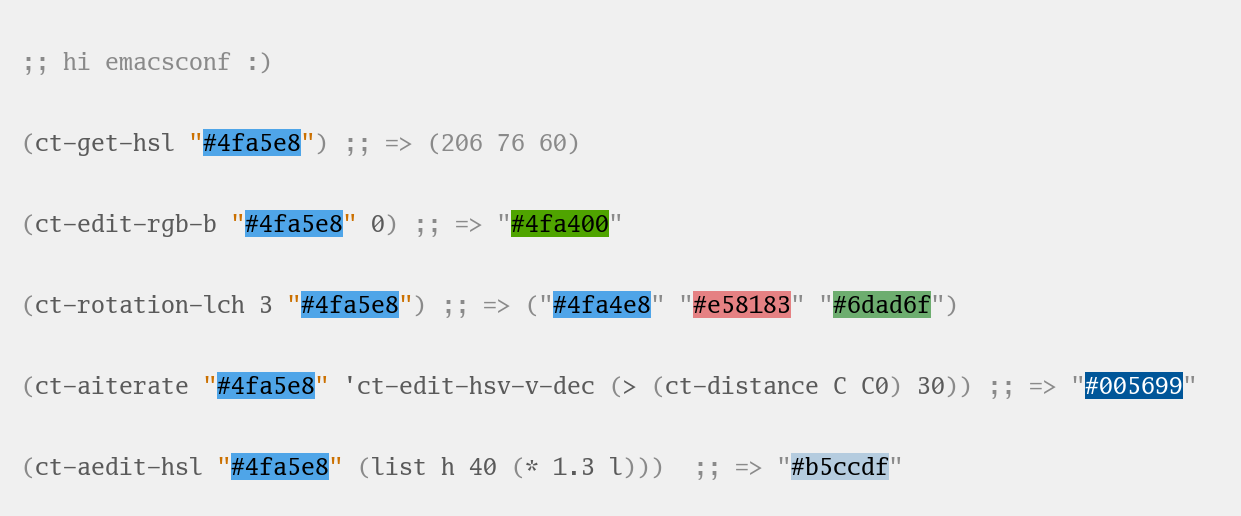
ct.el (color tools) is a color library for Emacs meant for making changes to individual colors in various color spaces. Builds on top of color.el and hsluv-emacs, providing a consistent interface to many color spaces, in addition to some utility functions. Visualized in this blog post, used to create myron-themes. Shouted out by prot (of modus themes fame).
Supported color spaces: rgb • hsl • hsv • hsluv • hpluv • (cie)lab • (cie)lch • (ok)lab
Installation
ct.el is on melpa. You may also install with straight.el:
(straight-use-package '(ct :host github :repo "neeasade/ct.el" :branch "master"))
Conventions
- Colorspace number range values are 0-100
- Exception: Hue (0-360 degrees)
- Exception: L(AB) (-100-100)
- Values are clamped to valid ranges coming out of the
ct-edit-*functions
Functions
Color Properties
- ct-contrast-ratio
(color1 color2) - ct-distance
(color1 color2) - ct-light-p
(color &optional threshold) - ct-format-argb
(color &optional opacity end) - ct-format-rbga
(color &optional opacity)
Color Modification
- ct-complement
(color) - ct-gradient
(step start end &optional with-ends space) - ct-greaten
(color &optional percent) - ct-lessen
(color &optional percent) - ct-iterate
(color edit-fn condition) - ct-iterations
(color edit-fn condition) - ct-lab-change-whitepoint
(color white-point white-point-new) - ct-mix
(colors &optional colorspace) - ct-mix-opacity
(top bottom opacity) - ct-pastel
(color &optional smod vmod) - ct-contrast-min
(foreground background contrast-ratio &optional color-property) - ct-contrast-max
(foreground background contrast-ratio &optional color-property) - ct-steal
(color property color2) - ct-rotation-hsl
(count color) - ct-rotation-hsluv
(count color) - ct-rotation-hpluv
(count color) - ct-rotation-hsv
(count color) - ct-rotation-lch
(count color)
RGB
- ct-make-rgb
(red green blue) - ct-get-rgb
(color) - ct-get-rgb-r
(color) - ct-get-rgb-g
(color) - ct-get-rgb-b
(color) - ct-edit-rgb
(color edit-fn) - ct-edit-rgb-b
(color func-or-val) - ct-edit-rgb-b-dec
(color &optional amount) - ct-edit-rgb-b-inc
(color &optional amount) - ct-edit-rgb-g
(color func-or-val) - ct-edit-rgb-g-dec
(color &optional amount) - ct-edit-rgb-g-inc
(color &optional amount) - ct-edit-rgb-r
(color func-or-val) - ct-edit-rgb-r-dec
(color &optional amount) - ct-edit-rgb-r-inc
(color &optional amount)
(cie)LAB
- ct-make-lab
(lightness a b) - ct-get-lab
(color) - ct-get-lab-l
(color) - ct-get-lab-b
(color) - ct-get-lab-a
(color) - ct-edit-lab
(color edit-fn) - ct-edit-lab-a
(color func-or-val) - ct-edit-lab-a-dec
(color &optional amount) - ct-edit-lab-a-inc
(color &optional amount) - ct-edit-lab-b
(color func-or-val) - ct-edit-lab-b-dec
(color &optional amount) - ct-edit-lab-b-inc
(color &optional amount) - ct-edit-lab-l
(color func-or-val) - ct-edit-lab-l-dec
(color &optional amount) - ct-edit-lab-l-inc
(color &optional amount)
HSL
- ct-make-hsl
(hue saturation lightness) - ct-get-hsl
(color) - ct-get-hsl-s
(color) - ct-get-hsl-l
(color) - ct-get-hsl-h
(color) - ct-edit-hsl
(color edit-fn) - ct-edit-hsl-h
(color func-or-val) - ct-edit-hsl-h-dec
(color &optional amount) - ct-edit-hsl-h-inc
(color &optional amount) - ct-edit-hsl-l
(color func-or-val) - ct-edit-hsl-l-dec
(color &optional amount) - ct-edit-hsl-l-inc
(color &optional amount) - ct-edit-hsl-s
(color func-or-val) - ct-edit-hsl-s-dec
(color &optional amount) - ct-edit-hsl-s-inc
(color &optional amount)
HSLuv
- ct-make-hsluv
(hue saturation lightness) - ct-get-hsluv
(color) - ct-get-hsluv-s
(color) - ct-get-hsluv-l
(color) - ct-get-hsluv-h
(color) - ct-edit-hsluv
(color edit-fn) - ct-edit-hsluv-h
(color func-or-val) - ct-edit-hsluv-h-dec
(color &optional amount) - ct-edit-hsluv-h-inc
(color &optional amount) - ct-edit-hsluv-l
(color func-or-val) - ct-edit-hsluv-l-dec
(color &optional amount) - ct-edit-hsluv-l-inc
(color &optional amount) - ct-edit-hsluv-s
(color func-or-val) - ct-edit-hsluv-s-dec
(color &optional amount) - ct-edit-hsluv-s-inc
(color &optional amount)
(cie)LCH
- ct-make-lch
(lightness chroma hue) - ct-get-lch
(color) - ct-get-lch-l
(color) - ct-get-lch-h
(color) - ct-get-lch-c
(color) - ct-edit-lch
(color edit-fn) - ct-edit-lch-c
(color func-or-val) - ct-edit-lch-c-dec
(color &optional amount) - ct-edit-lch-c-inc
(color &optional amount) - ct-edit-lch-h
(color func-or-val) - ct-edit-lch-h-dec
(color &optional amount) - ct-edit-lch-h-inc
(color &optional amount) - ct-edit-lch-l
(color func-or-val) - ct-edit-lch-l-dec
(color &optional amount) - ct-edit-lch-l-inc
(color &optional amount)
HSV
- ct-make-hsv
(hue saturation value) - ct-get-hsv
(color) - ct-get-hsv-v
(color) - ct-get-hsv-s
(color) - ct-get-hsv-h
(color) - ct-edit-hsv
(color edit-fn) - ct-edit-hsv-h
(color func-or-val) - ct-edit-hsv-h-dec
(color &optional amount) - ct-edit-hsv-h-inc
(color &optional amount) - ct-edit-hsv-s
(color func-or-val) - ct-edit-hsv-s-dec
(color &optional amount) - ct-edit-hsv-s-inc
(color &optional amount) - ct-edit-hsv-v
(color func-or-val) - ct-edit-hsv-v-dec
(color &optional amount) - ct-edit-hsv-v-inc
(color &optional amount)
HPLUV
- ct-make-hpluv
(hue percentage-saturation lightness) - ct-get-hpluv
(color) - ct-get-hpluv-p
(color) - ct-get-hpluv-l
(color) - ct-get-hpluv-h
(color) - ct-edit-hpluv
(color edit-fn) - ct-edit-hpluv-h
(color func-or-val) - ct-edit-hpluv-h-dec
(color &optional amount) - ct-edit-hpluv-h-inc
(color &optional amount) - ct-edit-hpluv-l
(color func-or-val) - ct-edit-hpluv-l-dec
(color &optional amount) - ct-edit-hpluv-l-inc
(color &optional amount) - ct-edit-hpluv-p
(color func-or-val) - ct-edit-hpluv-p-dec
(color &optional amount) - ct-edit-hpluv-p-inc
(color &optional amount)
okLAB
- ct-make-oklab
(lightness a b) - ct-get-oklab
(color) - ct-get-oklab-l
(color) - ct-get-oklab-a
(color) - ct-get-oklab-b
(color) - ct-edit-oklab
(color edit-fn) - ct-edit-oklab-l
(color func-or-val) - ct-edit-oklab-l-dec
(color &optional amount) - ct-edit-oklab-l-inc
(color &optional amount) - ct-edit-oklab-a
(color func-or-val) - ct-edit-oklab-a-dec
(color &optional amount) - ct-edit-oklab-a-inc
(color &optional amount) - ct-edit-oklab-b
(color func-or-val) - ct-edit-oklab-b-dec
(color &optional amount) - ct-edit-oklab-b-inc
(color &optional amount)
Color Properties
Functions for seeing properties of colors not necessarily related to a particular color space.
ct-contrast-ratio (color1 color2)
Get the contrast ratio between COLOR1 and COLOR2.
(ct-contrast-ratio "#bbbbbb" "#4fa5e8") ;; => 1
,
→ 1
ct-distance (color1 color2)
Get cie-DE2000 distance between COLOR1 and COLOR2, range 0-100.
(ct-distance "#4fa5e8" "#bc9a43") ;; => 53
→ 53
ct-light-p (color &optional threshold)
Determine if a COLOR passes a cieLAB lightness THRESHOLD.
(ct-light-p "#4fa5e8") ;; => t
ct-format-argb (color &optional opacity end)
Argb formatting: Pass in COLOR and OPACITY 0-100, get a string representation of COLOR as follows: ‘#AAFFFFFF’, where AA is a hex pair for the alpha, followed by FF times 3 hex pairs for red, green, blue. If END is truthy, then format will be ‘#FFFFFFAA’.
(ct-format-argb "#4fa5e8" 80 t) ;; => "#4fa5e8cc"
ct-format-rbga (color &optional opacity)
RGBA formatting: Pass in COLOR and OPACITY 0-100, get a string representation of COLOR as follows: ‘rgba(R, G, B, OPACITY)’, where values RGB are 0-255, and OPACITY is 0-1.0 (default 1.0).
(ct-format-rbga "#4fa5e8" 80) ;; => "rgba(79, 165, 232, 0.8)"
Color Modification
Functions for modifying colors in some way potentially unrelated to a specific colorspace
ct-complement (color)
Return a color complement of COLOR in the HSLUV space.
(ct-complement "#4fa5e8") ;; => "#bc9a43"
ct-gradient (step start end &optional with-ends space)
Create a gradient from color START to color END in STEP parts. Optionally include START and END in results using WITH-ENDS. Optionally choose a colorspace with SPACE (see ‘ct–colorspace-map’). Hue-inclusive colorspaces may see mixed results.
(ct-gradient 5 "#4fa5e8" "#bc9a43" t) ;; => ("#4fa5e8" "#6aa2be" "#859f95" "#a09c6c" "#bc9a43")
,
,
,
ct-greaten (color &optional percent)
Make a light COLOR lighter, a dark COLOR darker (by PERCENT).
(ct-greaten "#4fa5e8" 20) ;; => "#8ddbff"
ct-lessen (color &optional percent)
Make a light COLOR darker, or a dark COLOR lighter (by PERCENT).
(ct-lessen "#4fa5e8" 20) ;; => "#0071af"
ct-iterate (color edit-fn condition)
Change COLOR using EDIT-FN until CONDITION is met. Will return early if calling EDIT-FN results in no change.
(ct-iterate "#4fa5e8" 'ct-edit-hsv-v-inc (lambda (c) (> (ct-distance c "#4fa5e8") 10))) ;; => "#4f98ff"
ct-iterations (color edit-fn condition)
Change COLOR using EDIT-FN until CONDITION is met, returning each step. Will return early if calling EDIT-FN results in no change.
(ct-iterations "#4fa5e8" 'ct-edit-hsv-v-inc (lambda (c) (> (ct-distance c "#4fa5e8") 10))) ;; => ("#4fa5e8" "#4fa5e9" "#4fa5ea" "#4fa5eb" "#4fa5ec" "#4fa5ed" "#4fa5ee" "#4fa5ef" "#4fa5f0" "#4fa5f1" "#4fa5f2" "#4fa5f3" "#4fa5f4" "#4fa5f5" "#4fa5f6" "#4fa5f7" "#4fa5f8" "#4fa5f9" "#4fa5fa" "#4fa5fb" "#4fa5fc" "#4fa5fd" "#4fa5fe" "#4fa5ff" "#4fa4ff" "#4fa3ff" "#4fa2ff" "#4fa1ff" "#4fa0ff" "#4f9fff" "#4f9eff" "#4f9dff" "#4f9cff" "#4f9bff" "#4f9aff" "#4f99ff" "#4f98ff")
,
,
,
,
,
,
,
,
,
,
,
,
,
,
,
,
,
,
,
,
,
,
,
,
,
,
,
,
,
,
,
,
,
,
,
ct-lab-change-whitepoint (color white-point white-point-new)
Transform COLOR by changing it’s cieLAB WHITE-POINT property to WHITE-POINT-NEW.
(ct-lab-change-whitepoint "#4fa5e8" color-d50-xyz color-d55-xyz) ;; => "#29a6f4"
ct-mix (colors &optional colorspace)
Mix COLORS in COLORSPACE. See also: ‘ct–colorspace-map’.
(ct-mix (list "#4fa5e8" "#bbbbbb" "#bc9a43")) ;; => "#a0a48a"
→
ct-mix-opacity (top bottom opacity)
Get resulting color of TOP color with OPACITY overlayed against BOTTOM. Opacity is expected to be 0.0-1.0.
(ct-mix-opacity "#4fa5e8" "#bbbbbb" 1) ;; => "#4fa4e8"
ct-pastel (color &optional smod vmod)
Make COLOR more ‘pastel’ using the hsluv space – optionally change the rate of change with SMOD and VMOD.
(ct-pastel "#4fa5e8") ;; => "#77a2c4"
ct-contrast-min (foreground background contrast-ratio &optional color-property)
Edit FOREGROUND to have a minimum CONTRAST-RATIO on BACKGROUND.
Optionally specify the COLOR-PROPERTY used to tweak foreground (default ‘lab-l)
(ct-contrast-min "#4fa5e8" "#bbbbbb" 3) ;; => "#1369ac"
ct-contrast-max (foreground background contrast-ratio &optional color-property)
Edit FOREGROUND to have a maximum CONTRAST-RATIO on BACKGROUND.
Optionally specify the COLOR-PROPERTY used to tweak foreground (default ‘lab-l)
(ct-contrast-max "#000000" "#dddddd" 4) ;; => "#6a6a6a"
,
→
ct-steal (color property color2)
Steal PROPERTY of COLOR2 and set it on COLOR.
PROPERTY is a symbol of a colorspace property, such as ‘hsluv-l
(ct-steal "#bbbbbb" 'hsv-h "#4fa5e8") ;; => "#bbbbbb"
ct-rotation-hsl (count color)
Perform a hue rotation in hsl space starting with COLOR, generating COUNT colors.
(ct-rotation-hsl 6 "#4fa5e8") ;; => ("#4fa4e8" "#914fe8" "#e84fa4" "#e8914f" "#a5e84f" "#4fe892")
,
,
,
,
,
ct-rotation-hsluv (count color)
Perform a hue rotation in hsluv space starting with COLOR, generating COUNT colors.
(ct-rotation-hsluv 6 "#4fa5e8") ;; => ("#4ea5e7" "#e173ec" "#f0798f" "#bc9a43" "#5cb143" "#48ada5")
,
,
,
,
ct-rotation-hpluv (count color)
Perform a hue rotation in hpluv space starting with COLOR, generating COUNT colors.
(ct-rotation-hpluv 4 "#4fa5e8") ;; => ("#72a2d2" "#d585b4" "#b89a59" "#43b087")
,
,
,
ct-rotation-hsv (count color)
Perform a hue rotation in hsv space starting with COLOR, generating COUNT colors.
(ct-rotation-hsv 10 "#4fa5e8") ;; => ("#4ea5e8" "#544ee8" "#b04ee8" "#e84ec3" "#e84e67" "#e8924e" "#e2e84e" "#86e84e" "#4ee873" "#4ee8cf")
,
,
,
,
,
,
,
,
,
ct-rotation-lch (count color)
Perform a hue rotation in lch space starting with COLOR, generating COUNT colors.
(ct-rotation-lch 8 "#4fa5e8") ;; => ("#4fa4e8" "#ae91d9" "#df81a9" "#e18672" "#bd9953" "#84a961" "#31b193" "#00b0ca")
,
,
,
,
,
,
RGB
https://notes.neeasade.net/color-spaces.html#h-99356355-d54c-41d8-bc1a-6e14e29f42c8
ct-make-rgb (red green blue)
Make a rgb color using properties: RED, GREEN, BLUE.
(ct-make-rgb 31 65 91) ;; => "#4fa5e8"
→
ct-get-rgb (color)
Get rgb representation (Red, Green, Blue) of COLOR.
(ct-get-rgb "#4fa5e8") ;; => (31 65 91)
ct-get-rgb-r (color)
Get rgb Red value of COLOR.
(ct-get-rgb-r "#4fa5e8") ;; => 31
ct-get-rgb-g (color)
Get rgb Green value of COLOR.
(ct-get-rgb-g "#4fa5e8") ;; => 65
ct-get-rgb-b (color)
Get rgb Blue value of COLOR.
(ct-get-rgb-b "#4fa5e8") ;; => 91
ct-edit-rgb (color edit-fn)
Edit COLOR in the RGB colorspace by calling EDIT-FN with it’s RGB properties.
(ct-edit-rgb "#4fa5e8" (lambda (R G B) (list R 0 0))) ;; => "#4f0000"
ct-edit-rgb-b (color func-or-val)
Transform rgb Blue of COLOR using FUNC-OR-VAL.
(ct-edit-rgb-b "#4fa5e8" (lambda (b) (+ b 50))) ;; => "#4fa4ff"
ct-edit-rgb-b-dec (color &optional amount)
Decrease rgb-b property of COLOR by AMOUNT (defaults to minimum decrease amount).
(ct-edit-rgb-b-dec "#bbbbbb" 10) ;; => "#bbbba1"
ct-edit-rgb-b-inc (color &optional amount)
Increase rgb-b property of COLOR by AMOUNT (defaults to minimum increase amount).
(ct-edit-rgb-b-inc "#bbbbbb") ;; => "#bbbbbc"
ct-edit-rgb-g (color func-or-val)
Transform rgb Green of COLOR using FUNC-OR-VAL.
(ct-edit-rgb-g "#4fa5e8" 100) ;; => "#4fffe8"
ct-edit-rgb-g-dec (color &optional amount)
Decrease rgb-g property of COLOR by AMOUNT (defaults to minimum decrease amount).
(ct-edit-rgb-g-dec "#bbbbbb" 10) ;; => "#bba1bb"
ct-edit-rgb-g-inc (color &optional amount)
Increase rgb-g property of COLOR by AMOUNT (defaults to minimum increase amount).
(ct-edit-rgb-g-inc "#bbbbbb") ;; => "#bbbcbb"
ct-edit-rgb-r (color func-or-val)
Transform rgb Red of COLOR using FUNC-OR-VAL.
(ct-edit-rgb-r "#4fa5e8" 100) ;; => "#ffa4e8"
ct-edit-rgb-r-dec (color &optional amount)
Decrease rgb-r property of COLOR by AMOUNT (defaults to minimum decrease amount).
(ct-edit-rgb-r-dec "#bbbbbb" 10) ;; => "#a1bbbb"
ct-edit-rgb-r-inc (color &optional amount)
Increase rgb-r property of COLOR by AMOUNT (defaults to minimum increase amount).
(ct-edit-rgb-r-inc "#bbbbbb") ;; => "#bcbbbb"
(cie)LAB
https://notes.neeasade.net/color-spaces.html#h-9d5a1a9a-75d3-48f5-bf00-85332d9b023e
ct-make-lab (lightness a b)
Make a lab color using properties: LIGHTNESS, A, B.
(ct-make-lab 65 -5 -41) ;; => "#50a4e6"
→
ct-get-lab (color)
Get lab representation (Lightness, A, B) of COLOR.
(ct-get-lab "#4fa5e8") ;; => (65 -5 -41)
ct-get-lab-l (color)
Get lab Lightness value of COLOR.
(ct-get-lab-l "#4fa5e8") ;; => 65
ct-get-lab-b (color)
Get lab B value of COLOR.
(ct-get-lab-b "#4fa5e8") ;; => -41
ct-get-lab-a (color)
Get lab A value of COLOR.
(ct-get-lab-a "#4fa5e8") ;; => -5
ct-edit-lab (color edit-fn)
Edit COLOR in the cieLAB colorspace by calling EDIT-FN with it’s LAB properties.
(ct-edit-lab "#4fa5e8" (lambda (L A B) (list L -100 -100))) ;; => "#00ccff"
ct-edit-lab-a (color func-or-val)
Transform lab A of COLOR using FUNC-OR-VAL.
(ct-edit-lab-a "#4fa5e8" (lambda (a) (- a 20))) ;; => "#00aee7"
ct-edit-lab-a-dec (color &optional amount)
Decrease lab-a property of COLOR by AMOUNT (defaults to minimum decrease amount).
(ct-edit-lab-a-dec "#4fa5e8" 20) ;; => "#00aee7"
ct-edit-lab-a-inc (color &optional amount)
Increase lab-a property of COLOR by AMOUNT (defaults to minimum increase amount).
(ct-edit-lab-a-inc "#4fa5e8" 20) ;; => "#8c99e8"
ct-edit-lab-b (color func-or-val)
Transform lab B of COLOR using FUNC-OR-VAL.
(ct-edit-lab-b "#4fa5e8" 100) ;; => "#b79e00"
ct-edit-lab-b-dec (color &optional amount)
Decrease lab-b property of COLOR by AMOUNT (defaults to minimum decrease amount).
(ct-edit-lab-b-dec "#4fa5e8" 20) ;; => "#00a7ff"
ct-edit-lab-b-inc (color &optional amount)
Increase lab-b property of COLOR by AMOUNT (defaults to minimum increase amount).
(ct-edit-lab-b-inc "#4fa5e8" 20) ;; => "#7aa3c4"
ct-edit-lab-l (color func-or-val)
Transform lab Lightness of COLOR using FUNC-OR-VAL.
(ct-edit-lab-l "#4fa5e8" 0) ;; => "#000a3d"
ct-edit-lab-l-dec (color &optional amount)
Decrease lab-l property of COLOR by AMOUNT (defaults to minimum decrease amount).
(ct-edit-lab-l-dec "#4fa5e8") ;; => "#4ea4e7"
ct-edit-lab-l-inc (color &optional amount)
Increase lab-l property of COLOR by AMOUNT (defaults to minimum increase amount).
(ct-edit-lab-l-inc "#4fa5e8") ;; => "#50a5e8"
HSL
https://notes.neeasade.net/color-spaces.html#h-43869bc7-a7d1-410f-9341-521974751dac
ct-make-hsl (hue saturation lightness)
Make a hsl color using properties: HUE, SATURATION, LIGHTNESS.
(ct-make-hsl 206 77 61) ;; => "#4ea5e8"
→
ct-get-hsl (color)
Get hsl representation (Hue, Saturation, Lightness) of COLOR.
(ct-get-hsl "#4fa5e8") ;; => (206 77 61)
ct-get-hsl-s (color)
Get hsl Saturation value of COLOR.
(ct-get-hsl-s "#4fa5e8") ;; => 77
ct-get-hsl-l (color)
Get hsl Lightness value of COLOR.
(ct-get-hsl-l "#4fa5e8") ;; => 61
ct-get-hsl-h (color)
Get hsl Hue value of COLOR.
(ct-get-hsl-h "#4fa5e8") ;; => 206
ct-edit-hsl (color edit-fn)
Edit COLOR in the HSL colorspace by calling EDIT-FN with it’s HSL properties. EDIT-FN is called with values in ranges: {0-360, 0-100, 0-100}.
(ct-edit-hsl "#4fa5e8" (lambda (H S L) (list (+ H 60) 100 L))) ;; => "#8f38ff"
ct-edit-hsl-h (color func-or-val)
Transform hsl Hue of COLOR using FUNC-OR-VAL.
(ct-edit-hsl-h "#4fa5e8" (lambda (H) (+ H 60))) ;; => "#914fe8"
ct-edit-hsl-h-dec (color &optional amount)
Decrease hsl-h property of COLOR by AMOUNT (defaults to minimum decrease amount).
(ct-edit-hsl-h-dec "#4fa5e8") ;; => "#4fa6e8"
ct-edit-hsl-h-inc (color &optional amount)
Increase hsl-h property of COLOR by AMOUNT (defaults to minimum increase amount).
(ct-edit-hsl-h-inc "#4fa5e8") ;; => "#4fa4e8"
ct-edit-hsl-l (color func-or-val)
Transform hsl Lightness of COLOR using FUNC-OR-VAL.
(ct-edit-hsl-l "#4fa5e8" 0) ;; => "#000000"
ct-edit-hsl-l-dec (color &optional amount)
Decrease hsl-l property of COLOR by AMOUNT (defaults to minimum decrease amount).
(ct-edit-hsl-l-dec "#4fa5e8") ;; => "#4ea4e7"
ct-edit-hsl-l-inc (color &optional amount)
Increase hsl-l property of COLOR by AMOUNT (defaults to minimum increase amount).
(ct-edit-hsl-l-inc "#4fa5e8") ;; => "#50a5e8"
ct-edit-hsl-s (color func-or-val)
Transform hsl Saturation of COLOR using FUNC-OR-VAL.
(ct-edit-hsl-s "#4fa5e8" 100) ;; => "#38a7ff"
ct-edit-hsl-s-dec (color &optional amount)
Decrease hsl-s property of COLOR by AMOUNT (defaults to minimum decrease amount).
(ct-edit-hsl-s-dec "#4fa5e8") ;; => "#4fa4e7"
ct-edit-hsl-s-inc (color &optional amount)
Increase hsl-s property of COLOR by AMOUNT (defaults to minimum increase amount).
(ct-edit-hsl-s-inc "#4fa5e8") ;; => "#4ea5e8"
HSLuv
https://notes.neeasade.net/color-spaces.html#h-c147b84d-d95b-4d2d-8426-2f96529a8428
ct-make-hsluv (hue saturation lightness)
Make a hsluv color using properties: HUE, SATURATION, LIGHTNESS.
(ct-make-hsluv 243 81 65) ;; => "#4ea4e7"
→
ct-get-hsluv (color)
Get hsluv representation (Hue, Saturation, Lightness) of COLOR.
(ct-get-hsluv "#4fa5e8") ;; => (243 81 65)
ct-get-hsluv-s (color)
Get hsluv Saturation value of COLOR.
(ct-get-hsluv-s "#4fa5e8") ;; => 81
ct-get-hsluv-l (color)
Get hsluv Lightness value of COLOR.
(ct-get-hsluv-l "#4fa5e8") ;; => 65
ct-get-hsluv-h (color)
Get hsluv Hue value of COLOR.
(ct-get-hsluv-h "#4fa5e8") ;; => 243
ct-edit-hsluv (color edit-fn)
Edit COLOR in the HSLuv colorspace by calling EDIT-FN with it’s HSL properties. EDIT-FN is called with values in ranges: {0-360, 0-100, 0-100}.
(ct-edit-hsluv "#4fa5e8" (lambda (H S L) (list (+ H 60) 100 L))) ;; => "#f160ff"
ct-edit-hsluv-h (color func-or-val)
Transform hsluv Hue of COLOR using FUNC-OR-VAL.
(ct-edit-hsluv-h "#4fa5e8" (lambda (H) (+ H 60))) ;; => "#e173ec"
ct-edit-hsluv-h-dec (color &optional amount)
Decrease hsluv-h property of COLOR by AMOUNT (defaults to minimum decrease amount).
(ct-edit-hsluv-h-dec "#4fa5e8") ;; => "#4ea5e7"
ct-edit-hsluv-h-inc (color &optional amount)
Increase hsluv-h property of COLOR by AMOUNT (defaults to minimum increase amount).
(ct-edit-hsluv-h-inc "#4fa5e8") ;; => "#4fa4e8"
ct-edit-hsluv-l (color func-or-val)
Transform hsluv Lightness of COLOR using FUNC-OR-VAL.
(ct-edit-hsluv-l "#4fa5e8" 0) ;; => "#000000"
ct-edit-hsluv-l-dec (color &optional amount)
Decrease hsluv-l property of COLOR by AMOUNT (defaults to minimum decrease amount).
(ct-edit-hsluv-l-dec "#4fa5e8") ;; => "#4ea4e7"
ct-edit-hsluv-l-inc (color &optional amount)
Increase hsluv-l property of COLOR by AMOUNT (defaults to minimum increase amount).
(ct-edit-hsluv-l-inc "#4fa5e8") ;; => "#4fa5e9"
ct-edit-hsluv-s (color func-or-val)
Transform hsluv Saturation of COLOR using FUNC-OR-VAL.
(ct-edit-hsluv-s "#4fa5e8" 100) ;; => "#00a6f8"
ct-edit-hsluv-s-dec (color &optional amount)
Decrease hsluv-s property of COLOR by AMOUNT (defaults to minimum decrease amount).
(ct-edit-hsluv-s-dec "#4fa5e8") ;; => "#4fa4e7"
ct-edit-hsluv-s-inc (color &optional amount)
Increase hsluv-s property of COLOR by AMOUNT (defaults to minimum increase amount).
(ct-edit-hsluv-s-inc "#4fa5e8") ;; => "#4ea5e8"
(cie)LCH
https://notes.neeasade.net/color-spaces.html#h-c4f93e1f-4fa6-4ebc-99c1-18b6de0ef413
ct-make-lch (lightness chroma hue)
Make a lch color using properties: LIGHTNESS, CHROMA, HUE.
(ct-make-lch 65 42 -97) ;; => "#4da4e7"
→
ct-get-lch (color)
Get lch representation (Lightness, Chroma, Hue) of COLOR.
(ct-get-lch "#4fa5e8") ;; => (65 42 -97)
ct-get-lch-l (color)
Get lch Lightness value of COLOR.
(ct-get-lch-l "#4fa5e8") ;; => 65
ct-get-lch-h (color)
Get lch Hue value of COLOR.
(ct-get-lch-h "#4fa5e8") ;; => -97
ct-get-lch-c (color)
Get lch Chroma value of COLOR.
(ct-get-lch-c "#4fa5e8") ;; => 42
ct-edit-lch (color edit-fn)
Edit COLOR in the cieLCH colorspace by calling EDIT-FN with it’s LCH properties. EDIT-FN is called with values in ranges: {0-100, 0-100, 0-360}.
(ct-edit-lch "#4fa5e8" (lambda (L C H) (list L 100 (+ H 90)))) ;; => "#ff00b8"
ct-edit-lch-c (color func-or-val)
Transform lch Chroma of COLOR using FUNC-OR-VAL.
(ct-edit-lch-c "#4fa5e8" 100) ;; => "#00b0ff"
ct-edit-lch-c-dec (color &optional amount)
Decrease lch-c property of COLOR by AMOUNT (defaults to minimum decrease amount).
(ct-edit-lch-c-dec "#4fa5e8") ;; => "#4fa4e7"
ct-edit-lch-c-inc (color &optional amount)
Increase lch-c property of COLOR by AMOUNT (defaults to minimum increase amount).
(ct-edit-lch-c-inc "#4fa5e8") ;; => "#4ea5e8"
ct-edit-lch-h (color func-or-val)
Transform lch Hue of COLOR using FUNC-OR-VAL.
(ct-edit-lch-h "#4fa5e8" (lambda (H) (+ H 90))) ;; => "#df81a9"
ct-edit-lch-h-dec (color &optional amount)
Decrease lch-h property of COLOR by AMOUNT (defaults to minimum decrease amount).
(ct-edit-lch-h-dec "#4fa5e8") ;; => "#4ea5e7"
ct-edit-lch-h-inc (color &optional amount)
Increase lch-h property of COLOR by AMOUNT (defaults to minimum increase amount).
(ct-edit-lch-h-inc "#4fa5e8") ;; => "#4fa4e8"
ct-edit-lch-l (color func-or-val)
Transform lch Lightness of COLOR using FUNC-OR-VAL.
(ct-edit-lch-l "#4fa5e8" 100) ;; => "#baffff"
ct-edit-lch-l-dec (color &optional amount)
Decrease lch-l property of COLOR by AMOUNT (defaults to minimum decrease amount).
(ct-edit-lch-l-dec "#4fa5e8") ;; => "#4ea4e7"
ct-edit-lch-l-inc (color &optional amount)
Increase lch-l property of COLOR by AMOUNT (defaults to minimum increase amount).
(ct-edit-lch-l-inc "#4fa5e8") ;; => "#50a5e8"
HSV
https://en.wikipedia.org/wiki/HSL_and_HSV
ct-make-hsv (hue saturation value)
Make a hsv color using properties: HUE, SATURATION, VALUE.
(ct-make-hsv 206 66 91) ;; => "#4ea5e8"
→
ct-get-hsv (color)
Get hsv representation (Hue, Saturation, Value) of COLOR.
(ct-get-hsv "#4fa5e8") ;; => (206 66 91)
ct-get-hsv-v (color)
Get hsv Value value of COLOR.
(ct-get-hsv-v "#4fa5e8") ;; => 91
ct-get-hsv-s (color)
Get hsv Saturation value of COLOR.
(ct-get-hsv-s "#4fa5e8") ;; => 66
ct-get-hsv-h (color)
Get hsv Hue value of COLOR.
(ct-get-hsv-h "#4fa5e8") ;; => 206
ct-edit-hsv (color edit-fn)
Edit COLOR in the HSV colorspace by calling EDIT-FN with it’s HSV properties. EDIT-FN is called with values in ranges: {0-360, 0-100, 0-100}.
(ct-edit-hsv "#4fa5e8" (lambda (H S V) (list H 20 100))) ;; => "#cce8ff"
ct-edit-hsv-h (color func-or-val)
Transform hsv Hue of COLOR using FUNC-OR-VAL.
(ct-edit-hsv-h "#4fa5e8" (-partial #'+ 30)) ;; => "#4e58e8"
ct-edit-hsv-h-dec (color &optional amount)
Decrease hsv-h property of COLOR by AMOUNT (defaults to minimum decrease amount).
(ct-edit-hsv-h-dec "#4fa5e8") ;; => "#4ea5e8"
ct-edit-hsv-h-inc (color &optional amount)
Increase hsv-h property of COLOR by AMOUNT (defaults to minimum increase amount).
(ct-edit-hsv-h-inc "#4fa5e8") ;; => "#4ea4e8"
ct-edit-hsv-s (color func-or-val)
Transform hsv Saturation of COLOR using FUNC-OR-VAL.
(ct-edit-hsv-s "#4fa5e8" 20) ;; => "#b9d3e8"
ct-edit-hsv-s-dec (color &optional amount)
Decrease hsv-s property of COLOR by AMOUNT (defaults to minimum decrease amount).
(ct-edit-hsv-s-dec "#4fa5e8") ;; => "#50a5e8"
ct-edit-hsv-s-inc (color &optional amount)
Increase hsv-s property of COLOR by AMOUNT (defaults to minimum increase amount).
(ct-edit-hsv-s-inc "#4fa5e8") ;; => "#4ea4e8"
ct-edit-hsv-v (color func-or-val)
Transform hsv Value of COLOR using FUNC-OR-VAL.
(ct-edit-hsv-v "#4fa5e8" 100) ;; => "#56b5ff"
ct-edit-hsv-v-dec (color &optional amount)
Decrease hsv-v property of COLOR by AMOUNT (defaults to minimum decrease amount).
(ct-edit-hsv-v-dec "#4fa5e8") ;; => "#4ea4e7"
ct-edit-hsv-v-inc (color &optional amount)
Increase hsv-v property of COLOR by AMOUNT (defaults to minimum increase amount).
(ct-edit-hsv-v-inc "#4fa5e8") ;; => "#4fa5e9"
HPLUV
https://ajalt.github.io/colormath/api/colormath/com.github.ajalt.colormath.model/-h-p-luv/index.html
ct-make-hpluv (hue percentage-saturation lightness)
Make a hpluv color using properties: HUE, PERCENTAGE-SATURATION, LIGHTNESS.
(ct-make-hpluv 243 143 65) ;; => "#72a1d1"
→
ct-get-hpluv (color)
Get hpluv representation (Hue, Percentage-Saturation, Lightness) of COLOR.
(ct-get-hpluv "#4fa5e8") ;; => (243 143 65)
ct-get-hpluv-p (color)
Get hpluv Percentage-Saturation value of COLOR.
(ct-get-hpluv-p "#4fa5e8") ;; => 143
ct-get-hpluv-l (color)
Get hpluv Lightness value of COLOR.
(ct-get-hpluv-l "#4fa5e8") ;; => 65
ct-get-hpluv-h (color)
Get hpluv Hue value of COLOR.
(ct-get-hpluv-h "#4fa5e8") ;; => 243
ct-edit-hpluv (color edit-fn)
Edit COLOR in the HPLuv colorspace by calling EDIT-FN with it’s HPL properties. EDIT-FN is called with values in ranges: {0-360, 0-100, 0-100}.
(ct-edit-hpluv "#4fa5e8" (lambda (H P L) (list H 100 L))) ;; => "#72a2d2"
ct-edit-hpluv-h (color func-or-val)
Transform hpluv Hue of COLOR using FUNC-OR-VAL.
(ct-edit-hpluv-h "#4fa5e8" 0) ;; => "#d78798"
ct-edit-hpluv-h-dec (color &optional amount)
Decrease hpluv-h property of COLOR by AMOUNT (defaults to minimum decrease amount).
(ct-edit-hpluv-h-dec "#4fa5e8") ;; => "#71a2d2"
ct-edit-hpluv-h-inc (color &optional amount)
Increase hpluv-h property of COLOR by AMOUNT (defaults to minimum increase amount).
(ct-edit-hpluv-h-inc "#4fa5e8") ;; => "#72a2d2"
ct-edit-hpluv-l (color func-or-val)
Transform hpluv Lightness of COLOR using FUNC-OR-VAL.
(ct-edit-hpluv-l "#4fa5e8" 100) ;; => "#feffff"
ct-edit-hpluv-l-dec (color &optional amount)
Decrease hpluv-l property of COLOR by AMOUNT (defaults to minimum decrease amount).
(ct-edit-hpluv-l-dec "#4fa5e8") ;; => "#71a2d2"
ct-edit-hpluv-l-inc (color &optional amount)
Increase hpluv-l property of COLOR by AMOUNT (defaults to minimum increase amount).
(ct-edit-hpluv-l-inc "#4fa5e8") ;; => "#72a3d3"
ct-edit-hpluv-p (color func-or-val)
Transform hpluv Percentage-Saturation of COLOR using FUNC-OR-VAL.
(ct-edit-hpluv-p "#4fa5e8" 100) ;; => "#72a2d2"
ct-edit-hpluv-p-dec (color &optional amount)
Decrease hpluv-p property of COLOR by AMOUNT (defaults to minimum decrease amount).
(ct-edit-hpluv-p-dec "#4fa5e8") ;; => "#72a2d2"
ct-edit-hpluv-p-inc (color &optional amount)
Increase hpluv-p property of COLOR by AMOUNT (defaults to minimum increase amount).
(ct-edit-hpluv-p-inc "#4fa5e8") ;; => "#72a2d2"
okLAB
https://bottosson.github.io/posts/oklab/
ct-make-oklab (lightness a b)
Make a oklab color using properties: LIGHTNESS, A, B.
(ct-make-oklab 70 -5 -12) ;; => "#54a4ea"
→
ct-get-oklab (color)
Get oklab representation (Lightness, A, B) of COLOR.
(ct-get-oklab "#4fa5e8") ;; => (70 -5 -12)
ct-get-oklab-l (color)
Get oklab Lightness value of COLOR.
(ct-get-oklab-l "#4fa5e8") ;; => 70
ct-get-oklab-a (color)
Get oklab A value of COLOR.
(ct-get-oklab-a "#4fa5e8") ;; => -5
ct-get-oklab-b (color)
Get oklab B value of COLOR.
(ct-get-oklab-b "#4fa5e8") ;; => -12
ct-edit-oklab (color edit-fn)
Edit COLOR in by calling edit-fn with it’s okLAB properties.
(ct-edit-oklab "#4fa5e8" (lambda (L A B) (list L 100 B))) ;; => "#ff00c9"
ct-edit-oklab-l (color func-or-val)
Transform oklab Lightness of COLOR using FUNC-OR-VAL.
(ct-edit-oklab-l "#4fa5e8" 100) ;; => "#b1ffff"
ct-edit-oklab-l-dec (color &optional amount)
Decrease oklab-l property of COLOR by AMOUNT (defaults to minimum decrease amount).
(ct-edit-oklab-l-dec "#4fa5e8") ;; => "#4ea4e7"
ct-edit-oklab-l-inc (color &optional amount)
Increase oklab-l property of COLOR by AMOUNT (defaults to minimum increase amount).
(ct-edit-oklab-l-inc "#4fa5e8") ;; => "#4fa5e9"
ct-edit-oklab-a (color func-or-val)
Transform oklab A of COLOR using FUNC-OR-VAL.
(ct-edit-oklab-a "#4fa5e8" 0) ;; => "#8199e6"
ct-edit-oklab-a-dec (color &optional amount)
Decrease oklab-a property of COLOR by AMOUNT (defaults to minimum decrease amount).
(ct-edit-oklab-a-dec "#4fa5e8") ;; => "#4da5e8"
ct-edit-oklab-a-inc (color &optional amount)
Increase oklab-a property of COLOR by AMOUNT (defaults to minimum increase amount).
(ct-edit-oklab-a-inc "#4fa5e8") ;; => "#50a4e7"
ct-edit-oklab-b (color func-or-val)
Transform oklab B of COLOR using FUNC-OR-VAL.
(ct-edit-oklab-b "#4fa5e8" 100) ;; => "#ff0000"
ct-edit-oklab-b-dec (color &optional amount)
Decrease oklab-b property of COLOR by AMOUNT (defaults to minimum decrease amount).
(ct-edit-oklab-b-dec "#4fa5e8") ;; => "#4ea4e8"
ct-edit-oklab-b-inc (color &optional amount)
Increase oklab-b property of COLOR by AMOUNT (defaults to minimum increase amount).
(ct-edit-oklab-b-inc "#4fa5e8") ;; => "#4fa5e7"
Gotchas
Some colors as defined in color spaces may not be represented in the RGB space (and vice versa). The edit functions clamp values going out. One example is the narrowly scoped hpluv space:
(ct-get-hpluv "#dd00cc")
;; That p value is way out of range!
;; => (314.3830496716472 282.01497572464575 51.53528501195089)
;; notice we ask for the same color back, but the edit functions clamp the output to maximum HPL values:
(ct-edit-hpluv "#dd00cc" 'list)
;; => "#9f6898"
Testing
Right now testing happens by using the `ct-make-*` functions(these use the edit functions, which make up the basis for all the color space functions) against:
Related links
Emacs color libraries:
- https://github.com/emacs-mirror/emacs/blob/master/lisp/color.el
- https://github.com/emacsfodder/kurecolor
- https://github.com/yurikhan/yk-color
- https://github.com/hsluv/hsluv-emacs
General color knowledge: