
A general-purpose language server that adds LSP support to traditional linters and formatters by acting as a proxy. Once configured and set up for your editor of choice, it calls those tools when triggered over LSP, translates their output, and returns the result over LSP.
graph LR
E["EDITOR or IDE"] <== LSP ==> S(("`**efm-langserver**`"))
S <--> L["LINTER"]
S <--> F["FORMATTER"]
style S fill:orange,color:black
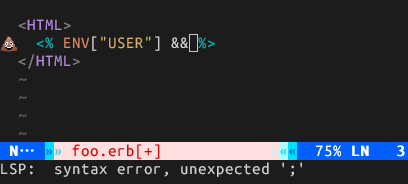
Here's efm-langserver in action:
Installation
go install github.com/mattn/efm-langserver@latestor via Homebrew:
brew install efm-langserverTermux (Android)
Plain Linux binaries do not work in Termux due to a Go runtime limitation (golang/go#60125). Build with the android target instead:
GOOS=android go install github.com/mattn/efm-langserver@latestUsage
Usage of efm-langserver:
  -c string
        path to config.yaml
  -d    dump configuration
  -logfile string
        logfile
  -loglevel int
        loglevel (default 1)
  -q    Run quieter
  -v    Print the version
Configuration
Configuration can be done with either a config.yaml file, or through
a DidChangeConfiguration
notification from the client.
DidChangeConfiguration can be called any time and will overwrite only provided
properties.
DidChangeConfiguration only supports V2 configuration and cannot set LogFile.
efm-langserver does not include formatters/linters for any languages, you must install these manually,
e.g.
- lua: LuaFormatter
- python: yapf isort
- vint for Vim script
- markdownlint-cli for Markdown
- etc...
InitializeParams
Because the configuration can be updated on the fly, capabilities might change throughout the lifetime of the server. To enable support for capabilities that will be available later, set them in the InitializeParams
Example
{
    "initializationOptions": {
        "documentFormatting": true,
        "documentRangeFormatting": true,
        "hover": true,
        "documentSymbol": true,
        "codeAction": true,
        "completion": true
    }
}
Example for config.yaml
Location of config.yaml is:
- UNIX:
$XDG_CONFIG_HOME/efm-langserver/config.yamlor$HOME/.config/efm-langserver/config.yaml - Windows:
%APPDATA%\efm-langserver\config.yaml
Below is example for config.yaml for Windows. Please see schema.md for full documentation of the available options.
version: 2
root-markers:
  - .git/
lint-debounce: 1s
commands:
  - command: notepad
    arguments:
      - ${INPUT}
    title: メモ帳
tools:
  any-excitetranslate: &any-excitetranslate
    hover-command: 'excitetranslate'
    hover-stdin: true
  blade-blade-formatter: &blade-blade-formatter
    format-command: 'blade-formatter --stdin'
    format-stdin: true
  css-prettier: &css-prettier
    format-command: './node_modules/.bin/prettier ${--tab-width:tabWidth} ${--single-quote:singleQuote} --parser css'
  csv-csvlint: &csv-csvlint
    lint-command: 'csvlint'
  dockerfile-hadolint: &dockerfile-hadolint
    lint-command: 'hadolint'
    lint-formats:
      - '%f:%l %m'
  eruby-erb: &eruby-erb
    lint-debounce: 2s
    lint-command: 'erb -x -T - | ruby -c'
    lint-stdin: true
    lint-offset: 1
    format-stdin: true
    format-command: htmlbeautifier
  gitcommit-gitlint: &gitcommit-gitlint
    lint-command: 'gitlint'
    lint-stdin: true
    lint-formats:
      - '%l: %m: "%r"'
      - '%l: %m'
  html-prettier: &html-prettier
    format-command: './node_modules/.bin/prettier ${--tab-width:tabWidth} ${--single-quote:singleQuote} --parser html'
  javascript-eslint: &javascript-eslint
    lint-command: 'eslint --stdin --stdin-filename ${INPUT}'
    lint-ignore-exit-code: true
    lint-stdin: true
    lint-after-open: true
    lint-formats:
      - "%+P%f" # a file-like string on a single line.
      - "%*[ ]%l:%c%*[ ]%t%*[^ ]%*[ ]%m" # Parse %l(ine) %c(olumn), %t(ype) and %m(essage)
      - "%-O" # if not a match, pop filename from %P stack.
  json-fixjson: &json-fixjson
    format-command: 'fixjson'
  json-jq: &json-jq
    lint-command: 'jq .'
  json-prettier: &json-prettier
    format-command: './node_modules/.bin/prettier ${--tab-width:tabWidth} --parser json'
  lua-lua-format: &lua-lua-format
    format-command: 'lua-format -i'
    format-stdin: true
  make-checkmake: &make-checkmake
    lint-command: 'checkmake'
    lint-stdin: true
  markdown-markdownlint: &markdown-markdownlint
    lint-command: 'markdownlint -s -c %USERPROFILE%\.markdownlintrc'
    lint-stdin: true
    lint-formats:
      - '%f:%l %m'
      - '%f:%l:%c %m'
      - '%f: %l: %m'
  markdown-pandoc: &markdown-pandoc
    format-command: 'pandoc -f markdown -t gfm -sp --tab-stop=2'
  mix_credo: &mix_credo
    lint-command: "mix credo suggest --format=flycheck --read-from-stdin ${INPUT}"
    lint-stdin: true
    lint-formats:
      - '%f:%l:%c: %t: %m'
      - '%f:%l: %t: %m'
    root-markers:
      - mix.lock
      - mix.exs
  perl-perlcritic: &perl-perlcritic
    lint-command: 'perlcritic --nocolor -3 --verbose "%l:%c %m\n"'
    lint-ignore-exit-code: true
    lint-formats:
      - '%l:%c %m'
  perl-perltidy: &perl-perltidy
    format-command: "perltidy -b"
    format-stdin: true
  php-phpstan: &php-phpstan
    lint-command: './vendor/bin/phpstan analyze --error-format raw --no-progress'
  php-psalm: &php-psalm
    lint-command: './vendor/bin/psalm --output-format=emacs --no-progress'
    lint-formats:
      - '%f:%l:%c:%trror - %m'
      - '%f:%l:%c:%tarning - %m'
  prettierd: &prettierd
    format-command: >
      prettierd ${INPUT} ${--range-start=charStart} ${--range-end=charEnd} \
        ${--tab-width=tabSize}
    format-stdin: true
    root-markers:
      - .prettierrc
      - .prettierrc.json
      - .prettierrc.js
      - .prettierrc.yml
      - .prettierrc.yaml
      - .prettierrc.json5
      - .prettierrc.mjs
      - .prettierrc.cjs
      - .prettierrc.toml
  python-autopep8: &python-autopep8
    format-command: 'autopep8 -'
    format-stdin: true
  python-black: &python-black
    format-command: 'black --quiet -'
    format-stdin: true
  python-flake8: &python-flake8
    lint-command: 'flake8 --stdin-display-name ${INPUT} -'
    lint-stdin: true
    lint-formats:
      - '%f:%l:%c: %m'
  python-isort: &python-isort
    format-command: 'isort --quiet -'
    format-stdin: true
  python-mypy: &python-mypy
    lint-command: 'mypy --show-column-numbers'
    lint-formats:
      - '%f:%l:%c: %trror: %m'
      - '%f:%l:%c: %tarning: %m'
      - '%f:%l:%c: %tote: %m'
  python-pylint: &python-pylint
    lint-command: 'pylint --output-format text --score no --msg-template {path}:{line}:{column}:{C}:{msg} ${INPUT}'
    lint-stdin: false
    lint-formats:
      - '%f:%l:%c:%t:%m'
    lint-offset-columns: 1
    lint-category-map:
      I: H
      R: I
      C: I
      W: W
      E: E
      F: E
  python-yapf: &python-yapf
    format-command: 'yapf --quiet'
    format-stdin: true
  rst-lint: &rst-lint
    lint-command: 'rst-lint'
    lint-formats:
      - '%tNFO %f:%l %m'
      - '%tARNING %f:%l %m'
      - '%tRROR %f:%l %m'
      - '%tEVERE %f:%l %m'
  rst-pandoc: &rst-pandoc
    format-command: 'pandoc -f rst -t rst -s --columns=79'
  sh-shellcheck: &sh-shellcheck
    lint-command: 'shellcheck -f gcc -x'
    lint-source: 'shellcheck'
    lint-formats:
      - '%f:%l:%c: %trror: %m'
      - '%f:%l:%c: %tarning: %m'
      - '%f:%l:%c: %tote: %m'
  sh-shfmt: &sh-shfmt
    format-command: 'shfmt -ci -s -bn'
    format-stdin: true
  vim-vint: &vim-vint
    lint-command: 'vint -'
    lint-stdin: true
    lint-formats:
      - '%f:%l:%c: %m'
  yaml-yamllint: &yaml-yamllint
    lint-command: 'yamllint -f parsable -'
    lint-stdin: true
languages:
  blade:
    - <<: *blade-blade-formatter
  css:
    - <<: *css-prettier
  csv:
    - <<: *csv-csvlint
  dockerfile:
    - <<: *dockerfile-hadolint
  elixir:
    - <<: *mix_credo
  eruby:
    - <<: *eruby-erb
  gitcommit:
    - <<: *gitcommit-gitlint
  html:
    - <<: *html-prettier
  javascript:
    - <<: *javascript-eslint
    - <<: *prettierd
  json:
    - <<: *json-fixjson
    - <<: *json-jq
    # - <<: *json-prettier
  lua:
    - <<: *lua-lua-format
  make:
    - <<: *make-checkmake
  markdown:
    - <<: *markdown-markdownlint
    - <<: *markdown-pandoc
  perl:
    - <<: *perl-perltidy
    - <<: *perl-perlcritic
  php:
    - <<: *php-phpstan
    - <<: *php-psalm
  python:
    - <<: *python-black
    - <<: *python-flake8
    - <<: *python-isort
    - <<: *python-mypy
    # - <<: *python-autopep8
    # - <<: *python-yapf
  rst:
    - <<: *rst-lint
    - <<: *rst-pandoc
  sh:
    - <<: *sh-shellcheck
    - <<: *sh-shfmt
  vim:
    - <<: *vim-vint
  yaml:
    - <<: *yaml-yamllint
  =:
    - <<: *any-excitetranslate
If you want to debug output of commands:
version: 2
log-file: /path/to/output.log
log-level: 1
Example for DidChangeConfiguration notification
{
    "settings": {
        "rootMarkers": [".git/"],
        "languages": {
            "lua": {
                "formatCommand": "lua-format -i",
                "formatStdin": true
            }
        }
    }
}
Client Setup
Configuration for vim-lsp
augroup LspEFM
  au!
  autocmd User lsp_setup call lsp#register_server({
      \ 'name': 'efm-langserver',
      \ 'cmd': {server_info->['efm-langserver', '-c=/path/to/your/config.yaml']},
      \ 'allowlist': ['vim', 'eruby', 'markdown', 'yaml'],
      \ })
augroup END
vim-lsp-settings provide installer for efm-langserver.
Configuration for coc.nvim
coc-settings.json
Configuration for Eglot (Emacs)
Add to eglot-server-programs with major mode you want.
(with-eval-after-load 'eglot
  (add-to-list 'eglot-server-programs
    `(markdown-mode . ("efm-langserver"))))
Configuration for neovim builtin LSP with nvim-lspconfig
Neovim's built-in LSP client sends DidChangeConfiguration, so config.yaml is optional.
init.lua example (settings follows schema.md):
vim.lsp.config("efm", {
    init_options = {documentFormatting = true},
    settings = {
        rootMarkers = {".git/"},
        languages = {
            lua = {
                {formatCommand = "lua-format -i", formatStdin = true}
            }
        }
    }
})
vim.lsp.enable("efm")
You can get premade tool definitions from creativenull/efmls-configs-nvim:
lua = {
  require('efmls-configs.linters.luacheck'),
  require('efmls-configs.formatters.stylua'),
}
If you define your own, make sure to define as table:
lua = {
    {formatCommand = "lua-format -i", formatStdin = true}
}
-- NOT
lua = {
    formatCommand = "lua-format -i", formatStdin = true
}
-- and for multiple formatters, add to the table
lua = {
    {formatCommand = "lua-format -i", formatStdin = true},
    {formatCommand = "lua-pretty -i"}
}
Configuration for Helix
~/.config/helix/languages.toml
[language-server.efm]
command = "efm-langserver"
[[language]]
name = "typescript"
language-servers = [
  { name = "efm", only-features = [ "diagnostics", "format" ] },
  { name = "typescript-language-server", except-features = [ "format" ] }
]
Configuration for VSCode
Example settings.json (change to fit your local installs):
{
  "glspc.languageId": "lua",
  "glspc.serverCommand": "/Users/me/.local/share/nvim/mason/bin/efm-langserver",
  "glspc.pathPrepend": "/Users/me/.local/share/rtx/installs/python/3.11.4/bin:/Users/me/.local/share/rtx/installs/node/20.3.1/bin",
}
Configuration for SublimeText LSP
Open Preferences: LSP Settings command from the Command Palette (Ctrl+Shift+P)
{
	"clients": {
	    "efm-langserver": {
	      "enabled": true,
	      "command": ["efm-langserver"],
	      "selector": "source.c | source.php | source.python" // see https://www.sublimetext.com/docs/3/selectors.html
	    }
  	}
}
License
MIT
Author
Yasuhiro Matsumoto (a.k.a. mattn)