eXo project
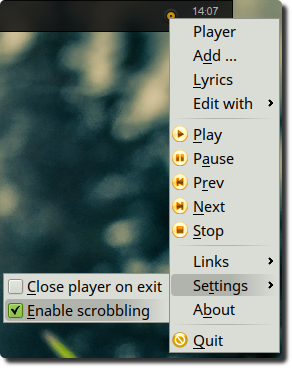
Qt frontend to MOC (Music on Console) player. Combination of eXo and MOC gives you a modern yet very minimalistic audio player.
Features:
- Lyrics from web
- Background mode
- DBus and MPRISv2 interfaces. Enables media controls in your desktop environment
- Scrobbling to last.fm (optional)
- Bookmarks for radio streams
- OSD notifications
- Optional CMus support
- Optional Spotify client support (limited functionality, scrobbling only)
See man exo for more information on command line options.
Build dependencies
CMake, QtBase, QtTools, LibLastfm (optional)
sudo apt install qtbase5-dev qttools5-dev liblastfm5-dev cmake
Runtime dependencies
moc, cmus(?), spotify(?)
Build and run
mkdir build && cd build
cmake -DBUILD_LASTFM=ON ..
make -j2
./src/exo
Build options:
BUILD_LASTFM=OFF # disable scrobbler module (enabled by default)
WITH_QT6=ON      # build with Qt6 (disabled by default)
Screenshot
Installation on Ubuntu
# stable releases
sudo add-apt-repository ppa:blaze/main
sudo apt update
sudo apt install exo-player
# development snapshots
sudo add-apt-repository ppa:blaze/dev
sudo apt update
sudo apt install exo-player
Background mode (no GUI or X-session needed)
Basic running
exo -d 2>/tmp/exo_errors.log &
Scrobbler (re)authentication
exo --force-reauth
Shutting down the app
qdbus org.mpris.MediaPlayer2.exo\
  /org/mpris/MediaPlayer2 org.mpris.MediaPlayer2.Quit
or
pkill -2 exo
Tips
Create a global hotkey to see the lyrics at any time by assigning the command below to a desired shortcut
qdbus local.exo_player /exo local.exo_player.showLyricsWindow