PostCSS plugin that enables @for loop syntax in your CSS.
Try it out!
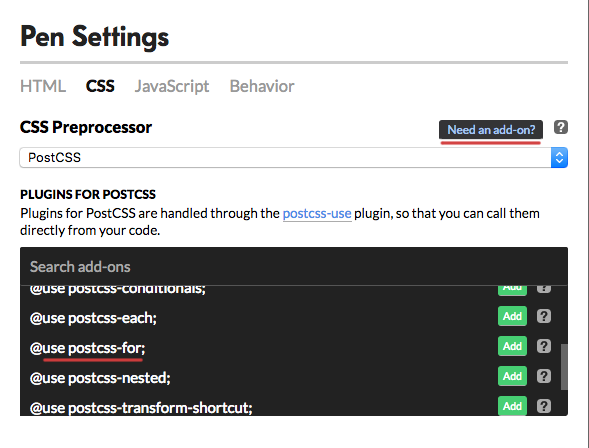
You can try postcss-for directly from codepen. Just choose PostCSS as a preprocessor and pick desired plugin from the list.
Usage
postcss([ require('postcss-for') ])
Note, that unlike the Sass @for, postcss-for in the example below iterates from 1 to 3 inclusively.
@for $i from 1 to 3 {
    .b-$i { width: $(i)px; }
}
.b-1 {
    width: 1px
}
.b-2 {
    width: 2px
}
.b-3 {
    width: 3px
}
This plugin must be set before postcss-nested and postcss-simple-vars. Therefore dollar variable cannot be used as a loop range parameter. If you do want to use predefined range parameters though, consider using postcss-custom-properties with postcss-at-rules-variables, or look into this postcss-for fork.
More features
By keyword is available:
@for $i from 1 to 5 by 2 {
    .b-$i { width: $(i)px; }
}
.b-1 {
    width: 1px
}
.b-3 {
    width: 3px
}
.b-5 {
    width: 5px
}
Locality of variables in nested loops is supported:
@for $x from 1 to 2 {
    @for $y from 1 to $x {
        @for $z from $y to $x {
            .c-$(x)-$(z)-$(y) { padding: $(x)em $(z)em $(y)em; }
        }
    }
}
.c-1-1-1 {
    padding: 1em 1em 1em
}
.c-2-1-1 {
    padding: 2em 1em 1em
}
.c-2-2-1 {
    padding: 2em 2em 1em
}
.c-2-2-2 {
    padding: 2em 2em 2em
}
See PostCSS docs for examples for your environment.