
PDF Filling & Generation API
DocSpring makes it easy for developers to fill out and generate PDFs with a simple API request
Trusted By
How DocSpring Works

Upload a PDF template
We’ll automatically import fields if your PDF has a fillable form.
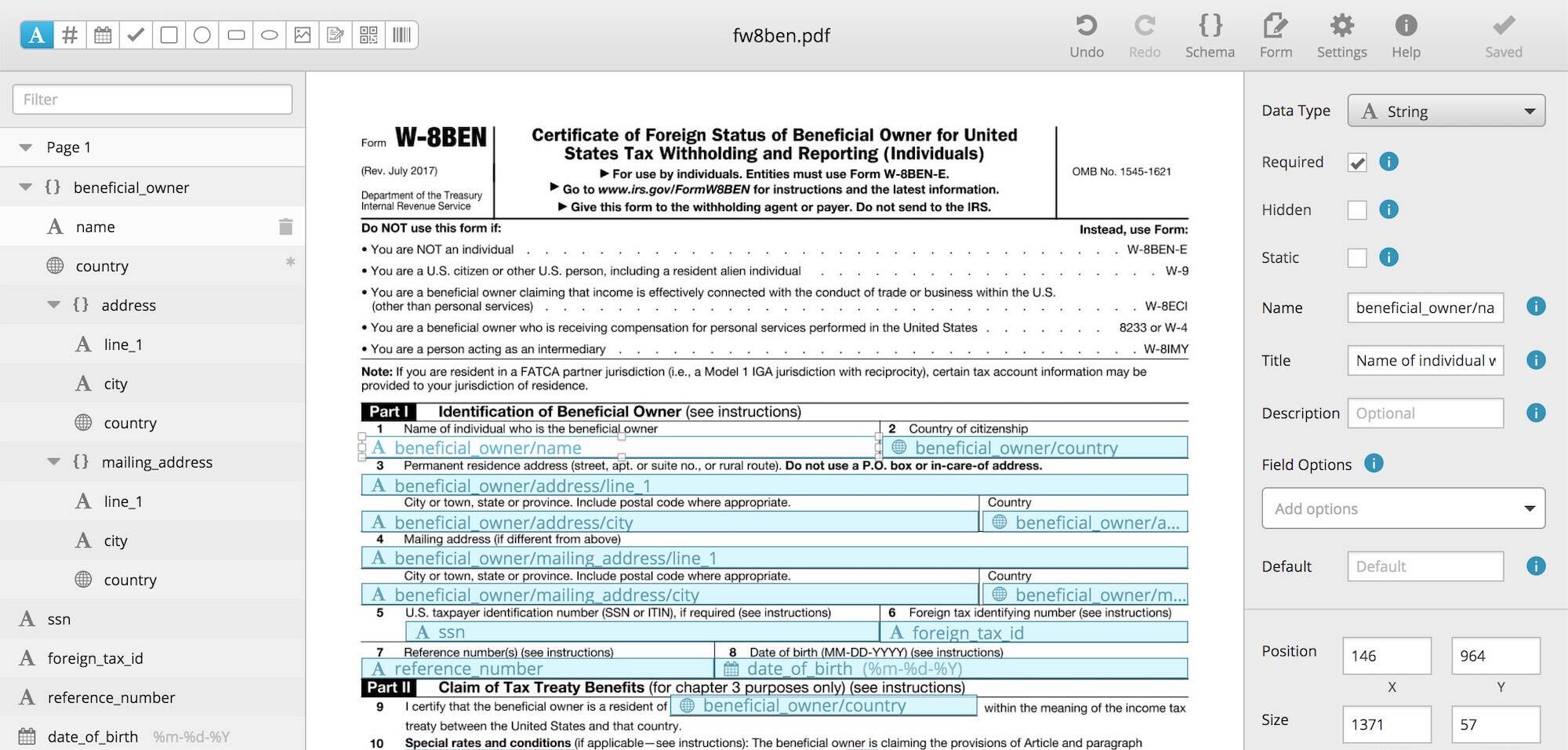
Set up your fields
Use our visual template editor to drag-and-drop your fields.

Send an API request
Send a POST request to generate a PDF with a few lines of code.
PDF Template Examples
Fill out Form W-8 BEN and give this form to the withholding agent or payer if you are a foreign person and you are the beneficial owner of an amount subject to withholding.
Submit Form W-8 BEN when requested by the withholding agent or payer whether or not you are claiming a reduced rate of, or exemption from, withholding.
Paste these commands into your terminal to run a script that will generate a new PDF.
# This template has a lot of fields, so you'll need to download and run this bash script:
curl -sfSL "https://app.docspring.com/api/v1/templates/tpl_AcXt4ar4DXPsz79Nrc/curl_example.sh" \
  -u "api_test_z9F4keTFADRyXf6JcA:qEm6Xbf7xXFnGxxFT5R7MzhYkAfJbmjkAa637jhRtq" \
  -o "/tmp/docspring_tpl_AcXt4ar4DXPsz79Nrc.sh"
bash "/tmp/docspring_tpl_AcXt4ar4DXPsz79Nrc.sh"
Use this simple HTML template to generate invoice PDFs to send to your customers.
This template demonstrates some features of the Liquid templating language. Liquid allows you to add powerful logic and conditions to your templates:
* Calculating the total amount for all invoice items.
* Formatting the invoice number with leading zeros.
* Using the current date as the invoice creation date.
* Calculating a due-date for the invoice that is 30 days in the future.
Paste these commands into your terminal to run a script that will generate a new PDF.
curl -fSL "https://sync.api.docspring.com/api/v1/templates/tpl_TrmdePAbxjKpbs2s93/submissions" \
  -u "api_test_z9F4keTFADRyXf6JcA:qEm6Xbf7xXFnGxxFT5R7MzhYkAfJbmjkAa637jhRtq" \
  -d '{
    "data": {
      "date": "2015-10-22",
      "payer": {
        "title": "Excepteur ea sit sint magna",
        "name": "Stacy Leffler",
        "email": "[email protected]"
      },
      "items": [
        {
          "description": "sit nostrud",
          "amount": 39385.8072146445
        },
        {
          "description": "cupidatat tempor dolore in reprehenderit",
          "amount": 14069.2398217276
        },
        {
          "description": "consequat Excepteur",
          "amount": 22676.99778816761
        }
      ],
      "invoice_number": 1
    },
    "test": true,
    "metadata": {}
  }'
Tourists can fill out this Application for Extension of Temporary Stay in the Kingdom (TM.7) form to extend their stay in Thailand for another 30 days. You can use DocSpring to fill out this Thailand immigration form instead of filling it out manually by hand.
Paste these commands into your terminal to run a script that will generate a new PDF.
# This template has a lot of fields, so you'll need to download and run this bash script:
curl -sfSL "https://app.docspring.com/api/v1/templates/mr4ekGhgZTptdQaN/curl_example.sh" \
  -u "api_test_z9F4keTFADRyXf6JcA:qEm6Xbf7xXFnGxxFT5R7MzhYkAfJbmjkAa637jhRtq" \
  -o "/tmp/docspring_mr4ekGhgZTptdQaN.sh"
bash "/tmp/docspring_mr4ekGhgZTptdQaN.sh"
Features

PDF Template Creation
Upload your PDF to DocSpring to create a new PDF template. Submit data to our PDF creation API to fill out your PDF templates with information.

Convert HTML to PDF
Design your own PDF templates using HTML, CSS, and Liquid. Templates can include advanced logic, such as variables, loops, and conditions.

PDF Template Editor
Drag-and-drop your fields in DocSpring's visual PDF template editor. You can also embed the template editor on your own website.

Data Validation
Ensure the data you send in your API requests matches the fields in your PDF templates. Never accidentally delete a field or send the wrong data.

Flexible Field Types
DocSpring supports a wide range of field types, so you can fill out any type of form. Fields include barcode, QR code, image, signature, and more.

Online Web Forms
Every PDF template has an automatically generated web-based form. Use these forms to test your PDF template, or embed them on your own website.
Enterprise-Grade Security

SOC 2 Type II

GDPR Compliant
DocSpring has completed a SOC 2 Type II audit and is fully GDPR compliant.

What Our Customers Say

Mike Moone Co-Founder & CEO, BrightReps
DocSpring has been great! We had to do a lot more PDF template iterations than we originally planned, and being able to do those from your interface was a lifesaver. When a PDF fails because we didn’t send the right payload, the detailed error messages you provide have been very helpful.

James Christopher Hall Founder & CEO, Harvust
DocSpring's simple API and client library was fast to integrate, flexible to our needs, and well documented. Using your service has allowed Harvust to iterate faster and deliver the best product to our growers.

Laura Hackney Cofounder and CTO, AnnieCannons
We truly enjoy using DocSpring for our development projects at AnnieCannons. We are able to quickly create, label, and upload PDFs to the interface, start sending data, and integrate the API calls into our builds. It is wonderful to be able to know that this piece of our pipeline is in good hands. The team and support for the product is also exceptional.

Scottie Schneider Founder & CEO, Followup Edge
I spent a good two days trying to integrate with one of your competitors, and came away frustrated because it still wasn’t working. I was up and running with DocSpring in thirty minutes.
What Our Customers Say
DocSpring has been great! We had to do a lot more PDF template iterations than we originally planned, and being able to do those from your interface was a lifesaver. When a PDF fails because we didn’t send the right payload, the detailed error messages you provide have been very helpful.
DocSpring's simple API and client library was fast to integrate, flexible to our needs, and well documented. Using your service has allowed Harvust to iterate faster and deliver the best product to our growers.
James Christopher Hall
Founder & CEO, Harvust
We truly enjoy using DocSpring for our development projects at AnnieCannons. We are able to quickly create, label, and upload PDFs to the interface, start sending data, and integrate the API calls into our builds. It is wonderful to be able to know that this piece of our pipeline is in good hands. The team and support for the product is also exceptional.
Laura Hackney
Cofounder and CTO, AnnieCannons
I spent a good two days trying to integrate with one of your competitors, and came away frustrated because it still wasn’t working. I was up and running with DocSpring in thirty minutes.
Scottie Schneider
Founder & CEO, Followup Edge
Fill out PDFs in minutes, not weeks
Sign up for a free trial and try out DocSpring with your own PDFs.