This guide takes you through your first steps with Restate.
We will run a simple Restate Greeter service that listens on port 9080 and responds with You said hi to <name>! to a greet request.

Building with an AI coding agent?
Every Restate template ships with the Restate coding agent plugin pre-configured. Your agent gets Restate expertise plus access to the full docs via MCP. Useful for:
- Migrating an existing application to Restate
- Building a new Restate service from scratch
Select your SDK:
TypeScript
Java
Kotlin
Go
Python
Rust
Select your favorite runtime:
Node.js
Bun
Deno
Cloudflare Workers
Next.js/Vercel
1
Install Restate Server & CLI
Restate is a single self-contained binary. No external dependencies needed.
Homebrew
Download binaries
npm
Docker
brew install restatedev/tap/restate-server restatedev/tap/restate
Start the server:
restate-server
Download prebuilt binaries from the releases page:
BIN=/usr/local/bin && RESTATE_PLATFORM=x86_64-apple-darwin && \
curl -L --remote-name-all https://restate.gateway.scarf.sh/latest/restate-{server,cli}-$RESTATE_PLATFORM.tar.xz && \
tar -xvf restate-server-$RESTATE_PLATFORM.tar.xz --strip-components=1 restate-server-$RESTATE_PLATFORM/restate-server && \
tar -xvf restate-cli-$RESTATE_PLATFORM.tar.xz --strip-components=1 restate-cli-$RESTATE_PLATFORM/restate && \
chmod +x restate restate-server && \
sudo mv restate $BIN && \
sudo mv restate-server $BIN
Start the server:
restate-server
npm install --global @restatedev/restate-server@latest @restatedev/restate@latest
Start the server:
restate-server
Run the Restate Server:
docker run --name restate_dev --rm \
-p 8080:8080 -p 9070:9070 -p 9071:9071 \
--add-host=host.docker.internal:host-gateway \
docker.restate.dev/restatedev/restate:latest
Run CLI commands:
docker run -it --network=host \
docker.restate.dev/restatedev/restate-cli:latest \
invocations ls
Replace invocations ls with any CLI subcommand.
You can find the Restate UI running on port 9070 (http://localhost:9070) after starting the Restate Server.
2
Get the Greeter service template
restate example typescript-hello-world &&
cd typescript-hello-world &&
npm install
3
Run the Greeter service
npm run dev
4
Register the service
Tell Restate where the service is running, so Restate can discover and register the services and handlers behind this endpoint.
You can do this via the UI (http://localhost:9070) or via:
restate deployments register http://localhost:9080
Show Output
❯ SERVICES THAT WILL BE ADDED:
- Greeter
Type: Service
HANDLER  INPUT                                     OUTPUT
greet    value of content-type 'application/json'  value of content-type 'application/json'


✔ Are you sure you want to apply those changes? · yes
✅ DEPLOYMENT:
SERVICE  REV
Greeter  1
If you run Restate with Docker, register http://host.docker.internal:9080 instead of http://localhost:9080.
Restate Cloud
When using Restate Cloud, your service must be accessible over the public internet so Restate can invoke it. If you want to develop with a local service, you can expose it using our tunnel feature.
5
Send a request to the Greeter service
Invoke the service via the Restate UI playground: go to http://localhost:9070, click on your service and then on playground.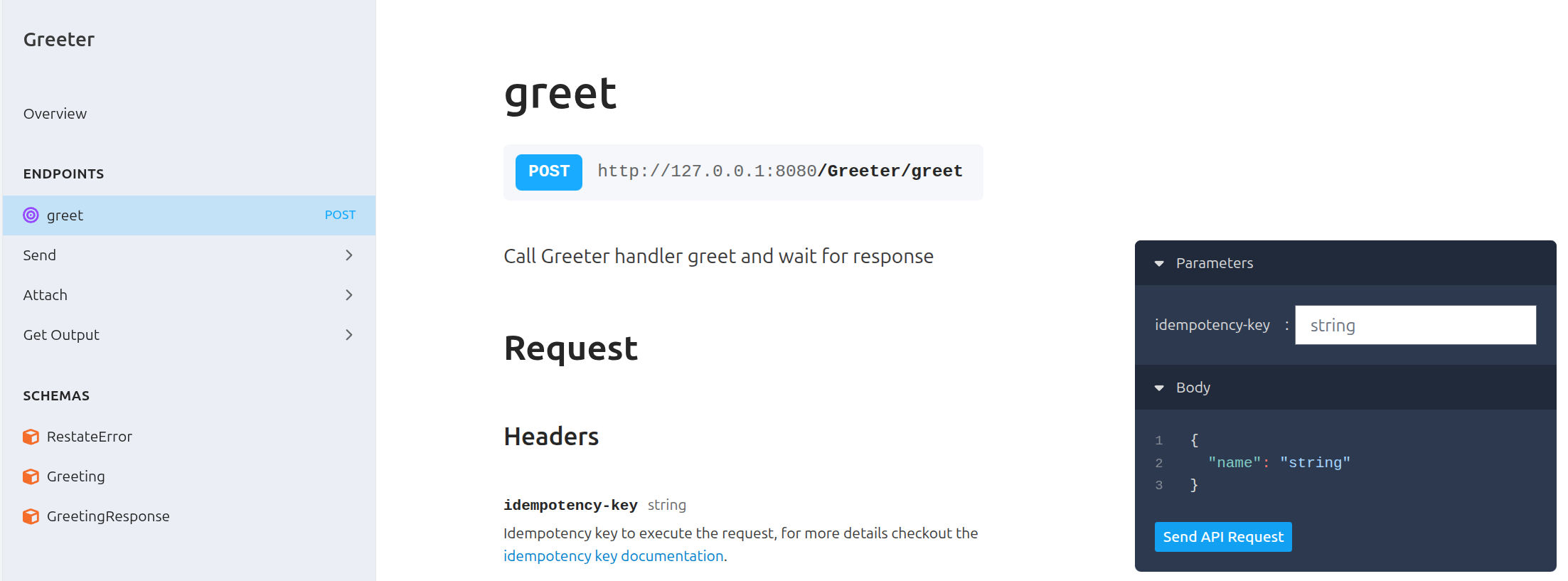 Or invoke via
 curl:
curl localhost:8080/restate/call/Greeter/greet --json '{"name": "Sarah"}'
Expected output: You said hi to Sarah!
6
Congratulations, you just ran Durable Execution!
The invocation you just sent used Durable Execution to make sure the request ran till completion. For each request, it sent a notification, slept for a second, and then sent a reminder.
const greeter = restate.service({
  name: "Greeter",
  handlers: {
    greet: restate.createServiceHandler(
      { input: restate.serde.schema(Greeting), output: restate.serde.schema(GreetingResponse) },
      async (ctx: restate.Context, { name }) => {
        // Durably execute a set of steps; resilient against failures
        const greetingId = ctx.rand.uuidv4();
        await ctx.run("Notification", () => sendNotification(greetingId, name));
        await ctx.sleep({ seconds: 1 });
        await ctx.run("Reminder", () => sendReminder(greetingId, name));

        // Respond to caller
        return { result: `You said hi to ${name}!` };
      },
    ),
  },
});

restate.serve({
  services: [greeter],
  port: 9080,
});
See how a failing request is retried
Send a request for Alice to see how the service behaves when it occasionally fails to send the reminder and notification:
curl localhost:8080/restate/call/Greeter/greet --json '{"name": "Alice"}'
Expected output:
You said hi to Alice!
You can see in the service logs and in the Restate UI how the request gets retried.
On a retry, it skipped the steps that already succeeded.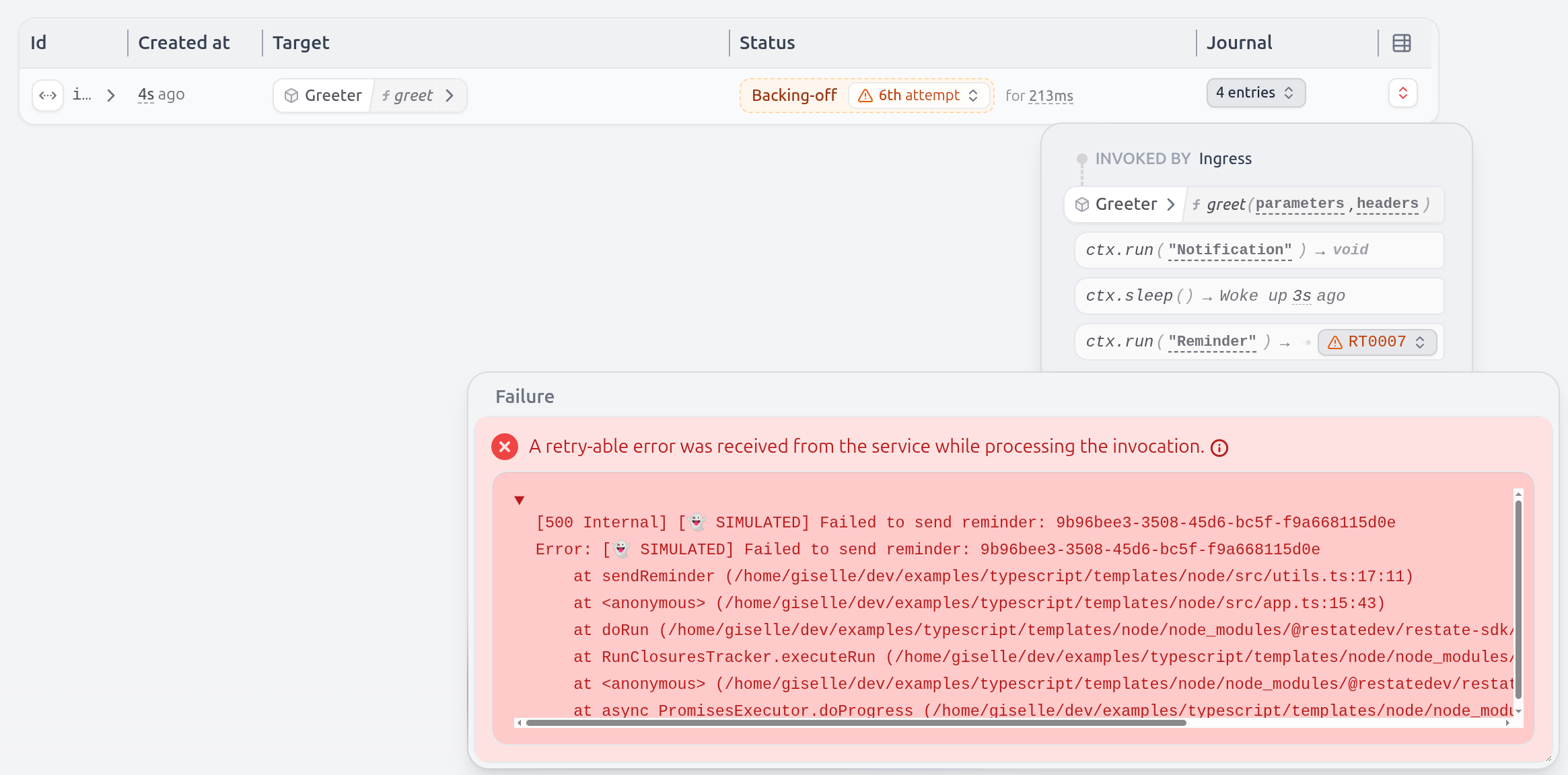 Even the sleep is durable and tracked by Restate.
If you kill/restart the service halfway through, the sleep will only last for what remained.
Even the sleep is durable and tracked by Restate.
If you kill/restart the service halfway through, the sleep will only last for what remained.
Restate persists the progress of the handler. Letting you write code that is resilient to failures out of the box. Have a look at the Durable Execution page to learn more.
1
Install Restate Server & CLI
Restate is a single self-contained binary. No external dependencies needed.
Homebrew
Download binaries
npm
Docker
brew install restatedev/tap/restate-server restatedev/tap/restate
Start the server:
restate-server
Download prebuilt binaries from the releases page:
BIN=/usr/local/bin && RESTATE_PLATFORM=x86_64-apple-darwin && \
curl -L --remote-name-all https://restate.gateway.scarf.sh/latest/restate-{server,cli}-$RESTATE_PLATFORM.tar.xz && \
tar -xvf restate-server-$RESTATE_PLATFORM.tar.xz --strip-components=1 restate-server-$RESTATE_PLATFORM/restate-server && \
tar -xvf restate-cli-$RESTATE_PLATFORM.tar.xz --strip-components=1 restate-cli-$RESTATE_PLATFORM/restate && \
chmod +x restate restate-server && \
sudo mv restate $BIN && \
sudo mv restate-server $BIN
Start the server:
restate-server
npm install --global @restatedev/restate-server@latest @restatedev/restate@latest
Start the server:
restate-server
Run the Restate Server:
docker run --name restate_dev --rm \
-p 8080:8080 -p 9070:9070 -p 9071:9071 \
--add-host=host.docker.internal:host-gateway \
docker.restate.dev/restatedev/restate:latest
Run CLI commands:
docker run -it --network=host \
docker.restate.dev/restatedev/restate-cli:latest \
invocations ls
Replace invocations ls with any CLI subcommand.
You can find the Restate UI running on port 9070 (http://localhost:9070) after starting the Restate Server.
2
Get the Greeter service template
restate example typescript-hello-world-bun &&
cd typescript-hello-world-bun &&
npm install
3
Run the Greeter service
npm run dev
4
Register the service
Tell Restate where the service is running, so Restate can discover and register the services and handlers behind this endpoint.
You can do this via the UI (http://localhost:9070) or via:
restate deployments register http://localhost:9080
Show Output
❯ SERVICES THAT WILL BE ADDED:
- Greeter
Type: Service
HANDLER  INPUT                                     OUTPUT
greet    value of content-type 'application/json'  value of content-type 'application/json'


✔ Are you sure you want to apply those changes? · yes
✅ DEPLOYMENT:
SERVICE  REV
Greeter  1
If you run Restate with Docker, register http://host.docker.internal:9080 instead of http://localhost:9080.
Restate Cloud
When using Restate Cloud, your service must be accessible over the public internet so Restate can invoke it. If you want to develop with a local service, you can expose it using our tunnel feature.
5
Send a request to the Greeter service
Invoke the service via the Restate UI playground: go to http://localhost:9070, click on your service and then on playground.Or invoke via curl:
curl localhost:8080/restate/call/Greeter/greet --json '{"name": "Sarah"}'
Expected output: You said hi to Sarah!
6
Congratulations, you just ran Durable Execution!
The invocation you just sent used Durable Execution to make sure the request ran till completion. For each request, it sent a notification, slept for a second, and then sent a reminder.
const greeter = restate.service({
  name: "Greeter",
  handlers: {
    greet: restate.createServiceHandler(
      { input: restate.serde.schema(Greeting), output: restate.serde.schema(GreetingResponse) },
      async (ctx: restate.Context, { name }) => {
        // Durably execute a set of steps; resilient against failures
        const greetingId = ctx.rand.uuidv4();
        await ctx.run("Notification", () => sendNotification(greetingId, name));
        await ctx.sleep({ seconds: 1 });
        await ctx.run("Reminder", () => sendReminder(greetingId, name));

        // Respond to caller
        return { result: `You said hi to ${name}!` };
      },
    ),
  },
});

restate.serve({
  services: [greeter],
  port: 9080,
});
Send a request for Alice to see how the service behaves when it occasionally fails to send the reminder and notification:
curl localhost:8080/restate/call/Greeter/greet --json '{"name": "Alice"}'
Expected output:
You said hi to Alice!
You can see in the service logs and in the Restate UI how the request gets retried.
On a retry, it skipped the steps that already succeeded.Even the sleep is durable and tracked by Restate.
If you kill/restart the service halfway through, the sleep will only last for what remained.
Restate persists the progress of the handler. Letting you write code that is resilient to failures out of the box. Have a look at the Durable Execution page to learn more.
1
Install Restate Server & CLI
Restate is a single self-contained binary. No external dependencies needed.
Homebrew
Download binaries
npm
Docker
brew install restatedev/tap/restate-server restatedev/tap/restate
Start the server:
restate-server
Download prebuilt binaries from the releases page:
BIN=/usr/local/bin && RESTATE_PLATFORM=x86_64-apple-darwin && \
curl -L --remote-name-all https://restate.gateway.scarf.sh/latest/restate-{server,cli}-$RESTATE_PLATFORM.tar.xz && \
tar -xvf restate-server-$RESTATE_PLATFORM.tar.xz --strip-components=1 restate-server-$RESTATE_PLATFORM/restate-server && \
tar -xvf restate-cli-$RESTATE_PLATFORM.tar.xz --strip-components=1 restate-cli-$RESTATE_PLATFORM/restate && \
chmod +x restate restate-server && \
sudo mv restate $BIN && \
sudo mv restate-server $BIN
Start the server:
restate-server
npm install --global @restatedev/restate-server@latest @restatedev/restate@latest
Start the server:
restate-server
Run the Restate Server:
docker run --name restate_dev --rm \
-p 8080:8080 -p 9070:9070 -p 9071:9071 \
--add-host=host.docker.internal:host-gateway \
docker.restate.dev/restatedev/restate:latest
Run CLI commands:
docker run -it --network=host \
docker.restate.dev/restatedev/restate-cli:latest \
invocations ls
Replace invocations ls with any CLI subcommand.
You can find the Restate UI running on port 9070 (http://localhost:9070) after starting the Restate Server.
2
Get the Greeter service template
restate example typescript-hello-world-deno &&
cd typescript-hello-world-deno
3
Run the Greeter service
deno task dev
4
Register the service
Tell Restate where the service is running, so Restate can discover and register the services and handlers behind this endpoint.
You can do this via the UI (http://localhost:9070) or via:
restate deployments register http://localhost:9080
Show Output
❯ SERVICES THAT WILL BE ADDED:
- Greeter
Type: Service
HANDLER  INPUT                                     OUTPUT
greet    value of content-type 'application/json'  value of content-type 'application/json'


✔ Are you sure you want to apply those changes? · yes
✅ DEPLOYMENT:
SERVICE  REV
Greeter  1
If you run Restate with Docker, register http://host.docker.internal:9080 instead of http://localhost:9080.
Restate Cloud
When using Restate Cloud, your service must be accessible over the public internet so Restate can invoke it. If you want to develop with a local service, you can expose it using our tunnel feature.
5
Send a request to the Greeter service
Invoke the service via the Restate UI playground: go to http://localhost:9070, click on your service and then on playground.Or invoke via curl:
curl localhost:8080/restate/call/Greeter/greet --json '{"name": "Sarah"}'
Expected output: You said hi to Sarah!
6
Congratulations, you just ran Durable Execution!
The invocation you just sent used Durable Execution to make sure the request ran till completion. For each request, it sent a notification, slept for a second, and then sent a reminder.
export const greeter = restate.service({
  name: "Greeter",
  handlers: {
    greet: restate.createServiceHandler(
      { input: restate.serde.schema(Greeting), output: restate.serde.schema(GreetingResponse) },
      async (ctx: restate.Context, { name }) => {
        // Durably execute a set of steps; resilient against failures
        const greetingId = ctx.rand.uuidv4();
        await ctx.run("Notification", () => sendNotification(greetingId, name));
        await ctx.sleep({ seconds: 1 });
        await ctx.run("Reminder", () => sendReminder(greetingId, name));

        // Respond to caller
        return { result: `You said hi to ${name}!` };
      },
    ),
  },
});

const handler = restate.createEndpointHandler({
  services: [greeter],
  bidirectional: true,
});

Deno.serve({ port: 9080 }, handler);
Send a request for Alice to see how the service behaves when it occasionally fails to send the reminder and notification:
curl localhost:8080/restate/call/Greeter/greet --json '{"name": "Alice"}'
Expected output:
You said hi to Alice!
You can see in the service logs and in the Restate UI how the request gets retried.
On a retry, it skipped the steps that already succeeded.Even the sleep is durable and tracked by Restate.
If you kill/restart the service halfway through, the sleep will only last for what remained.
Restate persists the progress of the handler. Letting you write code that is resilient to failures out of the box. Have a look at the Durable Execution page to learn more.
1
Install Restate Server & CLI
Restate is a single self-contained binary. No external dependencies needed.
Homebrew
Download binaries
npm
Docker
brew install restatedev/tap/restate-server restatedev/tap/restate
Start the server:
restate-server
Download prebuilt binaries from the releases page:
BIN=/usr/local/bin && RESTATE_PLATFORM=x86_64-apple-darwin && \
curl -L --remote-name-all https://restate.gateway.scarf.sh/latest/restate-{server,cli}-$RESTATE_PLATFORM.tar.xz && \
tar -xvf restate-server-$RESTATE_PLATFORM.tar.xz --strip-components=1 restate-server-$RESTATE_PLATFORM/restate-server && \
tar -xvf restate-cli-$RESTATE_PLATFORM.tar.xz --strip-components=1 restate-cli-$RESTATE_PLATFORM/restate && \
chmod +x restate restate-server && \
sudo mv restate $BIN && \
sudo mv restate-server $BIN
Start the server:
restate-server
npm install --global @restatedev/restate-server@latest @restatedev/restate@latest
Start the server:
restate-server
Run the Restate Server:
docker run --name restate_dev --rm \
-p 8080:8080 -p 9070:9070 -p 9071:9071 \
--add-host=host.docker.internal:host-gateway \
docker.restate.dev/restatedev/restate:latest
Run CLI commands:
docker run -it --network=host \
docker.restate.dev/restatedev/restate-cli:latest \
invocations ls
Replace invocations ls with any CLI subcommand.
You can find the Restate UI running on port 9070 (http://localhost:9070) after starting the Restate Server.
2
Get the Greeter service template
restate example typescript-hello-world-cloudflare-worker &&
cd typescript-hello-world-cloudflare-worker &&
npm install
3
Run the Greeter service
npm run dev
4
Register the service
Tell Restate where the service is running, so Restate can discover and register the services and handlers behind this endpoint.
You can do this via the UI (http://localhost:9070) or via:
restate deployments register http://localhost:9080 --use-http1.1
Expected output:
❯ SERVICES THAT WILL BE ADDED:
- Greeter
Type: Service
HANDLER  INPUT                                     OUTPUT
greet    value of content-type 'application/json'  value of content-type 'application/json'


✔ Are you sure you want to apply those changes? · yes
✅ DEPLOYMENT:
SERVICE  REV
Greeter  1
does not support HTTP2, so we need to tell Restate to use HTTP1.1.If you run Restate with Docker, use http://host.docker.internal:9080 instead of http://localhost:9080.
When using Restate Cloud, your service must be accessible over the public internet so Restate can invoke it. If you want to develop with a local service, you can expose it using our tunnel feature.
5
Send a request to the Greeter service
Invoke the service via the Restate UI playground: go to http://localhost:9070, click on your service and then on playground.Or invoke via curl:
curl localhost:8080/restate/call/Greeter/greet --json '{"name": "Sarah"}'
Expected output: You said hi to Sarah!
6
Congratulations, you just ran Durable Execution!
The invocation you just sent used Durable Execution to make sure the request ran till completion. For each request, it sent a notification, slept for a second, and then sent a reminder.
const greeter = restate.service({
  name: "Greeter",
  handlers: {
    greet: restate.createServiceHandler(
      { input: restate.serde.schema(Greeting), output: restate.serde.schema(GreetingResponse) },
      async (ctx: restate.Context, { name }) => {
        // Durably execute a set of steps; resilient against failures
        const greetingId = ctx.rand.uuidv4();
        await ctx.run("Notification", () => sendNotification(greetingId, name));
        await ctx.sleep({ seconds: 1 });
        await ctx.run("Reminder", () => sendReminder(greetingId, name));

        // Respond to caller
        return { result: `You said hi to ${name}!` };
      },
    ),
  },
});

export default {
    fetch: restate.createEndpointHandler({ services: [greeter] })
};
Send a request for Alice to see how the service behaves when it occasionally fails to send the reminder and notification:
curl localhost:8080/restate/call/Greeter/greet --json '{"name": "Alice"}'
Expected output:
You said hi to Alice!
You can see in the service logs and in the Restate UI how the request gets retried.
On a retry, it skipped the steps that already succeeded.Even the sleep is durable and tracked by Restate.
If you kill/restart the service halfway through, the sleep will only last for what remained.
Restate persists the progress of the handler. Letting you write code that is resilient to failures out of the box. Have a look at the Durable Execution page to learn more.
1
Install Restate Server & CLI
Restate is a single self-contained binary. No external dependencies needed.
Homebrew
Download binaries
npm
Docker
brew install restatedev/tap/restate-server restatedev/tap/restate
Start the server:
restate-server
Download prebuilt binaries from the releases page:
BIN=/usr/local/bin && RESTATE_PLATFORM=x86_64-apple-darwin && \
curl -L --remote-name-all https://restate.gateway.scarf.sh/latest/restate-{server,cli}-$RESTATE_PLATFORM.tar.xz && \
tar -xvf restate-server-$RESTATE_PLATFORM.tar.xz --strip-components=1 restate-server-$RESTATE_PLATFORM/restate-server && \
tar -xvf restate-cli-$RESTATE_PLATFORM.tar.xz --strip-components=1 restate-cli-$RESTATE_PLATFORM/restate && \
chmod +x restate restate-server && \
sudo mv restate $BIN && \
sudo mv restate-server $BIN
Start the server:
restate-server
npm install --global @restatedev/restate-server@latest @restatedev/restate@latest
Start the server:
restate-server
Run the Restate Server:
docker run --name restate_dev --rm \
-p 8080:8080 -p 9070:9070 -p 9071:9071 \
--add-host=host.docker.internal:host-gateway \
docker.restate.dev/restatedev/restate:latest
Run CLI commands:
docker run -it --network=host \
docker.restate.dev/restatedev/restate-cli:latest \
invocations ls
Replace invocations ls with any CLI subcommand.
You can find the Restate UI running on port 9070 (http://localhost:9070) after starting the Restate Server.
2
Get the Greeter service template
restate example typescript-hello-world-vercel &&
cd typescript-hello-world-vercel &&
npm install
3
Run the Greeter service
npm run dev
4
Register the service
restate deployments register http://localhost:3000/restate --use-http1.1
Show Output
❯ SERVICES THAT WILL BE ADDED:
- Greeter
Type: Service
HANDLER  INPUT                                     OUTPUT
greet    value of content-type 'application/json'  value of content-type 'application/json'


✔ Are you sure you want to apply those changes? · yes
✅ DEPLOYMENT:
SERVICE  REV
Greeter  1
If you run Restate with Docker, use http://host.docker.internal:3000/restate instead of http://localhost:3000/restate.
Restate Cloud
When using Restate Cloud, your service must be accessible over the public internet so Restate can invoke it. If you want to develop with a local service, you can expose it using our tunnel feature.
5
Send a request to the Greeter service
Invoke the service via the Restate UI playground: go to http://localhost:9070, click on your service and then on playground.Or invoke via curl:
curl localhost:8080/restate/call/Greeter/greet --json '{"name": "Sarah"}'
Expected output: You said hi to Sarah!
6
Congratulations, you just ran Durable Execution!
The invocation you just sent used Durable Execution to make sure the request ran till completion. For each request, it sent a notification, slept for a second, and then sent a reminder.
export const greeter = restate.service({
  name: "Greeter",
  handlers: {
    greet: restate.createServiceHandler(
      { input: restate.serde.schema(Greeting), output: restate.serde.schema(GreetingResponse) },
      async (ctx: restate.Context, { name }) => {
        // Durably execute a set of steps; resilient against failures
        const greetingId = ctx.rand.uuidv4();
        await ctx.run("Notification", () => sendNotification(greetingId, name));
        await ctx.sleep({ seconds: 1 });
        await ctx.run("Reminder", () => sendReminder(greetingId, name));

        // Respond to caller
        return { result: `You said hi to ${name}!` };
      },
    ),
  },
});

export type Greeter = typeof greeter;
Send a request for Alice to see how the service behaves when it occasionally fails to send the reminder and notification:
curl localhost:8080/restate/call/Greeter/greet --json '{"name": "Alice"}'
Expected output:
You said hi to Alice!
You can see in the service logs and in the Restate UI how the request gets retried.
On a retry, it skipped the steps that already succeeded.Even the sleep is durable and tracked by Restate.
If you kill/restart the service halfway through, the sleep will only last for what remained.
Restate persists the progress of the handler. Letting you write code that is resilient to failures out of the box. Have a look at the Durable Execution page to learn more.
Select your favorite build tool and framework:
Maven + Spring Boot
Maven + Quarkus
Maven
Gradle
Prerequisites:
- JDK >= 17 (JDK >= 23 recommended, required for the latest Restate features)
1
Install Restate Server & CLI
Restate is a single self-contained binary. No external dependencies needed.
Homebrew
Download binaries
npm
Docker
brew install restatedev/tap/restate-server restatedev/tap/restate
Start the server:
restate-server
Download prebuilt binaries from the releases page:
BIN=/usr/local/bin && RESTATE_PLATFORM=x86_64-apple-darwin && \
curl -L --remote-name-all https://restate.gateway.scarf.sh/latest/restate-{server,cli}-$RESTATE_PLATFORM.tar.xz && \
tar -xvf restate-server-$RESTATE_PLATFORM.tar.xz --strip-components=1 restate-server-$RESTATE_PLATFORM/restate-server && \
tar -xvf restate-cli-$RESTATE_PLATFORM.tar.xz --strip-components=1 restate-cli-$RESTATE_PLATFORM/restate && \
chmod +x restate restate-server && \
sudo mv restate $BIN && \
sudo mv restate-server $BIN
Start the server:
restate-server
npm install --global @restatedev/restate-server@latest @restatedev/restate@latest
Start the server:
restate-server
Run the Restate Server:
docker run --name restate_dev --rm \
-p 8080:8080 -p 9070:9070 -p 9071:9071 \
--add-host=host.docker.internal:host-gateway \
docker.restate.dev/restatedev/restate:latest
Run CLI commands:
docker run -it --network=host \
docker.restate.dev/restatedev/restate-cli:latest \
invocations ls
Replace invocations ls with any CLI subcommand.
You can find the Restate UI running on port 9070 (http://localhost:9070) after starting the Restate Server.
2
Get the Greeter service template
restate example java-hello-world-maven-spring-boot &&
cd java-hello-world-maven-spring-boot
3
Run the Greeter service
You are all set to start developing your service.
Open the project in an IDE, run your service and let it listen on port 9080 for requests:
mvn compile spring-boot:run
4
Register the service
Tell Restate where the service is running, so Restate can discover and register the services and handlers behind this endpoint.
You can do this via the UI (http://localhost:9070) or via:
restate deployments register http://localhost:9080
Show Output
❯ SERVICES THAT WILL BE ADDED:
- Greeter
Type: Service
HANDLER  INPUT                                     OUTPUT
greet    value of content-type 'application/json'  value of content-type 'application/json'


✔ Are you sure you want to apply those changes? · yes
✅ DEPLOYMENT:
SERVICE  REV
Greeter  1
If you run Restate with Docker, register http://host.docker.internal:9080 instead of http://localhost:9080.
Restate Cloud
When using Restate Cloud, your service must be accessible over the public internet so Restate can invoke it. If you want to develop with a local service, you can expose it using our tunnel feature.
5
Send a request to the Greeter service
Invoke the service via the Restate UI playground: go to http://localhost:9070, click on your service and then on playground.Or invoke via curl:
curl localhost:8080/restate/call/Greeter/greet --json '{"name": "Sarah"}'
Expected output: You said hi to Sarah!
6
Congratulations, you just ran Durable Execution!
The invocation you just sent used Durable Execution to make sure the request ran till completion. For each request, it sent a notification, slept for a second, and then sent a reminder.
@RestateComponent
@Service
public class Greeter {

  @Value("${greetingPrefix}")
  private String greetingPrefix;

  public record Greeting(String name) {}
  public record GreetingResponse(String message) {}

  @Handler
  public GreetingResponse greet(Greeting req) {
    // Durably execute a set of steps; resilient against failures
    String greetingId = Restate.random().nextUUID().toString();
    Restate.run("Notification", () -> sendNotification(greetingId, req.name));
    Restate.sleep(Duration.ofSeconds(1));
    Restate.run("Reminder", () -> sendReminder(greetingId, req.name));

    // Respond to caller
    return new GreetingResponse("You said " + greetingPrefix + " to " + req.name + "!");
  }
}
Send a request for Alice to see how the service behaves when it occasionally fails to send the reminder and notification:
curl localhost:8080/restate/call/Greeter/greet --json '{"name": "Alice"}'
Expected output:
You said hi to Alice!
You can see in the service logs and in the Restate UI how the request gets retried.
On a retry, it skipped the steps that already succeeded.Even the sleep is durable and tracked by Restate.
If you kill/restart the service halfway through, the sleep will only last for what remained.
Restate persists the progress of the handler. Letting you write code that is resilient to failures out of the box. Have a look at the Durable Execution page to learn more.
1
Install Restate Server & CLI
Restate is a single self-contained binary. No external dependencies needed.
Homebrew
Download binaries
npm
Docker
brew install restatedev/tap/restate-server restatedev/tap/restate
Start the server:
restate-server
Download prebuilt binaries from the releases page:
BIN=/usr/local/bin && RESTATE_PLATFORM=x86_64-apple-darwin && \
curl -L --remote-name-all https://restate.gateway.scarf.sh/latest/restate-{server,cli}-$RESTATE_PLATFORM.tar.xz && \
tar -xvf restate-server-$RESTATE_PLATFORM.tar.xz --strip-components=1 restate-server-$RESTATE_PLATFORM/restate-server && \
tar -xvf restate-cli-$RESTATE_PLATFORM.tar.xz --strip-components=1 restate-cli-$RESTATE_PLATFORM/restate && \
chmod +x restate restate-server && \
sudo mv restate $BIN && \
sudo mv restate-server $BIN
Start the server:
restate-server
npm install --global @restatedev/restate-server@latest @restatedev/restate@latest
Start the server:
restate-server
Run the Restate Server:
docker run --name restate_dev --rm \
-p 8080:8080 -p 9070:9070 -p 9071:9071 \
--add-host=host.docker.internal:host-gateway \
docker.restate.dev/restatedev/restate:latest
Run CLI commands:
docker run -it --network=host \
docker.restate.dev/restatedev/restate-cli:latest \
invocations ls
Replace invocations ls with any CLI subcommand.
You can find the Restate UI running on port 9070 (http://localhost:9070) after starting the Restate Server.
2
Get the Greeter service template
restate example java-hello-world-maven-quarkus &&
cd java-hello-world-maven-quarkus
3
Run the Greeter service
You are all set to start developing your service.
Open the project in an IDE, run your service and let it listen on port 9080 for requests:
quarkus dev
4
Register the service
Tell Restate where the service is running, so Restate can discover and register the services and handlers behind this endpoint.
You can do this via the UI (http://localhost:9070) or via:
restate deployments register http://localhost:9080
Show Output
❯ SERVICES THAT WILL BE ADDED:
- Greeter
Type: Service
HANDLER  INPUT                                     OUTPUT
greet    value of content-type 'application/json'  value of content-type 'application/json'


✔ Are you sure you want to apply those changes? · yes
✅ DEPLOYMENT:
SERVICE  REV
Greeter  1
If you run Restate with Docker, register http://host.docker.internal:9080 instead of http://localhost:9080.
Restate Cloud
When using Restate Cloud, your service must be accessible over the public internet so Restate can invoke it. If you want to develop with a local service, you can expose it using our tunnel feature.
5
Send a request to the Greeter service
Invoke the service via the Restate UI playground: go to http://localhost:9070, click on your service and then on playground.Or invoke via curl:
curl localhost:8080/restate/call/Greeter/greet --json '{"name": "Sarah"}'
Expected output: You said hi to Sarah!
6
Congratulations, you just ran Durable Execution!
The invocation you just sent used Durable Execution to make sure the request ran till completion. For each request, it sent a notification, slept for a second, and then sent a reminder.
@Service
public class Greeter {

  @ConfigProperty(name = "greetingPrefix") String greetingPrefix;

  public record Greeting(String name) {}
  public record GreetingResponse(String message) {}

  @Handler
  public GreetingResponse greet(Greeting req) {
    // Durably execute a set of steps; resilient against failures
    String greetingId = Restate.random().nextUUID().toString();
    Restate.run("Notification", () -> sendNotification(greetingId, req.name));
    Restate.sleep(Duration.ofSeconds(1));
    Restate.run("Reminder", () -> sendReminder(greetingId, req.name));

    // Respond to caller
    return new GreetingResponse("You said hi to " + req.name + "!");
  }
}
Send a request for Alice to see how the service behaves when it occasionally fails to send the reminder and notification:
curl localhost:8080/restate/call/Greeter/greet --json '{"name": "Alice"}'
Expected output:
You said hi to Alice!
You can see in the service logs and in the Restate UI how the request gets retried.
On a retry, it skipped the steps that already succeeded.Even the sleep is durable and tracked by Restate.
If you kill/restart the service halfway through, the sleep will only last for what remained.
Restate persists the progress of the handler. Letting you write code that is resilient to failures out of the box. Have a look at the Durable Execution page to learn more.
1
Install Restate Server & CLI
Restate is a single self-contained binary. No external dependencies needed.
Homebrew
Download binaries
npm
Docker
brew install restatedev/tap/restate-server restatedev/tap/restate
Start the server:
restate-server
Download prebuilt binaries from the releases page:
BIN=/usr/local/bin && RESTATE_PLATFORM=x86_64-apple-darwin && \
curl -L --remote-name-all https://restate.gateway.scarf.sh/latest/restate-{server,cli}-$RESTATE_PLATFORM.tar.xz && \
tar -xvf restate-server-$RESTATE_PLATFORM.tar.xz --strip-components=1 restate-server-$RESTATE_PLATFORM/restate-server && \
tar -xvf restate-cli-$RESTATE_PLATFORM.tar.xz --strip-components=1 restate-cli-$RESTATE_PLATFORM/restate && \
chmod +x restate restate-server && \
sudo mv restate $BIN && \
sudo mv restate-server $BIN
Start the server:
restate-server
npm install --global @restatedev/restate-server@latest @restatedev/restate@latest
Start the server:
restate-server
Run the Restate Server:
docker run --name restate_dev --rm \
-p 8080:8080 -p 9070:9070 -p 9071:9071 \
--add-host=host.docker.internal:host-gateway \
docker.restate.dev/restatedev/restate:latest
Run CLI commands:
docker run -it --network=host \
docker.restate.dev/restatedev/restate-cli:latest \
invocations ls
Replace invocations ls with any CLI subcommand.
You can find the Restate UI running on port 9070 (http://localhost:9070) after starting the Restate Server.
2
Get the Greeter service template
restate example java-hello-world-maven &&
cd java-hello-world-maven
3
Run the Greeter service
You are all set to start developing your service.
Open the project in an IDE, run your service and let it listen on port 9080 for requests:
mvn compile exec:java
4
Register the service
Tell Restate where the service is running, so Restate can discover and register the services and handlers behind this endpoint.
You can do this via the UI (http://localhost:9070) or via:
restate deployments register http://localhost:9080
Show Output
❯ SERVICES THAT WILL BE ADDED:
- Greeter
Type: Service
HANDLER  INPUT                                     OUTPUT
greet    value of content-type 'application/json'  value of content-type 'application/json'


✔ Are you sure you want to apply those changes? · yes
✅ DEPLOYMENT:
SERVICE  REV
Greeter  1
If you run Restate with Docker, register http://host.docker.internal:9080 instead of http://localhost:9080.
Restate Cloud
When using Restate Cloud, your service must be accessible over the public internet so Restate can invoke it. If you want to develop with a local service, you can expose it using our tunnel feature.
5
Send a request to the Greeter service
Invoke the service via the Restate UI playground: go to http://localhost:9070, click on your service and then on playground.Or invoke via curl:
curl localhost:8080/restate/call/Greeter/greet --json '{"name": "Sarah"}'
Expected output: You said hi to Sarah!
6
Congratulations, you just ran Durable Execution!
The invocation you just sent used Durable Execution to make sure the request ran till completion. For each request, it sent a notification, slept for a second, and then sent a reminder.
@Service
public class Greeter {

  public record Greeting(String name) {}
  public record GreetingResponse(String message) {}

  @Handler
  public GreetingResponse greet(Greeting req) {
    // Durably execute a set of steps; resilient against failures
    String greetingId = Restate.random().nextUUID().toString();
    Restate.run("Notification", () -> sendNotification(greetingId, req.name));
    Restate.sleep(Duration.ofSeconds(1));
    Restate.run("Reminder", () -> sendReminder(greetingId, req.name));

    // Respond to caller
    return new GreetingResponse("You said hi to " + req.name + "!");
  }

  public static void main(String[] args) {
    RestateHttpServer.listen(Endpoint.bind(new Greeter()));
  }
}
Send a request for Alice to see how the service behaves when it occasionally fails to send the reminder and notification:
curl localhost:8080/restate/call/Greeter/greet --json '{"name": "Alice"}'
Expected output:
You said hi to Alice!
You can see in the service logs and in the Restate UI how the request gets retried.
On a retry, it skipped the steps that already succeeded.Even the sleep is durable and tracked by Restate.
If you kill/restart the service halfway through, the sleep will only last for what remained.
Restate persists the progress of the handler. Letting you write code that is resilient to failures out of the box. Have a look at the Durable Execution page to learn more.
1
Install Restate Server & CLI
Restate is a single self-contained binary. No external dependencies needed.
Homebrew
Download binaries
npm
Docker
brew install restatedev/tap/restate-server restatedev/tap/restate
Start the server:
restate-server
Download prebuilt binaries from the releases page:
BIN=/usr/local/bin && RESTATE_PLATFORM=x86_64-apple-darwin && \
curl -L --remote-name-all https://restate.gateway.scarf.sh/latest/restate-{server,cli}-$RESTATE_PLATFORM.tar.xz && \
tar -xvf restate-server-$RESTATE_PLATFORM.tar.xz --strip-components=1 restate-server-$RESTATE_PLATFORM/restate-server && \
tar -xvf restate-cli-$RESTATE_PLATFORM.tar.xz --strip-components=1 restate-cli-$RESTATE_PLATFORM/restate && \
chmod +x restate restate-server && \
sudo mv restate $BIN && \
sudo mv restate-server $BIN
Start the server:
restate-server
npm install --global @restatedev/restate-server@latest @restatedev/restate@latest
Start the server:
restate-server
Run the Restate Server:
docker run --name restate_dev --rm \
-p 8080:8080 -p 9070:9070 -p 9071:9071 \
--add-host=host.docker.internal:host-gateway \
docker.restate.dev/restatedev/restate:latest
Run CLI commands:
docker run -it --network=host \
docker.restate.dev/restatedev/restate-cli:latest \
invocations ls
Replace invocations ls with any CLI subcommand.
You can find the Restate UI running on port 9070 (http://localhost:9070) after starting the Restate Server.
2
Get the Greeter service template
restate example java-hello-world-gradle &&
cd java-hello-world-gradle
3
Run the Greeter service
You are all set to start developing your service.
Open the project in an IDE, run your service and let it listen on port 9080 for requests:
./gradlew run
4
Register the service
Tell Restate where the service is running, so Restate can discover and register the services and handlers behind this endpoint.
You can do this via the UI (http://localhost:9070) or via:
restate deployments register http://localhost:9080
Show Output
❯ SERVICES THAT WILL BE ADDED:
- Greeter
Type: Service
HANDLER  INPUT                                     OUTPUT
greet    value of content-type 'application/json'  value of content-type 'application/json'


✔ Are you sure you want to apply those changes? · yes
✅ DEPLOYMENT:
SERVICE  REV
Greeter  1
If you run Restate with Docker, register http://host.docker.internal:9080 instead of http://localhost:9080.
Restate Cloud
When using Restate Cloud, your service must be accessible over the public internet so Restate can invoke it. If you want to develop with a local service, you can expose it using our tunnel feature.
5
Send a request to the Greeter service
Invoke the service via the Restate UI playground: go to http://localhost:9070, click on your service and then on playground.Or invoke via curl:
curl localhost:8080/restate/call/Greeter/greet --json '{"name": "Sarah"}'
Expected output: You said hi to Sarah!
6
Congratulations, you just ran Durable Execution!
The invocation you just sent used Durable Execution to make sure the request ran till completion. For each request, it sent a notification, slept for a second, and then sent a reminder.
@Service
public class Greeter {

    public record Greeting(String name) {}
    public record GreetingResponse(String message) {}

    @Handler
    public GreetingResponse greet(Greeting req) {
        // Durably execute a set of steps; resilient against failures
        String greetingId = Restate.random().nextUUID().toString();
        Restate.run("Notification", () -> sendNotification(greetingId, req.name));
        Restate.sleep(Duration.ofSeconds(1));
        Restate.run("Reminder", () -> sendReminder(greetingId, req.name));

        // Respond to caller
        return new GreetingResponse("You said hi to " + req.name + "!");
    }

    public static void main(String[] args) {
        RestateHttpServer.listen(Endpoint.bind(new Greeter()));
    }
}
Send a request for Alice to see how the service behaves when it occasionally fails to send the reminder and notification:
curl localhost:8080/restate/call/Greeter/greet --json '{"name": "Alice"}'
Expected output:
You said hi to Alice!
You can see in the service logs and in the Restate UI how the request gets retried.
On a retry, it skipped the steps that already succeeded.Even the sleep is durable and tracked by Restate.
If you kill/restart the service halfway through, the sleep will only last for what remained.
Restate persists the progress of the handler. Letting you write code that is resilient to failures out of the box. Have a look at the Durable Execution page to learn more.
Select your favorite framework:
Gradle + Spring Boot
Gradle
1
Install Restate Server & CLI
Restate is a single self-contained binary. No external dependencies needed.
Homebrew
Download binaries
npm
Docker
brew install restatedev/tap/restate-server restatedev/tap/restate
Start the server:
restate-server
Download prebuilt binaries from the releases page:
BIN=/usr/local/bin && RESTATE_PLATFORM=x86_64-apple-darwin && \
curl -L --remote-name-all https://restate.gateway.scarf.sh/latest/restate-{server,cli}-$RESTATE_PLATFORM.tar.xz && \
tar -xvf restate-server-$RESTATE_PLATFORM.tar.xz --strip-components=1 restate-server-$RESTATE_PLATFORM/restate-server && \
tar -xvf restate-cli-$RESTATE_PLATFORM.tar.xz --strip-components=1 restate-cli-$RESTATE_PLATFORM/restate && \
chmod +x restate restate-server && \
sudo mv restate $BIN && \
sudo mv restate-server $BIN
Start the server:
restate-server
npm install --global @restatedev/restate-server@latest @restatedev/restate@latest
Start the server:
restate-server
Run the Restate Server:
docker run --name restate_dev --rm \
-p 8080:8080 -p 9070:9070 -p 9071:9071 \
--add-host=host.docker.internal:host-gateway \
docker.restate.dev/restatedev/restate:latest
Run CLI commands:
docker run -it --network=host \
docker.restate.dev/restatedev/restate-cli:latest \
invocations ls
Replace invocations ls with any CLI subcommand.
You can find the Restate UI running on port 9070 (http://localhost:9070) after starting the Restate Server.
2
Get the Greeter service template
restate example kotlin-hello-world-gradle-spring-boot &&
cd kotlin-hello-world-gradle-spring-boot
3
Run the Greeter service
You are all set to start developing your service.
Open the project in an IDE and configure it to build with Gradle.
Run your service and let it listen on port 9080 for requests:
./gradlew bootRun
4
Register the service
Tell Restate where the service is running, so Restate can discover and register the services and handlers behind this endpoint.
You can do this via the UI (http://localhost:9070) or via:
restate deployments register http://localhost:9080
Show Output
❯ SERVICES THAT WILL BE ADDED:
- Greeter
Type: Service
HANDLER  INPUT                                     OUTPUT
greet    value of content-type 'application/json'  value of content-type 'application/json'


✔ Are you sure you want to apply those changes? · yes
✅ DEPLOYMENT:
SERVICE  REV
Greeter  1
If you run Restate with Docker, register http://host.docker.internal:9080 instead of http://localhost:9080.
Restate Cloud
When using Restate Cloud, your service must be accessible over the public internet so Restate can invoke it. If you want to develop with a local service, you can expose it using our tunnel feature.
5
Send a request to the Greeter service
Invoke the service via the Restate UI playground: go to http://localhost:9070, click on your service and then on playground.Or invoke via curl:
curl localhost:8080/restate/call/Greeter/greet --json '{"name": "Sarah"}'
Expected output: You said hi to Sarah!
6
Congratulations, you just ran Durable Execution!
The invocation you just sent used Durable Execution to make sure the request ran till completion. For each request, it sent a notification, slept for a second, and then sent a reminder.
@RestateComponent
@Service
class Greeter {

  @Value("\${greetingPrefix}")
  lateinit var greetingPrefix: String

  @Serializable
  data class Greeting(val name: String)
  @Serializable
  data class GreetingResponse(val message: String)

  @Handler
  suspend fun greet(req: Greeting): GreetingResponse {
    // Durably execute a set of steps; resilient against failures
    val greetingId = random().nextUUID().toString()
    runBlock("Notification") { sendNotification(greetingId, req.name) }
    sleep(1.seconds)
    runBlock("Reminder") { sendReminder(greetingId, req.name) }

    // Respond to caller
    return GreetingResponse("You said $greetingPrefix to ${req.name}!")
  }
}
Send a request for Alice to see how the service behaves when it occasionally fails to send the reminder and notification:
curl localhost:8080/restate/call/Greeter/greet --json '{"name": "Alice"}'
Expected output:
You said hi to Alice!
You can see in the service logs and in the Restate UI how the request gets retried.
On a retry, it skipped the steps that already succeeded.Even the sleep is durable and tracked by Restate.
If you kill/restart the service halfway through, the sleep will only last for what remained.
Restate persists the progress of the handler. Letting you write code that is resilient to failures out of the box. Have a look at the Durable Execution page to learn more.
1
Install Restate Server & CLI
Restate is a single self-contained binary. No external dependencies needed.
Homebrew
Download binaries
npm
Docker
brew install restatedev/tap/restate-server restatedev/tap/restate
Start the server:
restate-server
Download prebuilt binaries from the releases page:
BIN=/usr/local/bin && RESTATE_PLATFORM=x86_64-apple-darwin && \
curl -L --remote-name-all https://restate.gateway.scarf.sh/latest/restate-{server,cli}-$RESTATE_PLATFORM.tar.xz && \
tar -xvf restate-server-$RESTATE_PLATFORM.tar.xz --strip-components=1 restate-server-$RESTATE_PLATFORM/restate-server && \
tar -xvf restate-cli-$RESTATE_PLATFORM.tar.xz --strip-components=1 restate-cli-$RESTATE_PLATFORM/restate && \
chmod +x restate restate-server && \
sudo mv restate $BIN && \
sudo mv restate-server $BIN
Start the server:
restate-server
npm install --global @restatedev/restate-server@latest @restatedev/restate@latest
Start the server:
restate-server
Run the Restate Server:
docker run --name restate_dev --rm \
-p 8080:8080 -p 9070:9070 -p 9071:9071 \
--add-host=host.docker.internal:host-gateway \
docker.restate.dev/restatedev/restate:latest
Run CLI commands:
docker run -it --network=host \
docker.restate.dev/restatedev/restate-cli:latest \
invocations ls
Replace invocations ls with any CLI subcommand.
You can find the Restate UI running on port 9070 (http://localhost:9070) after starting the Restate Server.
2
Get the Greeter service template
restate example kotlin-hello-world-gradle &&
cd kotlin-hello-world-gradle
3
Run the Greeter service
You are all set to start developing your service.
Open the project in an IDE and configure it to build with Gradle.
Run your service and let it listen on port 9080 for requests:
./gradlew run
4
Register the service
Tell Restate where the service is running, so Restate can discover and register the services and handlers behind this endpoint.
You can do this via the UI (http://localhost:9070) or via:
restate deployments register http://localhost:9080
Show Output
❯ SERVICES THAT WILL BE ADDED:
- Greeter
Type: Service
HANDLER  INPUT                                     OUTPUT
greet    value of content-type 'application/json'  value of content-type 'application/json'


✔ Are you sure you want to apply those changes? · yes
✅ DEPLOYMENT:
SERVICE  REV
Greeter  1
If you run Restate with Docker, register http://host.docker.internal:9080 instead of http://localhost:9080.
Restate Cloud
When using Restate Cloud, your service must be accessible over the public internet so Restate can invoke it. If you want to develop with a local service, you can expose it using our tunnel feature.
5
Send a request to the Greeter service
Invoke the service via the Restate UI playground: go to http://localhost:9070, click on your service and then on playground.Or invoke via curl:
curl localhost:8080/restate/call/Greeter/greet --json '{"name": "Sarah"}'
Expected output: You said hi to Sarah!
6
Congratulations, you just ran Durable Execution!
The invocation you just sent used Durable Execution to make sure the request ran till completion. For each request, it sent a notification, slept for a second, and then sent a reminder.
@Service
class Greeter {

  @Serializable
  data class Greeting(val name: String)
  @Serializable
  data class GreetingResponse(val message: String)

  @Handler
  suspend fun greet(req: Greeting): GreetingResponse {
    // Durably execute a set of steps; resilient against failures
    val greetingId = random().nextUUID().toString()
    runBlock("Notification") { sendNotification(greetingId, req.name) }
    sleep(1.seconds)
    runBlock("Reminder") { sendReminder(greetingId, req.name) }

    // Respond to caller
    return GreetingResponse("You said hi to ${req.name}!")
  }
}

fun main() {
  RestateHttpServer.listen(endpoint {
    bind(Greeter())
  })
}
Send a request for Alice to see how the service behaves when it occasionally fails to send the reminder and notification:
curl localhost:8080/restate/call/Greeter/greet --json '{"name": "Alice"}'
Expected output:
You said hi to Alice!
You can see in the service logs and in the Restate UI how the request gets retried.
On a retry, it skipped the steps that already succeeded.Even the sleep is durable and tracked by Restate.
If you kill/restart the service halfway through, the sleep will only last for what remained.
Restate persists the progress of the handler. Letting you write code that is resilient to failures out of the box. Have a look at the Durable Execution page to learn more.
Prerequisites:
- Go: >= 1.25.0
1
Install Restate Server & CLI
Restate is a single self-contained binary. No external dependencies needed.
Homebrew
Download binaries
npm
Docker
brew install restatedev/tap/restate-server restatedev/tap/restate
Start the server:
restate-server
Download prebuilt binaries from the releases page:
BIN=/usr/local/bin && RESTATE_PLATFORM=x86_64-apple-darwin && \
curl -L --remote-name-all https://restate.gateway.scarf.sh/latest/restate-{server,cli}-$RESTATE_PLATFORM.tar.xz && \
tar -xvf restate-server-$RESTATE_PLATFORM.tar.xz --strip-components=1 restate-server-$RESTATE_PLATFORM/restate-server && \
tar -xvf restate-cli-$RESTATE_PLATFORM.tar.xz --strip-components=1 restate-cli-$RESTATE_PLATFORM/restate && \
chmod +x restate restate-server && \
sudo mv restate $BIN && \
sudo mv restate-server $BIN
Start the server:
restate-server
npm install --global @restatedev/restate-server@latest @restatedev/restate@latest
Start the server:
restate-server
Run the Restate Server:
docker run --name restate_dev --rm \
-p 8080:8080 -p 9070:9070 -p 9071:9071 \
--add-host=host.docker.internal:host-gateway \
docker.restate.dev/restatedev/restate:latest
Run CLI commands:
docker run -it --network=host \
docker.restate.dev/restatedev/restate-cli:latest \
invocations ls
Replace invocations ls with any CLI subcommand.
You can find the Restate UI running on port 9070 (http://localhost:9070) after starting the Restate Server.
2
Get the Greeter service template
restate example go-hello-world &&
cd go-hello-world
3
Run the Greeter service
Now, start developing your service in greeter.go. Run it with:
go run .
it will listen on port 9080 for requests.
4
Register the service
Tell Restate where the service is running, so Restate can discover and register the services and handlers behind this endpoint.
You can do this via the UI (http://localhost:9070) or via:
restate deployments register http://localhost:9080
Show Output
❯ SERVICES THAT WILL BE ADDED:
- Greeter
Type: Service
HANDLER  INPUT                                     OUTPUT
Greet    value of content-type 'application/json'  value of content-type 'application/json'


✔ Are you sure you want to apply those changes? · yes
✅ DEPLOYMENT:
SERVICE  REV
Greeter  1
If you run Restate with Docker, use http://host.docker.internal:9080 instead of http://localhost:9080.
5
Send a request to the Greeter service
Invoke the service via the Restate UI playground: go to http://localhost:9070, click on your service and then on playground.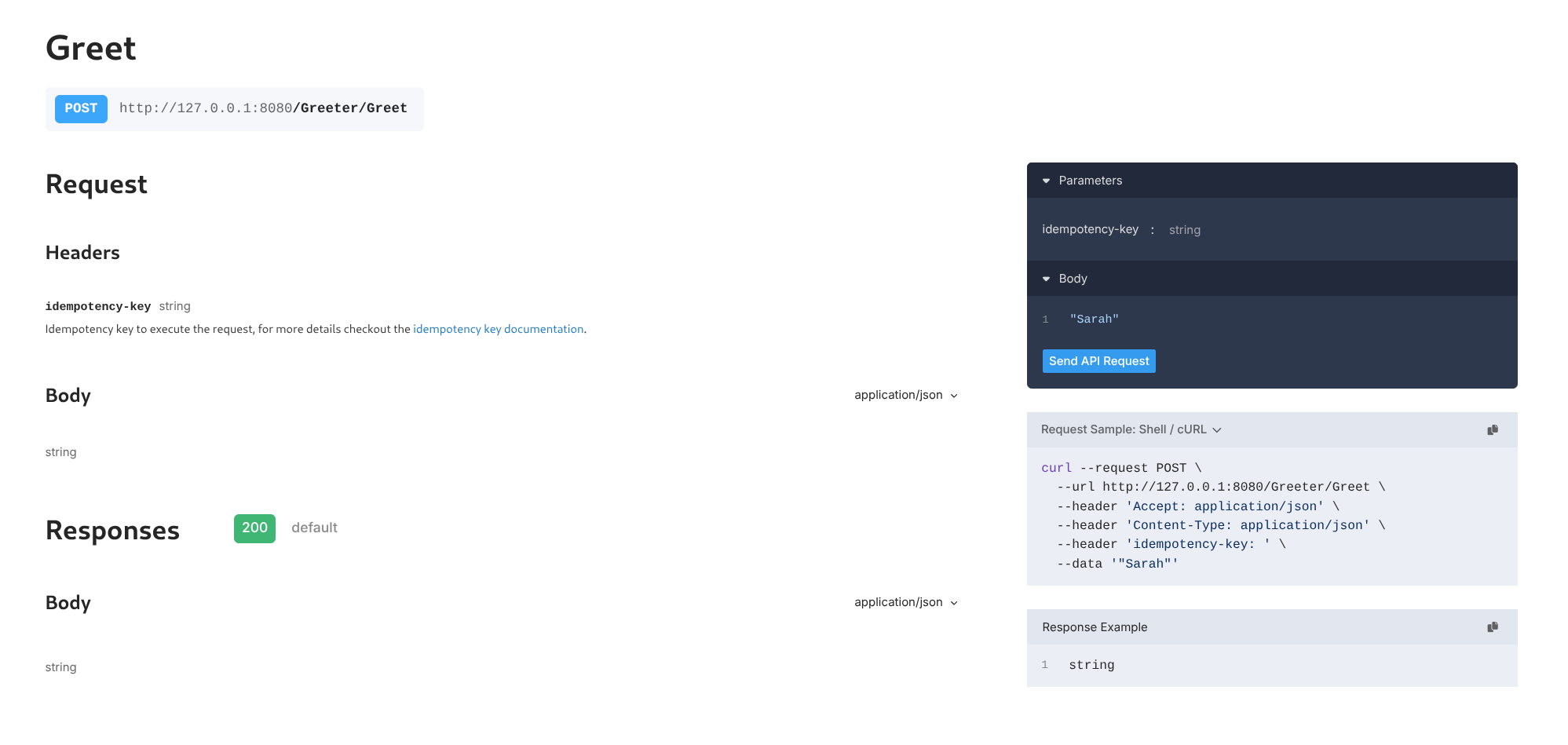 Or invoke via
 curl:
curl localhost:8080/restate/call/Greeter/Greet --json '"Sarah"'
Expected output:
You said hi to Sarah!
6
Congratulations, you just ran Durable Execution!
The invocation you just sent used Durable Execution to make sure the request ran till completion. For each request, it sent a notification, slept for a second, and then sent a reminder.
type Greeter struct{}

func (Greeter) Greet(ctx restate.Context, name string) (string, error) {
  //  Durably execute a set of steps; resilient against failures
  greetingId := restate.UUID(ctx).String()

  if _, err := restate.Run(ctx,
    func(ctx restate.RunContext) (restate.Void, error) {
      return SendNotification(greetingId, name)
    },
    restate.WithName("Notification"),
  ); err != nil {
    return "", err
  }

  if err := restate.Sleep(ctx, 1*time.Second); err != nil {
    return "", err
  }

  if _, err := restate.Run(ctx,
    func(ctx restate.RunContext) (restate.Void, error) {
      return SendReminder(greetingId, name)
    },
    restate.WithName("Reminder"),
  ); err != nil {
    return "", err
  }

  // Respond to caller
  return "You said hi to " + name + "!", nil
}
Send a request for Alice to see how the service behaves when it occasionally fails to send the reminder and notification:
curl localhost:8080/restate/call/Greeter/Greet --json '"Alice"'
Expected output:
You said hi to Alice!
You can see in the service logs and in the Restate UI how the request gets retried.
On a retry, it skipped the steps that already succeeded.Even the sleep is durable and tracked by Restate.
If you kill/restart the service halfway through, the sleep will only last for what remained.
Restate persists the progress of the handler. Letting you write code that is resilient to failures out of the box. Have a look at the Durable Execution page to learn more.
Prerequisites:
- Python >= v3.11
- uv
1
Install Restate Server & CLI
Restate is a single self-contained binary. No external dependencies needed.
Homebrew
Download binaries
npm
Docker
brew install restatedev/tap/restate-server restatedev/tap/restate
Start the server:
restate-server
Download prebuilt binaries from the releases page:
BIN=/usr/local/bin && RESTATE_PLATFORM=x86_64-apple-darwin && \
curl -L --remote-name-all https://restate.gateway.scarf.sh/latest/restate-{server,cli}-$RESTATE_PLATFORM.tar.xz && \
tar -xvf restate-server-$RESTATE_PLATFORM.tar.xz --strip-components=1 restate-server-$RESTATE_PLATFORM/restate-server && \
tar -xvf restate-cli-$RESTATE_PLATFORM.tar.xz --strip-components=1 restate-cli-$RESTATE_PLATFORM/restate && \
chmod +x restate restate-server && \
sudo mv restate $BIN && \
sudo mv restate-server $BIN
Start the server:
restate-server
npm install --global @restatedev/restate-server@latest @restatedev/restate@latest
Start the server:
restate-server
Run the Restate Server:
docker run --name restate_dev --rm \
-p 8080:8080 -p 9070:9070 -p 9071:9071 \
--add-host=host.docker.internal:host-gateway \
docker.restate.dev/restatedev/restate:latest
Run CLI commands:
docker run -it --network=host \
docker.restate.dev/restatedev/restate-cli:latest \
invocations ls
Replace invocations ls with any CLI subcommand.
You can find the Restate UI running on port 9070 (http://localhost:9070) after starting the Restate Server.
2
Get the Greeter service template
restate example python-hello-world &&
cd python-hello-world
3
Run the Greeter service
Run it and let it listen on port 9080 for requests:
uv run .
4
Register the service
Tell Restate where the service is running, so Restate can discover and register the services and handlers behind this endpoint.
You can do this via the UI (http://localhost:9070) or via:
restate deployments register http://localhost:9080
Show Output
❯ SERVICES THAT WILL BE ADDED:
- Greeter
Type: Service
HANDLER  INPUT                                     OUTPUT
greet    value of content-type 'application/json'  value of content-type 'application/json'


✔ Are you sure you want to apply those changes? · yes
✅ DEPLOYMENT:
SERVICE  REV
Greeter  1