Preface
Validating data is a common task that occurs throughout all application layers, from the presentation to the persistence layer. Often the same validation logic is implemented in each layer which is time consuming and error-prone. To avoid duplication of these validations, developers often bundle validation logic directly into the domain model, cluttering domain classes with validation code which is really metadata about the class itself.
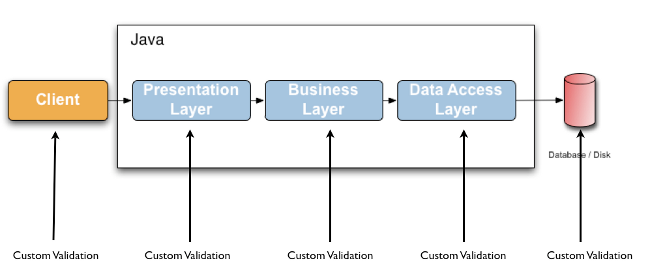
Jakarta Validation 3.1.1 defines a metadata model and API for entity and method validation. The default metadata source are annotations, with the ability to override and extend the meta-data through the use of XML. The API is not tied to a specific application tier nor programming model. It is specifically not tied to either web or persistence tier, and is available for both server-side application programming, as well as rich client Swing application developers.
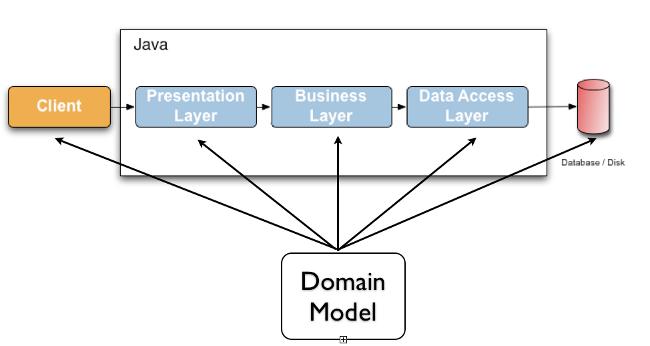
Hibernate Validator is the reference implementation of Jakarta Validation. The implementation itself as well as the Jakarta Validation API and TCK are all provided and distributed under the Apache Software License 2.0.
Hibernate Validator 9.1.3.Final and Jakarta Validation 3.1.1 require Java 17 or later.
1. Getting started
This chapter will show you how to get started with Hibernate Validator, the reference implementation (RI) of Jakarta Validation. For the following quick-start you need:
-
A JDK 17
-
An Internet connection (Maven has to download all required libraries)
1.1. Project set up
In order to use Hibernate Validator within a Maven project, simply add the following dependency to your pom.xml:
Example 1.1: Hibernate Validator Maven dependency
<dependency>
    <groupId>org.hibernate.validator</groupId>
    <artifactId>hibernate-validator</artifactId>
    <version>9.1.3.Final</version>
</dependency>
This transitively pulls in the dependency to the Jakarta Validation API
(jakarta.validation:jakarta.validation-api:3.1.1).
1.1.1. Unified EL
Hibernate Validator requires an implementation of Jakarta Expression Language for evaluating dynamic expressions in constraint violation messages (see Section 4.1, “Default message interpolation”). When your application runs in a Jakarta EE container such as WildFly/JBoss EAP, an EL implementation is already provided by the container. In a Java SE environment, however, you have to add an implementation as dependency to your POM file. For instance you can add the following dependency to use the Jakarta EL reference implementation:
Example 1.2: Maven dependencies for Unified EL reference implementation
<dependency>
    <groupId>org.glassfish.expressly</groupId>
    <artifactId>expressly</artifactId>
    <version>6.0.0</version>
</dependency>|
For environments where one cannot provide a EL implementation Hibernate Validator is offering a
Section 12.10, “ |
1.1.2. CDI
Jakarta Validation defines integration points with CDI (Contexts and Dependency Injection for Jakarta EE). If your application runs in an environment which does not provide this integration out of the box, you may use the Hibernate Validator CDI portable extension by adding the following Maven dependency to your POM:
Example 1.3: Hibernate Validator CDI portable extension Maven dependency
<dependency>
    <groupId>org.hibernate.validator</groupId>
    <artifactId>hibernate-validator-cdi</artifactId>
    <version>9.1.3.Final</version>
</dependency>
Note that adding this dependency is usually not required for applications running on a Jakarta EE application server. You can learn more about the integration of Jakarta Validation and CDI in Section 11.3, “CDI”.
1.1.3. Updating Hibernate Validator in WildFly
The WildFly application server contains Hibernate Validator out of the box. Starting with Hibernate Validator 9.0, the patch to update WildFly Jakarta Validation and Hibernate Validator modules is no loner supplied.
You can learn more about the WildFly patching infrastructure in general here.
1.1.4. Running in the modulepath
Starting with Hibernate Validator 9.0, JPMS module descriptors are provided for those who want to use the Hibernate Validator with a modulepath.
The names of the corresponding modules are:
-
Jakarta Validation API:
jakarta.validation -
Hibernate Validator core:
org.hibernate.validator -
Hibernate Validator CDI extension:
org.hibernate.validator.cdi -
Hibernate Validator test utilities:
org.hibernate.validator.testutils -
Hibernate Validator annotation processor:
org.hibernate.validator.annotationprocessor
1.2. Applying constraints
Let’s dive directly into an example to see how to apply constraints.
Example 1.4: Class Car annotated with constraints
/*
 * SPDX-License-Identifier: Apache-2.0
 * Copyright Red Hat Inc. and Hibernate Authors
 */
package org.hibernate.validator.referenceguide.chapter01;
import jakarta.validation.constraints.Min;
import jakarta.validation.constraints.NotNull;
import jakarta.validation.constraints.Size;
public class Car {
    @NotNull
    private String manufacturer;
    @NotNull
    @Size(min = 2, max = 14)
    private String licensePlate;
    @Min(2)
    private int seatCount;
    public Car(String manufacturer, String licencePlate, int seatCount) {
        this.manufacturer = manufacturer;
        this.licensePlate = licencePlate;
        this.seatCount = seatCount;
    }
    //getters and setters ...
}
The @NotNull, @Size and @Min annotations are used to declare the constraints which should be applied
to the fields of a Car instance:
-
manufacturermust never benull -
licensePlatemust never benulland must be between 2 and 14 characters long -
seatCountmust be at least 2
|
You can find the complete source code of all examples used in this reference guide in the Hibernate Validator source repository on GitHub. |
1.3. Validating constraints
To perform a validation of these constraints, you use a Validator instance. Let’s have a look at a
unit test for Car:
Example 1.5: Class CarTest showing validation examples
/*
 * SPDX-License-Identifier: Apache-2.0
 * Copyright Red Hat Inc. and Hibernate Authors
 */
package org.hibernate.validator.referenceguide.chapter01;
import static org.junit.Assert.assertEquals;
import java.util.Set;
import jakarta.validation.ConstraintViolation;
import jakarta.validation.Validation;
import jakarta.validation.Validator;
import jakarta.validation.ValidatorFactory;
import org.junit.BeforeClass;
import org.junit.Test;
public class CarTest {
    private static Validator validator;
    @BeforeClass
    public static void setUpValidator() {
        ValidatorFactory factory = Validation.buildDefaultValidatorFactory();
        validator = factory.getValidator();
    }
    @Test
    public void manufacturerIsNull() {
        Car car = new Car( null, "DD-AB-123", 4 );
        Set<ConstraintViolation<Car>> constraintViolations =
                validator.validate( car );
        assertEquals( 1, constraintViolations.size() );
        assertEquals( "must not be null", constraintViolations.iterator().next().getMessage() );
    }
    @Test
    public void licensePlateTooShort() {
        Car car = new Car( "Morris", "D", 4 );
        Set<ConstraintViolation<Car>> constraintViolations =
                validator.validate( car );
        assertEquals( 1, constraintViolations.size() );
        assertEquals(
                "size must be between 2 and 14",
                constraintViolations.iterator().next().getMessage()
        );
    }
    @Test
    public void seatCountTooLow() {
        Car car = new Car( "Morris", "DD-AB-123", 1 );
        Set<ConstraintViolation<Car>> constraintViolations =
                validator.validate( car );
        assertEquals( 1, constraintViolations.size() );
        assertEquals(
                "must be greater than or equal to 2",
                constraintViolations.iterator().next().getMessage()
        );
    }
    @Test
    public void carIsValid() {
        Car car = new Car( "Morris", "DD-AB-123", 2 );
        Set<ConstraintViolation<Car>> constraintViolations =
                validator.validate( car );
        assertEquals( 0, constraintViolations.size() );
    }
}
In the setUp() method a Validator object is retrieved from the ValidatorFactory. A Validator
instance is thread-safe and may be reused multiple times. It thus can safely be stored in a static
field and be used in the test methods to validate the different Car instances.
The validate() method returns a set of ConstraintViolation instances, which you can iterate over in
order to see which validation errors occurred. The first three test methods show some expected
constraint violations:
-
The
@NotNullconstraint onmanufactureris violated inmanufacturerIsNull() -
The
@Sizeconstraint onlicensePlateis violated inlicensePlateTooShort() -
The
@Minconstraint onseatCountis violated inseatCountTooLow()
If the object validates successfully, validate() returns an empty set as you can see in carIsValid().
Note that only classes from the package jakarta.validation are used. These are provided from the Bean
Validation API. No classes from Hibernate Validator are directly referenced, resulting in portable
code.
1.4. Where to go next?
That concludes the 5 minutes tour through the world of Hibernate Validator and Jakarta Validation. Continue exploring the code examples or look at further examples referenced in Chapter 14, Further reading.
To learn more about the validation of beans and properties, just continue reading Chapter 2, Declaring and validating bean constraints. If you are interested in using Jakarta Validation for the validation of method pre- and postcondition refer to Chapter 3, Declaring and validating method constraints. In case your application has specific validation requirements have a look at Chapter 6, Creating custom constraints.
2. Declaring and validating bean constraints
In this chapter you will learn how to declare (see Section 2.1, “Declaring bean constraints”) and validate (see Section 2.2, “Validating bean constraints”) bean constraints. Section 2.3, “Built-in constraints” provides an overview of all built-in constraints coming with Hibernate Validator.
If you are interested in applying constraints to method parameters and return values, refer to Chapter 3, Declaring and validating method constraints.
2.1. Declaring bean constraints
Constraints in Jakarta Validation are expressed via Java annotations. In this section you will learn how to enhance an object model with these annotations. There are four types of bean constraints:
-
field constraints
-
property constraints
-
container element constraints
-
class constraints
|
Not all constraints can be placed on all of these levels. In fact, none of the default constraints
defined by Jakarta Validation can be placed at class level. The |
2.1.1. Field-level constraints
Constraints can be expressed by annotating a field of a class. Example 2.1, “Field-level constraints” shows a field level configuration example:
Example 2.1: Field-level constraints
package org.hibernate.validator.referenceguide.chapter02.fieldlevel;
public class Car {
    @NotNull
    private String manufacturer;
    @AssertTrue
    private boolean isRegistered;
    public Car(String manufacturer, boolean isRegistered) {
        this.manufacturer = manufacturer;
        this.isRegistered = isRegistered;
    }
    //getters and setters...
}
When using field-level constraints field access strategy is used to access the value to be validated. This means the validation engine directly accesses the instance variable and does not invoke the property accessor method even if such an accessor exists.
Constraints can be applied to fields of any access type (public, private etc.). Constraints on static fields are not supported, though.
|
When validating byte code enhanced objects, property level constraints should be used, because the byte code enhancing library won’t be able to determine a field access via reflection. |
2.1.2. Property-level constraints
If your model class adheres to the JavaBeans standard, it is also possible to annotate the properties of a bean class instead of its fields. Example 2.2, “Property-level constraints” uses the same entity as in Example 2.1, “Field-level constraints”, however, property level constraints are used.
Example 2.2: Property-level constraints
package org.hibernate.validator.referenceguide.chapter02.propertylevel;
public class Car {
    private String manufacturer;
    private boolean isRegistered;
    public Car(String manufacturer, boolean isRegistered) {
        this.manufacturer = manufacturer;
        this.isRegistered = isRegistered;
    }
    @NotNull
    public String getManufacturer() {
        return manufacturer;
    }
    public void setManufacturer(String manufacturer) {
        this.manufacturer = manufacturer;
    }
    @AssertTrue
    public boolean isRegistered() {
        return isRegistered;
    }
    public void setRegistered(boolean isRegistered) {
        this.isRegistered = isRegistered;
    }
}|
The property’s getter method has to be annotated, not its setter. That way also read-only properties can be constrained which have no setter method. |
When using property level constraints property access strategy is used to access the value to be validated, i.e. the validation engine accesses the state via the property accessor method.
|
It is recommended to stick either to field or property annotations within one class. It is not recommended to annotate a field and the accompanying getter method as this would cause the field to be validated twice. |
2.1.3. Container element constraints
It is possible to specify constraints directly on the type argument of a parameterized type: these constraints are called container element constraints.
This requires that ElementType.TYPE_USE is specified via @Target
in the constraint definition. As of Jakarta Bean Validation 2.0, built-in Jakarta Validation as well as
Hibernate Validator specific constraints specify ElementType.TYPE_USE and can be used
directly in this context.
Hibernate Validator validates container element constraints specified on the following standard Java containers:
-
implementations of
java.util.Iterable(e.g.Lists,Sets), -
implementations of
java.util.Map, with support for keys and values, -
java.util.Optional,java.util.OptionalInt,java.util.OptionalDouble,java.util.OptionalLong, -
the various implementations of JavaFX’s
javafx.beans.observable.ObservableValue.
It also supports container element constraints on custom container types (see Chapter 7, Value extraction).
|
In versions prior to 6, a subset of container element constraints were supported. A |
We present below a couple of examples illustrating container element constraints on various Java types.
In these examples, @ValidPart is a custom constraint allowed to be used in the TYPE_USE context.
2.1.3.1. With Iterable
When applying constraints on an Iterable type argument, Hibernate Validator will validate each
element. Example 2.3, “Container element constraint on Set” shows an example of a
Set with a container element constraint.
Example 2.3: Container element constraint on Set
package org.hibernate.validator.referenceguide.chapter02.containerelement.set;
public class Car {
    private Set<@ValidPart String> parts = new HashSet<>();
    public void addPart(String part) {
        parts.add( part );
    }
    //...
}
Car car = new Car();
car.addPart( "Wheel" );
car.addPart( null );
Set<ConstraintViolation<Car>> constraintViolations = validator.validate( car );
assertEquals( 1, constraintViolations.size() );
ConstraintViolation<Car> constraintViolation =
constraintViolations.iterator().next();
assertEquals(
"'null' is not a valid car part.",
constraintViolation.getMessage()
);
assertEquals( "parts[].<iterable element>",
constraintViolation.getPropertyPath().toString() );Note how the property path clearly states that the violation comes from an element of the iterable.
2.1.3.2. With List
When applying constraints on a List type argument, Hibernate Validator will validate each
element. Example 2.4, “Container element constraint on List” shows an example of a
List with a container element constraint.
Example 2.4: Container element constraint on List
package org.hibernate.validator.referenceguide.chapter02.containerelement.list;
public class Car {
    private List<@ValidPart String> parts = new ArrayList<>();
    public void addPart(String part) {
        parts.add( part );
    }
    //...
}
Car car = new Car();
car.addPart( "Wheel" );
car.addPart( null );
Set<ConstraintViolation<Car>> constraintViolations = validator.validate( car );
assertEquals( 1, constraintViolations.size() );
ConstraintViolation<Car> constraintViolation =
constraintViolations.iterator().next();
assertEquals(
"'null' is not a valid car part.",
constraintViolation.getMessage()
);
assertEquals( "parts[1].<list element>",
constraintViolation.getPropertyPath().toString() );Here, the property path also contains the index of the invalid element.
2.1.3.3. With Map
Container element constraints are also validated on map keys and values.
Example 2.5, “Container element constraint on map keys and values” shows an example of a Map with a constraint on the key
and a constraint on the value.
Example 2.5: Container element constraint on map keys and values
package org.hibernate.validator.referenceguide.chapter02.containerelement.map;
public class Car {
    public enum FuelConsumption {
        CITY,
        HIGHWAY
    }
    private Map<@NotNull FuelConsumption, @MaxAllowedFuelConsumption Integer> fuelConsumption = new HashMap<>();
    public void setFuelConsumption(FuelConsumption consumption, int value) {
        fuelConsumption.put( consumption, value );
    }
    //...
}
Car car = new Car();
car.setFuelConsumption( Car.FuelConsumption.HIGHWAY, 20 );
Set<ConstraintViolation<Car>> constraintViolations = validator.validate( car );
assertEquals( 1, constraintViolations.size() );
ConstraintViolation<Car> constraintViolation =
constraintViolations.iterator().next();
assertEquals(
"20 is outside the max fuel consumption.",
constraintViolation.getMessage()
);
assertEquals(
"fuelConsumption[HIGHWAY].<map value>",
constraintViolation.getPropertyPath().toString()
);Car car = new Car();
car.setFuelConsumption( null, 5 );
Set<ConstraintViolation<Car>> constraintViolations = validator.validate( car );
assertEquals( 1, constraintViolations.size() );
ConstraintViolation<Car> constraintViolation =
constraintViolations.iterator().next();
assertEquals(
"must not be null",
constraintViolation.getMessage()
);
assertEquals(
"fuelConsumption<K>[].<map key>",
constraintViolation.getPropertyPath().toString()
);The property paths of the violations are particularly interesting:
-
The key of the invalid element is included in the property path (in the second example, the key is
null). -
In the first example, the violation concerns the
<map value>, in the second one, the<map key>. -
In the second example, you might have noticed the presence of the type argument
<K>, more on this later.
2.1.3.4. With java.util.Optional
When applying a constraint on the type argument of Optional, Hibernate Validator will automatically
unwrap the type and validate the internal value. Example 2.6, “Container element constraint on Optional” shows
an example of an Optional with a container element constraint.
Example 2.6: Container element constraint on Optional
package org.hibernate.validator.referenceguide.chapter02.containerelement.optional;
public class Car {
    private Optional<@MinTowingCapacity(1000) Integer> towingCapacity = Optional.empty();
    public void setTowingCapacity(Integer alias) {
        towingCapacity = Optional.of( alias );
    }
    //...
}
Car car = new Car();
car.setTowingCapacity( 100 );
Set<ConstraintViolation<Car>> constraintViolations = validator.validate( car );
assertEquals( 1, constraintViolations.size() );
ConstraintViolation<Car> constraintViolation = constraintViolations.iterator().next();
assertEquals(
"Not enough towing capacity.",
constraintViolation.getMessage()
);
assertEquals(
"towingCapacity",
constraintViolation.getPropertyPath().toString()
);Here, the property path only contains the name of the property as we are considering Optional as a "transparent"
container.
2.1.3.5. With custom container types
Container element constraints can also be used with custom containers.
A ValueExtractor must be registered for the custom type allowing to retrieve
the value(s) to validate (see Chapter 7, Value extraction for more information about how to implement
your own ValueExtractor and how to register it).
Example 2.7, “Container element constraint on custom container type” shows an example of a custom parameterized type with a type argument constraint.
Example 2.7: Container element constraint on custom container type
package org.hibernate.validator.referenceguide.chapter02.containerelement.custom;
public class Car {
    private GearBox<@MinTorque(100) Gear> gearBox;
    public void setGearBox(GearBox<Gear> gearBox) {
        this.gearBox = gearBox;
    }
    //...
}
package org.hibernate.validator.referenceguide.chapter02.containerelement.custom;
public class GearBox<T extends Gear> {
private final T gear;
public GearBox(T gear) {
this.gear = gear;
}
public Gear getGear() {
return this.gear;
}
}package org.hibernate.validator.referenceguide.chapter02.containerelement.custom;
public class Gear {
private final Integer torque;
public Gear(Integer torque) {
this.torque = torque;
}
public Integer getTorque() {
return torque;
}
public static class AcmeGear extends Gear {
public AcmeGear() {
super( 60 );
}
}
}package org.hibernate.validator.referenceguide.chapter02.containerelement.custom;
public class GearBoxValueExtractor implements ValueExtractor<GearBox<@ExtractedValue ?>> {
@Override
public void extractValues(GearBox<@ExtractedValue ?> originalValue, ValueExtractor.ValueReceiver receiver) {
receiver.value( null, originalValue.getGear() );
}
}Car car = new Car();
car.setGearBox( new GearBox<>( new Gear.AcmeGear() ) );
Set<ConstraintViolation<Car>> constraintViolations = validator.validate( car );
assertEquals( 1, constraintViolations.size() );
ConstraintViolation<Car> constraintViolation =
constraintViolations.iterator().next();
assertEquals(
"Gear is not providing enough torque.",
constraintViolation.getMessage()
);
assertEquals(
"gearBox",
constraintViolation.getPropertyPath().toString()
);2.1.3.6. Nested container elements
Constraints are also supported on nested container elements.
When validating a Car object as presented in Example 2.8, “Constraints on nested container elements”, both the @NotNull
constraints on Part and Manufacturer will be enforced.
Example 2.8: Constraints on nested container elements
package org.hibernate.validator.referenceguide.chapter02.containerelement.nested;
public class Car {
    private Map<@NotNull Part, List<@NotNull Manufacturer>> partManufacturers =
            new HashMap<>();
    //...
}
2.1.4. Class-level constraints
Last but not least, a constraint can also be placed on the class level. In this case not a single property is subject of the validation but the complete object. Class-level constraints are useful if the validation depends on a correlation between several properties of an object.
The Car class in Example 2.9, “Class-level constraint” has the two attributes seatCount and passengers and it
should be ensured that the list of passengers does not have more entries than available seats. For
that purpose the @ValidPassengerCount constraint is added on the class level. The validator of that
constraint has access to the complete Car object, allowing to compare the numbers of seats and
passengers.
Refer to Section 6.2, “Class-level constraints” to learn in detail how to implement this custom constraint.
Example 2.9: Class-level constraint
package org.hibernate.validator.referenceguide.chapter02.classlevel;
@ValidPassengerCount
public class Car {
    private int seatCount;
    private List<Person> passengers;
    //...
}
2.1.5. Constraint inheritance
When a class implements an interface or extends another class, all constraint annotations declared on the super-type apply in the same manner as the constraints specified on the class itself. To make things clearer let’s have a look at the following example:
Example 2.10: Constraint inheritance
package org.hibernate.validator.referenceguide.chapter02.inheritance;
public class Car {
    private String manufacturer;
    @NotNull
    public String getManufacturer() {
        return manufacturer;
    }
    //...
}
package org.hibernate.validator.referenceguide.chapter02.inheritance;
public class RentalCar extends Car {
private String rentalStation;
@NotNull
public String getRentalStation() {
return rentalStation;
}
//...
}Here the class RentalCar is a subclass of Car and adds the property rentalStation. If an instance of
RentalCar is validated, not only the @NotNull constraint on rentalStation is evaluated, but also the
constraint on manufacturer from the parent class.
The same would be true, if Car was not a superclass but an interface implemented by RentalCar.
Constraint annotations are aggregated if methods are overridden. So if RentalCar overrode the
getManufacturer() method from Car, any constraints annotated at the overriding method would be
evaluated in addition to the @NotNull constraint from the superclass.
2.1.6. Object graphs
The Jakarta Validation API does not only allow to validate single class instances but also complete
object graphs (cascaded validation). To do so, just annotate a field or property representing a
reference to another object with @Valid as demonstrated in Example 2.11, “Cascaded validation”.
Example 2.11: Cascaded validation
package org.hibernate.validator.referenceguide.chapter02.objectgraph;
public class Car {
    @NotNull
    @Valid
    private Person driver;
    //...
}
package org.hibernate.validator.referenceguide.chapter02.objectgraph;
public class Person {
@NotNull
private String name;
//...
}If an instance of Car is validated, the referenced Person object will be validated as well, as the
driver field is annotated with @Valid. Therefore the validation of a Car will fail if the name field
of the referenced Person instance is null.
The validation of object graphs is recursive, i.e. if a reference marked for cascaded validation
points to an object which itself has properties annotated with @Valid, these references will be
followed up by the validation engine as well. The validation engine will ensure that no infinite
loops occur during cascaded validation, for example if two objects hold references to each other.
Note that null values are getting ignored during cascaded validation.
As constraints, object graph validation also works for container elements. That means any type argument
of a container can be annotated with @Valid, which will cause each contained element to be validated when the
parent object is validated.
|
Cascaded validation is also supported for nested container elements. |
Example 2.12: Cascaded validation of containers
package org.hibernate.validator.referenceguide.chapter02.objectgraph.containerelement;
public class Car {
    private List<@NotNull @Valid Person> passengers = new ArrayList<Person>();
    private Map<@Valid Part, List<@Valid Manufacturer>> partManufacturers = new HashMap<>();
    //...
}
package org.hibernate.validator.referenceguide.chapter02.objectgraph.containerelement;
public class Part {
@NotNull
private String name;
//...
}package org.hibernate.validator.referenceguide.chapter02.objectgraph.containerelement;
public class Manufacturer {
@NotNull
private String name;
//...
}When validating an instance of the Car class shown in Example 2.12, “Cascaded validation of containers”, a
ConstraintViolation will be created:
-
if any of the
Personobjects contained in the passengers list has anullname; -
if any of the
Partobjects contained in the map keys has anullname; -
if any of the
Manufacturerobjects contained in the list nested in the map values has anullname.
|
In versions prior to 6, Hibernate Validator supported cascaded validation for a subset of container elements
and it was implemented at the container level (e.g. you would use This is still supported but is not recommended. Please use container element level |
2.2. Validating bean constraints
The Validator interface is the most important object in Jakarta Validation. The next section shows how
to obtain a Validator instance. Afterwards you’ll learn how to use the different methods of the
Validator interface.
2.2.1. Obtaining a Validator instance
The first step towards validating an entity instance is to get hold of a Validator instance. The
road to this instance leads via the Validation class and a ValidatorFactory. The easiest way is to
use the static method Validation#buildDefaultValidatorFactory():
Example 2.13: Validation#buildDefaultValidatorFactory()
ValidatorFactory factory = Validation.buildDefaultValidatorFactory();
validator = factory.getValidator();
This bootstraps a validator in the default configuration. Refer to Chapter 9, Bootstrapping to
learn more about the different bootstrapping methods and how to obtain a specifically configured
Validator instance.
2.2.2. Validator methods
The Validator interface contains three methods that can be used to either validate entire entities
or just single properties of the entity.
All three methods return a Set<ConstraintViolation>. The set is empty, if the validation succeeds.
Otherwise a ConstraintViolation instance is added for each violated constraint.
All the validation methods have a var-args parameter which can be used to specify which validation
groups shall be considered when performing the validation. If the parameter is not specified, the
default validation group (jakarta.validation.groups.Default) is used. The topic of validation groups
is discussed in detail in Chapter 5, Grouping constraints.
2.2.2.1. Validator#validate()
Use the validate() method to perform validation of all constraints of a given bean.
Example 2.14, “Using Validator#validate()” shows the validation of an instance of the Car class from
Example 2.2, “Property-level constraints” which fails to satisfy the @NotNull constraint on the manufacturer
property. The validation call therefore returns one ConstraintViolation object.
Example 2.14: Using Validator#validate()
Car car = new Car( null, true );
Set<ConstraintViolation<Car>> constraintViolations = validator.validate( car );
assertEquals( 1, constraintViolations.size() );
assertEquals( "must not be null", constraintViolations.iterator().next().getMessage() );
2.2.2.2. Validator#validateProperty()
With help of the validateProperty() you can validate a single named property of a given object. The
property name is the JavaBeans property name.
Example 2.15: Using Validator#validateProperty()
Car car = new Car( null, true );
Set<ConstraintViolation<Car>> constraintViolations = validator.validateProperty(
        car,
        "manufacturer"
);
assertEquals( 1, constraintViolations.size() );
assertEquals( "must not be null", constraintViolations.iterator().next().getMessage() );
2.2.2.3. Validator#validateValue()
By using the validateValue() method you can check whether a single property of a given class can be
validated successfully, if the property had the specified value:
Example 2.16: Using Validator#validateValue()
Set<ConstraintViolation<Car>> constraintViolations = validator.validateValue(
        Car.class,
        "manufacturer",
        null
);
assertEquals( 1, constraintViolations.size() );
assertEquals( "must not be null", constraintViolations.iterator().next().getMessage() );|
|
Validator#validateProperty() is for example used in the integration of Jakarta Validation into JSF 2
(see Section 11.2, “JSF & Seam”) to perform a validation of the values entered into a form
before they are propagated to the model.
2.2.3. ConstraintViolation
2.2.3.1. ConstraintViolation methods
Now it is time to have a closer look at what a ConstraintViolation is.
Using the different methods of ConstraintViolation a lot of useful information about the cause of the validation failure can be determined.
The following gives an overview of these methods.
The values under "Example" column refer to Example 2.14, “Using Validator#validate()”.
getMessage()-
The interpolated error message
- Example
-
"must not be null"
getMessageTemplate()-
The non-interpolated error message
- Example
-
"{… NotNull.message}"
getRootBean()-
The root bean being validated
- Example
-
car
getRootBeanClass()-
The class of the root bean being validated
- Example
-
Car.class
getLeafBean()-
If a bean constraint, the bean instance the constraint is applied on; if a property constraint, the bean instance hosting the property the constraint is applied on
- Example
-
car
getPropertyPath()-
The property path to the validated value from root bean
- Example
-
contains one node with kind
PROPERTYand name "manufacturer"
getInvalidValue()-
The value failing to pass the constraint
- Example
-
null
getConstraintDescriptor()-
Constraint metadata reported to fail
- Example
-
descriptor for
@NotNull
2.2.3.2. Exploiting the property path
To determine the element that triggered the violation, you need to exploit the result of the getPropertyPath()
method.
The returned Path is composed of Nodes describing the path to the element.
More information about the structure of the Path and the various types of Nodes can be found in
the ConstraintViolation section of the
Jakarta Validation specification.
2.3. Built-in constraints
Hibernate Validator comprises a basic set of commonly used constraints. These are foremost the constraints defined by the Jakarta Validation specification (see Section 2.3.1, “Jakarta Validation constraints”). Additionally, Hibernate Validator provides useful custom constraints (see Section 2.3.2, “Additional constraints”).
2.3.1. Jakarta Validation constraints
Below you can find a list of all constraints specified in the Jakarta Validation API. All these constraints apply to the field/property level, there are no class-level constraints defined in the Jakarta Validation specification. If you are using the Hibernate object-relational mapper, some of the constraints are taken into account when creating the DDL for your model (see "Hibernate metadata impact").
|
Hibernate Validator allows some constraints to be applied to more data types than required by the
Jakarta Validation specification (e.g. |
@AssertFalse-
Checks that the annotated element is false
- Supported data types
-
Boolean,boolean - Hibernate metadata impact
-
None
@AssertTrue-
Checks that the annotated element is true
- Supported data types
-
Boolean,boolean - Hibernate metadata impact
-
None
@DecimalMax(value=, inclusive=)-
Checks whether the annotated value is less than the specified maximum, when
inclusive=false. Otherwise whether the value is less than or equal to the specified maximum. The parameter value is the string representation of the max value according to theBigDecimalstring representation.- Supported data types
-
BigDecimal,BigInteger,CharSequence,byte,short,int,longand the respective wrappers of the primitive types; additionally supported by HV: any sub-type ofNumberandjavax.money.MonetaryAmount(if the JSR 354 API and an implementation is on the class path) - Hibernate metadata impact
-
None
@DecimalMin(value=, inclusive=)-
Checks whether the annotated value is larger than the specified minimum, when
inclusive=false. Otherwise whether the value is larger than or equal to the specified minimum. The parameter value is the string representation of the min value according to theBigDecimalstring representation.- Supported data types
-
BigDecimal,BigInteger,CharSequence,byte,short,int,longand the respective wrappers of the primitive types; additionally supported by HV: any sub-type ofNumberandjavax.money.MonetaryAmount - Hibernate metadata impact
-
None
@Digits(integer=, fraction=)-
Checks whether the annotated value is a number having up to
integerdigits andfractionfractional digits- Supported data types
-
BigDecimal,
BigInteger,CharSequence,byte,short,int,longand the respective wrappers of the primitive types; additionally supported by HV: any sub-type ofNumberandjavax.money.MonetaryAmount - Hibernate metadata impact
-
Defines column precision and scale
@Email-
Checks whether the specified character sequence is a valid email address. The optional parameters
regexpandflagsallow to specify an additional regular expression (including regular expression flags) which the email must match.- Supported data types
-
CharSequence - Hibernate metadata impact
-
None
@Future-
Checks whether the annotated date is in the future
- Supported data types
-
java.util.Date,java.util.Calendar,java.time.Instant,java.time.LocalDate,java.time.LocalDateTime,java.time.LocalTime,java.time.MonthDay,java.time.OffsetDateTime,java.time.OffsetTime,java.time.Year,java.time.YearMonth,java.time.ZonedDateTime,java.time.chrono.HijrahDate,java.time.chrono.JapaneseDate,java.time.chrono.MinguoDate,java.time.chrono.ThaiBuddhistDate; additionally supported by HV, if the Joda Time date/time API is on the classpath: any implementations ofReadablePartialandReadableInstant - Hibernate metadata impact
-
None
@FutureOrPresent-
Checks whether the annotated date is in the present or in the future
- Supported data types
-
java.util.Date,java.util.Calendar,java.time.Instant,java.time.LocalDate,java.time.LocalDateTime,java.time.LocalTime,java.time.MonthDay,java.time.OffsetDateTime,java.time.OffsetTime,java.time.Year,java.time.YearMonth,java.time.ZonedDateTime,java.time.chrono.HijrahDate,java.time.chrono.JapaneseDate,java.time.chrono.MinguoDate,java.time.chrono.ThaiBuddhistDate; additionally supported by HV, if the Joda Time date/time API is on the classpath: any implementations ofReadablePartialandReadableInstant - Hibernate metadata impact
-
None
@Max(value=)-
Checks whether the annotated value is less than or equal to the specified maximum
- Supported data types
-
BigDecimal,BigInteger,byte,short,int,longand the respective wrappers of the primitive types; additionally supported by HV: any sub-type ofCharSequence(the numeric value represented by the character sequence is evaluated), any sub-type ofNumberandjavax.money.MonetaryAmount - Hibernate metadata impact
-
Adds a check constraint on the column
@Min(value=)-
Checks whether the annotated value is higher than or equal to the specified minimum
- Supported data types
-
BigDecimal,BigInteger,byte,short,int,longand the respective wrappers of the primitive types; additionally supported by HV: any sub-type ofCharSequence(the numeric value represented by the character sequence is evaluated), any sub-type ofNumberandjavax.money.MonetaryAmount - Hibernate metadata impact
-
Adds a check constraint on the column
@NotBlank-
Checks that the annotated character sequence is not null and the trimmed length is greater than 0. The difference to
@NotEmptyis that this constraint can only be applied on character sequences and that trailing white-spaces are ignored.- Supported data types
-
CharSequence - Hibernate metadata impact
-
None
@NotEmpty-
Checks whether the annotated element is not null nor empty
- Supported data types
-
CharSequence,Collection,Mapand arrays - Hibernate metadata impact
-
None
@NotNull-
Checks that the annotated value is not
null- Supported data types
-
Any type
- Hibernate metadata impact
-
Column(s) are not nullable
@Negative-
Checks if the element is strictly negative. Zero values are considered invalid.
- Supported data types
-
BigDecimal,BigInteger,byte,short,int,longand the respective wrappers of the primitive types; additionally supported by HV: any sub-type ofCharSequence(the numeric value represented by the character sequence is evaluated), any sub-type ofNumberandjavax.money.MonetaryAmount - Hibernate metadata impact
-
None
@NegativeOrZero-
Checks if the element is negative or zero.
- Supported data types
-
BigDecimal,BigInteger,byte,short,int,longand the respective wrappers of the primitive types; additionally supported by HV: any sub-type ofCharSequence(the numeric value represented by the character sequence is evaluated), any sub-type ofNumberandjavax.money.MonetaryAmount - Hibernate metadata impact
-
None
@Null-
Checks that the annotated value is
null- Supported data types
-
Any type
- Hibernate metadata impact
-
None
@Past-
Checks whether the annotated date is in the past
- Supported data types
-
java.util.Date,java.util.Calendar,java.time.Instant,java.time.LocalDate,java.time.LocalDateTime,java.time.LocalTime,java.time.MonthDay,java.time.OffsetDateTime,java.time.OffsetTime,java.time.Year,java.time.YearMonth,java.time.ZonedDateTime,java.time.chrono.HijrahDate,java.time.chrono.JapaneseDate,java.time.chrono.MinguoDate,java.time.chrono.ThaiBuddhistDate; Additionally supported by HV, if the Joda Time date/time API is on the classpath: any implementations ofReadablePartialandReadableInstant - Hibernate metadata impact
-
None
@PastOrPresent-
Checks whether the annotated date is in the past or in the present
- Supported data types
-
java.util.Date,java.util.Calendar,java.time.Instant,java.time.LocalDate,java.time.LocalDateTime,java.time.LocalTime,java.time.MonthDay,java.time.OffsetDateTime,java.time.OffsetTime,java.time.Year,java.time.YearMonth,java.time.ZonedDateTime,java.time.chrono.HijrahDate,java.time.chrono.JapaneseDate,java.time.chrono.MinguoDate,java.time.chrono.ThaiBuddhistDate; Additionally supported by HV, if the Joda Time date/time API is on the classpath: any implementations ofReadablePartialandReadableInstant - Hibernate metadata impact
-
None
@Pattern(regex=, flags=)-
Checks if the annotated string matches the regular expression
regexconsidering the given flagmatch- Supported data types
-
CharSequence - Hibernate metadata impact
-
None
@Positive-
Checks if the element is strictly positive. Zero values are considered invalid.
- Supported data types
-
BigDecimal,BigInteger,byte,short,int,longand the respective wrappers of the primitive types; additionally supported by HV: any sub-type ofCharSequence(the numeric value represented by the character sequence is evaluated), any sub-type ofNumberandjavax.money.MonetaryAmount - Hibernate metadata impact
-
None
@PositiveOrZero-
Checks if the element is positive or zero.
- Supported data types
-
BigDecimal,BigInteger,byte,short,int,longand the respective wrappers of the primitive types; additionally supported by HV: any sub-type ofCharSequence(the numeric value represented by the character sequence is evaluated), any sub-type ofNumberandjavax.money.MonetaryAmount - Hibernate metadata impact
-
None
@Size(min=, max=)-
Checks if the annotated element’s size is between
minandmax(inclusive)- Supported data types
-
CharSequence,Collection,Mapand arrays - Hibernate metadata impact
-
Column length will be set to
max
|
On top of the parameters listed above each constraint has the parameters message, groups and payload. This is a requirement of the Jakarta Validation specification. |
2.3.2. Additional constraints
In addition to the constraints defined by the Jakarta Validation API, Hibernate Validator provides several useful custom constraints which are listed below.
With one exception also these constraints apply to the field/property level, only @ScriptAssert is a class-level constraint.
@CreditCardNumber(ignoreNonDigitCharacters=)-
Checks that the annotated character sequence passes the Luhn checksum test. Note, this validation aims to check for user mistakes, not credit card validity! See also Anatomy of a credit card number.
ignoreNonDigitCharactersallows to ignore non digit characters. The default isfalse.- Supported data types
-
CharSequence - Hibernate metadata impact
-
None
@Currency(value=)-
Checks that the currency unit of the annotated
javax.money.MonetaryAmountis part of the specified currency units.- Supported data types
-
any sub-type of
javax.money.MonetaryAmount(if the JSR 354 API and an implementation is on the class path) - Hibernate metadata impact
-
None
@DurationMax(days=, hours=, minutes=, seconds=, millis=, nanos=, inclusive=)-
Checks that annotated
java.time.Durationelement is not greater than the one constructed from annotation parameters. Equality is allowed ifinclusiveflag is set totrue.- Supported data types
-
java.time.Duration - Hibernate metadata impact
-
None
@DurationMin(days=, hours=, minutes=, seconds=, millis=, nanos=, inclusive=)-
Checks that annotated
java.time.Durationelement is not less than the one constructed from annotation parameters. Equality is allowed ifinclusiveflag is set totrue.- Supported data types
-
java.time.Duration - Hibernate metadata impact
-
None
@EAN-
Checks that the annotated character sequence is a valid EAN barcode. type determines the type of barcode. The default is EAN-13.
- Supported data types
-
CharSequence - Hibernate metadata impact
-
None
@IpAddress-
Checks that the annotated character sequence is a valid IP address.
typedetermines the version of IP address. The default isANY, which means both IPv4 and IPv6 addresses are considered valid.- Supported data types
-
CharSequence - Hibernate metadata impact
-
None
@ISBN-
Checks that the annotated character sequence is a valid ISBN.
typedetermines the type of ISBN. The default is ISBN-13.- Supported data types
-
CharSequence - Hibernate metadata impact
-
None
@Length(min=, max=)-
Validates that the annotated character sequence is between
minandmaxincluded- Supported data types
-
CharSequence - Hibernate metadata impact
-
Column length will be set to max
@CodePointLength(min=, max=, normalizationStrategy=)-
Validates that code point length of the annotated character sequence is between
minandmaxincluded. Validates normalized value ifnormalizationStrategyis set.- Supported data types
-
CharSequence - Hibernate metadata impact
-
None
@LuhnCheck(startIndex= , endIndex=, checkDigitIndex=, ignoreNonDigitCharacters=)-
Checks that the digits within the annotated character sequence pass the Luhn checksum algorithm (see also Luhn algorithm).
startIndexandendIndexallow to only run the algorithm on the specified sub-string.checkDigitIndexallows to use an arbitrary digit within the character sequence as the check digit. If not specified it is assumed that the check digit is part of the specified range. Last but not least,ignoreNonDigitCharactersallows to ignore non digit characters.- Supported data types
-
CharSequence - Hibernate metadata impact
-
None
@Mod10Check(multiplier=, weight=, startIndex=, endIndex=, checkDigitIndex=, ignoreNonDigitCharacters=)-
Checks that the digits within the annotated character sequence pass the generic mod 10 checksum algorithm.
multiplierdetermines the multiplier for odd numbers (defaults to 3),weightthe weight for even numbers (defaults to 1).startIndexandendIndexallow to only run the algorithm on the specified sub-string.checkDigitIndexallows to use an arbitrary digit within the character sequence as the check digit. If not specified it is assumed that the check digit is part of the specified range. Last but not least,ignoreNonDigitCharactersallows to ignore non digit characters.- Supported data types
-
CharSequence - Hibernate metadata impact
-
None
@Mod11Check(threshold=, startIndex=, endIndex=, checkDigitIndex=, ignoreNonDigitCharacters=, treatCheck10As=, treatCheck11As=)-
Checks that the digits within the annotated character sequence pass the mod 11 checksum algorithm.
thresholdspecifies the threshold for the mod11 multiplier growth; if no value is specified the multiplier will grow indefinitely.treatCheck10AsandtreatCheck11Asspecify the check digits to be used when the mod 11 checksum equals 10 or 11, respectively. Default to X and 0, respectively.startIndex,endIndexcheckDigitIndexandignoreNonDigitCharacterscarry the same semantics as in@Mod10Check.- Supported data types
-
CharSequence - Hibernate metadata impact
-
None
@Normalized(form=)-
Validates that the annotated character sequence is normalized according to the given
form.- Supported data types
-
CharSequence - Hibernate metadata impact
-
None
@Range(min=, max=)-
Checks whether the annotated value lies between (inclusive) the specified minimum and maximum
- Supported data types
-
BigDecimal,BigInteger,CharSequence,byte,short,int,longand the respective wrappers of the primitive types - Hibernate metadata impact
-
None
@ScriptAssert(lang=, script=, alias=, reportOn=)-
Checks whether the given script can successfully be evaluated against the annotated element. In order to use this constraint, an implementation of the Java Scripting API as defined by JSR 223 ("Scripting for the JavaTM Platform") must be a part of the class path. The expressions to be evaluated can be written in any scripting or expression language, for which a JSR 223 compatible engine can be found in the class path. Even though this is a class-level constraint, one can use the
reportOnattribute to report a constraint violation on a specific property rather than the whole object.- Supported data types
-
Any type
- Hibernate metadata impact
-
None
@UniqueElements-
Checks that the annotated collection only contains unique elements. The equality is determined using the
equals()method. The default message does not include the list of duplicate elements but you can include it by overriding the message and using the{duplicates}message parameter. The list of duplicate elements is also included in the dynamic payload of the constraint violation.- Supported data types
-
Collection - Hibernate metadata impact
-
None
@URL(protocol=, host=, port=, regexp=, flags=)-
Checks if the annotated character sequence is a valid URL according to RFC2396. If any of the optional parameters
protocol,hostorportare specified, the corresponding URL fragments must match the specified values. The optional parametersregexpandflagsallow to specify an additional regular expression (including regular expression flags) which the URL must match. Per default this constraint used thejava.net.URLconstructor to verify whether a given string represents a valid URL. A regular expression based version is also available -RegexpURLValidator- which can be configured via XML (see Section 8.2, “Mapping constraints viaconstraint-mappings”) or the programmatic API (see Section 12.15.2, “Adding constraint definitions programmatically”).- Supported data types
-
CharSequence - Hibernate metadata impact
-
None
@UUID(allowEmpty=, allowNil=, version=, variant=, letterCase=)-
Checks that the annotated character sequence is a valid universally unique identifier according to RFC 4122.
nullis always valid. The optionallowEmptyallows empty character sequences.allowNilincludes nil UUIDs (00000000-0000-0000-0000-000000000000). Theversionandvariantparameters control which UUID versions and variants are allowed.letterCaseensures lower case or upper case, but can also be configured as case insensitive.- Supported data types
-
CharSequence - Hibernate metadata impact
-
None
@BitcoinAddress(value=)-
Checks that the annotated character sequence is a valid Bitcoin address.
nullvalues are considered valid. The optionvalueallows to specify which types of Bitcoin addresses should be considered as valid. By default, all address types are considered as valid. SeeBitcoinAddress.BitcoinAddressTypefor a list of available address types.- Supported data types
-
CharSequence - Hibernate metadata impact
-
None
2.3.2.1. Country specific constraints
Hibernate Validator offers also some country specific constraints, e.g. for the validation of social security numbers.
|
If you have to implement a country specific constraint, consider making it a contribution to Hibernate Validator! |
@CNPJ-
Checks that the annotated character sequence represents a Brazilian corporate tax payer registry number (Cadastro de Pessoa Jurídica). An optional
formatparameter allows picking which format of CNPJ should be considered validNUMERIC, the current format, orALPHANUMERIC, the one that will replace the current one starting January 2026.- Supported data types
-
CharSequence - Hibernate metadata impact
-
None
- Country
-
Brazil
@CPF-
Checks that the annotated character sequence represents a Brazilian individual taxpayer registry number (Cadastro de Pessoa Física)
- Supported data types
-
CharSequence - Hibernate metadata impact
-
None
- Country
-
Brazil
@TituloEleitoral-
Checks that the annotated character sequence represents a Brazilian voter ID card number (Título Eleitoral)
- Supported data types
-
CharSequence - Hibernate metadata impact
-
None
- Country
-
Brazil
@NIP-
Checks that the annotated character sequence represents a Polish VAT identification number (NIP)
- Supported data types
-
CharSequence - Hibernate metadata impact
-
None
- Country
-
Poland
@PESEL-
Checks that the annotated character sequence represents a Polish national identification number (PESEL)
- Supported data types
-
CharSequence - Hibernate metadata impact
-
None
- Country
-
Poland
@REGON-
Checks that the annotated character sequence represents a Polish taxpayer identification number (REGON). Can be applied to both 9 and 14 digits versions of REGON
- Supported data types
-
CharSequence - Hibernate metadata impact
-
None
- Country
-
Poland
@INN-
Checks that the annotated character sequence represents a Russian taxpayer identification number (INN). Can be applied to both individual and juridical versions of INN
- Supported data types
-
CharSequence - Hibernate metadata impact
-
None
- Country
-
Russia
@KorRRN-
Checks that the annotated character sequence represents a Korean resident registration number (KorRRN)
- Supported data types
-
CharSequence - Hibernate metadata impact
-
None
- Country
-
South Korea
|
In some cases neither the Jakarta Validation constraints nor the custom constraints provided by Hibernate Validator will fulfill your requirements. In this case you can easily write your own constraint. You can find more information in Chapter 6, Creating custom constraints. |
3. Declaring and validating method constraints
As of Bean Validation 1.1, constraints can not only be applied to JavaBeans and their properties, but also to the parameters and return values of the methods and constructors of any Java type. That way Jakarta Validation constraints can be used to specify
-
the preconditions that must be satisfied by the caller before a method or constructor may be invoked (by applying constraints to the parameters of an executable)
-
the postconditions that are guaranteed to the caller after a method or constructor invocation returns (by applying constraints to the return value of an executable)
|
For the purpose of this reference guide, the term method constraint refers to both, method and constructor constraints, if not stated otherwise. Occasionally, the term executable is used when referring to methods and constructors. |
This approach has several advantages over traditional ways of checking the correctness of parameters and return values:
-
the checks don’t have to be performed manually (e.g. by throwing
IllegalArgumentExceptionor similar), resulting in less code to write and maintain -
an executable’s pre- and postconditions don’t have to be expressed again in its documentation, since the constraint annotations will automatically be included in the generated JavaDoc. This avoids redundancies and reduces the chance of inconsistencies between implementation and documentation
|
In order to make annotations show up in the JavaDoc of annotated elements, the annotation types themselves must be annotated with the meta annotation @Documented. This is the case for all built-in constraints and is considered a best practice for any custom constraints. |
In the remainder of this chapter you will learn how to declare parameter and return value
constraints and how to validate them using the ExecutableValidator API.
3.1. Declaring method constraints
3.1.1. Parameter constraints
You specify the preconditions of a method or constructor by adding constraint annotations to its parameters as demonstrated in Example 3.1, “Declaring method and constructor parameter constraints”.
Example 3.1: Declaring method and constructor parameter constraints
package org.hibernate.validator.referenceguide.chapter03.parameter;
public class RentalStation {
    public RentalStation(@NotNull String name) {
        //...
    }
    public void rentCar(
            @NotNull Customer customer,
            @NotNull @Future Date startDate,
            @Min(1) int durationInDays) {
        //...
    }
}
The following preconditions are declared here:
-
The
namepassed to theRentalStationconstructor must not benull -
When invoking the
rentCar()method, the givencustomermust not benull, the rental’s start date must not benullas well as be in the future and finally the rental duration must be at least one day
Note that declaring method or constructor constraints itself does not automatically cause their
validation upon invocation of the executable. Instead, the ExecutableValidator API (see
Section 3.2, “Validating method constraints”) must be used to perform the validation, which is
often done using a method interception facility such as AOP, proxy objects etc.
Constraints may only be applied to instance methods, i.e. declaring constraints on static methods is not supported. Depending on the interception facility you use for triggering method validation, additional restrictions may apply, e.g. with respect to the visibility of methods supported as target of interception. Refer to the documentation of the interception technology to find out whether any such limitations exist.
3.1.1.1. Cross-parameter constraints
Sometimes validation does not only depend on a single parameter but on several or even all parameters of a method or constructor. This kind of requirement can be fulfilled with help of a cross-parameter constraint.
Cross-parameter constraints can be considered as the method validation equivalent to class-level constraints. Both can be used to implement validation requirements which are based on several elements. While class-level constraints apply to several properties of a bean, cross-parameter constraints apply to several parameters of an executable.
In contrast to single-parameter constraints, cross-parameter constraints are declared on the method
or constructor as you can see in Example 3.2, “Declaring a cross-parameter constraint”. Here the cross-
parameter constraint @LuggageCountMatchesPassengerCount declared on the load() method is used to
ensure that no passenger has more than two pieces of luggage.
Example 3.2: Declaring a cross-parameter constraint
package org.hibernate.validator.referenceguide.chapter03.crossparameter;
public class Car {
    @LuggageCountMatchesPassengerCount(piecesOfLuggagePerPassenger = 2)
    public void load(List<Person> passengers, List<PieceOfLuggage> luggage) {
        //...
    }
}
As you will learn in the next section, return value constraints are also declared on the method
level. In order to distinguish cross-parameter constraints from return value constraints, the
constraint target is configured in the ConstraintValidator implementation using the
@SupportedValidationTarget annotation. You can find out about the details in
Section 6.3, “Cross-parameter constraints” which shows how to implement your own cross-parameter constraint.
In some cases a constraint can be applied to an executable’s parameters (i.e. it is a cross- parameter constraint), but also to the return value. One example for this are custom constraints which allow to specify validation rules using expression or script languages.
Such constraints must define a member validationAppliesTo() which can be used at declaration time to
specify the constraint target. As shown in Example 3.3, “Specifying a constraint’s target” you apply the
constraint to an executable’s parameters by specifying
validationAppliesTo = ConstraintTarget.PARAMETERS, while ConstraintTarget.RETURN_VALUE is used
to apply the constraint to the executable return value.
Example 3.3: Specifying a constraint’s target
package org.hibernate.validator.referenceguide.chapter03.crossparameter.constrainttarget;
public class Garage {
    @ELAssert(expression = "...", validationAppliesTo = ConstraintTarget.PARAMETERS)
    public Car buildCar(List<Part> parts) {
        //...
        return null;
    }
    @ELAssert(expression = "...", validationAppliesTo = ConstraintTarget.RETURN_VALUE)
    public Car paintCar(int color) {
        //...
        return null;
    }
}
Although such a constraint is applicable to the parameters and return value of an executable, the target can often be inferred automatically. This is the case, if the constraint is declared on
-
a void method with parameters (the constraint applies to the parameters)
-
an executable with return value but no parameters (the constraint applies to the return value)
-
neither a method nor a constructor, but a field, parameter etc. (the constraint applies to the annotated element)
In these situations you don’t have to specify the constraint target. It is still recommended to do
so if it increases readability of the source code. If the constraint target is not specified in
situations where it can’t be determined automatically, a ConstraintDeclarationException is raised.
3.1.2. Return value constraints
The postconditions of a method or constructor are declared by adding constraint annotations to the executable as shown in Example 3.4, “Declaring method and constructor return value constraints”.
Example 3.4: Declaring method and constructor return value constraints
package org.hibernate.validator.referenceguide.chapter03.returnvalue;
public class RentalStation {
    @ValidRentalStation
    public RentalStation() {
        //...
    }
    @NotNull
    @Size(min = 1)
    public List<@NotNull Customer> getCustomers() {
        //...
        return null;
    }
}
The following constraints apply to the executables of RentalStation:
-
Any newly created
RentalStationobject must satisfy the@ValidRentalStationconstraint -
The customer list returned by
getCustomers()must not benulland must contain at least on element -
The customer list returned by
getCustomers()must no containnullobjects
|
As you can see in the above example, container element constraints are supported on method return value. They are also supported on method parameters. |
3.1.3. Cascaded validation
Similar to the cascaded validation of JavaBeans properties (see
Section 2.1.6, “Object graphs”), the @Valid annotation can be used to mark executable
parameters and return values for cascaded validation. When validating a parameter or return value
annotated with @Valid, the constraints declared on the parameter or return value object are
validated as well.
In Example 3.5, “Marking executable parameters and return values for cascaded validation”, the car parameter of the method Garage#checkCar() as
well as the return value of the Garage constructor are marked for cascaded validation.
Example 3.5: Marking executable parameters and return values for cascaded validation
package org.hibernate.validator.referenceguide.chapter03.cascaded;
public class Garage {
    @NotNull
    private String name;
    @Valid
    public Garage(String name) {
        this.name = name;
    }
    public boolean checkCar(@Valid @NotNull Car car) {
        //...
        return false;
    }
}
package org.hibernate.validator.referenceguide.chapter03.cascaded;
public class Car {
@NotNull
private String manufacturer;
@NotNull
@Size(min = 2, max = 14)
private String licensePlate;
public Car(String manufacturer, String licencePlate) {
this.manufacturer = manufacturer;
this.licensePlate = licencePlate;
}
//getters and setters ...
}When validating the arguments of the checkCar() method, the constraints on the properties of the
passed Car object are evaluated as well. Similarly, the @NotNull constraint on the name field of
Garage is checked when validating the return value of the Garage constructor.
Generally, the cascaded validation works for executables in exactly the same way as it does for JavaBeans properties.
In particular, null values are ignored during cascaded validation (naturally this can’t happen
during constructor return value validation) and cascaded validation is performed recursively, i.e.
if a parameter or return value object which is marked for cascaded validation itself has properties
marked with @Valid, the constraints declared on the referenced elements will be validated as well.
Same as for fields and properties, cascaded validation can also be declared on container elements (e.g. elements of collections, maps or custom containers) of return values and parameters.
In this case, each element contained by the container gets validated.
So when validating the arguments of the checkCars() method in
Example 3.6, “Container elements of method parameter marked for cascaded validation”, each element instance of the passed list
will be validated and a ConstraintViolation created when any of the contained Car instances is invalid.
Example 3.6: Container elements of method parameter marked for cascaded validation
package org.hibernate.validator.referenceguide.chapter03.cascaded.containerelement;
public class Garage {
    public boolean checkCars(@NotNull List<@Valid Car> cars) {
        //...
        return false;
    }
}
3.1.4. Method constraints in inheritance hierarchies
When declaring method constraints in inheritance hierarchies, it is important to be aware of the following rules:
-
The preconditions to be satisfied by the caller of a method may not be strengthened in subtypes
-
The postconditions guaranteed to the caller of a method may not be weakened in subtypes
These rules are motivated by the concept of behavioral subtyping which requires that wherever a
type T is used, also a subtype S of T may be used without altering the program’s behavior.
As an example, consider a class invoking a method on an object with the static type T. If the
runtime type of that object was S and S imposed additional preconditions, the client class might
fail to satisfy these preconditions as is not aware of them. The rules of behavioral subtyping are
also known as the Liskov
substitution principle.
The Jakarta Validation specification implements the first rule by disallowing parameter constraints on methods which override or implement a method declared in a supertype (superclass or interface). Example 3.7, “Illegal method parameter constraint in subtype” shows a violation of this rule.
Example 3.7: Illegal method parameter constraint in subtype
package org.hibernate.validator.referenceguide.chapter03.inheritance.parameter;
public interface Vehicle {
    void drive(@Max(75) int speedInMph);
}
package org.hibernate.validator.referenceguide.chapter03.inheritance.parameter;
public class Car implements Vehicle {
@Override
public void drive(@Max(55) int speedInMph) {
//...
}
}The @Max constraint on Car#drive() is illegal since this method implements the interface method
Vehicle#drive(). Note that parameter constraints on overriding methods are also disallowed, if the
supertype method itself doesn’t declare any parameter constraints.
Furthermore, if a method overrides or implements a method declared in several parallel supertypes
(e.g. two interfaces not extending each other or a class and an interface not implemented by that
class), no parameter constraints may be specified for the method in any of the involved types. The
types in Example 3.8, “Illegal method parameter constraint in parallel types of a hierarchy” demonstrate a violation of that
rule. The method RacingCar#drive() overrides Vehicle#drive() as well as Car#drive().
Therefore the constraint on Vehicle#drive() is illegal.
Example 3.8: Illegal method parameter constraint in parallel types of a hierarchy
package org.hibernate.validator.referenceguide.chapter03.inheritance.parallel;
public interface Vehicle {
    void drive(@Max(75) int speedInMph);
}
package org.hibernate.validator.referenceguide.chapter03.inheritance.parallel;
public interface Car {
void drive(int speedInMph);
}package org.hibernate.validator.referenceguide.chapter03.inheritance.parallel;
public class RacingCar implements Car, Vehicle {
@Override
public void drive(int speedInMph) {
//...
}
}The previously described restrictions only apply to parameter constraints. In contrast, return value constraints may be added in methods overriding or implementing any supertype methods.
In this case, all the method’s return value constraints apply for the subtype method, i.e. the constraints declared on the subtype method itself as well as any return value constraints on overridden/implemented supertype methods. This is legal as putting additional return value constraints in place may never represent a weakening of the postconditions guaranteed to the caller of a method.
So when validating the return value of the method Car#getPassengers() shown in
Example 3.9, “Return value constraints on supertype and subtype method”, the @Size constraint on the method itself as well
as the @NotNull constraint on the implemented interface method Vehicle#getPassengers() apply.
Example 3.9: Return value constraints on supertype and subtype method
package org.hibernate.validator.referenceguide.chapter03.inheritance.returnvalue;
public interface Vehicle {
    @NotNull
    List<Person> getPassengers();
}
package org.hibernate.validator.referenceguide.chapter03.inheritance.returnvalue;
public class Car implements Vehicle {
@Override
@Size(min = 1)
public List<Person> getPassengers() {
//...
return null;
}
}If the validation engine detects a violation of any of the aforementioned rules, a
ConstraintDeclarationException will be raised.
|
The rules described in this section only apply to methods but not constructors. By definition, constructors never override supertype constructors. Therefore, when validating the parameters or the return value of a constructor invocation only the constraints declared on the constructor itself apply, but never any constraints declared on supertype constructors. |
|
Enforcement of these rules may be relaxed by setting the configuration parameters contained in
the |
3.2. Validating method constraints
The validation of method constraints is done using the ExecutableValidator interface.
In Section 3.2.1, “Obtaining an ExecutableValidator instance” you will learn how to obtain an ExecutableValidator
instance while Section 3.2.2, “ExecutableValidator methods” shows how to use the different methods
offered by this interface.
Instead of calling the ExecutableValidator methods directly from within application code, they are
usually invoked via a method interception technology such as AOP, proxy objects, etc. This causes
executable constraints to be validated automatically and transparently upon method or constructor
invocation. Typically a ConstraintViolationException is raised by the integration layer in case any
of the constraints is violated.
3.2.1. Obtaining an ExecutableValidator instance
You can retrieve an ExecutableValidator instance via Validator#forExecutables() as shown in
Example 3.10, “Obtaining an ExecutableValidator instance”.
Example 3.10: Obtaining an ExecutableValidator instance
ValidatorFactory factory = Validation.buildDefaultValidatorFactory();
executableValidator = factory.getValidator().forExecutables();
In the example the executable validator is retrieved from the default validator factory, but if
required you could also bootstrap a specifically configured factory as described in
Chapter 9, Bootstrapping, for instance in order to use a specific parameter name provider
(see Section 9.2.4, “ParameterNameProvider”).
3.2.2. ExecutableValidator methods
The ExecutableValidator interface offers altogether four methods:
-
validateParameters()andvalidateReturnValue()for method validation -
validateConstructorParameters()andvalidateConstructorReturnValue()for constructor validation
Just as the methods on Validator, all these methods return a Set<ConstraintViolation> which contains
a ConstraintViolation instance for each violated constraint and which is empty if the validation
succeeds. Also all the methods have a var-args groups parameter by which you can pass the validation
groups to be considered for validation.
The examples in the following sections are based on the methods on constructors of the Car class
shown in Example 3.11, “Class Car with constrained methods and constructors”.
Example 3.11: Class Car with constrained methods and constructors
package org.hibernate.validator.referenceguide.chapter03.validation;
public class Car {
    public Car(@NotNull String manufacturer) {
        //...
    }
    @ValidRacingCar
    public Car(String manufacturer, String team) {
        //...
    }
    public void drive(@Max(75) int speedInMph) {
        //...
    }
    @Size(min = 1)
    public List<Passenger> getPassengers() {
        //...
        return Collections.emptyList();
    }
}
3.2.2.1. ExecutableValidator#validateParameters()
The method validateParameters() is used to validate the arguments of a method invocation.
Example 3.12, “Using ExecutableValidator#validateParameters()” shows an example. The validation results in a
violation of the @Max constraint on the parameter of the drive() method.
Example 3.12: Using ExecutableValidator#validateParameters()
Car object = new Car( "Morris" );
Method method = Car.class.getMethod( "drive", int.class );
Object[] parameterValues = { 80 };
Set<ConstraintViolation<Car>> violations = executableValidator.validateParameters(
        object,
        method,
        parameterValues
);
assertEquals( 1, violations.size() );
Class<? extends Annotation> constraintType = violations.iterator()
        .next()
        .getConstraintDescriptor()
        .getAnnotation()
        .annotationType();
assertEquals( Max.class, constraintType );
Note that validateParameters() validates all the parameter constraints of a method, i.e. constraints
on individual parameters as well as cross-parameter constraints.
3.2.2.2. ExecutableValidator#validateReturnValue()
Using validateReturnValue() the return value of a method can be validated. The validation in
Example 3.13, “Using ExecutableValidator#validateReturnValue()” yields one constraint violation since the
getPassengers() method is expected to return at least one Passenger instance.
Example 3.13: Using ExecutableValidator#validateReturnValue()
Car object = new Car( "Morris" );
Method method = Car.class.getMethod( "getPassengers" );
Object returnValue = Collections.<Passenger>emptyList();
Set<ConstraintViolation<Car>> violations = executableValidator.validateReturnValue(
        object,
        method,
        returnValue
);
assertEquals( 1, violations.size() );
Class<? extends Annotation> constraintType = violations.iterator()
        .next()
        .getConstraintDescriptor()
        .getAnnotation()
        .annotationType();
assertEquals( Size.class, constraintType );
3.2.2.3. ExecutableValidator#validateConstructorParameters()
The arguments of constructor invocations can be validated with validateConstructorParameters() as
shown in method Example 3.14, “Using ExecutableValidator#validateConstructorParameters()”. Due to the
@NotNull constraint on the manufacturer parameter, the validation call returns one constraint
violation.
Example 3.14: Using ExecutableValidator#validateConstructorParameters()
Constructor<Car> constructor = Car.class.getConstructor( String.class );
Object[] parameterValues = { null };
Set<ConstraintViolation<Car>> violations = executableValidator.validateConstructorParameters(
        constructor,
        parameterValues
);
assertEquals( 1, violations.size() );
Class<? extends Annotation> constraintType = violations.iterator()
        .next()
        .getConstraintDescriptor()
        .getAnnotation()
        .annotationType();
assertEquals( NotNull.class, constraintType );
3.2.2.4. ExecutableValidator#validateConstructorReturnValue()
Finally, by using validateConstructorReturnValue() you can validate a constructor’s return value. In
Example 3.15, “Using ExecutableValidator#validateConstructorReturnValue()”, validateConstructorReturnValue()
returns one constraint violation, since the Car instance returned by the constructor doesn’t satisfy
the @ValidRacingCar constraint (not shown).
Example 3.15: Using ExecutableValidator#validateConstructorReturnValue()
//constructor for creating racing cars
Constructor<Car> constructor = Car.class.getConstructor( String.class, String.class );
Car createdObject = new Car( "Morris", null );
Set<ConstraintViolation<Car>> violations = executableValidator.validateConstructorReturnValue(
        constructor,
        createdObject
);
assertEquals( 1, violations.size() );
Class<? extends Annotation> constraintType = violations.iterator()
        .next()
        .getConstraintDescriptor()
        .getAnnotation()
        .annotationType();
assertEquals( ValidRacingCar.class, constraintType );
3.2.3. ConstraintViolation methods for method validation
In addition to the methods introduced in Section 2.2.3, “ConstraintViolation”,
ConstraintViolation provides two more methods specific to the validation of executable parameters
and return values.
ConstraintViolation#getExecutableParameters() returns the validated parameter array in case of
method or constructor parameter validation, while ConstraintViolation#getExecutableReturnValue()
provides access to the validated object in case of return value validation.
All the other ConstraintViolation methods generally work for method validation in the same way as
for validation of beans. Refer to the
JavaDoc
to learn more about the behavior of the individual methods and their return values during bean and
method validation.
Note that getPropertyPath() can be very useful in order to obtain detailed information about the
validated parameter or return value, e.g. for logging purposes. In particular, you can retrieve name
and argument types of the concerned method as well as the index of the concerned parameter from the
path nodes. How this can be done is shown in Example 3.16, “Retrieving method and parameter information”.
Example 3.16: Retrieving method and parameter information
Car object = new Car( "Morris" );
Method method = Car.class.getMethod( "drive", int.class );
Object[] parameterValues = { 80 };
Set<ConstraintViolation<Car>> violations = executableValidator.validateParameters(
        object,
        method,
        parameterValues
);
assertEquals( 1, violations.size() );
Iterator<Node> propertyPath = violations.iterator()
        .next()
        .getPropertyPath()
        .iterator();
MethodNode methodNode = propertyPath.next().as( MethodNode.class );
assertEquals( "drive", methodNode.getName() );
assertEquals( Arrays.<Class<?>>asList( int.class ), methodNode.getParameterTypes() );
ParameterNode parameterNode = propertyPath.next().as( ParameterNode.class );
assertEquals( "speedInMph", parameterNode.getName() );
assertEquals( 0, parameterNode.getParameterIndex() );
The parameter name is determined using the current ParameterNameProvider (see
Section 9.2.4, “ParameterNameProvider”).
3.3. Built-in method constraints
In addition to the built-in bean and property-level constraints discussed in
Section 2.3, “Built-in constraints”, Hibernate Validator currently provides one method-level constraint,
@ParameterScriptAssert. This is a generic cross-parameter constraint which allows to implement
validation routines using any JSR 223 compatible ("Scripting for the JavaTM Platform") scripting
language, provided an engine for this language is available on the classpath.
To refer to the executable’s parameters from within the expression, use their name as obtained from
the active parameter name provider (see Section 9.2.4, “ParameterNameProvider”).
Example 3.17, “Using @ParameterScriptAssert” shows how the validation logic of the @LuggageCountMatchesPassengerCount
constraint from Example 3.2, “Declaring a cross-parameter constraint” could be expressed with the help of
@ParameterScriptAssert.
Example 3.17: Using @ParameterScriptAssert
package org.hibernate.validator.referenceguide.chapter03.parameterscriptassert;
public class Car {
    @ParameterScriptAssert(lang = "groovy", script = "luggage.size() <= passengers.size() * 2")
    public void load(List<Person> passengers, List<PieceOfLuggage> luggage) {
        //...
    }
}
4. Interpolating constraint error messages
Message interpolation is the process of creating error messages for violated Jakarta Validation constraints. In this chapter you will learn how such messages are defined and resolved and how you can plug in custom message interpolators in case the default algorithm is not sufficient for your requirements.
4.1. Default message interpolation
Constraint violation messages are retrieved from so called message descriptors. Each constraint defines its default message descriptor using the message attribute. At declaration time, the default descriptor can be overridden with a specific value as shown in Example 4.1, “Specifying a message descriptor using the message attribute”.
Example 4.1: Specifying a message descriptor using the message attribute
package org.hibernate.validator.referenceguide.chapter04;
public class Car {
    @NotNull(message = "The manufacturer name must not be null")
    private String manufacturer;
    //constructor, getters and setters ...
}
If a constraint is violated, its descriptor will be interpolated by the validation engine using the
currently configured MessageInterpolator. The interpolated error message can then be retrieved from
the resulting constraint violation by calling ConstraintViolation#getMessage().
Message descriptors can contain message parameters as well as message expressions which will be
resolved during interpolation. Message parameters are string literals enclosed in {}, while
message expressions are string literals enclosed in ${}. The following algorithm is applied during
method interpolation:
-
Resolve any message parameters by using them as key for the resource bundle ValidationMessages. If this bundle contains an entry for a given message parameter, that parameter will be replaced in the message with the corresponding value from the bundle. This step will be executed recursively in case the replaced value again contains message parameters. The resource bundle is expected to be provided by the application developer, e.g. by adding a file named ValidationMessages.properties to the classpath. You can also create localized error messages by providing locale specific variations of this bundle, such as ValidationMessages_en_US.properties. By default, the JVM’s default locale (
Locale#getDefault()) will be used when looking up messages in the bundle. -
Resolve any message parameters by using them as key for a resource bundle containing the standard error messages for the built-in constraints as defined in Appendix B of the Jakarta Validation specification. In the case of Hibernate Validator, this bundle is named
org.hibernate.validator.ValidationMessages. If this step triggers a replacement, step 1 is executed again, otherwise step 3 is applied. -
Resolve any message parameters by replacing them with the value of the constraint annotation member of the same name. This allows to refer to attribute values of the constraint (e.g.
Size#min()) in the error message (e.g. "must be at least ${min}"). -
Resolve any message expressions by evaluating them as expressions of the Unified Expression Language. See Section 4.1.2, “Interpolation with message expressions” to learn more about the usage of Unified EL in error messages.
|
You can find the formal definition of the interpolation algorithm in section 6.3.1.1 of the Jakarta Validation specification. |
4.1.1. Special characters
Since the characters {, } and $ have a special meaning in message descriptors, they need to be
escaped if you want to use them literally. The following rules apply:
-
\{is considered as the literal{ -
\}is considered as the literal} -
\$is considered as the literal$ -
\\is considered as the literal\
4.1.2. Interpolation with message expressions
As of Hibernate Validator 5 (Bean Validation 1.1) it is possible to use the Jakarta Expression Language in constraint violation messages. This allows to define error messages based on conditional logic and also enables advanced formatting options. The validation engine makes the following objects available in the EL context:
-
the attribute values of the constraint mapped to the attribute names
-
the currently validated value (property, bean, method parameter etc.) under the name validatedValue
-
a bean mapped to the name formatter exposing the var-arg method
format(String format, Object… args)which behaves likejava.util.Formatter.format(String format, Object… args).
Expression Language is very flexible and Hibernate Validator offers several feature levels
that you can use to enable Expression Language features through the ExpressionLanguageFeatureLevel enum:
-
NONE: Expression Language interpolation is fully disabled. -
VARIABLES: Allow interpolation of the variables injected viaaddExpressionVariable(), resources bundles and usage of theformatterobject. -
BEAN_PROPERTIES: Allow everythingVARIABLESallows plus the interpolation of bean properties. -
BEAN_METHODS: Also allow execution of bean methods. Can be considered safe for hardcoded constraint messages but not for custom violations where extra care is required.
The default feature level for constraint messages is BEAN_PROPERTIES.
You can define the Expression Language feature level when bootstrapping the ValidatorFactory.
The following section provides several examples for using EL expressions in error messages.
4.1.3. Examples
Example 4.2, “Specifying message descriptors” shows how to make use of the different options for specifying message descriptors.
Example 4.2: Specifying message descriptors
package org.hibernate.validator.referenceguide.chapter04.complete;
public class Car {
    @NotNull
    private String manufacturer;
    @Size(
            min = 2,
            max = 14,
            message = "The license plate '${validatedValue}' must be between {min} and {max} characters long"
    )
    private String licensePlate;
    @Min(
            value = 2,
            message = "There must be at least {value} seat${value > 1 ? 's' : ''}"
    )
    private int seatCount;
    @DecimalMax(
            value = "350",
            message = "The top speed ${formatter.format('%1$.2f', validatedValue)} is higher " +
                    "than {value}"
    )
    private double topSpeed;
    @DecimalMax(value = "100000", message = "Price must not be higher than ${value}")
    private BigDecimal price;
    public Car(
            String manufacturer,
            String licensePlate,
            int seatCount,
            double topSpeed,
            BigDecimal price) {
        this.manufacturer = manufacturer;
        this.licensePlate = licensePlate;
        this.seatCount = seatCount;
        this.topSpeed = topSpeed;
        this.price = price;
    }
    //getters and setters ...
}
Validating an invalid Car instance yields constraint violations with the messages shown by the
assertions in Example 4.3, “Expected error messages”:
-
the
@NotNullconstraint on themanufacturerfield causes the error message "must not be null", as this is the default message defined by the Jakarta Validation specification and no specific descriptor is given in the message attribute -
the
@Sizeconstraint on thelicensePlatefield shows the interpolation of message parameters ({min},{max}) and how to add the validated value to the error message using the EL expression${validatedValue} -
the
@Minconstraint onseatCountdemonstrates how to use an EL expression with a ternary expression to dynamically choose singular or plural form, depending on an attribute of the constraint ("There must be at least 1 seat" vs. "There must be at least 2 seats") -
the message for the
@DecimalMaxconstraint ontopSpeedshows how to format the validated value using the formatter instance -
finally, the
@DecimalMaxconstraint onpriceshows that parameter interpolation has precedence over expression evaluation, causing the$sign to show up in front of the maximum price
|
Only actual constraint attributes can be interpolated using message parameters in the form
|
Example 4.3: Expected error messages
Car car = new Car( null, "A", 1, 400.123456, BigDecimal.valueOf( 200000 ) );
String message = validator.validateProperty( car, "manufacturer" )
        .iterator()
        .next()
        .getMessage();
assertEquals( "must not be null", message );
message = validator.validateProperty( car, "licensePlate" )
        .iterator()
        .next()
        .getMessage();
assertEquals(
        "The license plate 'A' must be between 2 and 14 characters long",
        message
);
message = validator.validateProperty( car, "seatCount" ).iterator().next().getMessage();
assertEquals( "There must be at least 2 seats", message );
message = validator.validateProperty( car, "topSpeed" ).iterator().next().getMessage();
assertEquals( "The top speed 400.12 is higher than 350", message );
message = validator.validateProperty( car, "price" ).iterator().next().getMessage();
assertEquals( "Price must not be higher than $100000", message );
4.2. Custom message interpolation
If the default message interpolation algorithm does not fit your requirements, it is also possible to
plug in a custom MessageInterpolator implementation.
Custom interpolators must implement the interface jakarta.validation.MessageInterpolator. Note that
implementations must be thread-safe. It is recommended that custom message interpolators delegate
final implementation to the default interpolator, which can be obtained via
Configuration#getDefaultMessageInterpolator().
In order to use a custom message interpolator it must be registered either by configuring it in the
Jakarta Validation XML descriptor META-INF/validation.xml (see
Section 8.1, “Configuring the validator factory in validation.xml”) or by passing it when bootstrapping a ValidatorFactory or
Validator (see Section 9.2.1, “MessageInterpolator” and
Section 9.3, “Configuring a Validator”, respectively).
4.2.1. ResourceBundleLocator
In some use cases, you want to use the message interpolation algorithm as defined by the Bean
Validation specification, but retrieve error messages from other resource bundles than
ValidationMessages. In this situation Hibernate Validator’s ResourceBundleLocator SPI can help.
The default message interpolator in Hibernate Validator, ResourceBundleMessageInterpolator,
delegates retrieval of resource bundles to that SPI. Using an alternative bundle only requires
passing an instance of PlatformResourceBundleLocator with the bundle name when bootstrapping the
ValidatorFactory as shown in Example 4.4, “Using a specific resource bundle”.
Example 4.4: Using a specific resource bundle
Validator validator = Validation.byDefaultProvider()
        .configure()
        .messageInterpolator(
                new ResourceBundleMessageInterpolator(
                        new PlatformResourceBundleLocator( "MyMessages" )
                )
        )
        .buildValidatorFactory()
        .getValidator();
Of course you also could implement a completely different ResourceBundleLocator, which for instance
returns bundles backed by records in a database. In this case, you can obtain the default locator via
HibernateValidatorConfiguration#getDefaultResourceBundleLocator(), which you e.g. could use as
fall-back for your custom locator.
Besides PlatformResourceBundleLocator, Hibernate Validator provides another resource bundle locator
implementation out of the box, namely AggregateResourceBundleLocator, which allows to retrieve error
messages from more than one resource bundle. You could for instance use this implementation in a
multi-module application where you want to have one message bundle per module.
Example 4.5, “Using AggregateResourceBundleLocator” shows how to use AggregateResourceBundleLocator.
Example 4.5: Using AggregateResourceBundleLocator
Validator validator = Validation.byDefaultProvider()
        .configure()
        .messageInterpolator(
                new ResourceBundleMessageInterpolator(
                        new AggregateResourceBundleLocator(
                                Arrays.asList(
                                        "MyMessages",
                                        "MyOtherMessages"
                                )
                        )
                )
        )
        .buildValidatorFactory()
        .getValidator();
Note that the bundles are processed in the order as passed to the constructor. That means if several bundles contain an entry for a given message key, the value will be taken from the first bundle in the list containing the key.
5. Grouping constraints
All validation methods on Validator and ExecutableValidator discussed in earlier chapters also take
a var-arg argument groups. So far we have been ignoring this parameter, but it is time to have a
closer look.
5.1. Requesting groups
Groups allow you to restrict the set of constraints applied during validation. One use case for validation groups are UI wizards where in each step only a specified subset of constraints should get validated. The groups targeted are passed as var-arg parameters to the appropriate validate method.
Let’s have a look at an example. The class Person in Example 5.1, “Example class Person” has a @NotNull
constraint on name. Since no group is specified for this annotation the default group
jakarta.validation.groups.Default is assumed.
|
When more than one group is requested, the order in which the groups are evaluated is not
deterministic. If no group is specified the default group |
Example 5.1: Example class Person
package org.hibernate.validator.referenceguide.chapter05;
public class Person {
    @NotNull
    private String name;
    public Person(String name) {
        this.name = name;
    }
    // getters and setters ...
}
The class Driver in Example 5.2, “Driver” extends Person and adds the properties age and
hasDrivingLicense. Drivers must be at least 18 years old (@Min(18)) and have a driving license
(@AssertTrue). Both constraints defined on these properties belong to the group DriverChecks which
is just a simple tagging interface.
|
Using interfaces makes the usage of groups type-safe and allows for easy refactoring. It also means that groups can inherit from each other via class inheritance. See Section 5.2, “Group inheritance”. |
Example 5.2: Driver
package org.hibernate.validator.referenceguide.chapter05;
public class Driver extends Person {
    @Min(
            value = 18,
            message = "You have to be 18 to drive a car",
            groups = DriverChecks.class
    )
    public int age;
    @AssertTrue(
            message = "You first have to pass the driving test",
            groups = DriverChecks.class
    )
    public boolean hasDrivingLicense;
    public Driver(String name) {
        super( name );
    }
    public void passedDrivingTest(boolean b) {
        hasDrivingLicense = b;
    }
    public int getAge() {
        return age;
    }
    public void setAge(int age) {
        this.age = age;
    }
}
/*
* SPDX-License-Identifier: Apache-2.0
* Copyright Red Hat Inc. and Hibernate Authors
*/
package org.hibernate.validator.referenceguide.chapter05;
public interface DriverChecks {
}Finally the class Car (Example 5.3, “Car”) has some constraints which are part of the default group as
well as @AssertTrue in the group CarChecks on the property passedVehicleInspection which indicates
whether a car passed the road worthy tests.
Example 5.3: Car
package org.hibernate.validator.referenceguide.chapter05;
public class Car {
    @NotNull
    private String manufacturer;
    @NotNull
    @Size(min = 2, max = 14)
    private String licensePlate;
    @Min(2)
    private int seatCount;
    @AssertTrue(
            message = "The car has to pass the vehicle inspection first",
            groups = CarChecks.class
    )
    private boolean passedVehicleInspection;
    @Valid
    private Driver driver;
    public Car(String manufacturer, String licencePlate, int seatCount) {
        this.manufacturer = manufacturer;
        this.licensePlate = licencePlate;
        this.seatCount = seatCount;
    }
    public boolean isPassedVehicleInspection() {
        return passedVehicleInspection;
    }
    public void setPassedVehicleInspection(boolean passedVehicleInspection) {
        this.passedVehicleInspection = passedVehicleInspection;
    }
    public Driver getDriver() {
        return driver;
    }
    public void setDriver(Driver driver) {
        this.driver = driver;
    }
    // getters and setters ...
}
/*
* SPDX-License-Identifier: Apache-2.0
* Copyright Red Hat Inc. and Hibernate Authors
*/
package org.hibernate.validator.referenceguide.chapter05;
public interface CarChecks {
}Overall three different groups are used in the example:
-
The constraints on
Person.name,Car.manufacturer,Car.licensePlateandCar.seatCountall belong to theDefaultgroup -
The constraints on
Driver.ageandDriver.hasDrivingLicensebelong toDriverChecks -
The constraint on
Car.passedVehicleInspectionbelongs to the groupCarChecks
Example 5.4, “Using validation groups” shows how passing different group combinations to the Validator#validate()
method results in different validation results.
Example 5.4: Using validation groups
// create a car and check that everything is ok with it.
Car car = new Car( "Morris", "DD-AB-123", 2 );
Set<ConstraintViolation<Car>> constraintViolations = validator.validate( car );
assertEquals( 0, constraintViolations.size() );
// but has it passed the vehicle inspection?
constraintViolations = validator.validate( car, CarChecks.class );
assertEquals( 1, constraintViolations.size() );
assertEquals(
        "The car has to pass the vehicle inspection first",
        constraintViolations.iterator().next().getMessage()
);
// let's go to the vehicle inspection
car.setPassedVehicleInspection( true );
assertEquals( 0, validator.validate( car, CarChecks.class ).size() );
// now let's add a driver. He is 18, but has not passed the driving test yet
Driver john = new Driver( "John Doe" );
john.setAge( 18 );
car.setDriver( john );
constraintViolations = validator.validate( car, DriverChecks.class );
assertEquals( 1, constraintViolations.size() );
assertEquals(
        "You first have to pass the driving test",
        constraintViolations.iterator().next().getMessage()
);
// ok, John passes the test
john.passedDrivingTest( true );
assertEquals( 0, validator.validate( car, DriverChecks.class ).size() );
// just checking that everything is in order now
assertEquals(
        0, validator.validate(
                car,
                Default.class,
                CarChecks.class,
                DriverChecks.class
        ).size()
);
The first validate() call in Example 5.4, “Using validation groups” is done using no explicit group. There are no
validation errors, even though the property passedVehicleInspection is per default false as
the constraint defined on this property does not belong to the default group.
The next validation using the CarChecks group fails until the car passes the vehicle inspection.
Adding a driver to the car and validating against DriverChecks again yields one constraint violation
due to the fact that the driver has not yet passed the driving test. Only after setting
passedDrivingTest to true the validation against DriverChecks passes.
The last validate() call finally shows that all constraints are passing by validating against all
defined groups.
5.2. Group inheritance
In Example 5.4, “Using validation groups”, we need to call validate() for each validation group, or specify all of
them one by one.
In some situations, you may want to define a group of constraints which includes another group. You can do that using group inheritance.
In Example 5.5, “SuperCar”, we define a SuperCar and a group RaceCarChecks that extends the Default group.
A SuperCar must have safety belts to be allowed to run in races.
Example 5.5: SuperCar
package org.hibernate.validator.referenceguide.chapter05.groupinheritance;
public class SuperCar extends Car {
    @AssertTrue(
            message = "Race car must have a safety belt",
            groups = RaceCarChecks.class
    )
    private boolean safetyBelt;
    // getters and setters ...
}
/*
* SPDX-License-Identifier: Apache-2.0
* Copyright Red Hat Inc. and Hibernate Authors
*/
package org.hibernate.validator.referenceguide.chapter05.groupinheritance;
import jakarta.validation.groups.Default;
public interface RaceCarChecks extends Default {
}In the example below, we will check if a SuperCar with one seat and no security belts is a valid car
and if it is a valid race-car.
Example 5.6: Using group inheritance
// create a supercar and check that it's valid as a generic Car
SuperCar superCar = new SuperCar( "Morris", "DD-AB-123", 1 );
assertEquals( "must be greater than or equal to 2", validator.validate( superCar ).iterator().next().getMessage() );
// check that this supercar is valid as generic car and also as race car
Set<ConstraintViolation<SuperCar>> constraintViolations = validator.validate( superCar, RaceCarChecks.class );
assertThat( constraintViolations ).extracting( "message" ).containsOnly(
        "Race car must have a safety belt",
        "must be greater than or equal to 2"
);
On the first call to validate(), we do not specify a group. There is one validation error because a
car must have at least one seat. It is the constraint from the Default group.
On the second call, we specify only the group RaceCarChecks. There are two validation errors: one
about the missing seat from the Default group, another one about the fact that there is no safety
belts coming from the RaceCarChecks group.
5.3. Defining group sequences
By default, constraints are evaluated in no particular order, regardless of which groups they belong to. In some situations, however, it is useful to control the order in which constraints are evaluated.
In the example from Example 5.4, “Using validation groups” it could for instance be required that first all default car constraints are passing before checking the road worthiness of the car. Finally, before driving away, the actual driver constraints should be checked.
In order to implement such a validation order you just need to define an interface and annotate it
with @GroupSequence, defining the order in which the groups have to be validated (see
Example 5.7, “Defining a group sequence”). If at least one constraint fails in a sequenced group, none of the
constraints of the following groups in the sequence get validated.
Example 5.7: Defining a group sequence
/*
 * SPDX-License-Identifier: Apache-2.0
 * Copyright Red Hat Inc. and Hibernate Authors
 */
package org.hibernate.validator.referenceguide.chapter05;
import jakarta.validation.GroupSequence;
import jakarta.validation.groups.Default;
@GroupSequence({ Default.class, CarChecks.class, DriverChecks.class })
public interface OrderedChecks {
}|
Groups defining a sequence and groups composing a sequence must not be involved in a cyclic
dependency either directly or indirectly, either through cascaded sequence definition or group
inheritance. If a group containing such a circularity is evaluated, a |
You then can use the new sequence as shown in in Example 5.8, “Using a group sequence”.
Example 5.8: Using a group sequence
Car car = new Car( "Morris", "DD-AB-123", 2 );
car.setPassedVehicleInspection( true );
Driver john = new Driver( "John Doe" );
john.setAge( 18 );
john.passedDrivingTest( true );
car.setDriver( john );
assertEquals( 0, validator.validate( car, OrderedChecks.class ).size() );
5.4. Redefining the default group sequence
5.4.1. @GroupSequence
Besides defining group sequences, the @GroupSequence annotation also allows to redefine the default
group for a given class. To do so, just add the @GroupSequence annotation to the class and specify
the sequence of groups which substitute Default for this class within the annotation.
Example 5.9, “Class RentalCar with redefined default group” introduces a new class RentalCar with a redefined default group.
Example 5.9: Class RentalCar with redefined default group
package org.hibernate.validator.referenceguide.chapter05;
@GroupSequence({ RentalChecks.class, CarChecks.class, RentalCar.class })
public class RentalCar extends Car {
    @AssertFalse(message = "The car is currently rented out", groups = RentalChecks.class)
    private boolean rented;
    public RentalCar(String manufacturer, String licencePlate, int seatCount) {
        super( manufacturer, licencePlate, seatCount );
    }
    public boolean isRented() {
        return rented;
    }
    public void setRented(boolean rented) {
        this.rented = rented;
    }
}
/*
* SPDX-License-Identifier: Apache-2.0
* Copyright Red Hat Inc. and Hibernate Authors
*/
package org.hibernate.validator.referenceguide.chapter05;
public interface RentalChecks {
}With this definition you can evaluate the constraints belonging to RentalChecks, CarChecks and
RentalCar by just requesting the Default group as seen in Example 5.10, “Validating an object with redefined default group”.
Example 5.10: Validating an object with redefined default group
RentalCar rentalCar = new RentalCar( "Morris", "DD-AB-123", 2 );
rentalCar.setPassedVehicleInspection( true );
rentalCar.setRented( true );
Set<ConstraintViolation<RentalCar>> constraintViolations = validator.validate( rentalCar );
assertEquals( 1, constraintViolations.size() );
assertEquals(
        "Wrong message",
        "The car is currently rented out",
        constraintViolations.iterator().next().getMessage()
);
rentalCar.setRented( false );
constraintViolations = validator.validate( rentalCar );
assertEquals( 0, constraintViolations.size() );|
Since there must be no cyclic dependency in the group and group sequence definitions, one cannot just
add |
The Default group sequence overriding is local to the class it is defined on and is not propagated
to associated objects. For the example, this means that adding DriverChecks to the default group
sequence of RentalCar would not have any effects. Only the group Default will be propagated to the
driver association.
Note that you can control the propagated group(s) by declaring a group conversion rule (see Section 5.5, “Group conversion”).
5.4.2. @GroupSequenceProvider
In addition to statically redefining default group sequences via @GroupSequence, Hibernate Validator
also provides an SPI for the dynamic redefinition of default group sequences depending on the object
state.
For that purpose, you need to implement the interface DefaultGroupSequenceProvider and register this
implementation with the target class via the @GroupSequenceProvider annotation. In the rental car
scenario, you could for instance dynamically add the CarChecks as seen in
Example 5.11, “Implementing and using a default group sequence provider”.
Example 5.11: Implementing and using a default group sequence provider
package org.hibernate.validator.referenceguide.chapter05.groupsequenceprovider;
public class RentalCarGroupSequenceProvider
        implements DefaultGroupSequenceProvider<RentalCar> {
    @Override
    public List<Class<?>> getValidationGroups(Class<?> klass, RentalCar car) {
        List<Class<?>> defaultGroupSequence = new ArrayList<Class<?>>();
        defaultGroupSequence.add( RentalCar.class );
        if ( car != null && !car.isRented() ) {
            defaultGroupSequence.add( CarChecks.class );
        }
        return defaultGroupSequence;
    }
}
package org.hibernate.validator.referenceguide.chapter05.groupsequenceprovider;
@GroupSequenceProvider(RentalCarGroupSequenceProvider.class)
public class RentalCar extends Car {
@AssertFalse(message = "The car is currently rented out", groups = RentalChecks.class)
private boolean rented;
public RentalCar(String manufacturer, String licencePlate, int seatCount) {
super( manufacturer, licencePlate, seatCount );
}
public boolean isRented() {
return rented;
}
public void setRented(boolean rented) {
this.rented = rented;
}
}5.5. Group conversion
What if you wanted to validate the car related checks together with the driver checks? Of course you
could pass the required groups to the validate call explicitly, but what if you wanted to make these
validations occur as part of the Default group validation? Here @ConvertGroup comes into play which
allows you to use a different group than the originally requested one during cascaded validation.
Let’s have a look at Example 5.12, “@ConvertGroup usage”. Here @GroupSequence({
CarChecks.class, Car.class }) is used to combine the car related constraints under the Default group
(see Section 5.4, “Redefining the default group sequence”). There is also a @ConvertGroup(from = Default.class, to =
DriverChecks.class) which ensures the Default group gets converted to the DriverChecks group during
cascaded validation of the driver association.
Example 5.12: @ConvertGroup usage
package org.hibernate.validator.referenceguide.chapter05.groupconversion;
public class Driver {
@NotNull
private String name;
@Min(
value = 18,
message = "You have to be 18 to drive a car",
groups = DriverChecks.class
)
public int age;
@AssertTrue(
message = "You first have to pass the driving test",
groups = DriverChecks.class
)
public boolean hasDrivingLicense;
public Driver(String name) {
this.name = name;
}
public void passedDrivingTest(boolean b) {
hasDrivingLicense = b;
}
public int getAge() {
return age;
}
public void setAge(int age) {
this.age = age;
}
// getters and setters ...
}package org.hibernate.validator.referenceguide.chapter05.groupconversion;
@GroupSequence({
CarChecks.class, Car.class })
public class Car {
@NotNull
private String manufacturer;
@NotNull
@Size(min = 2, max = 14)
private String licensePlate;
@Min(2)
private int seatCount;
@AssertTrue(
message = "The car has to pass the vehicle inspection first",
groups = CarChecks.class
)
private boolean passedVehicleInspection;
@Valid
@ConvertGroup(from = Default.class, to =
DriverChecks.class)
private Driver driver;
public Car(String manufacturer, String licencePlate, int seatCount) {
this.manufacturer = manufacturer;
this.licensePlate = licencePlate;
this.seatCount = seatCount;
}
public boolean isPassedVehicleInspection() {
return passedVehicleInspection;
}
public void setPassedVehicleInspection(boolean passedVehicleInspection) {
this.passedVehicleInspection = passedVehicleInspection;
}
public Driver getDriver() {
return driver;
}
public void setDriver(Driver driver) {
this.driver = driver;
}
// getters and setters ...
}As a result the validation in Example 5.13, “Test case for @ConvertGroup” succeeds, even though the constraint
on hasDrivingLicense belongs to the DriverChecks group and only the Default group is requested in
the validate() call.
Example 5.13: Test case for @ConvertGroup
// create a car and validate. The Driver is still null and does not get validated
Car car = new Car( "VW", "USD-123", 4 );
car.setPassedVehicleInspection( true );
Set<ConstraintViolation<Car>> constraintViolations = validator.validate( car );
assertEquals( 0, constraintViolations.size() );
// create a driver who has not passed the driving test
Driver john = new Driver( "John Doe" );
john.setAge( 18 );
// now let's add a driver to the car
car.setDriver( john );
constraintViolations = validator.validate( car );
assertEquals( 1, constraintViolations.size() );
assertEquals(
        "The driver constraint should also be validated as part of the default group",
        constraintViolations.iterator().next().getMessage(),
        "You first have to pass the driving test"
);
You can define group conversions wherever @Valid can be used, namely associations as well as method
and constructor parameters and return values. Multiple conversions can be specified using
@ConvertGroup.List.
However, the following restrictions apply:
-
@ConvertGroupmust only be used in combination with@Valid. If used without, aConstraintDeclarationExceptionis thrown. -
It is not legal to have multiple conversion rules on the same element with the same from value. In this case, a
ConstraintDeclarationExceptionis raised. -
The
fromattribute must not refer to a group sequence. AConstraintDeclarationExceptionis raised in this situation.
|
Rules are not executed recursively. The first matching conversion rule is used and subsequent rules
are ignored. For example if a set of |
6. Creating custom constraints
The Jakarta Validation API defines a whole set of standard constraint annotations such as @NotNull,
@Size etc. In cases where these built-in constraints are not sufficient, you can easily create
custom constraints tailored to your specific validation requirements.
6.1. Creating a simple constraint
To create a custom constraint, the following three steps are required:
-
Create a constraint annotation
-
Implement a validator
-
Define a default error message
6.1.1. The constraint annotation
This section shows how to write a constraint annotation which can be used to ensure that a given
string is either completely upper case or lower case. Later on, this constraint will be applied to
the licensePlate field of the Car class from Chapter 1, Getting started to ensure that
the field is always an upper-case string.
The first thing needed is a way to express the two case modes. While you could use String constants,
a better approach is using an enum for that purpose:
Example 6.1: Enum CaseMode to express upper vs. lower case
/*
 * SPDX-License-Identifier: Apache-2.0
 * Copyright Red Hat Inc. and Hibernate Authors
 */
package org.hibernate.validator.referenceguide.chapter06;
public enum CaseMode {
    UPPER,
    LOWER;
}
The next step is to define the actual constraint annotation. If you’ve never designed an annotation before, this may look a bit scary, but actually it’s not that hard:
Example 6.2: Defining the @CheckCase constraint annotation
package org.hibernate.validator.referenceguide.chapter06;
import static java.lang.annotation.ElementType.ANNOTATION_TYPE;
import static java.lang.annotation.ElementType.FIELD;
import static java.lang.annotation.ElementType.METHOD;
import static java.lang.annotation.ElementType.PARAMETER;
import static java.lang.annotation.ElementType.TYPE_USE;
import static java.lang.annotation.RetentionPolicy.RUNTIME;
@Target({ FIELD, METHOD, PARAMETER, ANNOTATION_TYPE, TYPE_USE })
@Retention(RUNTIME)
@Constraint(validatedBy = CheckCaseValidator.class)
@Documented
@Repeatable(List.class)
public @interface CheckCase {
    String message() default "{org.hibernate.validator.referenceguide.chapter06.CheckCase." +
            "message}";
    Class<?>[] groups() default { };
    Class<? extends Payload>[] payload() default { };
    CaseMode value();
    @Target({ FIELD, METHOD, PARAMETER, ANNOTATION_TYPE })
    @Retention(RUNTIME)
    @Documented
    @interface List {
        CheckCase[] value();
    }
}
An annotation type is defined using the @interface keyword. All attributes of an annotation type are
declared in a method-like manner. The specification of the Jakarta Validation API demands, that any
constraint annotation defines:
-
an attribute
messagethat returns the default key for creating error messages in case the constraint is violated -
an attribute
groupsthat allows the specification of validation groups, to which this constraint belongs (see Chapter 5, Grouping constraints). This must default to an empty array of type Class<?>. -
an attribute
payloadthat can be used by clients of the Jakarta Validation API to assign custom payload objects to a constraint. This attribute is not used by the API itself. An example for a custom payload could be the definition of a severity:public class Severity { public interface Info extends Payload { } public interface Error extends Payload { } }public class ContactDetails { @NotNull(message = "Name is mandatory", payload = Severity.Error.class) private String name; @NotNull(message = "Phone number not specified, but not mandatory", payload = Severity.Info.class) private String phoneNumber; // ... }Now a client can after the validation of a
ContactDetailsinstance access the severity of a constraint usingConstraintViolation.getConstraintDescriptor().getPayload()and adjust its behavior depending on the severity.
Besides these three mandatory attributes there is another one, value, allowing for the required case
mode to be specified. The name value is a special one, which can be omitted when using the
annotation, if it is the only attribute specified, as e.g. in @CheckCase(CaseMode.UPPER).
In addition, the constraint annotation is decorated with a couple of meta annotations:
-
@Target({ FIELD, METHOD, PARAMETER, ANNOTATION_TYPE, TYPE_USE}): Defines the supported target element types for the constraint.@CheckCasemay be used on fields (element typeFIELD), JavaBeans properties as well as method return values (METHOD), method/constructor parameters (PARAMETER) and type argument of parameterized types (TYPE_USE). The element typeANNOTATION_TYPEallows for the creation of composed constraints (see Section 6.4, “Constraint composition”) based on@CheckCase.When creating a class-level constraint (see Section 2.1.4, “Class-level constraints”), the element type
TYPEwould have to be used. Constraints targeting the return value of a constructor need to support the element typeCONSTRUCTOR. Cross-parameter constraints (see Section 6.3, “Cross-parameter constraints”) which are used to validate all the parameters of a method or constructor together, must supportMETHODorCONSTRUCTOR, respectively. -
@Retention(RUNTIME): Specifies, that annotations of this type will be available at runtime by the means of reflection -
@Constraint(validatedBy = CheckCaseValidator.class): Marks the annotation type as constraint annotation and specifies the validator to be used to validate elements annotated with@CheckCase. If a constraint may be used on several data types, several validators may be specified, one for each data type. -
@Documented: Says, that the use of@CheckCasewill be contained in the JavaDoc of elements annotated with it -
@Repeatable(List.class): Indicates that the annotation can be repeated several times at the same place, usually with a different configuration.Listis the containing annotation type.
This containing annotation type named List is also shown in the example. It allows to specify several
@CheckCase annotations on the same element, e.g. with different validation groups and messages.
While another name could be used, the Jakarta Validation specification recommends to use the name
List and make the annotation an inner annotation of the corresponding constraint type.
6.1.2. The constraint validator
Having defined the annotation, you need to create a constraint validator, which is able to validate
elements with a @CheckCase annotation. To do so, implement the Jakarta Validation interface ConstraintValidator
as shown below:
Example 6.3: Implementing a constraint validator for the constraint @CheckCase
package org.hibernate.validator.referenceguide.chapter06;
public class CheckCaseValidator implements ConstraintValidator<CheckCase, String> {
    private CaseMode caseMode;
    @Override
    public void initialize(CheckCase constraintAnnotation) {
        this.caseMode = constraintAnnotation.value();
    }
    @Override
    public boolean isValid(String object, ConstraintValidatorContext constraintContext) {
        if ( object == null ) {
            return true;
        }
        if ( caseMode == CaseMode.UPPER ) {
            return object.equals( object.toUpperCase() );
        }
        else {
            return object.equals( object.toLowerCase() );
        }
    }
}
The ConstraintValidator interface defines two type parameters which are set in the implementation.
The first one specifies the annotation type to be validated (CheckCase), the second one the type of
elements, which the validator can handle (String). In case a constraint supports several data types,
a ConstraintValidator for each allowed type has to be implemented and registered at the constraint
annotation as shown above.
The implementation of the validator is straightforward. The initialize() method gives you access to
the attribute values of the validated constraint and allows you to store them in a field of the
validator as shown in the example.
The isValid() method contains the actual validation logic. For @CheckCase this is the check whether
a given string is either completely lower case or upper case, depending on the case mode retrieved
in initialize(). Note that the Jakarta Validation specification recommends to consider null values as
being valid. If null is not a valid value for an element, it should be annotated with @NotNull
explicitly.
6.1.2.1. The ConstraintValidatorContext
Example 6.3, “Implementing a constraint validator for the constraint @CheckCase”
relies on the default error message generation by just returning true or false from the isValid()
method. Using the passed ConstraintValidatorContext object, it is possible to either add additional
error messages or completely disable the default error message generation and solely define custom
error messages. The ConstraintValidatorContext API is modeled as fluent interface and is best
demonstrated with an example:
Example 6.4: Using ConstraintValidatorContext to define custom error messages
package org.hibernate.validator.referenceguide.chapter06.constraintvalidatorcontext;
public class CheckCaseValidator implements ConstraintValidator<CheckCase, String> {
    private CaseMode caseMode;
    @Override
    public void initialize(CheckCase constraintAnnotation) {
        this.caseMode = constraintAnnotation.value();
    }
    @Override
    public boolean isValid(String object, ConstraintValidatorContext constraintContext) {
        if ( object == null ) {
            return true;
        }
        boolean isValid;
        if ( caseMode == CaseMode.UPPER ) {
            isValid = object.equals( object.toUpperCase() );
        }
        else {
            isValid = object.equals( object.toLowerCase() );
        }
        if ( !isValid ) {
            constraintContext.disableDefaultConstraintViolation();
            constraintContext.buildConstraintViolationWithTemplate(
                    "{org.hibernate.validator.referenceguide.chapter06."
                            + "constraintvalidatorcontext.CheckCase.message}"
            ).addConstraintViolation();
        }
        return isValid;
    }
}
Example 6.4, “Using ConstraintValidatorContext to define custom error messages”
shows how you can disable the default error message generation and add a custom error message using
a specified message template. In this example the use of the ConstraintValidatorContext results in
the same error message as the default error message generation.
|
It is important to add each configured constraint violation by calling |
By default, Expression Language is not enabled for custom violations created in the ConstraintValidatorContext.
However, for some advanced requirements, using Expression Language might be necessary.
In this case, you need to unwrap the HibernateConstraintValidatorContext and enable Expression Language explicitly.
See Section 12.13.1, “HibernateConstraintValidatorContext” for more information.
Refer to Section 6.2.1, “Custom property paths” to learn how to use the ConstraintValidatorContext API to
control the property path of constraint violations for class-level constraints.
6.1.2.2. The HibernateConstraintValidator extension
Hibernate Validator provides an extension to the ConstraintValidator contract: HibernateConstraintValidator.
The purpose of this extension is to provide more contextual information to the initialize() method
as, in the current ConstraintValidator contract, only the annotation is passed as parameter.
The initialize() method of HibernateConstraintValidator takes two parameters:
-
The
ConstraintDescriptorof the constraint at hand. You can get access to the annotation usingConstraintDescriptor#getAnnotation(). -
The
HibernateConstraintValidatorInitializationContextwhich provides useful helpers and contextual information, such as the clock provider or the temporal validation tolerance.
This extension is marked as incubating so it might be subject to change. The plan is to standardize it and to include it in Jakarta Validation in the future.
The example below shows how to base your validators on HibernateConstraintValidator:
Example 6.5: Using the HibernateConstraintValidator contract
package org.hibernate.validator.referenceguide.chapter06;
public class MyFutureValidator implements HibernateConstraintValidator<MyFuture, Instant> {
    private Clock clock;
    private boolean orPresent;
    @Override
    public void initialize(ConstraintDescriptor<MyFuture> constraintDescriptor,
            HibernateConstraintValidatorInitializationContext initializationContext) {
        this.orPresent = constraintDescriptor.getAnnotation().orPresent();
        this.clock = initializationContext.getClockProvider().getClock();
    }
    @Override
    public boolean isValid(Instant instant, ConstraintValidatorContext constraintContext) {
        //...
        return false;
    }
}|
You should only implement one of the |
6.1.2.3. Passing a payload to the constraint validator
From time to time, you might want to condition the constraint validator behavior on some external parameters.
For instance, your zip code validator could vary depending on the locale of your application instance if you have one instance per country. Another requirement could be to have different behaviors on specific environments: the staging environment may not have access to some external production resources necessary for the correct functioning of a validator.
The notion of constraint validator payload was introduced for all these use cases.
It is an object passed from the Validator instance to each constraint validator via the HibernateConstraintValidatorContext.
The example below shows how to set a constraint validator payload during the ValidatorFactory initialization.
Unless you override this default value, all the Validators created by this ValidatorFactory will have this
constraint validator payload value set.
Example 6.6: Defining a constraint validator payload during the ValidatorFactory initialization
ValidatorFactory validatorFactory = Validation.byProvider( HibernateValidator.class )
        .configure()
        .constraintValidatorPayload( "US" )
        .buildValidatorFactory();
Validator validator = validatorFactory.getValidator();
Another option is to set the constraint validator payload per Validator using a context:
Example 6.7: Defining a constraint validator payload using a Validator context
HibernateValidatorFactory hibernateValidatorFactory = Validation.byDefaultProvider()
        .configure()
        .buildValidatorFactory()
        .unwrap( HibernateValidatorFactory.class );
Validator validator = hibernateValidatorFactory.usingContext()
        .constraintValidatorPayload( "US" )
        .getValidator();
// [...] US specific validation checks
validator = hibernateValidatorFactory.usingContext()
        .constraintValidatorPayload( "FR" )
        .getValidator();
// [...] France specific validation checks
Once you have set the constraint validator payload, it can be used in your constraint validators as shown in the example below:
Example 6.8: Using the constraint validator payload in a constraint validator
package org.hibernate.validator.referenceguide.chapter06.constraintvalidatorpayload;
import jakarta.validation.ConstraintValidator;
public class ZipCodeValidator implements ConstraintValidator<ZipCode, String> {
    public String countryCode;
    @Override
    public boolean isValid(String object, ConstraintValidatorContext constraintContext) {
        if ( object == null ) {
            return true;
        }
        boolean isValid = false;
        String countryCode = constraintContext
                .unwrap( HibernateConstraintValidatorContext.class )
                .getConstraintValidatorPayload( String.class );
        if ( "US".equals( countryCode ) ) {
            // checks specific to the United States
        }
        else if ( "FR".equals( countryCode ) ) {
            // checks specific to France
        }
        else {
            // ...
        }
        return isValid;
    }
}
HibernateConstraintValidatorContext#getConstraintValidatorPayload() has a type parameter
and returns the payload only if the payload is of the given type.
|
It is important to note that the constraint validator payload is different from the dynamic payload you can include in the constraint violation raised. The whole purpose of this constraint validator payload is to be used to condition the behavior of your constraint validators.
It is not included in the constraint violations, unless a specific |
6.1.2.4. Constraint validator initialization shared data
While the constraint payload is intended to be used within the isValid(..) method,
initialization shared data opens up a way for constraint validators to access a shared instance within the initialize(..)
call. This can be used to cache and reuse elements required to construct a constraint validator. For example,
internally, this mechanism is used by the pattern constraint validator to reuse the java.util.regex.Pattern instances
when multiple constraints rely on the same pattern string and flags.
This shared data is accessible through the HibernateConstraintValidator extension,
more specifically through the HibernateConstraintValidatorInitializationContext#getSharedData(..) methods.
The first overloaded variant is getSharedData(Class<C>), which is intended to be used when the shared data is
provided during the Hibernate Validator factory configuration.
Once you have set the constraint validator initialization shared data, it can be accessed in your constraint validators as shown in the example below:
The other overloaded method to access the shared data getSharedData(Class<C>, Supplier<V>) is intended
for cases where the shared data is created lazily
and is not defined at the time of configuring the validator factory.
6.1.3. The error message
The last missing building block is an error message which should be used in case a @CheckCase
constraint is violated. To define this, create a file ValidationMessages.properties with the
following contents (see also Section 4.1, “Default message interpolation”):
Example 6.12: Defining a custom error message for the CheckCase constraint
org.hibernate.validator.referenceguide.chapter06.CheckCase.message=Case mode must be {value}.
If a validation error occurs, the validation runtime will use the default value, that you specified
for the message attribute of the @CheckCase annotation to look up the error message in this resource
bundle.
6.1.4. Using the constraint
You can now use the constraint in the Car class from the Chapter 1, Getting started chapter to
specify that the licensePlate field should only contain upper-case strings:
Example 6.13: Applying the @CheckCase constraint
package org.hibernate.validator.referenceguide.chapter06;
public class Car {
    @NotNull
    private String manufacturer;
    @NotNull
    @Size(min = 2, max = 14)
    @CheckCase(CaseMode.UPPER)
    private String licensePlate;
    @Min(2)
    private int seatCount;
    public Car(String manufacturer, String licencePlate, int seatCount) {
        this.manufacturer = manufacturer;
        this.licensePlate = licencePlate;
        this.seatCount = seatCount;
    }
    //getters and setters ...
}
Finally, Example 6.14, “Validating objects with the @CheckCase constraint” demonstrates how validating a Car instance with an invalid
license plate causes the @CheckCase constraint to be violated.
Example 6.14: Validating objects with the @CheckCase constraint
//invalid license plate
Car car = new Car( "Morris", "dd-ab-123", 4 );
Set<ConstraintViolation<Car>> constraintViolations =
        validator.validate( car );
assertEquals( 1, constraintViolations.size() );
assertEquals(
        "Case mode must be UPPER.",
        constraintViolations.iterator().next().getMessage()
);
//valid license plate
car = new Car( "Morris", "DD-AB-123", 4 );
constraintViolations = validator.validate( car );
assertEquals( 0, constraintViolations.size() );
6.2. Class-level constraints
As discussed earlier, constraints can also be applied on the class level to validate the state of an
entire object. Class-level constraints are defined in the same way as are property constraints.
Example 6.15, “Implementing a class-level constraint” shows constraint annotation and validator of the
@ValidPassengerCount constraint you already saw in use in Example 2.9, “Class-level constraint”.
Example 6.15: Implementing a class-level constraint
package org.hibernate.validator.referenceguide.chapter06.classlevel;
import static java.lang.annotation.ElementType.ANNOTATION_TYPE;
import static java.lang.annotation.ElementType.TYPE;
import static java.lang.annotation.RetentionPolicy.RUNTIME;
@Target({ TYPE, ANNOTATION_TYPE })
@Retention(RUNTIME)
@Constraint(validatedBy = { ValidPassengerCountValidator.class })
@Documented
public @interface ValidPassengerCount {
    String message() default "{org.hibernate.validator.referenceguide.chapter06.classlevel." +
            "ValidPassengerCount.message}";
    Class<?>[] groups() default { };
    Class<? extends Payload>[] payload() default { };
}
package org.hibernate.validator.referenceguide.chapter06.classlevel;
public class ValidPassengerCountValidator
implements ConstraintValidator<ValidPassengerCount, Car> {
@Override
public void initialize(ValidPassengerCount constraintAnnotation) {
}
@Override
public boolean isValid(Car car, ConstraintValidatorContext context) {
if ( car == null ) {
return true;
}
return car.getPassengers().size() <= car.getSeatCount();
}
}As the example demonstrates, you need to use the element type TYPE in the @Target annotation. This
allows the constraint to be put on type definitions. The validator of the constraint in the example
receives a Car in the isValid() method and can access the complete object state to decide whether
the given instance is valid or not.
6.2.1. Custom property paths
By default the constraint violation for a class-level constraint is reported on the level of the
annotated type, e.g. Car.
In some cases it is preferable though that the violation’s property path refers to one of the
involved properties. For instance you might want to report the @ValidPassengerCount constraint
against the passengers property instead of the Car bean.
Example 6.16, “Adding a new ConstraintViolation with custom property path”
shows how this can be done by using the constraint validator context passed to isValid() to build a
custom constraint violation with a property node for the property passengers. Note that you also
could add several property nodes, pointing to a sub-entity of the validated bean.
Example 6.16: Adding a new ConstraintViolation with custom property path
package org.hibernate.validator.referenceguide.chapter06.custompath;
public class ValidPassengerCountValidator
        implements ConstraintValidator<ValidPassengerCount, Car> {
    @Override
    public void initialize(ValidPassengerCount constraintAnnotation) {
    }
    @Override
    public boolean isValid(Car car, ConstraintValidatorContext constraintValidatorContext) {
        if ( car == null ) {
            return true;
        }
        boolean isValid = car.getPassengers().size() <= car.getSeatCount();
        if ( !isValid ) {
            constraintValidatorContext.disableDefaultConstraintViolation();
            constraintValidatorContext
                    .buildConstraintViolationWithTemplate( "{my.custom.template}" )
                    .addPropertyNode( "passengers" ).addConstraintViolation();
        }
        return isValid;
    }
}
6.3. Cross-parameter constraints
Jakarta Validation distinguishes between two different kinds of constraints.
Generic constraints (which have been discussed so far) apply to the annotated element, e.g. a type, field, container element, method parameter or return value etc. Cross-parameter constraints, in contrast, apply to the array of parameters of a method or constructor and can be used to express validation logic which depends on several parameter values.
In order to define a cross-parameter constraint, its validator class must be annotated with
@SupportedValidationTarget(ValidationTarget.PARAMETERS). The type parameter T from the
ConstraintValidator interface must resolve to either Object or Object[] in order to receive the
array of method/constructor arguments in the isValid() method.
The following example shows the definition of a cross-parameter constraint which can be used to
check that two Date parameters of a method are in the correct order:
Example 6.17: Cross-parameter constraint
package org.hibernate.validator.referenceguide.chapter06.crossparameter;
import static java.lang.annotation.ElementType.ANNOTATION_TYPE;
import static java.lang.annotation.ElementType.CONSTRUCTOR;
import static java.lang.annotation.ElementType.METHOD;
import static java.lang.annotation.RetentionPolicy.RUNTIME;
@Constraint(validatedBy = ConsistentDateParametersValidator.class)
@Target({ METHOD, CONSTRUCTOR, ANNOTATION_TYPE })
@Retention(RUNTIME)
@Documented
public @interface ConsistentDateParameters {
    String message() default "{org.hibernate.validator.referenceguide.chapter04." +
            "crossparameter.ConsistentDateParameters.message}";
    Class<?>[] groups() default { };
    Class<? extends Payload>[] payload() default { };
}
The definition of a cross-parameter constraint isn’t any different from defining a generic
constraint, i.e. it must specify the members message(), groups() and payload() and be annotated with
@Constraint. This meta annotation also specifies the corresponding validator, which is shown in
Example 6.18, “Generic and cross-parameter constraint”. Note that besides the element types METHOD and CONSTRUCTOR
also ANNOTATION_TYPE is specified as target of the annotation, in order to enable the creation of
composed constraints based on @ConsistentDateParameters (see
Section 6.4, “Constraint composition”).
|
Cross-parameter constraints are specified directly on the declaration of a method or constructor,
which is also the case for return value constraints. In order to improve code readability, it is
therefore recommended to choose constraint names - such as |
Example 6.18: Generic and cross-parameter constraint
package org.hibernate.validator.referenceguide.chapter06.crossparameter;
@SupportedValidationTarget(ValidationTarget.PARAMETERS)
public class ConsistentDateParametersValidator
        implements
        ConstraintValidator<ConsistentDateParameters, Object[]> {
    @Override
    public void initialize(ConsistentDateParameters constraintAnnotation) {
    }
    @Override
    public boolean isValid(Object[] value, ConstraintValidatorContext context) {
        if ( value.length != 2 ) {
            throw new IllegalArgumentException( "Illegal method signature" );
        }
        //leave null-checking to @NotNull on individual parameters
        if ( value[0] == null || value[1] == null ) {
            return true;
        }
        if ( !( value[0] instanceof Date ) || !( value[1] instanceof Date ) ) {
            throw new IllegalArgumentException(
                    "Illegal method signature, expected two " +
                            "parameters of type Date."
            );
        }
        return ( (Date) value[0] ).before( (Date) value[1] );
    }
}
As discussed above, the validation target PARAMETERS must be configured for a cross-parameter
validator by using the @SupportedValidationTarget annotation. Since a cross-parameter constraint
could be applied to any method or constructor, it is considered a best practice to check for the
expected number and types of parameters in the validator implementation.
As with generic constraints, null parameters should be considered valid and @NotNull on the
individual parameters should be used to make sure that parameters are not null.
|
Similar to class-level constraints, you can create custom constraint violations on single parameters
instead of all parameters when validating a cross-parameter constraint. Just obtain a node builder
from the |
In rare situations a constraint is both, generic and cross-parameter. This is the case if a
constraint has a validator class which is annotated with
@SupportedValidationTarget({ValidationTarget.PARAMETERS, ValidationTarget.ANNOTATED_ELEMENT}) or if
it has a generic and a cross-parameter validator class.
When declaring such a constraint on a method which has parameters and also a return value, the
intended constraint target can’t be determined. Constraints which are generic and cross-parameter at
the same time must therefore define a member validationAppliesTo() which allows the constraint user
to specify the constraint’s target as shown in Example 6.19, “Generic and cross-parameter constraint”.
Example 6.19: Generic and cross-parameter constraint
package org.hibernate.validator.referenceguide.chapter06.crossparameter;
import static java.lang.annotation.ElementType.*;
import static java.lang.annotation.RetentionPolicy.RUNTIME;
@Constraint(validatedBy = {
        ScriptAssertObjectValidator.class,
        ScriptAssertParametersValidator.class
})
@Target({ TYPE, FIELD, PARAMETER, METHOD, CONSTRUCTOR, ANNOTATION_TYPE })
@Retention(RUNTIME)
@Documented
public @interface ScriptAssert {
    String message() default "{org.hibernate.validator.referenceguide.chapter04." +
            "crossparameter.ScriptAssert.message}";
    Class<?>[] groups() default { };
    Class<? extends Payload>[] payload() default { };
    String script();
    ConstraintTarget validationAppliesTo() default ConstraintTarget.IMPLICIT;
}
The @ScriptAssert constraint has two validators (not shown), a generic and a cross-parameter one and
thus defines the member validationAppliesTo(). The default value IMPLICIT allows to derive the
target automatically in situations where this is possible (e.g. if the constraint is declared on a
field or on a method which has parameters but no return value).
If the target can not be determined implicitly, it must be set by the user to either PARAMETERS or
RETURN_VALUE as shown in Example 6.20, “Specifying the target for a generic and cross-parameter constraint”.
Example 6.20: Specifying the target for a generic and cross-parameter constraint
@ScriptAssert(script = "arg1.size() <= arg0", validationAppliesTo = ConstraintTarget.PARAMETERS)
public Car buildCar(int seatCount, List<Passenger> passengers) {
    //...
    return null;
}
6.4. Constraint composition
Looking at the licensePlate field of the Car class in Example 6.13, “Applying the @CheckCase constraint”, you see three
constraint annotations already. In more complex scenarios, where even more constraints could be applied
to one element, this might easily become a bit confusing. Furthermore, if there was a licensePlate
field in another class, you would have to copy all constraint declarations to the other class as
well, violating the DRY principle.
You can address this kind of problem by creating higher level constraints, composed from several
basic constraints. Example 6.21, “Creating a composing constraint @ValidLicensePlate” shows a composed constraint annotation which
comprises the constraints @NotNull, @Size and @CheckCase:
Example 6.21: Creating a composing constraint @ValidLicensePlate
package org.hibernate.validator.referenceguide.chapter06.constraintcomposition;
import static java.lang.annotation.ElementType.ANNOTATION_TYPE;
import static java.lang.annotation.ElementType.FIELD;
import static java.lang.annotation.ElementType.METHOD;
import static java.lang.annotation.ElementType.TYPE_USE;
import static java.lang.annotation.RetentionPolicy.RUNTIME;
@NotNull
@Size(min = 2, max = 14)
@CheckCase(CaseMode.UPPER)
@Target({ METHOD, FIELD, ANNOTATION_TYPE, TYPE_USE })
@Retention(RUNTIME)
@Constraint(validatedBy = { })
@Documented
public @interface ValidLicensePlate {
    String message() default "{org.hibernate.validator.referenceguide.chapter06." +
            "constraintcomposition.ValidLicensePlate.message}";
    Class<?>[] groups() default { };
    Class<? extends Payload>[] payload() default { };
}
To create a composed constraint, simply annotate the constraint declaration with its comprising
constraints. If the composed constraint itself requires a validator, this validator is to be
specified within the @Constraint annotation. For composed constraints which don’t need an additional
validator such as @ValidLicensePlate, just set validatedBy() to an empty array.
Using the new composed constraint at the licensePlate field is fully equivalent to the previous
version, where the three constraints were declared directly at the field itself:
Example 6.22: Application of composing constraint ValidLicensePlate
/*
 * SPDX-License-Identifier: Apache-2.0
 * Copyright Red Hat Inc. and Hibernate Authors
 */
package org.hibernate.validator.referenceguide.chapter06.constraintcomposition;
public class Car {
    @ValidLicensePlate
    private String licensePlate;
    //...
}
The set of ConstraintViolations retrieved when validating a Car instance will contain an entry for
each violated composing constraint of the @ValidLicensePlate constraint. If you rather prefer a
single ConstraintViolation in case any of the composing constraints is violated, the
@ReportAsSingleViolation meta constraint can be used as follows:
Example 6.23: Using @ReportAsSingleViolation
package org.hibernate.validator.referenceguide.chapter06.constraintcomposition.reportassingle;
//...
@ReportAsSingleViolation
public @interface ValidLicensePlate {
    String message() default "{org.hibernate.validator.referenceguide.chapter06." +
            "constraintcomposition.reportassingle.ValidLicensePlate.message}";
    Class<?>[] groups() default { };
    Class<? extends Payload>[] payload() default { };
}
Value extraction is the process of extracting values from a container so that they can be validated.
It is used when dealing with container element constraints and cascaded validation inside containers.
Hibernate Validator comes with built-in value extractors for the usual Java container
types so, except if you are using your own custom container types (or the ones
of external libraries such as Guava's Multimap),
you should not have to add your own value extractors.
Built-in value extractors are present for all the following container types:
-
java.util.Iterable; -
java.util.List; -
java.util.Map: for keys and values; -
java.util.Optional,java.util.OptionalInt,java.util.OptionalLongandjava.util.OptionalDouble; -
JavaFX's
ObservableValue(see Section 7.4, “JavaFX value extractors” for more details).
The complete list of built-in value extractors with all the details on how they behave can be found in the Jakarta Validation specification.
To extract values from a custom container, one needs to implement a ValueExtractor.
|
Implementing a |
ValueExtractor is a very simple API as the only purpose of a value extractor is to provide
the extracted values to a ValueReceiver.
For instance, let’s consider the case of Guava’s Optional. It is an easy example
as we can shape its value extractor after the java.util.Optional one:
Some explanations are in order:
-
The
@ExtractedValueannotation marks the type argument under consideration: it is going to be used to resolve the type of the validated value; -
We use the
value()method of the receiver asOptionalis a pure wrapper type; -
We don’t want to add a node to the property path of the constraint violation as we want the violation to be reported as if it were directly on the property so we pass a
nullnode name tovalue().
A more interesting example is the case of Guava’s Multimap: we would like to be
able to validate both the keys and the values of this container type.
Let’s first consider the case of the values. A value extractor extracting them is required:
It allows to validate constraints for the values of the Multimap:
Example 7.3: Constraints on the values of a Multimap
private Multimap<String, @NotBlank String> map1;Another value extractor is required to be able to put constraints on the keys
of a Multimap:
Once these two value extractors are registered, you can declare constraints on the
keys and values of a Multimap:
Example 7.5: Constraints on the keys and values of a Multimap
private Multimap<@NotBlank String, @NotBlank String> map2;The differences between the two value extractors may be a bit subtle at a first glance so let’s shed some light on them:
-
The
@ExtractedValueannotation marks the targeted type argument (eitherKorVin this case). -
We use different node names (
<multimap key>vs.<multimap value>). -
In one case, we pass the values to the receiver (third argument of the
keyedValue()call), in the other, we pass the keys.
Depending on your container type, you should choose the ValueReceiver
method fitting the best:
value()-
for a simple wrapping container - it is used for
Optionals iterableValue()-
for an iterable container - it is used for
Sets indexedValue()-
for a container containing indexed values - it is used for
Lists keyedValue()-
for a container containing keyed values - it is used for
Maps. It is used for both the keys and the values. In the case of keys, the key is also passed as the validated value.
For all these methods, you need to pass a node name: it is the name included in
the node added to the property path of the constraint violation. As mentioned
earlier, if the node name is null, no node is added to the property path:
it is be useful for pure wrapper types similar to Optional.
The choice of the method used is important as it adds contextual information to the property path of the constraint violation e.g. the index or the key of the validated value.
7.3. Non generic containers
You might have noticed that, until now, we only implemented value extractors for generic containers.
Hibernate Validator also supports value extraction for non generic containers.
Let’s take the case of java.util.OptionalInt which wraps a primitive int
into an Optional-like container.
A first attempt at a value extractor for OptionalInt would look like:
There is an obvious thing missing for a non generic container: we don’t have a type parameter. It has two consequences:
-
we cannot determine the type of the validated value using the type argument;
-
we cannot add constraints on the type argument (e.g.
Container<@NotNull String>).
First things first, we need a way to tell Hibernate Validator that the value
extracted from an OptionalInt is of type Integer.
As you can see in the above example, the type attribute of the @ExtractedValue
annotation allows to provide this information to the validation engine.
Then you have to tell the validation engine that the Min constraint you want to
add to the OptionalInt property relates to the wrapped value and not the wrapper.
Jakarta Validation provides the Unwrapping.Unwrap payload for this situation:
If we take a step back, most - if not all - the constraints we would like to add to an
OptionalInt property would be applied to the wrapped value so having a way to make it
the default would be nice.
This is exactly what the @UnwrapByDefault annotation is for:
When declaring this value extractor for OptionalInt, constraint annotations will
by default be applied to the wrapped value:
Note that you can still declare an annotation for the wrapper itself by using
the Unwrapping.Skip payload:
|
The |
Bean properties in JavaFX are typically not of simple data types like String
or int, but are wrapped in Property types which allows to make them observable,
use them for data binding etc.
Thus, value extraction is required to be able to apply constraints on the wrapped values.
The JavaFX ObservableValue value extractor is marked with @UnwrapByDefault.
As such, the constraints hosted on the container target the wrapped value by
default.
Thus, you can constrain a StringProperty as below:
Example 7.11: Constraining a StringProperty
@NotBlank
private StringProperty stringProperty;
Or a LongProperty:
Example 7.12: Constraining a LongProperty
@Min(5)
private LongProperty longProperty;
The iterable property types, namely ReadOnlyListProperty,
ListProperty and their Set and Map counterparts are generic and, as such,
container element constraints can be used. Thus, they have specific value
extractors that are not marked with @UnwrapByDefault.
A ReadOnlyListProperty would naturally be constrained as a List:
Example 7.13: Constraining a ReadOnlyListProperty
@Size(min = 1)
private ReadOnlyListProperty<@NotBlank String> listProperty;
Hibernate Validator does not detect automatically the value extractors in the classpath so they have to be registered.
There are several ways to register value extractors (in increasing order of priority):
- Provided by the validation engine itself
- Via the Java service loader mechanism
-
The file
META-INF/services/jakarta.validation.valueextraction.ValueExtractormust be provided, with the fully-qualified names of one or more value extractor implementations as its contents, each on a separate line. - In the
META-INF/validation.xmlfile -
See Section 8.1, “Configuring the validator factory in validation.xml” for more information about how to register value extractors in the XML configuration.
- By calling
Configuration#addValueExtractor(ValueExtractor<?>) -
See Section 9.2.6, “Registering
ValueExtractors” for more information. - By invoking
ValidatorContext#addValueExtractor(ValueExtractor<?>) -
It only declares the value extractor for this
Validatorinstance.
A value extractor for a given type and type parameter specified at a higher priority overrides any other extractors for the same type and type parameter given at lower priorities.
7.6. Resolution algorithms
In most cases, you should not have to worry about this but, if you are overriding existing value extractors, you can find a detailed description of the value extractors resolution algorithms in the Jakarta Validation specification:
-
for cascaded validation,
-
and for implicit unwrapping.
One important thing to have in mind is that:
-
for container element constraints, the declared type is used to resolve the value extractors;
-
for cascaded validation, it is the runtime type.
8. Configuring via XML
So far we have used the default configuration source for Jakarta Validation, namely annotations. However, there also exist two kinds of XML descriptors allowing configuration via XML. The first descriptor describes general Jakarta Validation behaviour and is provided as META-INF/validation.xml. The second one describes constraint declarations and closely matches the constraint declaration approach via annotations. Let’s have a look at these two document types.
8.1. Configuring the validator factory in validation.xml
The key to enable XML configuration for Hibernate Validator is the file META-INF/validation.xml.
If this file exists on the classpath its configuration will be applied when the ValidatorFactory
gets created. Figure 1, “Validation configuration schema” shows a model view of the XML schema to which
validation.xml has to adhere.
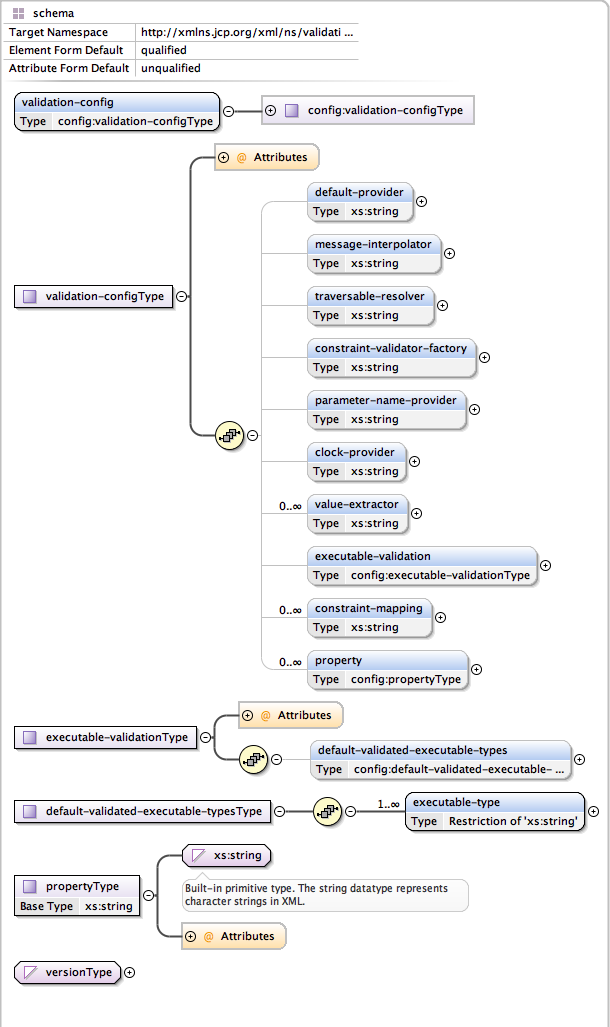
Figure 1. Validation configuration schema
Example 8.1, “validation.xml”
shows the several configuration options of validation.xml. All settings are optional and the same
configuration options are also available programmatically through jakarta.validation.Configuration. In
fact, the XML configuration will be overridden by values explicitly specified via the programmatic
API. It is even possible to ignore the XML configuration completely via
Configuration#ignoreXmlConfiguration(). See also Section 9.2, “Configuring a ValidatorFactory”.
Example 8.1: validation.xml
<?xml version="1.0" encoding="utf-8" ?>
<!--
    SPDX-License-Identifier: Apache-2.0
    Copyright Red Hat Inc. and Hibernate Authors
-->
<validation-config
        xmlns="https://jakarta.ee/xml/ns/validation/configuration"
        xmlns:xsi="http://www.w3.org/2001/XMLSchema-instance"
        xsi:schemaLocation="https://jakarta.ee/xml/ns/validation/configuration
            https://jakarta.ee/xml/ns/validation/validation-configuration-3.1.xsd"
        version="3.1">
    <default-provider>com.acme.ValidationProvider</default-provider>
    <message-interpolator>com.acme.MessageInterpolator</message-interpolator>
    <traversable-resolver>com.acme.TraversableResolver</traversable-resolver>
    <constraint-validator-factory>
        com.acme.ConstraintValidatorFactory
    </constraint-validator-factory>
    <parameter-name-provider>com.acme.ParameterNameProvider</parameter-name-provider>
    <clock-provider>com.acme.ClockProvider</clock-provider>
    <value-extractor>com.acme.ContainerValueExtractor</value-extractor>
    <executable-validation enabled="true">
        <default-validated-executable-types>
            <executable-type>CONSTRUCTORS</executable-type>
            <executable-type>NON_GETTER_METHODS</executable-type>
            <executable-type>GETTER_METHODS</executable-type>
        </default-validated-executable-types>
    </executable-validation>
    <constraint-mapping>META-INF/validation/constraints-car.xml</constraint-mapping>
    <property name="hibernate.validator.fail_fast">false</property>
</validation-config>|
There must only be one file named META-INF/validation.xml on the classpath. If more than one is found an exception is thrown. |
The node default-provider allows to choose the Jakarta Validation provider. This is useful if there is
more than one provider on the classpath. message-interpolator, traversable-resolver,
constraint-validator-factory, parameter-name-provider and clock-provider allow to customize
the used implementations for the interfaces MessageInterpolator, TraversableResolver,
ConstraintValidatorFactory, ParameterNameProvider and ClockProvider defined in the
jakarta.validation package.
See the sub-sections of Section 9.2, “Configuring a ValidatorFactory” for more information about these
interfaces.
value-extractor allows to declare additional value extractors either to extract values from custom
container types or to override the built-in value extractors. See Chapter 7, Value extraction for
more information about how to implement jakarta.validation.valueextraction.ValueExtractor.
executable-validation and its subnodes define defaults for method validation. The Jakarta Validation
specification defines constructor and non getter methods as defaults. The enabled attribute acts as
global switch to turn method validation on and off (see also Chapter 3, Declaring and validating method constraints).
Via the constraint-mapping element you can list an arbitrary number of additional XML files
containing the actual constraint configuration. Mapping file names must be specified using their
fully-qualified name on the classpath. Details on writing mapping files can be found in the next
section.
Last but not least, you can specify provider specific properties via the property nodes. In the
example, we are using the Hibernate Validator specific hibernate.validator.fail_fast property (see
Section 12.2, “Fail fast mode”).
8.2. Mapping constraints via constraint-mappings
Expressing constraints in XML is possible via files adhering to the schema seen in Figure 2, “Validation mapping schema”. Note that these mapping files are only processed if listed via constraint-mapping in validation.xml.

Figure 2. Validation mapping schema
Example 8.2, “Bean constraints configured via XML” shows how the classes Car and RentalCar from Example 5.3, “Car” resp.
Example 5.9, “Class RentalCar with redefined default group” could be mapped in XML.
Example 8.2: Bean constraints configured via XML
<?xml version="1.0" encoding="utf-8" ?>
<!--
    SPDX-License-Identifier: Apache-2.0
    Copyright Red Hat Inc. and Hibernate Authors
-->
<constraint-mappings
        xmlns="https://jakarta.ee/xml/ns/validation/mapping"
        xmlns:xsi="http://www.w3.org/2001/XMLSchema-instance"
        xsi:schemaLocation="https://jakarta.ee/xml/ns/validation/mapping
            https://jakarta.ee/xml/ns/validation/validation-mapping-3.1.xsd"
        version="3.1">
    <default-package>org.hibernate.validator.referenceguide.chapter05</default-package>
    <bean class="Car" ignore-annotations="true">
        <field name="manufacturer">
            <constraint annotation="jakarta.validation.constraints.NotNull"/>
        </field>
        <field name="licensePlate">
            <constraint annotation="jakarta.validation.constraints.NotNull"/>
        </field>
        <field name="seatCount">
            <constraint annotation="jakarta.validation.constraints.Min">
                <element name="value">2</element>
            </constraint>
        </field>
        <field name="driver">
            <valid/>
        </field>
        <field name="partManufacturers">
            <container-element-type type-argument-index="0">
                <valid/>
            </container-element-type>
            <container-element-type type-argument-index="1">
                <container-element-type>
                    <valid/>
                    <constraint annotation="jakarta.validation.constraints.NotNull"/>
                </container-element-type>
            </container-element-type>
        </field>
        <getter name="passedVehicleInspection" ignore-annotations="true">
            <constraint annotation="jakarta.validation.constraints.AssertTrue">
                <message>The car has to pass the vehicle inspection first</message>
                <groups>
                    <value>CarChecks</value>
                </groups>
                <element name="max">10</element>
            </constraint>
        </getter>
    </bean>
    <bean class="RentalCar" ignore-annotations="true">
        <class ignore-annotations="true">
            <group-sequence>
                <value>RentalCar</value>
                <value>CarChecks</value>
            </group-sequence>
        </class>
    </bean>
    <constraint-definition annotation="org.mycompany.CheckCase">
        <validated-by include-existing-validators="false">
            <value>org.mycompany.CheckCaseValidator</value>
        </validated-by>
    </constraint-definition>
</constraint-mappings>
Example 8.3, “Method constraints configured via XML” shows how the constraints from Example 3.1, “Declaring method and constructor parameter constraints”, Example 3.4, “Declaring method and constructor return value constraints” and Example 3.3, “Specifying a constraint’s target” can be expressed in XML.
Example 8.3: Method constraints configured via XML
<?xml version="1.0" encoding="utf-8" ?>
<!--
    SPDX-License-Identifier: Apache-2.0
    Copyright Red Hat Inc. and Hibernate Authors
-->
<constraint-mappings
        xmlns="https://jakarta.ee/xml/ns/validation/mapping"
        xmlns:xsi="http://www.w3.org/2001/XMLSchema-instance"
        xsi:schemaLocation="https://jakarta.ee/xml/ns/validation/mapping
            https://jakarta.ee/xml/ns/validation/validation-mapping-3.1.xsd"
        version="3.1">
    <default-package>org.hibernate.validator.referenceguide.chapter08</default-package>
    <bean class="RentalStation" ignore-annotations="true">
        <constructor>
            <return-value>
                <constraint annotation="ValidRentalStation"/>
            </return-value>
        </constructor>
        <constructor>
            <parameter type="java.lang.String">
                <constraint annotation="jakarta.validation.constraints.NotNull"/>
            </parameter>
        </constructor>
        <method name="getCustomers">
            <return-value>
                <constraint annotation="jakarta.validation.constraints.NotNull"/>
                <constraint annotation="jakarta.validation.constraints.Size">
                    <element name="min">1</element>
                </constraint>
            </return-value>
        </method>
        <method name="rentCar">
            <parameter type="Customer">
                <constraint annotation="jakarta.validation.constraints.NotNull"/>
            </parameter>
            <parameter type="java.util.Date">
                <constraint annotation="jakarta.validation.constraints.NotNull"/>
                <constraint annotation="jakarta.validation.constraints.Future"/>
            </parameter>
            <parameter type="int">
                <constraint annotation="jakarta.validation.constraints.Min">
                    <element name="value">1</element>
                </constraint>
            </parameter>
        </method>
        <method name="addCars">
            <parameter type="java.util.List">
                <container-element-type>
                    <valid/>
                    <constraint annotation="jakarta.validation.constraints.NotNull"/>
                </container-element-type>
            </parameter>
        </method>
    </bean>
    <bean class="Garage" ignore-annotations="true">
        <method name="buildCar">
            <parameter type="java.util.List"/>
            <cross-parameter>
                <constraint annotation="ELAssert">
                    <element name="expression">...</element>
                    <element name="validationAppliesTo">PARAMETERS</element>
                </constraint>
            </cross-parameter>
        </method>
        <method name="paintCar">
            <parameter type="int"/>
            <return-value>
                <constraint annotation="ELAssert">
                    <element name="expression">...</element>
                    <element name="validationAppliesTo">RETURN_VALUE</element>
                </constraint>
            </return-value>
        </method>
    </bean>
</constraint-mappings>
The XML configuration is closely mirroring the programmatic API. For this reason it should suffice
to just add some comments. default-package is used for all fields where a class name is expected. If
the specified class is not fully qualified the configured default package will be used. Every
mapping file can then have several bean nodes, each describing the constraints on the entity with
the specified class name.
|
A given class can only be configured once across all configuration files. The same applies for
constraint definitions for a given constraint annotation. It can only occur in one mapping file. If
these rules are violated a |
Setting ignore-annotations to true means that constraint annotations placed on the configured bean
are ignored. The default for this value is true. ignore-annotations is also available for the nodes
class, fields, getter, constructor, method, parameter, cross-parameter and return-value.
If not explicitly specified on these levels the configured bean value applies.
The nodes class, field, getter, container-element-type, constructor and method
(and its sub node parameter) determine on which level the constraint gets placed.
The valid node is used to enable cascaded validation and the constraint node to add a constraint
on the corresponding level.
Each constraint definition must define the class via the annotation attribute.
The constraint attributes required by the Jakarta Validation specification (message, groups and
payload) have dedicated nodes. All other constraint specific attributes are configured using the
element node.
|
|
The class node also allows to reconfigure the default group sequence (see
Section 5.4, “Redefining the default group sequence”) via the group-sequence node. Not shown in the example is the use
of convert-group to
specify group conversions (see Section 5.5, “Group conversion”). This node is available on field,
getter, container-element-type, parameter and return-value and specifies a from and a to
attributes to specify the groups.
Last but not least, the list of ConstraintValidator instances associated to a given constraint
can be altered via the constraint-definition node. The annotation attribute represents the constraint
annotation being altered. The validated-by element represent the (ordered) list of ConstraintValidator
implementations associated to the constraint. If include-existing-validator is set to false,
validators defined on the constraint annotation are ignored. If set to true, the list of constraint
validators described in XML is concatenated to the list of validators specified on the annotation.
|
One use case for constraint-definition is to change the default constraint definition for Using XML to register a regular expression based constraint definition for |
9. Bootstrapping
In Section 2.2.1, “Obtaining a Validator instance”, you already saw one way of creating a Validator instance - via
Validation#buildDefaultValidatorFactory(). In this chapter, you will learn how to use the other
methods in jakarta.validation.Validation in order to bootstrap specifically configured validators.
9.1. Retrieving ValidatorFactory and Validator
You obtain a Validator by retrieving a ValidatorFactory via one of the static methods on
jakarta.validation.Validation and calling getValidator() on the factory instance.
Example 9.1, “Bootstrapping default ValidatorFactory and Validator” shows how to obtain a validator from the default
validator factory:
Example 9.1: Bootstrapping default ValidatorFactory and Validator
ValidatorFactory validatorFactory = Validation.buildDefaultValidatorFactory();
Validator validator = validatorFactory.getValidator();|
The generated |
Jakarta Validation supports working with several providers such as Hibernate Validator within one
application. If more than one provider is present on the classpath, it is not guaranteed which one
is chosen when creating a factory via buildDefaultValidatorFactory().
In this case, you can explicitly specify the provider to use via Validation#byProvider(), passing the
provider’s ValidationProvider class as shown in Example 9.2, “Bootstrapping ValidatorFactory and Validator using a specific provider”.
Example 9.2: Bootstrapping ValidatorFactory and Validator using a specific provider
ValidatorFactory validatorFactory = Validation.byProvider( HibernateValidator.class )
        .configure()
        .buildValidatorFactory();
Validator validator = validatorFactory.getValidator();
Note that the configuration object returned by configure() allows to specifically customize the
factory before calling buildValidatorFactory(). The available options are discussed later in this
chapter.
Similarly you can retrieve the default validator factory for configuration which is demonstrated in
Example 9.3, “Retrieving the default ValidatorFactory for configuration”.
Example 9.3: Retrieving the default ValidatorFactory for configuration
ValidatorFactory validatorFactory = Validation.byDefaultProvider()
        .configure()
        .buildValidatorFactory();
Validator validator = validatorFactory.getValidator();|
If a |
9.1.1. ValidationProviderResolver
By default, available Jakarta Validation providers are discovered using the Java Service Provider mechanism.
For that purpose, each provider includes the file META-
INF/services/jakarta.validation.spi.ValidationProvider, containing the fully qualified classname of
its ValidationProvider implementation. In the case of Hibernate Validator, this is
org.hibernate.validator.HibernateValidator.
Depending on your environment and its classloading specifics, provider discovery via the Java’s
service loader mechanism might not work. In this case, you can plug in a custom
ValidationProviderResolver implementation which performs the provider retrieval.
To use a custom provider resolver, pass it via providerResolver() as shown in
Example 9.4, “Using a custom ValidationProviderResolver”.
Example 9.4: Using a custom ValidationProviderResolver
package org.hibernate.validator.referenceguide.chapter09;
public class CustomValidationProviderResolver implements ValidationProviderResolver {
    @Override
    public List<ValidationProvider<?>> getValidationProviders() {
        //...
        return providers;
    }
}
ValidatorFactory validatorFactory = Validation.byDefaultProvider()
.providerResolver( new CustomValidationProviderResolver() )
.configure()
.buildValidatorFactory();
Validator validator = validatorFactory.getValidator();9.2. Configuring a ValidatorFactory
By default, validator factories retrieved from Validation and any validators they create are
configured as per the XML descriptor META-INF/validation.xml (see Chapter 8, Configuring via XML),
if present.
If you want to disable the XML based configuration, you can do so by invoking
Configuration#ignoreXmlConfiguration().
The different values of the XML configuration can be accessed via
Configuration#getBootstrapConfiguration(). This can for instance be helpful if you want to integrate
Jakarta Validation into a managed environment and want to create managed instances of the objects
configured via XML.
Using the fluent configuration API, you can override one or more of the settings when bootstrapping
the factory. The following sections show how to make use of the different options. Note that the
Configuration class exposes the default implementations of the different extension points which can
be useful if you want to use these as delegates for your custom implementations.
9.2.1. MessageInterpolator
Message interpolators are used by the validation engine to create user readable error messages from constraint message descriptors.
In case the default message interpolation algorithm described in Chapter 4, Interpolating constraint error messages
is not sufficient for your needs, you can pass in your own implementation of the MessageInterpolator
interface via Configuration#messageInterpolator() as shown in
Example 9.5, “Using a custom MessageInterpolator”.
Example 9.5: Using a custom MessageInterpolator
package org.hibernate.validator.referenceguide.chapter09;
public class MyMessageInterpolator implements MessageInterpolator {
    @Override
    public String interpolate(String messageTemplate, Context context) {
        //...
        return null;
    }
    @Override
    public String interpolate(String messageTemplate, Context context, Locale locale) {
        //...
        return null;
    }
}
ValidatorFactory validatorFactory = Validation.byDefaultProvider()
.configure()
.messageInterpolator( new MyMessageInterpolator() )
.buildValidatorFactory();
Validator validator = validatorFactory.getValidator();9.2.2. TraversableResolver
In some cases the validation engine should not access the state of a bean property. The most obvious example for that is a lazily loaded property or association of a Jakarta Persistence entity. Validating this lazy property or association would mean that its state would have to be accessed, triggering a load from the database.
Which properties can be accessed and which ones not is controlled by querying the
TraversableResolver interface. Example 9.6, “Using a custom TraversableResolver” shows how to use a
custom traversable resolver implementation.
Example 9.6: Using a custom TraversableResolver
package org.hibernate.validator.referenceguide.chapter09;
public class MyTraversableResolver implements TraversableResolver {
    @Override
    public boolean isReachable(
            Object traversableObject,
            Node traversableProperty,
            Class<?> rootBeanType,
            Path pathToTraversableObject,
            ElementType elementType) {
        //...
        return false;
    }
    @Override
    public boolean isCascadable(
            Object traversableObject,
            Node traversableProperty,
            Class<?> rootBeanType,
            Path pathToTraversableObject,
            ElementType elementType) {
        //...
        return false;
    }
}
ValidatorFactory validatorFactory = Validation.byDefaultProvider()
.configure()
.traversableResolver( new MyTraversableResolver() )
.buildValidatorFactory();
Validator validator = validatorFactory.getValidator();If no specific traversable resolver has been configured, the default behavior is to consider all properties as reachable and cascadable. When using Hibernate Validator together with a Jakarta Persistence 3.2 provider such as Hibernate ORM, only those properties will be considered reachable which already have been loaded by the persistence provider and all properties will be considered cascadable.
By default, the traversable resolver calls are cached per validation call.
This is especially important in a Jakarta Persistence environment where calling isReachable() has a significant cost.
This caching adds some overhead. In the case your custom traversable resolver is very fast, it might be better to consider turning off the cache.
You can disable the cache either via the XML configuration:
Example 9.7: Disabling the TraversableResolver result cache via the XML configuration
<?xml version="1.0" encoding="UTF-8"?>
<!--
    SPDX-License-Identifier: Apache-2.0
    Copyright Red Hat Inc. and Hibernate Authors
-->
<validation-config xmlns="https://jakarta.ee/xml/ns/validation/configuration"
    xmlns:xsi="http://www.w3.org/2001/XMLSchema-instance"
    xsi:schemaLocation="https://jakarta.ee/xml/ns/validation/configuration https://jakarta.ee/xml/ns/validation/validation-configuration-3.1.xsd"
    version="3.1">
    <default-provider>org.hibernate.validator.HibernateValidator</default-provider>
    <property name="hibernate.validator.enable_traversable_resolver_result_cache">false</property>
</validation-config>
or via the programmatic API:
Example 9.8: Disabling the TraversableResolver result cache via the programmatic API
ValidatorFactory validatorFactory = Validation.byProvider( HibernateValidator.class )
        .configure()
        .traversableResolver( new MyFastTraversableResolver() )
        .enableTraversableResolverResultCache( false )
        .buildValidatorFactory();
Validator validator = validatorFactory.getValidator();
9.2.3. ConstraintValidatorFactory
ConstraintValidatorFactory is the extension point for customizing how constraint validators are
instantiated and released.
The default ConstraintValidatorFactory provided by Hibernate Validator requires a public no-arg
constructor to instantiate ConstraintValidator instances (see Section 6.1.2, “The constraint validator”).
Using a custom ConstraintValidatorFactory offers for example the possibility to use dependency
injection in constraint validator implementations.
To configure a custom constraint validator factory call Configuration#constraintValidatorFactory()
(see Example 9.9, “Using a custom ConstraintValidatorFactory”.
Example 9.9: Using a custom ConstraintValidatorFactory
package org.hibernate.validator.referenceguide.chapter09;
public class MyConstraintValidatorFactory implements ConstraintValidatorFactory {
    @Override
    public <T extends ConstraintValidator<?, ?>> T getInstance(Class<T> key) {
        //...
        return null;
    }
    @Override
    public void releaseInstance(ConstraintValidator<?, ?> instance) {
        //...
    }
}
ValidatorFactory validatorFactory = Validation.byDefaultProvider()
.configure()
.constraintValidatorFactory( new MyConstraintValidatorFactory() )
.buildValidatorFactory();
Validator validator = validatorFactory.getValidator();|
Any constraint implementations relying on |
|
|
9.2.4. ParameterNameProvider
In case a method or constructor parameter constraint is violated, the ParameterNameProvider
interface is used to retrieve the parameter name and make it available to the user via the
property path of the constraint violation.
The default implementation returns parameter names as obtained through the Java reflection API.
If you compile your sources using the -parameters compiler flag, the actual parameter names as
in the source code will be returned. Otherwise synthetic names in the form of arg0, arg1 etc.
will be used.
To use a custom parameter name provider either pass an instance of
the provider during bootstrapping as shown in Example 9.10, “Using a custom ParameterNameProvider”,
or specify the fully qualified class name of the provider as value for
the <parameter-name-provider> element in the META-INF/validation.xml file
(see Section 8.1, “Configuring the validator factory in validation.xml”). This is demonstrated in
Example 9.10, “Using a custom ParameterNameProvider”.
Example 9.10: Using a custom ParameterNameProvider
package org.hibernate.validator.referenceguide.chapter09;
public class MyParameterNameProvider implements ParameterNameProvider {
    @Override
    public List<String> getParameterNames(Constructor<?> constructor) {
        //...
        return null;
    }
    @Override
    public List<String> getParameterNames(Method method) {
        //...
        return null;
    }
}
ValidatorFactory validatorFactory = Validation.byDefaultProvider()
.configure()
.parameterNameProvider( new MyParameterNameProvider() )
.buildValidatorFactory();
Validator validator = validatorFactory.getValidator();|
Hibernate Validator comes with a custom |
9.2.5. ClockProvider and temporal validation tolerance
For time related validation (@Past and @Future constraints for instance), it might be useful to define what is
considered now.
This is especially important when you want to test your constraints in a reliable manner.
The reference time is defined by the ClockProvider contract. The responsibility of the ClockProvider is to
provide a java.time.Clock defining now for time related validators.
Example 9.11: Using a custom ClockProvider
package org.hibernate.validator.referenceguide.chapter09;
public class FixedClockProvider implements ClockProvider {
    private Clock clock;
    public FixedClockProvider(ZonedDateTime dateTime) {
        clock = Clock.fixed( dateTime.toInstant(), dateTime.getZone() );
    }
    @Override
    public Clock getClock() {
        return clock;
    }
}
ValidatorFactory validatorFactory = Validation.byDefaultProvider()
.configure()
.clockProvider( new FixedClockProvider( ZonedDateTime.of( 2016, 6, 15, 0, 0, 0, 0, ZoneId.of( "Europe/Paris" ) ) ) )
.buildValidatorFactory();
Validator validator = validatorFactory.getValidator();Alternatively, you can specify the fully-qualified classname of a ClockProvider implementation using the
<clock-provider> element when configuring the default validator factory via META-INF/validation.xml
(see Chapter 8, Configuring via XML).
|
When validating You can obtain the For instance, this might be useful if you want to replace the default message of the |
When dealing with distributed architectures, you might need some tolerance when applying temporal constraints
such as @Past or @Future.
You can set a temporal validation tolerance by bootstrapping your ValidatorFactory as below:
Example 9.12: Using temporal validation tolerance
ValidatorFactory validatorFactory = Validation.byProvider( HibernateValidator.class )
        .configure()
        .temporalValidationTolerance( Duration.ofMillis( 10 ) )
        .buildValidatorFactory();
Validator validator = validatorFactory.getValidator();
Alternatively, you can define it in the XML configuration by setting the hibernate.validator.temporal_validation_tolerance property
in your META-INF/validation.xml.
The value of this property must be a long defining the tolerance in milliseconds.
|
When implementing your own temporal constraints, you might need to have access to the temporal validation tolerance. It can be obtained by calling the Note that to get access to this context at initialization, your constraint validator has to implement
the |
As mentioned in Chapter 7, Value extraction, additional value extractors can be registered during bootstrapping
(see Section 7.5, “Registering a ValueExtractor” for the other ways to register a value extractor).
Example 9.13, “Registering additional value extractors” shows how we would register the value extractors we previously created
to extract the keys and the values of Guava’s Multimap.
9.2.7. Adding mapping streams
As discussed earlier, you can configure the constraints applied to your Java beans using XML based constraint mappings.
Besides the mapping files specified in META-INF/validation.xml, you can add further mappings via
Configuration#addMapping() (see Example 9.14, “Adding constraint mapping streams”). Note that the passed input
stream(s) must adhere to the XML schema for constraint mappings presented in
Section 8.2, “Mapping constraints via constraint-mappings”.
Example 9.14: Adding constraint mapping streams
InputStream constraintMapping1 = null;
InputStream constraintMapping2 = null;
ValidatorFactory validatorFactory = Validation.byDefaultProvider()
        .configure()
        .addMapping( constraintMapping1 )
        .addMapping( constraintMapping2 )
        .buildValidatorFactory();
Validator validator = validatorFactory.getValidator();
You should close any passed input stream after the validator factory has been created.
9.2.8. Provider-specific settings
Via the configuration object returned by Validation#byProvider(), provider specific options can be
configured.
In the case of Hibernate Validator, this e.g. allows you to enable the fail fast mode and pass one or more programmatic constraint mappings as demonstrated in Example 9.15, “Setting Hibernate Validator specific options”.
Example 9.15: Setting Hibernate Validator specific options
ValidatorFactory validatorFactory = Validation.byProvider( HibernateValidator.class )
        .configure()
        .failFast( true )
        .addMapping( (ConstraintMapping) null )
        .buildValidatorFactory();
Validator validator = validatorFactory.getValidator();
Alternatively, provider-specific options can be passed via Configuration#addProperty(). Hibernate
Validator supports enabling the fail fast mode that way, too:
Example 9.16: Enabling a Hibernate Validator specific option via addProperty()
ValidatorFactory validatorFactory = Validation.byProvider( HibernateValidator.class )
        .configure()
        .addProperty( "hibernate.validator.fail_fast", "true" )
        .buildValidatorFactory();
Validator validator = validatorFactory.getValidator();
Refer to Section 12.2, “Fail fast mode” and Section 12.4, “Programmatic constraint definition and declaration” to learn more about the fail fast mode and the constraint declaration API.
9.2.9. Configuring the ScriptEvaluatorFactory
For constraints like @ScriptAssert and @ParameterScriptAssert, it might be useful to configure
how the script engines are initialized and how the script evaluators are built.
This can be done by setting a custom implementation of ScriptEvaluatorFactory.
In particular, this is important for modular environments, where user might face issues with modular class loading and JSR 223. It also allows to use any custom script engine, not necessarily based on the JSR 223 (e.g. Spring Expression Language).
9.2.9.1. XML configuration
To specify the ScriptEvaluatorFactory via XML, you need to define the hibernate.validator.script_evaluator_factory
property.
Example 9.17: Defining the ScriptEvaluatorFactory via XML
<?xml version="1.0" encoding="utf-8" ?>
<!--
    SPDX-License-Identifier: Apache-2.0
    Copyright Red Hat Inc. and Hibernate Authors
-->
<validation-config
        xmlns="https://jakarta.ee/xml/ns/validation/configuration"
        xmlns:xsi="http://www.w3.org/2001/XMLSchema-instance"
        xsi:schemaLocation="https://jakarta.ee/xml/ns/validation/configuration
            https://jakarta.ee/xml/ns/validation/validation-configuration-3.1.xsd"
        version="3.1">
    <property name="hibernate.validator.script_evaluator_factory">
        org.hibernate.validator.referenceguide.chapter09.CustomScriptEvaluatorFactory
    </property>
</validation-config>
In this case, the specified ScriptEvaluatorFactory must have a no-arg constructor.
9.2.9.2. Programmatic configuration
To configure it programmatically, you need to pass an instance of ScriptEvaluatorFactory to the ValidatorFactory.
This gives more flexibility in the configuration of the ScriptEvaluatorFactory. Example 9.18, “Defining the ScriptEvaluatorFactory programmatically”
shows how this can be done.
Example 9.18: Defining the ScriptEvaluatorFactory programmatically
ValidatorFactory validatorFactory = Validation.byProvider( HibernateValidator.class )
        .configure()
        .scriptEvaluatorFactory( new CustomScriptEvaluatorFactory() )
        .buildValidatorFactory();
Validator validator = validatorFactory.getValidator();
9.2.9.3. Custom ScriptEvaluatorFactory implementation examples
This section shows a couple of custom ScriptEvaluatorFactory implementations that can be used
in modular environments as well as one using the Spring Expression Language
for writing constraint scripts.
Problems with modular environments and JSR 223 come from the class loading. The class loader where the script engine is available might be different from the one of Hibernate Validator. Thus the script engine wouldn’t be found using the default strategy.
To solve this issue, the MultiClassLoaderScriptEvaluatorFactory class below can be introduced:
/*
 * SPDX-License-Identifier: Apache-2.0
 * Copyright Red Hat Inc. and Hibernate Authors
 */
package org.hibernate.validator.referenceguide.chapter09;
import javax.script.ScriptEngine;
import javax.script.ScriptEngineManager;
import org.hibernate.validator.spi.scripting.AbstractCachingScriptEvaluatorFactory;
import org.hibernate.validator.spi.scripting.ScriptEngineScriptEvaluator;
import org.hibernate.validator.spi.scripting.ScriptEvaluationException;
import org.hibernate.validator.spi.scripting.ScriptEvaluator;
import org.hibernate.validator.spi.scripting.ScriptEvaluatorFactory;
/**
 * {@link ScriptEvaluatorFactory} that allows you to pass multiple {@link ClassLoader}s that will be used
 * to search for {@link ScriptEngine}s. Useful in environments similar to OSGi, where script engines can be
 * found only in {@link ClassLoader}s different from default one.
 *
 * @author Marko Bekhta
 */
public class MultiClassLoaderScriptEvaluatorFactory extends AbstractCachingScriptEvaluatorFactory {
    private final ClassLoader[] classLoaders;
    public MultiClassLoaderScriptEvaluatorFactory(ClassLoader... classLoaders) {
        if ( classLoaders.length == 0 ) {
            throw new IllegalArgumentException( "No class loaders were passed" );
        }
        this.classLoaders = classLoaders;
    }
    @Override
    protected ScriptEvaluator createNewScriptEvaluator(String languageName) {
        for ( ClassLoader classLoader : classLoaders ) {
            ScriptEngine engine = new ScriptEngineManager( classLoader ).getEngineByName( languageName );
            if ( engine != null ) {
                return new ScriptEngineScriptEvaluator( engine );
            }
        }
        throw new ScriptEvaluationException( "No JSR 223 script engine found for language " + languageName );
    }
}
and then declared with:
Validator validator = Validation.byProvider( HibernateValidator.class )
        .configure()
        .scriptEvaluatorFactory(
                new MultiClassLoaderScriptEvaluatorFactory( GroovyScriptEngineFactory.class.getClassLoader() )
        )
        .buildValidatorFactory()
        .getValidator();
This way, it is possible to pass multiple ClassLoader instances: typically the class loaders of the wanted ScriptEngines.
As already mentioned, you can also use script engines that are not based on JSR 223.
package org.hibernate.validator.referenceguide.chapter09;
public class SpringELScriptEvaluatorFactory extends AbstractCachingScriptEvaluatorFactory {
    @Override
    public ScriptEvaluator createNewScriptEvaluator(String languageName) {
        if ( !"spring".equalsIgnoreCase( languageName ) ) {
            throw new IllegalStateException( "Only Spring EL is supported" );
        }
        return new SpringELScriptEvaluator();
    }
    private static class SpringELScriptEvaluator implements ScriptEvaluator {
        private final ExpressionParser expressionParser = new SpelExpressionParser();
        @Override
        public Object evaluate(String script, Map<String, Object> bindings) throws ScriptEvaluationException {
            try {
                Expression expression = expressionParser.parseExpression( script );
                EvaluationContext context = new StandardEvaluationContext( bindings.values().iterator().next() );
                for ( Entry<String, Object> binding : bindings.entrySet() ) {
                    context.setVariable( binding.getKey(), binding.getValue() );
                }
                return expression.getValue( context );
            }
            catch (ParseException | EvaluationException e) {
                throw new ScriptEvaluationException( "Unable to evaluate SpEL script", e );
            }
        }
    }
}
This factory allows to use Spring Expression Language in ScriptAssert and ParameterScriptAssert
constraints:
@ScriptAssert(script = "value > 0", lang = "spring")
public class Foo {
    private final int value;
    private Foo(int value) {
        this.value = value;
    }
    public int getValue() {
        return value;
    }
}
9.2.10. Logging of values under validation
In some cases it might be useful to inspect logs produced by Hibernate Validator.
When the log level is set to TRACE validator will produce, among others,
log entries containing the descriptor of constraints that are evaluated. By default, values under validation are not going
to be visible in these messages to prevent sensitive data from getting exposed. If required, Hibernate Validator
can be configured to print these values as well. As usual, there are a few ways to do it:
Example 9.23: Programmatic configuration
Validator validator = Validation.byProvider( HibernateValidator.class )
        .configure()
        .showValidatedValuesInTraceLogs( true )
        .buildValidatorFactory()
        .getValidator();
Example 9.24: Programmatic configuration via property
Validator validator = Validation.byProvider( HibernateValidator.class )
        .configure()
        .addProperty( "hibernate.validator.show_validated_value_in_trace_logs", "true" )
        .buildValidatorFactory()
        .getValidator();
Example 9.25: XML configuration via property
<?xml version="1.0" encoding="UTF-8"?>
<!--
    SPDX-License-Identifier: Apache-2.0
    Copyright Red Hat Inc. and Hibernate Authors
-->
<validation-config xmlns="https://jakarta.ee/xml/ns/validation/configuration"
    xmlns:xsi="http://www.w3.org/2001/XMLSchema-instance"
    xsi:schemaLocation="https://jakarta.ee/xml/ns/validation/configuration https://jakarta.ee/xml/ns/validation/validation-configuration-3.1.xsd"
    version="3.1">
    <default-provider>org.hibernate.validator.HibernateValidator</default-provider>
    <property name="hibernate.validator.show_validated_value_in_trace_logs">true</property>
</validation-config>|
Hibernate Validator versions, prior to 8.0, logged both value and constraint descriptor
if logging level was set to |
9.3. Configuring a Validator
When working with a configured validator factory it can occasionally be required to apply a
different configuration to a single Validator instance. Example 9.26, “Configuring a Validator instance via usingContext()” shows how this can
be achieved by calling ValidatorFactory#usingContext().
Example 9.26: Configuring a Validator instance via usingContext()
ValidatorFactory validatorFactory = Validation.buildDefaultValidatorFactory();
Validator validator = validatorFactory.usingContext()
        .messageInterpolator( new MyMessageInterpolator() )
        .traversableResolver( new MyTraversableResolver() )
        .getValidator();
The Jakarta Validation specification provides not only a validation engine, but also an API for
retrieving constraint metadata in a uniform way, no matter whether the constraints are declared
using annotations or via XML mappings. Read this chapter to learn more about this API and its
possibilities. You can find all the metadata API types in the package jakarta.validation.metadata.
The examples presented in this chapter are based on the classes and constraint declarations shown in Example 10.1, “Example classes”.
10.1. BeanDescriptor
The entry point into the metadata API is the method Validator#getConstraintsForClass(), which
returns an instance of the BeanDescriptor interface. Using this
descriptor, you can obtain metadata for constraints declared directly on the bean itself (class- or
property-level), but also retrieve metadata descriptors representing single properties, methods and
constructors.
Example 10.2, “Using BeanDescriptor” demonstrates how to retrieve a BeanDescriptor for the
Car class and how to use this descriptor in form of assertions.
|
If a constraint declaration hosted by the requested class is invalid, a |
You can determine whether the specified class hosts any class- or property-level constraints via
isBeanConstrained(). Method or constructor constraints are not considered by isBeanConstrained().
The method getConstraintDescriptors() is common to all descriptors derived from ElementDescriptor
(see Section 10.4, “ElementDescriptor”) and returns a set of descriptors representing the
constraints directly declared on the given element. In case of BeanDescriptor, the bean’s class-
level constraints are returned. More details on ConstraintDescriptor can be found in
Section 10.7, “ConstraintDescriptor”.
Via getConstraintsForProperty(), getConstraintsForMethod() and getConstraintsForConstructor() you
can obtain a descriptor representing one given property or executable element, identified by its
name and, in case of methods and constructors, parameter types. The different descriptor types
returned by these methods are described in the following sections.
Note that these methods consider constraints declared at super-types according to the rules for
constraint inheritance as described in Section 2.1.5, “Constraint inheritance”. An example is the
descriptor for the manufacturer property, which provides access to all constraints defined on
Vehicle#getManufacturer() and the implementing method Car#getManufacturer(). null is returned in
case the specified element does not exist or is not constrained.
The methods getConstrainedProperties(), getConstrainedMethods() and getConstrainedConstructors()
return (potentially empty) sets with all constrained properties, methods and constructors,
respectively. An element is considered constrained if it has at least one constraint or is marked
for cascaded validation. When invoking getConstrainedMethods(), you can specify the type of the
methods to be returned (getters, non-getters or both).
10.2. PropertyDescriptor
The interface
PropertyDescriptor represents one given property of a
class. It is transparent whether constraints are declared on a field or a property getter, provided
the JavaBeans naming conventions are respected. Example 10.3, “Using PropertyDescriptor” shows
how to use the PropertyDescriptor interface.
Using getConstraintDescriptors(), you can retrieve a set of ConstraintDescriptors providing more
information on the individual constraints of a given property. The method isCascaded() returns
true if the property is marked for cascaded validation (either using the @Valid annotation or via
XML), false otherwise. An