You can use environment variables to adjust your function's behavior without updating code. An environment variable is a pair of strings that is stored in a function's version-specific configuration. The Lambda runtime makes environment variables available to your code and sets additional environment variables that contain information about the function and invocation request.
Note
To increase security, we recommend that you use AWS Secrets Manager instead of environment variables to store database credentials and other sensitive information like API keys or authorization tokens. For more information, see Use Secrets Manager secrets in Lambda functions.
Environment variables are not evaluated before the function invocation. Any value you define is considered a literal string and not expanded. Perform the variable evaluation in your function code.
Creating Lambda environment variables
You can configure environment variables in Lambda using the Lambda console, the AWS Command Line Interface (AWS CLI), AWS Serverless Application Model (AWS SAM), or using an AWS SDK.
Example scenario for environment variables
You can use environment variables to customize function behavior in your test environment and production environment. For example, you can create two functions with the same code but different configurations. One function connects to a test database, and the other connects to a production database. In this situation, you use environment variables to pass the hostname and other connection details for the database to the function.
The following example shows how to define the database host and database name as environment variables.
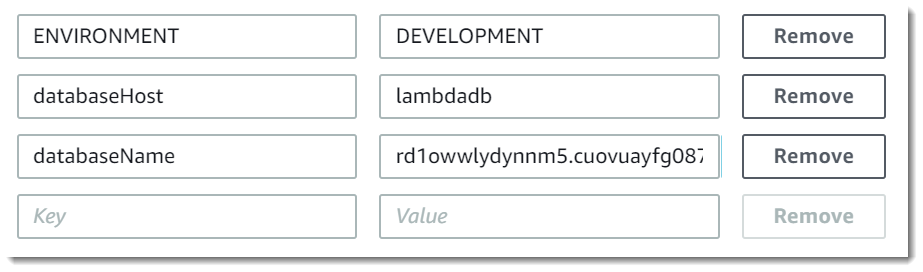
If you want your test environment to generate more debug information than the production environment, you could set an environment variable to configure your test environment to use more verbose logging or more detailed tracing.
For example, in your test environment, you could set an environment variable with the key LOG_LEVEL and a value indicating a log level of
debug or trace. In your Lambda function's code, you can then use this environment variable to set the log level.
The following code examples in Python and Node.js illustrate how you can achieve this. These examples assume your environment variable has a
value of DEBUG in Python or debug in Node.js.
Retrieving Lambda environment variables
To retrieve environment variables in your function code, use the standard method for your programming language.
Lambda stores environment variables securely by encrypting them at rest. You can configure Lambda to use a different encryption key, encrypt environment variable values on the client side, or set environment variables in an CloudFormation template with AWS Secrets Manager.
Defined runtime environment variables
Lambda runtimes set several environment variables during initialization. Most of the environment variables provide information about the function or runtime. The keys for these environment variables are reserved and cannot be set in your function configuration.
Reserved environment variables
-
_HANDLER– The handler location configured on the function. -
_X_AMZN_TRACE_ID– The X-Ray tracing header. This environment variable changes with each invocation.-
This environment variable is not defined for OS-only runtimes (the
providedruntime family). You can set_X_AMZN_TRACE_IDfor custom runtimes using theLambda-Runtime-Trace-Idresponse header from the Next invocation. -
For Java runtime versions 17 and later, this environment variable is not used. Instead, Lambda stores tracing information in the
com.amazonaws.xray.traceHeadersystem property.
-
-
AWS_DEFAULT_REGION– The default AWS Region where the Lambda function is executed. -
AWS_REGION– The AWS Region where the Lambda function is executed. If defined, this value overrides theAWS_DEFAULT_REGION.-
For more information about using the AWS Region environment variables with AWS SDKs, see AWS Region in the AWS SDKs and Tools Reference Guide.
-
-
AWS_EXECUTION_ENV– The runtime identifier, prefixed byAWS_Lambda_(for example,AWS_Lambda_java8). This environment variable is not defined for OS-only runtimes (theprovidedruntime family). -
AWS_LAMBDA_FUNCTION_NAME– The name of the function. -
AWS_LAMBDA_FUNCTION_MEMORY_SIZE– The amount of memory available to the function in MB. -
AWS_LAMBDA_FUNCTION_VERSION– The version of the function being executed. -
AWS_LAMBDA_INITIALIZATION_TYPE– The initialization type of the function, which ison-demand,provisioned-concurrency,snap-start, orlambda-managed-instances. For information, see Configuring provisioned concurrency, Improving startup performance with Lambda SnapStart, or Lambda Managed Instances. -
AWS_LAMBDA_LOG_GROUP_NAME,AWS_LAMBDA_LOG_STREAM_NAME– The name of the Amazon CloudWatch Logs group and stream for the function. TheAWS_LAMBDA_LOG_GROUP_NAMEandAWS_LAMBDA_LOG_STREAM_NAMEenvironment variables are not available in Lambda SnapStart functions. -
AWS_ACCESS_KEY,AWS_ACCESS_KEY_ID,AWS_SECRET_ACCESS_KEY,AWS_SESSION_TOKEN– The access keys obtained from the function's execution role. -
AWS_LAMBDA_RUNTIME_API– (Custom runtime) The host and port of the runtime API. -
LAMBDA_TASK_ROOT– The path to your Lambda function code. -
LAMBDA_RUNTIME_DIR– The path to runtime libraries. -
AWS_LAMBDA_MAX_CONCURRENCY– (Lambda Managed Instances only) The maximum number of concurrent invocations Lambda will send to one execution environment. -
AWS_LAMBDA_METADATA_API– The metadata endpoint server address in the format{ipv4_address}:{port}(for example,169.254.100.1:9001). -
AWS_LAMBDA_METADATA_TOKEN– A unique authentication token for the current execution environment used to authenticate requests to the metadata endpoint. Lambda generates this token automatically at initialization.
The following additional environment variables aren't reserved and can be extended in your function configuration.
Unreserved environment variables
-
LANG– The locale of the runtime (en_US.UTF-8). -
PATH– The execution path (/usr/local/bin:/usr/bin/:/bin:/opt/bin). -
LD_LIBRARY_PATH– The system library path (/var/lang/lib:/lib64:/usr/lib64:$LAMBDA_RUNTIME_DIR:$LAMBDA_RUNTIME_DIR/lib:$LAMBDA_TASK_ROOT:$LAMBDA_TASK_ROOT/lib:/opt/lib). -
NODE_PATH– (Node.js) The Node.js library path (/opt/nodejs/node12/node_modules/:/opt/nodejs/node_modules:$LAMBDA_RUNTIME_DIR/node_modules). -
NODE_OPTIONS– (Node.js) For Node.js runtimes, you can useNODE_OPTIONSto re-enable experimental features that Lambda disables by default. -
PYTHONPATH– (Python) The Python library path ($LAMBDA_RUNTIME_DIR). -
GEM_PATH– (Ruby) The Ruby library path ($LAMBDA_TASK_ROOT/vendor/bundle/ruby/3.3.0:/opt/ruby/gems/3.3.0). -
AWS_XRAY_CONTEXT_MISSING– For X-Ray tracing, Lambda sets this toLOG_ERRORto avoid throwing runtime errors from the X-Ray SDK. -
AWS_XRAY_DAEMON_ADDRESS– For X-Ray tracing, the IP address and port of the X-Ray daemon. -
AWS_LAMBDA_DOTNET_PREJIT– (.NET) Set this variable to enable or disable .NET specific runtime optimizations. Values includealways,never, andprovisioned-concurrency. For more information, see Configuring provisioned concurrency for a function. -
TZ– The environment's time zone (:UTC). The execution environment uses NTP to synchronize the system clock.
The sample values shown reflect the latest runtimes. The presence of specific variables or their values can vary on earlier runtimes.