Resource loading timestamps
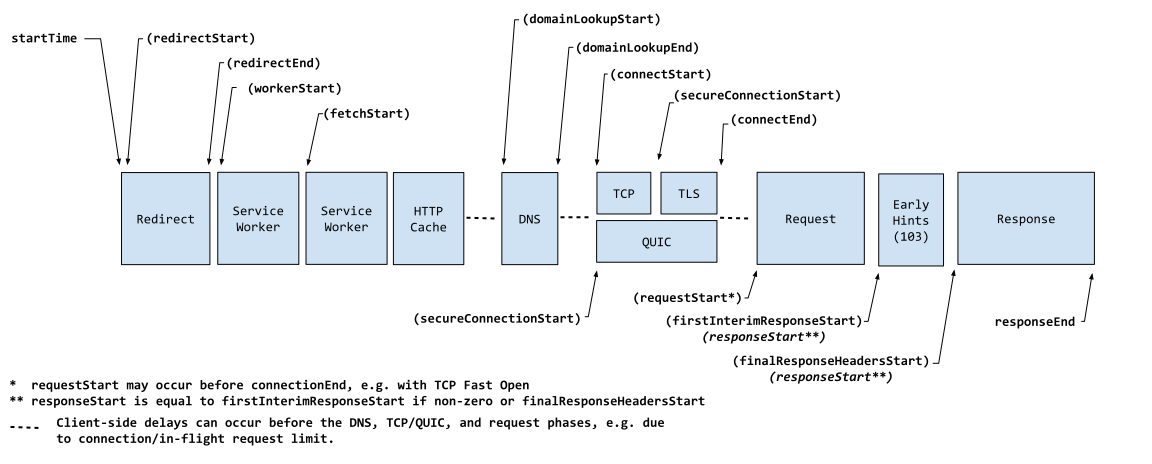 Figure 1. Resource loading timestamps (source).
An application can get timestamps for the various stages used to load a resource. For example the startTime, DNS timestamps, connection set up times and then various resource download times.
See timestamps in the reference page for the PerformanceResourceTiming interface.
Resource size
The PerformanceResourceTiming interface has three properties that can be used to obtain size data about a resource. The transferSize property returns the size (in bytes) of the fetched resource including the response header fields plus the response payload body.
The encodedBodySize property returns the size (in octets) received from the fetch (HTTP or cache), of the payload body, before removing any applied content-codings. decodedBodySize returns the size (in octets) received from the fetch (HTTP or cache) of the message body, after removing any applied content-codings.
Other properties
The PerformanceResourceTiming interface provides additional resources information. Consult the reference docs for the full list of properties.
Managing resource buffer sizes
If your website or application fetches more than 250 resources and you want to record more than 250 PerformanceResourceTiming entries, you need to increase the size of the resource timing buffer.
To set the size of the browser's performance resource data buffer, use the Performance.setResourceTimingBufferSize() method, and to clear the browser's performance resource data buffer, use the Performance.clearResourceTimings() method.
To get notified when the browser's resource timing buffer is full, listen for the resourcetimingbufferfull event.
The following call allows 500 "resource" performance entries in the browser's performance timeline.
js
performance.setResourceTimingBufferSize(500);
For more information, see also Managing buffer sizes.
Cross-origin timing information
Many of the resource timing properties are restricted to return 0 or an empty string when the resource is a cross-origin request. To expose cross-origin timing information, the Timing-Allow-Origin HTTP response header needs to be set.
For more information on the fields affected, see Cross-origin timing information in the reference page for the PerformanceResourceTiming interface.