Update 1.53.1: The update addresses these security issues.
Update 1.53.2: The update addresses these issues.
Downloads: Windows: x64 Arm64 | Mac: Intel | Linux: deb rpm tarball Arm snap
Welcome to the January 2021 release of Visual Studio Code. There are a number of updates in this version that we hope you will like, some of the key highlights include:
- Wrap tabs - Wrap editor tabs in the workbench instead of having a scrollbar.
- Configure tab decorations - Add editor tab status decorations.
- Customize search mode - Use the Search view or open a new Search editor.
- JavaScript debugging - Support for conditional exception breakpoints and Node.js worker_threads.
- Notebook UX updates - Outline view for Notebook cells, and breadcrumbs for improved navigation.
- Markdown preview image auto update - Preview automatically updates when images change.
- Emmet improvements - Faster performance and supporting the latest features.
- Extension guidelines - Documented best practices for extension authors.
- Remote Development video series - Learn to create and configure container-based environments.
If you'd like to read these release notes online, go to Updates on code.visualstudio.com.
Join us live at the VS Code team's livestream on Tuesday, February 9 at 8am Pacific (4pm London) to see a demo of what's new in this release, and ask us questions live.
Insiders: Want to try new features as soon as possible? You can download the nightly Insiders build and try the latest updates as soon as they are available.
Workbench
Wrap tabs
A new setting workbench.editor.wrapTabs lets editor tabs wrap instead of showing a scrollbar.
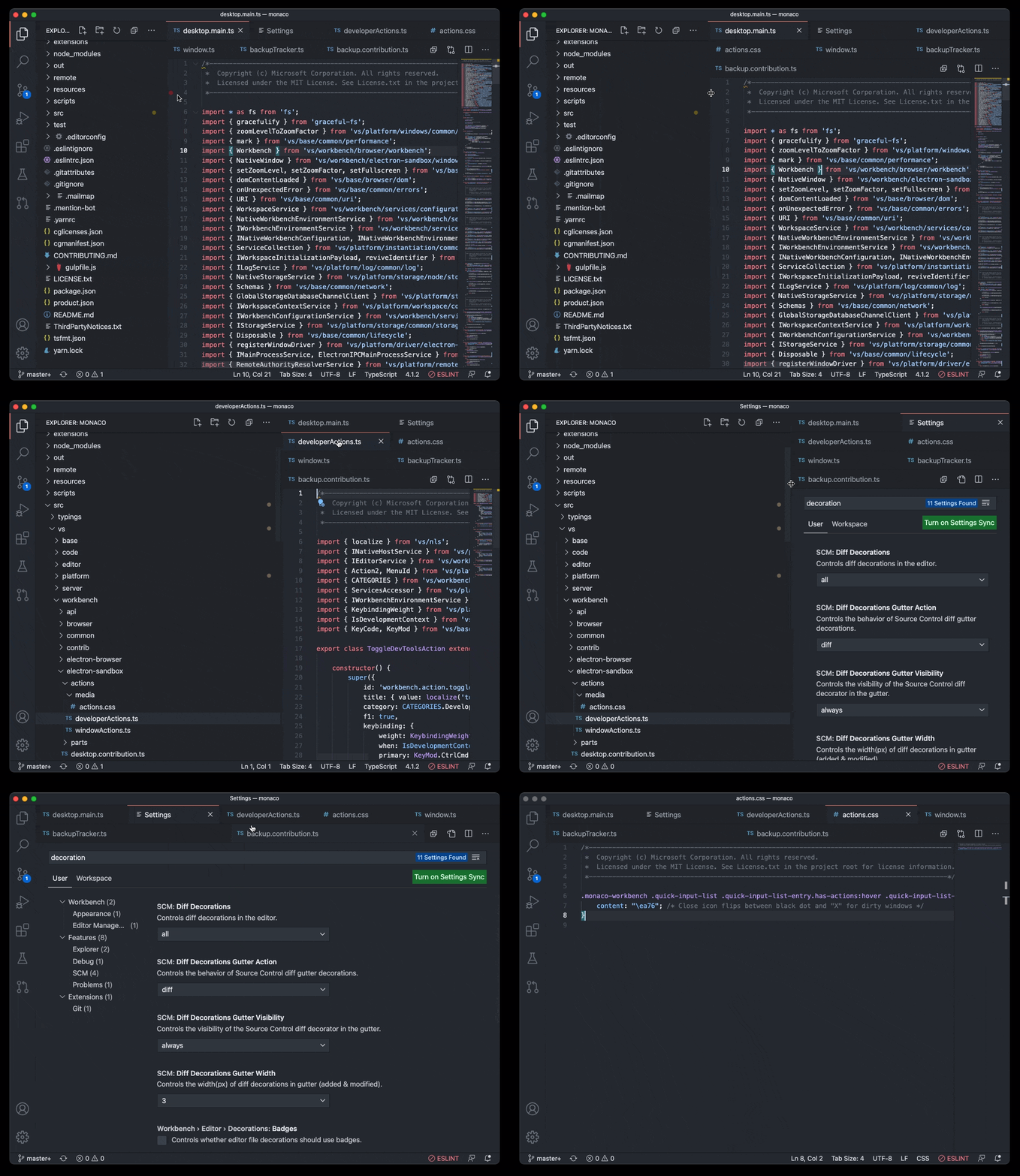 Theme: GitHub Dark Theme
If the available space for the tabs is too small, wrapping will temporarily turn off, and you will see the old experience with a scrollbar.
Note: You can prevent wrapped tabs from growing too large by configuring workbench.editor.tabSizing: shrink.
Tab decorations
Two new settings allow you to configure whether editor tabs show decorations, such as git status or diagnostics. Use workbench.editor.decorations.colors to decorate tabs with colors, like red/green for files with errors and warnings, and use workbench.editor.decorations.badges to decorate tabs with badges, like M for git modified.
 Theme: GitHub Light Theme
Open Editors view hidden by default
The Open Editors view is now hidden by default. This will only affect new VS Code users, and existing users will still see the Open Editors view. We wanted to present a cleaner look in the Explorer view out-of-the-box, and we believe that the functionality provided in the Open Editors view is covered in other areas of the workbench, like tabs. The visibility of the Open Editors view can be controlled by the context menu in the Explorer view title area.

New confirmation dialogs
If a user tries to quit VS Code while there is a file operation in progress, we now show a confirmation dialog. We also show a confirmation dialog for destructive undo operations from the Explorer.
We always want to avoid data loss, so we've introduced these dialogs to make sure it doesn't happen by accident.

New setting workbench.editor.enablePreviewFromCodeNavigation
A new setting workbench.editor.enablePreviewFromCodeNavigation allows you to explicitly enable preview editors from code navigations, such as Go to Definition. In our previous release, we changed the default to open editors normally from code navigations. This setting allows you to choose which option you prefer.
Emmet performance and feature improvements
Emmet now works much faster in HTML and CSS files. The extension also uses the latest Emmet, meaning that features such as countdowns are now supported.
Here's an example of Emmet expanding with a countdown in a large HTML file, with a 20x performance improvement:

Improved refactor participants UI
Extensions can participate when you create, move, rename, or delete files. This is useful when automatically running refactorings, for example, when you rename a Java file and also need to rename its public class.

The unified UI allows you to accept, skip, and preview the other changes that an extension is making.
Open with supports alternative opening mode
After running the Reopen Editor With command, you can now hold down Ctrl when selecting the editor to use to open the new editor to the side of the current editor. This matches the behavior of VS Code's quick open.
Additionally, pressing Right Arrow in the Reopen Editor With dialog will now open the editor in the background.
Issue reporting
If you're signed in with GitHub, you can now directly create issues from the issue reporter (Help > Report Issue).
Default search mode
The search.mode setting is now available to allow configuring what search UI commands like Search: Find in Files, and the explorer's Find in Folder... and Find in Workspace context menu entries use, with options of:
view: Default existing behavior, search using the search view in the sidebar or panelnewEditor: Search in a new Search EditorexistingEditor: Reusing an existing open Search Editor if one exists, otherwise create a new one
In the past, it was advised to configure default search UI by editing keybindings. This is no longer necessary, and these keybindings can be removed in favor of this setting.
 Theme: GitHub Light Theme
New file and folder icons
We've updated our New File and New Folder icons to make them consistent with the rest of our iconography library:

Editor
New snippet variables
There are new snippet variables for inserting UUIDs, and for inserting the relative path of the current file. The sample snippet below would print:
let someId = 'foo/test.js/c13d226f-1932-40e2-9fd9-10198c219e33'
  "onEnterRules": [
    {
      "beforeText": "^\\s*(?:def|class|for|if|elif|else|while|try|with|finally|except|async).*?:\\s*$",
      "action": { "indent": "indent" }
    }
  ]
Semantic token commands
There are now new commands to invoke the semantic tokens provider. The commands are:
vscode.provideDocumentSemanticTokensLegendwith an argument of typeUrivscode.provideDocumentSemanticTokenswith an argument of typeUrivscode.provideDocumentRangeSemanticTokensLegendwith an argument of typeUrivscode.provideDocumentRangeSemanticTokenswith two arguments: the first anUriand the second aRange.
Secrets API
Similar to the storage API, there is now an API for storing and retrieving secrets on a per-extension basis. This allows extensions to store sensitive information in the OS credential manager or keystore.
workspaceContains extension activation behavior change
This month, we fixed a bug with the behavior of the workspaceContains extension activation event that could change how an extension is activated.
The bug caused us to start a search over the entire workspace, when the workspaceContains pattern was only targeting files in the root of the workspace. Since this could affect the startup performance of VS Code, we needed to fix this and scope these searches correctly. But as a result, some extensions that were previously activated by this behavior may no longer get activated.
The change has been in our Insiders build since the beginning of January. For more information, see this comment on the GitHub issue.
Updated loading icon
We've updated our loading icon to make for a smoother experience.

Git extension APIs
- A new
API.onDidPublishevent has been added, which fires when a repository or branch is published from the VS Code Git extension. - A new
API.openRepositorymethod has been added, to allow extensions to tell the Git extension about other Git repositories, for example, outside the workspace, or more deeply nested within it. - The
API.pushmethod now has an additional optionalforceparameter. - The
API.commitmethod'sCommitOptionsnow has an additional optionalrequireUserConfigto avoid requiring a user or email address.
Welcome view content link enablement
A viewsWelcome contribution from an extension in which an enablement expression is specified will now render command links inactive when the expression evaluates as false.
resolveTreeItem
The resolveTreeItem API now supports cancellation. You can also now use resolveTreeItem to resolve the command property of your TreeItem.
Proposed extension APIs
Every milestone comes with new proposed APIs and extension authors can try them out. As always, we want your feedback. This is what you have to do to try out a proposed API:
- You must use Insiders because proposed APIs change frequently.
- You must have this line in the
package.jsonfile of your extension:"enableProposedApi": true. - Copy the latest version of the vscode.proposed.d.ts file into your project's source location.
You cannot publish an extension that uses a proposed API. There may be breaking changes in the next release and we never want to break existing extensions.
Inline value provider API
Today the Show Inline Values feature of VS Code's debugger is based on a generic implementation in VS Code core, and doesn't provide customizability through settings or extensibility via extensions. As a consequence, it is not a perfect fit for all languages and sometimes shows incorrect values because it doesn't understand the underlying source language. For this reason, we are working on an extension API that allows to replace the built-in implementation completely or to replace parts of the implementation with custom code.
In this milestone, we have created an initial proposal. If you are interested in this extension API, we'd appreciate your feedback.
Testing
We are investigating testing in VS Code, and the first version of the API is now present in vscode.proposed.d.ts. Please read the linked issue for more context, and participate if you have input.
This iteration focused building out the Selfhost Test Provider for VS Code and foundational UI, primarily the test explorer, gutter decorations, and peek views for results.
For example, here's a failed test showing the difference between actual and expected values in a diff peek view:
 Theme: Codesong
External URI opener
The proposed external URI opener API allows extensions to handle opening HTTP and HTTPS links that the user selects in the editor. For example, a browser preview extension could use this to open links to a local server in VS Code directly, instead of opening the link with the user's default browser:
To use the external opener API, first add an onOpenExternalUri activation event for the URL schemes your opener supports. Currently only http and https URLs are supported:
vscode.window.registerExternalUriOpener(
  'myExtension.opener',
  {
    canOpenExternalUri(uri: vscode.Uri) {
      // Check if a URI can be opened.
      // This is called when the user first selects a link and VS Code
      // needs to determine which openers are available.

      if (uri.authority === 'localhost:8080') {
        // This opener has default priority for this URI.
        // This will result in the user being prompted since VS Code always has
        // its own default opener.
        return vscode.ExternalUriOpenerPriority.Default;
      }

      // The opener can be used but should not be used by default
      return vscode.ExternalUriOpenerPriority.Option;
    },
    openExternalUri(resolveUri: vscode.Uri) {
      // Actually open the URI.
      // This is called once the user has selected this opener.
    }
  },
  {
    schemes: ['http', 'https'],
    label: localize('openTitle', 'Open URL using My Extension')
  }
);
Now when you select links to localhost:8080 in the editor or terminal, you will be prompted to select how the URL should be opened:

Additionally, you can configure a default opener for a URI using the new workbench.externalUriOpeners setting:
http://packages.microsoft.com/repos/code
The VS Code Debian packages will automatically migrate your system to the new repository, so there's no adoption necessary.
Progress on Electron sandbox
This milestone we continued to make the VS Code window fit for enabling Electron's sandbox and context isolation.
Specifically:
- The IPC connection to our background shared process changed from a Node.js socket connection to using Electron's MessagePort API.
- There is a new internal option to enable the experimental
vscode-fileprotocol for the main window that enables us to do some selfhosting (the issue reporter and process explorer already run with this option since last milestone). - We removed the more direct Node.js API that is used in the VS Code window.
VS Code is now Trusted Types compliant
We have finished the work to make VS Code trusted types compliant per the W3C Trusted Types specification.
Documentation
Remote Development
Check out our new Beginner's Series to: Dev Containers, a set of eight videos that show you how to get, create, and configure a container-based development environment using VS Code Dev Containers.

when clause reference
The when clause documentation is now in its own when clause contexts reference. Here you can learn how to conditionally enable or disable custom keybindings depending on the currently active VS Code UI (contexts) and tune the visibility of menus and views when contributing extensions.
">PR #521