BundleHuntmacOS · 2026flagship release
Every app.Every license.Every Mac you own.
AppVault snapshots your entire setup, updates apps from multiple sources, secures your keys, and restores everything on any machine in minutes — one native dashboard built for control.
one-time · lifetime · 3 macs · macOS 14+ · universal binary · $29.99
// 01 · magic install
flagship
One click,
Your entire bundle
—installed.
Magic Install — 1 Click
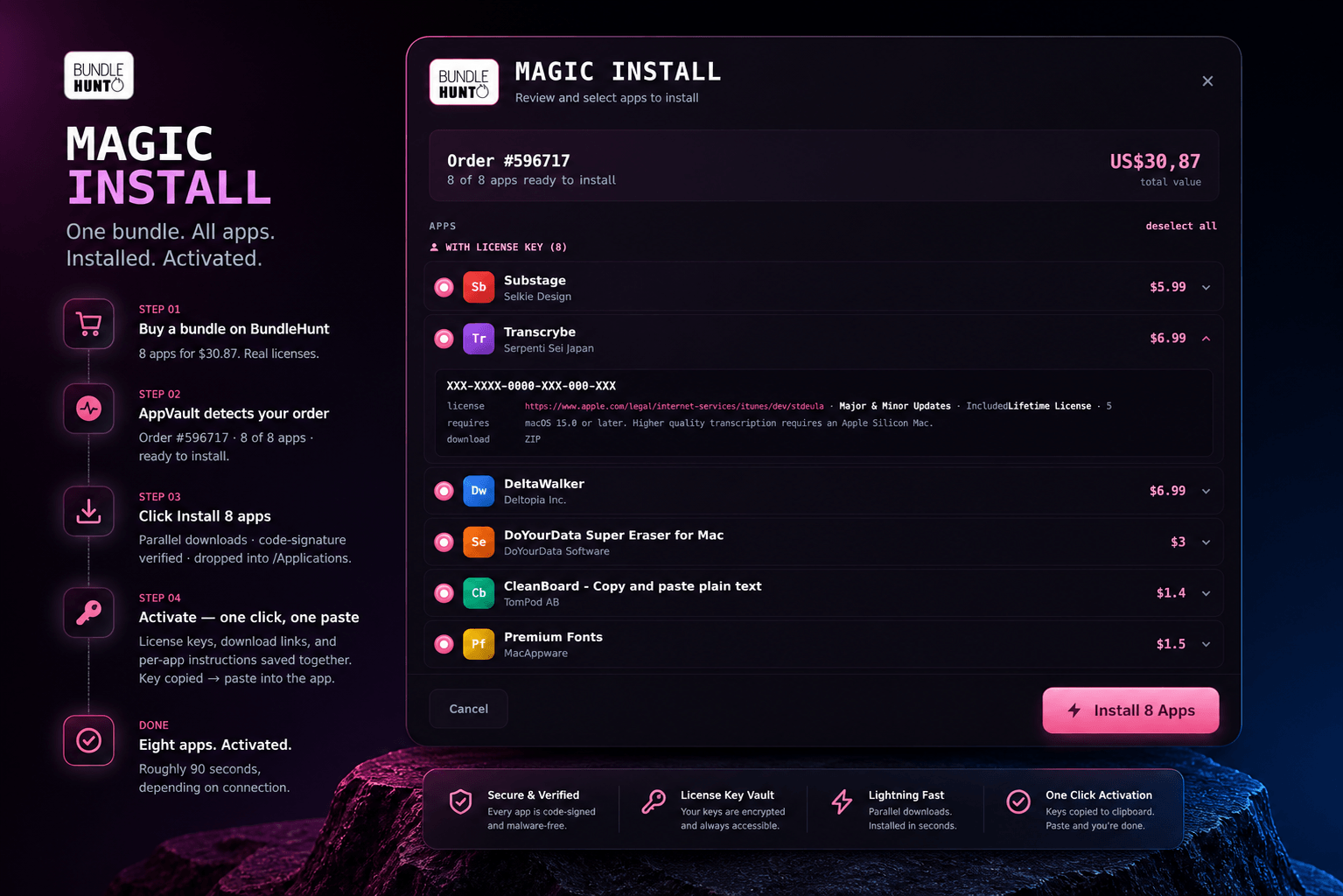
Use the AppVault ⌘ Magic Install button from your BundleHunt account to install all apps automatically. It stores keys, links, and instructions — then copies each key to your clipboard for instant activation.
step 01
Buy a bundle on BundleHunt
8 apps for $30.87. Real licenses.
step 02
AppVault detects your order
Order #596717 · 8 of 8 apps · ready to install.
step 03
Click
Install 8 apps
Parallel downloads · code-signature verified · dropped into /Applications.
step 04
Activate — one click, one paste
License keys, download links, and per-app instructions saved together.
Key copied
→ paste into the app.
done
Eight apps. Activated.
Roughly 90 seconds, depending on connection.
8/8 installed · keys saved
// sparkle·// homebrew·// mac app store·// electron updater·// direct downloads·// keychain·// touch id·// xpc privileged helper·// aes-gcm-256·// pbkdf2 600k·// swift 6·// universal binary·// sparkle·// homebrew·// mac app store·// electron updater·// direct downloads·// keychain·// touch id·// xpc privileged helper·// aes-gcm-256·// pbkdf2 600k·// swift 6·// universal binary·
// 02 · snapshot
Your Mac,
captured.
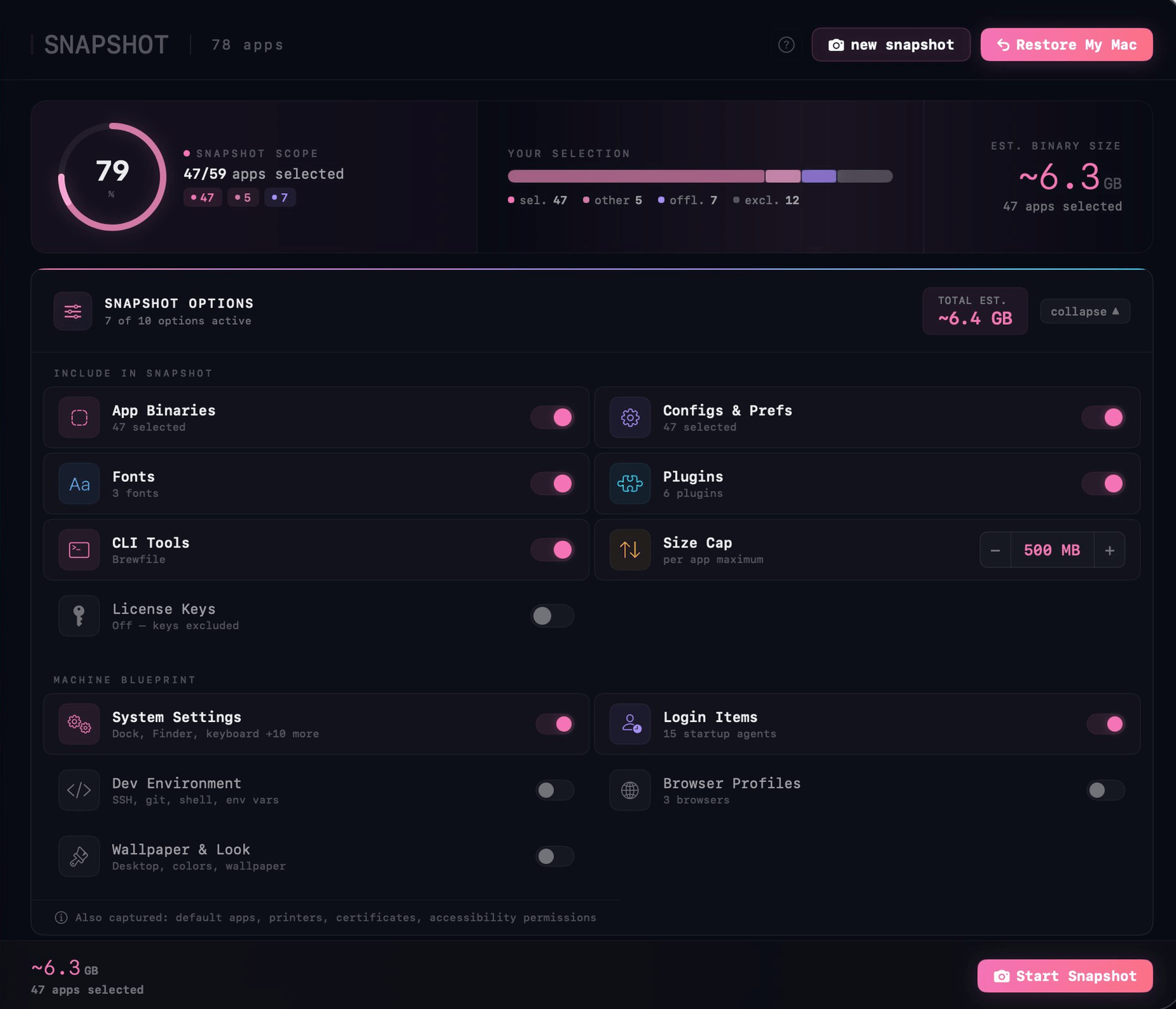
Apps, preferences, fonts, audio plugins, and Brewfile — all packaged into a single SHA-256 verified archive. Restore anywhere and resume instantly.
▸app binaries
▸configs
▸fonts
▸plugins
▸brewfile
▸blueprint
license vault — encrypted, optional
build
~6.4 GB
restore
77 apps
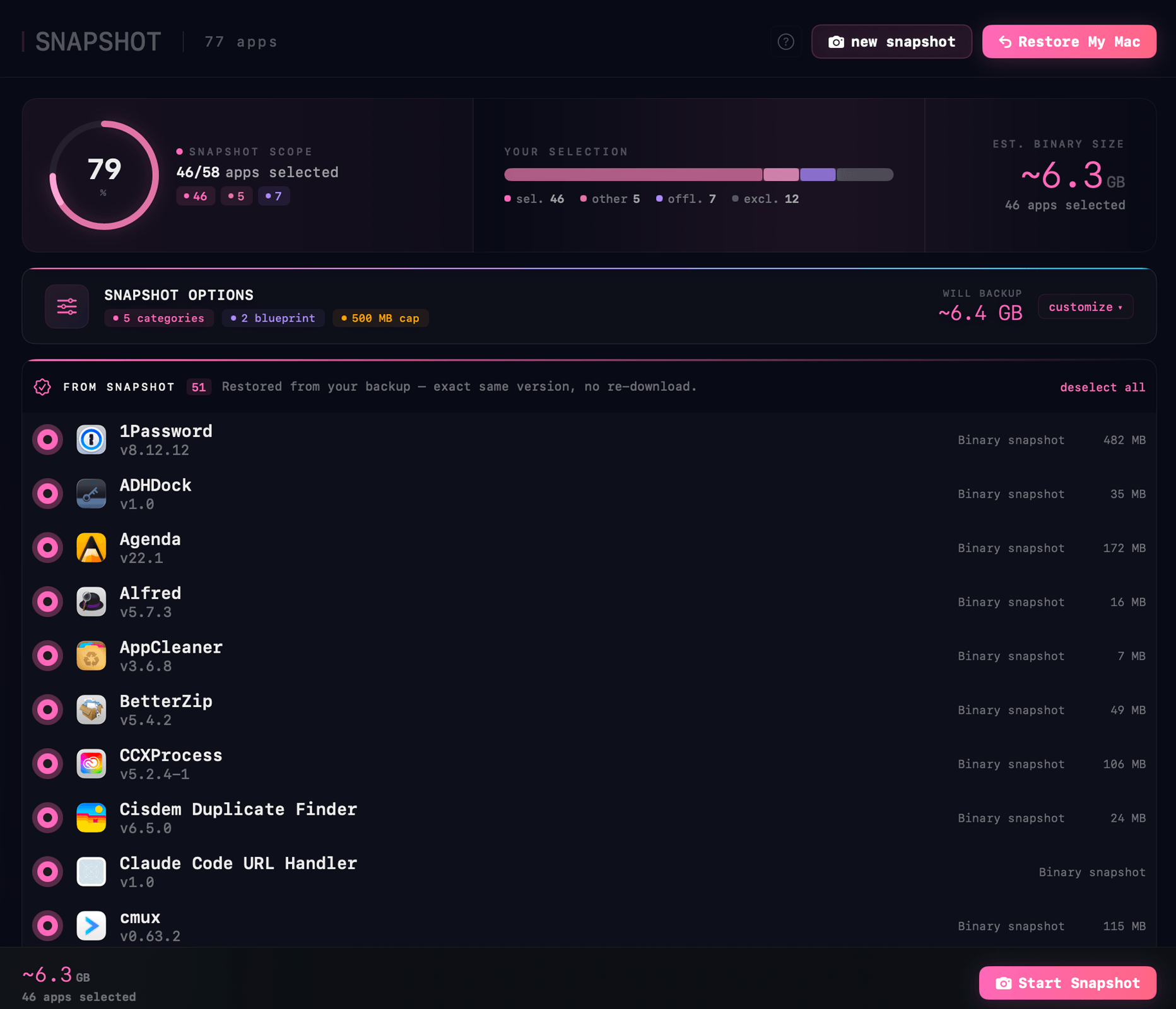
SHA-256·verified·portable
updates · 20 available
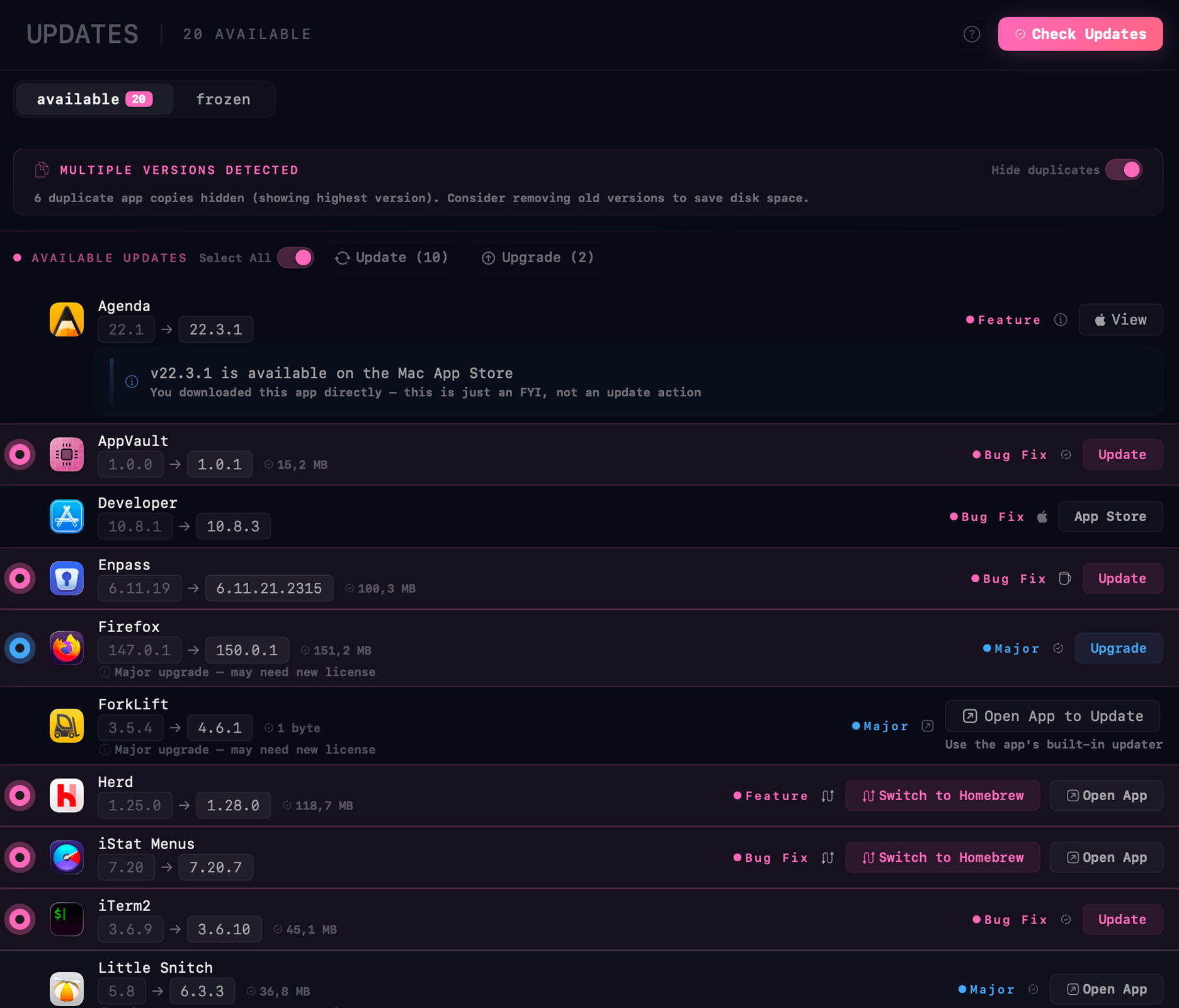
▲ sparkle·brew·⌘ mas·⚡ electron·↓ direct
// 02 · updates
Five sources.
One button.
Sparkle, Homebrew, Mac App Store, Electron updater, and direct downloads — checked in parallel. Every update classified Bug Fix, Feature, or Major. Batch-update everything, or freeze any app at its current version forever.
bug fix
auto-applied
feature
your call
major
may need new license
// 03 · vault
Your keys,
in one vault.
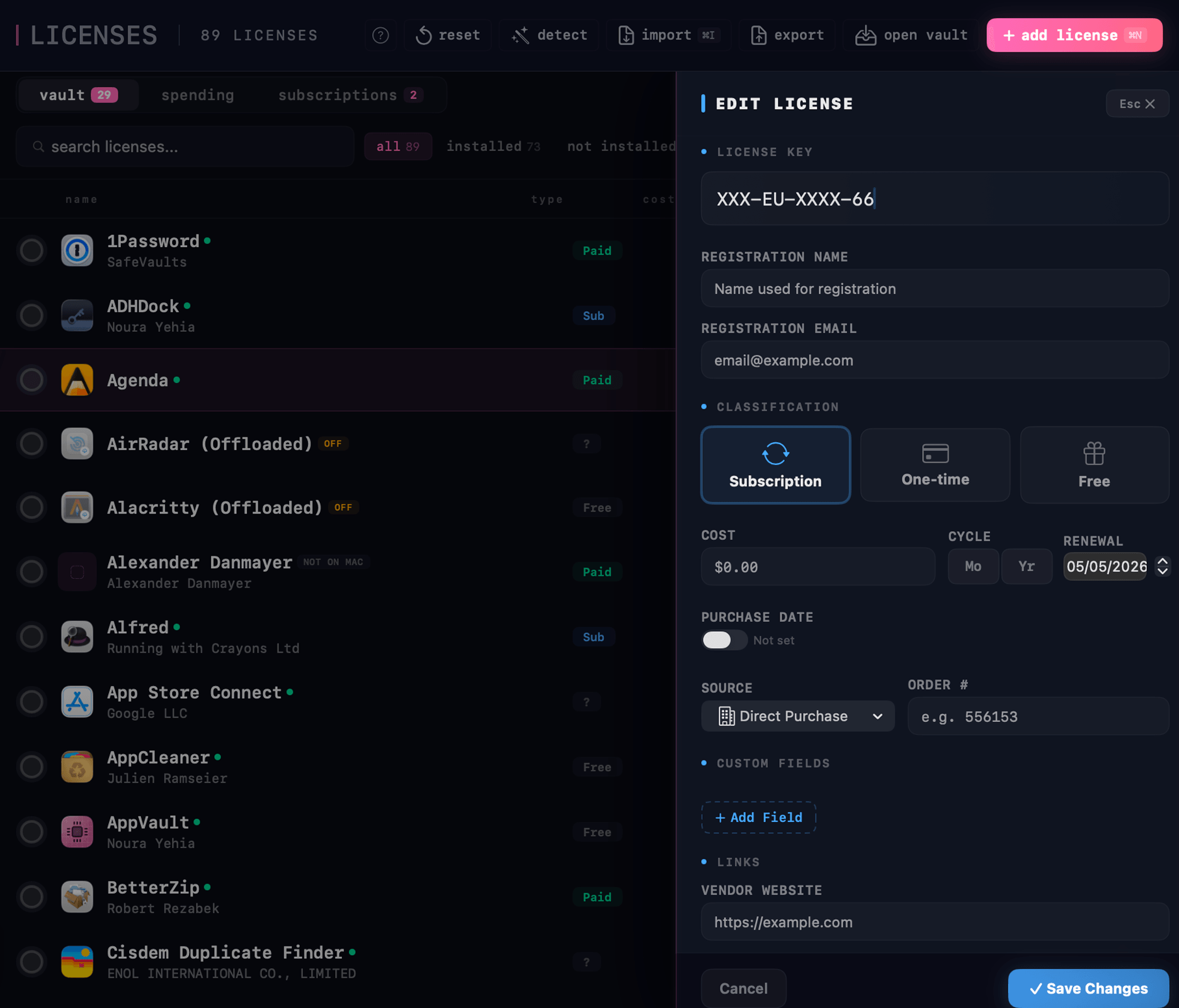
Every license key from every order — imported from CSVs, scraped from receipts, or captured from screenshots. Encrypted at rest. Copy any key in one click.
$appvault export --vault
→ deriving key (PBKDF2-HMAC-SHA256)
→ iterations: 600,000
→ cipher: AES-GCM-256
→ ssh keys: skipped
✓
vault exported · 89 licenses · 23 KB
licenses · vault
89 keys
// 05 · spending
in control
Know what
you’re paying for.
AppVault watches every paid app, every subscription, every renewal — automatically. ⚡ Speed Classify rips through your library in seconds: sub, paid, or free — one keystroke each. The leaderboard surfaces the bleeders so you know exactly what to cancel.
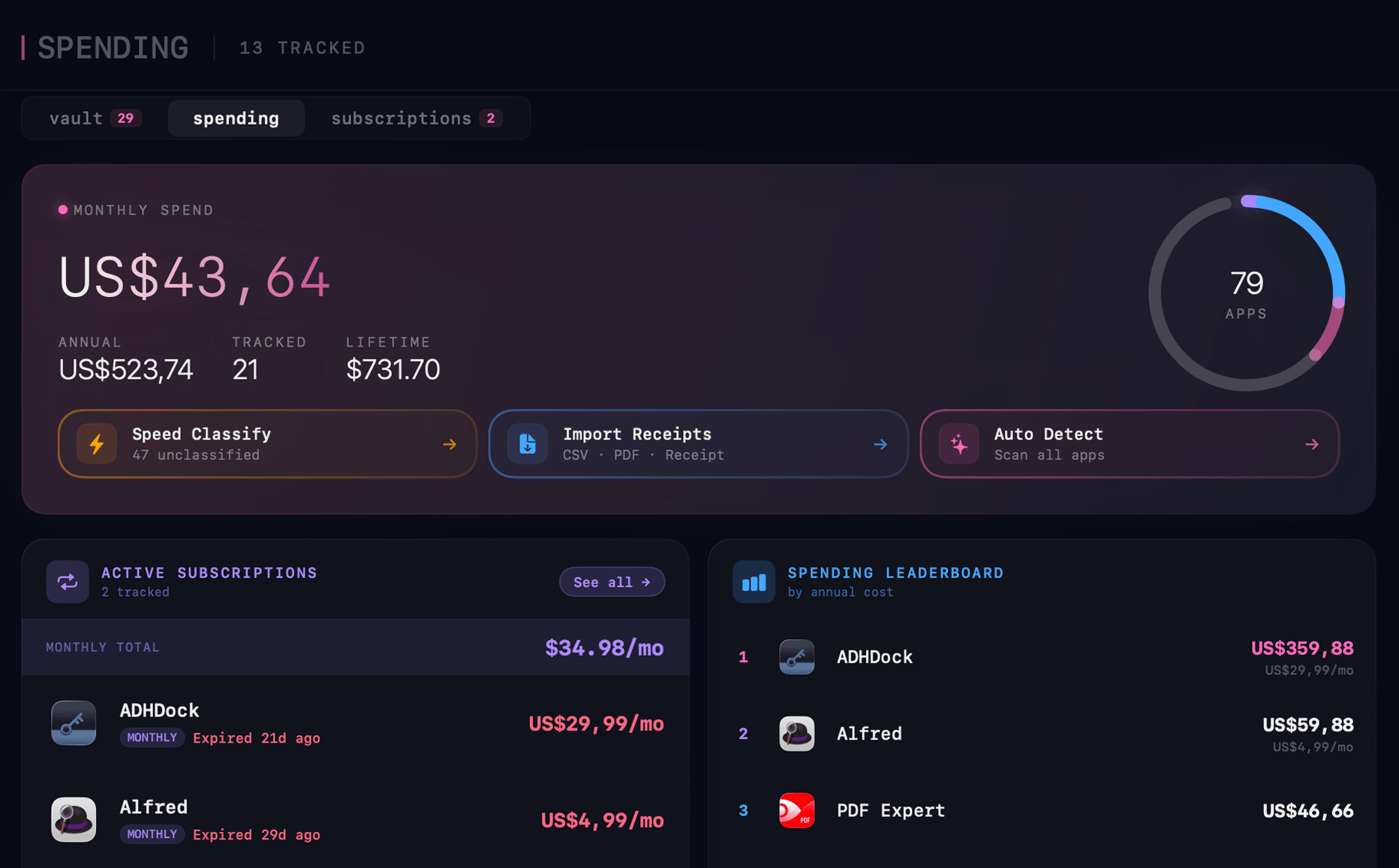
auto detect · on
// 06 · cli tools
no terminal
Homebrew,
without the terminal.
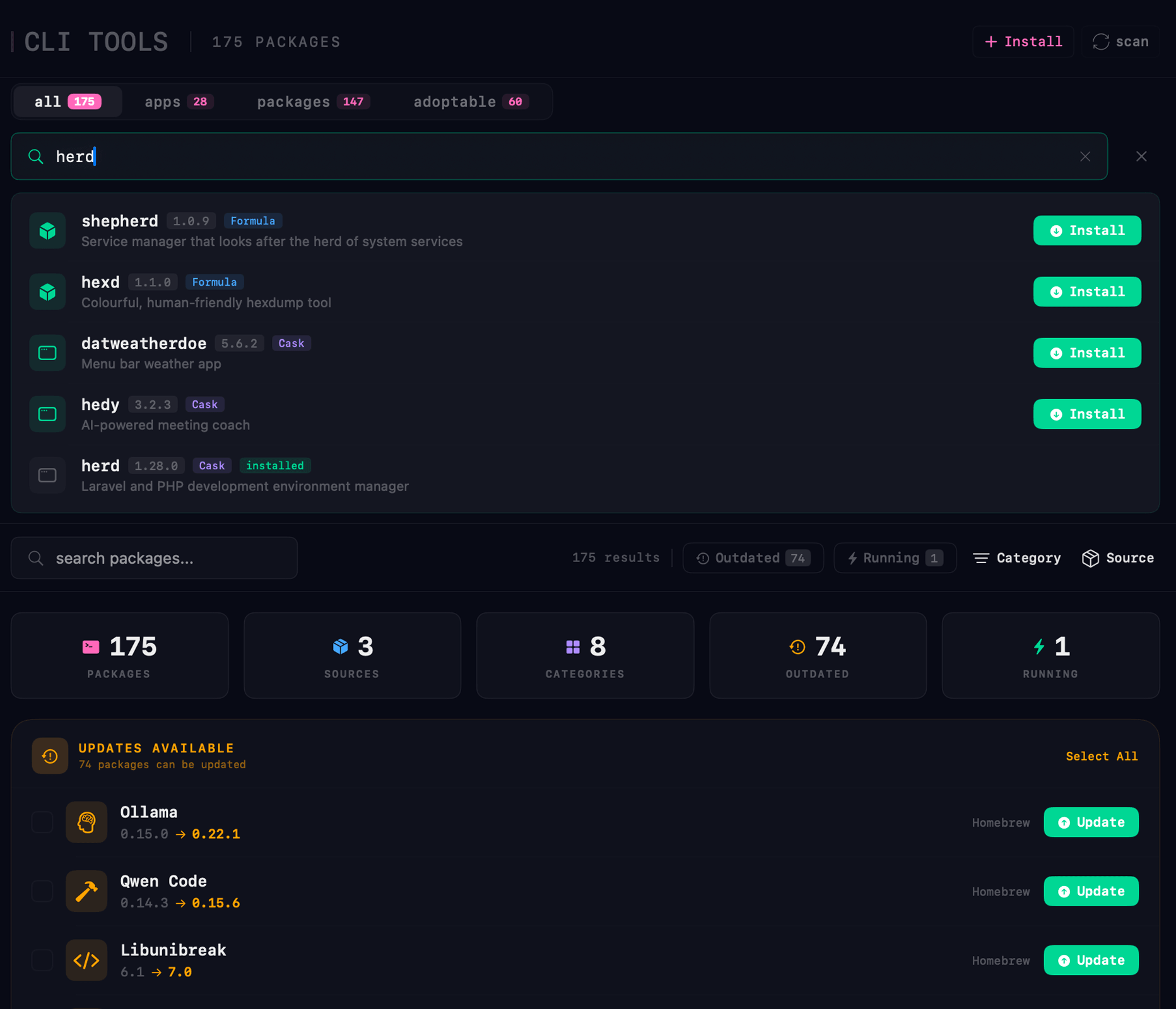
Brew Formulas, Casks, and Mac App Store packages — all in one searchable pane. Install, update, or adopt anything you’ve already got, without typing a single command.
three sources
Brew · Cask · MAS, unified
175 packages indexed across every source you actually use.
no terminal
Click to install
Search, install, update — through the UI. Skip the man pages.
batch update
74 outdated · one button
Every outdated package, every source, ready to upgrade in one pass.
adopt orphans
Pick up manually-installed apps
48 apps you installed by hand — folded into managed status.
live status
See what is running
Active CLI tools surface the moment they launch.
categorized
8 categories
Browse by what matters — devtools, services, fonts, more.
74 outdated · ready to upgrade
// the toolkit
Ten tools.
One dashboard.
Built to replace multiple standalone tools. Every feature verified against production macOS standards.
✕
// shredder
Beyond drag-to-trash.
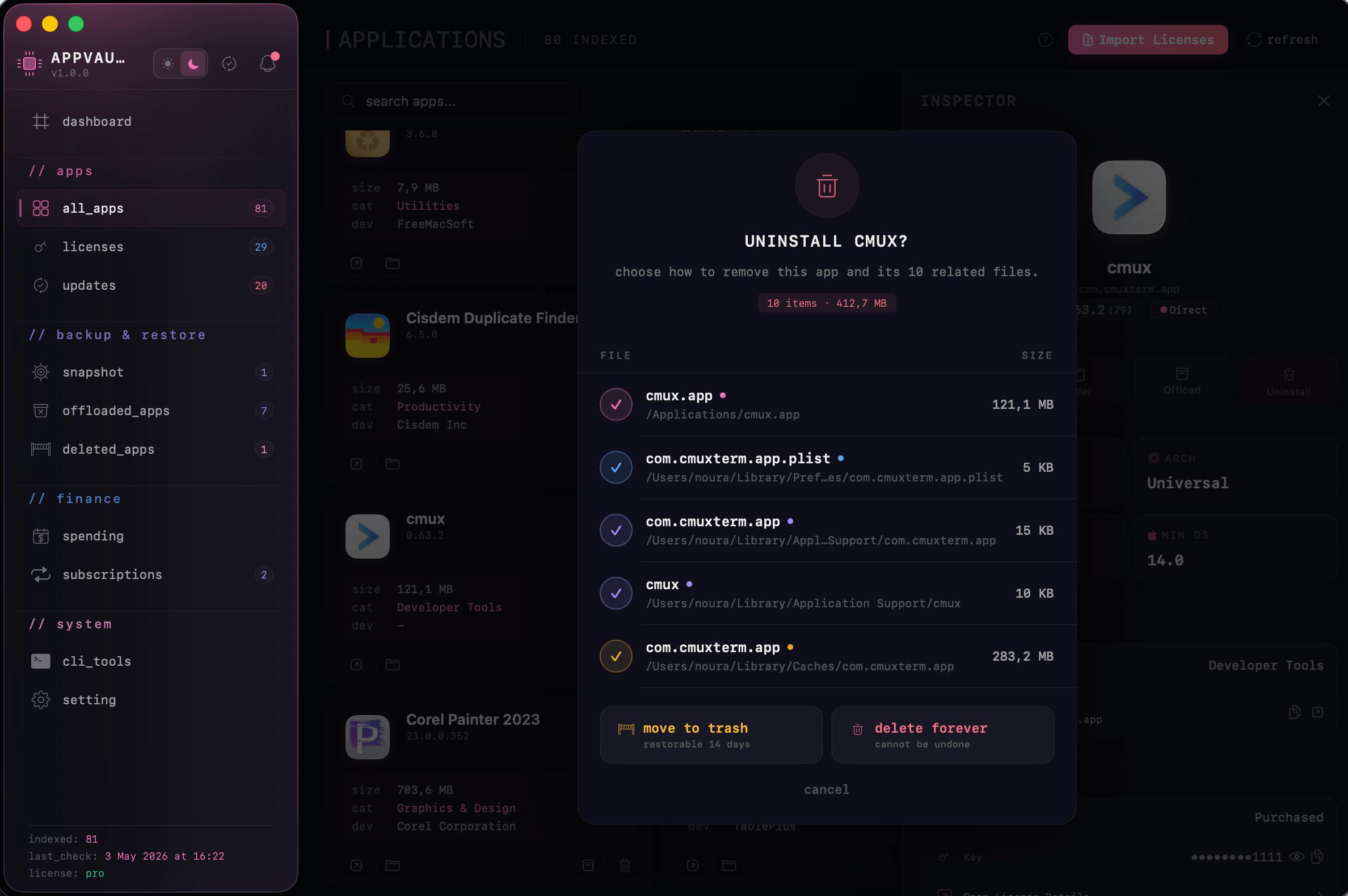
Discovers every file an app left behind — preferences, caches, containers, login items, launch agents, helpers. 14-day quarantine keeps mistakes recoverable.
10 items · 412.7 MB
uninstall — cmux
// 04 · shredder
Nothing
left behind.
AppVault discovers every fragment an app leaves on disk — caches, preferences, launch agents, helper binaries, container directories. Review the full list before confirming. 14-day quarantine catches mistakes.
✓cmux.app121.1 MB
✓com.cmuxterm.app.plist5 KB
✓~/Library/Application Support/cmux10 KB
✓Caches/com.cmuxterm.app283.2 MB
// pricing
Lifetime license.
One-time price.
Every AppVault Pro feature, every future update, on up to 3 Macs — paid once.
// spec sheet
Built for control
without complexity.
Local-first design. Secure by default. No system intrusion required.
// system
- os
- macOS 13 or later
- arch
- Apple Silicon + Intel
- ram
- 4 GB minimum · 8 GB recommended
- disk
- 200 MB + dynamic snapshots
- optional
- Homebrew auto-detected
// architecture
- engine
- Native Swift 6
- ui
- SwiftUI system-native
- storage
- Local metadata store only
- sync
- XPC system helpers
- crypto
- Local encrypted vault
// security
- auth
- Keychain + Touch ID
- privacy
- 100% local storage
- verification
- Signed app validation
- backup
- Encrypted snapshots
- import
- CSV · receipts · screenshots
// questions
In plain English.
How does multi-source update detection work?
+AppVault checks Sparkle XML feeds, Homebrew casks, the Mac App Store via the iTunes API, Electron updater, and direct download URLs — all in parallel. Updates are classified Bug Fix, Feature, or Major.
What does Snapshot My Mac include?
+App binaries, preferences, Application Support, containers, fonts, audio plugins, your Brewfile, plus a complete machine blueprint (login items, system preferences, SSH config public files, dev environment, browser profiles). Single SHA-256-verified ZIP. Encrypted license bundle is optional.
How is the license vault encrypted?
+License keys live in macOS Keychain — never in SQLite, never in plain text. Export uses AES-GCM-256 with PBKDF2-HMAC-SHA256 at 600,000 iterations (OWASP 2023). Wrong password or tampered file means decryption refuses to open.
Can I offload apps and restore them later with all my settings?
+Yes. AppVault saves the bundle, preferences, application support, containers, and login items. A stub icon stays in /Applications. Restore puts every file back at its original path — themes, settings, and configurations come back exactly as you left them.
What macOS version do I need?
+macOS 13 Ventura or later. Universal Binary on Apple Silicon and Intel. The privileged helper uses SMAppService XPC — no kernel extensions, no system extensions, no full-disk-access required.
How do I activate Pro?
+$21.99 lifetime, up to 3 Macs. Activation is offline — Ed25519 signature verification, no constant internet check.
Take control
of your Mac.
One-time purchase · lifetime license · 3 Macs · free updates forever.
↳ $29.99 · ships today · macOS 14+