Long time no see. There has been a lot going on since my last blog post which was about Plasma 5.10 but I didn’t feel like blogging for a long time. However, there is something super exciting for the upcoming Plasma 5.13 release I want to share with you:

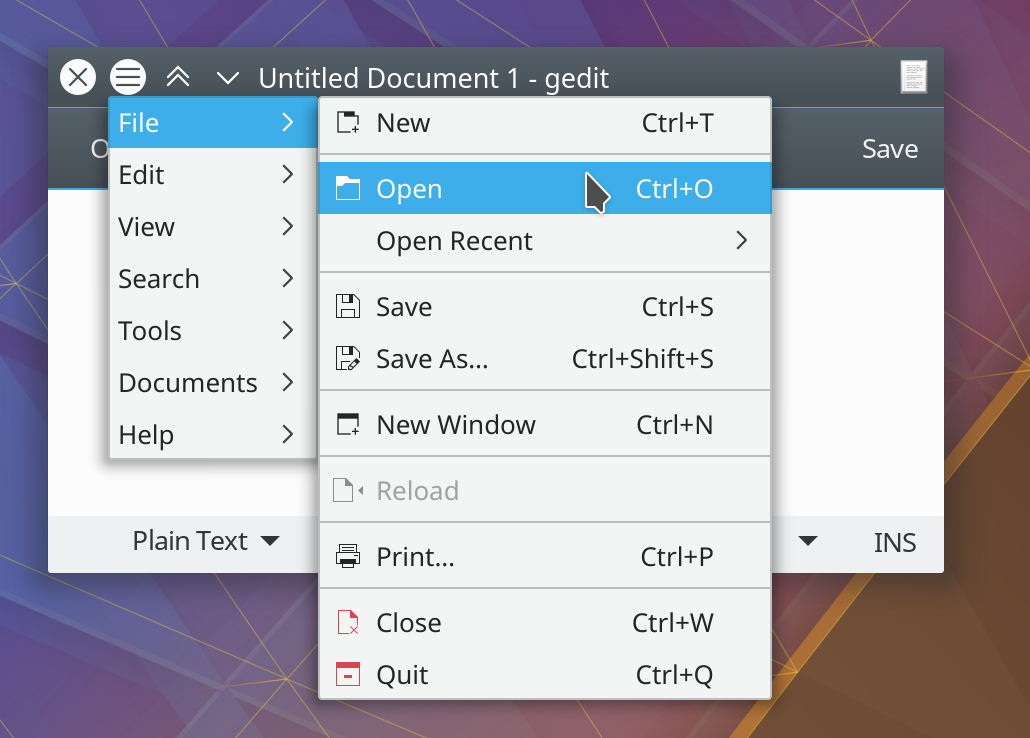
For the past couple of weeks I have been working on a way to get GTK applications talk to Plasma’s Global Menu feature. I came up with a little helper application called gmenu-dbusmenu-proxy that talks both GMenu and DBusMenu protocols. This way no adjustment on Plasma’s side is needed, it just sees a regular global menu enabled application.
Not only does it support a fully fledged menu bar, if available, but also the little application menu with settings, about, and quit:

It doesn’t stop there, though, it also works in conjunction with appmenu-gtk-module (or unity-gtk-module for pre-Gnome Ubuntu) enabling global menu for a wide selection of applications, including Gimp, Inkscape, Sublime Text, Audacity, and many more. There’s also a quite extensive mapping table for menu icons, although not all applications provide action names I can work with.

The code has just been merged so you can grab it from git right now or soon from your distro’s daily package repository. It sits in plasma-workspace/gmenu-dbusmenu-proxy. Please give it a try so we can iron out any glitches applications might expose! I’m curious to hear what applications you’re using and how it’s working out for you, specifically how they behave when run with and without the following additional configuration steps:
For LibreOffice you need to install libreoffice-gtk2 or libreoffice-gtk3 and then export SAL_USE_VCLPLUGIN=gtk (or gtk3). For Gimp, Inkscape, and others you need to install appmenu-gtk-module and export GTK_MODULES=appmenu-gtk-module (substitute unity for appmenu in older versions of Ubuntu and KDE neon). GTK3 applications such as gedit and shotwell should work right away. What now needs to be figured out with distributions is how to achieve the best possible user experience out of the box.
Many thanks to Konstantin, current maintainer of appmenu-gtk-module, for helping me understand the quirks in the protocol, and Rokas Kupstys for extensively testing my implementation.
What about HUD?
Update: Since this suggestion comes up a lot: Yes, porting the “appmenu runner” has been on my wishlist for a long time. Unfortunately, it’s far from trivial to get all the applications to export their menus whilst also keeping them shown inside the window. I could pull it off for Qt apps (by submitting a patch for an enabling flag) and perhaps GTK (by not setting the “shell shows menu” option) but there could be others that would have their menus rendered inaccessible. I might give it a try but for the time being it will only work when actually enabling global menu.