Tech
A review of the cataloging application from Delicious Monster, and exploration …
Introduction
“MacLibrary X is a cataloguing application that stores information about your collection of books, movies, music and games. It also tracks borrowers and suggests other, similar products that you may like. Product images, descriptions, and other metadata may be pulled from Amazon.com or entered manually.”
That sounds like a pretty boring product, doesn’t it? In fact, it sounds like a good first project for a programmer just starting to learn how to create Mac applications. Not surprisingly, there are many Mac OS X applications that do more or less what’s described above. Why does something like this even warrant a review, let alone a review at Ars?
Let’s start with the actual product name. It’s not “MacLibrary X” or anything similarly predictable. The application is called Delicious Library. That sounds…odd. On the other hand, it’s also slightly intriguing, maybe even fun.
But come on, it’s a glorified list of books, movies, music, and games. Surely anyone who’s even interested in such a thing already has a text file or Excel spreadsheet or (for the truly industrious) FileMaker database that works just fine, thank you, for tracking media libraries. Heck, I recall videophiles in the heyday of the VCR proudly displaying tightly-printed sheets of paper containing alphabetized lists of their vast VHS collections. Putting this stuff on the computer seems like using a sledgehammer to kill an ant.
And yet, if you travel in Mac enthusiast circles on the net, you’ve probably already heard of Delicious Library. Even if you’re not a Mac user, perhaps a Mac-using friend insisted on showing you some screenshots. Delicious Library is an application with some buzz.
This phenomenon is quintessentially “Macintosh”, as is Delicious Library itself, from its purpose, concept, and design, to the people that make it and every last pixel and line of code it contains. If you’re reading this on a PC that you built yourself from carefully selected parts for about the price of a low-end iMac, I hope this review will help you to begin to understand what’s so special about the Mac, Mac software, and the Mac community. If you’re already one of the faithful, sit back and relax as we examine the latest software offering from some old friends.
Background
Delicious Library is the first product from Delicious Monster, a new software company founded by Wil Shipley and Mike Matas. Wil was one of the founders and the former president of The Omni Group. Mike also worked for The Omni Group from age 15 to his current, ripe-old age of 18. The Omni Group started as a NeXT software developer, then reinvented itself as a maker of innovative, award winning Mac OS X software.
As sometimes happens, even in the candy-colored world of Mac software development, Wil decided to leave the company he’d founded to pursue more personal interests. Mike was of a similar mind, and the two of them are now living their dream in the form of Delicious Monster, a company that, say what you will, certainly has a more provocative personality than the comparatively stodgy Omni Group that they left behind.
You can read more about the backgrounds and philosophies of Wil and Mike on their web site. There you’ll also find a list of friends and contributors, including (not surprisingly) a few friends from The Omni Group.
Out of box disk image experience
These days, software in a cardboard box seems almost pass?, especially in the Mac market where so many of the best applications are freeware, shareware, or otherwise downloadable. There aren’t many retail outlets that carry a wide selection of Mac software anyway. So while, say, The Omni Group may produce and sell retail packaged versions of their applications, they are all also downloadable from their web site.
In short, this is truly the age of downloading. On the Mac platform, that means disk images. Apple’s disk image format supports all of the extended features of the Mac OS (resource forks, custom icons, stateful icon sizes and positions, etc.) as well as optional encryption, compression, license agreements, and even auto-expansion and clean-up.
Just as physical packaging makes an important first impression for hardware, so too can downloadable software packaging be elevated from utilitarian to a delight. On Mac OS X, the first test of quality downloadable software is this: does it come as a disk image, or is it compressed or packaged using some other standard? While StuffIt, zip, and even tar and friends are all technically compatible with Mac OS X, disk images combine the best features of all of them and have the nicest user experience.
Apple has extensive guidelines for packaging and distributing software for Mac OS X. For disk images, there are two “best practices.” The first is what Apple calls internet-enabled disk images. When an internet-enabled disk image is downloaded, it is automatically mounted, its contents are copied out of it, and then the disk image is unmounted and moved to the trash.
Since most Mac OS X applications can and should be single-icon, drag-installed bundles, the user experience of internet-enabled disk images is nicely transparent. The user clicks a download link in a web page, waits for the data transfer to complete, and then finds a single, uncompressed, ready to run application icon in the download location. From there, he’s free to drag it anywhere he wants, or even run it from its current location (usually the desktop).
But while that’s efficient and straightforward, it’s also essentially the total elimination of packaging. What if a software developer wants to make an impression? By foregoing the auto-copy-and-clean-up features, the developer has the entire contents of the disk image window to play with. Thanks to the OS X Finder’s ability display custom image backgrounds in windows, the results can be quite attractive.
So let’s see how Delicious Library stacks up. First, here’s the disk image itself, after being mounted.
Yes, they’ve even customized the volume icon: a wood-grain theme with the clever Delicious Monster logo branded onto it. The disk opens to reveal a continuation of the theme.
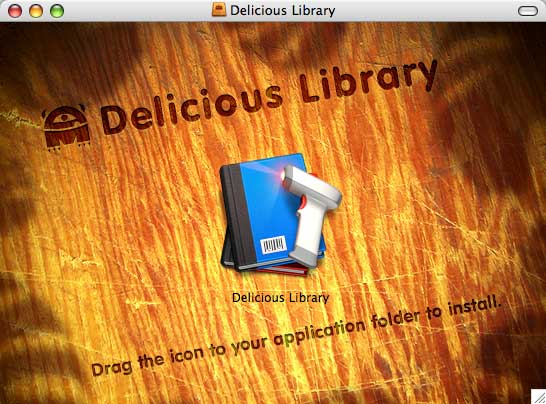
As is customary, the background image helpfully includes the “installation instructions” (if you can even call them that).
I’m pointing these things out not because Delicious Monster is unique among Mac developers in the quality of their artwork and their attention to detail, but because they aren’t unique. Nearly every popular Mac OS X application is a single-icon drag-installed affair, sporting an attractive icon, distributed in either an internet-enabled or meticulously decorated and arranged disk image. Even open source applications like Fire and multi-platform ports like Mozilla meet this standard on OS X. Heck, even Real gets it right. Real software…think about that!
This is an example of the best kind of peer pressure. There is simply a “climate of excellence” on the Mac platform. Any developer that does not live up to community standards is looked down upon, or even shunned. Commercial, open source, freeware, shareware, it doesn’t matter: pay attention to detail, or else.
Windows users, think about what your typical download and installation experience is like. How many dialogs are you presented with? What do the file names and icons look like? Do you have to run an installer? What kind of manual clean-up is required afterwards?
Linux users, when you look at the carefully laid out disk image contents in the screenshot and links above, think about how far “desktop Linux” has to come before it can even begin to think about details like how single-icon drag-installed applications are arranged in their disk image windows.
Yes, I know, all of this is “pointless” and “dumb” because looks are meaningless. It’s the software that counts?the code, the bits, not the packaging, right? And so we come to an important difference between Mac enthusiasts and other computer users. Mac users understand that the packaging counts too (and are willing to pay for it). Happily, you get a lot of nice things “for free” on the Mac platform these days: composited windows, large icons, rich disk image and application bundle standards, etc.
Before I move on, I want to include one more example. This review is based on my experience with a pre-release version of Delicious Library. Here’s what the beta version splash screen looks like.

(Here’s a JPEG for the browser-impaired)
Look hard at that graphic. This is a splash screen for a beta?something that will never be seen by more than a handful of people. Note the bullet hole, the magic marker graffiti, the scratched-out slogan, the haphazardly placed logo sticker.
Linux users, think about this image the next time you download a release version of a product without a comprehensive sample configuration file or with “cosmetic” bugs. Windows users, think about this the next time you see a poorly drawn 16-color icon or toolbar graphic in a multi-hundred dollar commercial software package.
People are right when they suspect that something very different is going on over in the Mac corner of the software development universe. Is it something crazy, or something sublime? You be the judge.
All the right features
Apple’s successful product designs over the past few years have shared an important quality. Rather than including every possible feature (or even most features that, say, an Ars reader would expect), they include only the most important features, and package them in such a way that they are accessible to the broadest range of customers.
To “computing enthusiasts” like us, this is often frustrating. But when Apple correctly identifies the handful of most important features and then concentrates all of its effort on implementing them well, the results are impressive. The iPod is the latest and greatest example. Nowhere is the stereotypical reaction of computer geeks to this design philosophy more famously revealed than in Slashdot’s original take on the iPod: “No wireless. Less space than a nomad. Lame.” Indeed.
There’s an excellent essay by Barbara Nelson that explains the benefits of what she calls this “market-driven” strategy. In it, ironically, she uses Apple’s Newton product introduction as an example of what not to do.
Choosing the right features, and only the right features, is important in software development as well. Every feature takes time to implement, and the cost of the time spent implementing unimportant features is less likely to be recouped by the sales generated by those features.
This is especially important for the very first version of a new product, and critically important for the very first version of the very first product from a new software company. Clearly, Wil and Mike of Delicious Monster have their work cut out for them.
So, what are the right features for a media library application? What does the media library market want from its software? Does such a market even exist? Perhaps that’s the first question to ask. The quest to identify the market will lead to an understanding of its needs.
Understanding the market
When you get right down to it, no one needs software for managing a personal media collection. Anyone making their living managing media collections (say, Blockbuster Video or the town librarian) has very different needs than a personal collector. So the first insight is that a personal media collection manager is a form of recreational software.
What recreational purpose does a media collection serve? The consumption of the media itself is the obvious end result, but even there, shades of gray exist. A favorite song may be listened to hundreds of times spread over many years, but how many times is the average book read? Movies fall somewhere in the middle of the two extremes. A game’s longevity and replay value depends on even more complex factors.
And yet these realities seem to have little effect on the relative sizes of each type of media collection. Book collections may dwarf music collections despite wildly differing frequencies of consumption. Some voracious readers may choose to get all their books from the library, but collect DVDs that they’ve only seen a few times each. I’m sure a few readers even know someone who has many more video games than either books or CDs (if not, check the gaming forum).
Clearly, the act of collection is an end in itself, at least to some degree. That’s where a personal media library application has to focus, since it really has no participation in the actual consumption of the media.
Clues to the motivations and rewards collecting are not hard to find. Most media collections are not just stored, but are displayed somehow. Or if they are not displayed, then they are at least listed or otherwise enumerated.
In some ways, collections are a form of packaging for the collector. We judge others by what they choose to collect, and in turn expect ourselves to be judged based on the contents of our media collections. “What’s on your iPod?” Even media that is only consumed a single time may still fulfill an important role by contributing to our public persona through it’s mere presence in our collection. At the very far end of the spectrum are those who collect media that is never consumed. We have now entered the realm of The Collector, and he may not be as far outside your circle of friends as you think.
Digital collections present a problem because they have the potential to remove the traditional rewards of collecting. As an outward representation of your personality, a digital collection stored in a file on a hard disk fails miserably. Publishing and sharing these lists (e.g. playlists on your iPod or shared via iTunes) is a start, but it still falls short of the sublime satisfaction of the nicely displayed collection.
In addition to trying to maintain the rewards of physical collections, a media library application must also be sure to provide the benefits that are uniquely possible in the world of software. Sorting and searching are no-brainers, but the usefulness of both depends on the quality of the data collected for each item.
Now we’re getting into dangerous territory. The work required to enter enough information for each item to make searching and sorting useful can very quickly eclipse the benefits derived from the completed digital collection. Only the most hardcore collector is going to dedicate the time necessary to manually enter even the bare minimum title and creator metadata for a collection of any significant size. Some form of automated data entry is clearly necessary, and the easier, the better.
Finally, arbitrary collections, which are such a pain in real life, are nearly trivial in software. When books or DVDs get rearranged on their shelves or moved to other rooms entirely, it’s a big project. In the digital world, reorganization is a considerably easier kind of “drag and drop.”
Although I am not privy to the thought process of Delicious Library’s developers, this list of features seems to be at the core of their application:
- The application should fulfill the desire to display and appreciate a collection.
- Data entry should be as efficient as possible.
- Searching, sorting, and arbitrary organization must be fast and easy.
But are these really the right features? Is something important missing? What should be added to make things better? Which is the most important feature? These are difficult questions to answer without seeing the software in action. So let’s (finally!) fire up Delicious Library and see how it works in practice.
A tour of Delicious Library
Delicious Library is a single-window, brushed-metal application. This fits nicely with the strategy of providing a simple interface that contains only what the market really needs, without too many extraneous elements to get in the way.

Main window (click for larger version)
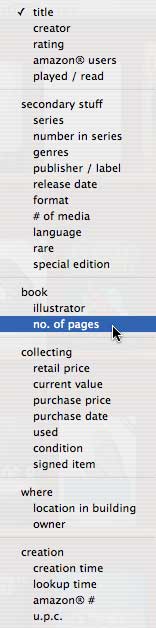
Sort order menu
On the first launch, the application asks whether to create a new, empty library or start with a pre-populated sample library in order to get a feel for the application. I talked before about lowering the barrier to entry by making data entry as easy as possible. If it’s too much of a pain to add items, the application will not be used (and therefore not paid for either). But no matter how easy it is to add items, the customer may not be motivated to populate the collection in order to even get an idea of what the application will be like. Including the optional sample library was a wise decision.
On the left of the window is a “source list”, familiar to users to Apple’s iApplications. The top four icons in the list are type-specific views of your collection. Below that are the arbitrary collections, or “shelves” as they’re called in Delicious Library.
A list of “borrowers” is in the lower left. Delicious Library can track who has borrowed what from your collection, and when the items are due back.
On the bottom of the left side are buttons for adding a new shelf and a new borrower. Borrowers are pulled from Apple’s system-wide address book database.
The center of the window shows the contents of the currently selected shelf (or the union of several shelves if more than one is selected in the source pane). There are two view modes, “Cover” and “List”, which can be selected from the “View” menu or by using the small widgets in the upper-left corner of the shelf pane.
The shelf pane’s title bar includes a pop-up menu for selecting the sort order. The options are extensive, from a simple sort by title to obscure orders based on things like rarity, number of pages, location in the house, or condition.
Below the shelf is a slider for dynamic zooming (cover view only), a search field, and buttons for adding a new item and performing an action on a selected item.
The search field operates, iTunes-like, in real-time as you type. There’s also a voice search feature that attempts to jump to an item when you speak its name. Speech input is handled using the OS X’s standard speech recognition system, configured using the Speech preference pane in System Preferences.
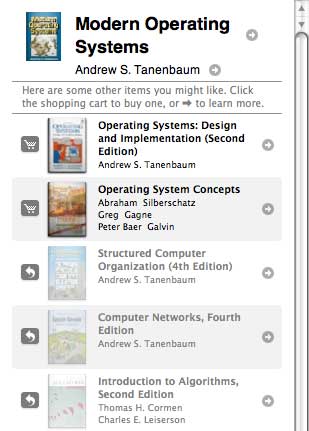
The right-hand pane changes based on context. When an item is selected in the shelf pane, the right-hand pane contains product details, personal annotations, and a list of similar items available for sale at Amazon. If a similar item is already in the collection, it is grayed out and accompanied by a link to reveal the item in the library. When adding a new item, the pane offers a list of possible data entry methods. If manual entry is selected, the pane changes to a data entry form. You can see an example of each kind of pane below.
|
|
|
|
|
|
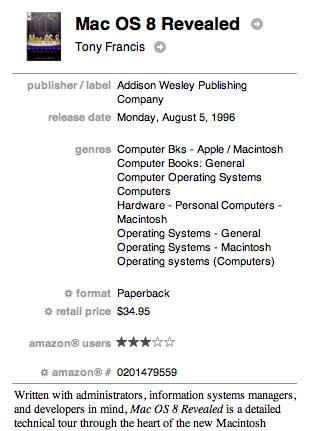
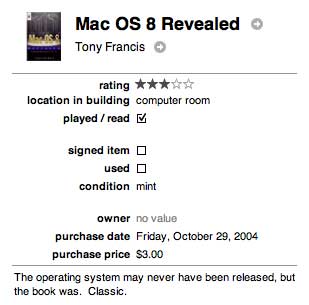
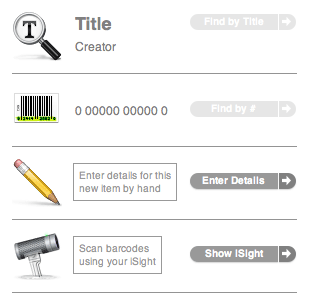
It seems like Delicious Library has already covered all the important features in this one, simple, unintimidating window. That’s swell, but aside from the voice search feature, it doesn’t seem very special. Let’s take a closer look.
Delicious visuals
They say the devil’s in the details, but in the case of Delicious Library, they’re definitely angels. Let’s start with the shelf pane in cover view. The dynamic zooming is passably smooth, at least on a G5, but we’ve seen this before in iPhoto. The wooden shelf art is nice, if a bit corny. The small “stickers” labeling the range of items on each shelf (e.g. “Giampaolo to Levy”) are quite clever. But by far the most impressive element is the product packaging artwork.
Rather than just showing disembodied cover images sitting on a shelf, Delicious Library includes artwork for each kind of media packaging: jewel cases for CDs, keep cases for DVDs, even packaging for GameBoy Advance games. But the cover art is not just pasted onto these templates. Instead, it’s incorporated into them according to the configuration of the physical packaging.
For example, cover art for a jewel case goes behind the clear plastic lid. It’s all composited together into a very pleasing and realistic whole. Below you can see the empty jewel case art (used for items with no cover art) alongside that same art with a cover inserted.
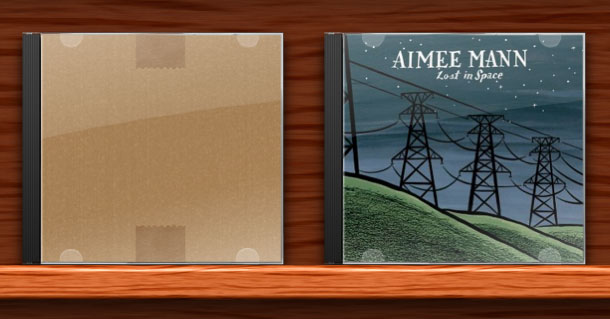
Jewel cases: empty and filled
The attention to detail is impressive. Note the subtle glare of the plastic cover and the slightly more opaque plastic “fingers” that hold the artwork to the case lid. The keep case artwork (used for DVDs and console games) is similarly impressive, and there are at least two varieties of book cover templates, one for soft-covers and one for hardcovers.
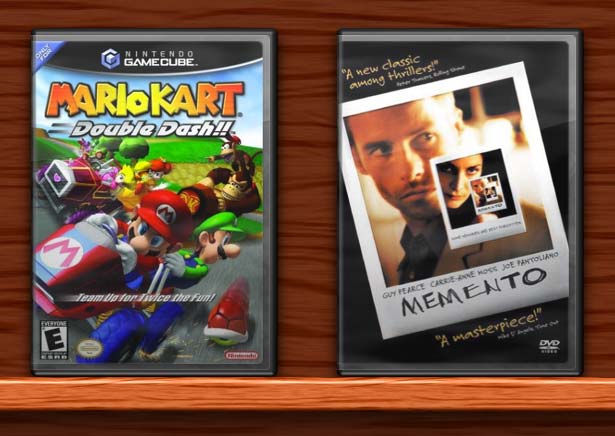
A console game and a DVD
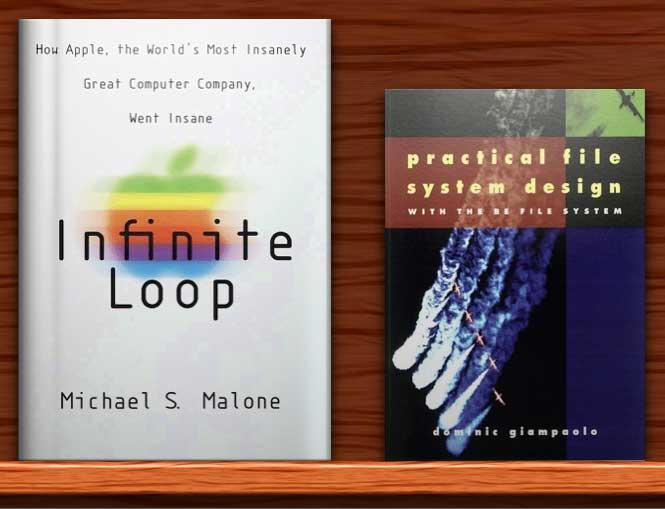
Books: hardcover and softcover
The examples above are shown at their maximum size, which tends to reveal any flaws in the original artwork. But the packaging display system actually helps to make low-quality cover art look a lot better, and it makes high-quality cover art look nearly photorealistic. The satisfaction of displaying your collection using this system is well beyond any other digital media library application that I’ve ever seen.
Needless to say, this is all made a heck of a lot easier by Mac OS X’s native support for fully composited windows and images. This is exactly what Apple is talking about when they say that they hope third party developers will use their technologies in new and innovative ways. And while all of this was technically possible in classic Mac OS, Mac OS X’s rich display system makes the use of techniques like this much more probable in practice.
From shelf to disk
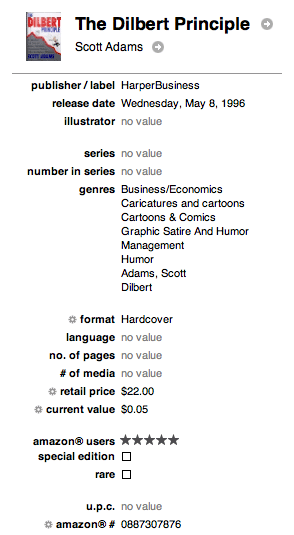
Item details (editable)
Data entry is a crucial issue for a media library application. Adding items has to be fast and easy, and each item has to have enough associated metadata to make searching and sorting useful. These seemingly contradictory goals can be reconciled with the help of a what I’m going to call an oracle. The user supplies enough information to uniquely identify the item, then the oracle fills in the blanks.
Delicious Library uses Amazon.com as its oracle, connecting through Amazon’s web services API. Given a title, creator, ISBN, or ASIN (Amazon product identifier), Delicious Library will attempt to lookup the metadata and cover art in Amazon’s product database. The list of applicable metadata depends on the product. It can be quite extensive, as seen in the screenshot on the right.
If the lookup fails, then manual entry is the order of the day. But there’s one more twist to data entry, and it’s a doozy. As you might have heard, read, or guessed based on the application icon, Delicious Library supports metadata lookups via barcode scanning. Delicious Monster will sell you a wireless (bluetooth) barcode scanner bundled with Delicious Library for an extra $175. The scanner has a claimed 50-foot range and will store up to 500 codes while out of range, dumping them all back to the computer when within 50 feet again.
This is clearly the most efficient way to add many items. Delicious Library can optionally speak the name of the scanned item so that you can confirm that Amazon got the lookup right. It will also speak the error message “lookup failed” when things go wrong, so you don’t have to constantly glance back at the computer to make sure things are okay. Delicious Library appears to be nicely multi-threaded. Stalled or slow lookups do not seem to prevent other lookups.
But wait, there’s more. Purchasing a dedicated barcode scanner may be a barrier to entry in its own right, regardless of how easy it makes data entry. Enter what I consider the most important feature of Delicious Library: video barcode scanning.
Delicious Library will use your iSight camera or any attached digital camcorder to scan barcodes. The penetration of dedicated barcode scanners is sure to be small, but digital camcorders are everywhere. This opens the floodgates to widespread, easy, fast data entry.
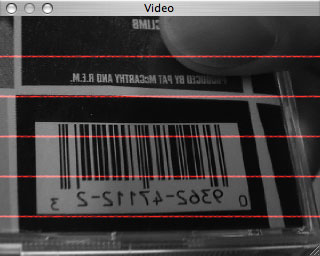
Video barcode scanning
Attaching and powering up a camera enables a black and white video preview window. The red lines running across the window are reminiscent of the scanning lines used by retail barcode scanners. For a barcode to be scanned by the camera, it must be intersected by one of the red lines.
Note that the image is mirrored in the preview window. This setup is ideal for an iSight mounted on a monitor facing the user, but it’s backwards for someone holding a camcorder in one hand and a barcoded product in the other. An option to flip the image would be nice.
In my testing, I found video scanning to be, by far, the fastest way to add items. It was a little tricky at first (much like real barcode scanning, as anyone who has worked in retail can attest), but I eventually got into a good rhythm. I scanned about 70 CDs in my first 30 minutes of using the application. That number includes several CDs that had no barcodes, and some that had to be touched up by hand (usually to correct incorrect cover art pulled from Amazon). The fastest way to add items that lacked barcodes was usually a title search.
The “Similar” button in the right-hand pane pulls a list of recommendations from Amazon. The list includes links to view the item’s detail page at Amazon.com or to buy the item immediately. (Actually, there’s a buffer web page in between that asks for one more click to add the item to the Amazon.com shopping cart, but I’m not sure if that’s just because I don’t have one-click purchasing enabled at Amazon.)
Small iTunes-style arrow icons appear in many places. Each one goes to Amazon.com: either a product page or a search based on the item next to the arrow. All of these Amazon links contain Delicious Monster’s Amazon.com “associate id.” Delicious Monster gets a small percentage of the purchase price of items purchased directly through one of these links, or even just purchased as part of the same shopping session.
The connection with the Amazon.com oracle is a key part of Delicious Library, so much so that I wonder how useful the application would be if Amazon ever pulled the plug on its web services API. This, unfortunately, is the risk all such applications must take…unless the developers are willing to implement their own oracle systems, which is a “non-trivial” task, to say the least.
Oracle failures were the main source of frustration for me as I scanned my collection. Amazon sometimes provides cover art that is poorly suited to Delicious Library’s usage of it. Ideally, the cover art is exactly equivalent to the booklet or piece of paper that is slipped under the clear plastic cover of a CD jewel case or DVD keep case. Many products on Amazon have cover art like this, but others diverge wildly. This trend seems to be getting worse, with many more newer products suffering from it than old. Here are just a few examples. These are the images straight from Amazon, scaled but otherwise unmodified (i.e., empty space has not been added around the edges).
| A sampling of bad cover art from Amazon.com | |
|---|---|
|
|
|
|
|
|



You can imagine how awful these images look when scaled and stuck under the virtual clear plastic of Delicious Library’s packaging artwork. Some can be edited down to something useful, but many cannot.
I also have a lot of imported DVDs and CDs, none of which are listed at the US Amazon.com web site. Amazon’s UK site has some of them, but Delicious Library does not query that site. Support for automatically detecting a product’s region of origin and then intelligently selecting the best oracle is planned for a future free upgrade. It will be a welcome addition.
The big picture
Producing a “1.0” release, no matter how seemingly trivial the application may be, is always a somewhat painful process. The first version often doesn’t do everything that the developer had initially envisioned, and it almost never does everything that customers want it to do. And then, of course, there are bugs.
I’m not in a good position to comment on bugs since I’ve been using a prerelease version of Delicious Library. But even the beta has been relatively bug free. I’ve never crashed the application and I’ve never lost data. There were several cosmetic bugs, but most issues were related to data lookup: missing cover art, failed lookups, etc. According to the developers, these are known issues and will be fixed before 1.0. Overall, I think it’s safe to expect the release version to be commendably stable.
But let’s get back to the tension between features and the 1.0 release. Delicious Monster seems to subscribe wholeheartedly to the market-driven strategy demonstrated so successfully in recent years by Apple’s iPod, iTunes, iPhoto, and iMovie products. Delicious Monster has sought to understand the mindset of media collector, and has focused nearly all of its attention on satisfying the most primal needs of this market.
Their effort has been fundamentally successful. Delicious Library does the most important things it needs to do, and does them exceptionally well. As a card-carrying member of the target market for this product, Delicious Library has fulfilled my basic needs with style and grace.
But, inevitably, I want more. Some would say that this is clearly a sign of a version 1.0 product, and they’d be right. That’s okay, so long as the features that do exist are distributed appropriately. But a desire for new features, and, more revealingly, a near-compulsion to dwell on the possibilities for new features, is also a sign of a great product that has already begun to inspire loyalty and admiration.
I have big dreams for Delicious Library. I want new shelf artwork, new media packaging templates, new ways to manipulate and view items in the shelf. How about a full-screen mode with animated reshuffling and dynamic pan and zoom? What about spine artwork for a more dense shelf view?
I want more varied oracles to help with obscure metadata lookups. I have many out of print books and imported movies and CDs that I don’t want to enter by hand. I want meta-oracles that aggregate information form many sources. How about using Google’s image search and scraping eBay in order to present me with a list of possible cover images?
Everything should be extensible by third parties: themes, media art, oracle plug-ins, even the data itself. Let’s go beyond oracles. My obscure video game soundtrack CD may not be on Amazon, but I’ll bet plenty of other people have it. If even just one of those people enters the metadata by hand and scans the cover art, I want to benefit from that work. Let’s go peer-to-peer with everything. Encourage correctness by integrating some form of reputation management for data entry. Do it better than CDDB: stamp out all misspelled album titles and artist names.
I want multiple libraries per account, libraries shared by multiple accounts, library subsets published to selected users over the network or through the web. I want scalable packaging that accurately reflects the relative sizes of individual books. I want custom art for boxed sets of all types, with the ability to expand them and view the individual discs as separate items, with their own cover art if applicable. In short, I want to create a Collector’s Utopia.
If this all sounds way over the top to you, consider this. With increasing bandwidth and personal data storage, there may soon come a time when the electronic distribution of media is the norm, and physical media is the secondary incarnation a collection.
Some might say that this has already happened for music. How many people now purchase CDs only to immediately convert their contents to MP3 or AAC and then shelve the CDs permanently? That’s how I’ve been operating for several years, although I won’t give up on physical media until the virtual equivalent is of the same quality. But other people are not as picky, and are already content to purchase all of their music in the form of downloadable files.
If the final quality barriers can be overcome with the aid of more bandwidth and more storage, then applications like Delicious Library suddenly seem a lot less frivolous. In fact, they start to look like the successor to today’s shelf full of optical discs in plastic packaging, rather than a mere imitation of them.
In some ways, applications like iTunes already fill this role. But Delicious Library has a broader reach, spanning all kinds of media and addressing some of the fundamental rewards of collecting that applications like iTunes have thus far ignored. On the other hand, Delicious Library is not involved at all with playback or the management of anything but the metadata for digital media. Ideally, both applications would begin to expand towards each other, meeting at some grand unified nexus of digital media collection, consumption, and management.
I consider it a sign of an good product when it inspires delusions of grandeur. But there’s a dark side to my enthusiastic extrapolations as well. I can also envision the many ways that things can go terribly wrong. In the limited time I’ve had to test Delicious Library, I have not been able to really stress-test the database system. Can it handle 10,000 items? How about 100,000? What are the limits? How reliable is the data store? And speaking of the data store, here’s yet another file with a disproportionately large amount of human effort invested it in?a file that, like my Quicken data file or email database, Must Be Preserved At All Costs.
What if I want to export to, or sync with, another database? How dedicated to interoperability is Delicious Monster? What if the product is a flop and they go under shortly after I’ve invested weeks importing my collection?
And then there’s the price: $39.95 for the software only, plus $175 more if I want the wireless barcode scanner. Is that too much to ask for an application that, let’s face it, no one really needs?
In the end, I am optimistic. Considering the potential time sink of data entry and collection and management, $40 buys an awful lot of fun (or “fun”, if you’re not the collecting type) when compared with, say, a moderately priced dinner for two. There’s also a special $29.95 price for users of these competing products: Chronopath Library, Intelliscan Collector, Booxter, DVDCollector, iMedia, DVDpedia, Bookpedia, DVD Cache, Readerware, and DVD Shelf X.
(As an aside, take a look at the web sites for the competing products. Most of them are simple, attractive, and informative. At least one of the products was created by a 12-year old (who, incidentally, also contributed to Delicious Library). See if you can guess which one.)
It’s been my experience that the best software is made by developers who are themselves part of the target market in some small (or not so small) way. Something tells me that one or both of Delicious Library’s primary developers possess extensive, exquisitely cared for and organized media collections, and have actively sought new ways to manage and augment these collections. They appear to be scratching their own itch, in the very best sense of that expression.
Part of what makes the Mac community so special is that so many Mac developers have itches?and, more importantly, corresponding talents?that have little or nothing to do with computers. I invite you to look again at some of the screenshots and artwork in this application. Someone loved those graphics. Someone sweated over every pixel of that application window. Someone knows what it means to be a lover of art, music, books, video games. This is in addition to (not instead of) the ability to write great code.
All of these human facilities and experiences have been harnessed to create not just a mere “program”, “application” or (God forbid) “executable”, but a digital love letter to collectors. Delicious Monster, from its products to its web site, exudes a spirit of passion and fun. “I’ve never been happier at work”, Wil Shipley told me in an email. “I think it shows in the finished product.”
I think so too. It may only be version 1.0, but it’s delicious.

(8.5 out of 10)
Now we come to the more pragmatic portion of the product review, wherein I distill six pages of rambling into a single number between one and ten. Here I must also point out, for those potentially blinded my by own diminutive reality distortion field, that this is a $40 product that lets you sort and search your collection of books, music, movies, and video games. You do not need this product. In fact, this product, if purchased, will undoubtedly absorb time that could be more productively spent doing something else. Shortly thereafter, you may simply get bored and never use it again. You have been warned.
If you’re still interested, here’s how I think Delicious Library shakes out. It’s clever, pretty, and fun, but also a bit green. I’d give it a 9 out of 10 if not for the fact that most of my “dream features” are not even slated to be considered until at least the next major version. Delicious Monster plans to charge for major version upgrades, so I’m dropping the final score to 8.5 out of 10. (Apparently we only have artwork for integer ratings. I’m not sure how fractions would look in Roman numerals anyway.)
Tradition also dictates that I provide a list of pros and cons:
Pros:
- Gorgeous “virtual packaging” graphics and shelf-view interface
- More metadata than you can shake a stick at
- Well-implemented barcode scanning feature with broad camera support
Cons:
- Poor metadata look-up support for rare, out-of-print, and imported items
- Some bad cover art from Amazon.com
- Leaves you wanting more: P2P, third-party themes and packaging art, more/better metadata sources, better support for boxed sets, etc.
If you can wait for version 2.0, you’ll get a better deal. Of course, if no one buys 1.0, there won’t be a version 2.0. I know I’d hate to see enthusiastic, talented, and (it needs to be said) admirably anal-retentive developers like those at Delicious Monster move on to another, potentially more lucrative platform, or another line of work entirely. I’ve told you what I think, but in the end, the market will decide.

John Siracusa has a B.S. in Computer Engineering from Boston University. He has been a Mac user since 1984, a Unix geek since 1993, and is a professional web developer and freelance technology writer.
Comments are closed.