Some programs extract data from themselves, e.g. SFX archive gets the compressed data from its exe file. The file consists of two parts — the executable and the archive — that are simply concatenated. You can append the archive to the exe with this command:
copy /b sfx.exe+archive.zip sfx_ready.exe
The program opens its own exe file, finds the zip file attached to it, and unpacks it. In similar way, some programming languages append your program to an interpreter to make a stand-alone exe, which is easier to distribute (AutoIt and Rapid-Q are the examples of such approach).
How can you do this?
Executable file structure
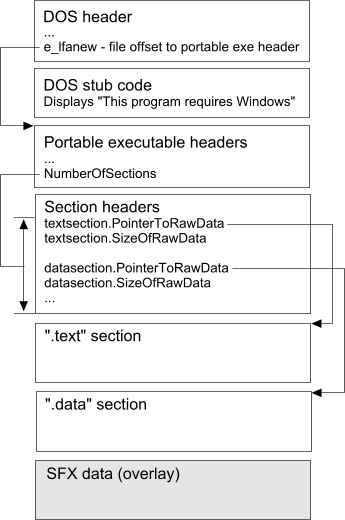
The exe file stores information about its size in headers. So you can get the size of executable data from the headers and read the attached data from this position.
The chart above shows all necessary details. First, you should reach the portable exe headers (IMAGE_NT_HEADERS32 structure in winnt.h file) by extracting the offset to it from DOS header. The PE header contains SizeOfCode and SizeOfInitializedData fields, but Windows doesn't require their values to be correct, that's why a linker can write wrong numbers here. We need more reliable source to calculate the exe data size.
And here it is — a section table. Each element of the table stores file offset of the section data and its size; the number of elements in the table can be found in the NumberOfSections field. There are two sections on the chart, ".data" and ".text". In real programs, there may be more different ones. Some of them can have PointerToRawData set to zero meaning the loader should initialize them to empty memory pages.
Let's walk through the section table and find the section with maximum PointerToRawData value. Then the size of executable data will be equal to PointerToRawData of this section plus its SizeOfRawData. In the sample file from the chart, the size will be calculated as offset of the ".data" section plus size of the ".data" section.
The program
Here is the program (error handling mostly stripped to make the example shorter and more clear):
int ReadFromExeFile(void)
{
  BYTE buff[4096]; DWORD read; BYTE* data;
  // Open exe file
  GetModuleFileName(NULL, (CHAR*)buff, sizeof(buff));
  HANDLE hFile = CreateFile((CHAR*)buff, GENERIC_READ, FILE_SHARE_READ,
    NULL, OPEN_EXISTING, FILE_ATTRIBUTE_NORMAL, NULL);
  if(INVALID_HANDLE_VALUE == hFile)
      return ERR_READFAILED;
  ReadFile(hFile, buff, sizeof(buff), &read, NULL);
  IMAGE_DOS_HEADER* dosheader = (IMAGE_DOS_HEADER*)buff;
  // Locate PE header
  IMAGE_NT_HEADERS32* header =
     (IMAGE_NT_HEADERS32*)(buff + dosheader->e_lfanew);
  if(dosheader->e_magic != IMAGE_DOS_SIGNATURE ||
    header->Signature != IMAGE_NT_SIGNATURE) {
    CloseHandle(hFile);
    return ERR_BADFORMAT;
  }
  // For each section
  IMAGE_SECTION_HEADER* sectiontable =
    (IMAGE_SECTION_HEADER*)((BYTE*)header + sizeof(IMAGE_NT_HEADERS32));
  DWORD maxpointer = 0, exesize = 0;
  for(int i = 0; i < header->FileHeader.NumberOfSections; i++) {
    if(sectiontable->PointerToRawData > maxpointer) {
      maxpointer = sectiontable->PointerToRawData;
      exesize = sectiontable->PointerToRawData +
        sectiontable->SizeOfRawData;
    }
    sectiontable++;
  }
  // Seek to the overlay
  DWORD filesize = GetFileSize(hFile, NULL);
  SetFilePointer(hFile, exesize, NULL, FILE_BEGIN);
  data = (BYTE*)malloc(filesize - exesize + 1);
  ReadFile(hFile, data, filesize - exesize, &read, NULL);
  CloseHandle(hFile);
  // Process the data
  *(data + datasize) = '\0';
  MessageBox(0, (CHAR*)data, AppName, MB_ICONINFORMATION);
  free(data);
  return ERR_OK;
}
The sample program just reads the whole overlay and shows it in the message box. In a real program, you may consider reading long overlays in chunks of 32-64 Kb or so. The code was tested with different compilers and sections' layouts.
Download source code (7 Kb) with full error handling
Other possible approaches
- Signature search. Put a signature between the extractor and the payload, open the executable file, and search for this signature. Rar self-extractor uses this method (see Archive::IsArchive method in UnRAR sources). Drawbacks:
- If the extractor is large, the search may take a long time.
- Because you search for the signature in your code, your executable will contain the signature, so a false positive is possible. You should somehow encode the signature instead of doing a direct comparison!
- Fast signature search. Exe file sections are aligned by 512 or 4096 bytes. So you don't need to scan the whole file, you just need to read the 512-byte chunks and look for the signature at their start. This method is used in NSIS installer. It's faster and the false positives are unlikely.
- Writing payload size at the end of the file. To extract the payload, you seek to the end of the file, read the payload size, then seek to the start of the payload (see this article). The same approach is used in Lyrics3 tag v2. Drawbacks:
- This will not work if the payload structure is predefined, and no footer can be appended to it, e.g., if you are attaching a standard RAR file.
- Embedding payload in resource. You can put your payload in exe file resources. Drawbacks:
- Modifying resources is a complex task.
- Such SFX file are not supported by WinZip/WinRAR.
Additional reading
You can find more information about PE file format in the paper by B. Luevelsmeyer and in Iczelion's tutorial. See also this forum thread about self-extracting from memory, not from file (note that Wayside's code will not work if the last section has PointerToRawData==0).