
Most people treat LinkedIn outreach like a part-time job.
They copy-paste the same generic message 50 times. They manually scroll through profiles. They forget to follow up. They burn hours — and get nothing back.
I got tired of it.
So I built a fully automated LinkedIn DM system that finds your ideal prospects, personalizes each message with AI, logs everything to a Google Sheet, and fires off outreach — all without you touching a single keyboard shortcut.
And today, I’m giving it to you. Free.
Here’s the full picture of what’s running under the hood:
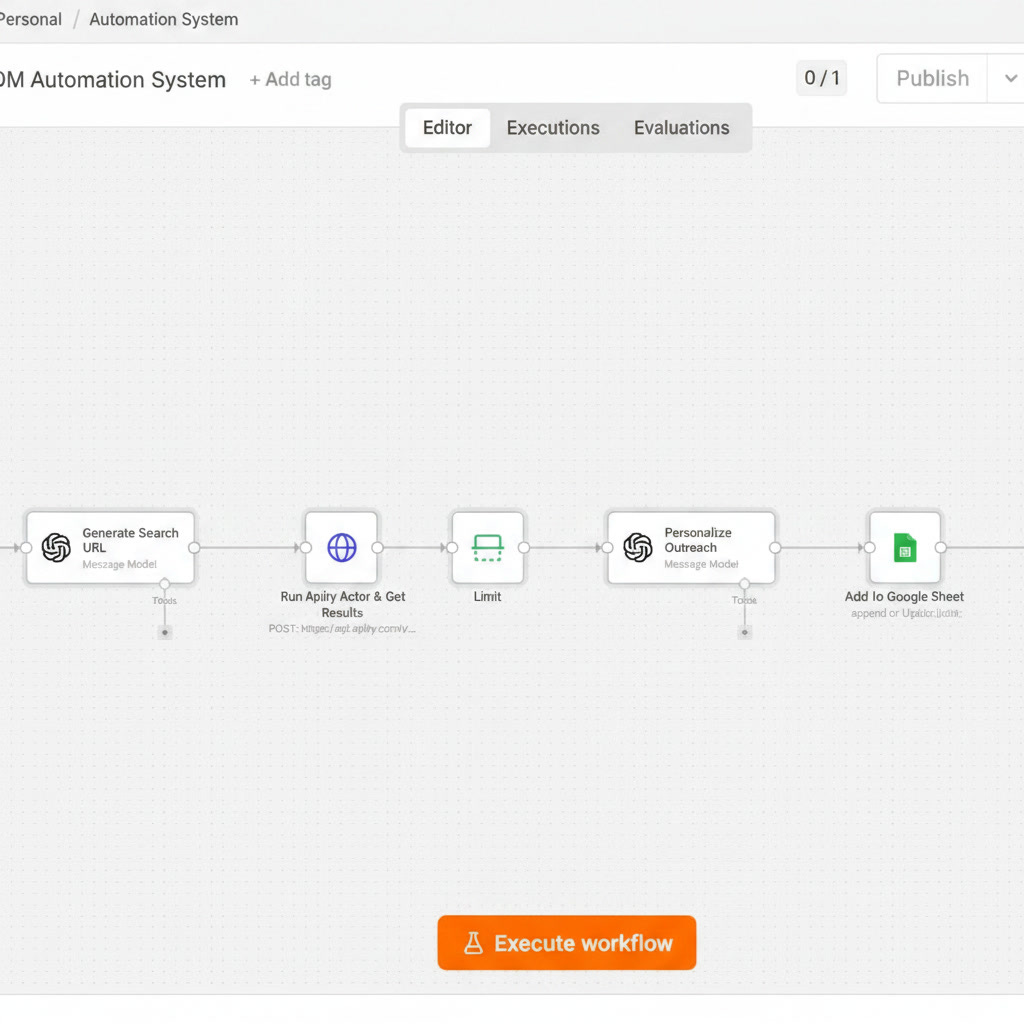
The system runs in 7 clean steps:
Form Submission Trigger — You fill out a simple form with your target criteria (job title, industry, location). That’s your only job.
Generate Search URL — Claude AI takes your inputs and crafts a precise LinkedIn search URL to find your exact audience.
Run Apify Actor & Scrape Results — Apify scrapes the LinkedIn search results and pulls the profile data automatically.
Limit — The workflow caps the outreach batch size so you stay under LinkedIn’s radar and don’t get flagged.
Personalize Outreach with AI — Claude reads each profile and writes a personalized DM for every single person. Not a template. An actual human-sounding message.
Add to Google Sheet — Every contact gets logged with their profile info and the message sent — so you always have a clean record.
Trigger PhantomBuster Agent — PhantomBuster takes the final list and delivers the messages directly on LinkedIn.
That’s it. Form in. Conversations out.
Most “automation” tools send the same message to everyone.
Prospects can smell it. They delete it instantly.
This system uses AI to read each person’s profile and write something that actually sounds like you wrote it at 2pm on a Tuesday — because you care about their specific situation. The result? Reply rates that don’t embarrass you.
What You’ll Need:
An n8n account (cloud or self-hosted)
An Apify account (free tier works)
A PhantomBuster account
An Anthropic API key (Claude)
A Google account (for Sheets logging)
Step 1 — Download the Workflow Click the link below to download the .json workflow file.
👉
Download ApexQuant LinkedIn DM Workflow
Step 2 — Import into n8n Open n8n → click “+” to create a new workflow → select “Import from file” → upload the .json file. The full workflow loads instantly.
Step 3 — Connect Your Credentials In n8n, go to Credentials and connect:
Anthropic API (paste your API key)
Apify API (paste your token)
PhantomBuster API (paste your key)
Google Sheets (OAuth login)
Step 4 — Set Up Your PhantomBuster Agent In PhantomBuster, activate the LinkedIn Message Sender phantom and copy your agent ID into the final node in n8n.
Step 5 — Fill Out the Form & Hit Execute Open the workflow trigger form, enter your target audience details, click Execute Workflow — and walk away.
Your outreach is running.
🤖 Get AI built for your business
LinkedIn has rate limits. This workflow is built with a Limit node specifically to keep your volume human — not bot-like. Still, use this responsibly. Don’t blast 500 people a day. Start small (20–30/day), monitor your reply rates, and scale from there.
Quality over quantity. Always.
This is one piece of a larger system I’ve been building inside ApexQuant — where automation meets intelligent outreach for serious operators.
Next issue: The exact AI prompts I use inside this workflow to write DMs that actually get replies.
Don’t miss it.
— Patrick Blaze Founder, ApexQuant
ApexQuant — Built for operators who don't have time to waste.
Comments
Nothing yet. Say the first thing.
Sign in to join the conversation.