
Estimated read time: 7 minutes
Most people treat LinkedIn outreach like a part-time job.
Find a lead. Write a message. Tweak the name. Hit send. Repeat 200 times. Wonder why nobody’s accepting.
I automated the entire thing — lead discovery, personalization, and DM delivery — in a single n8n workflow. One form submission triggers the whole chain. I don’t touch it after that.
This post is the full teardown: how it works, what breaks, and how to deploy it yourself.
The workflow JSON is free. Link at the bottom.
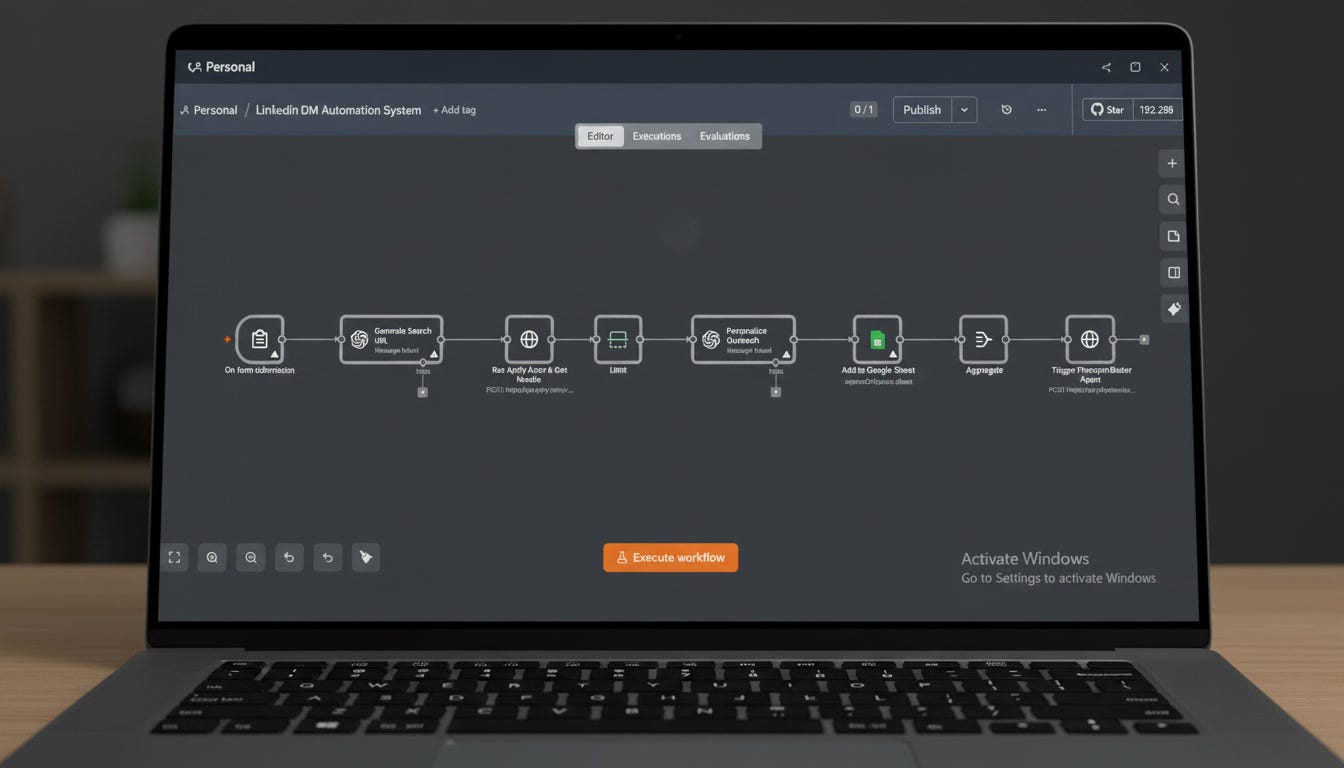
Here’s the full loop, start to finish:
You type your target audience in plain English (”B2B SaaS founders in the US, 1–50 employees”)
GPT-4 converts that into a precise Apollo.io search URL
Apify scrapes Apollo and returns up to 500 profiles — with emails
GPT-4o writes a personalized icebreaker for every lead
Every lead + their icebreaker gets written to Google Sheets
PhantomBuster picks up the list and sends the LinkedIn connection requests
That’s it. You typed one sentence. The system does the rest.
Before we go node-by-node, here’s what’s running under the hood:
n8n — orchestration. Everything lives here.
OpenAI GPT-4 / GPT-4o — two separate jobs: URL generation and icebreaker writing
Apollo.io — the lead database. Job titles, company size, location, keywords
Apify — scrapes Apollo results and returns structured profile data
PhantomBuster — handles LinkedIn DM delivery without triggering spam detection
Google Sheets — your lead CRM and review layer
Total cost to run at 500 leads: under $5 in API credits.
A single n8n form. One field:
“Describe your audience in plain English.”
That’s your only input. Everything downstream is automated from that sentence.
This is the first and most underrated node in the system.
Apollo.io uses URL parameters to encode search filters — job titles, locations, company size, keywords. Normally you’d configure this manually inside Apollo’s UI. Instead, GPT-4 takes your plain-English description and generates the exact URL.
You type: “SaaS founders in the US with under 50 employees.”
The prompt constrains GPT strictly — only four modifiable fields (location, titles, keywords, employee range), no hallucinated parameters, JSON output only. This means the URL always works.
Why this matters architecturally: Your audience targeting is now a text input. You can run 10 different campaigns by changing one sentence. No UI switching, no manual reconfiguration.
The Apollo URL gets passed to an Apify actor via HTTP POST. The actor scrapes the search results and returns structured data for each lead — name, job title, company, location, employment history, personal email, work email, LinkedIn URL.
You’re requesting up to 500 records per run. Apify returns the full dataset inline — no polling, no waiting on a webhook.
This is your raw lead pool.
The workflow is hard-capped at 3 leads per run in the base build.
This is intentional. Before you scale to 500, you validate that the icebreakers are high quality and that PhantomBuster isn’t triggering LinkedIn’s detection. Build confidence in the output first, then increase the cap in 10-lead increments.
This is the node that separates this system from every spray-and-pray LinkedIn tool on the market.
For every lead, GPT-4o receives their profile data — name, location, current title, current company, and the last two roles in their employment history — and writes a connection request message.
The prompt has two hard constraints:
Constraint 1: Never use the exact LinkedIn field data verbatim. Always paraphrase. This makes the message feel written by a human, not assembled from a database.
Constraint 2: Keep it extremely short. No corporate filler. No phrases like “passionate about turning vision into reality.” Laconic and specific.
The output template:
Hey [Name], loved seeing [thing about them — paraphrased]. I’m also into [plausible tie-in], thought I’d connect.
Real example output:
“Hey Danielle, loved seeing your creative agency journey. I’m also building brands, thought I’d connect.”
One sentence. Specific enough to feel personal. Short enough to read in 3 seconds.
This is what actually gets accepted.
Every processed lead gets written to a Google Sheet with:
Apollo ID (deduplication key)
First name, last name, full name
Job title
LinkedIn URL
Email status
Profile photo URL
Pre-written icebreaker
The node uses appendOrUpdate with ID matching — running the workflow twice won’t create duplicates.
This sheet is your review layer. Before PhantomBuster fires, you can audit every icebreaker. You should, especially in the first few runs.
After all leads are written to the sheet, the workflow aggregates everything and fires a single API call to PhantomBuster.
PhantomBuster’s LinkedIn Connection Request sender reads from the sheet and sends the connection requests with the pre-written icebreakers attached.
This is where actual LinkedIn activity happens. PhantomBuster is in the stack specifically because it mimics human browsing behavior — direct LinkedIn API calls get flagged and accounts get restricted. PhantomBuster routes around that.
PhantomBuster volume limits. LinkedIn’s detection has gotten aggressive. Keep daily connection requests under 20–25. The current workflow sends all processed leads in a single batch — you’ll want to schedule PhantomBuster separately rather than triggering it immediately.
Apify cost at scale. 500-record pulls are cheap individually. If you’re running this daily, the credits add up. Cache results where possible, and don’t run full scrapes on audiences you’ve already hit.
GPT hallucination on sparse profiles. If a lead has minimal employment history on Apollo, GPT-4o will sometimes invent a “plausible” past employer. The Google Sheets review step exists precisely for this — catch it before it goes out.
Apollo data freshness. Apollo’s email and job title data can be 6–18 months stale. If you’re planning to layer email outreach on top of this, run the list through an email verification tool (Hunter.io, NeverBounce) before sending.
The same skeleton runs five different outreach channels with minor modifications:
Cold email — swap PhantomBuster for Instantly or Smartlead
Twitter/X DMs — swap Apollo for a Twitter profile scraper, same icebreaker logic
Podcast guest outreach — swap the audience form for a topic input, pull relevant LinkedIn profiles
Sales intelligence briefs — skip the DM step, pipe enriched profiles into Notion or Google Docs
Recruiting outreach — target by engineering titles and skills, send connection requests at scale
One workflow architecture. Five deployment surfaces.
The complete n8n workflow is available as a free download — subscribers only.
It’s a one-click import. Everything is pre-wired: the form trigger, both GPT nodes, the Apify actor configuration, the Google Sheets mapping, the PhantomBuster trigger. You add your API keys and it runs.
This is the first drop from the ApexQuant Workflow Vault — a library of production-ready n8n workflows I’m building for AI automation, lead generation, and business operations.
What’s coming in the Vault:
WhatsApp AI Chatbot (customer support, full conversation handling)
AI Content Repurposing Pipeline (one input → 10 formats)
Automated Client Onboarding System
AI Research Assistant with live web scraping
Cold email sequencing automation
Full setup guides, prompt libraries, and video walkthroughs for every workflow
If you want early access at locked pricing when it launches — reply to this email with “Vault” and I’ll put you on the list.
If you’re running an agency, consulting practice, or selling automation services to businesses — the infrastructure in this workflow is what you should be deploying on client accounts, not building from scratch every engagement.
I work with a small number of operators directly to architect and build custom automation systems. If that’s a fit:
Tell me what you’re building and what’s blocking you. I’ll tell you if I can help.
Three things:
Share this with someone building on LinkedIn manually. This is a 10x upgrade for anyone still doing it by hand.
Drop a comment below — what would you automate with this architecture? Every interesting answer becomes a future workflow build. The best one I get this week goes on my build list.
Download the workflow — it’s free, it’s subscriber-only, and the link is right above. Zero reason not to grab it.
Until next time — build systems, not habits.
Pratik ApexQuant | AI Automation Architecture
Want to reach 22,000+ readers who build with AI? ApexQuant sponsorships are open. Reply to this email.
Comments
Nothing yet. Say the first thing.
Sign in to join the conversation.