
Disclaimer: The views, methods, and opinions expressed at Anchored Narratives are those of the author and do not necessarily reflect the official policy or position of my employer.

Background
After reading my last article on the StrongPity malware, my former colleague from Hoffmann Investigations and good friend Oscar Vermaas reached out with an interesting malware problem he worked on a couple of weeks ago. During our Hoffmann days, I spend many nights with Oscar working on the famous Diginotar breach investigation. Although our report has never been published, I still believe it is one of the best digital forensic reconstructions we ever did. I have worked on many Advanced Persistent Threat cases, but the Diginotar case is still one of the highlights of my career. Although Oscar’s passion is more into breaking security, he is an expert that can really break down a problem and solve it. Therefore the next anchored narrative will be more technical but focuses on XOR, frequency analysis, and a bit of crypto. But hang in there this exciting puzzle is also going to be solved. Very happy to have Oscar onboard with the next anchored narrative!
Introduction
Rule 1 of cryptanalysis - check for plaintext
Last week I had to de-obfuscate some javascript. After removing the first layer of obfuscation, I was left with a decrypt function and a large blob of ciphertext.
Figure 1 shows a similar sample, found on Pastebin. It is in fact the code that is the result of removing the first layers of obfuscation. The key of the decrypt function is 10 bytes long and initialized. However, the key is mangled at runtime with some XOR-values before it is actually used in the decrypt function.
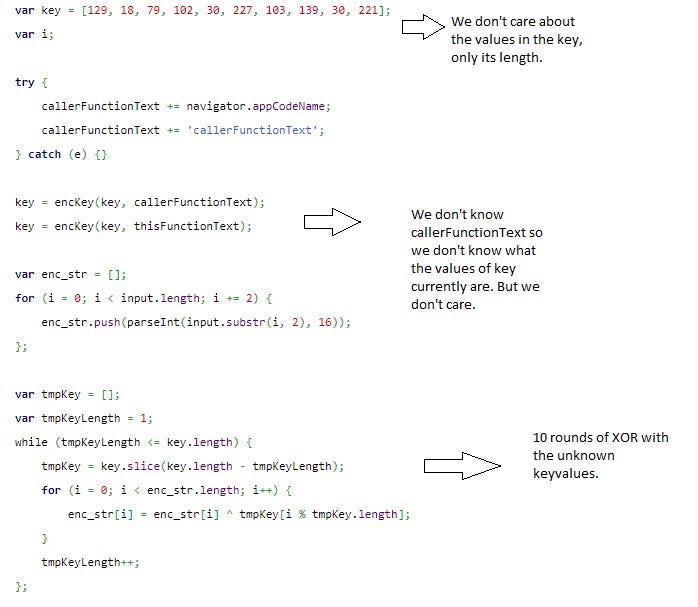
The key is dependent on the source code text of the javascript itself. This means that if, for example, for debugging purposes, you put a console.log somewhere, the text of the function changes, which in turn changes the key.
Also, the runtime key mangling is dependent on the body text of some of the calling functions, and the first layer of obfuscation (not shown here) makes it hard to follow the call stack, let alone pick the correct function text which is mixed in with the key. Actually, in the Pastebin post, the calling functions are not even there.
The screenshot below shows the second part of the paste. It is the application of the decrypt function on the ciphertext.

So basically, we have a decryption (also encryption because of symmetry) function, an unknown key of 10 bytes, and the ciphertext. The encrypt/decrypt function combines parts of the key in several rounds, which at first sight seems to make the encryption stronger. However, as we shall see in this article, it does not add any real security. Better yet, it leaks plaintext bytes at fixed positions, independent of the key used (as long as it has length 10).
The structure of this write-up is as follows
Some basic XOR properties
Character frequency counts of text
Analysis of the malware encryption/decryption function
Ciphertext-only attack based on weakness in encryption function
Some afterthoughts
Note that this blog does not claim that the method discussed here is the most efficient. We are aware of sandboxes, debuggers, etc which would also help determine the functionality of this code.
This article intends to, hopefully, be fun and educational. The intended audience is anyone who reverses malware sometimes or has ever participated in a Capture The Flag assignment and liked it.
Related work
Independently of this write-up, another article on the same encryption method was published a while ago. I was notified by RJM after having written a substantial amount of this blog. Therefore, we included a link to the article for transparency and more background. Although the linked article contains a lot of the same material as what is written here, I still think my article has something to add on the topic;
the author’s “faithful re-implementation” of the encrypt/decrypt function is (strictly speaking) incorrect;
The article does describe the weakness of the encryption, but IMHO not to the fullest extend. Neither does it demonstrate exploitation of the weakness by an attack on the ciphertext (although the author does include an encryption demo of a plaintext of his choosing).
RJM also found another article in which the author shows the process of finding the key by analyzing the javascript at runtime in a debugger. Although an interesting read in itself, the method is very different from the one described here.
Some basic XOR properties
First, some basics which we'll need later on (feel free to skip to the analysis). The XOR operation is defined on two bits p and q as shown in the table below:
p q | p xor q0 0 | 00 1 | 11 0 | 11 1 | 0It has some interesting properties;
First look at row 0 and 3:
p q | p xor q 0 0 | 0 1 0 | 1 It tells us that p XOR 0 == p, so XOR-ing p with 0 evaluates to p. (fun fact 1)
Look at row 0 and 4:
p q | p xor q0 0 | 01 1 | 0It shows that if p and q have the same value, the result will be 0. In other words, if you XOR p with the same p, the result is 0. (fun fact 2)
The XOR operation is “commutative”, meaning that p XOR q == q XOR p. Thus, we can swap operands (just like, for example, addition but not division).
Lastly, XOR is “associative”, meaning that (A XOR B) XOR C == A XOR (B XOR C). So, it does not matter which components of an expression we evaluate first. You can compare this to simple addition, for example, (3+5)+7 == 3+(5+7) == (3+7)+5 (fun fact 3)
Now, a simple encrypt and decrypt method may be defined as follows. In the example below P is plaintext, C is ciphertext and K is a key.
To encrypt P, we have:
C = P xor KTo decrypt C, we do:
C xor K substitute (P xor K) for C== (P xor K) xor K apply funfact 3== P xor (K xor K) apply funfact 2 == P xor 0 apply funfact 1== PAnother useful trick is to XOR both sides of an equation with the same value, eg:
A xor B = CA xor B xor B = C xor B (XOR both sides with B)A = C xor B (B xor B cancels)
When XOR operates on bytes (or words, double words, etc), it operates on the individual bits of the bit expansion of the operands.
The modulo operator
Many programming languages support the modulo operation (often denoted by ‘%‘). We discuss it here because it will be used later on. The value of p % n is the remainder of the integer division p/n.
Some examples;
7 % 5 = 2, because 7/5 = 1 with remainder 214 % 7 = 0, because 14/7 = 2 with remainder 0Another example maybe your digital clock, which shows the hours modulo 12 or perhaps modulo 24.
If we have to loop through fixed-length arrays multiple times, the modulo operator is convenient to use;
Suppose you have an array A of length l, and you have some incremental variable i. You may iterate through the array several times by using A[i % l]. Every time i “falls of the end” of the array (that happens when i is a multiple of l), it “wraps around” to the beginning of the array.
Frequency analysis
An effective way to attack a simple (!) (substitution) cipher is to perform a frequency count on the bytes in the ciphertext. The frequency count can help us make educated guesses, instead of blindly trying all possible keys/plaintext bytes.
It is known that the most common characters in standard English text are ETAOI and white space.
Let's copy the text of RJM's previous article and paste it into a text file to get a feel for plaintext English text (Most screenshots that follow are generated on a Linux console).

To perform the frequency count I normally use grep, sort, wc and uniq.
The line below first greps single characters from the file and puts each on its own line. After that, they are sorted and uniqued to group and count them. Lastly, they are sorted by their count. To generate a "top 10", 'head' is used.

As we can see, the result matches almost perfectly what we expected (The empty spot behind the number 2817 is the space character).
Another interesting statistic is the number of unique bytes. We just count the number of lines;

As we can see, there are only 88 different bytes in the file. A decent encrypted file will likely have 256 unique values, with an even distribution.
Now, if we are presented with some ciphertext, and some byte value is the most common, and there is a clear uneven distribution, you might guess that that byte value represents one of our top 10 characters (Obviously, this may differ per language and type of data, so you need to take that into account).
For fun, let's test it. In the image below, I first write one random byte to a file "keyfile". I then xor that value with the contents of the plaintext article.
Doing a frequency count gives us, as expected, different bytes, but the same statistics.

And indeed, the key matches the most frequent "encrypted" byte, which is 0xcc.
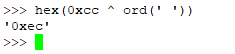
The little python xor script I use is this:

The script uses the "generalized" version to handle keyfiles of arbitrary length (remember the mod operator to wrap to the beginning of the key when we've reached the end of the key).
Let's try with a key of length 16 (bs=16 in the dd command in the screenshot below). The results are now not so nice.

As you can see, we now have 254 different values, and the count is much flatter (the extreme case would be if we used a key as long as the plaintext, resulting in a one-time pad).
However, if we know the key length and have enough ciphertext compared to the length of the key, we can still use the same trick. The difference is that we have to create as many different frequency counts as there are key bytes.
Basically, we divide the ciphertext into several smaller groups of ciphertext. Bytes that were encrypted with the same key byte end up in the same group.
We can write a program for this, but we might as well try it on the command line. In the next screenshot, we make a frequency count of every 16th byte (notice the change in the c flag in the xxd command), starting at offset 0.

Again, we see that we've returned to a frequency count with a large spike in it. Let's guess that that corresponds to a space, and calculate what key byte would have been used when our guess is correct.

It should be 0xe2. As you can see I also calculated for the guesses 'e' and 't', just in case.
However, the precaution was unnecessary, since the 0xe2 was indeed the first keybyte (which is revealed by the hexdump of “keyfile“).
We can do the same for the 1st, 17th, 33th, ... ciphertext bytes to get the second keybyte and so on until we completely recovered the key.
The cipher described above is very similar to the Vigenere cipher, although he uses modular addition instead of XOR. The principle of the attack is the same, however.
Finding the length of the key, in case it is unknown, can be achieved by analyzing repeating groups in the ciphertext. The common divisor of the differences between the offsets of such groups is likely the key length.
See, for a good explanation; https://en.wikipedia.org/wiki/Kasiski_examination
Key generation (side note)
In the previous examples, I generated the keys by reading from /dev/urandom (the command line "dd if=/dev/urandom .... ").
You could also imagine that someone would generate the 16 bytes, for example, by using the MD5 hash of some password. Or possibly the first 16 bytes of a million iterations of SHA256 hash on a salted password. Or by tossing a fair coin 128 times. Or a combination, perhaps xor, of all of the above.
If not already obvious, it's important to realize that, in the current case, it does not matter how this key material was generated, because an attacker doesn't care and just looks at the frequencies and calculates the key from educated guesses instantly (however, if the key material is predictable and easier to guess than performing the analysis on the ciphertext, I suppose the attacker will just predict the key).
More rounds
The above cipher does not get any better by adding rounds.
For example, the cipher does not get any harder to crack if we perform the encryption multiple times. By doing so, the "effective key" will just be an XOR of all keys used in the various rounds.
The picture below shows that I applied one more round with a different key (keyfile2) to the result of the first round. As expected, the count does not differ at all from the single-round version;

So, the "effective key" of round 1 and round 2 combined, is the ciphertext 0x12 XOR 0x20 => 0x32.
Indeed, this is the XOR of the first byte of key1 and the first byte of key 2, as shown below.

The analyst does not care about the two keys. The analyst only needs to care about the net effect (the "effective key") of the application of the key material in several rounds
The special case
In the previous example, when the keybytes in two rounds are the same, the net effect of the keybytes combined will be 0 (p XOR p == 0). You could say that, in that case, the second round undoes the encryption in the first round.
In the example below, I changed the last byte of keyfile2 to match the last byte of keyfile1. This ‘new‘ key was stored in keyfile3 and is used as the second round on the intermediate result of the previous example.

If you compare the result of the second round with the plaintext, you’ll see that every 16th byte matches the plaintext (shown below).
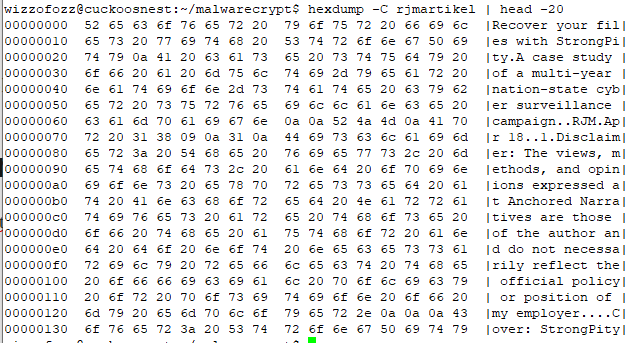
Now, we can take a look at our malware sample.
Malware analysis
Here’s a screenshot of the encrypt/decrypt function from the Pastebin post:
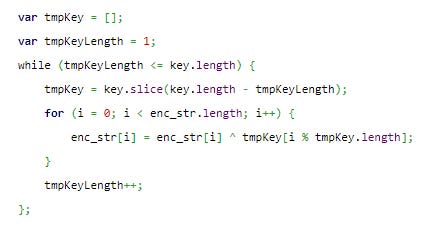
The function consists of 10 (the length of “key”) rounds. Every round will use as its input the result of the previous round. The first round works on plaintext or ciphertext, depending on whether it’s encrypting or decrypting. Here, I just call it “text“.
In the first round, the last keybyte k9 (tmpKey=[k9]), is XOR-ed with the entire text.
In the second round, the last two keybytes (tmpKey=[k8,k9]) are XOR-ed with the results of the previous round, in the following way; The first text byte is XOR-ed with k8 (tmpKey[0 % 2]), the second text byte is XOR-ed with k9 (tmpKey[1 % 2]), the third text byte is XOR-ed with k8 (tmpKey[2 % 2]), the fourth text byte with k9 (tmpKey[3 % 2]), and so on until we reach the end of the text. More general, the ith text byte is XOR-ed with tmpKey[i % 2], for 0 <= i < length(text).
In the third round, the last three keybytes (tmpKey=[k7,k8,k9]) are XOR-ed with the results of the previous round, in the following way; The first text byte is XOR-ed with k7 (tmpKey[0 % 3]), the second text byte is XOR-ed with k8 (tmpKey[1 % 3]), the third text byte is XOR-ed with k9 (tmpKey[2 % 3]), the fourth text byte with k7 (tmpKey[3 % 3]), and so on until we reach the end of the text. More general, the ith text byte is XOR-ed with tmpKey[i % 3], for 0 <= i < length(text).
In the nth round, the last n keybytes (tmpKey=[k10-n,..,k9]), are XOR-ed with the results of the previous round as text byte[i] XOR tmpKey[i%n].
Note that the length of tmpKey is the same as the round number (starting to count from 1). So, as the round number increases, the tmpKey will be [k9], [k8,k9], [k7,k8,k9], … [k0,k1,k2, … k8, k9]. The article we linked to erroneously describes this as [k0],[k0,k1], [k0,k1,k2,] .. etc. The principle is the same, but in a real-life situation, this will mess up the analysis.

In the table below it is illustrated as follows. The first line are the plaintext bytes (p1, .., p2824), the last line are the ciphertext bytes. The rows in between are the round keybytes:
p1 p2 p3 p4 p5 p6 p7 p8 p9 ..... p2824k9 k9 k9 k9 k9 k9 k9 k9 k9 ..... k9k8 k9 k8 k9 k8 k9 k8 k9 k8 ..... k8k7 k8 k9 k7 k8 k9 k7 k8 k9 ..... k?k6 k7 k8 k9 k6 k7 k8 k9 k6 ..... k?..k0 k1 k2 k3 k4 k5 k6 k7 k8 ..... k?c1 c2 c3 c4 c5 c6 c7 c8 c9 ..... c2824The table above should be read in vertical order, for example:
c1 = p1 XOR k9 XOR k8 XOR k7 XOR k6 XOR k5 XOR k4 XOR k3 XOR k2 XOR k1 XOR k0
c2 = p2 XOR k9 XOR k9 XOR k8 XOR k7 XOR k6 XOR k5 XOR k4 XOR k3 XOR k2 XOR k0
Basically, the 10 keybytes are combined together in 10 rounds to create 2520 different “combined“ keys. The number 2520 is the least common multiplier (LCM) of 1,2,3,4,5,6,7,8,9,10. This makes sense because to get a repeating column, the roundkeys (tmpKey) must repeat at that same position. The position of where this happens has to be divisible by the length of the roundkey of round 1, by the length of the roundkey of round 2, etc. So, the position is the smallest number divisible by 1,2,3,4,5,6,7,8,9,10, which is the LCM.
That is annoying because 2520 different keys for a ciphertext of length 2800 is too much. Yes, you can use the repeat after 2520 to attack the first and last 300 bytes of the ciphertext (Think "onetime pad with key re-use”), but it still is a tough cookie.
Now comes the main observation; while the combination of the 10 keys seems to make the encryption harder to crack, it also weakens it.
Reducing keys
Remember that A xor A = 0. This means that if in an XOR column above, there is an even number of the same keybytes, we can remove them because they cancel.
If there is an odd number of the same keybyte, we just handle this case as if there were only one occurrence of that keybyte. This works, because the number of other occurrences of that keybyte will then again be even, and we can cancel them as well.
Since the order of the applied keybytes does not matter, we can also sort the keybytes by their position in the key.
If we apply this to two different combined keys, we find that many reduce to the same effective key. For example;
k1 k1 k2 k2 k3 k3 k3 k2 k7 k7 => k2 k3
k1 k1 k3 k8 k8 k8 k8 k2 k9 k9 => k2 k3
The next screenshot shows the output of my python script, enumerating the combined keys, and reducing them to a canonical form. Note that ‘0‘, ‘1‘ etc, are just symbolic names for the first, second, etc keybytes. Their actual values (which are unknown anyway) do not matter.

Note that a combined key will never reduce to exactly one keybyte. If that were the case, there would be an odd number of occurrences of that keybyte, and the rest would need to cancel in order to end up with just that keybyte. This impossible since the length is 10, thus even, and there would be at least one other keybyte with an odd count. This keybyte would then also be included in the final reduced key. So, the best we can do is reducing to a combination of at least two keybytes.
This reduces the number of 2520 combined keys to 297 effective combined keys. This is something you can work with.

Better yet, at position 2519, the XOR column consists of 10 k9's. This means at that position there is a plaintext byte.
I developed a small python program to find all positions where all key bytes cancel each other (for example: k9 k9 k9 k9 k1 k2 k1 k2 k2 k1). This results in 99 plaintext bytes, scattered around in the ciphertext.

If we group and count all the unique reduced keys, we can find the offsets where the same reduced key will be applied. The picture below shows how often specific reduced keys are applied.

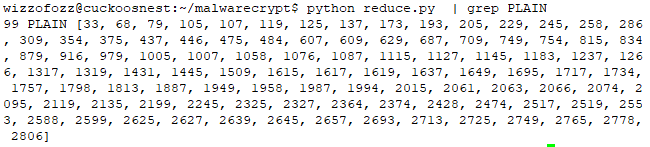
Note that all these relations hold, without knowing the actual values of those bytes.
With the reduced set of combined keys, we can now do a frequency count of all ciphertext values per combined key. A frequency count is a common attack on these kinds of ciphers.
Basically, for the most common ciphertext value per combined key, you guess it is, for example, whitespace or 'e' or 't' or some other common letter. With that assumption, you calculate the combined key from the ciphertext and guessed plaintext.
If the guess was correct and apply the combined key to the other positions of the ciphertext where that key applies, you will get a result that makes sense. If you get garbage at other points, it means the guess was incorrect.
If you can make a guess based on the surrounding leaked plaintext bytes, that's even better.
An actual sample
Here’s a snippet of the ciphertext from the Pastebin URL after having it transformed from its ASCII HEX representation to binary:

First, let us find the 99 plaintext bytes we get for free. The figure below shows a snippet. The snippet includes the plaintext bytes as their actual values. All other ciphertext bytes are represented as 0x00 for readability.

I also counted the most frequent ciphertext character per reduced key. The results are a bit disappointing. Maybe we have bad luck, but the sample size is not convenient in relation to the size of the combined keys. It is actually smaller than 2520. But let’s see how far we can get.

The figure above shows that the key 89 (k8k9) is applied at 56 positions in the ciphertext. The ciphertext contains at those positions 28 unique values. The value 0x0c is the most common with a count of 6. So, it would make sense to guess that k8k9 = 0x0c XOR 0x20, where 0x20 is the ASCII value for a space. If the guess is correct, we solve 56 positions. If the guess is incorrect, we might try for the characters ETAOI.
Here is an example; in the figure below, I made a guess for k8k9 as 0x0c XOR 0x20.

We already knew the X and b (offsets 0x651 and 0x653), as that was leaked plaintext. Our guess did not improve much (at positions 0x652 and 0x664, unprintable characters appeared). I then guessed ‘e‘, but still no luck. But see what happens when we guess ‘t‘.

As you can see, we get “XOb“, “HT“,”tp”. We can safely assume for now, that k8k9 is 0x78 (= ord(‘t‘) XOR 0x0c).
The python scripts I use for this, allow me to “hardwire” a key value for a given reduced key. The data structure is pretty simple, namely an associative array of the form {reducedkey1: keyvalue1, reducedkey2 keyvalue2, … }. If a reduced key is found in this array, it will override all other (automated frequency-based) guesses. Obviously, plaintext bytes will also never be altered by guesses.
Based on the guess above, I hardcode my first guess: { '89': 0x78 }.
Let’s try another frequency-based guess. The space and ‘e’ did not work, but again ‘t’ worked.

Ignoring the other changes in the file, we see that “XObject” is slowly starting to emerge.
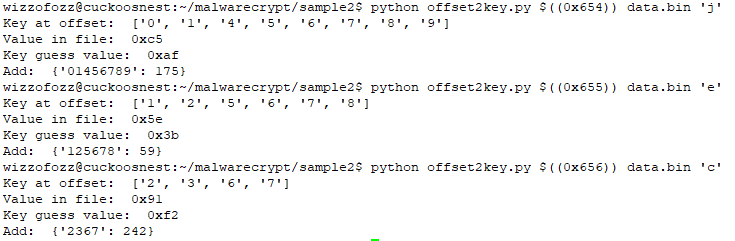
I created a small program that allows me to supply an offset in the file and a guess for the plaintext byte at that position. The program will then supply me with the reduced key at that offset and its value. The figure below shows how I make the guesses for “jec“ in “XObject“. The program returns the values I need to add to my fixed reduced key table.
Combining keys
Although the above process seems to work (in this case), it is a bit slow, and it is easy to get stuck. However, note that if we solve the keys k8k9 and k7k8, we also have solved k7k8, since k8k9 XOR k7k8 = k7k9 (the k8 cancels). Not only gives us these reduced keys “for free“, but also a way to break ties or (in)validate guesses.
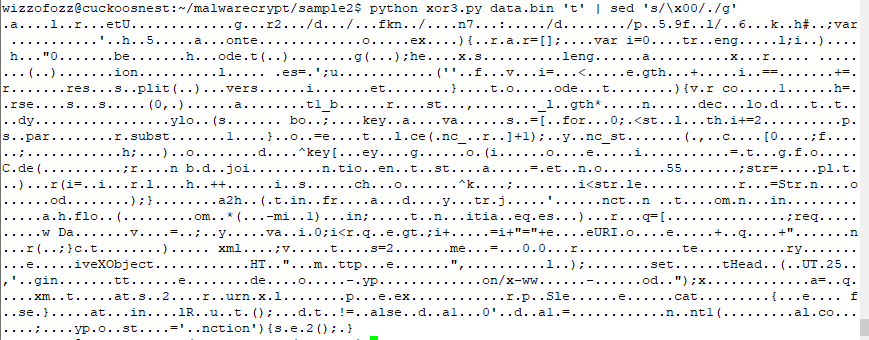
I created a small python script, which takes a keymapping as input and returns an expanded keymapping as output. The process is a bit brute force, as the script generates a powerset of all reduced keys found so far, combines their values by XOR, and reduces their concatenation. The following screenshot shows this in action.

As you can see, the program creates a pretty impressive new table from only 7 guessed reduced keys. After pasting this generated key in the decrypt script, we get this result:
The surprise
Now, from the above, one could conclude that it’s going to take a while to finish the remaining part of the ciphertext. At least, this is what I initially thought. However, and in hindsight this may have been a bit obvious, if we add one new reduced key mapping to the “key combiner”, it doubles the translation table (the powerset grows exponentially with respect to the number of elements in the set). I am not sure it always doubles. I can imagine that sometimes you add (partially) redundant information, leading to redundant results that will be filtered out in the end.
However, in this case, I added a ‘u‘ near the end to generate “unction“ (see screenshot above). From this change I created a new keymapping. Near “unction” we then find “typeo“. After adding the ‘f‘ for “typeof“ I created a new keymapping. The large generated table is shown in the screenshot below.

The plaintext
I put the new keymapping in my decrypt script and tried again. I recovered the plaintext:

So, without knowing anything of the key, but by exploiting some flaws in the crypto algorithm, it was possible to decrypt a ciphertext from scratch by just analyzing the ciphertext and the encryption algorithm.
Afterthoughts
I may need to think about this more, but I find it curious that I only needed to guess 9 bytes. That is less than the keylength of the original unknown key. I am not sure if this is always the case, or that I just got lucky with this instance.
Although this cipher was relatively easy to break, we have to consider that we were lucky with the plaintext. If the plaintext was obfuscated as well, it would have been much harder to spot words like “Object“. This is essential for the technique we discussed because it involves making educated guesses. Another layer of obfuscation would have made the guessing way harder. Knowing that the plaintext would most likely be javascript was very helpful too, of course.
Also, do note that in this instance, the space did not seem to be the most common character at all! Something to keep in mind. Here’s the top 20 frequency count after decryption (fun fact; the round brackets are balanced):

The cipher is ultimately a substitution cipher. Many ciphers employ transposition (moving plaintext bytes to other positions) as well. Had the author employed a simple transposition based on the key, I most likely would not have been able to recover the plaintext. This relatively simple extra step makes the problem much harder.
Had the malware author used an odd length key, the plaintext leakage would have been gone.
Although the javascript has been decrypted, the C2 is still obfuscated in the javascript source code. If you analyze the javascript, you will find that you need to reverse the URL at the beginning and consider every second character, starting at offset 1. You will then get “http://ftmp.pendidikann.info/mdjvrhg.php“. I did not further investigate this, but a quick search on VirusTotal suggests that it lives pretty much under the radar.

I did not publish the source code of my scripts. The reason for this is mainly because it is a bit of a mess. I have several copies of slightly different versions, all doing slightly different things. They are not documented at all, and error checking is missing. On the other hand, I don’t think they are very hard to develop yourself. If you’re really interested, just contact me.
Comments
Nothing yet. Say the first thing.
Sign in to join the conversation.