
I bet most of you have some version of this in your job. A weekly status report. A monthly update to your boss or your board. A standing “here’s what I’m seeing” note to your team. It shows up a thousand different ways, but the shape is always the same: a recurring thing where the structure barely changes, and only the content does.
That’s the exact kind of task AI is good at — if you set it up right. And “setting it up right” can be challenging if you aren’t sure how to create the project, instructions, and source files you need to make it helpful, so that’s what this is: the whole thing, start to finish, in the order I’ve actually done it.
I write a few different kinds of these for clients and this Substack. They’re genuinely different from each other — different structure, different audience, different voice register. So I don’t run them out of one setup. I have a separate project for each one. Hold onto that, because it’ll make more sense in a minute once I explain what a project even is.
First, outline what you want to do. When most people use AI for a recurring task, they open a fresh chat every time and re-explain everything from scratch: here’s my format, here’s my tone, here’s what I covered last time. Every cycle. No wonder it feels like more work than just writing the thing yourself.
The move is to stop re-explaining and start building. You set up your structure, your voice, and your standing context once, in a place the AI reads before it writes anything. Then each cycle, you’re not rebuilding the memo — you’re just handing it this month’s material. That’s a completely different, much smaller job. It’s the difference between AI that saves you an afternoon and AI that costs you one.
First, a quick glossary of the terms I’m going to use, just in case you aren’t familiar with them all:
→ A chat is a single conversation. You ask, it answers, and when you start a new one, it remembers nothing. Most people only ever use this, which is why AI feels like it has amnesia.
→ A project is a container that holds many chats plus a shared memory they all draw from. Everything within a project has access to the same instructions and files.
→ Instructions are the standing orders you set at the project level — who this is for, my role, my rules — so I never have to repeat them in the chat itself.
→ Files are documents you upload into the project that the AI reads from: my template, my running context, my voice guide. It reads these; it doesn’t have to hold them in its head.
You can see here in this sample screenshot from Claude where these different sections are in a project.
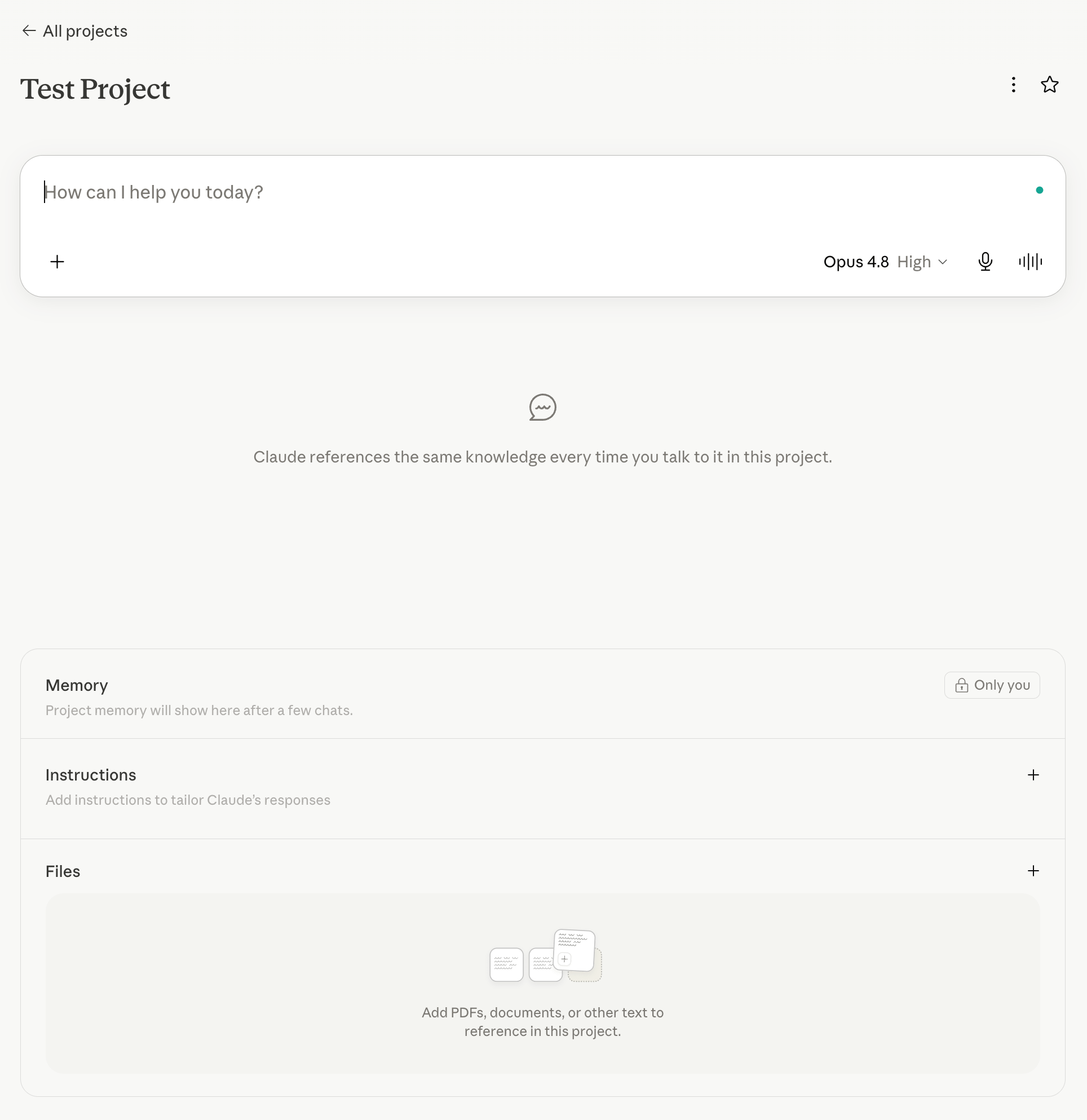
Don’t worry if you’re still a little confused. We’re going to go over it all.
So why should you go to the trouble of setting this up? Because the payoff isn’t just speed. It’s that the output actually sounds like you, maintains your structure, and remembers your context — every single time, without you having to manage it.
This is where free readers and paid readers part ways. If you just want to know that this is possible, you’ve got it. If you want to walk out of here and build the thing this week, that’s what’s below, in order, with the specific moves at each step.
Paid subscribers get the teaching layer — the how, not just the what. If you’ve been meaning to get your own AI setup off the ground, this is the walkthrough. It’s $50 a year, which is less than the time you’ll save in the first month by not rewriting the same report from scratch.
Comments
Nothing yet. Say the first thing.
Sign in to join the conversation.