
If you’re looking for mentoring on Power BI, Microsoft Fabric, AI, and building a career in the modern data profession, you can connect with me here:
https://topmate.io/analyticalguy/179812
For years, building a Power BI report has followed a predictable (and manual) process:
Gather requirements
Load & clean data
Build semantic model
Create visuals
Iterate with stakeholders
But what if this entire workflow could be automated?
Not partially… fully automated.
That’s exactly what Agentic AI enables.
Agentic AI goes beyond simple prompts. Instead of just generating code, it:
Understands your goal
Breaks it into steps
Executes each step independently
Iterates until the final output is ready
Think of it as a self-operating Power BI developer
In this section we will understand how Claude Code (Agentic AI) automates the full Power BI development process.
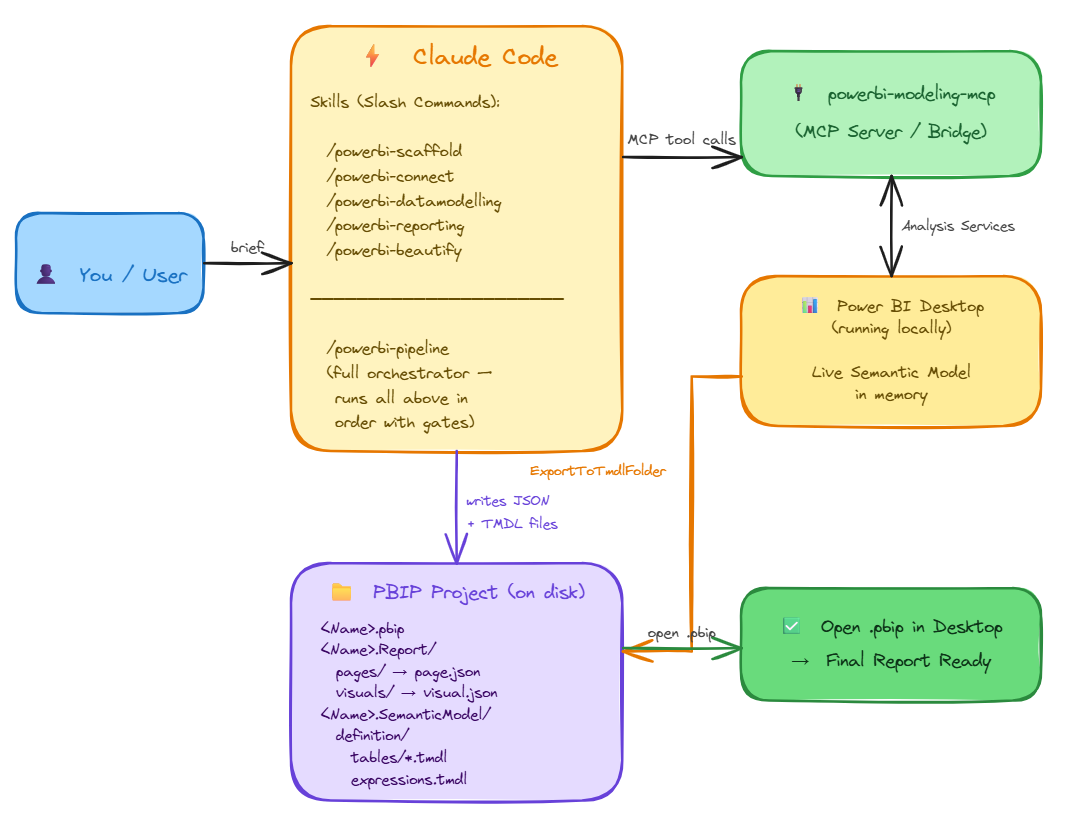
User / You (Blue Box)
You provide a brief description of your reporting requirements to Claude Code.
Claude Code (Orange Box)
Acts as the AI orchestrator.
It has various skills (slash commands) for Power BI tasks:
/powerbi-scaffold→ sets up project structure/powerbi-connect→ connects to data sources/powerbi-datamodelling→ builds semantic model/powerbi-reporting→ generates visuals/powerbi-beautify→ cleans up formatting/powerbi-pipeline→ runs all above steps in sequence
Claude Code writes JSON + TMDL files to disk to create the PBIP project.
MCP Tool / Server (Green Box, Top Right)
Claude Code interacts with powerbi-modeling-mcp (MCP Server / Bridge) for orchestration.
Handles Analysis Services calls needed for semantic models.
Power BI Desktop (Yellow Box)
Runs locally to hold the live semantic model in memory.
Receives data and model structure from MCP / Claude Code.
PBIP Project on Disk (Purple Box)
Claude Code writes all files here:
.pbipproject fileReport/pages/*.json→ visuals/pagesSemanticModel/definition/tables/*.tmdl→ tables & expressions
This project can then be opened in Power BI Desktop.
Final Output (Green Box, Bottom Right)
Open the
.pbipin Power BI Desktop → final report ready.
Not exactly—but it redefines the role.
The focus shifts from:
Building reports → Designing intelligent systems & validating outputs
I tested this end-to-end using Claude Code to generate a complete Power BI report without even opening Power BI manually.
👉 Watch the full video here:
Subscribe for more practical guides on data analytics, AI tools, and building a high-value analyst career.
Stay analytical. Stay curious.
Atikant Jain
Your Analytical Guy
admin@analyticalguy.tech
No posts
Comments
Nothing yet. Say the first thing.
Sign in to join the conversation.