
Lead generation is something every business does and needs. Not sure there’s any business without a lead generation plan or workflow. And if there’s any, and you’re reading this, you should start building one.
However, many businesses have a pile of “almost-customers”. Those who checked out your service or product, filled a form, asked you about it, but haven’t booked yet.
Some of them got busy with life, or found other services they preferred, and others just need a little nudge to book you.
A follow-up system can be helpful here. It’s not a full CRM, because this may take longer than just nudging them, and it’s not an expensive software setup or a dashboard with plugins. It’s you and a google sheet.
→ TLDR: If all of these still feel like a lot, I got you. You can download one here.

Many small businesses do the hard part well. Posting offers, talking to customers, putting yourself out there, and doing everything to deliver the service.
But as a consumer, follow-up misses, and I think it’s mostly because business can be noisy, you know. You’re answering emails, filling invoices, processing orders and returns, not to mention checking payments. Add that to dealing with life and fitting in laundry, meal prep, and working out, 24 hours is gone.
A follow-up tracker can give your business memory. I know when people see “tracker”, they immediately roll their eyes and sigh under their breath. Not another Excel sheet. But this is simple enough to help you, so you don’t rely on your brain to remember every potential customer.
You know how when you check out something on Amazon, all your notifications are brutal reminders to complete your cart? That’s it. Another brand that is persistent with follow-up is Cécred. If you do as much as check out an item on the site, they send at least 2 text messages, reminding you to check out your favorites. And sometimes it works. Yes, these examples have large CRMs and infrastructure, but you can replicate them with the simple steps I’ve shared here.
what you need: Google sheets. that’s all.
The flow is as simple as:
Who the customer is
What they asked for
When you last contacted them
When you should follow up (which is the important thing)
Your follow-up due date
And the message you should send.

Step 1: Create Your Sheet: In a Google sheet, create these columns:
Column Name
A Customer Name
B Email or Phone
C Business Type
D. Service/Product Interest
E Lead source
F Last Contact Date
G Status
H Follow-Up Days
I Next Follow-Up Date
J Due Today?
K Priority
L Message to Send
Your sheet should look like this:
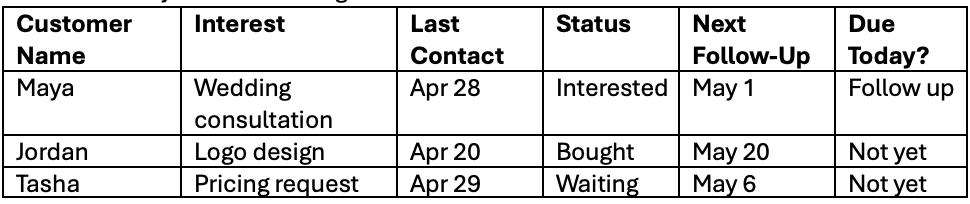
It looks boring, but that’s fine. Useful systems are a little boring, and money hides inside boring.
Step 2: Add simple Status Options
In the Status column, use these dropdown options:
New Lead
Interested
Waiting
Bought
Not Interested
Followed Up
In Google Sheets:
Select the Status column.
Go to Data > Data validation.
Choose Dropdown.
Add your options.
Assign colors if you like.
This gives you cleaner data, and you don’t have to spell-check every time you want to add something.
Step 3: add a follow-up formula (it’s very simple)
In the Next Follow-Up Date column, use this formula in cell F2:
What it means:
New Lead → follow up tomorrow
Interested → follow up in 3 days
Waiting → follow up in 7 days
Bought → check in after 30 days
You can change the numbers to suit your business. For example, a wedding planner can follow up after 2-3 days, but a freelance designer or analyst can check in in 4-5 days. A hair stylist, 30 days, because that’s how long most people tend to keep a hairstyle. So, the formula’s not the boss, you are.
Step 4: Add a “Due Today?” Column
In cell J2, add:
This helps your sheet check whether someone is due for a follow-up. Kind of a “this needs attention” button.
Step 5: make due follow-ups to stand out
Use conditional formatting for this, so “Follow up” is easier to spot. It’s a tiny alarm or bell that rings to wake you up.
Select column G, the due today column.
Go to Format > Conditional formatting.
Format cells if text contains Follow up.
Choose a bright color. That’s it.
Step 6: you can and should add a message template
This is how you personalize the follow-up messages. In the message to send column, just add a text like:
Hi [Name], just checking in to see if you had any questions about [Service]. I’m happy to help if you’re still interested.
[your name]
You can also create templates based on status. For example:
—> New Lead: Hi [Name], thanks for reaching out. I’d be happy to help with [Service]. Do you have any questions, or do you want me to send over next steps?
—> Interested: Hi [Name], just following up on [Service]. I just wanted to see if you had any questions or needed any clarification. Happy to help.
—> Bought: Hi [Name], thank you again for working with us. Just checking in to see how everything is going.
The sheet automatically drafts the message using the template tab logic. It’s not a marketing circus and you’re not telling them it’s their last chance, or any urgency. You’re just checking in, like a nudge.
Small business tech is doable when you have the right systems in place. And your best tool doesn’t always have to be the most expensive software. It could be an automated google sheet that keeps things organized.
Lastly, a follow-up tracker will not automatically fix all your business problems, and some people don’t like follow-ups at all. But it’s better than losing people in the cracks. It can help convert one person, and that’s something. You could have a loyal customer waiting on your list.
Alright, stay tuned for more.
Adios amigas x
Shh… if all of these still feel like a lot, I got you. You can download one here.
disclaimer: there are a couple more XLOOKUP formulas in the sheet to make the automation easier; you can just copy and use them as you wish.
Enjoyed this? I’m building some data tools using an AI-orchestrated workflow.
Subscribe for the drafts, failures, design choices, and finished product.
Up next on data according to me: Intro to Git vs GitHub…
ICYMI:
🔗 Biz and whimsy: https://linktr.ee/amyusifoh
🔗 Free design toolkit: dashboard design toolkit
Data Scientist⬩ Spreadsheet advocate ⬩ Freelancer ⬩
Comments
Nothing yet. Say the first thing.
Sign in to join the conversation.