
RSS Amplifier

Ajay Karwal · Aug 25, 2020

Add CSS to console logs

0
Sign in to vote or save

This site does not allow itself to be embedded. You can still read it on the original site — the toolbar below keeps your place in the directory.

Having lots of console.log() statements in your JavaScript (while you’re in dev mode of course, remove them in production!) your console can quickly become cluttered and all the logs can start looking the same. You can add CSS to your console logs be simply adding the color flag %c before the logged message and passing a string of CSS as the second argument. console . log ( '%c Hello World!' ,…

Having lots of console.log() statements in your JavaScript (while you’re in dev mode of course, remove them in production!) your console can quickly become cluttered and all the logs can start looking the same.

You can add CSS to your console logs be simply adding the color flag %c before the logged message and passing a string of CSS as the second argument.

console.log('%c Hello World!', 'font-size:3em; background: #073642; color: #EEE');
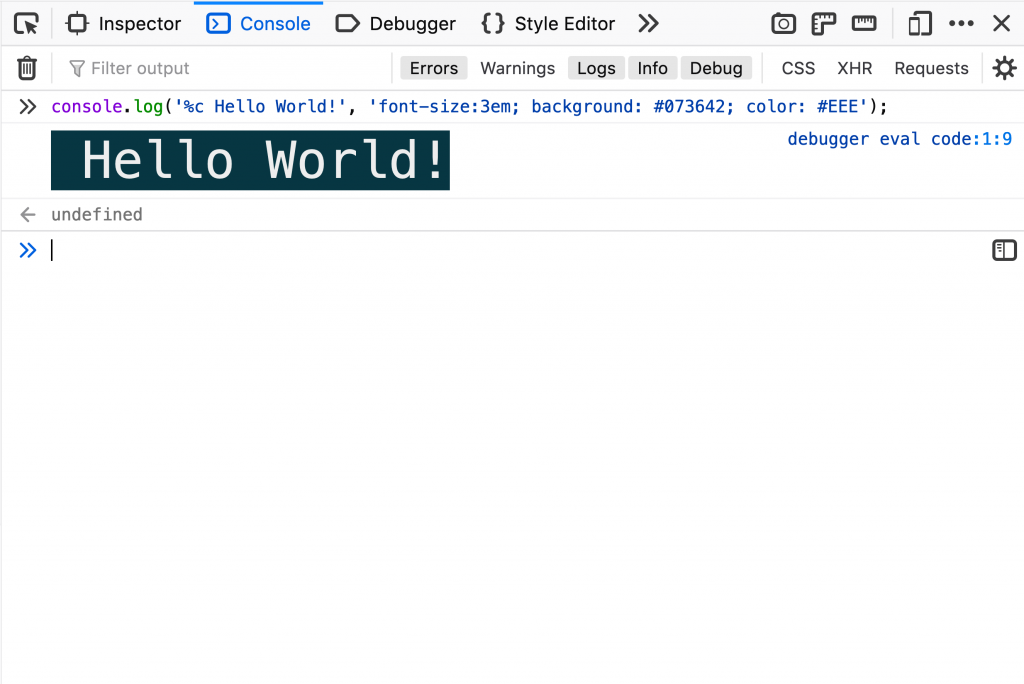
Console colours example

This can be a useful when you need to highlight key bits of information in your console to make your debugging easier.

Read on ajaykarwal.com

Comments

Nothing yet. Say the first thing.

    Sign in to join the conversation.