
Note: AI Weekender has moved. New posts are published at ai-weekender.com, and this Substack is now an archive.
To keep receiving weekly issues, please subscribe at ai-weekender.com instead of here.
The worst feeling on an AI project is realizing you fixed the wrong thing.
Prompting, retrieval, and fine-tuning are all valid solutions to improve LLM results. But they fix different failures, and picking the wrong one can be a costly mistake. This post is about the decision framework I use before I decide on implementation.
Fine-tuning sounds cool and technically advanced, but is also the highest-effort option, requiring:
GPU time
Eval cycles
Labeled examples
Retraining when behavior changes.
For plenty of projects it’s overkill. By the end of this post, you’ll learn how to know when to prompt, retrieve, or train.
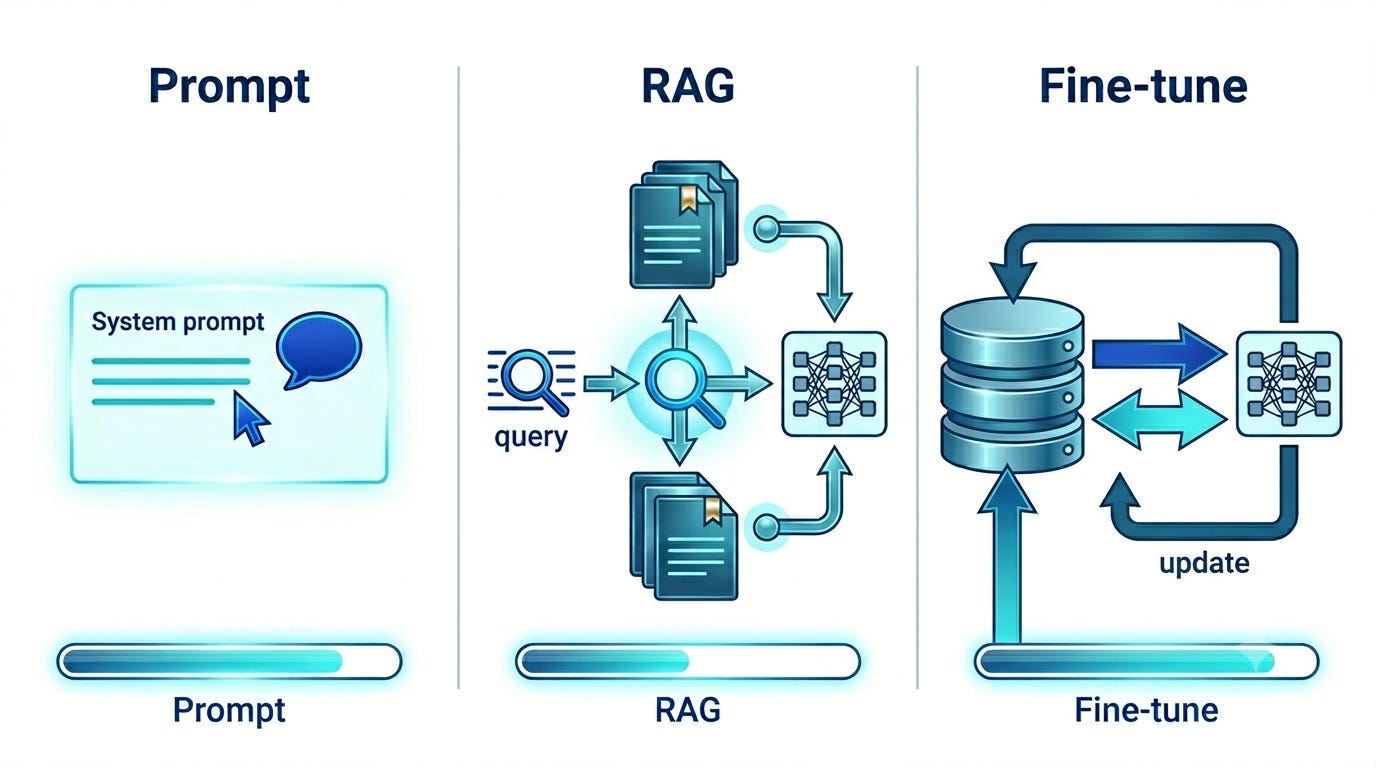
Diagnosing the Failure
Most production issues fall into two buckets:
Knowledge failures: the model does not have the right context, whether it be from docs, policies, customer data, or internal company domain knowledge. It may answer vaguely, guess, or hallucinate.
Behavior failures: the model has enough context but won’t follow your output contract reliably. It may pick the wrong label from your taxonomy, drift off your JSON schema, or slip into the wrong voice, especially after a few turns when instructions are buried in a long thread history.
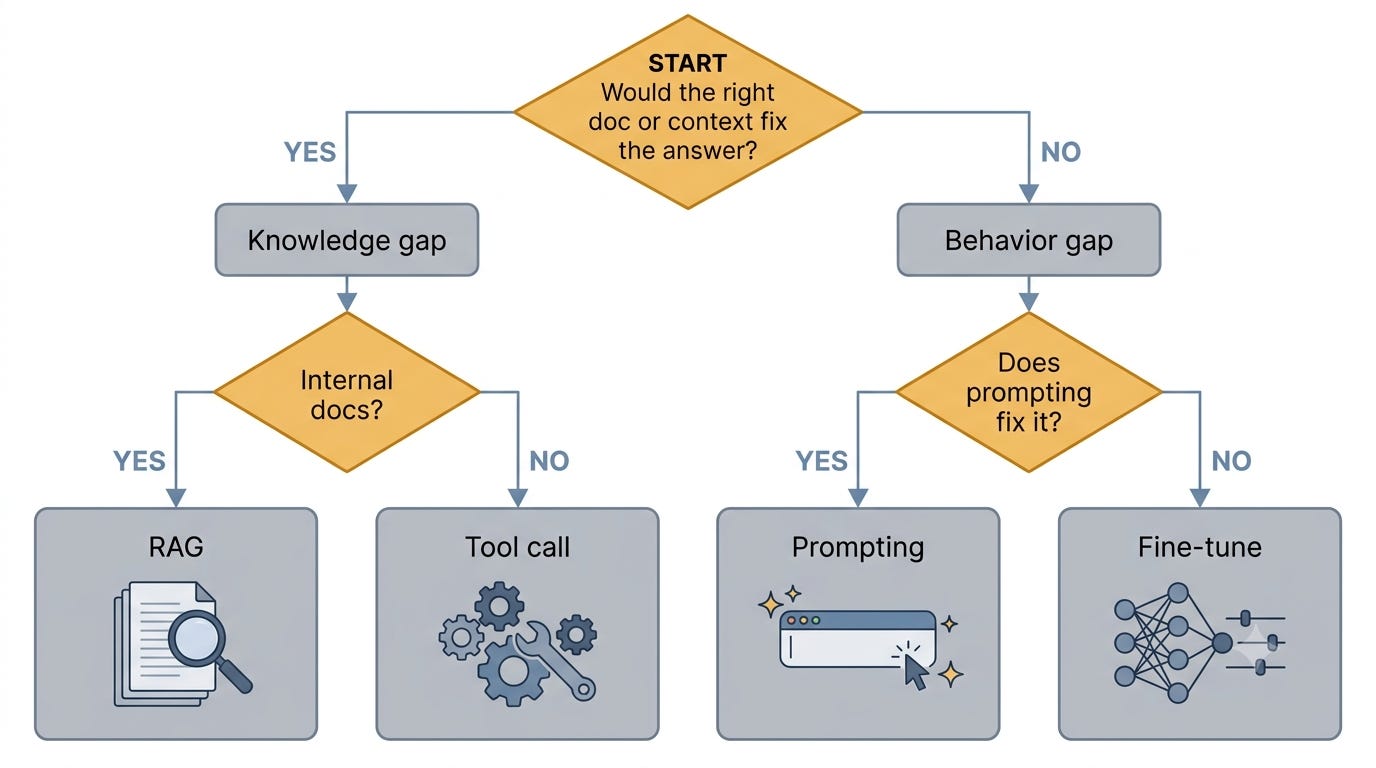
The question I start with is:
Would the right paragraph, search result, or database record change the answer?
If yes, it’s most likely a knowledge failure.
If no, it’s probably a behavior gap.
Fixing the Knowledge Gap
For knowledge failures, the work is on getting the right source for the model at answer time. That usually means RAG for internal or private docs, or tool calls when the answer is on the public web or in a live system I can run.
RAG (for private docs)
I use RAG when the source of truth is a private corpus that can be embedded and searched ahead of time, e.g. company wikis, legal docs, internal policies, or content you own.
On my blog assistant, I store post embeddings in a vector DB, retrieve the top chunks for each question, and inject them into the prompt:
# Pull relevant chunks from my blog post index (vector search in Supabase)
chunks = retrieve(user_query, top_k=5)
from openai import OpenAI
client = OpenAI()
# Inject retrieved content into the prompt, then call the model.
messages = [
    {”role”: “system”, “content”: “Answer using only the context below.”},
    {”role”: “user”, “content”: f”Context:\n{chunks}\n\nQuestion: {user_query}”},
]
response = client.chat.completions.create(model=model, messages=messages)
To evaluate my RAG system, I measure whether the right context is being served:
Use an LLM to generate synthetic question-chunk pairs
Run each question through the production retrieval path
Check whether the right chunk shows up in the top-k results
That tells me if the system is failing because of retrieval quality, and whether changes help or hurt.
Tool Calls (Web search, APIs, live data)
I use tool calls when the relevant context is on the public web, or it lives in a table that gets updated frequently:
Public web (e.g. news, API docs) →
web_searchLive data I own (e.g. SQL tables, tickets in a queue, CRM fields) → MCP or a function tool for that system
We can attach tools to the LLM API call itself. Here is an example with web search for company earnings and news using OpenAI’s API:
from openai import OpenAI
client = OpenAI()
tools = [{”type”: “function”, “function”: {
    “name”: “web_search”,
    “description”: “Search the public web for recent news and filings”,
    “parameters”: {”type”: “object”, “properties”: {”query”: {”type”: “string”}}, “required”: [”query”]},
}}]
response = client.chat.completions.create(
    model=model,
    messages=[{”role”: “user”, “content”: user_query}],
    tools=tools,
    tool_choice=”auto”,  # model decides whether to call web_search
)
Addressing the Behavior Gap
When the diagnostic question points to behavioral failures, the model has enough context, but it does not return output in the shape we need. We sometimes get a wrong label, broken JSON, or voice that drifts after a few turns.
Prompting
I usually start with prompting:
Writing a clear system prompt
Providing a few in-context examples (few-shot prompting)
Specifying explicit output rules (e.g. label list, JSON schema, tone).
For more prompting tips like chain-of-thought, structured outputs, and when to add examples, see:
Fine-tuning
Fine-tuning is next when your best prompt still misses and you have labeled input-output pairs. It updates the model weights to learn your taxonomy, format, or voice. Fine-tuning can be incredibly powerful when applied correctly.
In last week’s QLoRA walkthrough, I fine-tuned a small LLM on Banking77 to classify real customer messages into one of 77 support intents. On an eval set of 100 messages the model had not seen in training, the base model scored 0% on exact intent match. After fine-tuning on 1,500 labeled training examples, the adapter model scored 83% on that same eval set!
Note: AI Weekender has moved. New posts are published at ai-weekender.com, and this Substack is now an archive.
To keep receiving weekly issues, please subscribe at ai-weekender.com instead of here.
Comments
Nothing yet. Say the first thing.
Sign in to join the conversation.