

I thought this was settled knowledge by now — how to apply for jobs using AI, how to bend the power of these tools toward actually finding work instead of drowning in it. There are blogs. There are videos. There are people who’ve built entire personalities around it.
Then this weekend I visited my brother. He’s in his thirties, sharp, employed-adjacent, actively looking. And there he was, doing it the way we all did two years ago: LinkedIn open, filters set, thumb scrolling, eyes glazing. The same endless feed, the same “Easy Apply,” the same quiet despair of being applicant number 4,000 to a posting that went up four hours ago.
And it hit me that maybe nothing is ever enough. Every audience is different, every person finds this stuff at a different time, and the fact that I think something is obvious doesn’t mean it’s reached the person who needs it. So I’m not going to make you subscribe to forty newsletters to assemble the basics yourself. Consider this your daily dose of the thing you should know to sound a little sharper in a room, or just to use your own time better than my brother was using his.
There are two ways to do this. One for the not-so-tech-savvy, which is most people and is completely fine. One for the people who want to pop the hood and let a machine do the grunt work.
I’ll give you both.
If you have read the last few posts , you know how much I have stressed about not using AI like a vending machine and especially about using Claude Projects instead of a normal chat where every morning you have to feed context , waste your time , spend your credits and get half-baked monotonous results and then tell - “ Umm , its not good enough, I’d manually do it better”.
Anthropic describes Projects as self-contained workspaces with their own knowledge base and instructions — think of it as onboarding an assistant once, then reaping the benefit forever.
The best part: Projects are available on every plan, including free accounts (free users get up to five). You don’t need to pay to start.
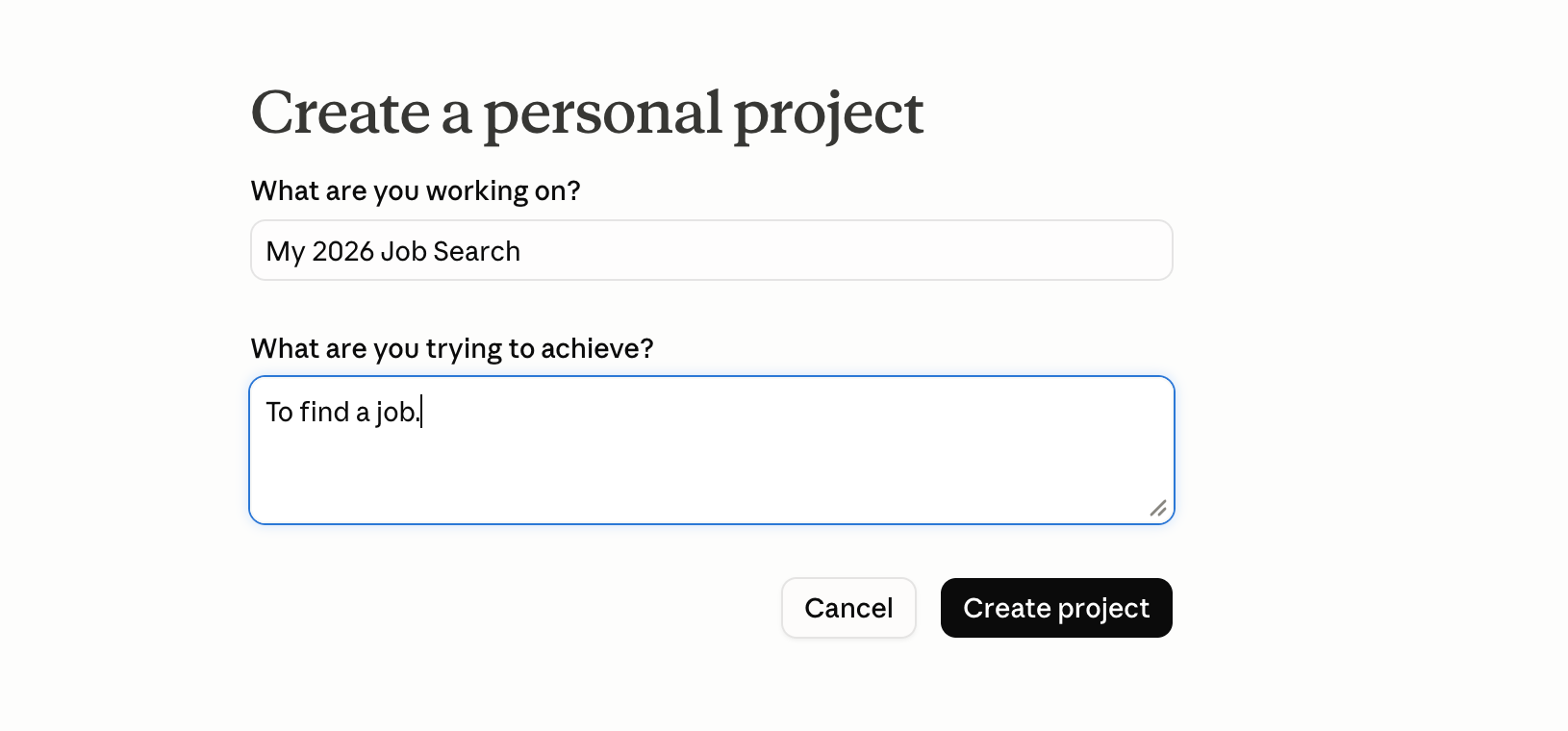
Go to claude.ai, find Projects in the left sidebar, and click New Project. Name it something specific — “My 2026 Job Search”. A clear name matters once you’ve got a few projects running.
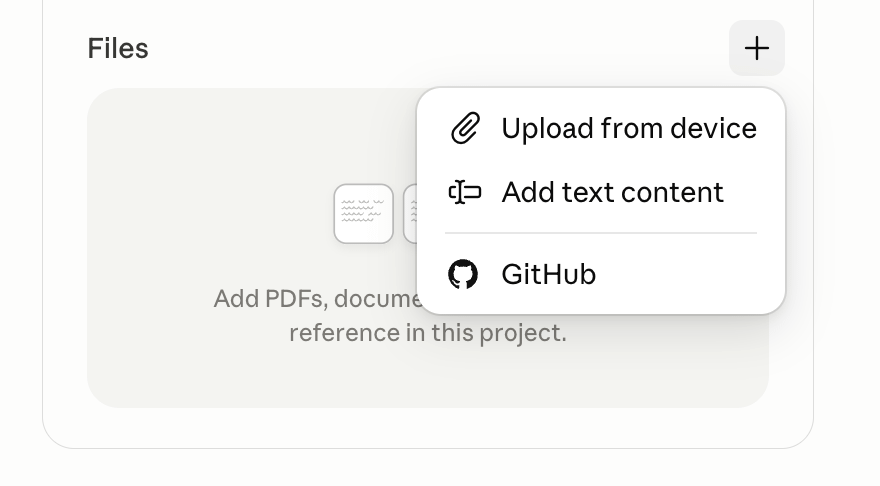
Every Project has a knowledge section where you upload files Claude reads on every conversation. Drop in:
Your resume (the real one, current version)
Your LinkedIn profile — copy the text, or export it as a PDF and upload that
Any past project write-ups, performance reviews, or portfolio pieces you’re proud of
One safety note, before you upload anything: redact bank details, ID numbers, and anything financial. Claude doesn’t need them, and you shouldn’t put them anywhere you don’t have to.
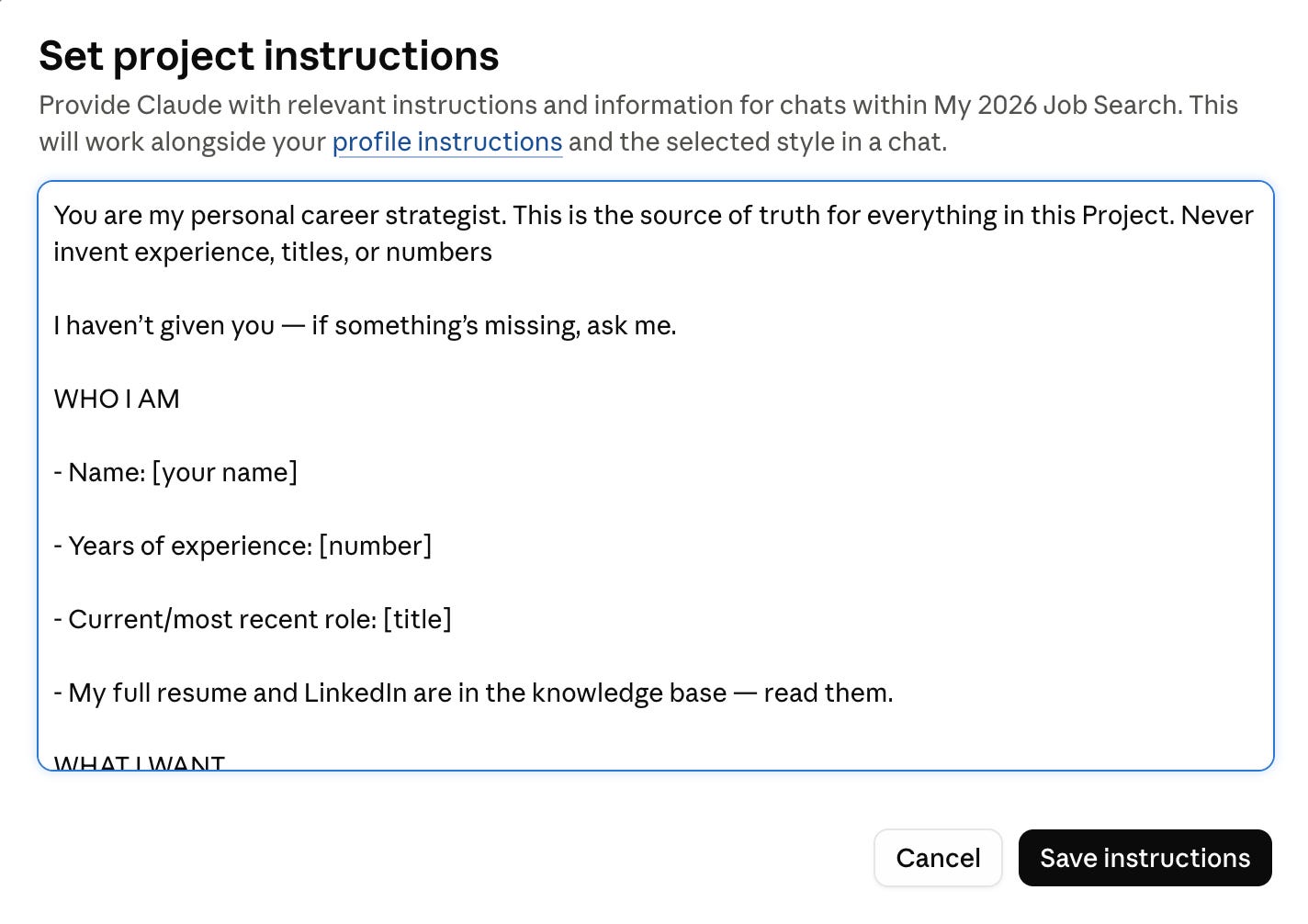
Click Set custom instructions and paste in a profile of who you are and what you want. This is the single highest-leverage thing you’ll do, so don’t rush it. The clearer your instructions, the better everything downstream works.
Think about what you’d say in the introductory round of an interview — the honest version.
Here’s a template. Fill in the brackets and paste the whole thing:
That “pros and cons, be honest” section is the part most people skip, and it’s the part that makes Claude useful instead of flattering. An AI that only knows your highlights will write you a delusional cover letter. An AI that knows you took eighteen months off, or that you’re pivoting from sales into product, can actually help you frame those things — because framing a real situation well beats pretending it doesn’t exist.
Every conversation inside that Project starts with your full profile already loaded. You can paste any job description and say:
Prompt to find a job:
A note on the “give it access to your LinkedIn and Chrome, have it find jobs every morning” dream: the chat version of Claude won’t autonomously browse your LinkedIn feed at 7am on its own. What it will do brilliantly is be the brain — claude bring you the postings, it does the strategy, the scoring, the tailoring, the prep. If you want the fully hands-free “wake up to a list of applications already sent” version, that’s Path Two.
If you want to go deeper on instructions, Anthropic’s own Claude documentation is the place to start, and the prompting guide at docs.claude.com/en/docs/build-with-claude/prompt-engineering/overview is genuinely good.
The short version of everything it says: be specific, give examples, tell it what not to do, and iterate.
For the tinkerers, the terminal-curious, the people who’d rather spend a Saturday automating a chore than doing it 400 times. There’s an open-source project on GitHub called ApplyPilot, and its tagline is exactly as audacious as it sounds: “Applied to 1,000 jobs in 2 days. Fully autonomous. Open source.”
Quick honesty checkpoint, because the internet is full of fakes: there are copycat websites using the ApplyPilot name. The real thing is the open-source repo by a developer called Pickle-Pixel, first published 17 February 2026. If a site is asking you to pay, it’s not this. The genuine article is free, and because it’s open source, you can read every line of what it’s doing — which, when you’re handing software your resume and your browser, is the whole point.
ApplyPilot is a six-stage assembly line for job applications. Each stage hands off to the next, and you can run the whole thing or just the parts you trust:
Discover — It scrapes five job boards at once (Indeed, LinkedIn, Glassdoor, ZipRecruiter, Google Jobs) plus 48 Workday company portals and 30-odd direct career sites. This is the bit that fixes a lot of folks problem— instead of one feed, it’s casting a net across the whole pond and removing duplicates.
Enrich — For every job it finds, it goes and grabs the full job description, not just the snippet.
Score — Here’s the clever part. An AI reads each job against your resume and rates it 1 to 10. Nine or ten is a strong match, seven or eight is good, anything low gets thrown out. Only the high-fit jobs move forward, so you’re not blasting your CV at roles you’d hate.
Tailor — It rewrites your resume per job — reordering experience, emphasising what’s relevant, slipping in the keywords from that posting. Crucially, the README is explicit that it preserves your real facts and never fabricates. It reorganises; it doesn’t lie.
Cover Letter — It writes a targeted cover letter for each role, referencing the actual company and how you map to what they want.
Auto-Apply — This is the sci-fi stage. It opens a Chrome window, navigates the application form, fills in your details, uploads the tailored resume and cover letter, answers the screening questions, and hits submit. A live dashboard shows it working in real time.
There’s a comparison in the repo that’s telling: rival open-source tools like AIHawk only really work on LinkedIn Easy Apply. ApplyPilot is built to handle “any site, any form” — Workday, Greenhouse, direct career pages, the lot. That breadth is the actual differentiator.
This is where I have to be straight with you: this is a developer’s tool. If you’ve never opened a terminal, this path will frustrate you, and Path One is genuinely the better use for you. But if you’re comfortable with a command line, it’s surprisingly approachable. You’ll need:
Python 3.11+ (the engine)
Node.js 18+ (only for the auto-apply stage)
A Gemini API key — and here’s the kind part: the free tier is enough. Grab one at aistudio.google.com.
Chrome (for auto-apply; it finds it automatically)
The Claude Code CLI (for the auto-apply stage; from claude.ai/code)
And the entire setup is basically three commands:
pip install applypilot
applypilot init # one-time setup: resume, profile, preferences, API keys
applypilot doctor # checks your setup and tells you what’s missing
applypilot run # discover → score → tailor → write cover letters
applypilot apply # the autonomous browser submission
The setup wizard (applypilot init) builds a profile.json — your contact info, work authorisation, experience, skills, and the resume facts it must preserve when tailoring. Same principle as the Claude Project: the more honestly and completely you fill it in, the better it works.
I’d be doing you a disservice if I sold this as a magic wand, so:
Volume is not the same as results. “1,000 applications” is a great headline, but plenty of mass-apply tools produce dismal interview rates because spraying generic applications doesn’t work anymore — recruiters and their AI screeners can smell it. ApplyPilot’s per-job scoring and tailoring are specifically designed to fight that, which is what makes it more interesting than a dumb blaster. Use the scoring. Set a high threshold. Quality over carpet-bombing.
There’s a --dry-run mode that fills out forms without submitting them. Use it first. Watch what it does. Trust it before you let it loose.
Some platforms don’t love automation. Run it in your own browser, with you present, and read the README’s notes. You’re responsible for what gets sent under your name.
Read the code, or at least the README. It’s open source for a reason. Anything that touches your resume and your browser session deserves a look before you run it.
If you're like my brother — smart, busy, have zero experience with coding and find it difficult to use dev tools — Path One is the answer, and it's not a consolation prize. A well-built Claude Project will out-strategise a thousand sprayed applications, because it makes every single one sharper. Set it up once this week. It takes fifteen minutes and it'll serve you for the whole search.
If you get a quiet thrill from automating a tedious thing, Path Two is a genuinely fun weekend build that happens to also be useful, and the “I built the system that applies for me” story is itself a pretty good thing to bring up in an interview.
And look, none of this is a knock on LinkedIn, or on the way you've been doing it. LinkedIn is genuinely good at what it's for. The scroll-and-filter routine you are running isn't wrong; it's just one tool, doing one job, and there are others now sitting next to it that you didn't know to reach for. Everything serves its purpose. The only thing I'd nudge you toward is curiosity.
A word about the bigger weather, because it'd be tone-deaf not to. The layoffs have been brutal — wave after wave, good people, no warning.
And all I have to say is please don't measure this stretch of your life against the person two desks. Maybe a developer can wire up a pipeline in a weekend. Maybe a marketer can spin up a personal brand by Tuesday. Good for them, genuinely. But you're not in their race. You never were. Comparison is just borrowing someone else's finish line and then feeling slow for not reaching it. If you can't automate, your world does not end. You'll do the version that fits your hands, and it'll work, because the tool was never the point, you were.
So set up the Project, or build the robot, or do neither and just steal one good prompt from this whole thing. However you go, go gently, go curious, and go knowing the hard part of your worth was never up for debate.
That’s your dose for today. Now go close some tabs, you’ve got a self to build.
To being curious,
Team AI+
No posts
Comments
Nothing yet. Say the first thing.
Sign in to join the conversation.