
If you’ve used Claude for company research, you’ve probably felt both sides of this.
You build up a rich conversation, close the tab, come back the next day and it picks up exactly where you left off.
Perfect…
But then you start a new chat expceting the same context, and it’s gone
Blank slate.
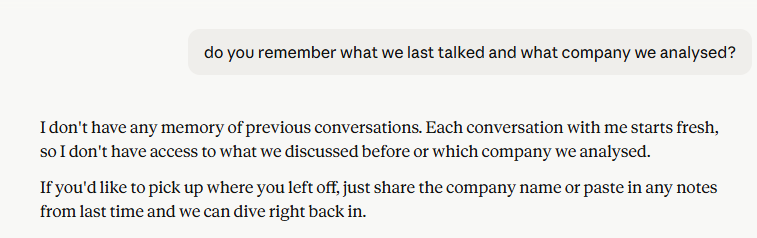
That’s not a bug!
That’s exactly how Claude’s memory works.
And once you understand the logic, you can use it deliberately.
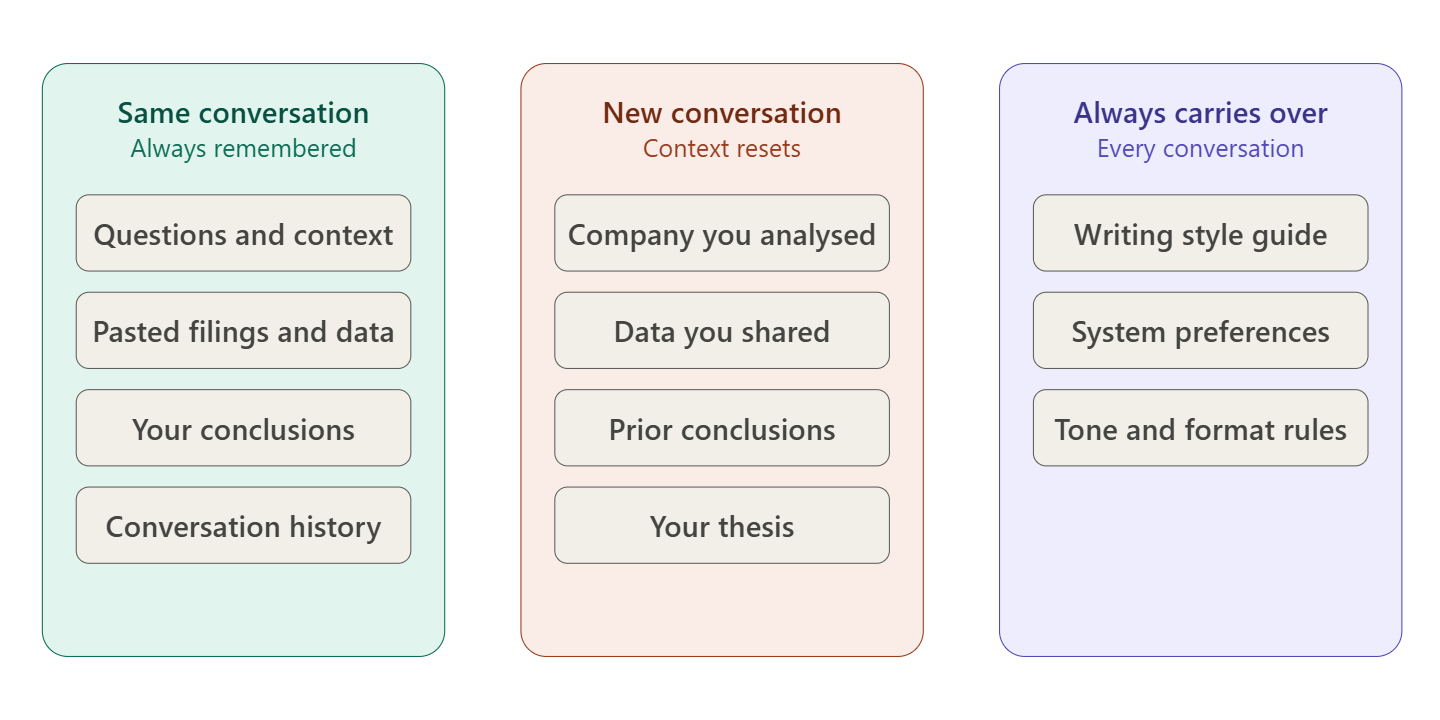
Claude holds full context within a conversation.
Every question you've asked, every document you've pasted, every conclusion you've reached, it all stays live for the duration of that thread.
Reopen the same conversation from your recents and Claude picks up exactly where you left off.
Your analysis is intact.
The practical implication is simple.
Be intentional about when you start a new conversation versus continuing an old one.
For companies you are actively researching, keep one long conversation per company.
Reopen it each time you want to dig deeper.
Over time that thread becomes a living research file.
You can scroll back and see exactly how your thinking evolved, which questions you asked early on and how the analysis shifted as you learned more.
That’s genuinely valuable.
When you do need to start a fresh conversation, for a new company or a new angle on an existing one, paste your context at the top before asking a single analytical question. Use some of the battle tested prompts.
This means the business description, the key metrics you care about, the most recent earnings call highlights and your current thesis or the question you’re trying to answer.
A few other habits that sharpen the analysis:
Paste source material directly, not summaries.
When you want Claude to analyse an earnings call, paste the actual transcript or the relevant section of the 10-K.
Summarising it yourself before asking introduces your own framing before the analysis even starts.
Give Claude the raw material.
For companies you follow regularly, maintain a short text file with the business model overview, key metrics and your ongoing thesis.
When you open a new conversation, paste this document at the top.
Ten seconds of setup, dramatically sharper output.
Use a single session like a research meeting.
Build one long thread per research sprint.
Ask follow-up questions, push back on the analysis, ask Claude to argue the bear case.
The longer the session, the richer the context it draws on.
This one is for investors willing to go a level deeper using Claude Code, the command-line version of Claude.
Claude Code supports a file called CLAUDE.md that lives in a folder on your computer.
Claude reads it automatically at the start of every session in that directory.
You write it once and it loads every time, no pasting required.
For investment research, you could create a folder for each company you follow, with a CLAUDE.md containing the business overview, your key metrics, your thesis and the main risks you’re tracking.
Every session in that folder starts with full context already loaded.
It requires using Claude Code (paid Claude version) rather than the standard chat interface, so it’s a setup investment.
But for companies you return to often, it removes the manual context-loading step entirely.
The core principle is this: Claude is a powerful analyst with no long-term memory.
Your job is to be the memory layer.
Here are the specific workflows that actually help.
Start every session with a context block. Before asking a single analytical question, paste in the key information.
This means the business description, the most recent earnings call highlights, the financial metrics you care about (revenue growth, operating margins, free cash flow), and your current thesis or the question you are trying to answer.
This one habit changes everything.
A well-loaded Claude session is genuinely powerful.
Each one of us follow and watch for something else and understand different things. I have specfic filters and things I watch in each company.
I maintain a master prompt library that helps me structuring all the most important things and structured prompts that I use on each new analysis. It helps me research faster 10x. Here is that library.
When you open a new Claude session, paste your prompt at the top.
Rather than opening and closing tabs, build one long session per company per research sprint using more prompts.
Ask follow-up questions, push back on the analysis, ask Claude to steelman the bear case.
The longer the session, the more useful it becomes.
Use master prompts for recurring analysis tasks.
You are not starting from scratch each time.
You are running a repeatable workflow.
Claude’s memory reset in new conversations is actually useful if you think about it right.
There’s no anchoring to last quarter’s narrative or whatever the market consensus was when you last opened a chat.
Every new session reads your source material fresh.
Feed it good primary sources and ask sharp questions.
That’s the whole game.
Claude remembers everything within a conversation, including when you reopen it from recents.
Context only resets when you start a new chat.
The best habit for ongoing research is one long conversation per company, and a context block at the top of any new session.
Advanced users can take this further with CLAUDE.md in Claude Code for persistent, automatic context loading.
If you want more frameworks like this for AI-assisted research, subscribe below.
Know someone who would find this useful? Send it to them
No posts
Comments
Nothing yet. Say the first thing.
Sign in to join the conversation.