
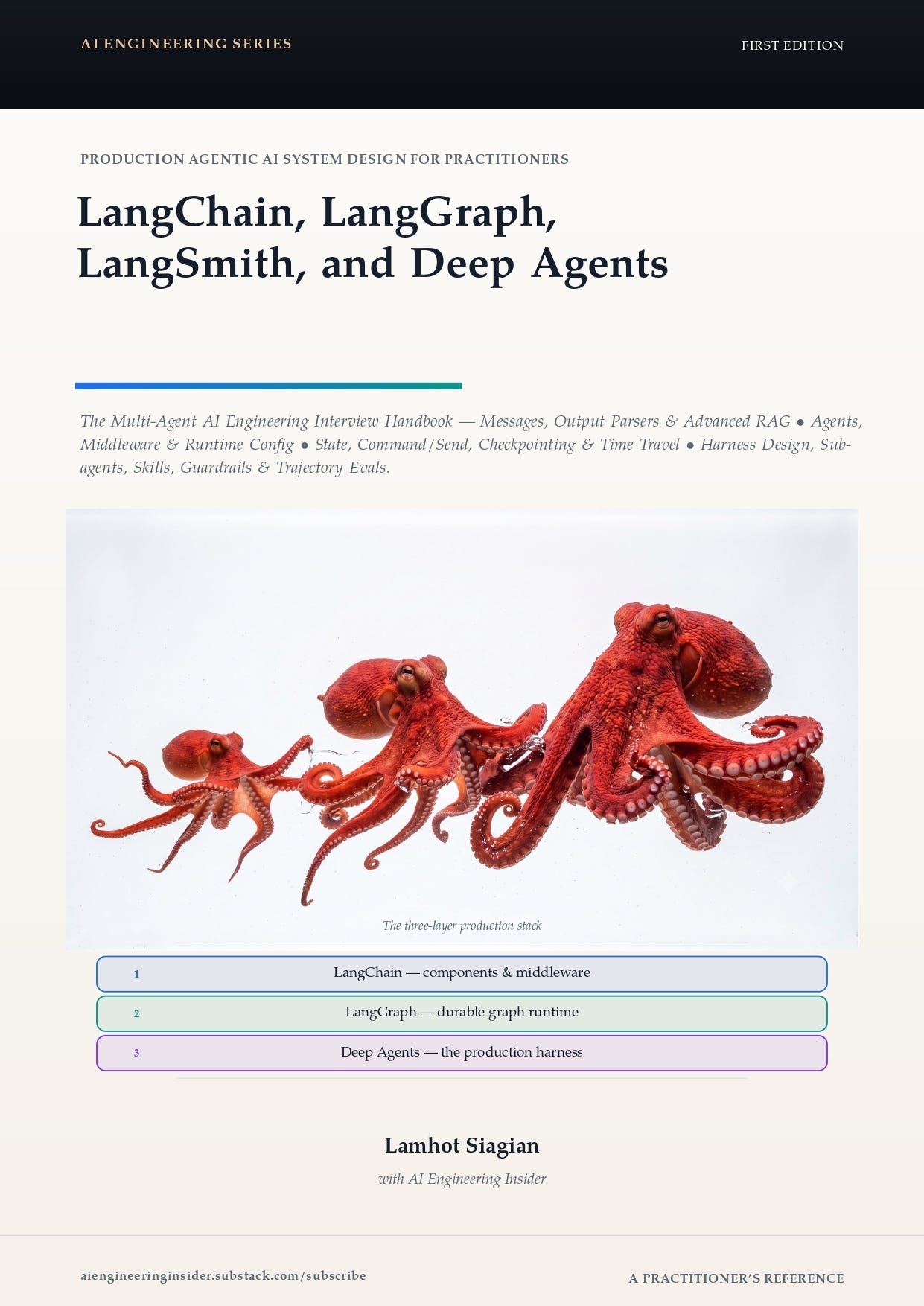
A practitioner’s reference that takes you from LangChain’s message layer all the way to production-operated multi-agent systems. Every concept across all 15 chapters maps to working, runnable code. Nothing is fabricated — the knowledge base, seed data, and tool responses are all real documents grounded in a realistic payment-platform scenario (NimbusPay).
Repository: Link
Check out the ebook: Premium Guide
Preview: Preview
Demo Video
This book answers the questions that come up in senior AI engineering interviews:
How LangChain’s message layer works and why it matters for multimodal content
How to build reliable agents with middleware, HITL approvals, PII guards, and retries
How to design advanced RAG pipelines combining sparse BM25, dense embeddings, and hybrid reranking
How LangGraph state machines work and how to checkpoint, replay, and time-travel through execution
How to build a deep-agent harness with planning, subagent orchestration, and context offloading
How to secure agents with guardrails, permission gates, and trajectory-level evaluation
How to extend agents over a network using the Model Context Protocol (MCP)
How to give agents a shell safely inside sandboxed execution backends
How to industrialize evaluation with agentevals and LangSmith CI gates
langchain-langgraph-deepagent/
│
├── corpus/                         # Real Markdown knowledge base (not generated)
│   ├── api/                        # NimbusPay API reference docs
│   ├── hr/                         # Onboarding & team policies
│   ├── product/                    # Settlement, payout & fee guides
│   ├── research/                   # Internal research notes
│   ├── runbooks/                   # Ops runbooks (webhooks, retries, DLQ)
│   └── security/                   # Compliance & secret-rotation docs
│
├── langchain/                      # Part I companion app (Chapters 1–4)
│   ├── app.py                      # Home page + environment health check
│   ├── core/
│   │   ├── llm.py                  # ChatOllama + OllamaEmbeddings wrappers
│   │   └── seed_data.py            # Loads corpus/ recursively at startup
│   ├── pages/                      # One Streamlit page per chapter
│   └── requirements.txt
│
├── langgraph/                      # Part II companion app (Chapters 5–8)
│   ├── app.py
│   ├── core/
│   ├── pages/
│   └── requirements.txt
│
├── deepagent/                      # Part III companion app (Chapters 9–12)
│   ├── app.py
│   ├── core/
│   ├── pages/
│   ├── skills/                     # Skill definitions loaded by the harness
│   ├── workspace/                  # Agent virtual filesystem root
│   └── requirements.txt
│
└── tests/
    └── run_tests.py                # Playwright end-to-end UI test runner
Part IV (Chapters 13–15) ships as standalone Python scripts. Each listing runs from the repository root against the same local Ollama stack — no extra app required.
You need the following tools installed before you begin.
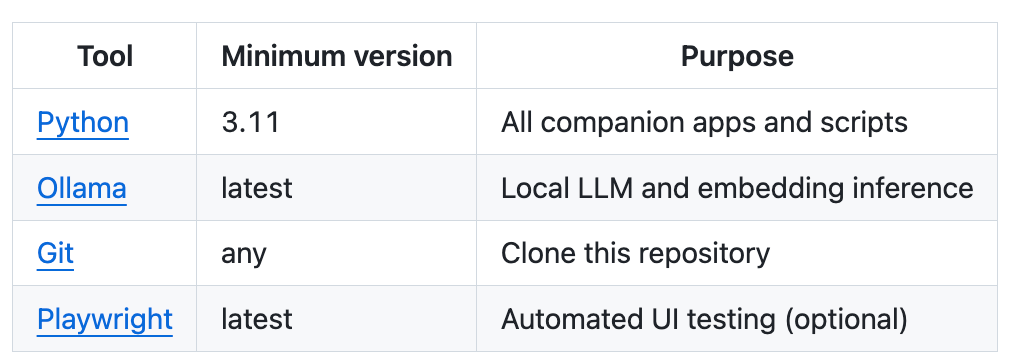
Run this once before starting any companion app:
ollama pull llama3.2:1b
ollama pull nomic-embed-text
The home page of every companion app checks that Ollama is reachable and both models are present before you navigate to any chapter page.
Clone the repository, then set up whichever part(s) you need. Each app is an independent Python environment — you do not need to install all three.
git clone https://github.com/lamhotsiagian/langchain-langgraph-deepagent.git
cd langchain-langgraph-deepagent
cd langchain
python3.11 -m venv .venv
source .venv/bin/activate # Windows: .venv\Scripts\activate
pip install -r requirements.txtWhat gets installed: langchain ≥ 1.0, langchain-core, langchain-ollama, langgraph, streamlit ≥ 1.39, rank_bm25, httpx
cd langgraph
python3.11 -m venv .venv
source .venv/bin/activate
pip install -r requirements.txt
What gets installed: langchain ≥ 1.0, langchain-core, langchain-ollama, langgraph, langgraph-checkpoint-sqlite ≥ 2.0, streamlit ≥ 1.39, httpx
cd deepagent
python3.11 -m venv .venv
source .venv/bin/activate
pip install -r requirements.txt
What gets installed: deepagents ≥ 0.6, langchain ≥ 1.0, langchain-core, langchain-ollama, langgraph, streamlit ≥ 1.39, httpx
Part IV listings run as standalone scripts. Install the additional libraries into any active virtual environment:
pip install langchain-mcp-adapters fastmcp agentevalsThe LangSmith integration in Chapter 15 requires an optional free-tier LANGSMITH_API_KEY. All other listings run fully offline.
Launch the app for the part you are studying. Each starts on port 8501 by default.
cd langchain && source .venv/bin/activate
streamlit run app.py
# → http://localhost:8501
cd langgraph && source .venv/bin/activate
streamlit run app.py
# → http://localhost:8501cd deepagent && source .venv/bin/activate
streamlit run app.py
# → http://localhost:8501To run multiple apps at the same time, pass a different port to each:
streamlit run app.py --server.port 8502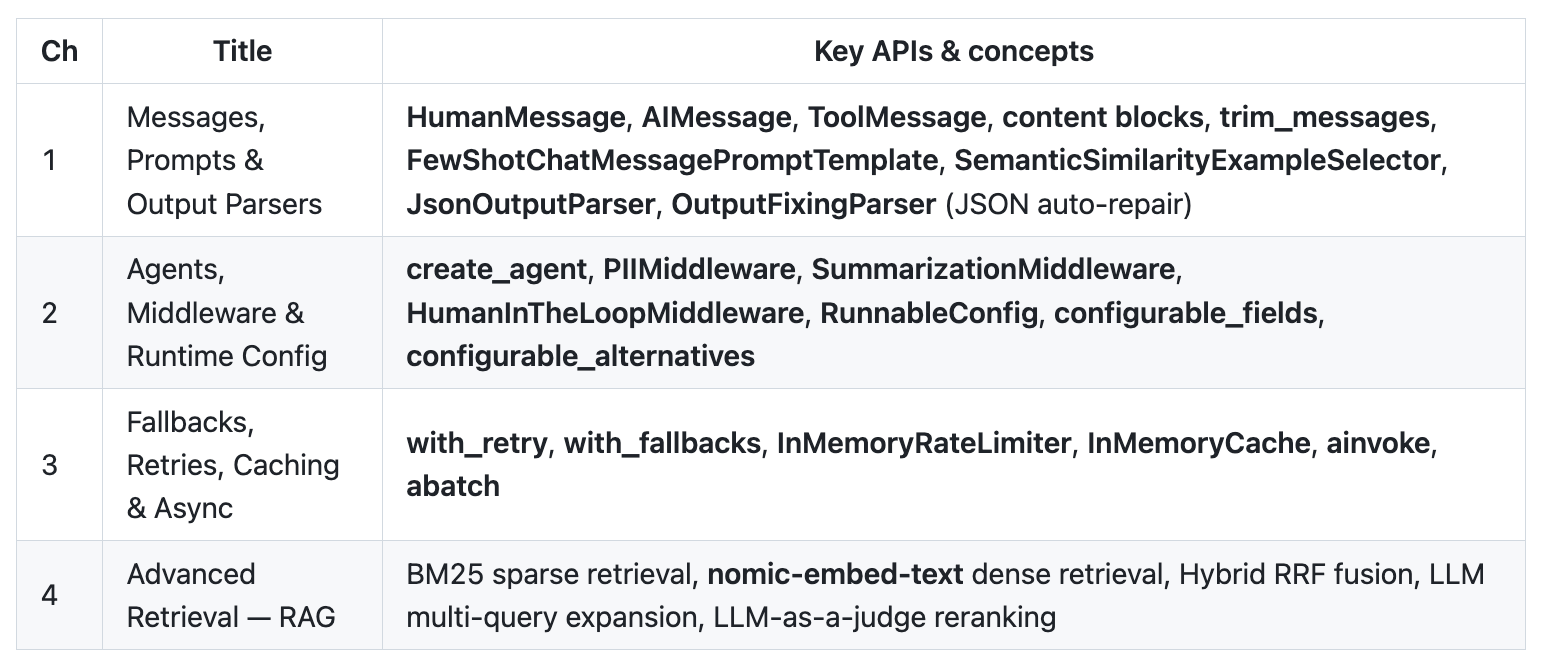
Companion app: langchain/ → streamlit run app.py
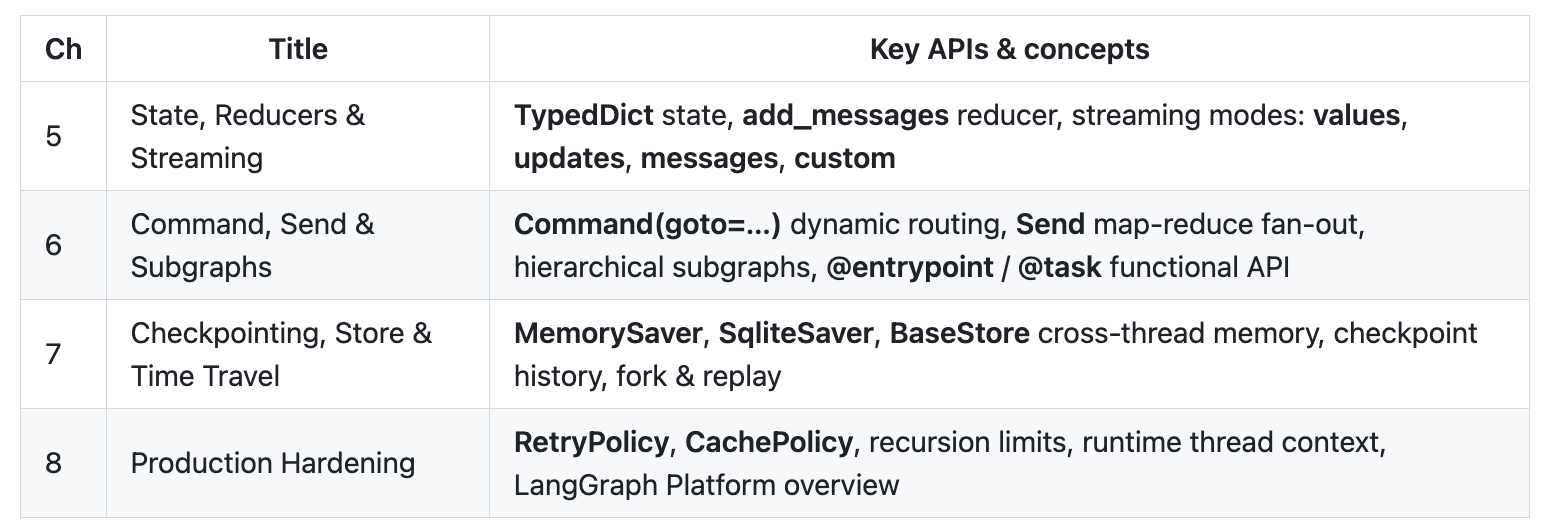
Companion app: langgraph/ → streamlit run app.py
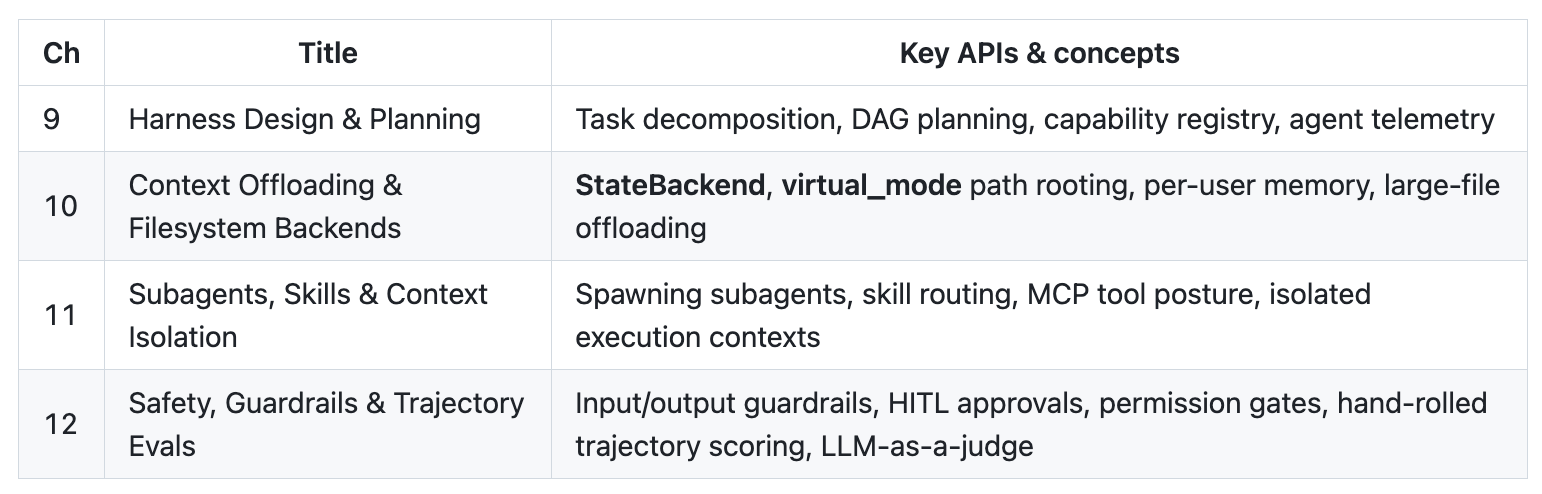
Companion app: deepagent/ → streamlit run app.py
Standalone script listings — run from the repository root, no separate app needed.
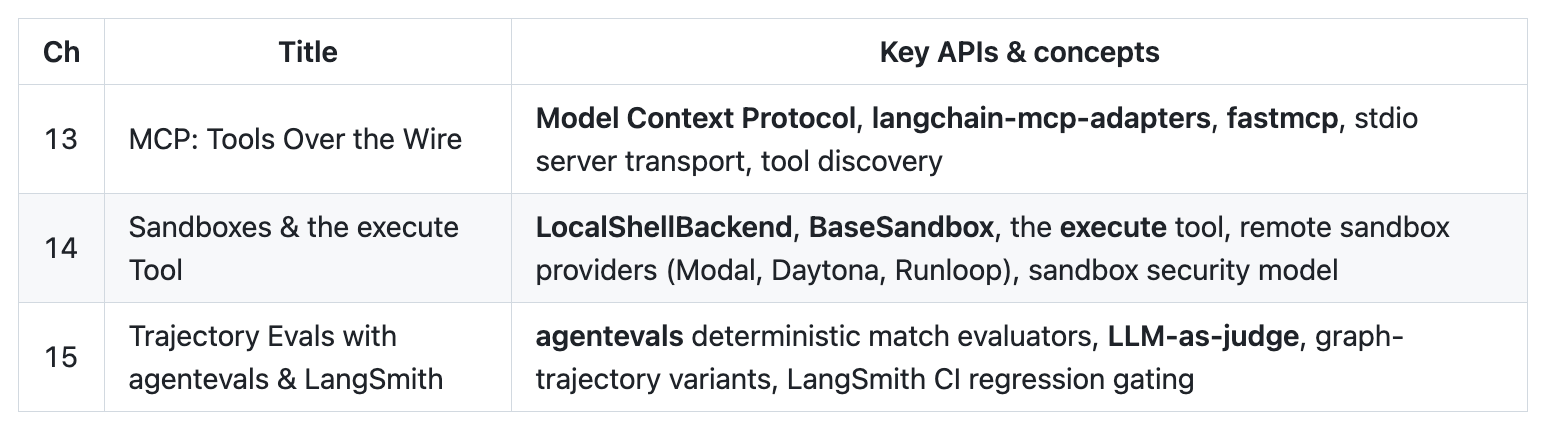
Chapters 13 and 14 run fully offline. Chapter 15 match evaluators run offline; the LangSmith section needs a free-tier LANGSMITH_API_KEY.
The test runner at tests/run_tests.py boots all three Streamlit apps in parallel on separate ports, navigates every chapter page, types real queries, waits for LLM responses, and captures screenshots. The browser window is visible, so you can watch each step.
pip install playwright
playwright install chromium
Comments
Nothing yet. Say the first thing.
Sign in to join the conversation.