
This article is sponsored by Cluing. They paid for the placement, not the praise. Everything here comes from actually using it, not just testing it for a review, since this is an app I use every week.
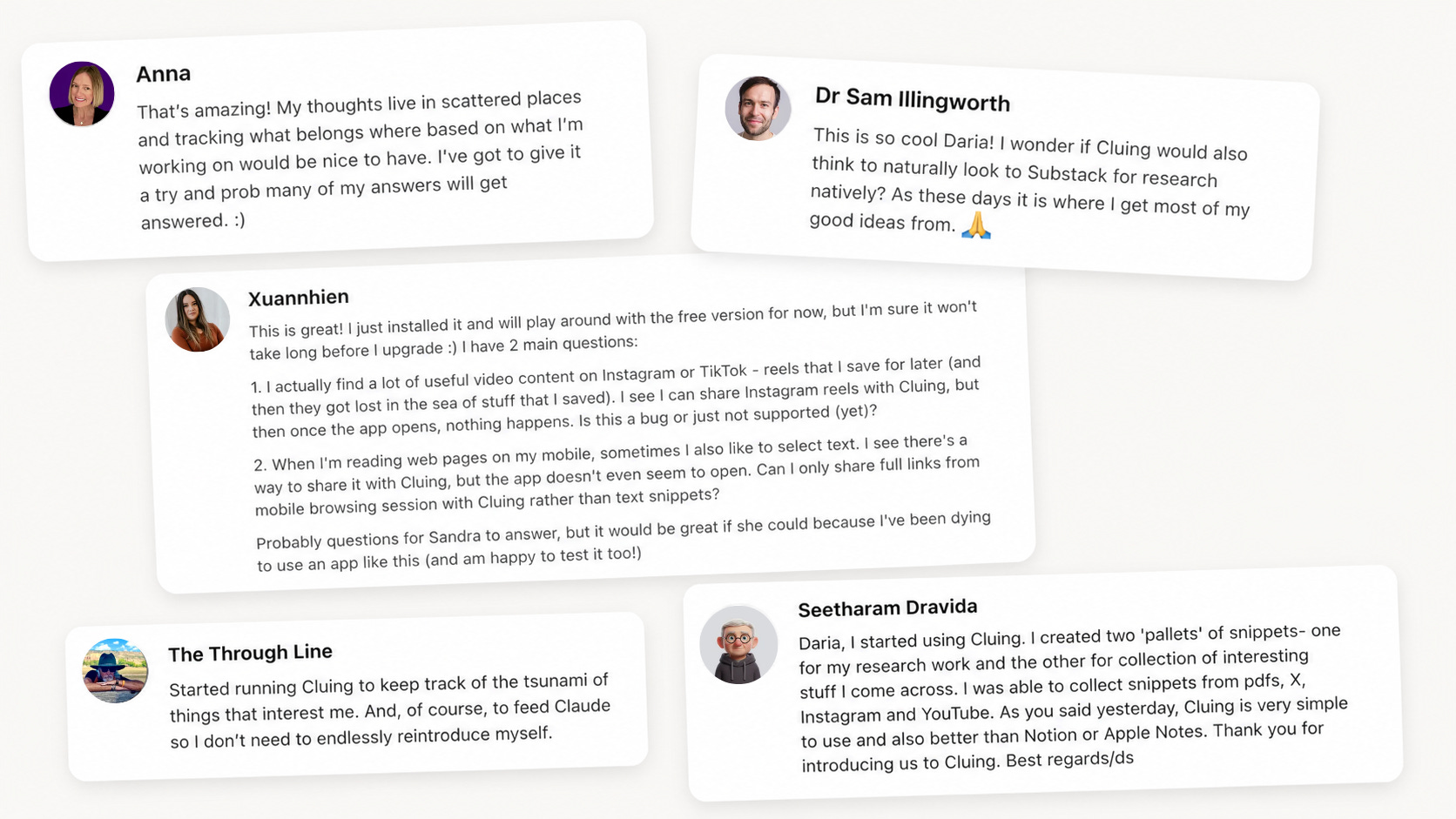
Back in April, I wrote about Cluing, the AI second brain I use to save ideas from anywhere I find them and keep them all organized in one place. You were excited about it. The comments filled up with questions, and some of you even started using it the same day.
In the first article, I walked you through how I use it to gather and organize my research before writing a piece. That one was about getting everything in.
This one is about what happens after. Because saving things is only half the problem. The harder half is connecting it, organizing it without doing the filing by hand, and using it inside the AI tools where you already work.
Since then, the Cluing team has been busy building for that second half. And I can confidently say it’s become the second brain I wanted, because I can now reach everything I’ve saved without leaving the app I’m in the most (hello there, Claude!).
Here’s what shipped:
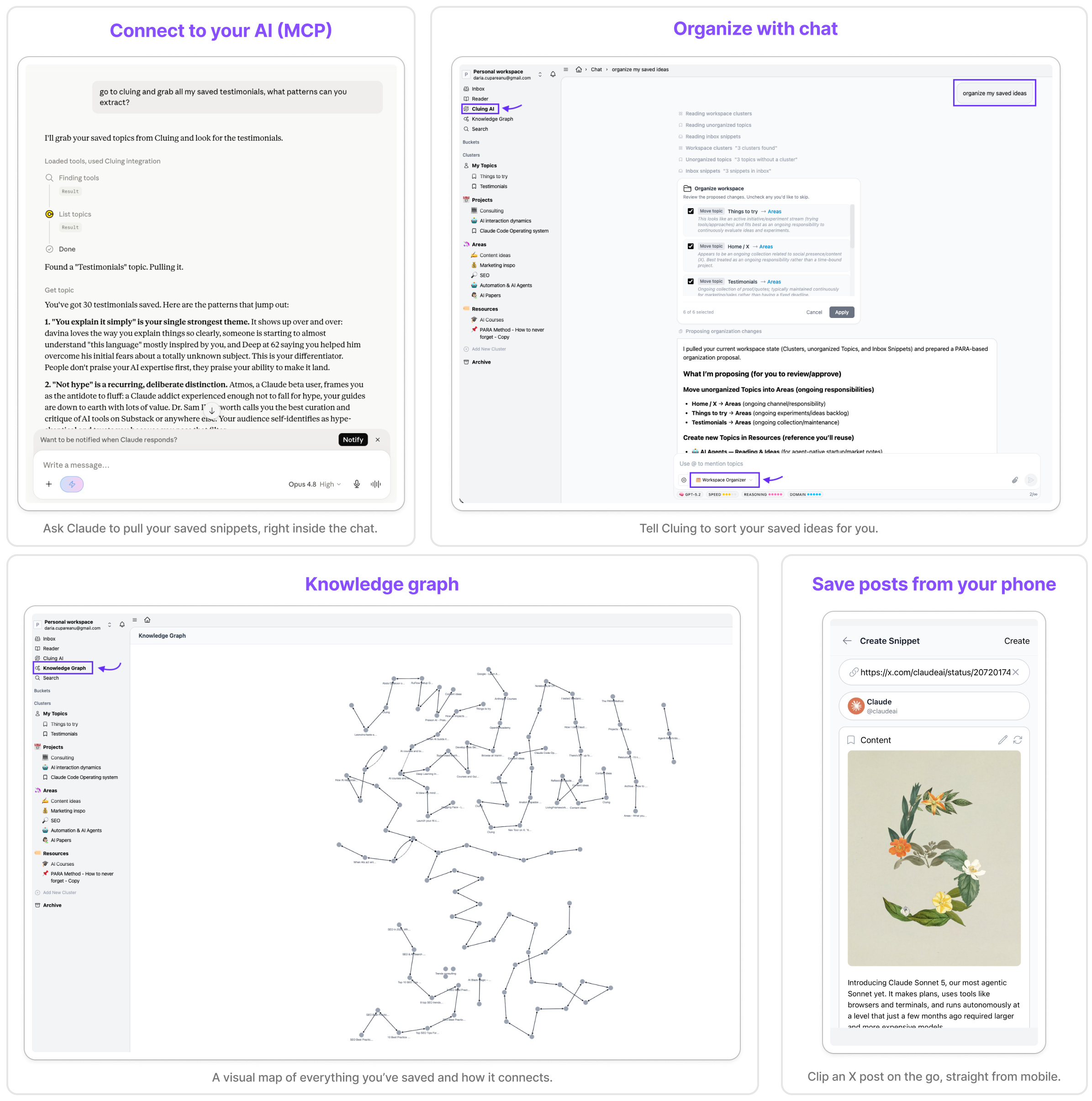
An MCP, so Cluing now plugs straight into your AI (Claude, ChatGPT, Gemini, and other MCP-friendly LLMs). The one I’d been hoping for.
AI organization through chat. Tell the chat to sort your saved ideas and attach documents or images, instead of filing everything manually.
Documents in AI Chat — drop a PDF, screenshot, or file directly into the AI chat and ask questions about it
The knowledge graph, a visual map of everything you’ve saved and how it connects. A great feature if you ever tried Obsidian, loved the graph view, but never quite stuck with the app, like me.
A new X integration for mobile, so you can save posts straight from your phone. Instagram and Facebook coming soon.
So this is part 2: less about saving interesting finds from across the web, more about connecting the dots and putting them to work. I’ll show you the MCP workflows I’m running now, including one I’d been fantasizing about since I first tested the tool, where the research runs itself and lands where I need it without me lifting a finger.
Let’s get into it.
PS. Paid AI blew my mind subscribers get an exclusive 20% discount on Cluing. The code is on the Premium Perks page, use it at checkout.
Before I show you the workflows and the other ways I use Cluing now, here’s a quick overview of everything it can do, so nobody’s lost, whether you’ve used it or you’re just hearing about it.
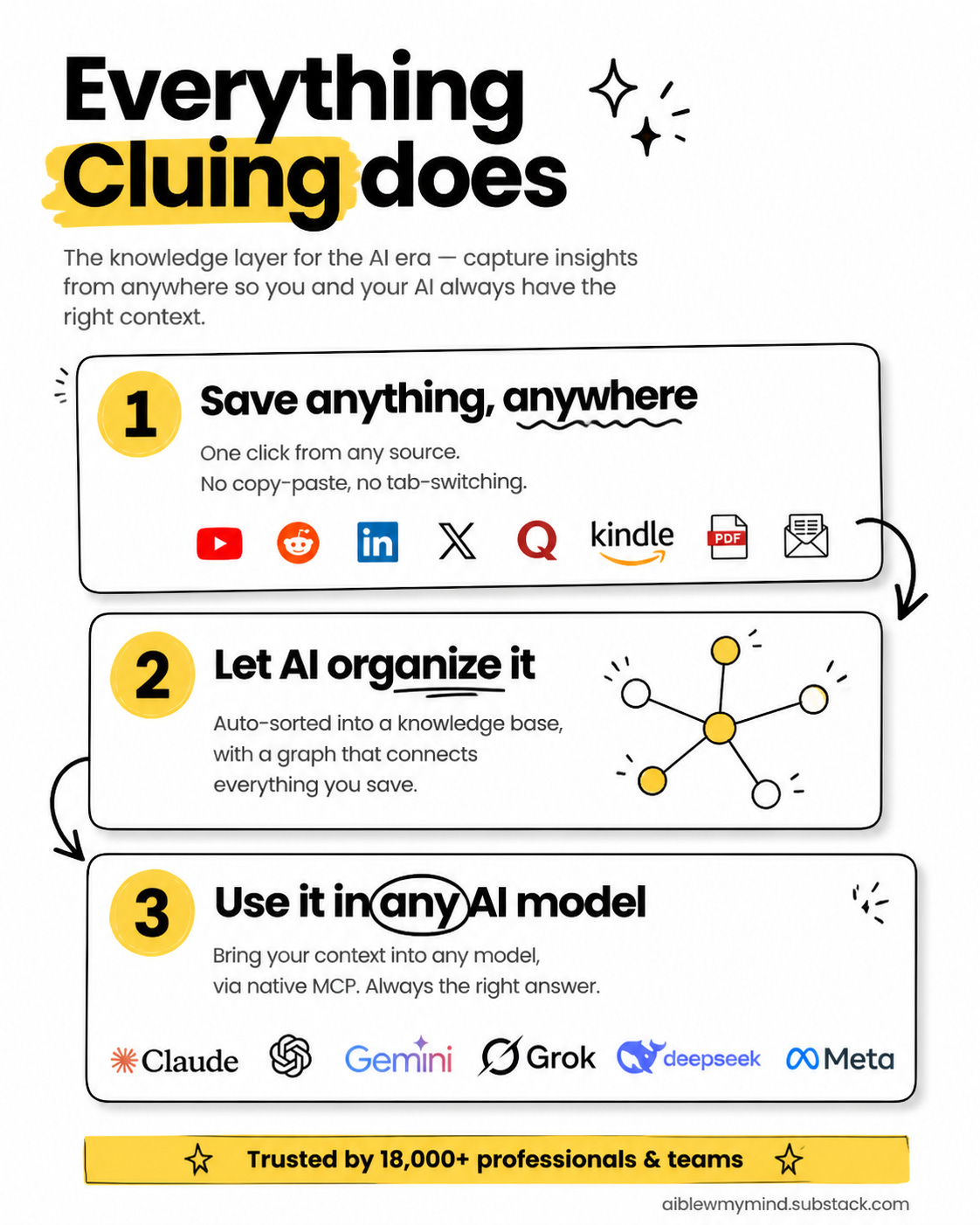
Cluing does three core things. It saves anything you find, organizes it for you, and puts all of it to work inside whatever AI you already use.
The whole point of Cluing is capturing things where you find them, in one click, with no copy-pasting and no switching apps.
Highlight a passage on any web page or PDF and save it as a snippet
Save posts from LinkedIn, X, Reddit, Quora, Instagram, and other platforms, from your computer or your phone
Clip YouTube videos and Kindle highlights
Forward newsletters straight into Cluing by email
Drop in your own notes and ideas, the things that only live in your head
Saving is the easy part. What usually falls apart is keeping it organized so you can find it again. Cluing handles that side too.
Ask the AI chat inside Cluing to sort your snippets, and it files them for you
Get suggestions on where new things belong as you save them
Set up triggers that alert you when something new comes up on a topic you follow
See everything mapped in a knowledge graph, so you spot connections between ideas you’d never have made on your own
Everything lives inside the PARA structure (Projects, Areas, Resources, Archive), so nothing gets lost
This is the part that didn’t exist when I wrote the first article, and it’s the one I use most. Your saved knowledge doesn’t just sit there. You bring it into your AI work.
Pull your saved context into any model: Claude, OpenAI, Gemini, Grok, and more
Connect Cluing directly through its MCP (here’s how), so your research is right there while you work
Use the AI canvas to turn what you’ve collected into something new
No tab-switching, no re-explaining yourself, no lost context
Anyone who reads and researches more than they can keep track of. If you’re writing content, prepping for client calls, studying a topic, or just drowning in tabs you keep meaning to get back to, Cluing is the system that catches all of it and hands it back the moment you need it.
A quick heads-up: for all of these to work, especially the mobile integrations like X, make sure you’re on the latest version of Cluing and your phone’s software is up to date.
Next I’ll share with you five ways I use Cluing. Not the only ones, but the ones I think might give you some ideas too.
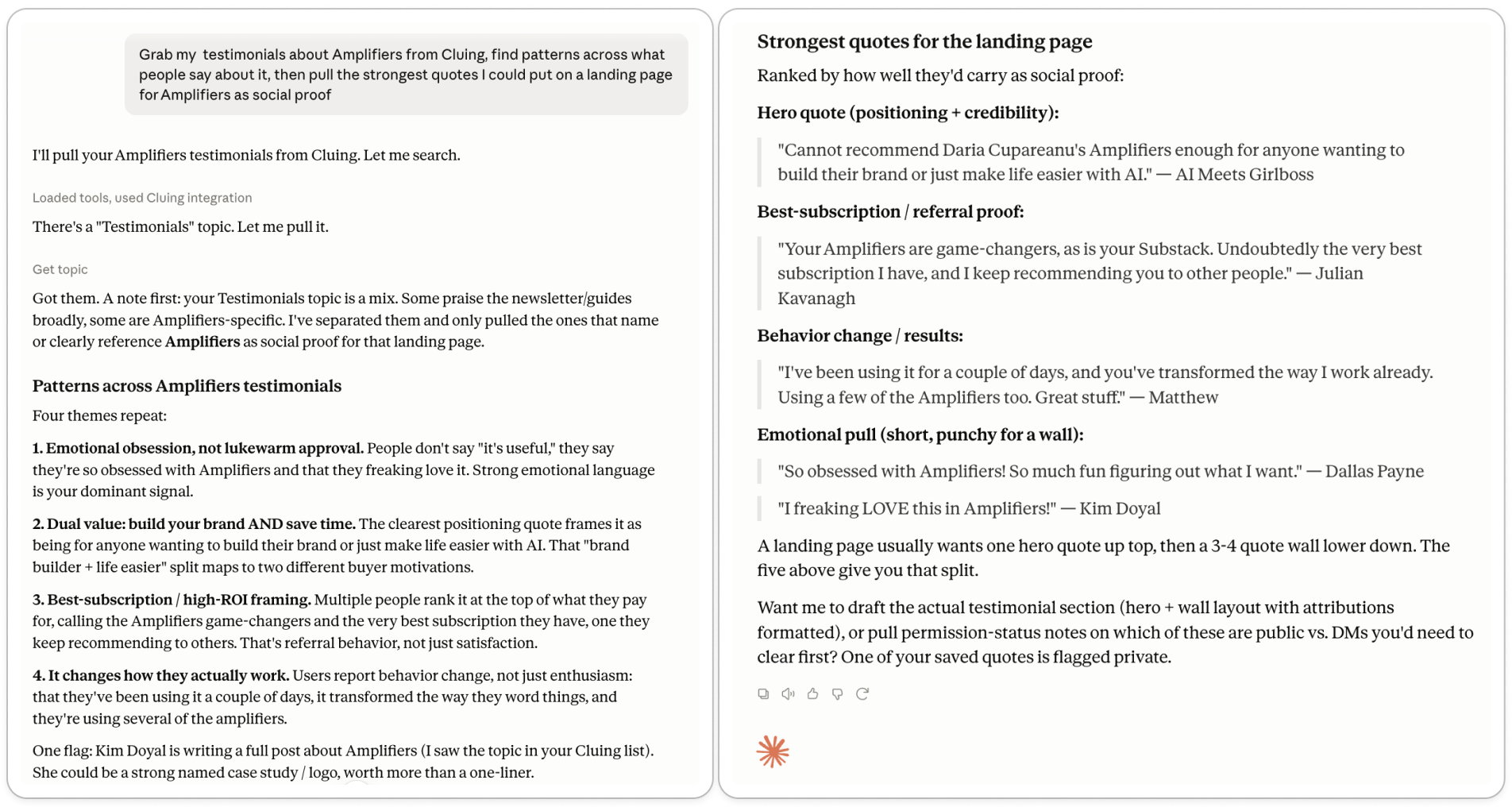
Every time one of you writes something nice (a Substack comment, a DM, a reply to my newsletter) it goes straight into my Testimonials collection in Cluing. If I’ve ever replied telling you “this is going into my testimonials”, well… this is the place it goes.
The bonus is that when I sit down to write copy, I don’t have to invent anything. Because I’ve already saved what you told me. So I just pull the collection into Claude through MCP.
Other things worth saving in a Cluing collection like this:
Voice-of-customer research. If you work in marketing, save the way people in your niche talk about their problems. When you write positioning or ads, Claude can surface the exact phrases your audience uses to describe what they need.
A quotes library for inspiration. If you’re the type who highlights lines in books, podcast episodes, or interviews and then can never find them again, Cluing keeps them all in one place, searchable and taggable by theme.
Objection tracking for sales. Save the reasons prospects say no, along with the wording. When you rewrite your FAQ or sales page, you’re answering the real objections in the real words, not the ones you assume.
A “wins” archive. Every good result a client, reader, or student gets. Useful for case studies, but also useful when you’re having a bad day and forget your work matters.
Founder story ammunition. Every time someone tells you why they chose you or what changed for them, save it. When you write your About page or pitch a talk, you have a stack of real moments to pull from instead of trying to reconstruct memories.
Reader questions and comments. Every time someone asks you something in a comment, DM, or reply, save it. When you’re stuck on what to write next, the list is your content calendar.
The idea is the same across all of them: capture the raw language as it appears, let it pile up, let AI find the patterns when you need them.
I’ve been adding resources into a Cluing project on AI for stock market investing. It’s an area I haven’t touched yet, but I want to start building workflows in Amplifiers for it, and maybe write about it too. So whenever I run into something good (a GitHub repo, a YouTube video, an Instagram or TikTok clip, an article) it goes straight into the Cluing project.
The bonus is I don’t have to watch any of those videos. When I’m ready to make sense of what I’ve collected, I pull the whole project into Claude through Cluing’s MCP, ask it to transcribe every video link through Amplifiers, and build a clustered report on what’s out there right now. What tools exist, what different creators are saying, where the gaps are.
I don’t have to open 30 tabs to get up to speed on a new topic. I just save stuff as I stumble on it, and let Claude do the synthesis when I’m ready.
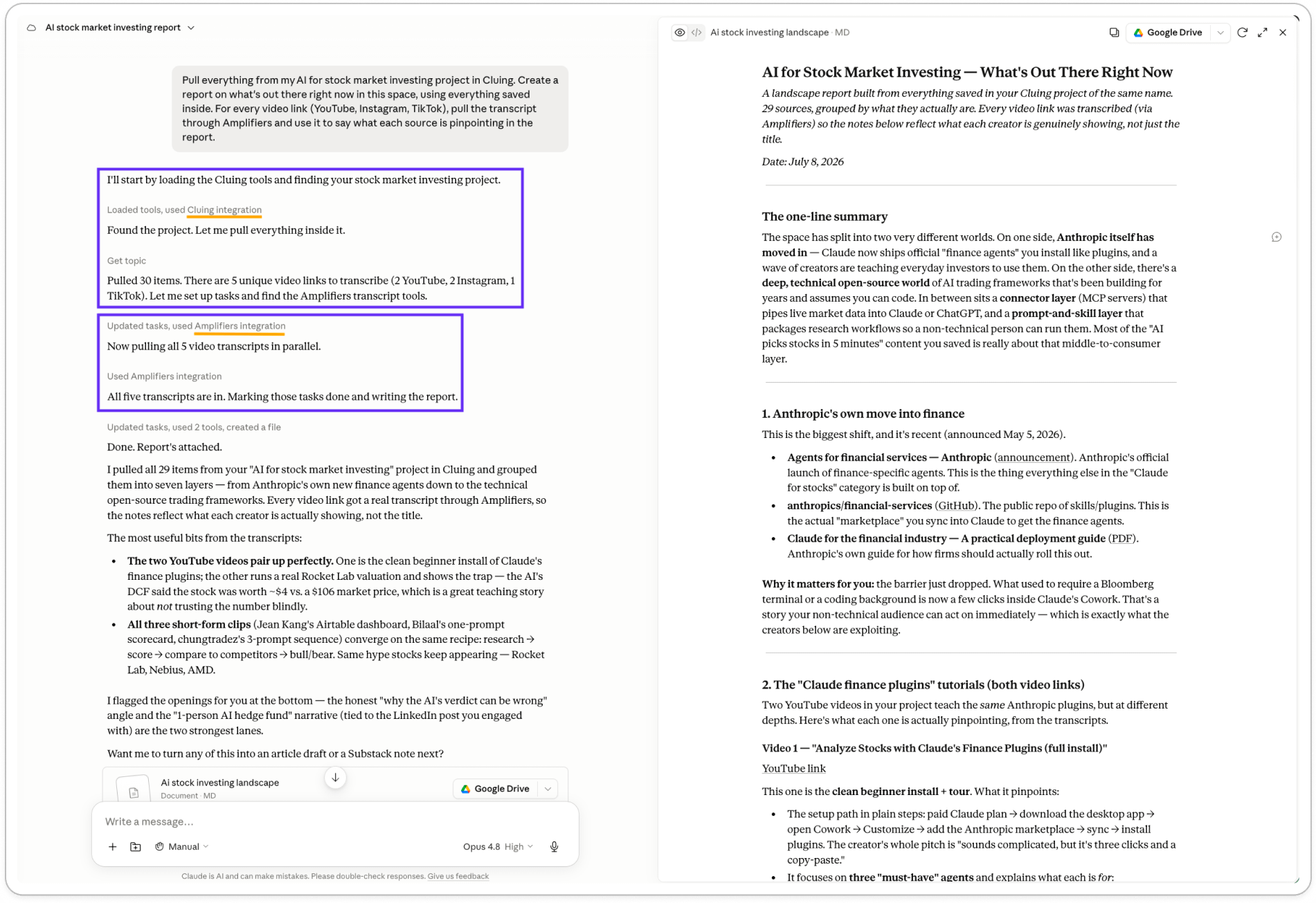
And the best part? It works both ways. Claude can save things back into Cluing too, not just pull from it. So after transcribing a YouTube video, I can ask Claude to save a short summary as a snippet, and my collection grows on its own.
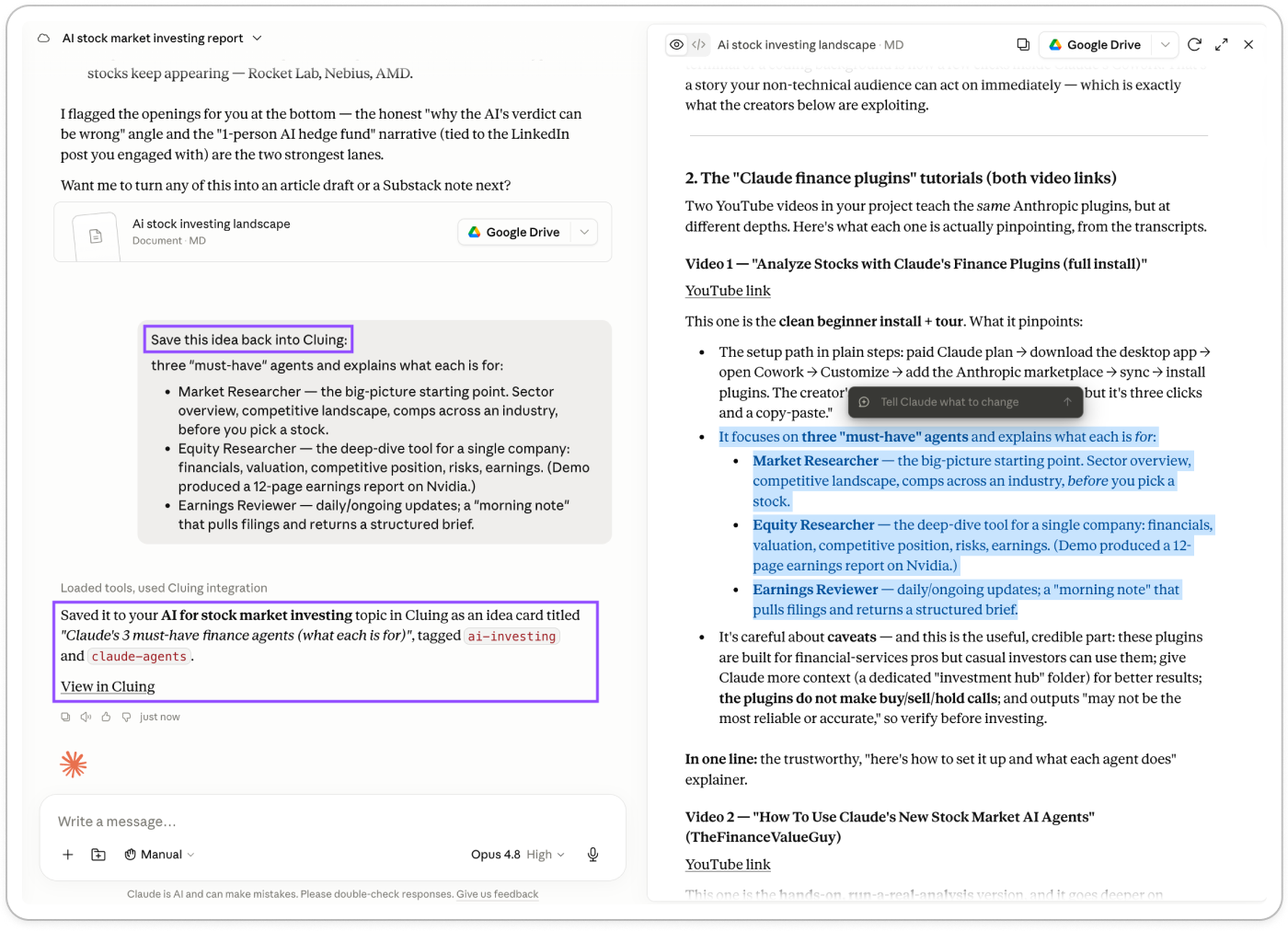
You can build a project like this for anything:
Learning a new skill from scattered creators. Save the best tutorials from YouTube, Instagram, and articles as you find them. When you’re ready to sit down and learn, Claude turns the pile into a structured path.
Prepping for a podcast interview or a big meeting. Gather everything a person or company has said publicly across posts, videos, and interviews. Get the themes back.
Trend-spotting in your niche. Save every emerging idea, tool, or take you notice over time. Cluster monthly to see what’s shifting.
Competitive research on a market you’re entering. Save every player, tool, and take. Ask Claude to map who’s doing what and where the gaps are.
Cluing now lets you drop a PDF (or a screenshot, or any file) into its AI chat, so I don’t have to read the whole thing before deciding what’s worth keeping.
I dropped Anthropic’s Claude for the financial industry deployment guide into the AI chat and asked it to pull the important ideas and save them individually to my AI for stock market investing project. What used to be “download PDF, skim, highlight, copy-paste into my notes” is now one instruction.
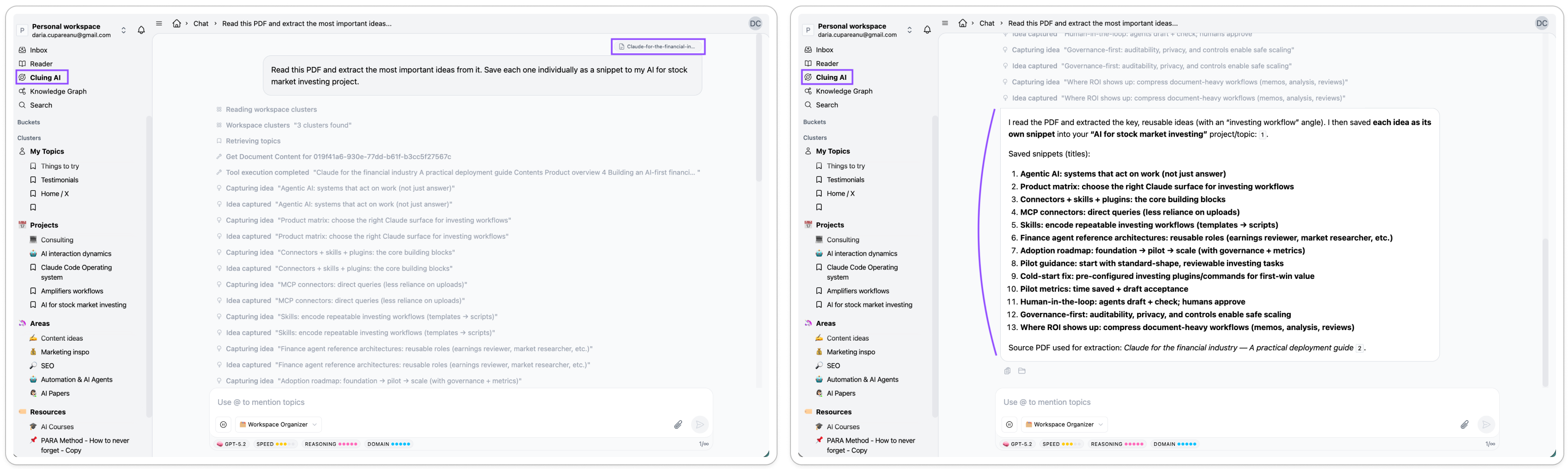
Quick note: I used the Workspace Organizer mode for this. The same mode also reorganizes anything already inside Cluing. Messy project, snippets in the wrong place, whole workspace needs a cleanup? Just ask in the Cluing AI chat.
You can build a project like this for anything:
Industry reports and whitepapers you keep meaning to read. Drop them in, extract the parts that matter, save them where they belong.
Course materials or client-shared documents. Turn a 40-page onboarding PDF into structured notes you can actually reference later.
Book highlights from PDFs. Especially useful for research-heavy books where you want the arguments, not the fluff.
Meeting decks and briefs. Save the takeaways separately from the file so you can find them later without hunting through Google Drive.
I’ve got a Things to try collection in Cluing where I dump every idea, tool, or angle I run into that could turn into something later. The problem with a collection like that is it grows fast, and by the time you look at it, everything feels equally interesting.
So I asked Cluing to build me an AI canvas from it, that scores each idea against the things I care about, and ranks them. In a couple of seconds I went from a messy list to a prioritized backlog with the top picks ready to draft.
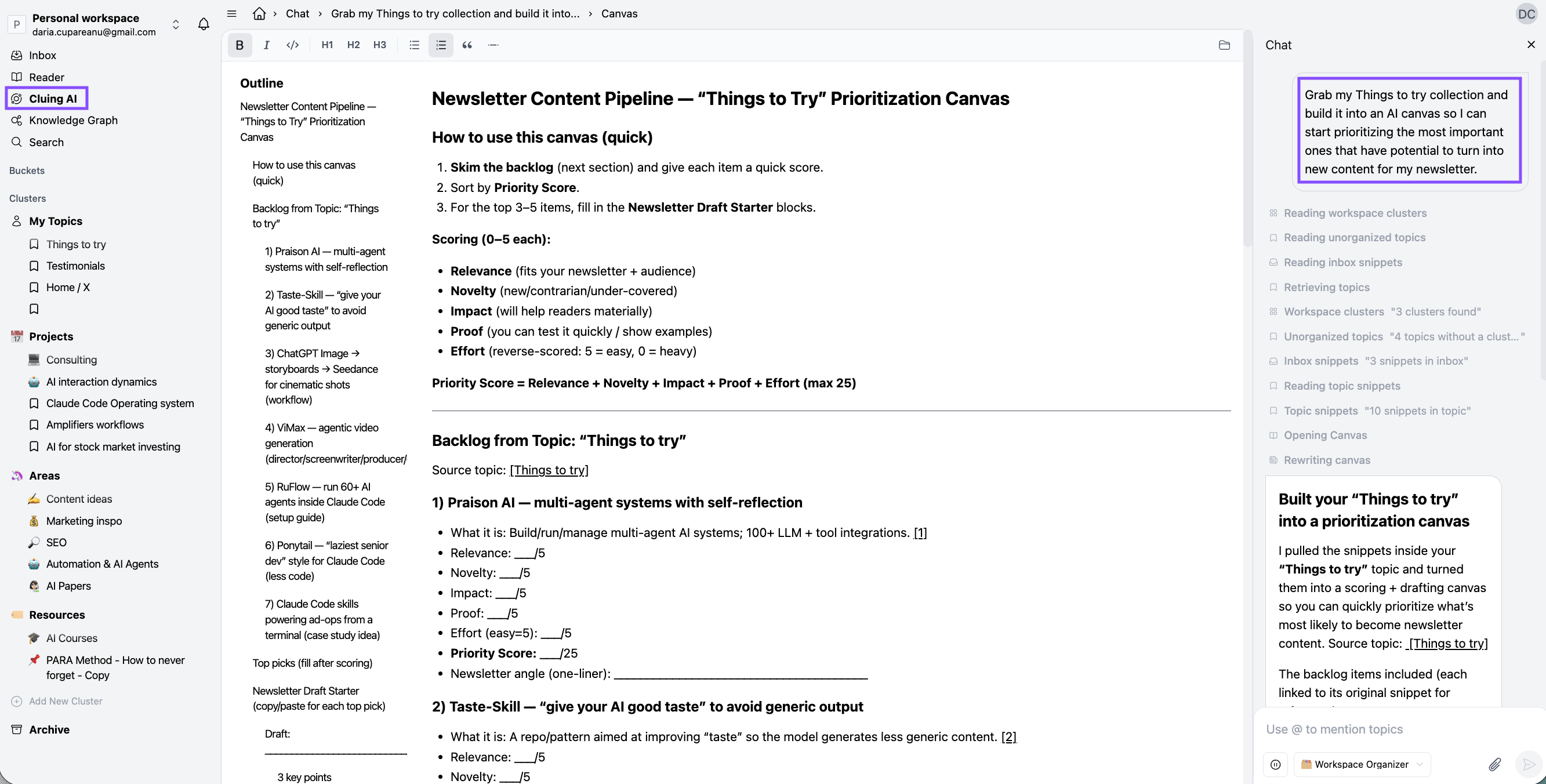
You can build a canvas like this for:
A content calendar built from every article idea you’ve saved
A shortlist of tools to test from the AI space (or whatever niche you follow)
A hiring decision built from candidate notes you’ve been collecting
An investment thesis from a research collection you’ve been building over months
A quarterly planning canvas built from every idea, note, and half-formed strategy in your workspace
A competitive analysis that scores every player you’ve been tracking against the criteria that matter for you
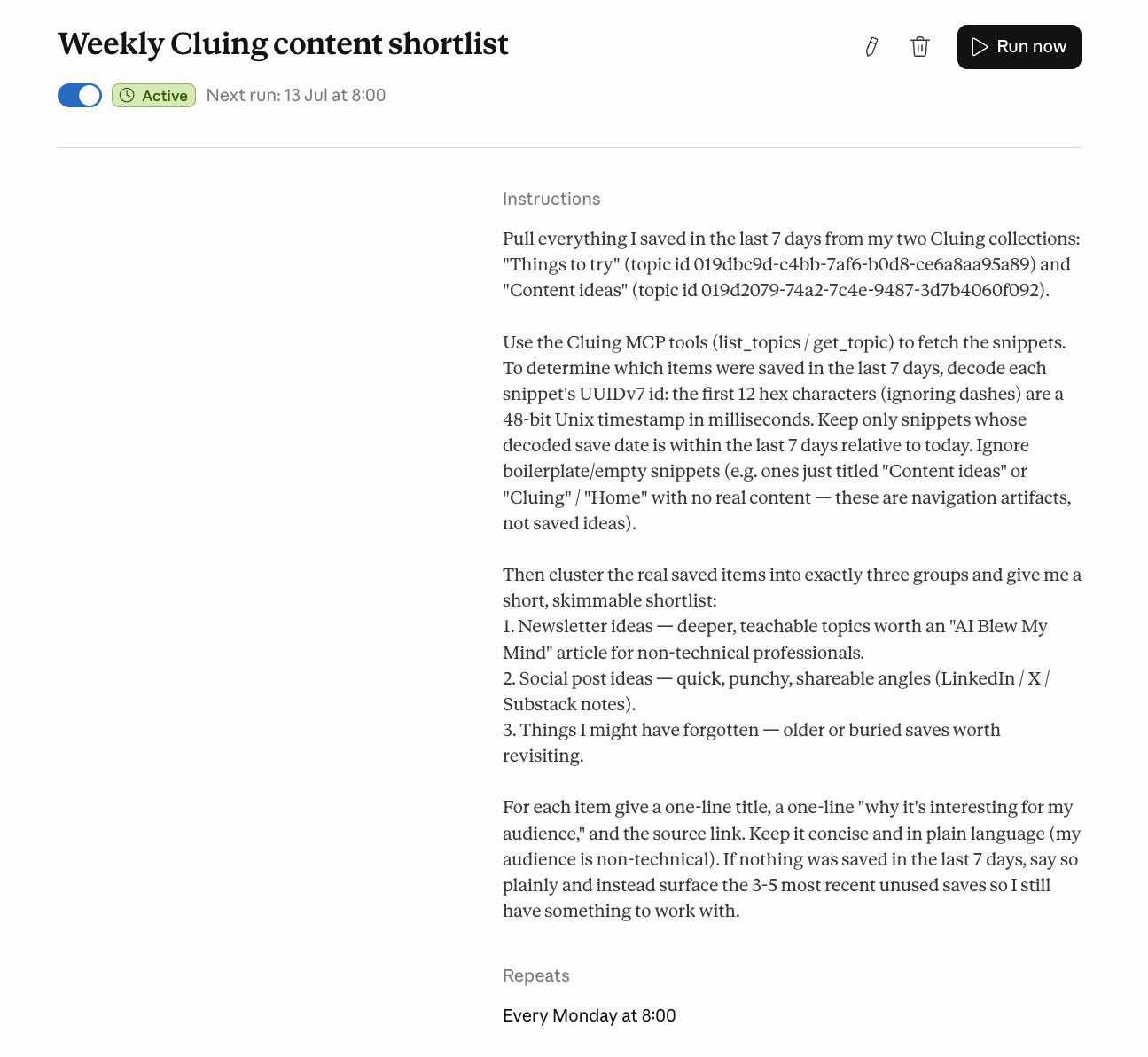
I set up a scheduled task in Cowork that runs every week. Its job: pull everything I saved in the last seven days from my Things to try and Content ideas collections in Cluing, cluster it into three buckets (newsletter ideas, social post ideas, and things I might have forgotten I saved), and drop the shortlist in my inbox Monday morning.
A second brain only works if something reminds you what’s in it. And since Cowork runs on a schedule and Cluing is now an MCP, the two work together without me touching anything.
The next thing I’m building on top of this: a workflow in my Claude Code OS that takes what Cowork surfaces from Cluing each week and turns it into drafts for social posts automatically (things like infographics and even carousels).
If you’d like to build your own version (a personal AI system that runs on Claude Code) I walk through the process here. The same principle applies to Cowork, where I’m also layering scheduled tasks like this one into my Cowork OS. It now runs in the cloud, so it can keep working even when your laptop is closed.
Getting Cluing running takes about two minutes. Here’s the whole flow so you can start saving today.
Create your account. Go to cluing.io and sign up. The free plan gets you unlimited highlights, topics, and hashtags, plus 5 clusters and unlimited PDF uploads. If you want the MCP integration, AI canvas, and access to every AI model (Claude, GPT, Gemini, Grok, DeepSeek, Meta), that’s the Professional plan at $12/month billed yearly.
PS. Paid AI blew my mind subscribers get an exclusive 20% discount on Cluing. The code is on the Premium Perks page, use it at checkout.
On desktop. The main way to save things is the browser extension. Cluing has one for Chrome, Edge, and Firefox. Once installed, you’ll see the Cluing icon in your toolbar. When you find something worth saving (a paragraph, a quote, a chart, a video), highlight it, click the extension, tag it to a topic or project, done.
For anything that isn’t a webpage (PDFs, screenshots, your own thoughts, files you want to work with) you drop them straight into the Cluing app or into the AI chat.
On mobile. Two ways to save from your phone:
The Cluing app (iOS and Android). Install it, sign in, and use the share sheet from any app on your phone to save posts, articles, or videos straight to a project. Instagram, X, TikTok, YouTube, LinkedIn, everything.
Edge and Firefox mobile extensions (iOS and Android). If you want to highlight passages on webpages while browsing on your phone the same way you do on desktop, install Edge or Firefox as your mobile browser and add the Cluing extension. Same highlight-and-save flow, just from your phone.
Newsletters. Cluing gives you a custom email address so you can forward any newsletter to it and it lands in your Cluing inbox, ready to be turned into snippets.
Once you have both set up, saving becomes background behavior. You stop thinking about it. The value shows up later, when you sit down to write, research, or feed everything into an AI through the MCP or the Cluing AI chat.
AI is a commodity now. Everyone has access to the same models. What makes your work different from anyone else’s is the context you bring to it.
The reading, the notes, the ideas, the feedback, the patterns you’ve been chewing on for years. And Cluing keeps track of all of it: what you save, and just as importantly, why you thought it mattered when you saved it.
That’s what a second brain is supposed to do: hold all of that in one place so you can actually use it when you need it. And when it plugs into Claude, ChatGPT, or Gemini, everything you’ve saved becomes context they can work from. So when I sit down to write, research, or build something, my AI is working from what I already know, not what it thinks I might want.
Free plan is enough to see if you like it. Paid AI blew my mind subscribers get 20% off the Professional plan (code on the Premium Perks page).
If you try Cluing (or already tried it), tell me how it went. And PS, Sandra (Cluing’s CEO) is also reading every comment and replying, so this is the place to ask questions if you have any.
And if this was useful, forward it to someone who's been drowning in tabs, screenshots, and "I swear I saved that somewhere".
This post is free. Paid subscribers get access to all premium prompts and tools inside Amplifiers (the AI blew my mind MCP), weekly premium articles, all premium resources inside the AI blew my mind Lab, and exclusive partner discounts like Cluing. Upgrade here.
No posts
Comments
Nothing yet. Say the first thing.
Sign in to join the conversation.