
TLDR:</strong>
This is a tutorial on how to write a CLI tool in Haskell to display fingering
charts for the Ukulele in your terminal.
As this post is written in literate Haskell</a>,
it also contains the complete code for the program itself.
If you just want to use the tool
check out the short how to</a> at the end.</p>
While I originally started to write this 2 years ago
(I thought it's about time to finish it 😛)
in JavaScript, I recently got introduced to Haskell and it's awesome.
Especially for building CLI tools</a>.</p>
First a short overview of what it's actually supposed to do.
This is our target output:</p>
You specify a chord and First, we need to set a few compiler settings and import some basic modules:</p>
Now we need types to model our domain.
Normally you'd expect something like Actually, even the notion of absolute note values isn't particularly useful,
as western music is inherently relative
and you can start the same song from every note.
To accommodate this we simply model everything relatively
and only make the common note names and the particular tuning of the
Ukulele a special instance of it.
I'll call this notation the "relative notation".</p>
A Piano supports 88 notes and MIDI supports 128 notes.
An octave contains 12 notes and so we can use a base 12 (duodecimal</a>) system
to simplify counting in octaves.
The duodecimal system uses 2 special unicode characters for ten and eleven,
called Pitman digits:</p>
So all 12 digits are:
Gotchas:</p>
Our The first duodecimal number after the Explicitly listing all possible intervals has the advantage that we can
now ensure at compile time that no invalid intervals are specified.</p>
This amounts to 144 intervals, which is great, as it's
slightly more than the 128 notes defined in MIDI and therefore
we can model everything that MIDI can.</p>
For specifying absolute note values, which we'll need at some point,
we simply use the MIDI values in dozenal notation:</p>
This can easily be translated to the archaic notation,
as We can now map this to our Ukulele:</p>
To completely model the domain we need some more types ...
like for our 5 fingers 🤚.</p>
Each finger will later be rendered by printing its first character.
We also add ANSI color codes to colorize the terminal output.</p>
Now we need to make it possible to pick a string at a certain position,
play the string open, or mute the string
(Attention: "Strings" always refers to the Ukulele strings.
The datatype to store a string of characters is called To model the pick position we'll have to define a fret position
in the range 1 to length of fretboard</em>.
There is, however, no good type safe way to model this with integers.
0 could mean open, but using a special value for it makes more sense.
Normally fretted instruments don't have more than around 30 frets,
so we'll just use the base 36 system without the zero (i.e. 1, …, 9, A, …, Z).</p>
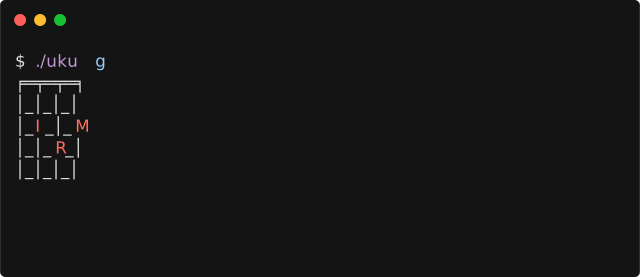 </p>
</p>
uku</code> pretty prints the fingering chart
as an ANSI art chord box</a> to the terminal.
Cool, right? So let's get started with the code:</p>
{-#</span> OPTIONS_GHC</span> -Wall -Wincomplete-uni-patterns #-}</span></span>
{-#</span> LANGUAGE NoImplicitPrelude</span> #-}</span></span>
{-#</span> LANGUAGE OverloadedStrings</span> #-}</span></span>
{-#</span> LANGUAGE MultiWayIf</span> #-}</span></span>
</span>
module</span> </span>Main</span> where</span></span>
</span>
import</span> </span>Protolude</span> as</span> </span>Pl</span></span>
</span>
import</span> </span>Data.List.Index</span> (</span>setAt</span>,</span> imap</span>)</span></span>
import</span> </span>Data.Map.Strict</span> as</span> </span>Map</span></span>
import</span> </span>Data.Text</span> as</span> </span>Text</span></span></code></pre>
data Note = C | Cis | D | Dis …</code>,
but this notation is mostly used for historical reasons
and not for its ingeniousness.
E.g. the distance between E</code> and F</code> is half the distance of F</code> to G</code> 🤦.
The notation just doesn't make a lot of sense
in times of the twelve-tone equal temperament</a>.
I'll call this notation the "arachaic notation" for the rest of the post.</p>
0 1 2 3 4 5 6 7 8 9
2</span>
3</span></code>.
Each step corresponds to one semi tone in archaic notation.</p>
X</code> (like the Roman literal for 10) and
3</span>
with E</code> (like "eleven").
This is the recommend way for ASCII text
by the Dozenal Society of America</a>.</li>
</ul>
Interval</code> data type:</p>
-- data Interval</span></span>
-- = I00 | I01 | I02 | … | I09 | I0X | I0E</span></span>
-- | I10 | … | IEE</span></span></code></pre>
I</code>
is the octave and the second one is the semi tone.
To spare you the complete list, I appended it to the end of the post.</p>
-- data MidiNote</span></span>
-- = M00 | M01 | M02 | … | M09 | M0X | M0E</span></span>
-- | M10 | … | MX7</span></span></code></pre>
M00</code> is C-1, M10</code> is C0, M20</code> is C1 and so on.
I appended the full list to the end of the post.</p>
Archaic notation Relative to C4 Absolute MIDI notes</span></span>
</span>
A4 ╓──┬──┬──┬──┬ I09 ╓──┬──┬──┬──┬ M59 ╓──┬──┬──┬──┬</span></span>
E4 ╟──┼──┼──┼──┼ I04 ╟──┼──┼──┼──┼ M54 ╟──┼──┼──┼──┼</span></span>
C4 ╟──┼──┼──┼──┼ I00 ╟──┼──┼──┼──┼ M50 ╟──┼──┼──┼──┼</span></span>
G4 ╙──┴──┴──┴──┴ I07 ╙──┴──┴──┴──┴ M57 ╙──┴──┴──┴──┴</span></span></code></pre>
data</span> Finger</span> =</span> Thumb</span> |</span> Index</span> |</span> Middle</span> |</span> Ring</span> |</span> Pinky</span> |</span> AnyFinger</span></span>
deriving</span> (</span>Eq</span>,</span> Ord</span>,</span> Show</span>)</span></span></code></pre>
fingerToText</span> ::</span> Finger</span> -></span> Text</span></span>
fingerToText finger </span>=</span></span>
let</span> colorize text </span>=</span> "</span>\x1b</span>[31m"</span> <></span> text </span><></span> "</span>\x1b</span>[0m"</span></span>
in</span> colorize </span>$ case</span> finger </span>of</span></span>
Thumb</span> -></span> "T"</span></span>
Index</span> -></span> "I"</span></span>
Middle</span> -></span> "M"</span></span>
Ring</span> -></span> "R"</span></span>
Pinky</span> -></span> "P"</span></span>
AnyFinger</span> -></span> "●"</span></span></code></pre>
Text</code>)</small>.</p>
data</span> FretPosition</span></span>
=</span> F1</span> |</span> F2</span> |</span> F3</span> |</span> F4</span> |</span> F5</span> |</span> F6</span> |</span> F7</span> |</span> F8</span> |</span> F9</span> |</span> FA</span> |</span> FB</span></span>
|</span> FC</span> |</span> FD</span> |</span> FE</span> |</span> FF</span>
Adrian Sieber's Website · Sep 12, 2018
<code>uku</code> — A Haskell CLI tool to display Ukulele fingering charts
0Sign in to vote or save
This page did not load. You can still read it on the original site — the toolbar below keeps your place in the directory.
TLDR: This is a tutorial on how to write a CLI tool in Haskell to display fingering charts for the Ukulele in your terminal. As this post is written in literate Haskell , it also contains the complete code for the program itself. If you just want to use the tool check out the short how to at the end. While I originally started to write this 2 years ago (I thought it's about time to finish it…