

AstroJS has been getting a lot of love in the Javascript community for some time now. If you haven’t heard of Astro it is a web framework for content driven websites. It uses concepts like ‘Islands’ to help speed up your site by stripping away all non-essential Javascript.
I wanted to try it out and I use Neovim as my editor of choice. It wasn’t 100% obvious how to set everything up so I am sharing how I did in this article. This is what I had to do to setup Neovim to work nicely with an AstroJS project.
This one was a little confusing to me.
First you have to install the
astro-language-serverthrough Mason:
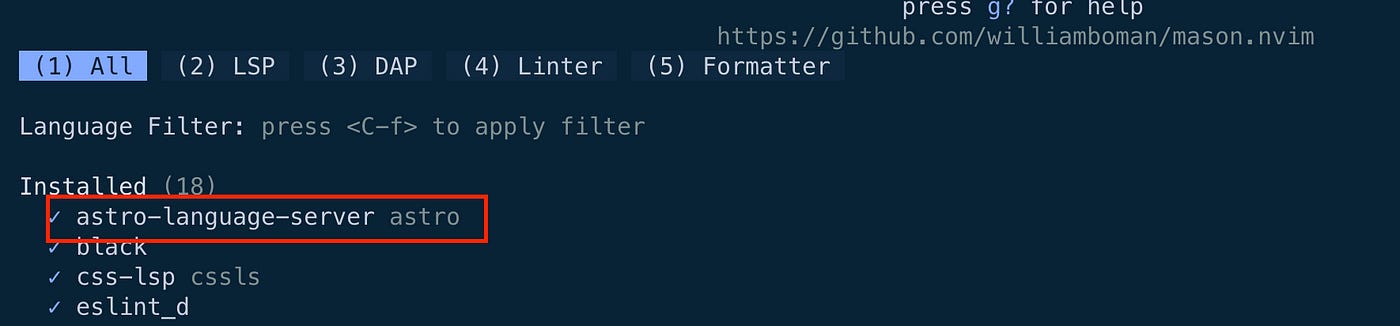
2. In you mason_lspconfig.setup make sure you have astro in your ensure_installed object:
 mason_lspconfig.setup({
   -- list of servers for mason to install
   ensure_installed = {
    "astro",
    "tsserver",
    "html",
    "cssls",
    "tailwindcss",
   },
   -- auto-install configured servers (with lspconfig)
   automatic_installation = true, -- not the same as ensure_installed
  })
3. Where ever you have your lspconfig put this code:
  -- astro --
  lspconfig["astro"].setup({
   capabilities = capabilities,
   on_attach = on_attach,
   filetypes = { "astro" },
  })
This one was confusing for me because I installed astro-language-server but for the lspconfig you use just astro. I see in retrospect that in Mason it provides you the name astro after the LSP name but this wasn’t immediately obvious to me.
This should get the lsp working for .astro files.
For this I just added astro to the ensure_installed object in my treesitter config.
 require("nvim-treesitter.configs").setup({
    ensure_installed = {
     "astro",
    },
 })
For this I am using a combination of prettier and a plugin called prettier-plugin-astro. First in my none-ls.lua file I added astro filetype to the list of files to be formatted with prettier (I have prettier installed as a formatter via Mason).
 formatting.prettier.with({
     extra_filetypes = { "svelte", "typescriptreact", "astro" },
    }),
Then in the local astro project I installed this prettier-plugin-astro as a local dev dependency.
pnpm add -D prettier-plugin-astroThen after restarting Neovim when I save a .astro file it is formatted on save.
It wasn’t 100% obvious to me how to set this all up and it took me a while. I had to do a fair bit of looking around coupled with some trial and error. Hopefully this article can help anyone hoping to work on AstroJs projects to get their setup working nicely in Neovim.
If you liked this blog post you can subscribe to receive emails every time I publish. I publish every Monday morning at 8:30 Central European Time.
I am a Frontend Developer working mainly with React and Typescript in my day-to-day professional life. I love exploring new tools and libraries and love the Javascript Ecosystem.
I like to write blog posts that share exciting new tools I’ve discovered, how-to articles, and also the occasional opinion piece.
I live in Prague in the Czech Republic with my family.
Check out the original blog post on my blog.
No posts
Comments
Nothing yet. Say the first thing.
Sign in to join the conversation.