
With the rapid advances in AI in the past 6-12 months, we are seeing the most technology forward accounting teams become Accounting Engineers and start to automate more of their workflows using AI. These teams are inspecting their own processes and asking “what can be automated here that couldn’t be automated before?” Once they have that answer, the next question is “does software exist for this?” and then more and more frequently, the next question is “should we just build it ourselves?”
Historically, most accounting teams didn’t have the resourcing to even consider building their own solutions. At best, they’d have a really solid excel wizard. But now, they have tools like Claude, Codex, and Lovable and accountants are really empowered. Building has become such a hot topic item for accounting teams that modern accounting software companies are offering $5,000 to crown the best Finance Engineer (Numeric’s Finance Engineer Cup).
Before AI, building software was slow and expensive because someone had to translate business requirements into a repeatable flow, then write the code to make that flow run the same way every time. Now, you can describe what you want in English and get the computer to do useful work: draft the workflow, write the script, classify the email, extract the invoice detail, or generate the first version of an internal tool.
So the build-versus-buy question has changed, but it has not disappeared. AI has made the first version of a workflow much cheaper to build. But accounting makes production expensive: the work still needs controls, evidence, review paths, exception handling, auditability, and someone accountable when it breaks.
The right question is no longer just, “Can we build this ourselves?” Increasingly, the answer is yes. The better question is: “Are we prepared to own this workflow once the team depends on it?”
To answer this question, first separate prototype difficulty from production ownership.
When thinking about automating a business process, you have to understand what type of system you are likely going to end up building. You can frame this by grading your workflow across two dimensions: the ambiguity of the process and the amount of control & assurance required.
By “process ambiguity”, I mean how much judgment the workflow requires (e.g., is the outcome of this up for interpretation). Ask:
Is the work mostly rules-based, where the same input should produce the same output (aka low-ambiguity)?
Does it involve messy language, incomplete context, exceptions, judgment calls, and information spread across different systems (aka high ambiguity)?
By “control & assurance burden”, I mean the accounting risk created by the workflow. In other words, what would we need to trust, review, and be able to defend the results of this process once the business depends on it? Ask:
Does it touch cash, payments, payroll, tax, revenue, journal entries, approvals, or vendor master data?
Can a reviewer verify the output quickly, or would they need to redo the work to verify?
Does the workflow need evidence, audit trail, preparer/reviewer signoff, or approval history?
Does it cross systems, users, clients, or external parties?
If it fails, is the result a minor cleanup task, a close delay, a misstated number, a payment error, or a fraud risk?
With AI, the frontier for what can be built internally has shifted significantly. We can visualize it along these dimensions:
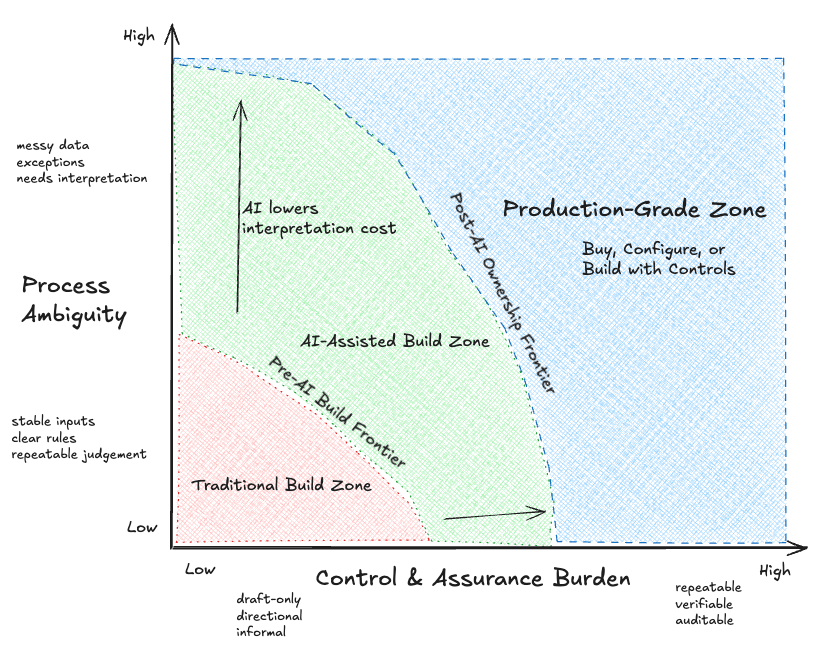
As we can see from the diagram, AI has made handling messy inputs, drafting, classification, and investigation easier to automate. But control and assurance requirements haven’t changed, so the problem shifts from what we can build to what we really want to own. You need review paths, deterministic checks, audit trails, permissions, exception handling, and someone accountable when the workflow fails.
In other words: AI lowers the cost of handling ambiguity, but it does not lower the need for accountability. The farther right a workflow sits, the more it starts to look like production-grade software, whether you buy it, configure it inside an existing platform, or build it yourself with controls.
The chart helps classify the workflow, but there is one more practical question: how “production ready” does this need to be?
The same AI workflow can be safe in one context and risky in another. A prompt that helps one accountant clean up a CSV is very different from a shared workflow that routes AP approvals, updates vendor records, or produces client-facing commentary. We can think of 4 levels of maturity levels:
Personal helper: CSV cleanup, email drafts, contract summaries. Build freely, with human review.
Team workflow: AP triage queue, close checklist, recurring report prep. Build only with ownership, documentation, logs, and exception handling.
Client-facing deliverable: Variance commentary, CFO memo, board package support. Requires evidence links, review, signoff, and retention.
System-of-record workflow: Vendor master changes, payments, journal entries, approvals. Usually buy, or build only with product-grade controls.
Here is how we think common accounting workflows map across ambiguity, assurance burden, and production responsibility:
Rename invoice files by vendor/date
Ambiguity: Low
Control burden: Low
Production maturity level: Personal helper, or team workflow if shared
Required control: Naming convention, spot check, and preservation of original filesClean up a CSV export for your own analysis
Ambiguity: Low
Control burden: Low
Production maturity level: Personal helper
Required control: Human review before use and preservation of source dataDraft a vendor email response
Ambiguity: High
Control burden: Medium, because it affects vendor communication
Production maturity level: Personal helper or team workflow
Required control: Human reviews and sends the final response; no autonomous commitmentsTriage AP inbox messages
Ambiguity: High
Control burden: Medium to high, because of missed invoices, routing errors, and approval delays
Production maturity level: Team workflow
Required control: Queue, logs, assigned reviewer, and exception pathCheck approval thresholds
Ambiguity: Low
Control burden: High, because it affects approval policy and spend control
Production maturity level: Team workflow or system-of-record adjacent
Required control: Deterministic rule, locked threshold source, audit trail, and no LLM discretionDetect duplicate invoices
Ambiguity: Medium
Control burden: High, because of overpayment risk
Production maturity level: Team workflow or system-of-record adjacent
Required control: Matching logic, exception review, and evidence retained before payment decisionExtract invoice details
Ambiguity: Medium to high
Control burden: High, because of posting accuracy and payment accuracy
Production maturity level: System-of-record adjacent
Required control: Field validation, confidence thresholds, source document link, and human review for exceptionsHandle vendor bank-detail changes
Ambiguity: High
Control burden: Very high, because of fraud risk, cash loss, and vendor master data
Production maturity level: System-of-record workflow
Required control: Out-of-band verification, dual approval, restricted permissions, audit trail, and no autonomous updateDraft month-end variance commentary with evidence links
Ambiguity: High
Control burden: High to very high, because it involves client-facing judgment and reporting support
Production maturity level: Client-facing deliverable
Required control: Evidence links to trusted data, preparer/reviewer signoff, version retention, and human final approval
Take approval thresholds. There is very little ambiguity. If the threshold is $10,000, the system should not improvise. But assurance is high because approvals affect financial controls. That belongs far to the right and low on the ambiguity axis. You probably want deterministic software.
Vendor email drafting is different. The ambiguity is high because the language is messy and context matters. But the assurance requirement is lower if a human reviews the draft before sending. That can be a good place for an LLM-assisted workflow.
Vendor bank-detail changes are different again. The ambiguity is high because the request may show up in a messy email thread, but the assurance requirement is also extremely high because the downside is serious with the risk of potential fraud and monetary loss. That is where “just use an agent” is the wrong answer. You might use an LLM to identify the request, but the actual workflow needs hard controls, escalation, audit trail, and human approval.
The hardest automation is where ambiguity and assurance are both high. That is where a lot of real accounting workflow lives. Accounts Payable is a good stress test for this build-versus-buy question. At first glance, an AP inbox looks like a language problem: messy emails, invoice attachments, vendor questions, approval nudges, and exceptions. That makes it tempting to just use an agent. But in production, AP is also a control problem. It touches vendor records, payment timing, duplicate invoices, approvals, audit trails, and fraud risk.
That is why the hardest quadrant is not solved by prompting alone. You need an LLM where interpretation matters (reading emails, classifying requests, extracting context) and deterministic rails where the workflow needs to be reliable, reviewable, and auditable.
Once you know where the workflow sits on ambiguity, assurance burden, and production maturity, ask a few practical questions:
Is the workflow narrow and specific to our firm?
Building is more attractive if the answer is yes.
Buying, configuring, or building with stronger controls is more attractive if this is a common accounting workflow.Is the output easy to verify?
Building is more attractive if a reviewer can check the output quickly.
Buying, configuring, or building with stronger controls is more attractive if the reviewer has to redo the work to verify it.Does it touch financial records, cash, payroll, tax, approvals, or vendor master data?
Building is more attractive if it does not.
Buying, configuring, or building with stronger controls is more attractive if it does.Who depends on it?
Building is more attractive if it is mostly used by one person.
Buying, configuring, or building with stronger controls is more attractive if a team, clients, or the system of record depends on it.What happens if it fails?
Building is more attractive if the failure creates minor cleanup work.
Buying, configuring, or building with stronger controls is more attractive if the failure could cause a close delay, bad data, payment error, fraud risk, or client-facing issue.Does it need integrations, permissions, audit trail, or support?
Building is more attractive if those needs are minimal.
Buying, configuring, or building with stronger controls is more attractive if those are required for the workflow to be trusted.Do we have a clear owner?
Building is more attractive if someone durable owns the workflow, understands it, and can maintain it.
Buying, configuring, or building with stronger controls is more attractive if ownership is unclear or concentrated with one person.
As a rule of thumb: build when the workflow is narrow, reversible, easy to verify, and clearly owned. Buy or govern heavily when the workflow is shared, common, high-volume, tied to financial records, or expensive to get wrong.
Some other dimension to consider:
Maintenance cost & operational risk: Is your team well positioned to own this over time? Is the knowledge of the system siloed with one person or spread across the team? Who owns it and responds when it fails and how frequently will they need to make tweaks and changes over time?
If one person creates a useful workflow on their laptop, that may be fine for a personal process. The moment a workflow moves from personal helper to team process, client deliverable, or system-of-record workflow, the ownership burden changes. It now needs documentation, permissions, monitoring, review paths, and a clear fallback when it fails.
For bookkeeping and fractional CFO firms, this burden compounds across clients. A workflow that works for one client may need to handle different ERPs, approval policies, vendor habits, close calendars, document storage rules, and client-specific exceptions. The build-versus-buy question is not just, “Can we automate this once?” It is, “Can we safely maintain this across every client who will depend on it?”
Runtime cost: How frequently does this run and how expensive is this to actually run?
If you are using an agent to fetch your latest emails every time a workflow runs, you may be paying the model to do something deterministic over and over again. It is much more efficient to write the code once: fetch the emails, structure the context, and then let the agent reason over the result.
That is a small example, but I think it points at the larger architecture question. You generally want deterministic code wherever the process can be made deterministic, and LLMs where judgment, language, and ambiguity actually matter.
This matters even if today’s tools make usage feel cheap. Flat-rate plans and generous limits can hide the real marginal cost of a workflow. If a process is going to become part of how the business runs, you should estimate it against actual usage: how many times it runs, how many tokens it burns, which models it needs, what tools it calls, and what happens as volume grows. This matters because usage patterns and model pricing can change. A workflow that feels cheap in a small pilot may look different once it runs across every client, every invoice, or every close cycle.
Market availability: Is this workflow actually unique, or is it something vendors are already building into their products?
This is easy to overlook because AI makes the internal build feel newly possible. But the same tools that make it easier for your team to build also make it easier for vendors to ship more workflow automation into the products you already use. Before you take on the cost of owning a workflow internally, it is worth asking whether your ERP, close platform, AP tool, payroll provider, or reporting tool already has this on the roadmap.
If the workflow is specific to how your company operates, building may still make sense. But if it is a common accounting process, you are probably not the only team asking for it. In that case, the better question is whether you want to maintain your own version, or wait for a vendor to package the workflow with permissions, audit trails, support, and integrations already attached.
It’s obvious to us that teams should absolutely build more than they used to. If a workflow is narrow, low-risk, easy to verify, and mostly used by one person, build the thing. Write the prompt. Add the script. Use the agent. A lot of useful internal automation will live there, and that is good.
You can also use internal builds to learn. Sometimes the fastest way to understand what you want from a product is to prototype the workflow yourself first. Even if you eventually buy software, you will be a much sharper buyer because you have felt where the process gets weird.
Buying starts to make more sense when the workflow is common, high-volume, shared across a team, tied to financial records, and expensive to get wrong. That is especially true when the workflow needs integrations, permissions, audit history, monitoring, exception handling, and support. The product value is that the workflow has been made durable: observable, auditable, controllable, and maintainable across a team.
So the build-versus-buy question has changed, but it has not gone away. AI makes the first version much easier to build, but it does not automatically make the workflow cheap to own. AP is a perfect example: you can prototype invoice triage or vendor email drafting quickly, but owning the full workflow means handling queues, approvals, vendor verification, exception paths, evidence, audit history, and visibility across the team.
That is the layer TenKey is focused on: helping accounting teams automate the operational work of Accounts Payable while preserving the controls, visibility, and exception handling they need to trust the process.
No posts
Comments
Nothing yet. Say the first thing.
Sign in to join the conversation.