
Don’t be shy! Today’s topics aren’t as technical as they sound at first. All of them require us to look at the code of a webpage.
Topic Eleven covers the “Language of Page” and “Language of Parts.”
The default human language of a webpage must be programmatically determined, typically through the lang attribute on the HTML element. It looks like this: lang=”en-US”
For the Trusted Tester, we use ANDI structures to verify if the correct language subtag, is defined according to the IANA registry. Sometimes fails happen simply by mixing up the language shorthand, like “sp” instead of “es” for Spanish. Always check if the lang attribute matches the output language.
Note that 11.A Language of Page always applies as some form of text will always be associated with the page.
While Language of Page applies to the entire document, Language of Parts requires that any specific phrases or passages differing from the primary language is marked with the correct language attribute. Here is an example from Mozilla mdn:
Does every single word need a language definition? No! Exceptions exist for proper names, technical terms, and words that have become part of the vernacular of the primary document language.
Say my name, say my name, or at least give your frames and pages names. The title attribute and tag have to be defined in the code.
Every web page must have a non-empty title element. Easy as that. For the Trusted Tester process, we don’t need to inspect the code, ANDI already alerts us if the page has no title or multiple title tags.
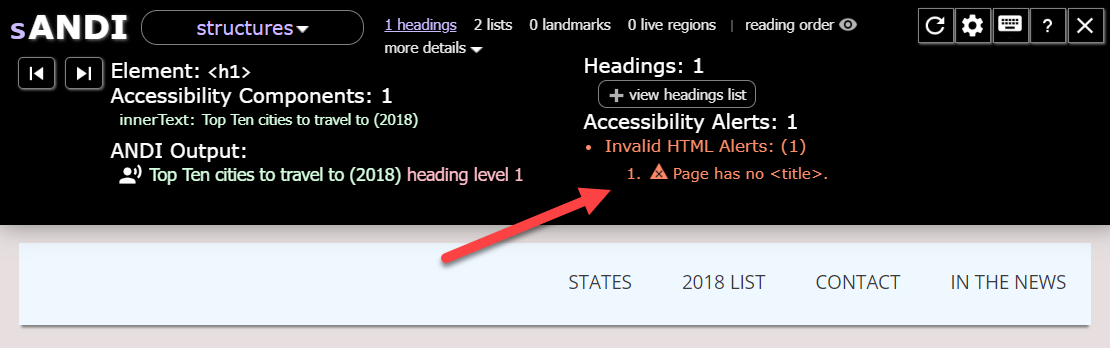
But it’s still good to know where to look. You usullay find the HTML document title element in the header element, and it looks like this:
Beyond mere existence, the “Page Title Purpose” criterion requires that the title accurately describe the content or purpose of the page and distinguish it from other pages within the same site. This is particularly important for dynamic web applications, such as email clients, where the title should remain stable even as new content arrives.
Any frames or iframes used on a page need descriptive title attributes that explain their content. In contrast to 12.A and 12.B that look at the <title> tag, 12.C and 12.D are concerned with the title attribute. The difference is that the tag can stand alone, while the attribute is nestled inside other tags (in this case, inside the <frame> and <iframe> tags.
Note: The <frame> HTML element is no longer recommended because of performance disandvantages and lack of screen reader support. In many cases, <iframe> is preferred.
An <iframe> outside the tab order or those that are not visible are marked “not tested” but any interactive or visible embedded content must be properly labeled.
Even if using <frame> is not encouraged, if you spot one in the wild, the title attribute looks the same as in an iFrame. Sidenode: A frame should be used within a <frameset>.
For checking language attributes: Internet Assigned Numbers Authority (IANA) Language Subtags, Tag Extensions, and Tags
ANDI Accessibility Testing Tool (bookmarklet)
Next sessions: GDG Vienna
Comments
Nothing yet. Say the first thing.
Sign in to join the conversation.