
WARNING: This is a fairly long post. If you’re serious about making passive income from your Substack, grab a coffee and read every word.
If you don’t have a digital product to sell on Substack, you won’t make real money anytime soon.
Yes, you should turn on paid subscriptions from Day 1.
But don’t be surprised if you don’t get any takers.
Even if you do, it takes a lot of $5 monthly subs to make $1,000 (200).
I know that all sounds a bit harsh, but this is my Substack promise to you:
I’ll help you get paid what you deserve by monetizing your Substack with digital products and an automated, 24/7 sales funnel. I’ll share the same battle-tested methods I use to earn income, and together we’ll finally bust the “starving writer” myth.
I’ll never deliver on that promise if I sugarcoat the facts and only tell you what you want to hear!
A quick AI search tells me this:
The average paid subscriber percentage on Substack is generally considered to be between 1% and 5% of total subscribers, with 1–2% being the most common, according to various estimates. While Substack has historically cited 10% as a potential target, this is considered high, with many seasoned writers seeing 3–5%.
I’m not too concerned about the absolute accuracy of the data; I just want to make a basic point, which is…
Even if we take a 5% conversion to paid subs:
$1,000 = 200 subs at $5
200 subs is 5%
So you’d need 20 x 200 = 4,000 subs to reach your $1,000 target (and Substack takes a % cut of that).
If you converted at 2% 10,000 subs, and so on…
So, it’s clear you need something to sell, other than paid subs, if you want to make a livable income from your Substack newsletter.
We’re not going into detail on the digital products themselves in this post.
A digital product could be a small book, a PDF, a video course, or perhaps some coaching calls.
It’s the Passive System we want to get to the bottom of.
A lot of people say sell a product to make passive income from your Substack, but no one shows you exactly how to do it. I don’t mean some vague description that leaves you second-guessing the steps. I mean the precise framework, the tools, and the steps you need to take to make money from your Substack while you sleep.
How about I show you exactly what to do right now, nothing held back?
Better, how about I show you the best way to do it (like I’ve been doing for years) without spending thousands on top-end, expensive tools you don’t need and shouldn’t waste your money on?
All you need is a simple system that works.
Here it is.
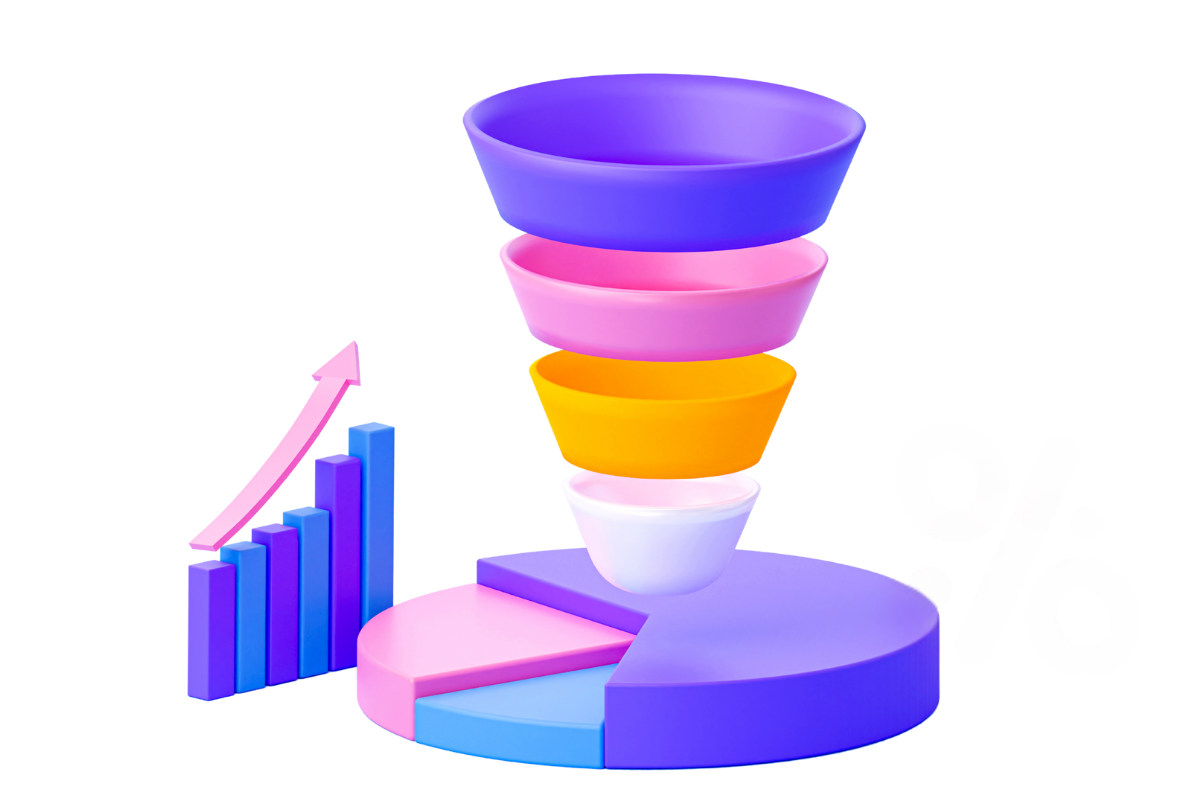
To sell anything online, including selling a digital product to your Substack audience, you need a basic “sales funnel.”
If that sounds scary, don’t worry, I’ve got you covered.
Just think of it as a path your prospects walk to become customers and buy your digital product.
Here are the four online pages you need for a basic sales funnel:
An Opt-In Page (The Lead Capture): This is where you give away a valuable “freebie” in exchange for prospects’ email addresses. The freebie could be a checklist or a short PDF. This builds your email list so you can promote your current product and email subscribers again in the future, letting them know about new product offerings.
Note: Substack captures emails, but it’s not good for sending out ad hoc emails and promotions whenever you want.A Sales Page: This is the page that tells everyone why your product is great. It explains the price and has a big button that says “Buy Now.”
A Checkout Page: This is where the money happens. It must be secure so people feel safe using their credit cards or PayPal. It should be clean and easy to use.
A Thank You Page: After they pay, customers see this page. It tells them their purchase worked, and what to do next.
You also need a way to send the product to your customers. If it is an ebook or cheatsheet, the system should send a download link via email. If it’s a course or mini-course, customers should get a login to a private area to access your materials.
That, right there, is a basic sales funnel that works on autopilot 24/7.
Next, you need the tools to build your basic sales funnel.
This is where you can literally waste $1,000s, so pay close attention.
Some people will tell you to buy a different tool for every job.
They say you need a tool for your sales page, one for your checkout page, yet another software to host your course (if you have one), and a separate platform to send emails - the list goes on.
No, no, and no!
Firstly, here’s an example of how these monthly costs can quickly spiral out of control:
Website Hosting: $15-$20
Page Builder: $30 to $100
Email Provider: $20 to $150
Shopping Cart: $20 to $99
Course Hosting: $50 to $200
Video Hosting: $20 to $100
Total Monthly Spend: You could end up paying over $600 every month before you even make your first sale, and that’s madness.
These tools often don’t talk to each other or play nicely together. You spend hours trying to “duct tape” them into something that works, using even more tools like Zapier (yet another expense). If one tool breaks, the whole thing stops working.
Cobbling these tools together is the stuff nightmares are made of - trust me, I’ve been there and wasted countless hours of my life - you don’t need that!
You might hear about Stan Store or Gumroad. They’re popular, but they’re not the right choice for your first product.
You would never open up a grocery store with just one product to sell, right?
Stan Store: This is great if you only sell from your phone or social media, but we’re on Substack, that’s OUR base
It costs about $29 every month
It is very simple, but it doesn’t have many features to build an integrated path for your customers to follow (like our sales funnel).
Gumroad: This tool is “free” to start because it has no monthly fee.
But there’s a catch. They take 10% of every sale you make.
If you sell $1,000 worth of products, they take $100; that’s a lot of money to give away when you’re just starting out.
This makes much more sense.
Remember what you need in your sales funnel as a minimum to get started:
An Opt-In Page (Lead Capture)
A Sales Page
A Checkout Page
A Thank You Page
All of the following integrated marketing suites can deliver on these four basic requirements.
I’ve run all of these products at one time or another in my business.
I’ve used them hands-on, so none of what follows is guesswork; it’s from my personal experience.
ClickFunnels: They’re famous for sales funnels, but the cost is high. Their basic plan starts at $97 every month. It can also be a bit buggy and hard to learn. It’s way overfeatured and overpriced for what you need.
Kartra: This is a strong tool, but it starts at $59 every month for their cheapest plan. It has a lot of features you don’t need, and it can feel slow and clunky to use.
Personally, I would never use Kartra again. I left it a few years ago for the product I now use, and recommend below. The reason I left? I lost ALL my data, including a course that took me 2 years to build! I lost my email list and all my contacts - gone! Luckily, I had a backup of my contacts at least. They refused to help me recover my data despite me being on a plan that was costing me $99/month at the time.
GoHighLevel: This is more suited to big marketing companies that manage multiple clients. It starts at $97 every month. It‘s extremely difficult to set up because you have to connect your own email and phone systems manually. You don’t need the price or the complexity.
HubSpot: This is for medium to large companies. While it has a free plan, the price jumps to $800 or more every month very quickly once you want to automate things. In other words, if you want it to automate your 4-step funnel, you’re in for spending a fortune. It’s not right for your first product at all.
With the exception of Stan Store, I’ve used ALL the tools listed above in the last 15 years.
When I had my Kartra disaster and lost all my data, I immediately moved my whole operation over to systeme - more on that in a moment, but first, here’s a quick side-by-side comparison table for you.
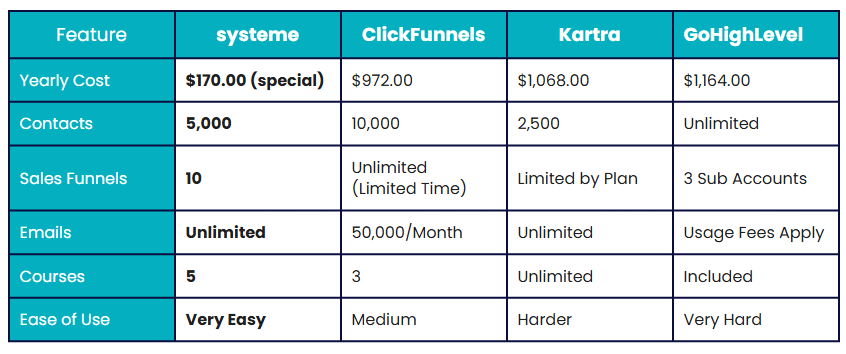
Note: When I researched GoHighLevel’s pricing, I found it to be very vague and evasive. The email usage fee is a red flag. When I briefly used GHL, their marketing was relentless, and extra “paid-for add-ons” kept popping up unexpectedly.
Conclusion - avoid.
I’ve been using systeme to build my sales funnels for years, and most of my colleagues who sell products online use it too. Some converted by me, some who realized it’s the best (and most cost-effective) choice.
If you choose a tool like ClickFunnels or Kartra, you’re spending at least $700 to $1,100 in your first year just for the software vs. $170 (special offer) for systeme.
With systeme, you get all the features that professional marketers use, without the huge cost! It’s incredible value - just what you need when you’re starting and feeling your way with your first digital product.
You could pay much more than the annual cost of systeme for a single month of some of the other products I’ve mentioned!
Check systeme out for just $14.17 a month on an annual plan (the link I’ve provided below is not publicly available).
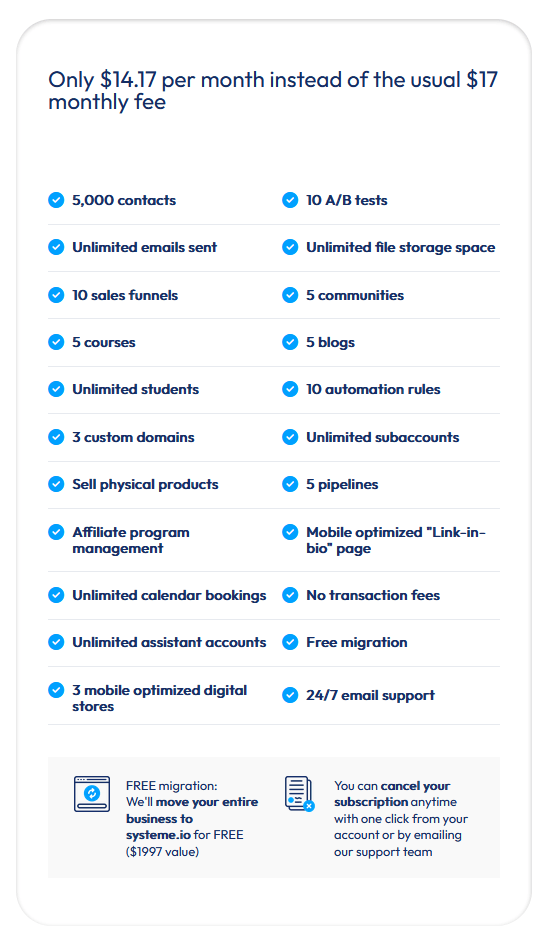
Everything in one dashboard.
Your funnel pages, your emails, your courses, and much more, all in the same place
You don’t have to worry about tools not talking to each other.
It’s by far the easiest to use.
You can have your sales page and checkout up and earning in an afternoon.
Once set up, your funnel operates on autopilot, even while you sleep!
I’ve used systeme for many years, I wouldn’t even consider using anything else.
Make your product even better.
Buy a better microphone or camera.
Pay for some simple ads to find more customers.
Fund a course to educate yourself even more in your chosen field.
Have a holiday 🌴
Don’t wait, take positive action and get started now
Sign up for your heavily discounted account on systeme.
Use one of the ready-made templates they provide to build your opt-in page, sales page, checkout page, and thank you page.
Connect your Stripe or PayPal account so you can get paid.
Send the link to your Substack readers.
Your goal is to get your product in front of your readers as quickly and easily as possible.
Don’t let expensive “shiny” tools you don’t need distract you.
Successful Substackers start with a very simple setup - this is it!
Contact me if you need help.
Talk soon,

Comments
Nothing yet. Say the first thing.
Sign in to join the conversation.