
Alt texts are very important for accessibility (a11y) and search engine optimization (SEO). Visually impaired users often make use of screen readers. It's software that interprets and reads out the contents of a website. Images of course can't be read out. So it's important to add so called alt texts to them. They also help search engines crawl and interpret the contents of your website.
As any cms, Statamic has support for adding alt texts in the media library, but unfortunately it doesn't support multilingual alt texts. You can only add them in one language. In this post I'll explain how you can easily add support for multilingual alt texts using fields and Runtime Antlers.
Update the asset fieldset
In order for the user to edit alt texts in multiple language you have to update resources/blueprints/assets.yamland add some fields. This is how the fieldset looks for this site.
1title: Asset
2sections:
3 main:
4 display: Main
5 fields:
6 -
7 handle: alt
8 field:
9 display: 'Alt Text Dutch'
10 type: text
11 instructions: 'Description of the image in Dutch'
12 instructions_position: above
13 listable: hidden
14 read_only: false
15 input_type: text
16 antlers: false
17 validate:
18 - required
19 -
20 handle: alt_en
21 field:
22 input_type: text
23 antlers: false
24 display: 'Alt Text English'
25 instructions: 'Description of the image in English, falls back to the Dutch description.'
26 type: text
27 icon: text
28 listable: hidden
29 instructions_position: above
30 read_only: false
The asset blueprint for localized assets.
You can see here I kept the original alt field and added a language instruction. There's a second field called alt_en for the English site. The asset manager now looks like this:
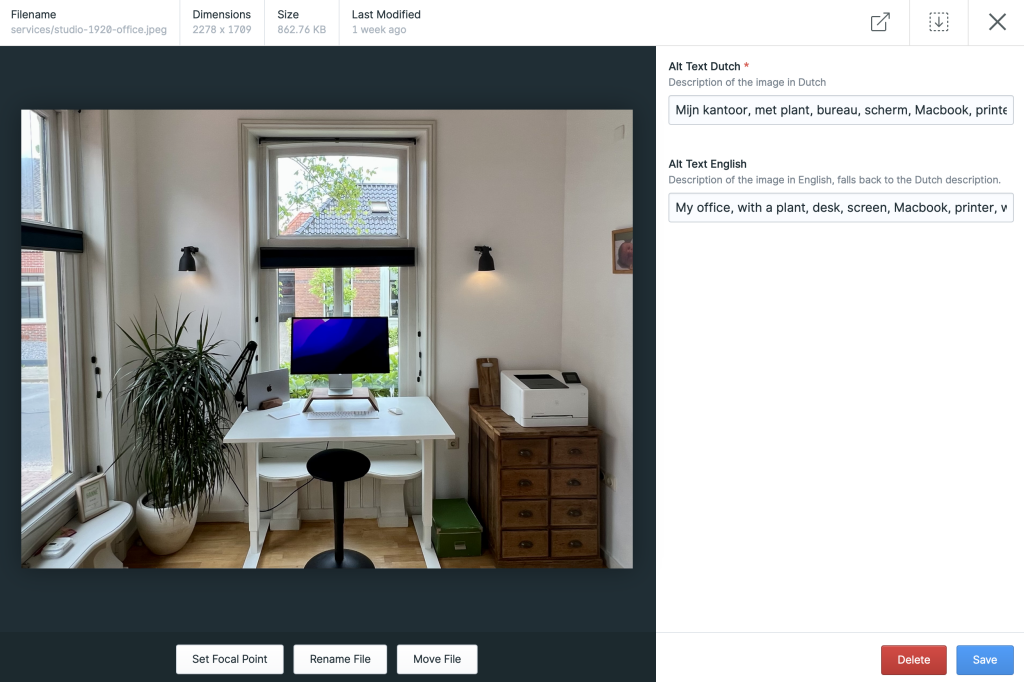
In the picture partial I use the following Antlers magic to fetch the localized alt text and ensure it ends with a dot. This helps people who rely on screen readers to consume your site so the reader uses a full stop.
1{{ localized_alt = 'alt_{locale}' }}
Fetch the localized alt text.
When it's time to actually render the alt text I use the following.
1alt="{{ @localized_alt ?? alt | ensure_right('.') }}"
Use the localized alt text.
The @ here makes sure Antlers will actually parse the values in the variable. If there's no localized alt text available it will fallback to the default alt text.
And that's it. Until Statamic properly supports asset localization feel free to use this solution. Do you like this article or have any questions? Let me know.
Responsive images with Statamic, Tailwind and Glide
- Statamic
- Peak
- Accessibility
- Antlers
Comments
Nothing yet. Say the first thing.
Sign in to join the conversation.